Business Intelligence
The 9 Best MCP Servers for Data Analysis in 2026 (Tested)
Compare nine MCP servers for governed analytics, warehouse-native access, and notebook workflows; choose by governance and data location.

If you want the short answer: I’d group these 9 MCP servers into 3 buckets - governed analytics, warehouse-native access, and analyst workflow tools. For most teams, the choice comes down to where your data lives, how strict your access rules are, and whether you need metric consistency or raw query freedom.
Here’s the fast take:
- Querio MCP: best for governed self-serve analytics across mixed data sources
- dbt MCP: best if your team already uses dbt Semantic Layer and MetricFlow
- Snowflake MCP Server: best for Snowflake-only teams that want native controls
- BigQuery MCP Server: best for Google Cloud teams, but watch cost and data-region issues
- PostgreSQL MCP Server: best low-cost path for direct Postgres access
- Amazon Redshift MCP Server: best for AWS teams with Redshift as the main warehouse
- Looker MCP Server: best when LookML already defines your metrics
- ThoughtSpot MCP Server: best for teams already deep in ThoughtSpot
- Hex MCP Server: best for analysts working in SQL and Python notebooks
The test focused on 4 things that matter most in production:
- Data-source coverage
- Permission inheritance
- Governed metric support
- Query reliability
One stat stood out: systems tied to a semantic layer often hit 85%–90% query accuracy in their defined scope, while SQL vs. AI-driven data exploration setups are more likely to drift. And Google’s internal data says semantic grounding can cut AI data errors by 66%.
::: @figure 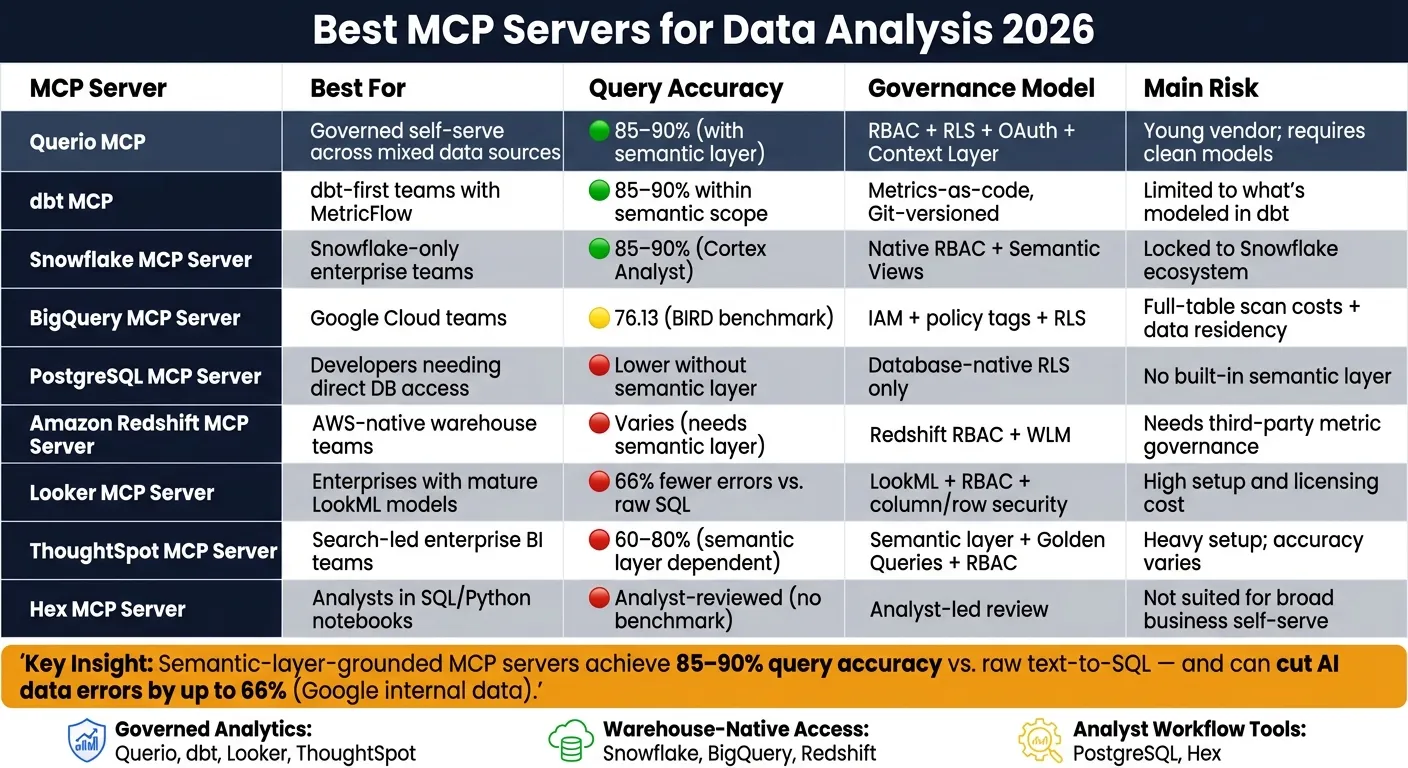 {Best MCP Servers for Data Analysis 2026: Side-by-Side Comparison}
:::
{Best MCP Servers for Data Analysis 2026: Side-by-Side Comparison}
:::
Quick comparison
| Server | Best for | Main strength | Main risk |
|---|---|---|---|
| Querio MCP | Governed self-serve across mixed systems | Shared context layer + inspectable SQL/Python | Young vendor; setup still depends on clean models |
| dbt MCP | dbt-first teams | Uses approved metrics and joins | Limited by what’s modeled in dbt |
| Snowflake MCP Server | Snowflake-only teams | Native RBAC + Semantic Views | Locked to Snowflake |
| BigQuery MCP Server | Google Cloud teams | Native BigQuery and IAM support | Full-table scans and region concerns |
| PostgreSQL MCP Server | Direct Postgres querying | Simple setup and low cost | No built-in semantic layer |
| Amazon Redshift MCP Server | AWS warehouse teams | Direct Redshift access | Needs outside metric governance in many cases |
| Looker MCP Server | LookML-based analytics | Governed metrics through LookML | High setup and modeling overhead |
| ThoughtSpot MCP Server | Search-led enterprise BI | Semantic layer + Golden Queries | Accuracy varies with model quality |
| Hex MCP Server | Analyst notebook workflows | SQL + Python in one workspace | Less suited to broad business self-serve |
The main pattern is simple: if you care about trusted business metrics, pick the server that matches your governed semantic layer first. If you care more about direct access and speed, warehouse-native or database-native MCP servers may fit better.
Below, I break down where each option fits, where it falls short, and how I’d choose based on team setup.
sbb-itb-284a532
1. Querio MCP
Querio MCP is built for data teams that want AI assistants to query live warehouse data without losing control of metric definitions. It connects straight to Snowflake, BigQuery, Amazon Redshift, Databricks, ClickHouse, MotherDuck, PostgreSQL, MySQL, MariaDB, Microsoft SQL Server, and QuestDB through encrypted, read-only credentials [2].
That makes Querio a strong option for teams that need governed analysis across both warehouse and operational data. If your stack spans more than one system, this is where it starts to make sense fast.
Data-Source Coverage
Querio works well for hybrid setups, like Snowflake plus PostgreSQL, while keeping AI analysis inside one governed interface.
For Snowflake, it supports RSA key-pair authentication with 2,048-bit or 4,096-bit keys [2]. That gives teams a setup that fits how many enterprise data groups already handle access.
Auth and Permissions
Querio uses RBAC, RLS, and OAuth, so agent queries inherit the requesting user’s permissions [2]. In plain English, the AI only sees what that person is already allowed to see.
That’s a big deal for regulated teams. Querio is SOC 2 Type II compliant, HIPAA ready, and supports BAAs [2]. For organizations with strict data residency needs, self-hosted deployment is available, with pricing starting at $60,000+ per year [5].
Governed Analytics Fit
This is where Querio stands out.
Its Context Layer lets teams define joins, metrics, and glossary terms once using plain SQL, Markdown, and Python files, then sync them to GitHub in the same repo as dbt. Every AI query runs against those definitions. So if someone asks for “revenue,” the meaning stays the same whether the question comes from a sales manager in Slack, an analyst in a notebook, or Claude through an MCP request.
The agent can suggest updates to the Context Layer, but people still decide what gets approved. That setup helps teams keep metrics steady without handing the keys to the model.
Query Reliability
Answers come back as inspectable SQL or Python in a reactive notebook. That matters because teams can check the work instead of taking the output on faith.
Querio also includes 24/7 KPI monitoring with root-cause analysis by dimension [5].
It’s worth being clear about the tradeoff: Querio is still a young company, and autonomous analysis should get human review before anyone uses it for high-stakes decisions [5]. Results also depend on clean warehouse modeling. If the semantic layer is messy, self-serve AI will be messy too.
For teams that already have a solid warehouse setup, that mix of live access, governance, and inspectable outputs is the main draw.
Best fit: Mid-market B2B SaaS, healthcare, and finance teams with a real warehouse, a lean data team, and growing self-serve analytics demand.
2. dbt MCP
dbt MCP connects AI assistants straight to your dbt Semantic Layer. That means every query uses approved metric definitions, dimensions, and joins.
Data-Source Coverage
dbt MCP requires dbt v1.6+ with YAML semantic models. It can run queries in Snowflake, BigQuery, Redshift, and Postgres. But its reach depends on what you've already defined in the Semantic Layer. If a metric, dimension, or join isn't there, the tool won't magically fill in the gaps. Once the warehouse connection is in place, permissions become the next big control point.
Auth and Permissions
dbt MCP inherits your existing warehouse permissions, so access follows the policies your warehouse already enforces. Row-level security is applied by injecting filters like WHERE org_id = 123 into generated SQL before execution. That's a solid guardrail, but it's still smart to double-check that the server defaults to read-only access. It's also wise to start by limiting the agent to a small schema set. That setup matters even more when the Semantic Layer is the system of record for metrics.
Governed Analytics Fit
dbt MCP works best when the Semantic Layer is already your source of truth. In that setup, the upside is pretty clear: semantic-layer-grounded AI tools can cut data errors by as much as two-thirds compared to text-to-SQL query tools, and natural-language query accuracy can land in the 85%–90% range [7][2].
A recent example helps make that concrete. The Philadelphia Inquirer adopted the dbt Semantic Layer in early 2026 to speed trusted self-serve access. The governance model here is metrics-as-code and Git-versioned, which means changes stay auditable. For analytics engineers, that means metric consistency. For BI teams, it means self-serve access without the usual drift into one-off SQL.
Query Reliability
The main tradeoff is scope. Accuracy is strongest when the semantic model is complete. Within that defined semantic scope, reliability is strong, and latency ranges from 2 to 60 seconds based on warehouse size and query complexity. Step outside the Semantic Layer, though, and results can fall off fast. Clean definitions, tags, and metadata help a lot.
| Feature | dbt MCP (MetricFlow) |
|---|---|
| Setup Requirement | dbt v1.6+, YAML Semantic Models |
| Warehouse Execution | Snowflake, BigQuery, Redshift, Postgres |
| Governance Model | Metrics-as-code, Git-versioned |
| Query Accuracy | 85–90% within defined semantic scope [2] |
| Latency | 2s – 60s (warehouse dependent) |
Best fit: Mid-to-large data teams with an established dbt project, well-documented semantic models, and a need to cut repetitive ad hoc requests without giving up metric consistency.
3. Snowflake MCP Server
For teams that already run on Snowflake, the native MCP route keeps both querying and governance in one place. Snowflake MCP Server is Snowflake's native MCP layer for AI-driven analytics, built on Cortex Analyst. It lets AI assistants like Claude, ChatGPT, or Gemini query your Snowflake warehouse directly.
Data-Source Coverage
The server exposes Snowflake data through Semantic Views. This is where you define business-defined tables, dimensions, facts, metrics, and relationships for the AI to use.
There’s a clear trade-off here: if your data lives outside Snowflake, this server can’t query it. So it works best for teams that want Snowflake-native AI, not cross-system access.
Auth and Permissions
Snowflake MCP Server inherits Snowflake RBAC, which means AI queries follow the same permissions as human users. You can limit access to specific tables and columns up front, which gives teams a direct way to control what the AI can see.
Governed Analytics Fit
WEX Field Service Management rolled out conversational analytics tools over Snowflake in early 2026. The company reached a 65% AI adoption rate and cut report generation from five-minute timeouts to under three seconds - a 30x improvement - by grounding the AI in governed definitions [4].
Cortex Analyst can reach 85–90% accuracy on natural-language queries when the semantic view layer is set up well [2]. That part matters more than it might seem. If the business logic is messy, the AI will reflect that mess back to users.
Query Reliability
Some query types are harder than others. Negations such as "not sold in X region", nested subqueries, or poorly modeled source data can hurt accuracy [7][5].
One useful safeguard: every answer exposes the generated SQL or Python for inspection [5]. That gives teams a way to review outputs before bad answers get passed around. Pricing follows Snowflake consumption-based billing [2].
At the end of the day, semantic configuration is what decides whether AI answers stay dependable in production.
| Feature | Snowflake MCP (Cortex Analyst) |
|---|---|
| Setup Requirement | Semantic View configuration, YAML- or metadata-driven business logic |
| Warehouse Execution | Snowflake only |
| Governance Model | Native Snowflake RBAC, Semantic Views |
| Query Accuracy | 85–90% within defined semantic scope [2] |
| Pricing | Consumption-based [2] |
Best fit: Teams fully standardized on Snowflake that need deep native security integration and are willing to invest in semantic view setup - and do not need to query data outside the Snowflake environment.
If your stack is centered on a different warehouse, the next server may be a better fit.
4. BigQuery MCP Server
BigQuery MCP Server makes sense when BigQuery is already your system of record. It lets assistants like Claude or Gemini query live warehouse data directly, so there’s no need to export data first.
That said, access alone isn’t the whole story. The bigger issue is whether the server keeps permissions and metric definitions intact once AI starts sending live queries.
Data-Source Coverage
The server surfaces native BigQuery tables, views, partitioned tables, and materialized views by reading BigQuery's Information Schema. It also supports external tables and BigLake tables, but those need extra IAM permissions for the underlying storage, such as Google Cloud Storage. Authorized views only expose the view schema.
At that point, governance becomes the make-or-break factor.
Auth and Permissions
Setup calls for a Google Cloud service account with, at minimum, the BigQuery Data Viewer and BigQuery Job User roles. If you use column-level security, you’ll also need the matching policy tag permissions.
A read-only service account is the safe move. That way, the AI can query data but can’t change or delete it. You should also enforce BigQuery policy tags and row-level security so the assistant only sees data it’s allowed to access.
There’s also a data residency concern here: native Gemini processing may happen outside the data region.
Governed Analytics Fit
BigQuery access is useful. Governed business logic is what makes the output dependable. Raw schema access doesn’t cut it for business analytics when metric definitions matter. In those cases, a semantic layer like Looker or dbt does a lot of heavy lifting.
Google Cloud’s own data shows that grounding AI queries in a semantic layer reduces natural-language query errors by 66% [7]. That matters because the biggest risk isn’t always a failed query. Sometimes the query runs just fine and still gives the wrong answer because the join logic or metric definition is off.
A simple rollout guardrail: spot-check AI-generated SQL against known results before letting teams use it at scale.
Query Reliability
On the BIRD benchmark, BigQuery scored 76.13 for text-to-SQL accuracy [8]. That’s a good starting point. But things can go sideways when the AI has to guess joins or work through models that aren’t documented well.
Cost is another issue. AI-generated queries can trigger full-table scans on unpartitioned tables, and that can get expensive fast. Cloud Billing alerts help. So does looking at capacity pricing before you open the server to broader business use.
| Feature | BigQuery MCP Server |
|---|---|
| Setup Requirement | Service account with Data Viewer + Job User roles; policy tag permissions for column-level security |
| Warehouse Execution | BigQuery only |
| Governance Model | Native IAM, row-level security, column-level policy tags |
| Query Accuracy | 76.13 on the BIRD benchmark |
| Data Residency Risk | Native Gemini processing may occur outside the data's region |
Best fit: Google Cloud teams using BigQuery with dbt or Looker for governed self-serve analytics.
5. PostgreSQL MCP Server
When your analysis starts in an operational database instead of a warehouse, Postgres is often the fastest route to live AI querying. PostgreSQL MCP Server is the simplest live-query choice for teams that already work with operational data in Postgres. Tools like DBHub let Claude query live Postgres tables through a read-only connection. Cloud-hosted setups like Amazon RDS, Aurora, Neon, and Supabase work too, as long as you have a standard connection string.
Data-Source Coverage
In testing, PostgreSQL MCP servers connected cleanly to PostgreSQL, Supabase, RDS, Aurora, and Neon instances. Setup is pretty simple: provide a connection string, create a dedicated read-only database user, and point the server to the tables you want to use. From there, the server reads table schemas through introspection and exposes them to the AI assistant.
Auth and Permissions
This is where your guardrails matter. A PostgreSQL MCP server can be safe, but only if you lock it down. Use:
- a SELECT-only user
- database-level RLS
- column-level security
- query logging
- a read replica for production
Governed Analytics Fit
Raw Postgres MCP is fine for ad hoc lookups, but business metrics can get shaky without a semantic layer like dbt or Querio's governed context layer. That's the catch. The AI may read the schema and still miss how the business actually defines a metric. Semantic-layer-grounded setups report accuracy rates of 85%–90%, while raw schema introspection performs much worse [2].
Query Reliability
PostgreSQL MCP servers are best for fast operational lookups and ad hoc analysis. The main risk isn't that the query fails. It's that the query runs and gives you the wrong answer because the join logic is off. That kind of mistake can slip by if no one checks it.
Before you roll AI-generated SQL out to a larger team, compare it against a known manual result. That quick spot check can save a lot of pain later.
| Feature | PostgreSQL MCP Server |
|---|---|
| Setup Requirement | Connection string, SELECT-only DB user, optional config file |
| Supported Data Sources | PostgreSQL, RDS, Aurora, Neon, Supabase |
| Governance Model | Database-native RLS; no built-in semantic layer |
| Query Accuracy | Lower without semantic grounding; 85%–90% with a semantic layer [2] |
| Best Open-Source Option | DBHub (free) [2] |
Best fit: Developer teams running ad hoc operational queries on Postgres that want a fast, low-cost setup, and are ready to pair it with a semantic layer for anything business-critical.
For warehouse-first teams, the next sections cover those native options.
6. Amazon Redshift MCP Server
A Redshift MCP server gives Redshift teams a live, read-only connection for AI assistants. The data stays in Redshift. Access runs through read-only credentials. In most setups, you’ll need an MCP config plus a YAML or Markdown context file.
This setup makes the most sense when Redshift is your system of record and your metric definitions already live in dbt or another governed layer.
Data-Source Coverage
Redshift MCP servers can expose core tables, views, materialized views, Spectrum external tables, datashares, and Serverless namespaces. Those are the Redshift surfaces that matter most for AI analysis.
| Redshift Object Type | Exposed in MCP? | Setup Requirement |
|---|---|---|
| Core Tables | ✓ | Read-only credentials + schema mapping |
| Views | ✓ | Standard SQL view permissions |
| Materialized Views | ✓ | Semantic-layer mapping for pre-aggregated data |
| Spectrum External Tables | ✓ | Redshift Spectrum IAM role + external schema access |
| Datashares | ✓ | Warehouse-level RBAC inheritance |
| Serverless Namespaces | ✓ | Endpoint configuration + VPC permissions |
Auth and Permissions
Redshift's native Workload Management (WLM) is the main control for stopping AI queries from eating too much warehouse capacity [8]. Redshift RBAC and Row Access Policies can also carry through to datashares and Serverless namespaces, so the same security rules apply across those surfaces [9].
That split is useful. It means AI traffic can stay separate from production workloads, and capacity control stays a WLM issue instead of turning into an access-control mess.
Governed Analytics Fit
Raw schema introspection won't get you very far if you care about governed analytics. In dbt-modeled Redshift setups, MCP works best when you pair it with a semantic or governed context layer. That helps keep Spectrum, datashares, and modeled facts aligned [8] [4].
Put simply, if one team defines revenue one way and another defines it another way, AI will only be as good as the context you give it.
Query Reliability
MCP also gives you room to switch LLMs later without rebuilding your Redshift connection or your governance rules [3]. A smart rollout is to start with a small, read-only schema, test outputs against known results, and then expand from there.
If your team wants a BI-layer workflow instead of direct warehouse access, the next option fits that pattern better.
Best fit: AWS-native teams running dbt on Redshift that want fast AI access without giving up governed metrics.
7. Looker MCP Server
The Looker MCP Server sends AI through LookML instead of raw tables. That means assistants work with governed business definitions, not ad hoc SQL. For teams that already run metrics in Looker, this keeps AI inside the same rules the rest of the business uses.
Data-Source Coverage
Looker connects to BigQuery, Snowflake, Redshift, and Postgres through LookML-modeled data. The tradeoff is pretty simple: if a table or metric hasn't been modeled in LookML, the AI can't access it.
Auth and Permissions
Looker applies RBAC, row-level security, and column-level permissions before any query runs [7].
Governed Analytics Fit
Because AI queries LookML instead of raw SQL, it picks up modeled joins and metric logic by default. That matters a lot in practice. Google's internal testing found this setup cuts data errors in generative AI queries by as much as 66% compared to direct text-to-SQL [7].
Query Reliability
Reliability is best when the LookML model is complete and up to date. It handles multi-step analysis well, but the outcome still depends on how well that LookML layer is built and maintained.
| Feature | Looker MCP Server |
|---|---|
| Warehouse Support | BigQuery, Snowflake, Redshift, Postgres |
| Governance | Centralized LookML metrics, RBAC, row/column-level permissions |
| AI Accuracy | Up to 66% fewer data errors vs. direct text-to-SQL [7] |
| Setup Complexity | High - requires LookML expertise |
| Best For | Governed enterprise analytics on an existing Looker model |
Best fit: Enterprises with a mature LookML model and a dedicated analytics engineering team.
8. ThoughtSpot MCP Server
ThoughtSpot MCP routes AI through ThoughtSpot's semantic layer and Spotter AI. That helps keep answers tied to governed business definitions instead of letting the model guess.
Data-Source Coverage
ThoughtSpot connects to Snowflake, BigQuery, and Redshift. But there’s a catch: it only works with objects that are defined in the semantic layer.
Auth and Permissions
The server ties into enterprise SSO, RBAC, and row-level security inherited from the data platform underneath. If access rules already exist in Snowflake or BigQuery, those same rules carry into the AI layer. So users only see data they’re already allowed to access.
That sounds clean on paper, but setup can take time. Catalog integration adds extra work, and the semantic layer usually needs tuning before query results are dependable. That’s the tradeoff here: the stronger and better maintained the semantic layer is, the more you can trust the output.
Governed Analytics Fit
ThoughtSpot’s governance leans on Golden Queries - verified SQL snippets that act like guardrails. They help stop the AI from producing bad joins or made-up metrics. When those guardrails are in place, ThoughtSpot tends to work well for self-serve analytics use cases.
Query Reliability
Reliability ranges from 60% to 80%, depending on semantic-layer maturity.
| Feature | ThoughtSpot MCP Server |
|---|---|
| Warehouse Support | Snowflake, BigQuery, Redshift |
| Governance | Semantic layer, RBAC, RLS, Golden Queries |
| Query Accuracy | 60–80% depending on semantic layer maturity |
| Setup Complexity | High - semantic layer and metadata prep required |
| Best For | Enterprise self-serve BI with a mature ThoughtSpot deployment |
Best fit: Large analytics teams that already run ThoughtSpot at scale and have put time into a well-maintained semantic layer. If your team is already deep into ThoughtSpot, this can be a strong option - but a lot rides on the quality of the groundwork already in place.
9. Hex MCP Server
Hex is a collaborative notebook for SQL and Python. Its MCP integration works best for teams that already live inside Hex notebooks and want AI help in that same workspace. So this is a workflow-first MCP server, not a self-serve layer for the whole warehouse.
Data-Source Coverage
Hex projects connect straight to live warehouse-backed sources, including Snowflake, BigQuery, Redshift, and Postgres. That means queries run against the source systems directly, with no need to export data first.
Auth and Permissions
Hex uses workspace-level access controls and project permissions. In plain terms, analysts stay inside the limits their organization has already put in place.
Governed Analytics Fit
Hex is a strong match for analyst-heavy teams that build in notebooks and publish interactive data apps. The governance model is led by analysts, not by a semantic layer. Because of that, it’s a weaker pick for non-technical business users who need governed answers from plain-English questions.
Query Reliability
Notebook workflows rely on analyst review. Analysts check, edit, and validate SQL and Python before results are shared more broadly. The upside here is output people can inspect, rather than black-box automation.
The tradeoff is speed for analysts, not breadth for business users.
| Feature | Hex MCP Server |
|---|---|
| Workflow | Collaborative SQL and Python notebooks |
| Warehouse Support | Snowflake, BigQuery, Redshift, Postgres |
| Governance | Analyst-led review and inspection |
| Best For | Analyst-heavy teams publishing notebook-based analysis |
Best fit: Analyst teams already working in Hex notebooks and using AI to speed up SQL and Python authoring.
Pros and Cons of Each MCP Server
No single MCP server works for every data team. From our testing, the better pick usually comes down to fit, not brand. What matters most is whether the server keeps permissions in place, protects metric definitions, and returns solid queries. So the choice depends on what your team needs most: governed metrics, raw SQL freedom, notebook work, or search-led analytics for less technical users.
| Server | Main Advantages | Main Drawbacks | Best-Fit Team |
|---|---|---|---|
| Querio MCP | Transparent SQL/Python for every answer; governed context layer; live warehouse connections; inspectable and editable output | Startup tier is limited to 10 users and one data connection | Mid-market B2B SaaS, healthcare, and finance teams |
| dbt MCP | Grounds AI in existing dbt Semantic Layer definitions; prevents metric drift; single source of truth for metrics | Requires a pre-existing, well-modeled dbt project | Analytics engineering teams with established dbt and MetricFlow setups |
| Snowflake MCP Server | Native governance; ~85–90% accuracy on natural-language queries; respects row-level and column-level security [2] | Locked to the Snowflake ecosystem; consumption-based costs can scale unpredictably [2] | Enterprises standardized on Snowflake |
| BigQuery MCP Server | Native Gemini integration; strong text-to-SQL benchmark score (76.13 on BIRD) [8] | LLM processing may occur outside the data's region | Google Cloud-centric teams running BigQuery as their primary warehouse |
| PostgreSQL MCP Server | Free, open source, flexible across SQL setups | No built-in semantic layer or governance | Developers wiring AI agents directly to databases |
| Amazon Redshift MCP Server | Direct warehouse connection; broad compatibility with major MCP clients | Often needs a third-party semantic layer for reliable natural-language answers | AWS-heavy teams running large-scale data workloads |
| Looker MCP Server | LookML semantic layer reduces generative AI query errors by roughly two-thirds vs. direct text-to-SQL; tight Google ecosystem integration [7] | Tightly coupled to Looker; higher licensing costs limit accessibility | Organizations with complex, governed metric definitions already in LookML |
| ThoughtSpot MCP Server | Search-based interface; proactive Spotter agent | Higher cost and heavier enterprise setup | Large enterprises with a mature ThoughtSpot deployment |
| Hex MCP Server | Collaborative SQL and Python notebooks; analyst-led review keeps output inspectable | Requires clean, well-modeled data for best AI performance | Data analysts who prefer code-first, notebook-based exploration |
The pattern in the table is pretty clear: the strongest server is usually the one that matches your governance setup first and your data source second. That may sound a little backwards at first, but it makes sense. If a server can’t keep metric logic and permissions straight, the answers may look fine while being off in ways that hurt trust.
The main divide here is governance vs. flexibility. Native warehouse servers make sense when you want tight control inside one ecosystem. Semantic-layer servers are better when your team needs consistent business metrics across AI answers. Raw database servers give you more freedom, but they also leave more room for drift, messy SQL, or answers that sound right and still miss the mark.
That’s why semantic grounding stands out across this group. It’s the line between answers you can check and answers that only seem believable. For teams that need governed metrics and still want live warehouse access, those setups tend to land in the sweet spot. The tradeoff is simple: speed and freedom on one side, governed and trusted answers on the other.
How to Choose the Right MCP Server
The simplest way to choose an MCP server is to start with who’s asking the questions. Then work backward to the workflow and the warehouse.
With the nine servers tested, there isn’t one pick that works for everyone. The right fit depends on your warehouse, how you handle permissions, and whether the main users are business teams, analysts, or data folks.
Use the matrix below to compare enterprise analytics platforms and match each server to the team that’ll use it.
| Your Setup | Best Fit | Why |
|---|---|---|
| Business users need governed answers | Querio MCP | Shared context layer keeps metric definitions consistent; SQL is visible and editable [1] |
| You already run dbt and MetricFlow | dbt MCP | Grounds AI in the dbt Semantic Layer/MetricFlow; no duplicate metric coding [8] |
| Your warehouse is Snowflake and you want native warehouse governance | Snowflake MCP | Native RBAC and Cortex Analyst grounding can reach ~85–90% accuracy on natural-language queries [2] |
| Your stack is Google Cloud | BigQuery MCP | Native GCP metadata, policy tags, and Gemini support; 76.13 BIRD benchmark score [8] |
| You need direct PostgreSQL access without extra BI tooling | PostgreSQL MCP | Best for direct, read-only PostgreSQL querying without extra BI tooling [2] |
| You run complex governed metrics inside Looker | Looker MCP | LookML grounding can reduce AI query errors by as much as two-thirds vs. direct text-to-SQL [7] |
| Enterprise search-based analytics with ThoughtSpot already deployed | ThoughtSpot MCP | Best when ThoughtSpot is already part of the stack and you want governed search-based analytics |
| Analysts want collaborative SQL and Python notebooks | Hex MCP | Combines SQL, Python, and AI-assisted analysis in one shared workspace [6] |
| Large AWS workloads | Redshift MCP | Best when your warehouse already lives in Amazon Redshift and you want direct querying |
Once you know the best fit, check permissions and metric control next. That step matters more than people think. A server can look perfect on paper, but if access rules are too loose, things can go sideways fast.
A good starting point:
- Use read-only access first
- Limit access to a small set of tables
- Expand only after query behavior looks right
Warehouse-native data analysis tools are usually the fastest to get running. Semantic-layer servers take more setup, but they help keep metric logic the same across teams.
For healthcare and finance teams, confirm database-level row security before rollout.
FAQs
::: faq
How much semantic modeling do I need first?
Clear business metrics matter. If they aren’t defined in one consistent way, the AI can pull from the wrong tables or mix definitions that don’t match.
Start with the metrics and joins your team asks about most. Then govern them in one source of truth.
In a governed semantic or context layer, you define each metric once. That way, every AI answer uses the same definition and avoids metric drift. :::
::: faq
What is the safest way to pilot an MCP server?
Use a staged rollout with governance from the start.
- Default to read-only access. Any write action should require explicit opt-in.
- Limit permissions to specific tables and columns.
- Make sure every query is logged for auditing.
Start with one schema or a small, non-sensitive dataset. Then expand only after you’ve validated performance and accuracy. :::
::: faq
How do I balance query accuracy and flexibility?
Balance accuracy with flexibility by grounding AI in a governed semantic layer instead of leaning on raw schema introspection.
Here’s the big idea: define business logic, metric definitions, and join relationships in one central place. That way, AI-generated queries follow set rules instead of trying to guess what someone meant. And that guesswork is often where things go sideways.
It also helps to use platforms that let you inspect and edit generated SQL or Python. If the output looks off, you can step in and fix it before it causes trouble.
For more involved work, a mixed approach tends to make sense:
- Use natural language for routine questions that sit inside governed rules
- Use SQL for custom analysis, where ambiguity can lead to mistakes
That split gives teams the ease of plain-English querying without giving up control when the work gets more nuanced. :::