Business Intelligence
How to Use AI to Auto-Generate SQL for Your Users
Convert plain English into secure, dialect-compatible SQL. Supports Snowflake, BigQuery, Postgres, semantic layers, role-based access, and audit trails.

Accessing data insights shouldn’t require technical expertise. AI-powered SQL generation lets you write plain English questions - like “What were our total sales in March?” - and instantly get accurate SQL queries, saving time and reducing errors. This technology simplifies AI-driven self-serve analytics for non-technical users, integrates with tools like Snowflake and PostgreSQL, and supports advanced features like multi-table joins and real-time dashboards. By automating SQL creation, teams can focus on interpreting results instead of writing queries.
Key Points:
- AI translates plain English into SQL, cutting query time by up to 70%.
- Works with major databases (e.g., Snowflake, BigQuery, PostgreSQL).
- Supports secure, read-only database connections to prevent data risks.
- Helps users refine queries conversationally and generate visual reports.
- Reduces reliance on data teams, enabling faster decision-making.
This guide explains how AI SQL tools work, their benefits, and how to implement them securely in your organization.
Building an AI Agent for Natural Language to SQL Query Execution on Live Databases
::: @iframe https://www.youtube.com/embed/aK_rFcKW4mY :::
How AI-Powered SQL Generation Works
::: @figure 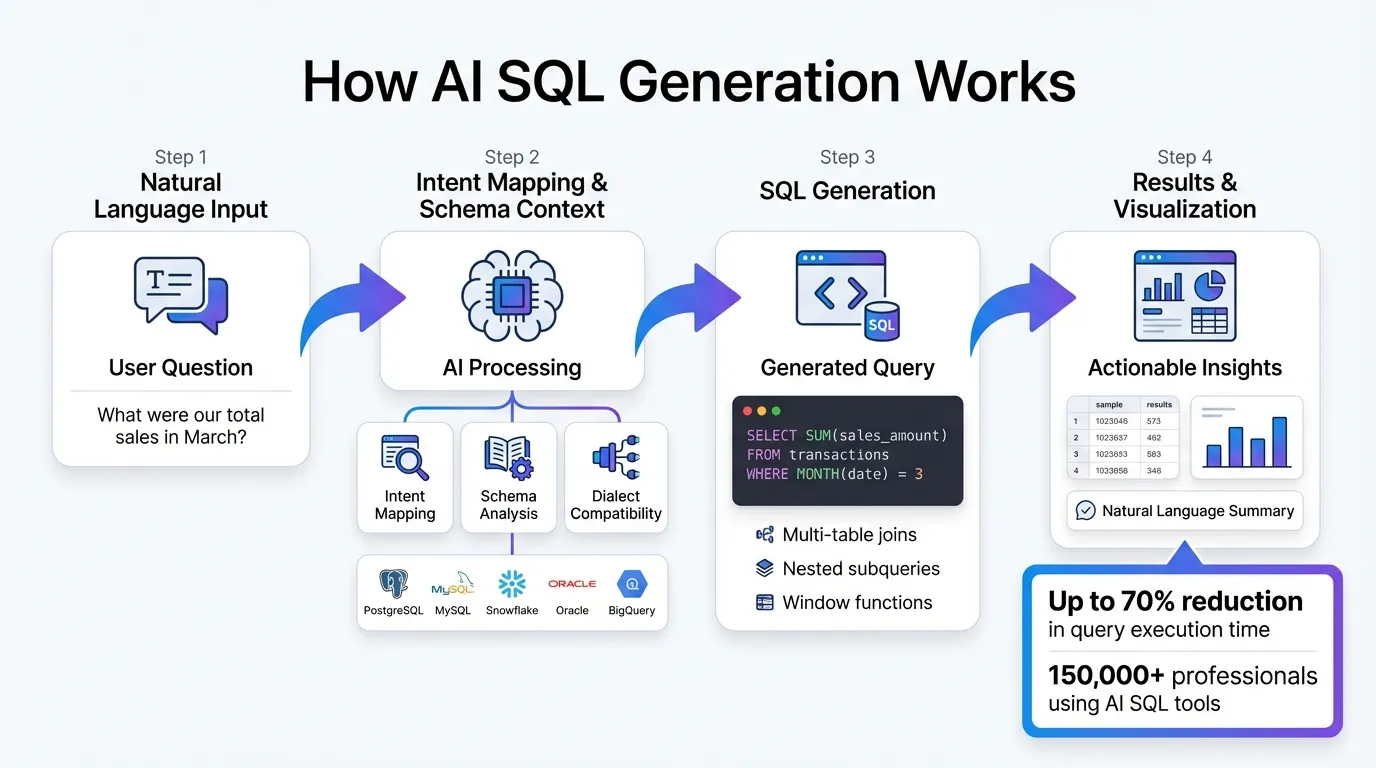 {How AI SQL Generation Works: From Natural Language to Database Query}
:::
{How AI SQL Generation Works: From Natural Language to Database Query}
:::
AI-powered SQL generation works by transforming everyday language into executable database queries. The system takes your natural language input and combines it with your database's structure to generate precise queries. This process, often referred to as prompt augmentation, ensures the AI understands not only your question but also how it relates to your database's schema. Here's how it all comes together.
The Core Mechanism Behind AI SQL Generation
At the heart of this technology is intent mapping - the AI interprets your plain-language request and aligns it with your database schema to produce tailored SQL. Unlike generic templates, these queries are customized to fit the specific structure of your database. Many platforms now support multiple large language model (LLM) providers, each optimized for different tasks.
To ensure accuracy, the system provides the AI with your database's data dictionary and catalog. This prevents errors like referencing non-existent tables or columns. With this context, the AI can handle advanced SQL tasks, including multi-table joins, nested subqueries, and window functions. Additionally, it ensures dialect compatibility, generating SQL that matches the syntax of your database - whether it's PostgreSQL, MySQL, Snowflake, or Oracle.
Mark Hornick, Senior Director of Machine Learning and AI Product Management at Oracle, explains: "Combining generative AI large language models (LLMs) with Oracle SQL empowers you to describe what you want – declarative intent – and let the database generate the SQL query relevant to your schema."
Benefits for Non-Technical Users
This technology is a game-changer for non-technical users. Professionals like marketing managers, sales directors, and HR staff can access complex data without needing to understand table relationships or SQL syntax. They simply phrase their questions in plain English and get accurate results in seconds. This eliminates the steep learning curve and reduces reliance on data teams for everyday queries.
The AI takes care of the technical heavy lifting - figuring out which tables to join, applying filters, and deciding on aggregations - while users focus on interpreting the results. Internal benchmarks reveal that AI-powered SQL tools can cut query execution time by up to 70% compared to manual methods. Over 150,000 professionals are already leveraging these tools to simplify tasks like generating Common Table Expressions (CTEs).
These advantages fit seamlessly into broader business intelligence (BI) processes, making data access faster and more intuitive.
How AI Fits Into Modern BI Workflows
Manual SQL processes are often slow and prone to errors, but AI-driven SQL generation streamlines real-time decision-making. This technology integrates directly into BI workflows, connecting with semantic layers in business intelligence, dashboards, and live data sources. It works with data warehouses like Snowflake, BigQuery, and Postgres through secure, read-only, encrypted credentials. This ensures real-time access while maintaining security.
Users can refine their queries through conversational follow-ups, with the system retaining session context. For example, after generating a query, you can say, "Actually, show data for the last 30 days instead of the last quarter", and the AI will adjust accordingly.
The system also respects your database's existing security rules, so users can only access data they’re authorized to see. Advanced setups use Retrieval-Augmented Generation (RAG) to dynamically pull relevant schema details. This allows the AI to navigate databases with hundreds of tables without being overwhelmed by unnecessary information, ensuring both efficiency and accuracy.
Setting Up AI SQL Generation in Your Organization
Implementing AI-powered SQL generation involves three key steps: ensuring secure database connections, creating a semantic layer, and training users to effectively use natural language queries. Each step plays a critical role in delivering accurate results and a seamless user experience.
Database Connectivity and Integration
Start by setting up read-only connections to your data warehouse. Querio, for example, integrates directly with platforms like Snowflake, BigQuery, and Postgres using encrypted credentials. This approach prevents data duplication and minimizes security risks. Use service accounts with limited privileges, granting access only to the schemas your team needs. For PostgreSQL, make sure to enable extensions like alloydb_ai_nl or google_ml_integration and adjust the required flags.
To further secure the setup, register your schemas explicitly in the AI configuration. This step ensures the system can only access specific tables and columns, reducing the chances of unintentionally exposing sensitive or irrelevant data. With this secure foundation, your organization is ready to turn raw data into actionable insights.
Creating a Semantic Layer for Accuracy
Raw schema details alone won't suffice for accurate query generation. The AI needs to understand your business logic - how tables are related, what terms like "gross margin" mean, and which metrics matter most. Define key elements such as relationships (e.g., foreign keys), dimensions (like product categories or regions), and metrics (such as revenue or customer lifetime value). Platforms like Snowflake support "Semantic Views", which allow you to store this context directly in the database.
Chanin Nantasenamat of Snowflake explains, "A semantic view acts as a translator between your raw data and how humans or AI interpret it."
Incorporate synonyms into your definitions to ensure flexibility. For instance, map terms like "total sales quantity" and "total sales amount" to the same metric. Validate these definitions through your CI/CD pipeline to avoid disruptions caused by upstream changes in dbt models or database schemas. When structural changes occur, refresh the AI's schema view to prevent outdated references. By embedding business context, the AI can accurately translate natural language into precise SQL queries.
Training Users for Natural Language Queries
Equip your team with the skills to make the most of natural language querying. Encourage them to reference specific table names when dealing with large schemas. For example, asking "Show me revenue from the sales_transactions table" helps the AI pinpoint the right data. For more complex queries, users can rely on multi-line prompts by using # or /* text */ blocks to provide detailed instructions.
Teach users to refine their queries with follow-up prompts, such as "limit to last 30 days" or "add a breakdown by region." Additionally, the AI's "Explain" feature can help users understand the logic behind generated SQL. During onboarding, offer few-shot examples that pair sample questions with their corresponding SQL outputs.
Mrigaen Kapadia, Founder of SimplyFleet, highlights: "Most requests generate the right SQL on the first try."
This success stems from users learning to craft clear, context-rich queries. By following these steps, your organization can unlock the full potential of AI-driven SQL generation, making data insights more accessible to everyone.
What AI SQL Generation Can Do
AI-powered SQL generation brings a game-changing approach to how teams interact with data. By eliminating technical hurdles, it empowers users to access and analyze data independently, without relying on specialized expertise.
Natural Language Querying
With natural language querying, users can simply type questions in plain English and receive accurate SQL queries tailored to their specific needs. For example, instead of learning SQL syntax or waiting on an analyst, a marketing manager could type, "Show me total sales by region for Q4 2025," and instantly get results. The AI interprets the intent, generates the SQL query, runs it against the database, and delivers the answer.
The system doesn’t just provide results - it also promotes transparency. Features like showsql let technical users review the generated code, while explainsql breaks down complex queries into plain English. This not only builds trust but also helps non-technical users gain a better understanding of how their data is structured. For further exploration, conversational tools allow users to refine queries with follow-ups like, "Limit to the top 10 customers" or "Add a breakdown by product category."
These tools go beyond quick queries, offering solutions for more robust reporting needs as well.
Automated Dashboards and Reporting
AI doesn’t stop at answering individual questions - it can create dynamic dashboards and automated reports. For instance, data teams can set up KPI tracking boards that update automatically, ensuring executives and stakeholders always have the latest insights without constant manual effort. This automation not only saves time but also guarantees consistency and accuracy in reporting.
By taking over repetitive tasks, AI frees up analysts to focus on deeper insights. Additionally, it transforms static reports into dynamic, interactive tools that improve decision-making.
Real-Time Data Visualization and Insights
AI takes raw data and turns it into visuals - fast. Whether it’s a bar chart comparing monthly revenue or a line graph tracking customer growth, users can request a specific visualization and see it generated in seconds. The narrate function goes a step further, providing natural language summaries that explain trends, highlight anomalies, and offer context for those who aren’t data experts.
This ability to visualize and interpret data in real time speeds up decision-making across an organization. As Enver Melih Sorkun, Co-founder and CTO of Growdash, explains:
"It's not just about saving time and money, it's about making data accessible."
When teams can ask questions and immediately see the answers, they can adapt to market changes more quickly, test ideas on the spot, and make informed decisions without waiting for scheduled reports or analyst input.
Best Practices for Governance and Security
Using AI-powered SQL generation can make data more accessible across your organization, but it also brings new security and compliance challenges. The good news? With the right safeguards in place, you can maintain control while empowering self-service analytics.
Ensuring Data Security and Privacy
To keep AI SQL generation secure, start with strong database integration and security protocols. For example, even if a generated query includes commands like DELETE or UPDATE, it won't execute. Credentials should always be stored in encrypted vaults. Tools like Querio follow SOC 2 Type II standards, using managed encryption keys (similar to AWS KMS) to protect sensitive data both at rest and in transit.
Another key measure is schema-only querying. This ensures the AI only accesses metadata - like table names, column names, and data types - without exposing actual row-level data. This approach significantly reduces risk. Pair this with role-based access controls that mirror your database permissions, ensuring users can only access the data they're authorized to see.
Establishing Governance Frameworks
Governance frameworks rely heavily on access controls and audit trails. By logging every natural language input and its corresponding SQL output, you create a detailed audit trail that helps identify patterns, detect misuse, and strengthen security measures.
For sensitive queries or production environments, consider a human-in-the-loop review process. While AI can generate precise SQL, having a technical user review and approve queries before execution adds an extra layer of protection. You can also define rules within your AI tool, such as limiting results to 200 rows or enforcing specific syntax standards. Software developer Boemo Mmopelwa emphasizes the importance of vigilance:
"AI-generated queries can expose crucial credentials such as passwords when not managed properly. It is important to ensure that the queries generated by AI are checked for any security vulnerabilities such as SQL injection."
Continuous Monitoring and Improvement
Security isn't a "set it and forget it" task - it requires constant attention. Once you've implemented governance policies, continuous monitoring ensures they remain effective. Use Abstract Syntax Tree (AST) parsing to analyze query structures before execution, blocking risky commands like DROP TABLE or DELETE regardless of how they're formatted. This approach prevents harmful actions before they reach your database.
Regularly reviewing AI-generated queries can uncover performance issues and security gaps. Studies show that about 25–30% of AI-generated code contains common vulnerabilities, and 68% of software engineering leaders report spending extra time addressing these issues. Monitoring and refining your processes are essential. For example, start by testing new queries with a LIMIT 10 clause to validate their logic and avoid resource-heavy operations that could strain your systems.
Conclusion
AI-powered SQL generation is transforming the way organizations handle data by enabling instant, plain-English queries. This approach removes traditional bottlenecks, reduces errors, and allows analysts to focus on more strategic, high-value tasks.
Key Takeaways
The advantages of AI-driven SQL generation ripple through the entire organization. Non-technical teams can gain insights without needing to learn SQL, while the use of AI minimizes syntax errors and ensures more reliable outcomes. Additionally, the ability to translate SQL into plain English enhances user understanding, making data more accessible to everyone. With proper safeguards in place - such as read-only access, SOC 2 Type II compliance, and role-based permissions - you can maintain security while opening up data access across teams.
The impact is undeniable. Many organizations have reported significant time savings, with processes that used to take weeks now completed in minutes. Professionals also save an estimated 7–10 hours per week by eliminating manual data work. These benefits make it clear that integrating AI-driven SQL tools into your workflow can be a game-changer.
Next Steps for Implementation
Start applying these ideas to streamline your data operations. Identify the teams that frequently face delays waiting for manual queries, and launch a pilot program to implement self-service analytics using natural language querying in real-world scenarios. Ensure your database schemas are current and include detailed column descriptions to help the AI grasp semantic relationships. Secure, read-only connections can help maintain compliance while empowering teams with faster, more reliable access to insights.
Querio is designed to connect directly with platforms like Snowflake, BigQuery, and PostgreSQL, eliminating the need to copy data. Its AI-driven natural language querying, combined with a semantic layer, ensures consistent metrics across departments. Consider how Querio could enhance your analytics workflow and start unlocking faster, smarter data access for your teams.
FAQs
::: faq
How does AI create accurate SQL queries for users?
AI plays a critical role in generating precise SQL queries by thoroughly analyzing the database schema. This includes understanding tables, columns, data types, and relationships. By using this metadata, AI creates queries that correctly reference database objects and follow the specific SQL dialect required. This approach reduces common mistakes like mismatched table or column names and ensures joins, filters, and aggregations are applied correctly.
To boost accuracy even further, many systems validate the generated SQL through syntax checks and schema comparisons. If any errors are found, the AI can refine the query automatically. Additionally, some tools offer explainability features, which translate the SQL into plain English. This allows users to double-check that the query matches their intentions. These measures ensure the SQL not only works correctly but also meets the user's needs. :::
::: faq
How does AI ensure sensitive data stays secure when generating SQL queries?
AI-powered SQL generation platforms place a strong emphasis on keeping data secure, employing several layers of protection to safeguard sensitive information. One key strategy is avoiding the storage or caching of actual data rows. Instead, these systems work with schema details - like table and column names - ensuring that raw data never interacts directly with the AI model.
To add another layer of security, these platforms utilize encryption for connection credentials and metadata, whether they're stored or being transmitted. Many also implement role-based access controls to ensure that only authorized users can access specific data. On top of that, policy guardrails and auditing tools are often built in to ensure generated SQL queries adhere to security protocols and respect data classification policies. Together, these measures create a safe and secure environment for leveraging AI in SQL generation. :::
::: faq
How can AI-generated SQL help non-technical users access data more easily?
AI-powered SQL generation makes it possible for anyone to access and analyze data without needing to write a single line of code. Imagine typing a simple question like, "What were our sales last month?" and instantly getting the answer. The AI takes your natural-language query, converts it into a precise SQL command, executes it, and delivers the results - all in seconds.
This approach removes the complexity of learning SQL syntax, giving teams like marketing, sales, and operations the ability to explore data on their own. No more waiting on IT or analysts to pull reports. It’s quicker, reduces manual errors, and helps teams make faster, data-informed decisions.
By managing the technical aspects behind the scenes, AI lets users focus on their actual business questions. Plus, with built-in governance tools like role-based permissions and read-only settings, it keeps data access secure. This makes self-service analytics not only simpler but also more practical for teams across your organization. :::