Business Intelligence
Claude for Data Analysis: What It Can and Can't Do Without an Execution Layer
Claude drafts SQL and reasons over pasted data; verified, consistent KPIs require a read-only warehouse and a governed semantic layer.

If you need an answer based on live data, Claude alone is not enough. I’d use Claude by itself for SQL drafts, schema walkthroughs, and pasted CSVs. But if I need checked numbers, audit logs, row-level access, or the same KPI every time, I need a warehouse connection and, in many cases, a semantic layer too.
Here’s the short version:
- Claude alone helps with reasoning, SQL drafts, and pasted results
- Claude + execution can run SQL or Python against live warehouse data
- Claude + semantic layer + BI adds fixed metric definitions, access controls, and repeatable reporting
- This matters most for teams in SaaS, healthcare, and finance, where one metric mismatch can affect dashboards, board reports, or compliance work
- The safest setup is a read-only warehouse or replica, not a production database
A simple way to think about it:
- If you want help thinking through analysis, Claude alone can work
- If you want help checking analysis, you need execution
- If you want numbers that stay the same across chat, dashboards, and scheduled reports, you need governance too
One big risk: without a governed metric layer, the same question can lead to different SQL and different totals across sessions. That is a problem for revenue reporting, healthcare reporting, and finance controls.
::: @figure 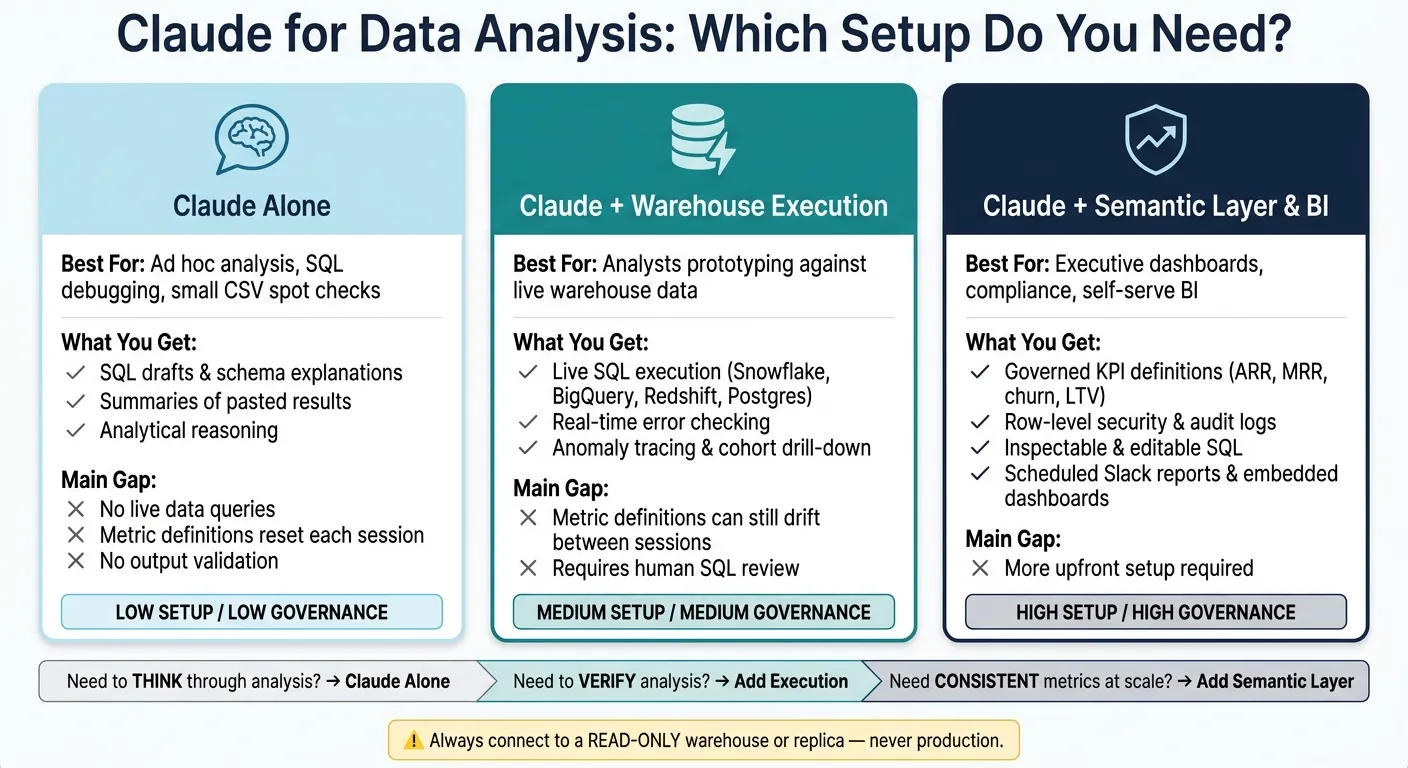 {Claude for Data Analysis: 3 Setup Tiers Compared}
:::
{Claude for Data Analysis: 3 Setup Tiers Compared}
:::
Quick Comparison
| Setup | What I get | Main gap | Best fit |
|---|---|---|---|
| Claude alone | AI tools that write SQL, schema help, and summaries of pasted outputs | No live queries, no output checks, no lasting metric memory | Ad hoc analysis and SQL debugging |
| Claude + warehouse execution | Live queries, error checks, notebook-style reruns, anomaly tracing | Metrics can still drift between sessions | Analysts working against live warehouse data |
| Claude + semantic layer & BI | Governed KPIs, inspectable SQL, access controls, audit trails, scheduled reporting | More setup work up front | Executive dashboards, compliance, and self-serve BI |
In plain English: I’d trust Claude alone to help me think. I’d trust Claude with execution to help me verify. And I’d trust Claude with a semantic layer to keep reporting consistent at scale.
sbb-itb-284a532
1. Claude Alone
Claude is session-based, not connection-based. You paste in a schema, CSV export, or query results, and Claude works from that fixed snapshot. There’s no live link to Snowflake, BigQuery, Redshift, or Postgres. That setup is fine for text-only analysis, but it hits a wall the moment execution matters.
On its own, Claude can still do a lot. It can read a schema and explain what the tables probably mean, draft SQL for your warehouse dialect, suggest a path for an analysis problem, and sum up results you paste back in. For ad hoc analysis, query debugging, and planning, that can be enough.
The friction shows up fast in BI work. Claude can’t confirm whether the SQL it wrote actually runs. It can’t check whether a column disappeared after a schema change. It also doesn’t keep lasting memory of your team’s metric definitions, so unless you restate them, it has to infer. That’s where things get messy.
For data teams in healthcare and finance, inconsistent metric definitions can lead to reporting and compliance issues. In SaaS, the same question can produce different answers depending on who asked it and how they phrased it. Without a governed semantic layer, Claude can’t enforce one metric definition across users or across sessions. Once Claude can run queries or code, the workflow starts to look very different.
| What Claude Can Do Alone | What It Can't Do Without an Execution Layer |
|---|---|
| Explain warehouse schemas from pasted DDL | Query live data in Snowflake, BigQuery, Redshift, or Postgres |
| Draft SQL in your warehouse dialect | Validate whether that SQL actually runs or returns correct results |
| Summarize pasted results | Detect schema changes or stale data |
| Suggest analytical approaches | Enforce governed metric definitions across sessions |
| Reason over pasted outputs | Investigate anomalies end-to-end |
The next section shows what changes once Claude can execute against a warehouse and code runtime.
2. Claude With a Warehouse and Code Execution
Connect Claude to a live warehouse - Snowflake, BigQuery, Redshift, or Postgres - and a Python runtime, and it can work with live data through read-only access instead of relying on a pasted snapshot.
With only a pasted schema, Claude can write SQL. But you have no way to check whether it actually runs. With a live connection, the SQL executes, returns real rows, and shows errors on the spot. That changes the workflow in a pretty big way.
Reproducibility gets better too. Instead of a one-off chat that disappears into the scrollback, you get a live notebook where cells and charts change when the SQL changes. That’s where live execution starts to shift BI workflows - not just by moving faster, but by making the work easier to check and rerun.
Claude can also dig into anomalies from start to finish. If engagement drops in a SaaS funnel, it can trace the issue step by step, break it out by cohort, and pinpoint where the drop begins.
There’s still a gap, though. Claude may execute against live data correctly, but it still needs a governed metrics layer to keep answers steady across sessions.
Do not run exploratory AI-written queries against a live production database. Use a read-only analytical warehouse or replica.
Execution fixes verification. It does not fix shared metric governance, and that next layer is what closes the gap.
3. Claude With a Semantic Layer and BI Integrations
A semantic layer fixes the consistency problem. And that’s a different issue from execution on its own.
When Claude connects to a governed semantic layer, it no longer has to rework metric logic from raw tables every session. It pulls from business logic that’s already been set. ARR, MRR, churn, and “active user” get defined once and then used the same way every time. Without that layer, Claude might write different SQL or pick different tables for the same question on different days. That can lead to mismatched numbers and unofficial versions of the same metric. This matters most when a KPI needs to match across chat, dashboards, and scheduled reports.
A governed semantic layer defines revenue once, so every answer follows the same logic. That’s the heart of the issue: metric ownership. To define churn the right way, you have to separate logo churn from revenue churn and decide what counts as a spike. LTV has the same problem because the formula and segment rules change the result. Activation is no different. You need to spell out the actions and the time window. Those definitions belong in a governed layer, not rebuilt from a prompt each time, especially for compliance reporting, where consistency matters.
Platforms like Querio expose an MCP endpoint, which lets Claude query a governed data platform directly. So instead of going straight to raw tables, it hits a governed endpoint that queries certified metrics. The SQL Claude writes is inspectable and editable, which gives analysts a chance to review it, trust it, and reuse it. Answers can also move beyond chat into scheduled Slack reports and embedded dashboards. That’s what makes Claude fit into a governed BI workflow, rather than acting like a one-off chat tool.
| Feature | Claude Alone (Pasted Schema/CSV) | Claude + Semantic Layer & BI |
|---|---|---|
| Metric logic and governance | Re-derived each session | Certified definitions, RLS, audit logs, SSO |
| Distribution | Chat interface only | Scheduled Slack reports, embedded dashboards |
| SQL transparency | Depends on the tool | Inspectable and editable |
The next section shows how Claude alone, Claude with execution, and Claude with a semantic layer compare in real BI use cases.
How Each Approach Holds Up Across Common BI Use Cases
The use case usually decides the stack. Claude alone can help frame the question and sketch the logic. Live warehouse execution checks that logic against actual data. And a semantic layer keeps reporting steady from one session to the next.
That difference shows up fast in day-to-day BI work. Some jobs need speed. Others need tight controls and the same answer every time.
Executive revenue dashboards put consistency first. If you don't have a governed metric layer, the same revenue question can lead to different SQL and different totals across sessions. That's a nonstarter when finance needs board numbers to match month over month. Claude with live warehouse access can pull current data, but metric drift can still happen without a governed definition. This becomes a hard requirement when finance reporting and board reporting need to line up exactly across dashboards and chat.
That pressure eases in exploratory analysis, where moving fast often matters more than having one locked definition.
Product usage analysis is a good fit for early work with Claude alone. It can help spot patterns and shape the first pass of the analysis. With live access, Claude can drill into cohorts in Snowflake or BigQuery and check results against the warehouse. Add a semantic layer, and now cohort logic becomes reusable, while event definitions stay the same across sessions.
Funnel and attribution reporting is less forgiving. Claude alone can suggest join logic, but it can't test that logic against Redshift or Postgres. Live access changes that. Claude can run the joins against actual tables and fix the analysis when the data says the logic is off. A semantic layer then keeps those joins and funnel definitions steady across reports.
The standard gets stricter in regulated settings. There, being accurate isn't enough if you can't show who accessed what and how the result was produced.
Healthcare engagement reporting has tighter governance needs. Claude alone is limited to pasted context, and that's not enough for regulated workflows. In those workflows, permissions, audit trails, and row-level security are required.
Finance risk and compliance monitoring shifts the focus to traceability. Claude alone can draft logic and explain the method, but it can't enforce access controls or give you a dependable audit trail. In risk and compliance monitoring, access controls and a traceable SQL path are non-negotiable.
| Use Case | Claude Alone | Claude + Warehouse Execution | Claude + Semantic Layer & BI |
|---|---|---|---|
| Executive revenue dashboards | Drafts SQL; metric definitions drift | Fresh data; metric drift still possible | Governed metrics; self-serve with governed metrics |
| Product usage analysis | Exploration on pasted results | Live cohort drill-down; warehouse reconciliation | Reusable cohort logic; governed event definitions |
| Funnel & attribution reporting | Proposes join logic; no live validation | Tests joins against real tables; corrects analysis | Governed joins; consistent funnel definitions |
| Healthcare engagement reporting | Limited to pasted context; no auditability | Platform-dependent permissions and compliance | Role-based, auditable self-serve; BAAs and RLS |
| Finance risk & compliance monitoring | Drafts logic; no audit trail | Live validation with execution logs | Inspectable SQL; traceable definitions |
Pros and Cons of Each Approach
The use case usually makes the choice pretty clear. The trade-offs below explain why.
Each setup matches a different level of risk and control. Claude is good at reasoning through analysis problems, but it doesn’t keep your business definitions from one session to the next. That leaves one main issue: governance. Once execution enters the picture, you get live data. But steady, shared metrics still come from a semantic layer.
The table below pulls those trade-offs into one view.
| Configuration | Strengths | Limitations | When to Use It |
|---|---|---|---|
| Claude Alone | Strong reasoning; explains SQL concepts and debugs snippets | No live data access; metric definitions reset each session; limited by the current prompt | Ad hoc analysis, SQL debugging, or small CSV spot checks |
| Claude + Warehouse | Fast query generation against real tables; handles complex joins and aggregations; direct warehouse connection | Requires human review for logic and metric drift | Technical users prototyping against live data who can review generated SQL |
| Claude + Semantic Layer & BI | Governed, consistent metrics; warehouse security controls; inspectable SQL; live data freshness | Requires upfront investment in the semantic model and business glossary | Executive reporting, compliance workflows, and self-serve analytics for non-technical teams |
This is the practical split:
- Claude Alone works best when speed matters more than shared definitions.
- Claude + Warehouse gives you live answers, but someone still needs to check the SQL.
- Claude + Semantic Layer & BI is the better fit when the same metric has to mean the same thing for everyone.
These trade-offs set up the choice; the conclusion turns them into a simple rule of thumb.
Conclusion
The pattern here is pretty simple: use Claude for analysis, and use an execution layer when the answer needs to be checked.
Claude on its own works well for debugging SQL, looking through pasted schemas, and sketching out analysis. But the moment an answer touches revenue, compliance, patient outcomes, or executive reporting, Claude by itself stops being enough. Metric definitions can shift from one session to the next, outputs can’t be checked against live data, and there’s no dependable audit trail.
Any execution layer should connect to a read-only analytical warehouse or replica, not production. A governed semantic layer is what keeps the same metric definition consistent every time a question gets asked [1].
That’s the gap Querio is built to close: governed definitions, inspectable SQL and Python, and live warehouse answers that fail safely when data is missing. If a question only calls for reasoning, Claude is enough. If it calls for verified data, governance, or repeatable reporting, it needs execution.
FAQs
::: faq
When is Claude alone enough for analysis?
Claude on its own is enough when you need help thinking through an analysis, explaining schemas, drafting SQL, or making sense of static results when there’s no live data in the loop.
It also works well for learning SQL, fixing syntax issues, and brainstorming different ways to approach a problem. But it is not a data platform, and it’s not the right fit for production analytics. It doesn’t have live warehouse connections, a governed semantic layer, or auditability. :::
::: faq
Why doesn’t live warehouse access by itself solve metric consistency?
Live warehouse access gives you current data. But it doesn't give you consistent metric definitions.
That's the gap a governed semantic layer fills.
Without it, an AI system or analyst can read the same raw warehouse and still come back with different answers. Why? They may pick different tables, use different join paths, or define the same metric in different ways.
A semantic layer acts as the single source of truth for business logic. That means metrics like revenue or churn are calculated the same way across queries, dashboards, and teams. :::
::: faq
What should a safe execution setup include?
A safe execution setup for AI data analysis should include governance, transparency, and controlled access to live data.
That usually means a few core pieces working together:
- Direct, governed warehouse connections with read-only access
- A centralized semantic layer for consistent metrics and relationships
- RBAC, RLS, and table-level scoping
- Logged, inspectable, editable queries
- Validation against known results and anomaly checks
The idea is simple: let AI work with live data, but keep clear guardrails in place. Read-only access helps prevent unwanted changes. A centralized semantic layer keeps metrics and relationships consistent, so one team’s “revenue” doesn’t quietly mean something different from another team’s. Logged and editable queries add visibility too, which matters when you want to check what the system did instead of taking the answer on faith.
Validation matters just as much. If results can be checked against known outputs and anomaly checks can flag odd patterns, you have a much better shot at catching mistakes before they turn into bad decisions. :::