Business Intelligence
data analytics tools list enterprise and AI features comparison
Compare 10 enterprise analytics platforms by AI features, security, integrations, pricing, and ideal use cases.

Choosing the right analytics tool for your business can be overwhelming. This guide compares 10 leading platforms, focusing on their AI capabilities, security, integration options, pricing, and ideal use cases. Here's a quick summary of the tools covered:
- Power BI: Best for organizations using Microsoft tools. Integrates with Azure and offers AI features like Copilot and AutoML. Affordable for Microsoft 365 users.
- Tableau: Excels at creating polished visualizations. Works well with Salesforce but has higher costs and a learning curve.
- Databricks: Ideal for data engineering and machine learning. Uses a lakehouse architecture for seamless data handling.
- ThoughtSpot: Great for natural language analytics and self-service dashboards and proactive insights.
- Snowflake Cortex Analyst: Focused on precise text-to-SQL conversion with strong governance. Works exclusively with Snowflake data.
- Tellius: Automates root cause analysis and supports multi-cloud environments. Suited for commercial analytics teams.
- DataRobot: Comprehensive AI platform for predictive modeling. Strong in supply chain and financial services.
- Qlik Sense: Unique associative engine for uncovering hidden data relationships. Supports both SaaS and on-premises deployments.
- IBM watsonx / Cognos Analytics: Combines AI with rigorous governance. Suitable for regulated industries.
- Querio: Offers natural language querying with transparent SQL and Python code. No per-seat pricing and strong governance.
Quick Comparison
| Platform | Best For | Key AI Features | Pricing | Integration |
|---|---|---|---|---|
| Power BI | Microsoft ecosystem users | Copilot, AutoML, Key Influencers | $5,000+/month (Premium) | Azure, Microsoft 365, Teams |
| Tableau | Visualizations | Tableau Agent, Ask Data, Pulse | $75–$115/user/month | Salesforce, major data sources |
| Databricks | Data engineering, ML | Genie, Mosaic AI, lakehouse architecture | $0.07–$0.55/DBU | AWS, Azure, GCP |
| ThoughtSpot | Self-service analytics | Spotter Agent, SpotIQ | $25–$50/user/month | Salesforce, Google Analytics |
| Snowflake Cortex | Snowflake users | Multi-agent AI, semantic views, text-to-SQL | Consumption-based | Snowflake-only |
| Tellius | Commercial analytics | Root Cause Analysis, Proactive Feed | Capacity-based | Multi-cloud |
| DataRobot | Predictive modeling | AutoML, Feature Discovery, LLM blueprints | Custom pricing | Snowflake, BigQuery, S3 |
| Qlik Sense | Complex data relationships | Associative Engine, AutoML | Custom pricing | SaaS, on-premises |
| IBM watsonx | Regulated industries | Predictive BI, Intelligent Reliability Scoring | Custom pricing | Hybrid, multi-cloud |
| Querio | Transparent analytics | SQL/Python transparency, semantic layer | Free plan; Core $2,499/mo | Snowflake, BigQuery, Redshift |
Each platform has unique strengths. Consider your organization's needs - whether it's AI-driven insights, visualizations, integration with existing systems, or budget constraints - to find the best fit.
::: @figure 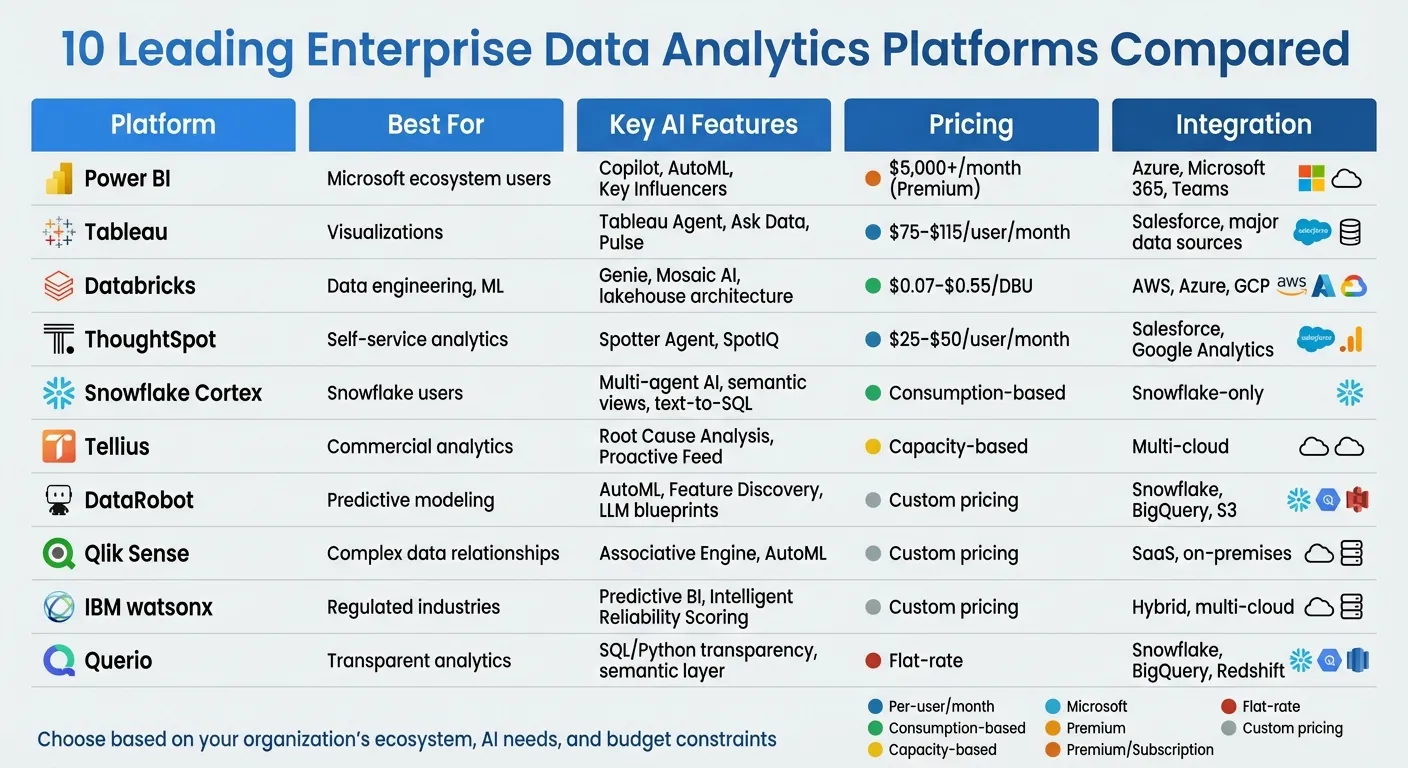 {Enterprise Data Analytics Tools Comparison: AI Features, Pricing & Best Use Cases}
:::
{Enterprise Data Analytics Tools Comparison: AI Features, Pricing & Best Use Cases}
:::
1. Power BI
AI Capabilities
Power BI integrates AI through Copilot, leveraging Azure OpenAI to interpret data models, relationships, and measures automatically using Natural Language Processing in BI. Among its built-in AI visuals, Key Influencers uses logistic regression to rank factors affecting metrics, Decomposition Tree supports interactive root cause analysis, and Smart Narrative creates dynamic text summaries that adjust with filter changes [5][6].
The platform's AutoML feature in Dataflows allows business analysts to develop machine learning models for tasks like binary prediction, classification, and regression - no coding required [5][6]. AI-driven tools, such as "Column from Examples" and fuzzy matching, can reduce data transformation time by up to 60% [5]. Analysts reportedly save about three hours each day by automating chart and model creation [7].
"Copilot is not a chatbot bolted onto the side of Power BI - it is integrated into the core workflow, understanding your data model, relationships, and measures." - ECOSIRE Research Team [6]
That said, Power BI's AI insights are probabilistic, requiring runtime validation due to the potential for inaccuracies, while its deterministic calculation engine (DAX/SQL) ensures consistent outputs [8]. To optimize tools like Copilot and Q&A, data modelers must carefully define synonyms, phrasing, and relationships in the linguistic schema for natural language interfaces [5][6]. Additionally, AutoML models should be retrained quarterly to ensure they reflect current business dynamics [6].
Beyond its AI capabilities, Power BI emphasizes security and governance as foundational elements.
Enterprise Security and Governance
Power BI integrates seamlessly with Azure AD (Microsoft Entra ID), enabling single sign-on (SSO) and conditional access policies. These features allow organizations to enforce multi-factor authentication and location-based access controls [9]. For compliance, every AI interaction - whether Copilot prompts or AutoML training - is logged in the Power BI audit system [5].
The platform employs deployment pipelines and dataset endorsements (Promoted/Certified) to ensure only validated data informs decisions [9]. With its commanding 30–36% share of the global BI market projected by 2026 [1], Power BI has become a go-to solution for enterprises aligned with Microsoft's ecosystem.
Its integration capabilities further amplify its value.
Integration and Scalability
Power BI offers native integration with Microsoft 365, Azure services, and Dynamics 365 [9]. It supports over 1,000 data sources, including platforms like Google Analytics 4, Salesforce, and cloud data warehouses such as Snowflake.
Through Microsoft Fabric, Power BI enables unified storage using OneLake. Features like Direct Lake mode allow Parquet files to be read directly without moving data, providing sub-second response times even for billions of rows [9]. Power BI Premium and Fabric capacities can support over 10,000 concurrent users, with autoscaling to manage peak usage [9].
"Power BI is the clear leader for organizations invested in the Microsoft ecosystem, offering tighter integration with Azure, Microsoft 365, Teams, and Microsoft Fabric." - Power BI Consulting [9]
Pricing and Cost Efficiency
Power BI is estimated to cost 3–5 times less per user than Tableau for large-scale enterprise deployments [9]. Organizations with Microsoft 365 E5 subscriptions can leverage included Power BI Pro licenses, further reducing overall expenses [9]. For larger needs, Power BI Premium Capacity starts at around $5,000 per month for the P1 SKU [9].
Ideal Use Cases
Power BI is particularly suited for monitoring and KPI tracking, especially for organizations deeply integrated with Microsoft's ecosystem. It's ideal for enterprises requiring deterministic calculations, extensive data source connectivity, and seamless integration with existing Microsoft tools. Companies already using Azure infrastructure or looking to centralize analytics on Microsoft Fabric will find Power BI a strong fit [9]. Its AI-powered features and integration capabilities make it a top choice for businesses aiming to streamline decision-making and analytics.
sbb-itb-284a532
2. Tableau
AI Capabilities
Tableau brings a range of AI-driven features to the table. Tableau Agent simplifies tasks like generating calculations, automating data documentation, and transforming natural language queries into visualizations [10]. The platform's Tableau Semantics ensures AI-generated insights are grounded in consistent, enterprise-wide metric definitions [1].
Another standout feature is Tableau Pulse, which alerts users to key metrics and anomalies automatically [10]. Through Agentforce Integration, organizations can create custom AI agents capable of handling complex analyses, all within the secure framework of the Agentforce Trust Layer [10]. Specialized agents like Data Pro (for data preparation), Concierge (for exploration), and Inspector (for monitoring metrics and alerting users to trends or breaches) enhance the platform's functionality [1].
"Tableau Next represents Salesforce's bet on AI-augmented analytics, shipping with three AI agents (Data Pro, Concierge, Inspector) and a new semantic layer." - Chris Walker [1]
Despite these advancements, some users have noted limitations. For example, the "Ask Data" feature can struggle with more complex models [11]. To get the most out of Tableau's AI tools, teams need to ensure their data is clean and well-organized, with clear naming conventions in place [12][11].
These AI innovations operate within a secure, governed framework designed for sensitive enterprise data.
Enterprise Security and Governance
Tableau complements its AI capabilities with a strong focus on security and governance. Its integration with Salesforce Data Cloud and the broader Salesforce ecosystem brings enterprise-grade identity management and security standards [1][14].
The platform includes Tableau Data Management and Advanced Management suites, which help organizations oversee data governance and lifecycle management at scale [13]. The Agentforce Trust Layer adds an extra layer of security, making Tableau well-suited for automated analytical workflows in enterprise environments.
Integration and Scalability
Tableau seamlessly connects to major cloud data warehouses like Snowflake, Databricks, Google BigQuery, and Amazon Redshift through pre-built connectors [1][11]. It can process millions of rows via live connections, though its scalability depends on the capabilities of the underlying data source.
For large organizations, the Advanced Management and Data Management suites simplify tasks like security, governance, and content migration [13]. Tableau also boasts one of the largest user communities in the business intelligence space, with extensive third-party tools and resources available through the Tableau Marketplace [10][1]. However, accessing the full range of Tableau Next AI features often requires routing data through Salesforce Data Cloud, which can lead to reliance on the Salesforce ecosystem [1].
This level of integration and functionality aligns with Tableau's premium pricing model.
Pricing and Cost Efficiency
Tableau's pricing reflects its enterprise-level capabilities. The Standard plan is $75 per user per month, while the Tableau+ (Enterprise) plan costs $115 per user per month for the Creator tier [1][12]. Additional fees apply for Salesforce Data Cloud and Agentforce [1]. Viewer and Explorer licenses are priced between $15 and $35 per user per month [12]. For organizations looking to leverage Tableau Next AI features, there’s an extra charge of $40 per user per month [14].
While the platform delivers powerful features, the costs can add up quickly, especially for large-scale deployments [12][11]. Organizations already invested in Salesforce are likely to see the most value, but others may find the total cost of ownership challenging due to AI add-ons and data cloud requirements.
Ideal Use Cases
Tableau shines in environments where high-quality visualizations are a priority. It’s particularly effective for teams focused on creating presentation-ready visuals and data stories. Notably, Tableau has been recognized as a Leader in the 2024 Gartner Magic Quadrant for Analytics and Business Intelligence Platforms [2].
"Tableau visualizations look better than anything else in the category. When the deliverable is a board presentation or a public-facing data story, that matters." - Summer Lambert, Marketing, Zerve [12]
The platform is best suited for organizations already integrated with Salesforce, teams that prioritize polished visual outputs, and enterprises with dedicated analysts familiar with its advanced features. However, its complexity and steep learning curve make it less suitable for occasional users or those seeking simpler, budget-friendly solutions [12][11].
For enterprises that need a platform combining top-tier visualizations with AI-driven analytics, Tableau offers a comprehensive solution. Its mix of advanced features, secure governance, and seamless integration makes it a strong choice for meeting complex analytics needs.
3. Databricks
AI Capabilities
Databricks' Data Intelligence Engine blends generative AI with lakehouse architecture to interpret your organization's data contextually. Tools like Genie and automated dashboard creation adapt to your business's specific semantics, turning natural language prompts into datasets and visualizations [17][15].
Genie simplifies complex tasks by executing SQL queries, analyzing results, and creating detailed reports. Through the Assistant panel, users can generate datasets, visualizations, and even full dashboard layouts - all from a single natural language input [15].
"Databricks combines generative AI with the unification benefits of a lakehouse to power a Data Intelligence Engine that understands the unique semantics of your data." - Databricks [17]
In February 2026, The AA integrated Databricks' conversational analytics into Microsoft Teams, cutting insight generation time by 70% [16]. Similarly, Anker Innovations adopted Databricks' lakehouse architecture, reducing BI query times by 94% - shrinking the time to insight from 30 minutes to just 2 minutes [16].
For businesses building custom AI applications, Mosaic AI and the Agent Bricks framework offer production-ready solutions tailored to enterprise data [19][20]. These features, combined with strict governance measures, help Databricks deliver scalable analytics and faster insights.
Enterprise Security and Governance
Unity Catalog is at the heart of Databricks' governance system, offering full lineage tracking and consistent metric definitions across integrated BI tools [22][23]. It acts as a centralized hub for managing permissions on data and AI assets, including files, tables, machine learning models, notebooks, and dashboards. With attribute-based access controls, permissions can be managed at a granular level across different clouds and teams.
For generative AI, Databricks uses AI Gateway to enforce centralized guardrails, ensuring prompts and responses adhere to governance standards.
In 2024, PepsiCo used Unity Catalog to streamline governance for over 1,500 users across 30+ digital product teams. This improved data lineage visibility and reduced onboarding time for new users by 30% [16]. Additionally, organizations practicing AI governance reportedly deploy 12 times more AI projects into production compared to those without such practices [22].
The platform complies with key industry standards like HIPAA, FedRAMP, and PCI, though achieving compliance may require more manual setup than some closed systems. Databricks has even open-sourced Unity Catalog, enabling unified governance across AWS, Azure, and GCP - even for external data [23]. This approach ensures seamless integration and scalability.
Integration and Scalability
Databricks' lakehouse architecture bridges the capabilities of data lakes with the governance and performance of data warehouses [16][24]. This allows BI tools like Power BI and Tableau to connect directly via SQL endpoints, delivering up-to-date, governed data without creating silos. Organizations can modernize their data infrastructure without disrupting existing dashboards.
The platform's decoupled storage and compute model stores data in open formats like Delta Lake and Apache Iceberg within the customer’s cloud account. Compute clusters activate only when needed, optimizing resource usage. The Photon Engine, written in C++, powers high-performance processing that rivals traditional warehouses. Additionally, serverless compute eliminates the need for manual cluster management, offering instant scalability and reducing overhead [20][23].
Databricks is trusted by over 60% of Fortune 500 companies and serves more than 20,000 customers globally as of early 2026 [19].
Pricing and Cost Efficiency
Databricks uses a consumption-based pricing model measured in Databricks Units (DBUs), where costs range from $0.07 to $0.55 per DBU depending on workload and instance type [20][21]. Unlike per-user licensing, this model scales with processing power, not headcount.
Serverless compute ensures there are no idle charges, while cloud spot instances provide cost savings for non-critical batch processing. For predictable workloads, committed use discounts are available, offering savings for customers who agree to specific usage levels over time [24].
However, the consumption-based model can make budgeting more complex compared to fixed per-user pricing. Organizations running large-scale data engineering or AI workloads should monitor usage closely to avoid unexpected costs.
Ideal Use Cases
Databricks thrives in scenarios where data engineering, machine learning, and analytics intersect. It’s particularly well-suited for organizations building custom AI applications, handling streaming data, or managing extensive data pipelines. With support for Python, SQL, R, and Scala, the platform appeals to teams with technical expertise.
For businesses already invested in cloud infrastructure like AWS, Azure, or GCP, Databricks offers significant advantages by storing data in the customer’s own cloud account. Its use of open formats prevents vendor lock-in, ensuring compatibility with the broader data ecosystem [23][24]. Organizations looking for advanced analytics and machine learning capabilities on a unified platform will find Databricks a strong fit.
That said, teams seeking low-code or plug-and-play solutions may find Databricks requires more technical setup, making it a better option for organizations with dedicated data engineering and science teams.
4. ThoughtSpot
AI Capabilities
ThoughtSpot's Spotter Agent introduces a concept called "Agentic Analytics." This approach goes beyond just answering queries - it proactively surfaces insights and automates tasks like data preparation. The combination of Spotter Agent and SpotIQ transforms natural language queries into actionable insights by how AI is transforming data analytics by automating data prep, identifying anomalies, and prioritizing key metrics [25][26][27].
To refine the AI's accuracy, ThoughtSpot offers the Spotter Coach feature. This allows analysts to fine-tune the system using curated synonyms, prompts, and feedback, ensuring the natural language engine aligns with the organization’s specific terminology and logic.
"SpotIQ is the standout feature for us. It automatically surfaces insights and anomalies that we would have missed manually. It's like having an extra analyst on the team." - InsightSeeker, Capterra [26]
ThoughtSpot also empowers business users to handle approximately 60% of their queries independently, helping data teams avoid common bottlenecks in reporting workflows.
These capabilities, combined with ThoughtSpot's integration features, create a platform built for scaling efficiently.
Enterprise Security and Governance
ThoughtSpot prioritizes security with features designed to protect sensitive data. Administrators can control what metadata and sample values are shared with the language model layer. Additionally, ThoughtSpot logs all AI interactions, ensures prompts aren’t stored, and prevents its models from retraining on customer data. These measures align with strict privacy standards and certifications, including SOC 1/2/3, ISO 27001, HIPAA, GDPR, and CCPA compliance. Organizations also have the flexibility to select their preferred large language model rather than being tied to a single option.
As of February 2026, ThoughtSpot holds an impressive consensus rating of 8.29/10 based on 384 verified reviews [26].
Integration and Scalability
ThoughtSpot seamlessly integrates with major enterprise tools, including Salesforce and Google Analytics, and provides an SDK for embedding analytics into custom applications. For advanced users, the Analyst Studio supports SQL, R, and Python, making it suitable for more complex workflows. Mobile apps offer additional flexibility, although some users have noted occasional performance issues with dense dashboards.
That said, organizations need to invest time and resources upfront in data modeling and metadata configuration to ensure the AI delivers accurate insights. Administrators may also face a learning curve when working with ThoughtSpot Modeling Language (TML).
Pricing and Cost Efficiency
ThoughtSpot offers flexible pricing to match its advanced AI and integration features.
- Essentials Plan: Starts at $25 per user per month (billed annually), designed for teams of 5–50 users, and supports up to 25 million rows.
- Pro Plan: Costs $50 per user per month (billed annually), accommodates up to 1,000 users and 250 million rows, and includes the Spotter AI Agent.
- Usage-Based Option: For organizations with unpredictable workloads, pricing is set at $0.10 per query [26].
Ideal Use Cases
ThoughtSpot is particularly suited for organizations aiming to make data more accessible through natural language search, reducing reliance on static dashboards. It’s a strong fit for environments with a heavy backlog of data requests, where enabling business users to self-serve can alleviate pressure on technical teams and minimize the need for SQL expertise.
While ThoughtSpot shines in democratizing data access and uncovering insights, businesses should be prepared for the initial investment in data modeling. Additionally, its visualization options may not be as customizable as those offered by more design-focused platforms.
5. Snowflake Cortex Analyst
AI Capabilities
Snowflake Cortex Analyst is a multi-agent AI system designed to transform natural language queries into SQL commands with over 90% accuracy. Unlike single-pass AI tools, it employs six specialized agents - Classification, Feature Extraction, Context Enrichment, SQL Generation, Error Correction, and Synthesizer - to achieve this level of precision. This makes it twice as accurate as single-shot methods like GPT-4o and 14% better than other text-to-SQL solutions [29].
The system uses YAML-based semantic models, also called Semantic Views, to bridge business terminology with database schemas. For example, if a user asks about "USA", the Context Enrichment agent will ensure the query uses "United States of America" for better accuracy [32,34].
"Cortex Analyst leverages a collection of AI agents, built with deep understanding of data analytics and business intelligence, to mimic a human analyst and deliver trustworthy responses with an extraordinary SQL accuracy of over 90%."
– Nipun Sehrawat, Author, Snowflake Engineering [29]
Cortex Analyst also supports multi-turn conversations, allowing users to ask follow-up questions while maintaining context. For instance, a user could inquire about sales in one region and then follow up with, "What about North America?" The Error Correction agent ensures reliability by using Snowflake's SQL compiler to detect and fix errors before presenting results [32,34].
These AI tools are backed by rigorous security measures to protect user data.
Enterprise Security and Governance
All data, metadata, and prompts are kept within Snowflake's secure environment. Snowflake does not use customer data to train or refine large language models [32,33]. The platform integrates seamlessly with Snowflake's Role-Based Access Control (RBAC), ensuring that SQL queries respect user permissions and organizational policies.
Administrators can manage access at a granular level through model-specific RBAC, restricting certain large language models based on compliance needs [28]. A Classification Agent filters out ambiguous or irrelevant queries, while Cortex Guard reduces harmful content in outputs [31]. Additionally, the CORTEX_ANALYST_USAGE_HISTORY view provides tools for monitoring credit usage and auditing interactions [28].
Integration and Scalability
Cortex Analyst stands out for its seamless integration capabilities and scalability. It is accessible through a REST API, making it easy to connect with platforms like Streamlit, Slack, Microsoft Teams, and custom chat applications [28]. It also supports the Model Context Protocol (MCP), allowing external AI agents, such as Salesforce Agentforce, to interact with Snowflake data via a standardized interface [36,31].
In 2024, Penske Logistics used Snowflake Cortex AI to develop an AI summarization model in under 15 days. Vishwa Ram, Vice President of Data Science and Analytics at Penske Logistics, highlighted its ease of use:
"The game-changer in Snowflake Cortex AI is its simplicity and ease of implementation. Our data already sits in Snowflake, so we can make use of the LLMs without needing to use anything external."
– Vishwa Ram, Penske Logistics [30]
TS Imagine reported saving 4,000 hours of manual work and cutting costs by 30% after adopting Snowflake's generative AI at scale. Similarly, Luminate achieved a 334% boost in daily processing speed, handling over a trillion data points [35,37]. Cross-region inference support further enhances performance by enabling users to access models outside their default region [28].
Pricing and Cost Efficiency
Cortex Analyst uses a consumption-based pricing model, billed through Snowflake credits based on the number of successful (HTTP 200) responses. When Cortex Analyst is accessed via Cortex Agents, the cost depends on the number of tokens in a message. Otherwise, pricing is strictly message-based [28].
Standard Snowflake virtual warehouse costs apply for executing SQL queries, and organizations can track credit usage through the CORTEX_ANALYST_USAGE_HISTORY view [28].
Ideal Use Cases
Snowflake Cortex Analyst is perfect for enterprises that rely on Snowflake for data storage and need precise text-to-sql conversion. It's especially useful for empowering business users to query data in natural language, eliminating the need to write SQL manually. This is particularly beneficial for handling complex business terminology that requires careful mapping to database schemas.
Investing time in defining detailed semantic models and verified queries can significantly improve accuracy. For instance, as of August 2024, Siemens Energy used Cortex AI to summarize over 700,000 pages of historical records, giving 25 R&D engineers instant access to decades of insights previously buried in unstructured archives [35,34].
6. Tellius
AI Capabilities
Tellius streamlines the analytical process by automating investigations from start to finish. Its Kaiya conversational AI handles complex, multi-layered queries across over 30 data sources, including multi-cloud platforms like Snowflake, Databricks, and BigQuery [32][34]. Unlike tools that merely translate natural language into SQL, Tellius focuses on uncovering the reasons behind metric changes.
With Automated Root Cause Analysis, machine learning identifies and ranks contributing factors to metric shifts, assigning "Impact Scores" that quantify their influence. This reduces analysis time from days to seconds [32][34]. For example, PepsiCo saw a 12× improvement in root cause investigation speed by switching from manual drill-downs to automated driver analysis. Similarly, Novo Nordisk cut its analysis cycle time by 88%, while Regeneron reduced investigation time by 97% [32][35]. These features empower organizations to make faster, data-driven decisions.
The platform's Agent Mode takes automation further by planning and executing multi-step analytical workflows independently. These agents manage tasks like data extraction, apply statistical methods such as changepoint detection, and even generate narratives without human input [32][33]. Meanwhile, the Proactive Feed monitors KPIs in real-time, identifying anomalies and providing root-cause insights before users even ask. This capability enabled a top-10 pharmaceutical company to uncover a $12 million opportunity and achieve a staggering 2,200% ROI in the first year [35].
"Tellius reduced what used to take our analytics team 3–5 days to just seconds - we went from manually investigating root causes to having the platform surface the drivers automatically."
– Director of Commercial Analytics, top-10 pharmaceutical company [35]
Beyond its AI-driven features, Tellius emphasizes security and compliance to ensure trustworthiness.
Enterprise Security and Governance
Tellius provides a governed semantic layer with a centralized metrics ontology and knowledge graph, ensuring both AI agents and users receive consistent, auditable insights [1][32]. The platform is SOC 2 Type II certified and offers SOX-ready governance, making it suitable for highly regulated industries [32]. Features like Row-Level Security (RLS), Single Sign-On (SSO/SAML), and data lineage tracking enhance its reliability [1][32]. Every autonomous root cause analysis is fully reproducible and explainable, which is critical for compliance. This level of trust has led 8 of the top 10 pharmaceutical companies globally to rely on Tellius [1][33].
Integration and Scalability
Tellius supports seamless querying across cloud platforms like AWS, GCP, and Azure, all within a single conversational session - no data migration required [32]. The platform also offers System Packs, pre-configured with domain-specific intelligence for industries like Pharma (IQVIA, Veeva), CPG (Nielsen, Circana), and FP&A (SAP, Oracle), helping organizations deploy solutions faster [32][34].
Pricing and Cost Efficiency
Tellius employs a capacity-based pricing model based on data volume and processing needs, avoiding the cost spikes associated with per-user pricing [34][35]. The Pro tier is tailored for mid-sized teams prioritizing governed analytics, while the Enterprise tier caters to larger organizations requiring full automation and dedicated support [1][34]. Most enterprises experience a payback period of 6 to 9 months [34].
Ideal Use Cases
Tellius is perfect for organizations looking to go beyond static visualizations and uncover the "why" behind business metric changes. It’s particularly useful for commercial analytics teams in industries like pharmaceuticals, CPG, and B2B, where understanding revenue drivers, market share shifts, or operational anomalies is critical. Its proactive KPI monitoring and comprehensive analysis capabilities make it a game-changer for enterprises aiming to shift from reactive reporting to proactive decision-making [32][34].
7. DataRobot
AI Capabilities
DataRobot is an all-in-one AI platform designed to streamline production-ready workflows with tools like AI tools like AI tools for data analysis like automated machine learning and advanced predictive modeling. It supports a variety of data types, including text, images, geospatial, and time-series data, making it versatile for tackling classification, regression, and time-series forecasting tasks. This includes specialized forecasting like nowcasting and cold start scenarios. One standout feature is its Feature Discovery tool, which automates feature engineering by ranking features based on importance and reducing unnecessary data noise. Interactive visualizations further enhance usability by explaining feature impacts and pinpointing potential biases. These tools collectively make DataRobot a powerful option for enterprises looking to integrate diverse data sources into their analytics.
The platform also incorporates generative AI and agent orchestration, allowing users to create vector databases and develop large language model (LLM) blueprints for enterprise-level applications. Its Agent Lifecycle Governance ensures transparency by tracking all assets and activities, reducing the risk of unauthorized agent actions. The platform’s impact in real-world scenarios is impressive: a global energy company reported a $200 million ROI from over 600 AI use cases, while a major global bank achieved $70 million in ROI through more than 40 AI-driven applications [36].
"For data scientists, it's only a push of a button to move models into production."
– Diego J. Bodas, Director of Advanced Analytics, MAPFRE ESPAÑA [37]
Enterprise Security and Governance
DataRobot emphasizes security and compliance at a global scale. It provides strict controls to manage access and approval workflows, ensuring alignment with industry regulations. A unified repository consolidates both DataRobot and third-party models, enabling better version control and collaboration. Automated testing frameworks proactively identify behavioral issues, and real-time monitoring helps teams address performance problems as they arise. Whether deployed on-premises, in hybrid setups, or across multi-cloud environments, the platform ensures data sovereignty and robust security measures.
Integration and Scalability
DataRobot integrates smoothly with major data warehouses, including Snowflake, Google BigQuery, and Amazon S3. It is certified to operate within the SAP ecosystem and validated for NVIDIA Enterprise AI Factory, showcasing its adaptability across different infrastructures. The Business Critical Package allows for up to 10GB of data ingestion in AutoML projects [38]. Additionally, dynamic compute orchestration enables teams to deploy agents across various environments while balancing performance and cost efficiency.
"The platform made it easy to bring together data across Snowflake, SQL, and S3 - and helped us automate and accelerate the entire forecasting process."
– Venkatesh Sekar, Enterprise Architect: AI/ML at NetApp [36]
Pricing and Cost Efficiency
DataRobot follows a custom enterprise pricing model. While the Business Critical Package unlocks advanced features like high-volume data ingestion, costs can increase significantly for compute-intensive workloads [2].
Ideal Use Cases
DataRobot shines in enterprise scenarios that require comprehensive AI-driven analytics. It is particularly effective in supply chain optimization, managing processes like procurement and shipment through a wide range of AI applications. For instance, a major consumer tech company reported a $60 million ROI by deploying over 50 AI use cases across its supply chain [36]. The platform is also well-suited for financial services, aiding in areas such as capital markets, wealth management, lead scoring, and fraud detection. In energy and manufacturing, it supports predictive maintenance, well performance monitoring, and anomaly detection, helping to prevent costly errors in production.
8. Qlik Sense
AI Capabilities
Qlik Sense brings a fresh perspective to enterprise AI with its advanced data discovery tools. At the heart of its functionality is the Associative Engine, which identifies relationships in data without relying on traditional indexes. This unique approach uncovers connections that linear, query-based tools often overlook. The platform's Insight Advisor takes this a step further by using natural language processing to create visualizations automatically, making it easier for non-technical users to explore data through simple, conversational queries. Additionally, Qlik AutoML simplifies predictive modeling and forecasting, removing the need for deep expertise in data science.
Another standout feature is the Discovery Agent, which continuously scans datasets to pinpoint potential risks and opportunities. This proactive capability places Qlik at Level 4 of AI maturity, where it identifies emerging trends and patterns without requiring manual input [1]. Meanwhile, Qlik Answers turns unstructured data - like PDFs, emails, and other documents - into actionable insights, helping businesses make sense of scattered information.
Enterprise Security and Governance
Qlik Sense emphasizes trust and transparency with its centralized Data Catalog, which tracks data lineage throughout the analytics process. This ensures that users can see how data flows through AI models and business applications, fostering confidence in the insights generated. The catalog balances the flexibility of self-service analytics benefits and challenges with strict governance policies, enabling teams to explore data freely while staying compliant with regulatory standards.
Integration and Scalability
Qlik offers deployment options that cater to diverse enterprise needs. Qlik Cloud Analytics provides a full SaaS solution, while Client-Managed installations are available for organizations with stringent regulatory or operational requirements. The platform's Application Automation feature uses a low-code workflow builder to integrate seamlessly with external systems like Slack and Salesforce. This ensures that analytics can directly drive actions in operational systems, whether in cloud-based or on-premises environments, without requiring extensive custom development.
Ideal Use Cases
Qlik Sense thrives in environments with complex, non-linear data relationships. For example, financial institutions rely on it to detect hidden patterns in transaction data, while healthcare organizations use its associative engine to link patient records across various systems. In manufacturing, the platform’s ability to proactively monitor and alert teams about supply chain disruptions or quality issues helps prevent minor problems from escalating into major setbacks.
9. IBM watsonx / Cognos Analytics
AI Capabilities
IBM's watsonx platform blends traditional business intelligence with AI through features like the watsonx BI AI Agent, a conversational insight tool, and Predictive Business Intelligence, which forecasts trends, identifies key metric drivers, and flags anomalies before they escalate [39][41].
The latest version, watsonx.data 2.3, enhances the platform's ability to autonomously observe, retrieve, reason, and act using natural language input or vector search [40]. One standout feature is Intelligent Reliability Scoring, which monitors AI performance in terms of accuracy, efficiency, and cost under real-world conditions. This gives businesses a clear view of how their AI investments are performing over time [40].
"The future of AI powered business moves through the data layer. Version 2.3 helps organizations move faster, scale smarter and build AI they can trust" – Isabella Rocha, Sr. Technical Product Marketing Manager at IBM [40]
These AI-driven tools are supported by IBM's commitment to maintaining strong governance throughout the platform.
Enterprise Security and Governance
The watsonx.governance framework ensures that AI models remain transparent and compliant throughout their lifecycle [42]. It provides detailed data lineage and reproducibility for all AI/ML models, simplifying audits and ensuring adherence to regulations. The platform also includes a governed semantic layer, which prevents inconsistencies in business logic across teams, while maintaining full auditability [39][18].
In late 2025, the platform achieved FedRAMP Compliance on AWS GovCloud, making it a trusted option for U.S. government agencies and industries with strict regulatory requirements [40].
Integration and Scalability
IBM watsonx is designed to integrate seamlessly across various environments. Its open lakehouse architecture, built on Apache Iceberg, allows multiple query engines - such as Presto, Apache Spark, IBM Db2, and Netezza - to access shared metadata and storage [42]. This setup can cut data warehouse costs by up to 50% by optimizing workloads across different engines and storage tiers [42]. The platform also supports hybrid and multi-cloud deployments, including IBM Cloud, AWS (with GovCloud), and on-premises setups.
"Watsonx.data could allow us to easily access and analyze our expansive, distributed data to help extract actionable insights" – Vitaly Tsivin, EVP of Business Intelligence, AMC Networks [42]
Cognos Analytics supports thousands of concurrent users for self-serve analytics, while watsonx.data v2.3 introduces Serverless Spark on IBM Cloud, which automatically scales to handle heavy workloads [40][43]. Additionally, the platform includes a FinOps dashboard, offering teams greater visibility into cloud usage and costs to optimize performance and spending [40].
Ideal Use Cases
IBM watsonx and Cognos Analytics are tailored for industries that demand rigorous governance and advanced predictive capabilities. Manufacturing companies use its predictive tools to anticipate equipment failures and streamline production schedules. Financial organizations rely on its fraud detection and risk assessment features, while government agencies benefit from its FedRAMP-compliant deployment options.
"The power of watsonx.ai models, combined with the ability to leverage governed data in watsonx.data, enables our teams to build, train, tune, and deploy custom models at scale" – Raman Venkatraman, CEO, STL Digital (Vedanta Group) [42]
These essential BI features highlight how IBM watsonx and Cognos Analytics enable organizations to integrate cutting-edge AI, secure governance, and scalable solutions for smarter, data-driven decisions.
10. Querio
AI Capabilities
Querio transforms plain-English queries into clear SQL and Python code, giving users complete visibility into how results are generated. This transparency ensures data teams can trust the logic behind every insight. The platform also features a dynamic, auto-updating notebook, which automatically refreshes results whenever underlying data or logic changes. This approach eliminates inconsistencies and keeps analytics workflows aligned. By combining natural language querying with code-level clarity, Querio empowers data teams to deliver fast, reliable insights while maintaining full control over the process.
In addition to these advanced features, Querio prioritizes security and governance.
Enterprise Security and Governance
Security is at the core of Querio’s design. The platform complies with SOC 2 Type II, GDPR, and CCPA standards, ensuring data protection and privacy. It uses encrypted, read-only connections, keeping your data securely in place. Importantly, Querio does not use customer data to train external AI models, addressing a common concern with AI-driven analytics tools.
Querio also includes a centralized semantic layer that serves as the definitive source for business definitions, metrics, and joins. For example, key metrics like MRR or churn rate can be defined once and applied consistently across queries, dashboards, and embedded analytics. This version-controlled logic eliminates discrepancies and ensures everyone in the organization relies on the same trusted data. Additional security features like role-based access controls and SSO integrations further enhance enterprise readiness.
Querio doesn’t just stop at security - it’s designed to scale effortlessly for growing organizations.
Integration and Scalability
Querio integrates seamlessly with leading data warehouses such as Snowflake, BigQuery, Amazon Redshift, and ClickHouse. It also supports relational databases like PostgreSQL, MySQL, and Microsoft SQL Server. By using live connections, Querio removes the need for data extracts or separate analytics databases, streamlining workflows.
Its pricing, with no per-seat fees and unlimited users on every plan, eliminates cost barriers often associated with scaling analytics across large teams. Whether deployed in the cloud, on-premises, or in a hybrid setup, Querio adapts to meet varying infrastructure needs.
Ideal Use Cases
Querio is an excellent fit for organizations with modern data warehouses that need to expand analytics access without compromising on accuracy or governance. Businesses looking for self-service analytics with consistent, governed definitions will find Querio particularly useful. Additionally, its embedded analytics tools and capabilities make it a strong choice for product teams developing customer-facing analytics features that rely on the same trusted logic used internally.
Advantages and Disadvantages
Analytics platforms bring a mix of strengths and challenges to enterprise workflows. Here's a breakdown to help you weigh the options effectively.
Platforms like Power BI and Tableau shine when it comes to creating visualizations, while Databricks and Snowflake Cortex focus on seamless integration with data warehouses. A standout feature of Snowflake Cortex is its ability to run AI functions directly in SQL without needing to transfer data. However, it lacks built-in visualization tools and is confined to Snowflake environments [1][11]. On the other hand, ThoughtSpot and Tellius take unique approaches to analytics, with Tellius offering flexible pricing models that avoid per-user fees [1]. For advanced predictive modeling, DataRobot and IBM watsonx are strong contenders, while Qlik Sense impresses with its associative analytics capabilities.
AI-powered features like natural language querying and autonomous analysis are becoming essential for modern enterprise BI. In fact, 62% of enterprises are experimenting with AI agents, and 23% have already scaled their use [2].
"Data governance has evolved from a compliance-focused discipline into... the control plane for trust, agility, and AI at enterprise scale." – Raluca Alexandru, Forrester [2]
Querio stands out with its natural language querying, fully transparent code, and a centralized semantic layer. It has no per-seat pricing and a free plan, making it budget-friendly. Features like reactive notebooks and version-controlled business logic ensure consistent results across analyses, dashboards, and embedded analytics. These capabilities are especially critical as global data volumes are expected to grow more than tenfold between 2020 and 2030 [2].
When choosing a platform, consider whether your priorities lie in visualization tools, AI embedded within data warehouses, or self-service analytics with strong governance. These insights can help align platform capabilities with your enterprise's specific analytics goals.
Conclusion
The analytics world is evolving quickly, with a clear shift toward systems that do much more than just answer questions. Gartner forecasts that by the end of 2026, 40% of enterprise applications will include task-specific AI agents, a significant jump from under 5% in 2025 [1]. This change is crucial because traditional root cause investigations, which often take 3 to 5 business days of analyst effort, are now being automated by modern platforms [1].
Querio stands out among the available solutions by combining AI-driven insights with a focus on transparency and governance. It has no per-seat pricing and provides fully inspectable SQL and Python code, ensuring every result is auditable. Its centralized semantic layer also guarantees consistent business definitions across analyses, dashboards, and embedded AI and analytics.
For organizations dealing with unstructured data - like financial PDFs or scanned documents - specialized tools are a must. Modern platforms now achieve over 94% accuracy on financial analysis benchmarks [3][4]. With global data volumes expected to grow more than tenfold between 2020 and 2030, having transparent and governed analytics is becoming increasingly critical [2].
To get started, consider running a high-value pilot, such as monitoring your supply chain, to see Querio's impact firsthand [18]. Whether your main challenge involves structured warehouse data, unstructured documents, or predictive modeling, Querio’s capabilities can help address your specific needs. Use Querio to unlock actionable insights and streamline decision-making for your enterprise.
FAQs
::: faq
How do I choose the right enterprise analytics tool for my team?
When selecting an enterprise analytics tool, focus on a few critical aspects to ensure it meets your organization's needs. Look for seamless integration with your existing data sources, so you can leverage all your data efficiently. Prioritize platforms with powerful AI-driven features, like natural language querying and predictive analytics, to enhance decision-making.
Governance is another key consideration. Tools offering row-level security and holding compliance certifications can help maintain data integrity and meet regulatory requirements. Additionally, make sure the platform aligns with your budget, can scale as your business grows, and strikes the right balance between being user-friendly for non-technical staff while still offering advanced features for your technical team. :::
::: faq
What governance features matter most for AI-driven analytics?
Key elements of governance for AI-driven analytics include the following:
- Semantic layer integration: Ensures consistent data interpretation across platforms.
- Data lineage visibility: Tracks the origin and transformation of data, offering transparency.
- Compliance certifications like SOC 2, HIPAA, and GDPR: These are crucial to meet regulatory requirements.
- Row-level security: Restricts data access to specific users or groups based on their roles.
- Audit trails: Provide a detailed log of data usage and changes for accountability.
Another critical aspect is the ability to align with existing governance frameworks. This avoids creating silos and ensures smooth integration across the enterprise. :::
::: faq
How can I estimate total cost beyond the sticker price?
When calculating the total cost of a solution, the sticker price is just the beginning. You also need to factor in implementation, maintenance, governance, and scalability expenses. These can include things like data integration, infrastructure setup, user training, and ongoing support.
Don’t forget about costs tied to connecting live data sources, ensuring proper governance, and maintaining the platform over time. For instance, platforms like Querio offer strong governance capabilities, but these might come with additional setup and compliance-related expenses. Taking all these elements into account helps you avoid underestimating the true investment required. :::