Business Intelligence
Top 7 Embedded Analytics Platforms for SaaS (2026)
Compare seven embedded analytics platforms for SaaS with guidance on embedding UX, tenant isolation, API control, and warehouse+AI fit.

If you sell a SaaS product and need customer-facing analytics, your shortlist is usually seven tools: Querio, ThoughtSpot Embedded, Sigma Embedded, Looker, Tableau Embedded, Power BI Embedded, and Metabase.
I’d narrow the choice by looking at 4 things first: embedding UX, tenant isolation and permissions, API/SDK control, and warehouse + AI fit. For most teams with 100–500 employees and a stack built on Snowflake, BigQuery, Redshift, or Postgres, the choice is less about flashy demos and more about how the tool behaves with live tenant data, white-label needs, and pricing at scale.
Here’s the short version:
- Querio: best when I want warehouse-native analytics, inspectable SQL/Python, and definitions kept as files in my own git repo
- ThoughtSpot Embedded: best for search-style analytics and plain-English questions
- Sigma Embedded: best when users want spreadsheet-like analysis on live data
- Looker: best for strict metric governance with LookML
- Tableau Embedded: best for visual depth and many connectors
- Power BI Embedded: best for teams already deep in Microsoft and Azure
- Metabase: best for simple embedded reporting with a low setup burden
What matters most?
If users mostly view dashboards, I’d start with Power BI Embedded or Tableau Embedded.
If they slice, pivot, and calculate, I’d look at Sigma.
If they type questions in plain English, I’d test ThoughtSpot.
If I care most about governance, I’d focus on Looker and Querio.
If I need a low-cost starting point, I’d consider Metabase.
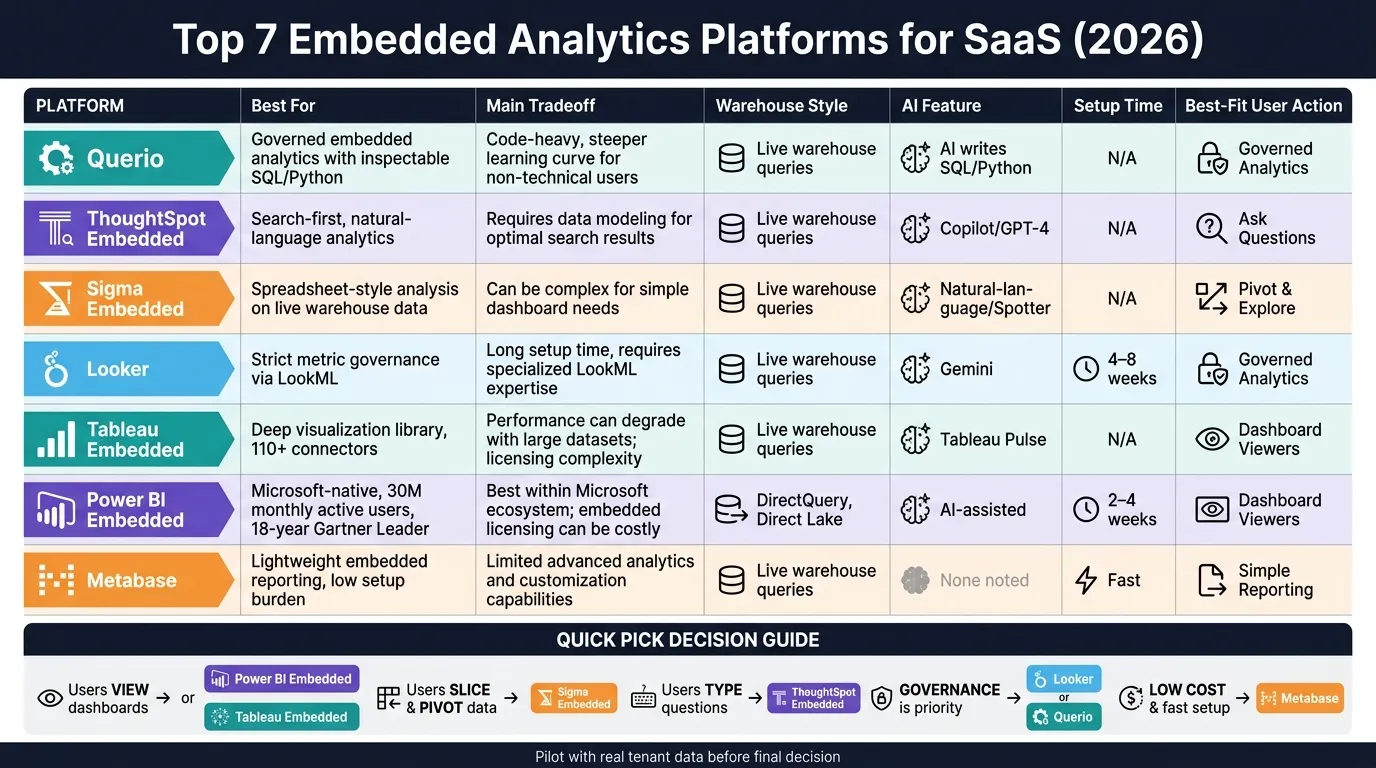
Quick Comparison
| Platform | Best for | Main tradeoff | Warehouse style | AI angle |
|---|---|---|---|---|
| Querio | Governed embedded analytics with inspectable answers | Smaller market presence than older BI tools | Live warehouse queries | AI writes SQL/Python and shows the work |
| ThoughtSpot Embedded | Search-first analytics | More setup if the data model is messy | Works best with modeled data | Natural-language search, Spotter, SpotIQ |
| Sigma Embedded | Spreadsheet-style user analysis | Can feel heavy for simple dashboards | Live warehouse queries | AI-assisted analysis |
| Looker | Strict metric control | Setup often takes 4–8 weeks | Strong warehouse tie-in | Gemini features and conversational analytics |
| Tableau Embedded | Chart quality and connector range | Cost can climb with usage | Native warehouse support | Tableau Pulse summaries and trend help |
| Power BI Embedded | Microsoft-heavy SaaS stacks | Less styling freedom outside Microsoft patterns | DirectQuery / Direct Lake | Copilot for Q&A, DAX, summaries |
| Metabase | Simple embedded reporting | Less depth for governance and AI | Direct query support | No AI focus called out here |
The bottom line: I’d cut this list to 2 or 3 tools, then run a pilot with actual tenant data, evaluate your multi-tenant embedded analytics architecture, test row-level isolation, check load under concurrency, and confirm that white-labeling removes vendor UI before I decide.
1. Querio
Querio is git-native analytics for data teams and their AI agents. It runs analytics straight from live warehouse data, and every answer maps back to SQL or Python. For SaaS teams that need to embed analytics inside a product, that kind of visibility matters. Customers can see where numbers come from, and data teams have a direct way to check how each result was generated.
Embedding UX
Querio supports customer-facing analytics with embeddable dashboards built from notebooks, through iFrame embedding. Dashboards live as plain files in a git repo your team owns, so teams can review changes and update dashboards without rebuilding things by hand. Each dashboard is marked experimental, team or trusted, and promoting one opens a pull request your reviewers approve.
White-label options help keep your product branding front and center. And in CI, renaming a dbt model flags every dashboard, query and context file that uses it before the pull request can pass. That cuts down on maintenance and helps teams avoid the usual dashboard drift.
Multi-tenancy & Permissions
Querio uses row-level security in embedded analytics to keep each tenant limited to its own data, while roles manage query and sharing rights. An agent sees only what its user sees, whether it comes in through the app, the API or MCP.
This is a big deal for teams working with Snowflake, BigQuery, or Databricks, where per-user OAuth runs each query as the person, so the warehouse's own access rules apply. On Postgres, Redshift and ClickHouse, a service account plus Querio's policies controls access. In plain terms, governance stays in sync without making extra warehouse copies.
API/SDK & Extensibility
Querio's API (on Core and Enterprise) lets product teams build analytics features that feel native inside their app. Its MCP server, on every plan, lets Claude, ChatGPT and custom agents query your warehouse through Querio's governed context, and its CLI does the same for Claude Code, Cursor and CI.
That means agent queries inherit the definitions, joins, and permissions your team has already approved. The context lives as plain files in a git repo you own on GitHub, and it can sit in the same repo as your dbt project, so a model change and its context go in one pull request. If your team likes working in files instead of clicking around in a UI, that setup will feel natural.
Warehouse & AI Fit
For SaaS teams, the main test is simple: does the platform stay warehouse-native as the stack gets bigger? Querio connects live to Snowflake, BigQuery, Redshift, ClickHouse, Postgres, and MySQL, with no extracts or CSV round-trips.
The AI agent writes real SQL and Python for every answer, providing embedded natural language BI for SaaS users. Notebooks run in a sandbox with no internet access. Querio also reads dbt's semantic_manifest.json, so MetricFlow metrics are defined once in dbt and used as is, which keeps metric definitions, joins, and saved queries aligned as your models change over time.
2. ThoughtSpot Embedded
ThoughtSpot Embedded is built around search-first, natural-language analytics for SaaS products. The idea is simple: a user types a question in plain English, and the product returns a visual answer. It tends to work best when your warehouse is already modeled well, since Spotter and SpotIQ lean on clean semantic structure to return accurate results.
Embedding UX
The Visual Embed SDK supports white-labeling and iframe embedding, so teams can add app-native search and dashboards without a lot of surface-level friction. The bigger lift usually happens in production, not the UI layer. That’s because ThoughtSpot depends on modeled warehouse data to keep AI responses on track.
Multi-tenancy & Permissions
ThoughtSpot supports multi-tenancy through Orgs. It also includes row-level security and JWT token-based authentication, which gives SaaS teams native tenant scoping. The tradeoff is that the upfront data-modeling work can take some time, especially if your warehouse structure still needs cleanup.
API/SDK & Extensibility
Alongside the Visual Embed SDK, ThoughtSpot also offers REST APIs. For product teams building embedded, search-first analytics with AI help, those APIs make it easier to connect ThoughtSpot to an existing application and wire it into the product flow.
Warehouse & AI Fit
ThoughtSpot relies on pre-modeled warehouse data to keep AI answers accurate. WEX Field Service Management cut report generation from five-minute timeouts to under three seconds and reached a 65% AI adoption rate in 90 days [3]. In practice, that makes ThoughtSpot a strong fit for teams with a mature warehouse model that want search-first, self-serve analytics.
3. Sigma Embedded
Sigma is a strong fit for SaaS products that need spreadsheet-style analysis on live warehouse data, not just dashboard viewing. In practice, that means it works best for products where customers actively dig into data, pivot it, and run calculations, instead of simply reading reports. So the embed decision here is less about dashboard polish and more about how people actually work inside the product.
Embedding UX
Sigma supports embed URLs, APIs, and headless BI, which gives teams room to split analytics logic from the UI [4]. Its sweet spot is users who want to explore data hands-on. If your end-users want to pivot, filter, and calculate, Sigma lines up well. If they only need a polished dashboard to glance at, it can feel like more than they need.
Multi-tenancy & Permissions
Sigma supports multi-tenant SaaS deployments by isolating tenant workspaces inside one cloud instance. It uses warehouse-level access controls and row-level security (RLS) to keep customer data separate. It also connects directly to Snowflake, BigQuery, and Databricks, which cuts down on data movement overhead.
Sigma supports write-back too, so users can enter data back into the system. That matters most when product teams want the embedded layer to follow warehouse permissions by default instead of rebuilding those rules somewhere else.
API/SDK & Extensibility
Sigma's embed API gives product teams control over how the integration works, similar to other embedded analytics platforms. That makes it easier to shape the experience around the product instead of forcing users into a fixed reporting layer.
Warehouse & AI Fit
Sigma runs live queries on Snowflake, BigQuery, and Databricks without extracts and includes AI-assisted exploration [4]. For lightweight dashboarding, though, Sigma's spreadsheet-first model is often more than most SaaS users need.
4. Looker
Looker puts governance first. It uses LookML to keep metric definitions in sync across dashboards and embeds. That said, setup often takes 4–8 weeks [2].
Embedding UX
Looker gives teams a Visual Embed SDK, signed URLs, and REST APIs to add dashboards inside a product. In plain English, the embed route is more hands-on than what you get with lighter tools. So it helps to plan for more build work up front.
That extra work can be worth it when tenant isolation and controlled rollout are a big deal.
Multi-tenancy & Permissions
Looker supports multi-tenancy with User Attributes and row-level security. That means you can isolate tenant data inside a single instance. The same model also carries into Looker’s warehouse-native analytics and AI features.
API/SDK & Extensibility
Looker’s REST API is one of its strongest parts [2]. Teams can automate embed generation and manage users in code, which is helpful when you need repeatable deployment patterns across customers or environments.
Looker was also recognized as a Leader in the 2025 Gartner Magic Quadrant for Analytics and Business Intelligence Platforms, with praise for robust governance and open architecture [2].
Warehouse & AI Fit
Looker is BigQuery-native and also supports Snowflake, Redshift, and Postgres across AWS, Azure, and GCP [2]. It includes Gemini AI features such as LookML Assistant and a Conversational Analytics API.
That means teams can extend AI-assisted analysis straight into customer-facing embedded experiences. It’s a strong match for teams that want governed metrics, enterprise controls, and AI-assisted analysis built on a semantic layer for SaaS.
5. Tableau Embedded
Tableau Embedded gives up some launch speed and simple pricing in exchange for top-tier visuals and a long list of connectors. Its charting depth is one of its biggest draws. The catch is cost: annual, role-based pricing can get expensive as embedded usage grows.
Embedding UX
Tableau Embedded’s JavaScript Embedding API v3 gives developers direct control over filters, parameters, and in-app interactions. That matters when you want the embedded experience to feel like part of your product instead of a widget dropped onto the page.
Multi-tenancy & Permissions
Tenant isolation is usually handled with security tables or user filters that map user identities to specific data rows [5]. SSO and OAuth help with access, but tenant scoping still needs manual setup and upkeep.
API/SDK & Extensibility
Tableau offers 110+ native connectors, which makes it useful in mixed-data environments [2]. If a SaaS product needs to work across multiple warehouses and day-to-day systems, that connector range can save a lot of friction.
Warehouse & AI Fit
Tableau connects natively to Snowflake, BigQuery, Redshift, and Postgres, and Tableau Pulse adds generative AI for trend detection and metric summaries [1].
That makes Tableau a strong premium pick for visual-heavy SaaS products. Compared with the next platform, the tradeoff leans more toward Microsoft-native deployment and tighter cost control.
6. Power BI Embedded
Power BI Embedded is a strong fit for SaaS teams already set up around Azure, Microsoft 365, or Teams. That alignment matters. If your product already lives in the Microsoft world, Power BI usually feels like a natural extension instead of a bolt-on. Microsoft reported 30 million monthly active users for Power BI in June 2025, and Gartner named it a Magic Quadrant Leader for 18 consecutive years [2]. The catch is control: Power BI works best when your product can stay inside Microsoft’s embed and security setup.
Embedding UX
Power BI uses an "app owns data" model built for ISVs. That means your customers don’t need their own Power BI licenses or accounts, which removes a lot of friction.
Embedding runs through iframes plus a JavaScript API. That setup works well for customer-facing dashboards, but it gives you less room to shape styling and native UI behavior than SDK-first tools. White-labeling is possible, though the styling surface is narrower than what you get from platforms built around SDKs from day one.
Multi-tenancy & Permissions
Tenant isolation is handled with Row-Level Security (RLS) and Service Principal Profiles. One service principal can manage up to 100,000 profiles, and each profile maps to a customer tenant.
REST APIs handle workspace provisioning, while isolation stays in the semantic model through RLS and Service Principal Profiles. In practice, auth should move from SaaS login to tenant context, then analytics authorization, and finally to a short-lived embed token. The result is tenant-scoped dashboards without separate customer accounts. At that point, the next pressure point is automation, which is why the APIs matter so much.
API/SDK & Extensibility
Power BI includes a mature JavaScript API and REST APIs for automating report provisioning and capacity management. Plan for a DAX learning curve, because semantic model design affects both report quality and AI behavior.
Setup usually takes 2–4 weeks. Once the model is in place, warehouse connectivity and Copilot shape how far the embedded experience can go.
Warehouse & AI Fit
Power BI connects through DirectQuery for live warehouse access. Microsoft Fabric’s Direct Lake architecture supports near-real-time querying of large datasets in OneLake. On the AI side, features center on Copilot, powered by GPT-4, for natural language querying, DAX generation, and visual summarization [2].
"Power BI's advantages compound for organizations already using Microsoft Azure, Teams, SharePoint, and Excel - but its advantages diminish in non-Microsoft environments." - TechDogs [2]
A-Series capacity pricing decouples cost from user count, which can play in your favor as embedded usage grows.
7. Metabase
Metabase is the lightest option in this group for teams that want an API-driven embed layer. It works well when you need simple embedded reporting and want to avoid a heavy setup. But it’s not the right fit if you need deep governance or AI-led analysis.
Embedding UX & API/SDK Extensibility
Metabase supports headless BI, which means analytics can be delivered through APIs instead of a separate UI. In plain English, your team can pull results into an existing frontend and keep the user experience inside your product.
That makes Metabase a good match for teams that want embedded analytics without adding a bulky integration layer. You get the data where you need it, and your product team keeps more control over how it looks and feels.
Multi-tenancy & Permissions
The source material does not spell out tenant isolation or permissions. So if you plan to use Metabase for customer-facing embeds, you’ll want to check governance details yourself before moving ahead.
Warehouse & AI Fit
Metabase queries Postgres, Snowflake, and BigQuery directly [4][5]. The source material does not mention AI-assisted analytics.
That simplicity is a double-edged sword. It keeps the product easy to plug in, but it also means teams looking for more control or AI features may hit limits pretty fast.
Pros and Cons by Platform
Use this table for a quick side-by-side view of the main trade-offs. The biggest things to weigh are still tenant isolation, white-labeling, API control, and live warehouse access.
| Platform | Biggest Advantage | Main Limitation | Best-Fit SaaS Scenario |
|---|---|---|---|
| Querio | Governed semantic/context layer with inspectable SQL/Python | Smaller ecosystem than long-established BI suites | B2B SaaS and regulated teams that need governed, warehouse-native self-serve analytics embedded in-product |
| ThoughtSpot Embedded | Search-driven, natural-language analytics with strong AI-assisted exploration | Higher cost at scale | Mid-to-large SaaS products where end users want natural-language analytics without writing SQL |
| Sigma Embedded | Spreadsheet-style UX on live warehouse data | Higher cost at scale | SaaS teams whose customers prefer hands-on pivoting and exploration over dashboard viewing |
| Looker | LookML governance keeps metric definitions consistent across all embeds | Longer setup than lighter-weight tools | Enterprise SaaS that needs strict governance and reusable metric definitions |
| Tableau Embedded | Deep visualization library with broad connector support | Higher total cost of ownership as embedded usage grows | SaaS products with complex visualization needs and existing Tableau expertise |
| Power BI Embedded | Fast launch and broad adoption for teams already on Azure or Microsoft 365 | Governance and styling flexibility diminish outside the Microsoft stack | SaaS teams on Microsoft infrastructure that want fast deployment and wide user reach |
| Metabase | Fast to deploy with a low cost floor | Limited multi-tenant isolation and governance depth | Early-stage SaaS or simple customer reporting builds where speed and cost matter most |
This embedded analytics overview should help trim the shortlist before the next section.
How to Choose the Right Platform for Your SaaS
Start by using the table above to cut your list down to two or three options. From there, choose the platform that lines up with your tenant model, warehouse stack, governance needs, and the user experience you want to give customers. Treat embedded analytics pricing as the tie-breaker. Seat-based pricing tends to work better for smaller embedded setups, while capacity- or usage-based pricing usually makes more sense for customer-facing analytics at scale.
The best way to shortlist well is to anchor the decision in what your customers actually do inside your product.
If they mostly need dashboards, steer toward Power BI Embedded or Tableau Embedded. If they want to pivot, slice, and filter live data, Sigma is a better fit. If they’d rather type questions in plain English, ThoughtSpot Embedded stands out. And if your main goal is low cost and fast setup, with simple reporting needs, Metabase is the lightest option.
Governance can narrow things down fast too. If that’s the main issue, focus on Looker and Querio. Looker’s LookML keeps metric definitions consistent across embeds, and the source says setup takes 4–8 weeks. Querio keeps definitions as plain files in a git repo you own, changes go through pull requests, and every AI-generated answer includes SQL you can inspect.
Before you make the call, put the finalists through a real test with actual tenant data. In pilots, check:
- tenant isolation at the data layer
- performance under concurrent tenant load
- whether white-labeling removes vendor UI
That last step matters more than it seems on paper. A platform can look good in a demo and still feel clunky once it’s inside your product.
FAQs
How should I pilot an embedded analytics tool with real tenant data?
Start by checking security and tenant isolation before you look at UI polish or feature depth.
Create at least two tenants with overlapping data, then test whether one tenant can get to the other tenant’s records. Don’t settle for frontend filters alone. You want row-level security enforced at the query or semantic layer, so data access is blocked at the source.
After that, style one chart to match your branding and see where white-labeling starts to hit limits. This is a simple way to spot what you can change easily and what stays locked down.
Then simulate a schema change and watch what happens. Can you update the logic without a mess? Is the review process clear? That test tells you a lot about how the setup will hold up once things change - which they always do.
What pricing model usually works best for embedded analytics in SaaS?
For embedded analytics in SaaS, pricing that isn't tied to total viewer count is usually the better bet. Models like flat-rate, capacity-based, tenant-based, or workspace pricing tend to fit customer-facing apps more naturally.
Per-user or per-viewer pricing can get risky fast. As your customer base grows, your costs can climb right along with it. That’s fine for some internal tools, but for embedded analytics, it can turn into a bad deal pretty quickly.
It’s also smart to look closely at AI pricing. Some vendors include AI features in the base tier. Others bill per query or usage event. That kind of hidden usage-based cost can change your total cost of ownership more than you’d expect.
When do I need warehouse-native analytics instead of extracts?
You need warehouse-native analytics when your SaaS product depends on fresh data, tight security, and one source of truth for metrics.
Unlike extract-based systems, warehouse-native platforms like Querio query Snowflake, BigQuery, or Redshift directly. That means less overhead because you don’t have to manage ETL pipelines. It also cuts the security risk and lag that come with moving or duplicating sensitive customer data.