Business Intelligence
Row-Level Security for Multi-Tenant SaaS Analytics
How database-enforced Row-Level Security isolates tenant data in shared SaaS databases, with setup steps, performance tips, and governance best practices.

Row-Level Security (RLS) is a database feature that ensures each tenant in a multi-tenant SaaS platform can only access their own data. It works by applying security rules at the database level, filtering rows based on the user's context (like their tenant ID). This approach is especially useful in shared database models, where multiple tenants' data resides in the same tables, ensuring logical separation without duplicating filtering logic in the application layer.
Key Takeaways:
- What RLS Does: Automatically applies tenant-specific data restrictions at the database level, ensuring data isolation.
- How It Works: Uses predicates (invisible filters) and session variables to enforce access rules.
- Why It Matters: Prevents accidental data leaks, simplifies GDPR compliance in SaaS BI, and reduces developer error.
- Where It’s Used: Most effective in multi-tenant architecture models (pool or bridge), where tenants share tables but need strict data separation.
Querio, for example, integrates RLS with databases like Snowflake and PostgreSQL to ensure secure analytics. By setting a tenant-specific session context, Querio enforces RLS policies consistently across dashboards, APIs, and AI-driven insights. This eliminates the need for manual filters, ensuring tenant data remains isolated.
RLS in Action:
- Tenant Context: Session variables (e.g.,
current_tenant) are used to identify the tenant making the query. - Security Policies: Predicate functions enforce row-level rules, acting like automated WHERE clauses.
- Performance: Proper indexing of tenant IDs and simplified predicates ensure minimal impact on query speed.
RLS is essential for scalable, secure SaaS platforms, especially when handling shared databases. It centralizes security, reduces risk, and ensures compliance, making it a reliable solution for tenant isolation.
Building Multi-Tenant APIs Using EF Core and Row-Level Security
::: @iframe https://www.youtube.com/embed/OwCgDPa0DnA :::
Core Concepts and Architecture for RLS
::: @figure 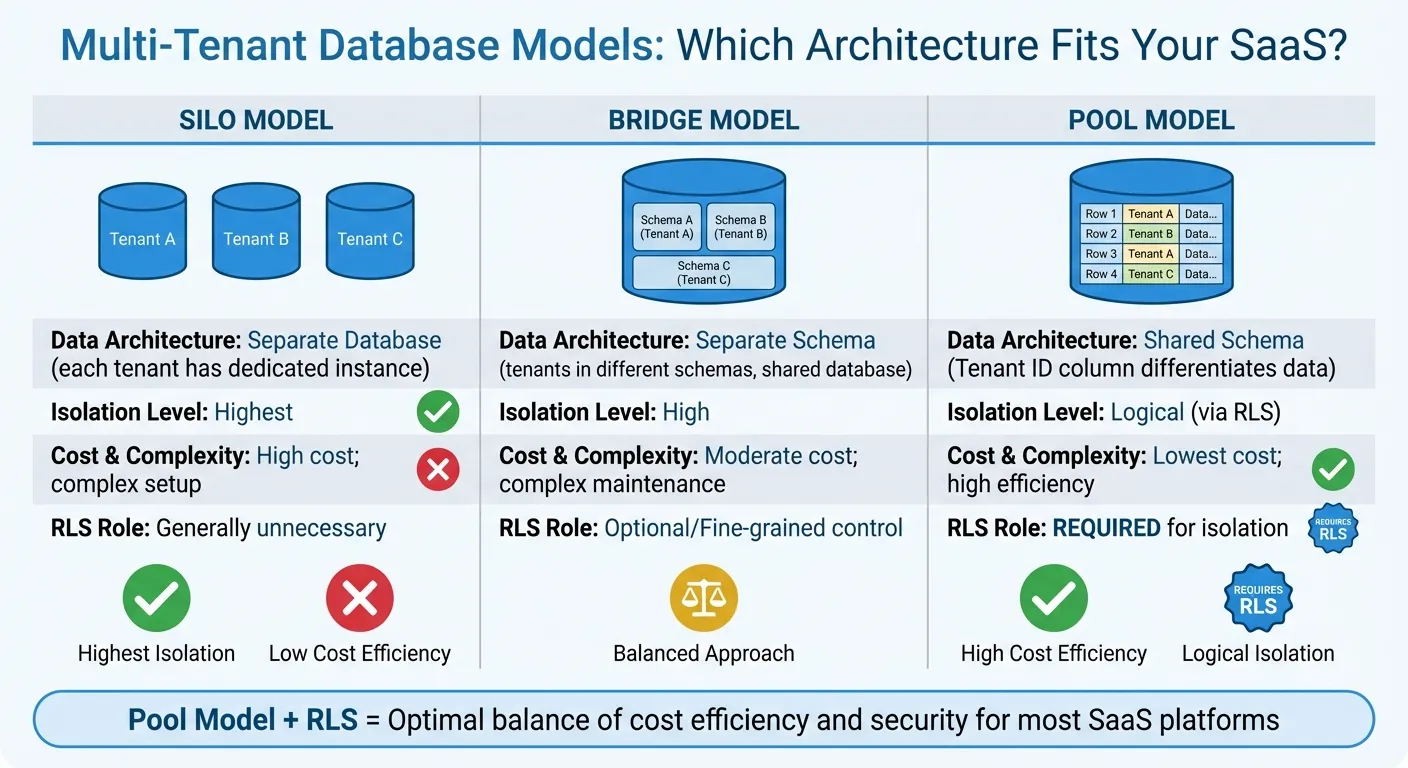 {Multi-Tenant Database Models Comparison: Silo vs Bridge vs Pool}
:::
{Multi-Tenant Database Models Comparison: Silo vs Bridge vs Pool}
:::
Row-Level Security (RLS) operates on three main elements: tenant identifiers, security predicates, and session context. At its core is the tenant identifier - usually a UUID or an integer column like tenant_id. This column serves as the backbone for partitioning data in shared tables, ensuring each row belongs to a specific tenant. It’s the foundation for all security decisions.
Security predicates are inline functions that enforce access rules. These come in two forms: filter predicates and block predicates. Filter predicates ensure unauthorized rows are excluded silently during data retrieval or modification, while block predicates prevent operations that violate tenant boundaries. These predicates are tied to tables via security policies, which enable or disable enforcement as needed. The session context variable - such as app.current_tenant in PostgreSQL or SESSION_CONTEXT in SQL Server - plays a crucial role here. The application sets this variable at the start of a database connection, signaling the tenant making the request. The database then matches this session value to the tenant_id column, automatically filtering results.
"You can think of an RLS policy as an automated WHERE clause that the database engine manages itself." - Michael Beardsley, Sr Partner Solutions Architect, AWS
Key Components of RLS
RLS relies on several interconnected pieces working together. The tenant identifier is visible in every shared table and must be indexed for optimal performance. Session variables carry the current tenant's ID from the application layer into the database. Predicate functions enforce the filtering rules, while security policies link these functions to specific tables and roles.
Database roles (like app_user, manager, or tenant_admin) define broad permissions, while RLS adds a layer of granularity by managing access at the row level. SaaS platforms typically use a shared application role, setting a tenant-specific session variable at runtime. For example, in April 2024, AWS SaaS Factory shared a PostgreSQL RLS reference architecture. In this setup, the application sets app.current_tenant as a runtime parameter, and the RLS policy uses USING (tenant_id = current_setting('app.current_tenant')::UUID) to ensure tenant-specific filtering - even if a developer forgets to include a WHERE clause in the query.
To enhance security and consistency, enable Force RLS and use default constraints to auto-fill the tenant_id column based on the session context. Keeping security logic in a dedicated schema (like rls or security) helps isolate predicate functions and policies from the main application data.
Multi-Tenant Data Models
Your database structure directly impacts how RLS is implemented. In multi-tenant environments, there are three primary data models to consider:
- Silo Model: Each tenant gets a dedicated database instance. This provides the highest level of isolation but comes with increased infrastructure costs and management complexity. RLS isn’t needed here since isolation is handled at the instance level.
- Bridge Model: Tenants are placed in separate schemas within a shared database. This balances resource sharing with logical separation. While RLS is optional, it can add a layer of fine-grained control.
- Pool Model: All tenants share the same database instance and schema, with data differentiated only by a
tenant_idcolumn. This approach is cost-efficient and highly scalable but requires strict logical isolation enforced by RLS.
For example, Azure SQL Database uses the pool model for multi-tenant shards. It sets a TenantId in SESSION_CONTEXT after a connection is established. A predicate function then ensures logical isolation by checking CAST(SESSION_CONTEXT(N'TenantId') AS int) = @TenantId. This setup allows premium tenants to have dedicated shards while standard tenants share a multi-tenant shard, all managed under the same RLS logic.
| Model | Data Architecture | Isolation Level | Cost & Complexity | RLS Role |
|---|---|---|---|---|
| Silo | Separate Database | Highest | High cost; complex setup | Generally unnecessary |
| Bridge | Separate Schema | High | Moderate cost; complex maintenance | Optional/Fine-grained |
| Pool | Shared Schema (Tenant ID column) | Logical (via RLS) | Lowest cost; high efficiency | Required for isolation |
With these models in mind, let’s explore how RLS policies are enforced and integrated with identity management.
RLS Policy Evaluation and Identity Management
RLS ensures tenant restrictions are applied reliably during every query. At runtime, the database uses the tenant’s session value to enforce security predicates, eliminating the need for developers to manually include tenant filters in their SQL statements. This centralized approach reduces the risk of human error.
"The access restriction logic is located in the database tier rather than away from the data in another application tier... This makes your security system more reliable and robust by reducing the surface area of your security system." - Microsoft SQL Server Documentation
Tenant identifiers and session variables are the driving forces behind RLS, and they integrate seamlessly with identity providers for robust access control. Modern SaaS platforms often extract tenant IDs from JWT claims. The application parses the JWT, retrieves the tenant_id, and injects it into the database session context - using commands like sp_set_session_context in Azure SQL or SET app.current_tenant in PostgreSQL - before running queries. This ensures that every query respects tenant boundaries, regardless of whether it’s initiated by a reporting tool, API, or embedded analytics tools.
Performance is a critical factor. Complex predicates with table joins can slow down queries, so it’s essential to index the tenant_id column and keep predicate functions streamlined. Enabling SCHEMABINDING on security policies can further improve performance and prevent unauthorized changes to the underlying functions. By shifting access control logic from the application tier to the database tier, RLS ensures consistent enforcement across all data access paths, whether it’s direct SQL, embedded analytics, or AI-powered dashboards.
How to Implement RLS for Multi-Tenant SaaS Analytics
Setting up Row-Level Security (RLS) for a multi-tenant SaaS analytics platform involves four key steps: identifying tenant-specific schema objects, creating roles (like app_user or tenant_viewer) with baseline permissions, enabling RLS on tables using ALTER TABLE [table_name] ENABLE ROW LEVEL SECURITY, and defining detailed policies with CREATE POLICY. This method ensures that tenant isolation is managed directly at the database level. Below, we’ll break down the prerequisites and step-by-step process to implement RLS effectively.
"Isolating tenant data is a fundamental responsibility for Software as a Service (SaaS) providers. If one of your tenants gains access to another tenant's data, you lose trust and may permanently damage your brand." - Michael Beardsley, Sr Partner Solutions Architect, AWS
For scalability, it’s best to use a single shared database user and rely on a runtime session variable (e.g., app.current_tenant) rather than creating individual database users for each tenant. This approach simplifies role management and allows the system to handle thousands of tenants without straining the database. Policies in RLS function like automated WHERE clauses: USING conditions control SELECT, UPDATE, and DELETE operations, while WITH CHECK conditions validate INSERT and UPDATE. A common practice is to use restrictive policies with AND logic to ensure tenant IDs always align with the session context, preventing any unintended access through permissive policies.
Prerequisites for RLS Implementation
Before diving into RLS, there are a few foundational steps to complete:
-
Tenant Identifier: Ensure every table with tenant-specific data includes a consistent identifier, such as a
tenant_idorUUID. This column must be indexed using a B-tree index to maintain query performance during row evaluations. For example, Supabase testing showed a 99.94% improvement in query speed after indexing theuser_idcolumn used in RLS policies. -
Role Taxonomy: Define broad roles like
app_user,manager, ortenant_adminto establish basic permissions. RLS will then add fine-grained control at the row level. UseFORCE ROW LEVEL SECURITYto ensure even table owners and service accounts adhere to these policies, avoiding unfiltered access. -
Governed Semantic Layer: Centralize business logic, joins, and metrics in a semantic layer to ensure RLS rules are consistently applied across all query types - whether through SQL, dashboards, or natural-language queries.
Step-by-Step RLS Implementation Patterns
Here’s how to implement RLS based on the database platform you’re using:
-
PostgreSQL: Start by creating a policy to filter rows based on the session context. For instance, use
CREATE POLICY tenant_isolation ON orders USING (tenant_id = current_setting('app.current_tenant')::UUID)to restrict access to rows matching the session variable. To boost performance, wrap session functions in a subquery (e.g.,(SELECT auth.uid())) to cache results per statement, which has shown a 94.97% performance gain in benchmarks. -
Google BigQuery: Use
CREATE ROW ACCESS POLICYwithSESSION_USER()or a grantee list to filter data. For example,CREATE ROW ACCESS POLICY tenant_filter ON dataset.orders GRANT TO ('user:tenant1@example.com') FILTER USING (tenant_id = SESSION_USER())ensures only authenticated users see their own data. Note that BigQuery limits subquery results in RLS policies to 100 MB per policy, and RLS filters don’t support query pruning on partitioned or clustered columns, which can increase data scanning costs. -
Embedded Analytics: Leverage token-based methods where the application extracts the
tenant_idfrom a JWT claim and injects it into the database session context. In PostgreSQL, this is done by executingSET app.current_tenant = 'UUID'during the session setup. When using server-side poolers likepgBouncerin transaction mode, ensure session variables are properly isolated to prevent leaks between tenants.
Integrating RLS with Querio's Context and Semantic Layers
Querio simplifies RLS integration by embedding these rules within its context and semantic layers. The semantic layer ensures RLS policies are enforced consistently across all data access methods, whether users query data through dashboards, natural-language inputs, or notebooks. For example, when a user asks a question in plain English, Querio’s AI translates it into SQL that respects the RLS rules defined in your database - whether it’s Snowflake, BigQuery, or PostgreSQL.
Querio connects directly to your data warehouse using read-only, encrypted credentials, meaning RLS enforcement happens at the database level. This approach ensures that even if a developer forgets to include a tenant filter in their query, the database automatically applies the RLS policy. For embedded analytics, Querio uses token-based authentication to extract the tenant_id from the user’s session and inject it into the database context before running any queries. This guarantees that users - whether internal team members or external customers - only see the data they’re permitted to access, without requiring manual filters or additional tools.
sbb-itb-284a532
Best Practices for Managing RLS
Managing Row-Level Security (RLS) effectively requires a solid governance framework. The aim is to ensure policies remain secure, efficient, and easy to audit as your tenant base grows. By adhering to specific design principles, you can lay the groundwork for maintaining performance and accountability.
Design Principles for Secure RLS Policies
Adopt a deny-by-default approach. With RLS enabled, if no policy is defined or applicable to a user, access is automatically denied, and no rows are returned. This minimizes the risk of unintentional data exposure, especially when adding new roles or tenants. Always enforce FORCE ROW LEVEL SECURITY to ensure that even table owners and superusers adhere to the policies.
Avoid connecting as the table owner role. If applications connect using the table owner role, RLS policies won’t apply by default. Instead, create a non-owner role for application connections. To further separate privileges, establish a dedicated schema for RLS objects, such as predicate functions and security policies. This isolates security logic from general data management permissions. Use restrictive policies (with AND logic) to ensure tenant IDs match the session context.
"By centralizing RDBMS isolation policies at the database level you ease the burden on your software developers... and reduce the risk of cross-tenant data access." - Michael Beardsley, Sr. Partner Solutions Architect, AWS
Optimizing Performance and Scalability
To maintain performance, focus on proper indexing and simplified predicates. Index the tenant ID column to speed up queries. Keep RLS expressions straightforward - avoid complex logic, excessive joins, or recursion in predicate functions, as these are evaluated row by row.
For multi-tenant environments, cluster tables on the tenant ID to improve data locality. However, note that in systems like BigQuery, RLS filters may not integrate with query pruning on partitioned columns, which can lead to higher data scanning costs. Use default constraints to auto-fill the tenant ID during INSERT operations. Also, watch for potential side-channel attacks, where malicious users might infer data through query timing or error messages. If extreme isolation is critical, consider moving from a shared "pool" model to a "silo" model, using separate tables or databases for each tenant.
Ensuring Compliance and Auditability
Compliance is just as important as security and performance. Monitor and log any ALTER or DROP actions on security policies and predicate functions, as these could disable data isolation. Limit roles with the BYPASSRLS attribute strictly to administrative use. To ensure consistency, use DDL triggers or administrative scripts to automatically apply RLS policies to new tables, preventing any ungoverned "dark data."
Regularly test your policies to validate their effectiveness. For example, attempt cross-tenant queries (e.g., trying to access Tenant B’s data while authenticated as Tenant A) to confirm the RLS policy blocks unauthorized access. In cloud-native setups like BigQuery, complement RLS with VPC Service Controls to prevent tenant data from being moved outside authorized boundaries. Be mindful of database systems where Change Data Capture (CDC) messages or backup/restore processes may bypass RLS policies, potentially causing data leaks. Secondary controls can help mitigate these risks.
| Governance Component | Strategy/Measure | Compliance Benefit |
|---|---|---|
| Identity Management | Use session-level runtime variables | Avoids the need for thousands of DB-level users; scales securely. |
| Access Control | Deny-by-default for undefined roles | Ensures no data leaks to unconfigured users. |
| Integrity | Enable SCHEMABINDING |
Prevents schema changes from breaking security filters. |
| Auditability | Log access to base tables and policy changes | Provides an audit trail for SOC 2 and GDPR compliance. |
| Superuser Control | Use FORCE ROW LEVEL SECURITY |
Ensures even table owners follow isolation rules. |
Advanced Use Cases for Multi-Tenant RLS
Fine-Grained and Hierarchical Access Control
RLS isn't just about isolating tenants - it can also handle more complex, fine-grained access controls. For example, managers might need visibility into their team's data, while directors require access to department-wide information. You can achieve this by defining policies that rely on subqueries or functions to evaluate relationships, such as comparing a manager_id column with the current user's ID. To refine access further, you can combine attributes like department, region, or seniority level using boolean logic in the USING clause. For instance, you could write a condition like Month In Range AND (Country = 'USA' OR Number >= 10000).
For administrative users who need unrestricted visibility, permissive policies can be created that always evaluate to TRUE, effectively bypassing tenant-level restrictions. To ensure efficient performance, index key security columns such as tenant_id, department_id, or manager_id. Additionally, use SET LOCAL instead of SET for session variables within transactions. This ensures the tenant context is automatically cleared at the end of a transaction, which helps prevent accidental data exposure in connection pools. These advanced filtering techniques create a solid foundation for integrating features like embedded analytics architecture or multi-database setups.
RLS for Embedded and AI-Powered Analytics
RLS also plays a critical role in securing embedded and AI-powered analytics. By enforcing tenant isolation at the database level, RLS eliminates the risk of data leaks caused by code errors or missed filters. Michael Beardsley, Sr. Partner Solutions Architect at AWS, emphasizes the importance of this approach:
"You want to enforce tenant isolation centrally instead of leaving it to 'the everyday variability of your source code.'"
To make this work, assert user identity and permissions - such as date ranges or geographic regions - at runtime using encrypted tokens. This avoids the need to duplicate complex security logic in third-party analytics platforms. If you're using caching to speed up AI analytics, ensure the cache is "tenant-aware" by including the tenant ID in the cache key. Additionally, set database views to execute as the invoking user (security_invoker = true), ensuring that RLS policies are enforced consistently.
Using RLS Across Multiple Databases
When working with hybrid systems, RLS can help maintain consistent data isolation across multiple databases. One way to do this is by centralizing RLS policies within dedicated schemas, which ensures uniform security across operational databases and cloud data warehouses.
However, keep in mind that certain processes, like CDC (Change Data Capture) or temporal table replication, can bypass RLS. To address this, apply isolation checks at the destination database. If you're using temporal tables, remember that security predicates aren't automatically replicated. You'll need to manually apply these policies to both the current and historical tables to maintain proper isolation.
Conclusion
Let's recap some of the standout advantages of using RLS (Row-Level Security) in SaaS analytics and how Querio makes implementing it seamless.
Key Benefits of RLS in SaaS Analytics
RLS brings security to the forefront by embedding it directly into the database, ensuring data access is tightly controlled and reducing the risk of coding errors. This creates a "secure-by-default" setup where the database itself enforces isolation, even if there are issues in the application layer. As Rico Fritzsche, a SaaS architect, puts it:
"RLS gives us defense in depth: even if our code has a bug, the database won't return or modify data outside the tenant's scope."
This approach doesn't just enhance security - it also lowers operational costs, simplifies schema updates, and streamlines compliance audits. Developers can dedicate their time to refining business logic instead of repeatedly coding security filters, which also cuts down on potential bugs. When properly indexed, RLS operates with minimal performance impact while safeguarding against SQL injection and cross-tenant data leaks. It’s a win-win: strong security with no added complexity.
How Querio Simplifies RLS Integration
Querio takes full advantage of RLS-enabled databases to deliver real-time, secure analytics without the need for duplicating security logic across multiple platforms. By connecting directly to databases like Snowflake, BigQuery, or Postgres in read-only mode, Querio respects the RLS policies already defined in your data warehouse. This ensures that every embedded dashboard, AI-driven insight, and natural-language query adheres to tenant isolation rules - no extra filtering code required.
To make this even more secure, Querio uses JWT assertions to inject context securely, ensuring every query aligns with your RLS policies. When you define metrics in SQL and publish them as secure REST APIs through Querio's semantic layer, RLS is seamlessly integrated into those endpoints. This not only eliminates the risk of client-side tampering but also keeps your security framework centralized. With these features, Querio ensures your analytics environment stays both highly secure and adaptable.
FAQs
::: faq
How does Row-Level Security (RLS) improve data security in multi-tenant SaaS platforms?
Row-Level Security (RLS) plays a crucial role in safeguarding data within multi-tenant SaaS platforms by restricting access at the database level. Instead of depending on application-level filtering, RLS uses database policies to control which rows users can access based on tenant identifiers. This ensures that users only see data tied to their specific tenant, reducing the risk of accidental cross-tenant data exposure.
What makes RLS particularly useful is its centralized approach. By managing access directly in the database, it eliminates the need for developers to add tenant-specific filters to every query. This not only streamlines development but also reduces the chance of human error leading to security issues.
RLS also enables secure data sharing among multiple tenants using a single database infrastructure. This approach simplifies management and lowers costs by doing away with the need for separate databases for each tenant. With policies enforced directly at the database level, RLS offers a scalable and secure way to protect sensitive information and maintain compliance in SaaS analytics environments. :::
::: faq
What are the essential steps to set up Row-Level Security (RLS) in a multi-tenant SaaS platform?
To set up Row-Level Security (RLS) effectively in a multi-tenant SaaS platform, you'll need a few essential elements working together to ensure data stays securely separated.
Start by enabling RLS in your database management system (DBMS) and applying it to every table that holds tenant-specific data. Each of these tables should include a tenant identifier column (like tenant_id) to differentiate data belonging to various tenants. The RLS policy will rely on this column to filter rows based on the tenant currently accessing the system.
At the application layer, you'll need to establish the tenant context for every database connection. This is typically done by setting a session-level variable to the authenticated tenant’s ID. By doing so, the database can enforce the appropriate RLS policy for each query, ensuring only the correct data is accessible.
Lastly, make it a priority to define, thoroughly test, and routinely audit your RLS policies. This step is key to avoiding data leaks and staying compliant with any regulations. With these practices in place, you can achieve secure tenant isolation while keeping data management straightforward in your multi-tenant setup. :::
::: faq
How does Row-Level Security (RLS) work with AI-powered analytics to keep tenant data secure?
Row-Level Security (RLS) plays a key role in keeping tenant data separate and secure by applying strict filtering directly at the database level. Every query runs within the context of a specific tenant, using a session variable like current_tenant_id to automatically filter rows. This approach removes the need for manual query adjustments while ensuring tenants can only access their own data. Even when AI tools, such as large language models, interact with the database, they operate within the same secure session, preserving compliance and privacy standards.
Once RLS is implemented, AI systems can safely process the filtered data to create outputs such as dashboards, forecasts, or natural-language summaries. Because the database itself enforces data isolation, the AI layer doesn’t need to handle tenant-specific logic. This ensures consistent, secure, and efficient analytics in multi-tenant environments. :::