Business Intelligence
The 6 Best AI SQL Generators (With Accuracy Scores)
Compare 6 AI SQL generators by accuracy, governance, and setup to choose the right tool for your warehouse and semantic layer.

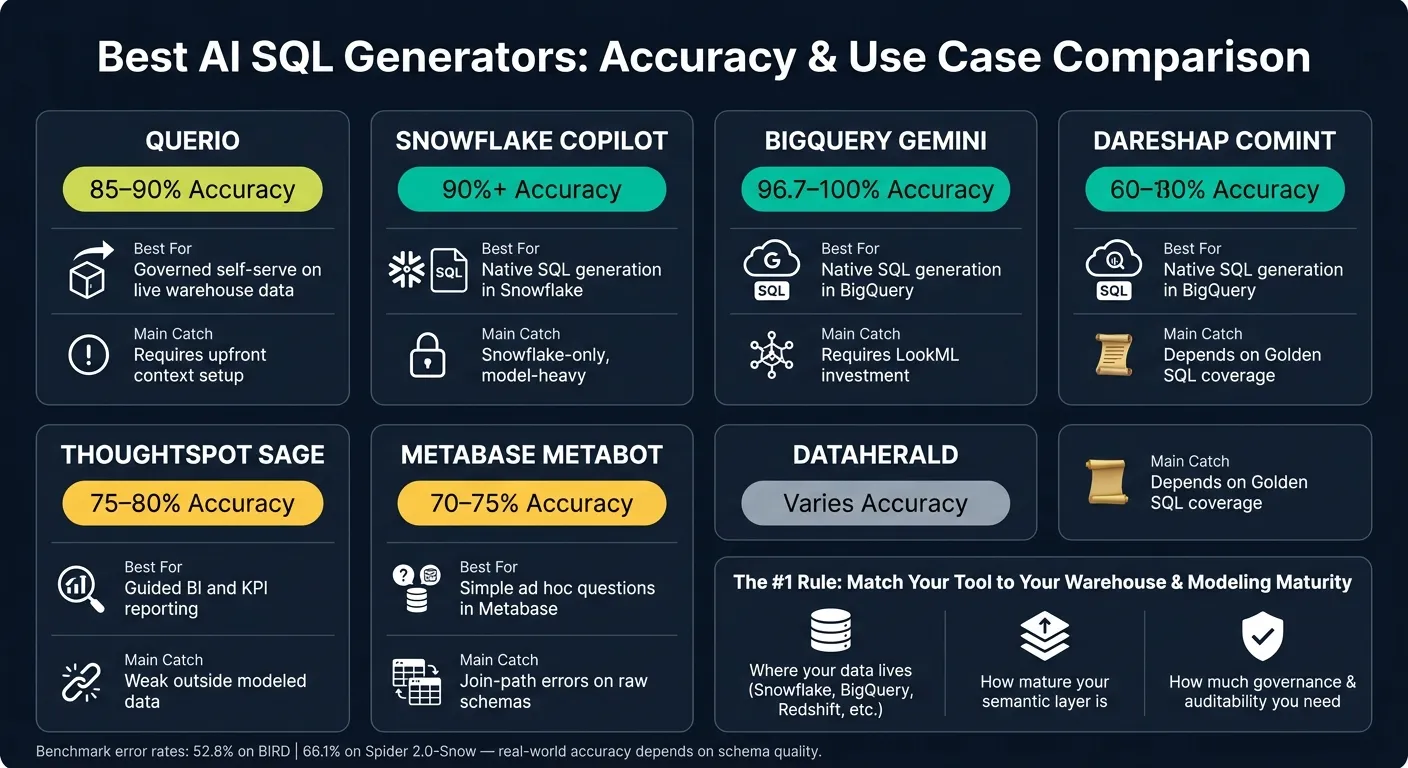
Most AI SQL tools are only as good as the context you give them. In this roundup, I’d boil it down like this: if you already have a clean semantic layer, Snowflake Copilot and BigQuery Gemini look strongest on paper; if you want governed self-serve across live warehouse data, with definitions in a git repo you own, Querio stands out; and if your setup is lighter or more model-led, ThoughtSpot Sage, Metabase Metabot, and Dataherald fit narrower jobs.
Here’s the short version:
- Querio: Best when you want inspectable SQL, metrics defined in a git repo you own, and live warehouse context
- Snowflake Copilot: Best for Snowflake teams with a maintained semantic model
- BigQuery Gemini: Best for BigQuery teams, especially with LookML already in place
- ThoughtSpot Sage: Best for KPI-driven BI on modeled data
- Metabase Metabot: Best for simple questions on curated Metabase models
- Dataherald: Best for repeatable SQL backed by verified query examples
The big theme is simple: headline accuracy scores do not tell the whole story. The article points to benchmark error rates of 52.8% on BIRD and 66.1% on Spider 2.0-Snow, which is a good reminder that messy schemas, weak joins, and thin metadata can break text-to-SQL fast.
If I were choosing, I’d look at three things first:
- Where your data lives: Snowflake, BigQuery, Redshift, Postgres, or mixed systems
- How much semantic modeling is done: because most of the top scores depend on it
- How much review and governance you need: inspectable SQL, RBAC, audit trails, and human approval
Quick Comparison
| Tool | Reported/Estimated Accuracy | Best Use Case | Main Catch |
|---|---|---|---|
| Querio | No single score given | Governed self-serve on live warehouse data | Needs setup work; can still miss on hard joins |
| Snowflake Copilot | 90%+ with full semantic modeling | Native SQL generation in Snowflake | Snowflake-only and model-heavy |
| BigQuery Gemini | 96.7%–100% in cited tests | Native SQL generation in BigQuery | Works best when LookML is already defined |
| ThoughtSpot Sage | 75%–80% on pre-modeled queries | Guided BI and KPI reporting | Weak outside modeled data |
| Metabase Metabot | 70%–75% on curated data | Simple ad hoc questions in Metabase | Join-path mistakes on raw or thinly modeled schemas |
| Dataherald | No single score given | Repeatable text-to-SQL with verified examples | Output depends on Golden SQL coverage |
So if you want the shortest answer: pick the tool that matches your warehouse and your modeling maturity, not the flashiest accuracy claim. That’s what this article shows.
1. Querio
Querio is git-native analytics for data teams and their AI agents, and its accuracy depends heavily on how well its context (table docs, business terms and metric definitions) is set up and kept up to date.
SQL Accuracy
Querio's accuracy comes from a maintained semantic layer. In plain English, the better the setup work, the better the answers.
The Context Layer gives teams a place to define table descriptions, allowed joins, domain terms, and analysis rules before anyone starts asking questions. That upfront work is the main thing driving accuracy.
In one warehouse dataset, a single prompt produced a multi-part report with correct joins, schema-qualified references, and multiple outputs [2].
There are limits, though. Querio can choose the wrong join when more than one foreign key path exists between the same tables [2]. It has also made up details at times - for example, assigning a report to a person who wasn’t in the dataset - though it corrected itself when challenged [2].
One point matters here: this accuracy comes from live warehouse context, not from copied data.
Warehouse Context Handling
Querio connects live to Snowflake, BigQuery, Redshift, ClickHouse, PostgreSQL, and MySQL. Its context, metric definitions, and saved queries are plain files in a git repo your team owns, synced both ways with the app, and they can sit in the same repo as your dbt project. Querio reads dbt's MetricFlow metrics as they are, so there's no second copy.
To get the best results, teams need to put real effort into the Context Layer before rolling it out to business users [2]. That means writing table descriptions, defining domain language, and making the system less likely to guess.
Governance and Auditability
Querio writes every answer as inspectable SQL and Python inside a reactive notebook that updates automatically when the logic changes. Questions asked in Slack, or by Claude and ChatGPT through Querio's MCP server and by Claude Code and Cursor through its CLI, follow that same path and use the same definitions.
Dashboards can be tagged as trusted, experimental, or team-specific. The agent can also suggest context updates, but saving context or promoting a dashboard opens a pull request under your repo's own reviewers, so people still decide what gets approved and kept. Role-based access control and OAuth make sure agent queries inherit each user’s data permissions.
Billing hard caps are available, but teams should set them up early. If someone asks a vague question, the agent can trigger an expensive full-table scan [2].
That setup makes Querio a strong fit when teams want self-serve analytics without giving up the ability to inspect the logic.
Workflows It Fits Best
Querio fits governed self-serve analytics best, especially when metric definitions need to stay consistent.
A couple of parts stand out:
- Without dbt, you define metrics in Querio and they're committed to the repo in MetricFlow format.
- The agent can keep a dataframe and build on the last result, and automations send scheduled prompts or SQL to email or Slack.
Changes move through pull requests, which analytics engineers already work in. This is a better fit for teams willing to invest time in setup and governance, not teams looking for plug-and-play BI.
2. Snowflake Copilot
Snowflake Copilot, powered by Cortex Analyst, is Snowflake’s native natural-language SQL layer for teams that already run governed analytics in Snowflake.
SQL Accuracy
The headline number sounds strong, but there’s a catch: it depends on how complete the semantic model is. Snowflake reports 90% or higher accuracy once a full semantic model is in place [1][3].
That said, this doesn’t happen by magic. Accuracy depends on a well-kept semantic model, and benchmark numbers often look better than what teams see across a messy enterprise setup.
Warehouse Context Handling
Copilot relies on YAML Semantic Views to map tables, metrics, synonyms, join paths, and verified query examples [1][2]. That structure gives the system the context it needs to turn plain-English prompts into SQL that makes sense.
The trade-off is setup time. Teams should expect weeks or months of semantic-model work before production use [1][3].
Governance and Auditability
Copilot inherits Snowflake RBAC, row- and column-level security, and query audit trails [3].
Workflows It Fits Best
This is where Snowflake Copilot makes the most sense: governed exploration inside Snowflake. It works best for teams already standardized on Snowflake that need governed SQL from warehouse data, especially for standardized KPIs already mapped in the semantic model [3].
Where it struggles is pretty plain too. It’s weak for cross-platform analysis and for tables that haven’t been modeled yet.
3. Google BigQuery Gemini SQL Generation
Gemini for BigQuery is Google Cloud’s native natural-language SQL tools layer [1]. It makes the most sense for teams that keep their data in BigQuery and rely on Looker’s LookML semantic layer to define metrics and business logic [1].
SQL Accuracy
BigQuery’s SQL-generation models reach 96.7%–100% correctness [3]. That matters, especially at scale.
There’s also a cost angle here. Standard LLM-generated queries can scan more than 36 GB, and the model you pick can change cost by as much as 3.4x [3]. Scanning fewer bytes helps keep SQL generation steady in large setups. But there’s a catch: that level of accuracy tends to hold up best when LookML already contains the business definitions.
Warehouse Context Handling
Gemini works best when it’s grounded in LookML and native metadata [1][3]. In plain terms, it performs better when the semantic layer already spells out the business logic.
That makes Gemini a strong fit for BigQuery setups where LookML already defines how metrics should work. Without a curated semantic model, it has much less to lean on, and performance becomes more limited.
Governance and Auditability
Because Gemini stays inside Google Cloud, it uses the controls you already have in place and doesn’t need extra integration work [1][3].
Workflows It Fits Best
Gemini is enterprise-ready inside Google Cloud for teams that actively maintain LookML and already have their metrics defined [1]. It’s weaker when data and logic are spread across several systems [3].
Put simply, the deciding factor is semantic-layer quality, not prompt quality alone.
4. ThoughtSpot Sage
ThoughtSpot Sage is at its best in governed, pre-modeled reporting. It uses a BI semantic layer to answer questions against modeled data, not raw warehouse exploration. That’s an important distinction. Sage works well for governed BI questions, but it isn’t built for open-ended SQL generation across messy schemas.
SQL Accuracy
Sage lands at about 75–80% accuracy on pre-modeled queries, and performance drops fast once you move outside the semantic layer [3]. It works best when metrics are already defined and business logic is mapped ahead of time.
That makes it a good fit for recurring KPI questions. Ask for the same sales, pipeline, or retention numbers people check every week, and it tends to do well. But once the question leans on raw warehouse tables, unmapped fields, or open exploration, Sage is much less steady.
context-aware AI analytics
This model-first setup is both Sage’s biggest strength and its clearest limit. It relies on a complete model, including joins, metric definitions, and business terms. In teams using Snowflake, BigQuery, or Redshift with predefined metrics, Sage can work smoothly, but answer quality still depends on how complete that model is [3].
If the semantic layer is well built, Sage has a strong foundation. If it’s thin or missing key relationships, the cracks show fast.
Governance and Auditability
Because Sage sits on top of a semantic layer, it helps keep reporting consistent and keeps business users within approved metrics. That matters in companies where two teams pulling the “same” number can somehow end up with two different answers.
It also means the raw-source exploration workflow doesn’t apply here. Sage simply isn’t designed for that kind of work.
Workflows It Fits Best
In day-to-day use, Sage is best seen as a reporting tool for trusted metrics, not a warehouse discovery tool. It fits:
- Executive dashboards
- Standardized KPIs
- Recurring business questions
It’s not the right choice for raw-source exploration. If a team doesn’t yet have a solid semantic model in place, that layer usually needs to come first before Sage can deliver much value.
5. Metabase Metabot
Metabase Metabot adds natural-language querying to Metabase's semantic layer, which means it works best when your warehouse data has already been modeled. That's the trade-off: speed instead of flexibility. If the model is in place, Metabot can be fast and useful. If not, things get shaky.
SQL Accuracy
Metabot lands at about 70–75% accuracy on curated, pre-modeled data. It does a solid job with simple questions on curated models, but that drops once you move into raw tables, unmapped sources, or thin metadata.
One common failure mode is join-path errors. When a schema has foreign key relationships that could point in more than one direction, Metabot may pick the wrong join path. That can lead it to create definitions or return wrong results without warning [2].
This tends to show up most on multi-table questions over raw warehouse tables, especially when Metabase models, metrics, saved questions, and table metadata haven't been set up. On a simple KPI lookup against a well-modeled dataset, Metabot usually holds up. On open-ended warehouse digging, it doesn't.
It helps business users query approved models. It is not built for broad warehouse exploration.
Warehouse Context Handling
Metabot works through Metabase's internal models, metrics, saved questions, and table metadata. So its grasp of your data depends on how well those pieces have been modeled and labeled [3]. If tables are unmapped, relationships are missing, or business definitions are incomplete, the output gets less reliable [1].
Governance and Auditability
If the semantic layer isn't complete, Metabot can lead to metric drift. So before using any result, check the joins, filters, and aggregations. That's the part you don't want to skip.
Workflows It Fits Best
Metabot fits teams that want fast answers from data that's already modeled in Metabase. It's less dependable for exploratory work across unmapped sources or for multi-table questions where correctness needs to stay steady. In plain English: it's a good fit for simple, governed questions, not broad ad hoc querying.
6. Dataherald
Dataherald is an enterprise text-to-SQL engine built around "Golden SQL," a curated library of verified SQL examples. Its edge comes from grounding prompts in those checked examples, not from open-ended prompt generation.
SQL Accuracy
Dataherald doesn't hang its case on one benchmark score. Accuracy depends on how closely its verified examples line up with the prompt. In practice, performance on complex enterprise schemas is often lower than text-to-sql benchmark numbers [2].
Warehouse Context Handling
Dataherald works with live schemas in Snowflake, BigQuery, Redshift, and Postgres. But here's the catch: results depend on how well Golden SQL mirrors your warehouse structure.
When a data team keeps a strong set of verified examples, the model has better grounding. Without that base, performance can slip on unfamiliar joins or table layouts. That same curation also helps during review.
Governance and Auditability
Dataherald includes a review workflow for checking and approving AI-generated SQL [3]. That makes it a better fit for teams that want human oversight around SQL generation.
Workflows It Fits Best
Dataherald works best for teams that are willing to maintain verified examples and review SQL for repeatable queries. It's less suited to ad hoc analysis, where the range of questions is too broad for pre-verification to scale cleanly.
In plain English: it's a better match for repeatable business questions than for broad discovery work.
Where Each Tool Wins and Falls Short
Looking across all six tools, one thing stands out: accuracy comes from the semantic layer, not just the model. Big benchmark numbers can look great on a landing page, but they often don't hold up once the tool hits a live warehouse with messy joins, odd naming, and business logic layered on top.
The table below shows where each tool tends to do best in day-to-day use.
| Tool | Strongest Use Case | Key Limitation | Best Fit |
|---|---|---|---|
| Querio | Governed self-serve on a live warehouse | Requires upfront context work; can still hallucinate on complex schemas [2] | Small data teams at B2B SaaS, healthcare, or finance companies that want inspectable SQL/Python and shared metric definitions in git |
| Snowflake Cortex Analyst | Governed SQL generation inside Snowflake | Locked to the Snowflake ecosystem [1][4] | Snowflake-centric analysts and data engineers |
| BigQuery Gemini | SQL generation inside BigQuery | Best for BigQuery-first teams with modeled metrics | BigQuery-centric data teams |
| ThoughtSpot Sage | Guided BI for modeled data | Built for guided BI, not raw SQL exploration | Business users and BI teams that want guided exploration |
| Metabase Metabot | Quick ad hoc questions on simpler schemas | accuracy drops without evaluating your semantic layer for real-world use | Analysts and ops teams with relatively straightforward data models |
| Dataherald | Repeatable text-to-SQL workflows on stable reporting patterns | Reliability depends on the quality of verified examples | Teams with standardized queries and a clear data model |
The big tradeoff is pretty simple: governed context vs. faster setup. Some tools take more work at the start, but give you tighter control over definitions and outputs. Others are easier to get running, yet they can struggle when the schema gets messy or metric logic starts to drift.
Use the table above to line up the tool with your warehouse setup and reporting flow. If you have the choice, lean toward tools that read live schema metadata instead of relying on static uploads.
Pros and Cons of Each Tool
After the tool-by-tool reviews, this summary strips each product down to the production tradeoff that matters most.
| Product | Pros | Cons | Best For |
|---|---|---|---|
| Querio | Inspectable SQL and Python in a reactive notebook; governed context stored as plain files in a git repo you own, with changes reviewed through pull requests; live warehouse connections to Snowflake, BigQuery, Redshift, and more; Claude and Cursor use the same context through MCP and the CLI | Requires upfront context work to get consistent results | Governed self-serve analytics for small warehouse-native teams |
| Snowflake Cortex Analyst | 90%+ accuracy when grounded in a Snowflake Semantic View (YAML) [1][3]; no data movement; consumption-based pricing on existing Snowflake credits [1][4] | Locked to the Snowflake ecosystem | Snowflake-centric teams with a semantic model already in place |
| BigQuery Gemini | Native GCP integration; leverages LookML for governed metrics; inherits existing cloud security and governance [1] | Best results require LookML investment; limited to BigQuery and enterprise-only pricing [1] | BigQuery and Looker teams wanting SQL generation inside their existing stack |
| ThoughtSpot Sage | Strong on governed, pre-modeled reporting; keeps business users within approved metrics; consistent KPI answers [3] | Performance drops sharply outside the semantic layer; not built for raw warehouse exploration | BI teams running standardized KPIs on modeled data |
| Metabase Metabot | Fast answers on curated Metabase models; accessible for non-technical users | Accuracy falls to 70–75% on raw tables; prone to join-path errors on unmapped schemas [2] | Analysts with straightforward, pre-modeled data |
| Dataherald | Grounded in verified Golden SQL examples; includes a human review workflow for SQL approval [3] | Reliability depends on the quality and coverage of verified examples; less suited to ad hoc queries | Teams with stable, repeatable reporting patterns |
The pattern is pretty clear: the right pick depends on how much structure your warehouse already has. If your team has a clean metric layer, modeled data, and well-defined business logic, tools like Snowflake Cortex Analyst, BigQuery Gemini, and ThoughtSpot Sage tend to fit more neatly. If that layer is thin or still taking shape, the setup work starts to matter a lot more.
Put simply, match the tool’s context requirements to the state of your warehouse and metric or semantic model. That’s usually where the decision gets easier.
Conclusion
After looking at accuracy, governance, and setup effort, the pattern is pretty clear: the best option depends on where your data lives and how much modeling work is already in place.
If your team runs mainly on Snowflake or BigQuery and already has a maintained semantic layer, start with the native warehouse assistant. It uses the security and governance you already have and keeps SQL generation inside the warehouse. That tends to work well when the warehouse is already standardized.
If your metric layer still needs stronger governance, Querio is the better fit. It’s a good pick for governed self-serve analytics across Slack, notebooks, dashboards, and Claude or Cursor through its MCP server and CLI, especially for data leaders, analysts, and BI teams. You also get inspectable SQL/Python and live warehouse context, which makes it much easier to see what the tool is doing.
At the end of the day, every tool should be judged on one thing: is it grounded in your live schema and metric definitions? Plausible SQL helps. Correct SQL built on governed metrics is infrastructure.
FAQs
Why do AI SQL accuracy scores vary so much?
AI SQL accuracy can swing a lot. The big reason? It depends less on the language model by itself and more on the semantic model and the data context around it.
That’s where many public benchmarks fall short. They often don’t reflect the messiness of enterprise data: ambiguous schemas, complex joins, and business definitions that mean one thing to one team and something else to another.
When a tool doesn’t have your DDL, business logic, and table relationships, it has to guess. And guessing is exactly what you don’t want in SQL. A governed semantic layer gives the model the context it needs, so it can map questions to the right fields, joins, and definitions instead of making shaky assumptions.
How much semantic modeling do we need first?
For anything your business depends on, you need a semantic model if you want steady, accurate results. If definitions aren't governed, different tools can calculate the same metric in different ways, which leads to mixed answers.
Some tools can work from the raw schema alone. But results tend to get better once you define business terms, joins, and metrics. The safest move is to start there, then add more definitions as your team’s vocabulary becomes more settled.
When should teams manually review AI-generated SQL?
Teams should always review AI-generated SQL by hand.
A query can run with zero syntax errors and still give you the wrong answer. That happens all the time with bad joins, wrong filters, mixed-up business definitions, or a pick of the wrong table.
Manual review matters most when the work is more involved, headed for production, tied to an unclear schema, or running in a setup that doesn’t follow the usual patterns.
AI can speed things up. It should not be the final decision-maker. Check the SQL, confirm the business definitions, and verify row counts before you trust the output.