Business Intelligence
Top White-Label Analytics Tools for SaaS
White-label analytics let SaaS teams add branded, scalable analytics fast—without building from scratch, saving months and millions.

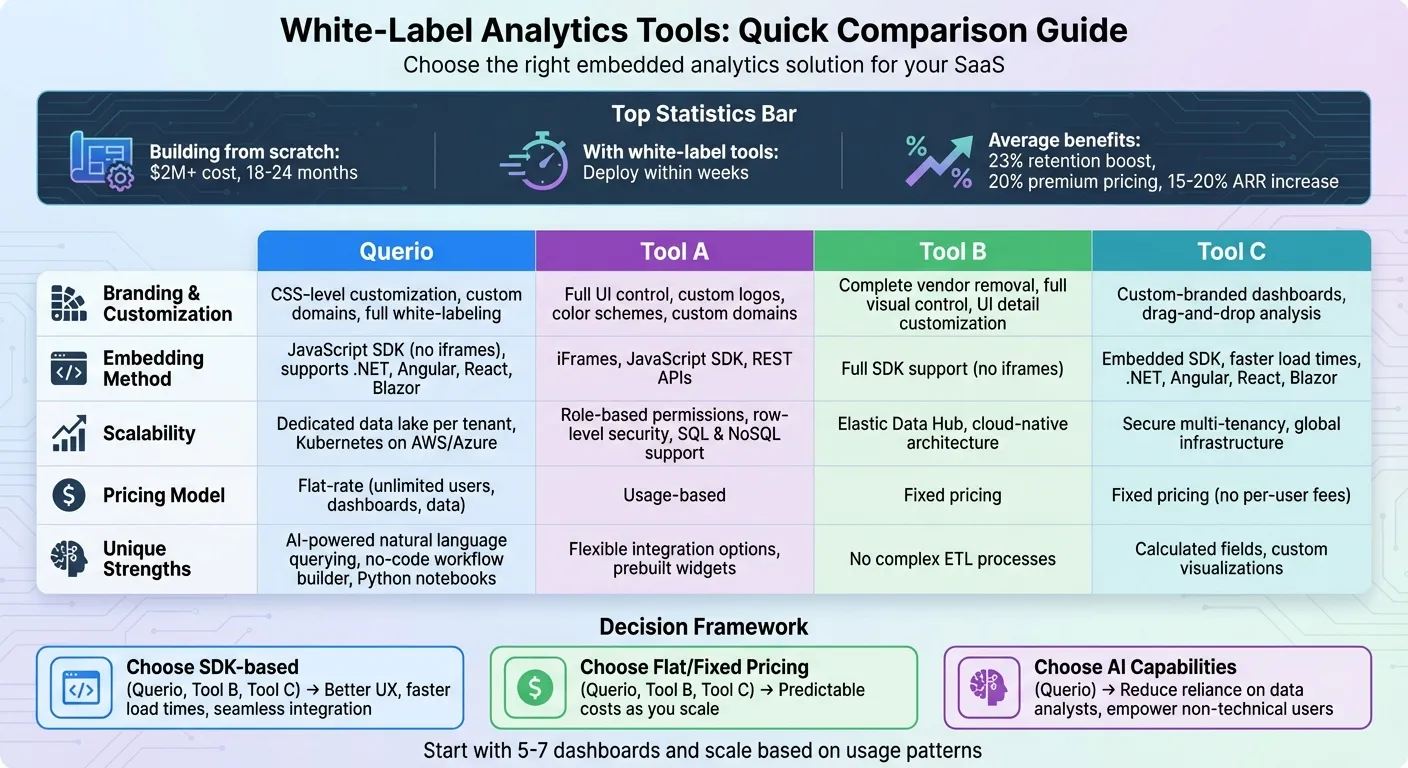
White-label analytics tools allow SaaS companies to integrate rebranded, third-party analytics into their platforms, saving time and resources while boosting customer retention and revenue. Instead of building analytics from scratch (which can cost over $2 million and take 18–24 months), these tools can be deployed within weeks. They offer features like branding customization, seamless embedding, and multi-tenant scalability, making them ideal for SaaS businesses looking to deliver enterprise-grade insights under their own brand.
Here’s a quick look at the tools covered:
- Querio: AI-powered natural language querying, JavaScript-based embedding, and no per-seat pricing.
- Tool A: Flexible branding, iFrame/SDK integration, and usage-based pricing.
- Tool B: Full SDK support, fixed pricing, and secure multi-tenancy.
- Tool C: Drag-and-drop analysis, SDK integration, and global infrastructure.
Quick Comparison:
| Feature | Querio | Tool A | Tool B | Tool C |
|---|---|---|---|---|
| Branding | CSS-level customization | Full control over UI | Full control over UI | Custom-branded dashboards |
| Embedding | JavaScript SDK | iFrames, SDK, REST APIs | Full SDK support | SDK with faster load times |
| Scalability | Dedicated data lake per user | Role-based permissions | Elastic Data Hub | Secure multi-tenancy |
| Pricing | Embedded add-on from $1,500/mo | Usage-based | Fixed | Fixed |
Each tool offers unique strengths, so choose based on your SaaS needs for customization, integration, and cost.
1. Querio
Branding & Customization
Querio offers CSS-level customization that gives developers precise control over layouts, colors, animations, and even micro-animations. This means you can align your analytics dashboards seamlessly with your SaaS application's design, making them feel like a natural extension of your product rather than a third-party tool.
With complete white-labeling, Querio allows you to use custom domains and full SDK-based theming. Vendor branding can be completely removed, letting you maintain your brand's identity while providing a self-service dashboard builder. End-users can create their own reports using an intuitive, no-code drag-and-drop interface - all while keeping your brand's look and feel intact. Unlike tools that lock you into rigid templates, Querio ensures flexibility without compromising consistency.
Embedding & Integration
Querio takes embedding to the next level by using JavaScript-based embedding instead of outdated iframes. This approach eliminates common issues like broken scrolling, poor mobile responsiveness, and visual mismatches. JavaScript widgets integrate smoothly into your application, creating a seamless user experience. The platform also includes a robust embedded SDK with native support for frameworks like .NET, Angular, React, and Blazor.
"Qrvey is one of the only tools out there that gives us the ability to embed a full suite of analytics into web apps. Qrvey's embed capability goes beyond charts and dashboards, letting us integrate a full analytics authoring interface into apps." - Dara K., Senior Business Consultant
This integration ensures a polished experience, empowering users with advanced analytics tools that blend naturally into your product.
AI & Automation
Querio isn't just about delivering analytics - it takes action. The platform includes a no-code workflow builder that automates business processes by setting alerts and triggers when data meets specific conditions. These automated workflows cut down on manual tasks and keep users engaged by handling routine operations effortlessly.
With embedded data pipelines, Querio automates the entire data lifecycle, managing both structured and semi-structured data without needing external warehouses. The recent Version 9.2 release introduced AI-powered dashboards with advanced Generative AI capabilities and an early-access MCP (Model Context Protocol) Server, making data interactions even more dynamic and efficient.
Scalability & Multi-Tenancy
Querio is built for SaaS scalability with a multi-tenant architecture with a dedicated data lake for each tenant, ensuring secure data separation while sharing infrastructure costs. Unlike traditional BI tools that rely on complex permission layers, Querio's architecture is designed specifically for multi-tenant SaaS environments. Its Kubernetes-powered deployment on AWS and Azure enables smooth scaling across multiple clouds, avoiding the high costs associated with traditional server-based models.
Pricing
Querio keeps things simple with no per-seat pricing. Every plan includes unlimited users, dashboards and data connections, allowing your SaaS product to grow without per-user costs as your user base expands. White label and embedding come with the Embedded add-on: from $1,500 a month on any plan, with 7,500 AI credits a month. AI usage past the included credits is billed per credit, and admins can set a spending cap.
2. Tool A
Branding & Customization
Tool A lets you take full control of its appearance, making it feel like an extension of your brand. With white-labeling options, you can replace the vendor's branding with your own logo and custom color schemes. Whether it's the colors in charts, accents, or various report layouts, you can align everything with your agency's visual identity. You can even host reports on custom domains like reports.yourbrand.com and tailor automated emails to reflect your brand's personality. These features make it easy to create a consistent and professional look across the board.
Embedding & Integration
When it comes to embedding, Tool A offers flexibility through iFrames, JavaScript SDK, and REST APIs, making it adaptable to different environments. Developers will appreciate the platform's resources, like prebuilt widgets and ready-to-use APIs, which streamline the implementation process. You can even rebrand APIs and widgets to create a seamless, native user experience that feels fully integrated with your existing systems.
Scalability & Multi-Tenancy
Tool A is designed to scale effortlessly, thanks to its role-based permissions and row-level security that keep tenants securely separated. The platform works natively with both SQL and NoSQL databases, including MongoDB. Instead of charging per user, Tool A uses usage-based pricing, making it easier to grow without worrying about escalating costs as your user base expands.
3. Tool B
Branding & Customization
Tool B gives you full control to make the analytics experience feel like an organic part of your product. You can remove vendor branding entirely and tailor every visual element to match your brand's identity. From logos and color schemes to typography and layouts, everything can be adjusted to reflect your style. Even the smallest UI details - like button shapes, colors, sizes, and placements - can be customized to maintain a cohesive brand presence throughout. This level of flexibility ensures your product looks polished and professional as it grows.
Scalability & Multi-Tenancy
With Tool B, managing multiple clients is straightforward and secure, thanks to its multi-tenancy capabilities. Designed with a cloud-native architecture, it seamlessly supports modern data pipelines and databases, making it an ideal choice for mid- to large-scale businesses. Its Elastic Data Hub allows you to connect and analyze data from various sources without the hassle of complex ETL processes. This streamlined approach not only simplifies scaling but also ensures data management stays efficient and secure as your user base expands.
4. Tool C
Tool C stands out by focusing on smooth integration and a design that grows with your needs. Here's what it brings to the table:
Branding & Customization
With Tool C, you can create custom-branded reports and white-label dashboards that blend effortlessly with your product. Features like calculated fields, drag-and-drop analysis, and custom visualizations give your team the tools to craft an analytics experience that feels like an extension of your brand.
Embedding & Integration
Tool C uses an embedded SDK that works seamlessly with frameworks such as .NET, Angular, React, and Blazor. By avoiding the limitations of iframes, it offers greater UI control, faster load times, and smoother interactions - making the analytics feel like a natural part of your application.
Scalability & Multi-Tenancy
Designed for multi-tenant environments, Tool C offers fixed pricing without per-user fees, ensuring predictable costs as you scale. Its global infrastructure ensures consistent performance across regions, while maintaining secure data separation, so you don’t have to worry about unpredictable usage-based costs.
Strengths and Weaknesses
Here's a quick rundown of the key strengths and limitations of each white-label analytics tool, helping you weigh your options more effectively for your SaaS business.
Querio stands out with its AI-native design, allowing non-technical users to query in plain English and create precise charts instantly. It connects seamlessly with platforms like Snowflake, BigQuery, and Postgres while offering unlimited viewer access with no hidden fees. Additionally, its custom Python notebook environment, complete with AI agents, makes it a powerful choice for reducing reliance on data analysts. White-label embedding is an add-on, from $1,500 a month on any plan.
Tool A shines with CSS-level customization and multi-tenant architecture, paired with a flat-rate pricing model that includes unlimited users, data, and connections. Its no-code workflow builder simplifies automating business processes based on insights. However, setting it up does require a moderate level of technical expertise, which could be a hurdle for some teams.
Tool B provides a seamless native experience through its full SDK for .NET, Angular, and React, avoiding iframe-related performance issues. Its fixed pricing model ensures cost predictability as you grow. On the flip side, integrating the SDK demands significant developer effort, and teams without strong engineering support might face a steeper learning curve.
Tool C offers smooth integration with features like calculated fields, drag-and-drop analysis, and custom visualizations. Its embedded SDK enhances UI control and speeds up load times, while its strong global infrastructure ensures reliable performance. However, like other SDK-based tools, it requires upfront developer involvement, which could delay deployment for teams with limited technical resources.
Each tool has its strengths and challenges, allowing SaaS businesses to choose one that best fits their growth goals, branding needs, and technical capabilities.
Conclusion
Selecting the best white-label analytics tool for your SaaS business means focusing on your specific needs, such as scalability, branding flexibility, and technical resources. Embedded analytics tools are more than just features - they’re growth accelerators. On average, they boost retention rates by 23%, allow for 20% premium pricing, and drive a 15–20% increase in ARR within the first year.
To make the right choice, consider the balance between scalability, branding customization, and seamless integration. Determine if you need advanced white-label options like CSS-level control and custom domains or if basic branding adjustments will suffice. For a smoother user experience, SDK-based embedding is ideal, while iframe-based solutions often feel less integrated and offer limited UI control. When it comes to pricing, flat-rate or usage-based models are smarter choices to avoid spiraling costs. Tools with AI-driven Natural Language Query (NLQ) capabilities can also reduce reliance on technical teams, empowering non-technical users to explore data independently. Additionally, opting for platforms with multi-tenant architecture ensures secure, isolated data environments while leveraging shared infrastructure for cost efficiency.
Start small with 5–7 dashboards and refine them as you understand usage patterns. Check your current data connections, whether it’s Snowflake, BigQuery, or Postgres, and be on the lookout for hidden costs like usage caps or premium support fees. The right analytics tool should align with your growth goals, technical expertise, and branding needs - all while delivering measurable business outcomes.
FAQs
What advantages do white-label analytics tools offer SaaS businesses?
White-label analytics tools give SaaS businesses a shortcut to adding branded reporting and dashboards without the headache of building an analytics system from the ground up. This not only slashes development time - getting analytics features ready in weeks rather than months - but also frees up engineering teams to concentrate on refining the core product.
One standout advantage is brand customization. These tools allow companies to tweak visual elements like logos, color schemes, and fonts to align perfectly with their platform's design. The result? A seamless, native user experience that feels like an organic part of the service. This attention to detail can boost customer satisfaction and even improve retention rates.
On top of that, white-label analytics tools can unlock new revenue streams. SaaS businesses can package advanced analytics as premium features or optional add-ons, providing an extra source of income without the hefty costs of developing in-house solutions. Plus, these tools are designed to scale and handle data securely, ensuring the platform can grow effortlessly alongside the business.
How do Querio's AI and automation features improve data interaction and user engagement?
Querio's AI-powered tools simplify the way users interact with data, making the process quicker and more straightforward. By taking over repetitive tasks like data processing and generating reports, Querio frees up time for users to concentrate on making smart, data-backed decisions.
On top of that, Querio boosts user engagement by offering personalized analytics experiences - think tailored dashboards and predictive insights designed to fit unique business requirements. This means users can effortlessly access the information they need without getting bogged down by unnecessary layers of complexity.
What should I look for in a white-label analytics tool to ensure it scales well and aligns with my brand?
When selecting a white-label analytics tool for your SaaS platform, it’s important to focus on two critical factors: scalability and branding.
For scalability, look for tools built with a multi-tenant architecture. This ensures secure management of customer data across different clients. Additionally, tools with cloud-native capabilities are a smart choice, as they can automatically adjust to accommodate a growing user base. It’s also crucial to have support for a variety of data connectors - whether it’s SQL, NoSQL, or other SaaS platforms - and real-time data processing to efficiently manage increasing data loads.
On the branding side, opt for tools that allow full customization. This means you can tweak everything from logos and colors to fonts and even domain names, creating a seamless user experience that aligns with your brand. Features like theming engines and hosting under your own custom domain can further reinforce brand consistency and build trust with your users.
Choosing a tool that combines strong scalability with flexible branding ensures you can provide a polished, tailored analytics experience that evolves with your business.