Business Intelligence
Embedded Analytics Pricing: What You Need to Know
Compare embedded analytics pricing models, learn key cost drivers, and calculate TCO to pick a clear, scalable plan for your product.

Embedded analytics can increase software product prices by up to 24% while boosting customer retention (5%-15%) and reducing support tickets (30%-50%). But pricing models can make or break your ROI. Here's an overview:
- Usage-Based Pricing: Pay for activity like queries or views; great for occasional use but unpredictable costs.
- Per-User Pricing: Straightforward for small teams but expensive as user numbers grow.
- Flat-Rate Pricing: Fixed monthly/annual cost; predictable but higher upfront investment.
- Capacity-Based Pricing: Based on server resources; ideal for heavy data use but requires clear infrastructure planning.
- Revenue Share Pricing: Tied to your earnings; low initial costs but grows as revenue increases.
Key cost drivers include user roles, data volume, hosting type, and hidden costs of traditional BI like premium features or support. Querio offers a transparent tiered model with a free plan, unlimited users on every plan, an Embedded add-on from $1,500/month, and spending caps against surprise charges, making it a scalable option for businesses of all sizes.
Takeaway: Choose a pricing model aligned with your growth and calculate the Total Cost of Ownership (TCO) to avoid unexpected expenses. Comparing embedded BI platforms can help you identify which models offer the best long-term value. Free trials can help you evaluate performance before committing.
How To Understand Analytics Tool Pricing Models?
::: @iframe https://www.youtube.com/embed/hFNOJLiSvVI :::
Pricing Models for Embedded Analytics
::: @figure 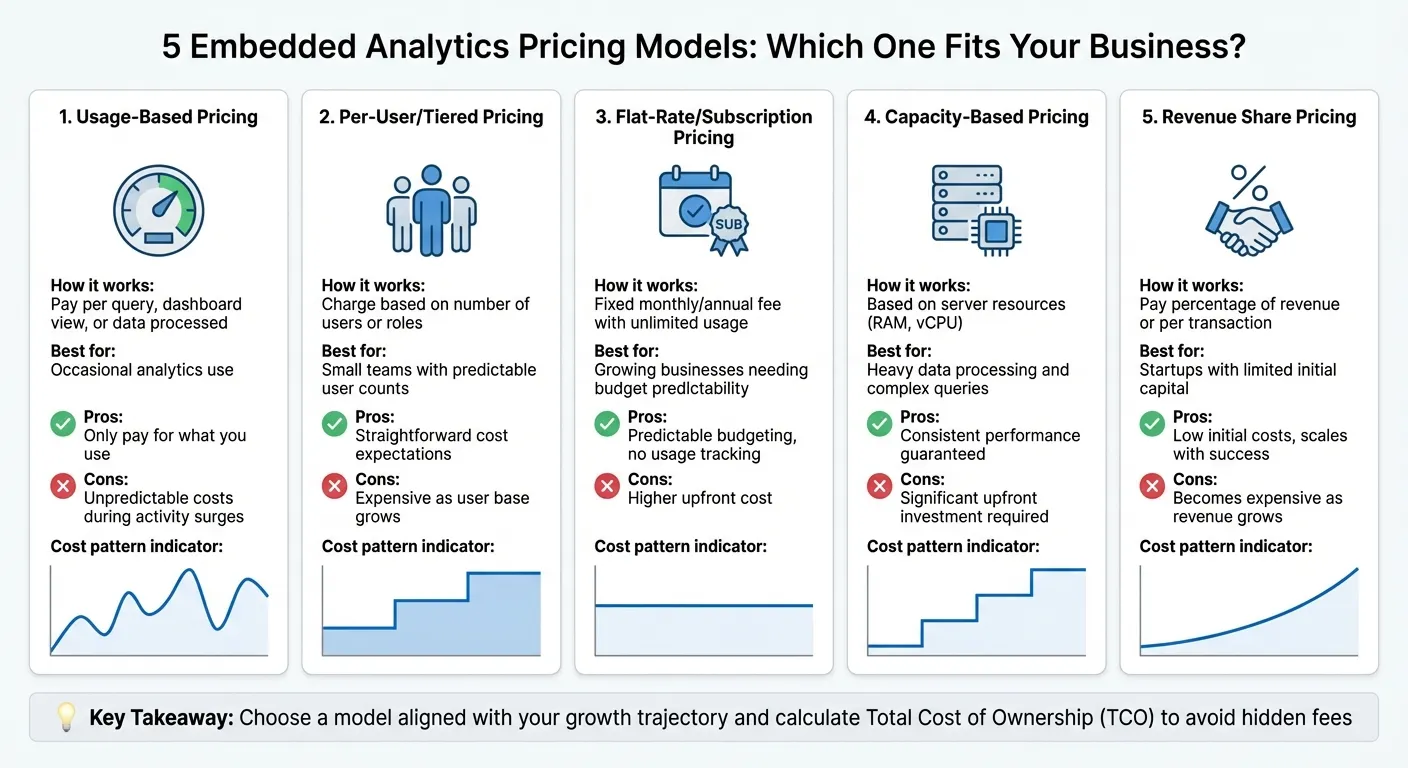 {5 Embedded Analytics Pricing Models Compared: Pros, Cons, and Best Use Cases}
:::
{5 Embedded Analytics Pricing Models Compared: Pros, Cons, and Best Use Cases}
:::
Choosing the right pricing model for top embedded analytics platforms depends on your usage patterns and growth expectations. Below, we break down the most common models, highlighting their advantages and potential challenges.
Usage-Based Pricing
With usage-based pricing, you’re charged based on activity - such as the number of queries, dashboard views, or data processed. This model works well for applications with occasional embedded self-serve analytics use since you only pay for what you use. However, it comes with a downside: costs can become unpredictable. If your app experiences a sudden surge in activity, your analytics expenses could skyrocket, making it harder to stick to a budget.
Tiered or Per-User Pricing
This approach charges based on the number of users or their roles. It’s a good fit for smaller teams with predictable user counts, offering straightforward cost expectations. But as your user base grows, expenses can quickly add up. For platforms serving thousands of users in a multi-tenant architecture, this model may become unsustainable, especially when onboarding new users significantly increases costs.
Flat-Rate or Subscription Pricing
Flat-rate pricing provides a consistent monthly or annual fee that covers a defined set of features and unlimited usage. It offers the benefit of predictable budgeting, which can be a relief for those wary of fluctuating costs. However, the higher upfront cost might be challenging for smaller businesses. Over time, though, this model becomes more economical as your user base expands, eliminating the need to track individual usage or seat counts.
Server Core or Capacity-Based Pricing
This pricing structure is based on server resources, such as processing power, instead of user numbers. It’s ideal for handling complex queries or large data volumes, ensuring consistent performance. However, it requires a significant upfront investment and is best suited for businesses with clear infrastructure needs. If your operations demand guaranteed server capacity, this model can deliver, but the annual commitment may not appeal to everyone.
Revenue Share or Value-Based Pricing
Revenue share pricing ties costs directly to your business outcomes - you pay a percentage of your revenue or a fee per transaction. This model reduces initial costs, making it appealing for businesses just starting out. However, as your revenue grows, this approach can become more expensive. It’s most effective when your analytics directly contribute to monetization and you want to avoid large upfront expenses.
Next, we’ll delve into the factors that influence these embedded analytics costs even further.
What Drives Embedded Analytics Costs
Understanding what influences the cost of embedded analytics is just as important as choosing the right vendor and pricing model. While the pricing model provides the structure, several underlying factors can significantly impact your overall expenses. Let’s break down the key elements that shape these costs.
User and Viewer Limits
One major cost factor is how vendors differentiate between creators (internal users who design dashboards) and viewers (end-users who simply consume the data). Vendors often charge different rates for these roles, and if not carefully managed, costs can rise quickly - especially as your user base grows. Casey Ciniello from RevealBI highlights this issue:
"Companies that are searching for a white label or OEM solution should avoid BI vendors that charge them per user because they will be penalized as they grow."
High per-viewer costs can discourage you from offering analytics to your entire audience, which might limit the perceived value of your product. To avoid overspending, audit user roles regularly and ensure that infrequent users aren’t assigned costly high-tier licenses. Understanding these distinctions can help you control expenses as your business scales.
Data Volume and Query Complexity
The amount of data you process and the complexity of your queries are other significant cost drivers. Many usage-based pricing models charge for metrics such as the number of rows processed, API calls, or storage used. Some vendors include a base data allowance in their pricing, but costs can escalate as your concurrency needs or query complexity increase.
Don’t forget secondary costs like data warehouse fees from platforms such as Snowflake or BigQuery. Every query your analytics platform runs can trigger additional charges from these services, so it’s essential to include them in your overall cost estimates.
Deployment Type and Hosting Fees
Your choice of hosting - whether self-managed or fully managed - also impacts costs. Self-managed deployments (on-premises or private cloud) require you to cover infrastructure and maintenance expenses. On the other hand, fully managed SaaS solutions bundle these costs into their subscription fees, but they often come with higher base prices. Some vendors even charge more than double for their cloud-hosted versions compared to self-hosted options.
If your business has specific data residency or compliance requirements, make sure your deployment choice aligns with those needs while keeping costs in check. This consideration becomes increasingly important as your business grows and scales.
Additional Features and Hidden Costs
Beyond the standard license, premium features like AI-driven querying, semantic layers, and advanced integrations can come with extra fees. Some vendors also restrict features like white-labeling and customizations to higher-tier plans. According to a 2025 survey, 65% of IT leaders reported unexpected charges on SaaS solutions due to the complexity of consumption-based or AI-driven pricing models.
Hidden costs can also creep in through implementation expenses, such as data migration, custom development, training, and premium support. To get a clear picture, calculate the total cost of ownership (TCO) over three years. Solutions that seem affordable at first glance often become much more expensive as you scale. Assessing these factors now will help you weigh pricing against the business value your solution delivers - something we’ll dive into further later.
sbb-itb-284a532
How Querio Prices Embedded Analytics
Querio offers a tiered model whose plans differ in included AI credits and features. Instead of charging per user, Querio includes a monthly allowance of AI credits on every plan, and customer-facing embedding comes through the Embedded add-on. Usage shows as it happens and admins can set a spending cap, which makes budgeting more predictable and allows for scaling without surprises.
Transparent Pricing with No Hidden Costs
Querio keeps its pricing clear and upfront - no need for drawn-out sales calls. Every plan, the free plan included, has unlimited users and unlimited data connections. This means you can provide analytics access to your entire team or customer base without worrying about additional licensing fees. AI usage past the included credits is billed per credit, while dashboard refreshes, automations and running SQL or Python use no credits.
Here’s how the pricing breaks down:
- Free: $0/month – 500 AI credits a month, AI agent, notebooks and dashboards
- Core: $2,499/month, or $25,000 a year billed annually – 10,000 AI credits a month
- Enterprise: Custom pricing – custom AI credit allowance and single-tenant hosting
- Embedded add-on: from $1,500/month on any plan – 7,500 AI credits a month, white label, iFrame embedding and row-level security
All plans come with AI-powered natural language querying and an AI data catalog included right from the start.
Scalable Features for Growing Needs
Querio's tiered plans are designed to grow with your analytics needs, offering more advanced features as you scale - without charging extra for adding users.
- Free includes the AI agent, notebooks, dashboards, a Slack agent, a shared context layer, and 2 automations by email.
- Core steps it up with SSO, groups and datasource permissions, API access, SSH tunneling and VPN, unlimited automations, and private Slack support with responses in under 2 hours.
- Enterprise customers gain access to single-tenant hosting, on-prem and AWS GovCloud deployment as add-ons, audit export, and a dedicated solutions engineer.
Pre-Series A startups can also apply to Querio's Startup Program.
Maximizing Value with AI-Powered Insights
Querio integrates directly with your existing data warehouse - whether you’re using Snowflake, BigQuery, or Postgres - avoiding the need for costly data duplication or storage by following a perfect embedded analytics architecture. This live connection not only reduces infrastructure expenses but also delivers real-time insights.
Jennifer Leidich, Co-Founder & CEO at Mercury, highlights the efficiency gains:
"What used to be a week-long process now takes minutes."
Guilia Acchioni Mena, Co-Founder at Zim, shares her experience:
"I immediately started saving 7-10 hours a week!"
These time savings translate directly into a stronger ROI, giving teams more time to focus on strategic tasks instead of manual data work.
How to Evaluate Pricing Against Business Value
Choosing the right pricing model for embedded analytics goes beyond simply hunting for the lowest monthly fee. It’s about ensuring the pricing structure aligns with your specific usage patterns, understanding the long-term financial commitment, and recognizing the broader strategic benefits that may not be immediately obvious.
Match Pricing Models to Your Usage Patterns
Start by assessing how your team and customers will use the analytics features. For software vendors adding analytics as a product feature, it’s smart to find a pricing model that mirrors your existing billing structure. For example, if you charge customers per site or device, a revenue-share model can align your analytics costs with the growth of that feature, scaling your expenses naturally with your revenue.
For enterprise applications with steady, predictable demand, capacity-based pricing - tied to compute resources - can become more economical once you hit a certain usage level. On the other hand, if your usage fluctuates seasonally or is still growing, a usage-based model ensures you only pay for what you actually consume. To avoid unnecessary costs, audit your usage patterns and select entitlements that cover your needs throughout the contract period, accounting for both slow and busy months.
Once you’ve matched a pricing model to your usage, it’s important to dig deeper into the overall financial impact.
Calculate Total Cost of Ownership
The subscription fee is just one part of the equation. To truly understand what you’re committing to, you need to calculate the total cost of ownership (TCO), which includes all expenses required to implement and maintain the analytics solution. These might include:
- Time and resources for integration and data migration
- Infrastructure and API usage fees
- Costs for data preparation (e.g., ETL tools, warehousing, cataloging)
- Personnel costs for setup, dashboard creation, and documentation
- Training and ongoing maintenance expenses
When comparing vendors, ask for quotes that include features you might need in the next two to three years. This can help you avoid unpleasant surprises as you scale, such as unexpected fees for premium support, additional API calls, or advanced security options.
Beyond the immediate costs, also think about how the solution’s performance and security features can contribute to long-term value.
Focus on Long-Term Value Over Short-Term Costs
A lower upfront price tag might seem appealing, but it can lead to higher costs down the road. Solutions that require constant maintenance, deliver subpar performance, or lack essential security features can drain resources and even lead to customer dissatisfaction.
Look for vendors that include compliance certifications like SOC 2 as part of their standard offering. These certifications not only reduce operational risks but also save you from building custom security layers. For multi-tenant applications, row-level security (RLS) is crucial - it ensures customers only see their own data without adding unnecessary complexity.
Your pricing evaluation should align with your broader business goals. Embedded analytics can drive operational improvements and customer engagement, which translates to measurable business value. According to Software Pricing Partners, app owners can charge up to 24% more for their products by embedding analytics. A high-quality analytics experience can boost customer satisfaction and retention, offering a return on investment that far outweighs the initial costs.
To minimize risk, take advantage of free proof-of-concept (POC) periods. These trials allow you to test performance, integration, and usability firsthand, helping you uncover potential challenges or hidden costs that might not surface during a sales demo.
Conclusion
When considering embedded analytics pricing, it's crucial to align the model with your business's growth strategy. The choice between per-user, capacity-based, consumption-based, or flat-rate pricing can significantly impact your costs - leading to either unexpected expenses or meaningful savings as your business scales.
The real trick lies in digging deeper than the sticker price to understand the total cost of ownership. Building an in-house solution often comes with hefty expenses and time commitments, which is why a embedded analytics tools for SaaS can be a smarter choice. When evaluating vendors, be sure to ask tough questions about potential hidden fees - like charges for white-labeling, API usage, data connectors, or premium support - before signing on the dotted line.
Querio simplifies this process by offering unlimited users across all pricing tiers, with costs tied to AI usage (included AI credits, with spending caps) instead of the number of users. This approach ensures your expenses grow based on how much AI analysis you run, not the number of employees or customers you add. For startups, Querio's free plan and its Startup Program for pre-Series A companies provide an easy entry point to enterprise-grade analytics, making budgeting more straightforward while supporting efficient cost management. This transparent pricing strategy complements your business growth without adding unnecessary financial strain.
It's also important to choose a pricing model and embedded analytics implementation strategy that supports your long-term goals without penalizing success. Research shows that apps with embedded analytics can charge 24% more for their product, turning analytics into a revenue booster rather than just a cost. Take advantage of free proof-of-concept trials to evaluate performance and identify hidden fees before committing to a long-term contract.
The best pricing model for embedded analytics is one that's clear, scalable, and aligned with your business growth. Whether you're a startup exploring new opportunities or an enterprise managing millions of queries, the right pricing structure should grow alongside your business while delivering measurable returns through improved user engagement and operational efficiency.
FAQs
::: faq
How do I choose the right embedded analytics pricing model for my business?
To choose the right pricing model for your business, start by identifying your unique requirements. Think about factors like how many users you'll have, how often they'll use the service, and the amount of data you'll be managing. If your business experiences fluctuating usage, a usage-based model might be a good fit, as it aligns costs with actual consumption. On the other hand, a flat-rate or tiered pricing structure could work better for businesses with steady, predictable usage patterns.
Consider your user base too. If most of your users need full access, a per-user pricing model might make sense. But if your team includes both occasional and frequent users, a consumption-based approach could help you avoid paying for access that isn’t fully utilized. Additionally, think about where your business is headed. If you need predictable costs for budgeting, a tiered plan can make financial planning easier. However, if you're anticipating rapid growth, a usage-based model can scale with you without requiring hefty upfront investments.
By weighing key factors like cost predictability vs. flexibility, user behavior, and growth expectations, you can find a pricing approach that aligns with your goals and delivers the most value for your money. :::
::: faq
What should I consider when determining the total cost of embedded analytics?
When figuring out the total cost of embedded analytics, there are several important factors to weigh to make a smart choice. Start by looking at the pricing model - is it user-based, usage-based, tiered, or flat-rate? The right model should match how your business operates and scales.
Next, consider the integration and implementation costs. These can vary widely based on how complex your system is and how much customization you need. If your setup is intricate, expect the costs to reflect that.
Think about your scalability needs too. For instance, if you require multi-tenant architecture, make sure the solution can handle that while maintaining secure and compliant data connectivity. And don’t forget the ongoing costs - things like maintenance, hosting, and support. There might also be hidden expenses, such as administrative overhead or fees for AI-driven features.
By taking all these aspects into account, you’ll get a clearer picture of how the total cost connects to your ROI and aligns with your long-term goals. :::
::: faq
How does Querio’s pricing model help businesses scale and grow?
Querio offers tiered pricing plans tailored to support businesses as they grow, with unlimited users included in every plan. This means no per-user fees or complicated licensing structures to worry about. Querio has a free plan, and Core is $2,499 a month (or $25,000 a year billed annually). Each tier includes more AI credits - 500 a month on Free, 10,000 on Core and a custom allowance on Enterprise - and more resources, from 8 GB memory and 1 vCPU on Free to 16 GB and 2 vCPUs on Core. This ensures that as your data and user needs expand, performance keeps pace.
As businesses move to higher tiers, they gain access to advanced features such as SSO, API access, unlimited automations, SSH tunneling and VPN, and quicker support response times. For larger or highly regulated organizations, the Enterprise option adds even more flexibility, including single-tenant hosting, on-prem deployment as an add-on, audit export, and a dedicated solutions engineer. Querio’s transparent pricing, free of hidden fees, makes it easier for companies to plan their budgets, align expenses with growth, and scale without interruptions. :::