Business Intelligence
Guide to Embedded Analytics Security
Embedded analytics must be security-first: use RBAC and RLS, live warehouse connections, encryption and audit logs to prevent cross-tenant data exposure.

Security in embedded analytics is non-negotiable. When integrating dashboards or reports into applications, missteps like poor configurations can lead to data breaches, compliance violations, or tenant data exposure. This article breaks down how to safeguard your analytics with proven strategies, ensuring both protection and performance.
Key Points:
- Access Control: Use Role-Based Access Control (RBAC) and Row-Level Security (RLS) to restrict data access based on user roles and context.
- Encryption: Protect data at rest with AES-256 and in transit with TLS encryption.
- Authentication: Implement Single Sign-On (SSO) with short-lived tokens for secure user access.
- Compliance: Meet standards like SOC 2 Type II, GDPR, and HIPAA through live data connections and audit logging.
- Data Isolation: Prevent tenant data exposure with logical partitions, RLS, and tenant-specific security settings.
Why It Matters:
- 51% of tech leaders cite security as their top challenge for 2025.
- 73% plan to expand AI use, increasing exposure risks.
A robust security framework like Querio’s ensures your embedded analytics are protected without sacrificing speed or reliability. Learn how to implement these strategies effectively.
::: @figure 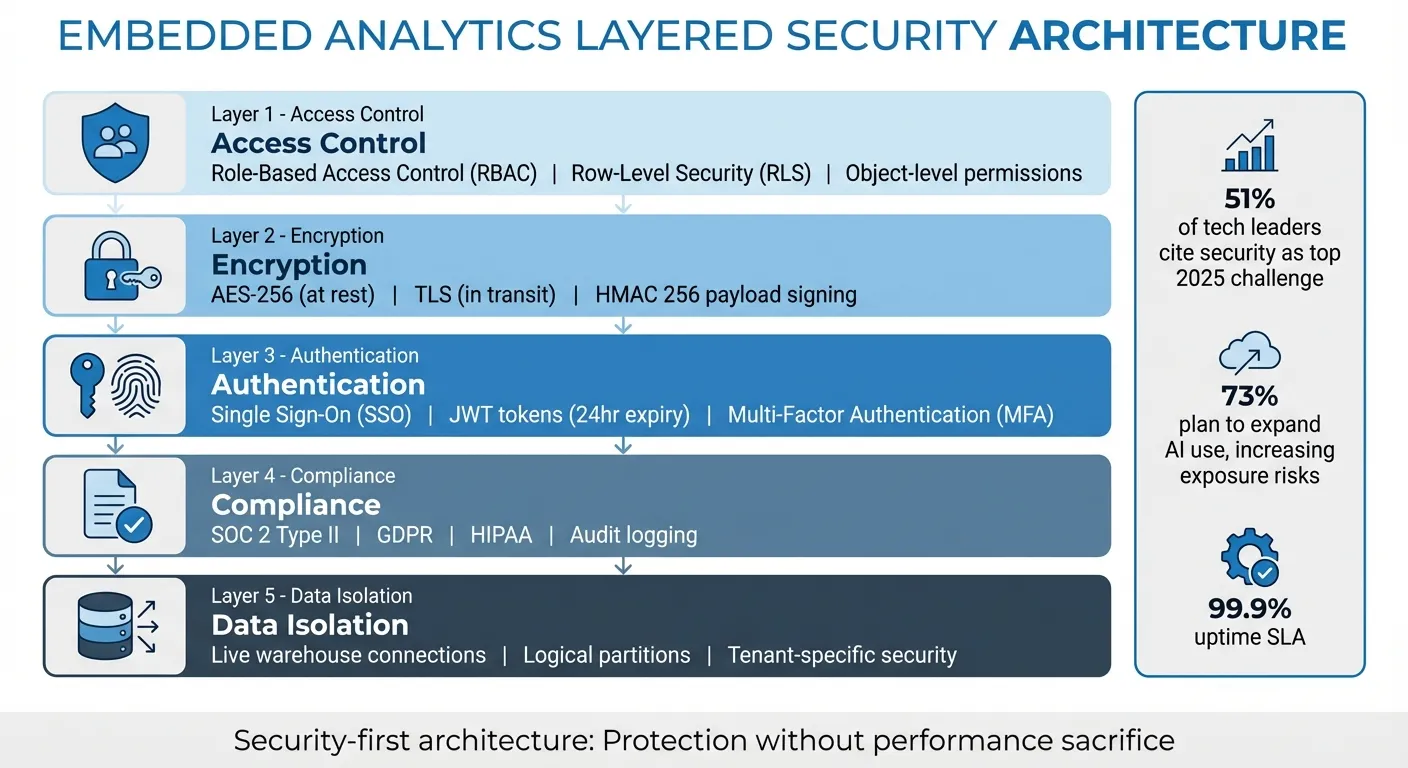 {5 Core Security Layers for Embedded Analytics Implementation}
:::
{5 Core Security Layers for Embedded Analytics Implementation}
:::
Mastering Row-Level Security (RLS) for Secure and Compliant Embedded Analytics with Reveal
::: @iframe https://www.youtube.com/embed/q9mbN2kIXFs :::
Core Security Principles for Querio Embedded Analytics
Securing embedded analytics requires comprehensive protection, covering everything from the data source to every query and user interaction. Querio integrates security directly into its design by connecting to your data warehouse, centralizing rule enforcement via a semantic layer in business intelligence, and adhering to strict compliance standards. Let’s break down how these layers are implemented.
Data Governance and Access Control
Start by establishing strong governance to control what users can access and do before they even initiate a query. Querio’s semantic layer serves as a centralized hub where you define joins, metrics, and business glossaries just once. These rules are then enforced across all clients and embedded instances. This setup not only hides unauthorized metadata from users but also safeguards against SQL injection by locking down measure definitions and object permissions at the model level.
Set permissions at the object level to ensure users only see data relevant to their roles. For instance, Finance might access revenue metrics, while Support focuses on ticket data. Embed these permissions securely using JSON Web Tokens (JWT) to prevent URL tampering and unauthorized access.
Reducing Risk with Live Warehouse Connections
Data duplication introduces unnecessary risks. Instead, Querio connects directly to your Snowflake, BigQuery, or Postgres warehouse, eliminating extra points of failure. The platform retrieves only the specific rows and columns needed to generate a chart or answer a question, ensuring a streamlined and secure process.
By using live connections, Querio inherits your warehouse's existing security configurations, including row-level security, column masking, and access policies. When users submit queries in plain English, Querio translates them into SQL and executes encrypted, read-only queries directly on the warehouse. This seamless integration ensures every query complies with your established security policies.
SOC 2 Type II Compliance and 99.9% Uptime
SOC 2 Type II certification confirms that Querio maintains rigorous security controls, an essential requirement for embedding analytics into customer-facing products. Independent audits verify that these controls consistently protect data integrity while building user trust.
With a 99.9% uptime SLA, Querio ensures uninterrupted, secure access to dashboards and AI-driven queries, eliminating the need for risky workarounds while keeping your analytics reliable and secure.
Access Management Strategies
Effective access management is essential for safeguarding embedded analytics. By controlling who can view and interact with specific data, organizations can prevent leaks and ensure users access only the information relevant to their role. Querio employs several key strategies - role-based access control, row-level security, and single sign-on integration - to maintain secure and efficient data access. These methods complement Querio's built-in security framework, ensuring a safe environment for embedded analytics.
Role-Based Access Control (RBAC)
RBAC ensures users only access data that aligns with their job responsibilities. By centralizing role definitions and permissions in Querio's context layer, organizations can tightly control access and enforce consistent rules across all data interactions. For example, finance teams can view financial metrics, while customer support teams are limited to service-related data.
Querio connects to data warehouses like Snowflake, BigQuery, or Postgres using read-only service accounts with SELECT-only permissions. This setup guarantees that Querio cannot modify or delete source data. To align access with organizational responsibilities, roles should mirror the company’s structure. In hierarchical setups, managers can inherit team permissions while gaining access to broader datasets. Conduct regular audits to prevent "permission creep", where users accumulate unnecessary access over time.
| Feature | Querio RBAC Implementation |
|---|---|
| Primary Control Hub | Context Layer (centralized business logic and permissions) |
| Access Provisioning | Just-In-Time (JIT) adjustments and AI-recommended updates |
| Connection Security | Read-only service accounts |
| User Interaction | Role-specific guardrails for natural language queries |
RBAC lays the groundwork for secure access, but Row-Level Security (RLS) takes data filtering to the next level by ensuring compliant access during natural language queries.
Row-Level Security (RLS)
RLS ensures users only see data they are authorized to access by filtering it before it reaches their view. For instance, when customers access an embedded dashboard, they’ll only see data tied to their account, even if the underlying dataset includes information for multiple accounts. Querio achieves this by embedding dashboards with a server-side security token. This token includes a securityContext JSON object containing fields like userId, orgId, or role, which are dynamically injected into SQL queries using Jinja templating.
This approach allows a single dashboard template to serve multiple users while maintaining strict data isolation. Developers can also use the no-code builder’s "View as" presets to preview how dashboards will appear to different users before deployment.
| Feature | Permission Settings | Control Settings |
|---|---|---|
| Purpose | Data Access Control | UI Aesthetics / Default Values |
| Restriction Level | Dataset level (Strict) | UI only (Can be tampered with) |
| Security | Recommended for best practices | Not a primary security measure |
RLS works seamlessly with centralized authentication systems like Single Sign-On (SSO) for a streamlined user experience.
Single Sign-On (SSO) Integration
SSO simplifies user authentication by allowing users to log in once through your host application. Querio then grants access via JWT or SAML tokens, eliminating the need for separate credentials. User attributes such as department, region, or account ID are passed during SSO and trigger RLS filtering, ensuring users automatically see only the data they’re authorized to access.
To minimize risks, set token expiration to 24 hours and use encrypted credentials. Centralized identity management systems like Azure Active Directory further streamline administration by automatically updating permissions when employees join, change roles, or leave the organization.
| Feature | SSO Integration Benefit |
|---|---|
| Authentication | Users sign in once to the host app; Querio access is granted automatically via JWT/SAML. |
| Data Security | User attributes passed during SSO trigger automatic Row-Level Security (RLS) filtering. |
| Management | Centralized identity management reduces the need to manage separate BI user accounts. |
| Risk Mitigation | Short-lived tokens and encrypted credentials reduce the risk of unauthorized access or data leaks. |
These access management strategies work together to create a secure, seamless experience for users while keeping sensitive data protected.
Data Encryption and Secure Communication
In embedded analytics, safeguarding data - whether it's stored or in transit - is absolutely essential. Querio achieves this through robust encryption practices, ensuring data remains protected from unauthorized access, no matter where it resides or how it moves between systems.
Encryption at Rest
To protect stored data, Querio employs AES-256 encryption, a highly secure standard that ensures data cannot be read without the correct decryption keys. On top of this, Querio uses a secure key management system that regularly rotates encryption keys. This proactive approach adds an extra layer of defense against potential breaches and works seamlessly with Querio's centralized access controls.
Additionally, Querio ensures that encrypted data remains confined to your controlled environment by utilizing direct connections.
Encryption in Transit
When data is in motion, Querio uses HTTPS with TLS encryption to prevent interception. This standard applies to all embedded content, from dashboards and visualizations to static assets like JavaScript and CSS files.
To further enhance security, Querio incorporates HMAC 256 (Hash-based Message Authentication Code) for signing payloads and JSON Web Tokens (JWT) for user authentication. These tools ensure data integrity by verifying that transmitted data remains unaltered. JWTs are specifically used for authentication purposes, so they should never include sensitive data. To minimize risks, tokens are designed with short expiration times, and all signed embed URLs should be generated server-side - not in the browser - to keep secret keys secure.
"Security is not a one-time setup but a continuous process of improvement and vigilance." - Tractorscope
These encryption practices lay the groundwork for compliance measures, which are explored in the following section.
sbb-itb-284a532
Meeting Compliance and Regulatory Requirements
For organizations managing sensitive data through embedded analytics, meeting compliance standards isn't optional - it's a must.
SOC 2, GDPR, and HIPAA Compliance
Querio holds a SOC 2 Type II certification, demonstrating its commitment to high standards in data security, availability, and processing integrity. This certification is supported by robust security features designed to safeguard sensitive information at every step.
One standout feature is Querio's live warehouse connections. Instead of duplicating data, it directly queries platforms like Snowflake, BigQuery, or Postgres. This approach ensures data stays within your controlled environment, reducing exposure risks and making compliance audits much simpler.
Row-Level Security (RLS) plays a critical role in meeting GDPR's data minimization principles and HIPAA's need-to-know requirements. Unlike user interface-based filters that can be bypassed, RLS enforces restrictions at the dataset level, making it impossible for users to access unauthorized data. Combined with Role-Based Access Control (RBAC) and Single Sign-On (SSO) integration, Querio strengthens your organization's identity and access management policies with multiple layers of protection.
"Implementing security-first architecture from day one... helps clients achieve compliance certifications 60% faster than retrofit approaches." - Sagar Rabadiya, Co-Founder of SR Analytics
For industries with strict regulations, Querio’s encryption measures - AES-256 for data at rest and TLS for data in transit - align with GDPR and HIPAA requirements. Its multi-tenancy capabilities further enhance security by isolating tenant data through separate instances or team-based configurations, preventing any cross-tenant exposure. To top it off, detailed audit logging tracks every access and action, reinforcing compliance and providing a clear record for accountability.
Audit Logging and Monitoring
Compliance isn’t just about prevention - it’s also about oversight. Querio’s audit logging captures every interaction with its embedded analytics tools, from dashboard views and applied filters to executed queries and even AI feature usage. Each log entry includes key details like user ID, timestamp, specific actions, and data accessed.
This level of transparency is invaluable during regulatory audits. Compliance teams can pinpoint exactly what data was accessed, by whom, and when. These logs act as a forensic trail, proving accountability and aiding investigations if needed.
Audit logs also act as an early warning system for potential security threats. By monitoring analytics-specific risks - like failed queries, permission mismatches, or unusual activity spikes - security teams can address issues before they escalate. For AI-powered analytics, Querio logs every interaction, including the query, output, and timestamp. This supports the growing demand for "explainable AI", ensuring regulators can trace and understand AI decisions.
Multi-Tenancy and Data Isolation
When multiple customers share the same analytics platform, keeping their data separate is non-negotiable. Even a single misstep in configuration could expose sensitive data between customers, putting compliance and trust at risk. Protecting multi-tenancy is key to preventing cross-organizational data exposure.
"Multi-tenant security ensures that every customer's data stays private and secure, even when they're all using the same software application. Think of it like building virtual walls - each tenant gets their own secure space." - David Abramson, CTO, Qrvey (Querio)
The following sections explain how Querio enforces strong data isolation through tenant-specific controls and partitioning methods.
Tenant-Specific Security Settings
Querio builds on its use of RBAC (Role-Based Access Control) and encryption—both essential features of modern business intelligence tools—to extend these safeguards into multi-tenant setups. With RBAC and column-level permissions, the platform ensures tenant-specific access without requiring additional infrastructure. For example, one tenant might need full visibility into revenue metrics, while another only accesses operational data. These granular settings are applied directly at the query level.
For organizations with strict governance needs, Querio offers self-hosted analytics. This option allows businesses to keep all data on-premises, fully under their control, while still benefiting from the platform's security features. Additionally, Multi-Factor Authentication (MFA) adds an extra layer of security, requiring users to verify their identity beyond just a password before accessing sensitive information.
Data Partitioning Methods
Querio ensures natural data isolation by leveraging live warehouse connections. Instead of copying data into a shared analytics database, Querio directly queries your data warehouses - such as Snowflake, BigQuery, or Postgres - using read-only, encrypted credentials. This keeps each tenant's data securely within your own environment.
To further reinforce isolation, the platform employs logical partitions and unique database schemas to create those "virtual walls" between tenants. Security rules are enforced at the query level through Row-Level Security (RLS), which filters data based on each user's context. Shared tables automatically display only the records users are authorized to see, eliminating the need for manual filtering and reducing the risk of accidental exposure. This approach also avoids "noisy neighbor" issues, where one tenant's activity could impact others, all while keeping infrastructure management simple and scalable.
Maintaining Security Without Sacrificing Performance
In embedded analytics, security and speed don’t have to be at odds. Features like encryption, authentication layers, and access controls can be implemented without slowing down queries, while removing these protections can leave sensitive data exposed. As highlighted earlier, strong security is critical, and here’s how Querio ensures this without compromising performance. While tech leaders often cite security as one of the biggest challenges in software development, users still demand fast, responsive dashboards. The key lies in building an architecture where security and performance go hand in hand. Below, we’ll explore how live connections and scalable configurations help Querio maintain this balance.
Fast Query Processing with Live Connections
Querio’s live warehouse connections avoid the delays caused by duplicating data into separate analytics databases. Instead of copying data from platforms like Snowflake, BigQuery, or Postgres - which can introduce security risks and outdated information - Querio directly queries your warehouse using encrypted credentials. This approach ensures a single source of truth while leveraging the data warehouse’s native processing power for quick execution.
Row-Level Security (RLS) adds another layer of protection by filtering data based on user context, ensuring only authorized data is accessed and minimizing unnecessary data transfer. Meanwhile, JSON Web Tokens (JWT) streamline authentication by embedding permissions directly in the token. This eliminates the need for resource-heavy server lookups and prevents users from manipulating URL parameters to gain unauthorized access.
Scaling Security Configurations
Querio builds on the speed of live connections with scalable security configurations that grow alongside your data and user base. As your operations expand, security measures can keep pace without requiring extensive manual adjustments. This is achieved through centralized governance at the data source, where security policies are applied during query planning. A single policy can secure multiple tables and views, maintaining efficiency as workloads increase.
Smart caching further ensures high performance, even with complex security rules. By caching results while respecting user-specific security tokens, Querio delivers fast responses without compromising data isolation. For organizations managing multiple tenants, Querio’s architecture integrates seamlessly with identity systems like SSO, OAuth, and SAML. This eliminates the need for separate authentication infrastructure, which could otherwise introduce latency. The result? A framework that scales effortlessly - adding new users doesn’t mean additional manual configurations. Security rules automatically adapt based on roles, tenants, and data context, ensuring both speed and protection as your needs grow.
Conclusion and Key Takeaways
A strong embedded analytics framework starts with security woven into its foundation. Missteps, like a single misconfiguration in a multi-tenant setup, can lead to exposed customer data, compliance violations, and a loss of trust. That’s why integrating protection and performance from the beginning is non-negotiable.
Querio’s security model exemplifies this approach. By using secure live connections, Role-Level Security (RLS), and JWT-based authentication, Querio ensures robust safeguards. Compliance with SOC 2 Type II, GDPR, and HIPAA is achieved through audit logging and enforcing the principle of least privilege. This principle is critical - users should only have the access they need, and short-lived tokens (24 hours or less) should be used to reduce potential risks.
As organizations expand their AI capabilities, security challenges grow. It's vital to audit schema changes regularly and restrict sensitive data in tokens. Always secure data at the source, as dataset-level permission settings provide stricter control than UI-level settings, which can be bypassed by savvy users. These practices underscore the importance of adopting a security-first strategy across every layer of your analytics architecture.
The ever-evolving self-service embedded analytics landscape requires vigilance. Essential safeguards include authentication via SSO or OAuth, encryption for data in transit and at rest, tenant-specific data isolation, and ongoing monitoring. Querio’s architecture simplifies these processes by scaling protections automatically as your user base grows, reducing the need for manual configurations. Additionally, secure management of embed secrets and routine access audits are critical steps to maintaining a secure environment.
FAQs
::: faq
How does Querio protect and isolate data in a shared environment?
Querio prioritizes data security in multi-tenant setups by implementing role-based access control (RBAC) and row-level security filters. When a user logs in, Querio assigns a role tied specifically to their tenant. This role ensures that data access is limited to their organization, with filters automatically applied to restrict visibility to relevant records - even when multiple tenants share the same database.
Additionally, Querio strengthens security by encrypting all data payloads and protecting them with HMAC-256 tokens. These tokens are verified with every request, ensuring that only authorized sessions can access their organization's visualizations. By combining RBAC, row-level security, and advanced encryption, Querio delivers a dependable solution for keeping sensitive data secure in shared environments. :::
::: faq
How does Querio secure data during transmission and storage?
Querio places a strong emphasis on keeping your data safe, employing advanced encryption to safeguard it both during transmission and while stored. Though the specific encryption methods aren't outlined, this approach ensures that sensitive information stays protected from unauthorized access, whether it's traveling across networks or residing within the platform.
With these solid security practices in place, Querio enables organizations to utilize embedded analytics with peace of mind, ensuring data integrity and privacy are never at risk. :::
::: faq
How does Role-Based Access Control (RBAC) improve security in embedded analytics?
Role-Based Access Control (RBAC) strengthens security by ensuring users have access only to the data and tools necessary for their specific responsibilities. With RBAC, users are assigned roles that come with predefined permissions. For instance, a sales representative might have access to customer dashboards but would be restricted from viewing sensitive financial details or administrative settings. This least-privilege approach minimizes the chances of data breaches, reduces the damage from compromised accounts, and safeguards against threats from both inside and outside the organization.
RBAC also streamlines compliance and governance. Administrators can manage roles centrally, apply precise security measures like row- or column-level restrictions, and adjust permissions quickly as team structures evolve. This approach prevents outdated access rights from lingering. By offering a scalable and consistent security framework, RBAC supports organizations in meeting regulations such as GDPR and HIPAA while keeping operations efficient. :::