Business Intelligence
Top 6 Sigma Computing Alternatives (2026)
If spreadsheet BI falls short, choose a warehouse-native BI that enforces governed metrics, inspectable SQL, and reliable AI.

If Sigma no longer fits, I’d narrow the list to 6 tools: Querio, ThoughtSpot, Looker, Power BI, Hex, and Omni. They split across 4 buying factors: warehouse support, metric control, AI behavior, and day-to-day team fit.
Here’s the short version:
- Querio: best for small data teams that want governed answers on live warehouse data in Slack and notebooks, with definitions kept in a git repo they own
- ThoughtSpot: best for search-first self-serve across large business teams
- Looker: best for teams that want strict metric control, especially on BigQuery
- Power BI: best for Microsoft-heavy companies, but full Copilot use can add about $6,400/month
- Hex: best for analyst-led SQL and Python work
- Omni: best for teams that want Sigma-like workbook analysis with tighter metric rules
I’d use these 4 checks before picking:
- Warehouse connectivity: Snowflake, BigQuery, Databricks, Redshift, or Postgres
- Governance: whether metrics, joins, and access rules stay controlled
- AI: whether AI answers use governed metrics or just raw tables
- Workflow fit: whether the tool is for business users, analysts, or both
About 50% of this list leans more toward strict metric control (Looker, Power BI, Omni), while the rest leans more toward search, notebooks, or lighter setup (Querio, ThoughtSpot, Hex).
Quick Comparison
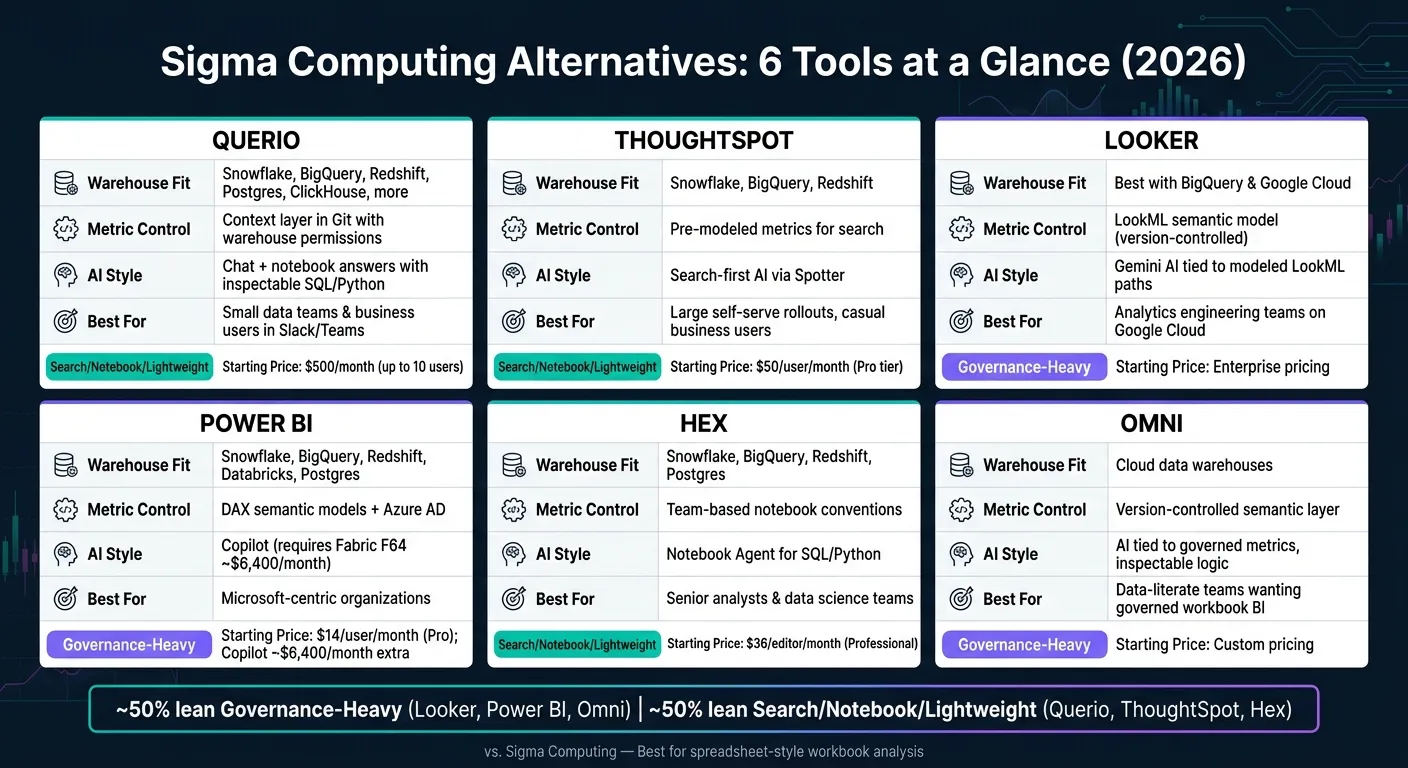
| Platform | Warehouse fit | Metric control | AI style | Best for |
|---|---|---|---|---|
| Querio | Snowflake, BigQuery, Redshift, Postgres, more | Context layer in Git with warehouse permissions | Chat + notebook answers with SQL/Python shown | Small data teams and business users |
| ThoughtSpot | Snowflake, BigQuery, Redshift | Pre-modeled metrics for search | Search-first AI with Spotter | Large self-serve rollouts |
| Looker | Best fit with BigQuery and Google Cloud | LookML semantic model | AI depends on modeled paths | Analytics engineering teams |
| Power BI | Snowflake, BigQuery, Redshift, Databricks, Postgres | DAX semantic models + Azure AD | Copilot tied to Fabric and model quality | Microsoft-based companies |
| Hex | Snowflake, BigQuery, Redshift, Postgres | Mostly team process, not one shared metric layer | Notebook Agent for SQL/Python | Senior analysts and data teams |
| Omni | Cloud warehouses | Version-controlled semantic layer | AI tied to governed metrics | Data-literate teams that want workbook BI |
If I had to sum it up in one line: Sigma is strongest for spreadsheet-style work, but these 6 options cover the gaps when you need tighter metric rules, chat-based access, or analyst-grade notebook work.
1. Querio
Querio is git-native analytics for data teams and their AI agents, built for mid-market B2B SaaS, healthcare, and finance companies that want governed self-serve analytics on live warehouse data. Its main draw is simple: it keeps analysis under control while staying close to the warehouse.
Warehouse connectivity
Querio queries live warehouse data directly. That means no CSV exports, no extracts, and no copied data sitting somewhere else.
It supports warehouses like Snowflake, BigQuery, Amazon Redshift, ClickHouse, and MotherDuck, along with databases such as Postgres, MySQL, and SQL Server.
Governance and semantic layer
Querio keeps context, metric definitions, and saved queries in a semantic layer made of plain files in a git repo your team owns. Those files can live in your dbt repo, so a model change and the context that describes it go in one pull request. So instead of hiding business logic inside a black box, it keeps things out in the open.
The agent can propose new definitions, but saving one opens a PR, and your repo's own reviewers decide whether it merges. On Snowflake, BigQuery, and Databricks, permissions come from your warehouse through per-user OAuth. Dashboards are also marked by trust level:
- trusted
- experimental
- team
That same setup shapes how the agent answers questions.
"Querio positions around governed analytics with a context layer over live data... Aimed at teams that want consistency without building the full semantic layer first." - Valiotti Data [1]
AI and agentic analytics
Every answer comes with inspectable SQL and Python inside a reactive notebook. Charts update on their own, and connected cells keep state between edits. In plain English, you can follow the work instead of just taking the output on faith.
The agent works in Slack and the Querio web app, and Claude, ChatGPT, Claude Code, and Cursor work from the same definitions through Querio's MCP server and CLI. An agent sees only what its user sees, and on Snowflake, BigQuery, and Databricks each query runs as that person.
Analyst workflow fit
Querio is a strong fit for data teams of one to five people dealing with ad hoc requests from finance and RevOps. Data teams work in notebooks, while business users ask questions in Slack and get answers they can audit later.
Automations run scheduled prompts or SQL and deliver the results to email, or to Slack on the Core plan. Querio has a free plan with unlimited users. The Core plan costs $2,499/month, or $25,000 a year billed annually. If you manage Sigma data models from code, our Querio vs Sigma comparison shows what changing one metric involves in each tool.
The next sections show how other platforms handle similar warehouse-native analytics needs.
2. ThoughtSpot
ThoughtSpot is a good match for teams that want search-first, governed self-serve instead of workbook-style analysis. Put simply, it leans more toward a search bar experience than Sigma does. That makes it a better pick for companies that need controlled access across a large group of casual users.
Warehouse connectivity
ThoughtSpot connects live to Snowflake, BigQuery, and Redshift from a single interface. As of mid-2026, it also integrates with Snowflake Cortex through MCP to extend its AI features [2].
Governance and semantic layer
ThoughtSpot asks analysts to model metrics and dimensions through a governed semantic layer ahead of time so non-technical users can self-serve through a search bar [6][3]. That upfront setup also affects the kinds of questions Spotter can answer well.
AI and agentic analytics
ThoughtSpot's AI engine is called Spotter, and it includes reasoning and Python forecasting [2]. It handles simple metric questions well, but multi-step analysis like funnel reporting still depends on pre-modeled measures [5].
Analyst workflow fit
ThoughtSpot fits large enterprises that want to roll out governed self-serve search to lots of casual users, especially finance and RevOps teams [6][3]. Pricing starts at $50 per user per month for the Pro tier [4], and costs can add up fast as usage grows.
3. Looker
Looker takes a model-first approach to BI, while Sigma leans into free-form workbook analysis. In Looker, analytics engineers set up the model in LookML, its own semantic layer, before the rest of the team starts self-serve analysis. That gives teams more consistency, but it also means less flexibility and more work up front.
Warehouse connectivity
Looker is the strongest fit for teams that already run on Google Cloud and BigQuery [2].
Governance and semantic layer
For teams that care most about governance, this tradeoff is often worth it. Looker’s main strength is governance: LookML standardizes metrics so “revenue” and “CAC” mean the same thing in every dashboard and query [2]. In 2026, Looker is still a main pick for teams that want governed metrics across top business intelligence tools and embedded surfaces [2].
The downside is rigidity. Analysts have to hand-write LookML models, and custom measures like funnels or retention need to be defined before the AI agent can query them with confidence [5].
AI and agentic analytics
Gemini lets users ask questions in plain English. But for more complex workflows, like funnels or retention, those paths still need to be modeled in LookML before the AI can answer in a reliable way [2][5].
Analyst workflow fit
Looker comes with enterprise pricing [2]. It fits best for large teams with dedicated analytics engineers, Google Cloud, and a strong need for governed metrics [4]. For smaller teams, or teams that aren’t very Google-native, LookML can slow things down.
4. Microsoft Power BI
Power BI works best for teams that already run on Azure and Microsoft 365. In that setup, it feels like a natural fit. Outside the Microsoft stack, though, Copilot and Fabric needs can pile up fast. So Power BI tends to shine when governed self-serve is the priority, not open-ended analyst exploration.
Warehouse connectivity
Power BI connects to Snowflake, BigQuery, Redshift, Databricks, and Postgres through DirectQuery for live access or Import Mode for stored data. If you use Microsoft Fabric, governance stays inside the Microsoft ecosystem.
Governance and semantic layer
Power BI handles governance through semantic models built in DAX, row-level security, and Azure AD policies. That setup helps teams keep metrics consistent across reports. The catch is that self-serve usually depends on solid upfront modeling and regular maintenance.
AI and Copilot
Power BI Copilot supports natural language analytics and DAX generation. But there’s a catch: how well it works depends a lot on how mature the semantic model already is. Full Copilot access requires Microsoft Fabric capacity at F64 or higher, which costs about $6,400 per month on top of the standard $14 per month Pro seats [2].
Analyst workflow fit
Power BI is a strong fit for large Microsoft-standardized teams with dedicated BI developers who can maintain DAX models. If that setup isn’t already in place, the overhead can feel heavy pretty fast. Add Fabric pricing on top, and adoption gets harder. That’s why Power BI often makes sense in enterprise settings, but it isn’t always the fastest route for analyst-led exploration.
5. Hex
Hex is a notebook-first analytics platform for teams that work in SQL and Python right on top of their warehouse, then turn that work into interactive data apps.
Warehouse connectivity
Hex connects live to Snowflake, BigQuery, Redshift, and Postgres. Queries run straight against the warehouse.
Governance and semantic layer
Hex relies on shared notebook habits to keep metrics aligned. So it tends to fit analyst-led teams better than companies that need one central place to lock metric definitions. In plain English, Hex shines when analysis begins with the analyst, not the business user.
AI and analyst workflow
Hex's Notebook Agent helps analysts write and debug SQL and Python inside notebooks. That setup works well for teams that publish analysis for other people to use, not just for their own internal work.
Analyst workflow fit
Hex is a strong fit for senior analysts and data teams who spend most of their time in notebooks and want a clean way to publish and share interactive analysis. Pricing starts at $36 per editor per month for the Professional plan and $75 per editor per month for the Team plan, with unlimited viewers on paid tiers [4].
This platform makes the most sense when the buyer wants SQL/Python notebooks plus published apps. It is less suited to spreadsheet-style analysis for non-technical users. If the team needs more business-user self-serve and a dashboard-first BI setup, the next platform is the closer match.
6. Omni
Omni is a good match for data-literate teams that want workbook-style analytics, SQL flexibility, and AI tied to governed metrics. It helps most when a team wants Sigma-like exploration but with tighter control over metrics and AI output. Omni sits on the governance-heavy side of BI, where metric consistency matters just as much as flexibility.
Warehouse connectivity
Omni connects directly to cloud data warehouses. It doesn't offer native store connectors like Shopify, so it's a better fit for teams that already pull data into a warehouse.
Governance and semantic layer
Omni keeps metric definitions in a version-controlled semantic layer. That means analysts, business users, and AI all work from the same governed logic.
### AI agents in analytics
Omni's AI answers questions using governed metrics, and users can inspect the logic behind each response. The tradeoff is setup time. You need mature modeling in place, and implementation can take weeks.
Analyst workflow fit
That same governed layer shapes the workbook experience too. Omni uses a workbook-style interface that blends SQL with spreadsheet logic, which makes it a strong fit for teams already comfortable with both. If your team cares a lot about trust and accuracy, that setup will feel like a good guardrail instead of red tape. Pricing is custom-quoted.
Omni works best when core business definitions are already in place and the team wants AI to stay inside those guardrails. So if you want exploratory analysis without giving up governed metrics, Omni makes a lot of sense.
Pros and Cons by Platform
Use this table to compare warehouse connectivity, governance, AI, and workflow fit at a glance. It lays out the main tradeoffs side by side, so you can see where each tool shines and where it asks for more setup, admin time, or technical skill.
| Platform | Key Pros | Key Cons | Best fit for Sigma users |
|---|---|---|---|
| Querio | Governed semantic/context layer; inspectable SQL and Python; live warehouse connections (Snowflake, BigQuery, Redshift); broad self-serve access for many users; definitions in a git repo with pull request review | Requires initial setup to build out the context layer; less suited to pure spreadsheet-style pivot exploration | RevOps and lean data teams needing verifiable, real-time warehouse analytics with self-serve access |
| ThoughtSpot | Search-driven interface; automated anomaly detection; Spotter AI works best when the semantic model is mature | High setup time; consumption-based pricing can scale steeply; no native writeback | Large enterprises with dedicated admin teams and casual business users who need search-first analytics |
| Looker | Industry-leading governance via LookML; version-controlled metrics; deep Google Cloud and BigQuery integration | Developer-heavy workflow; platform fees can be expensive | Central data teams requiring absolute metric consistency across BI and embedded products |
| Microsoft Power BI | Seamless Microsoft 365, Excel, and Teams integration; strong DAX semantic model; Pro seats start at $14/month [2] | Full AI Copilot requires Fabric F64 capacity, which is about $6,400/month [2] | Finance teams in Microsoft-centric organizations |
| Hex | Notebook-first (SQL, Python, R); strong for complex multi-step analysis; collaborative | Less intuitive for non-technical users; analyst-led rather than true self-serve | Data science and advanced RevOps workflows requiring deep, code-driven analysis |
| Omni | Semantic-layer-aware AI; mixes SQL and spreadsheet logic; AI answers stay inside governed metric definitions | Requires pre-defined metrics to be effective; custom pricing only | Data-literate teams that prioritize trust and governed definitions over raw exploration speed |
The pattern is pretty clear. Looker and Omni lean hard into control and metric discipline. ThoughtSpot leans into search-first self-serve. Querio and Hex land in different mid-market lanes, with Querio geared more toward governed warehouse access for business teams and Hex better suited to analyst-heavy, code-based work.
Use this summary to cut down the shortlist before matching tools to the team that will use them day to day. The next section does exactly that by mapping each option to team type.
Which Sigma Alternative Should You Choose?
The right pick comes down to one thing: how your team works with data. Use the comparison above to match each platform to the way your team works day to day. Start with where your data lives and how much control you need over metrics and access. From there, the right tool usually becomes pretty clear.
Pick the platform that fits your main workflow, not the one with the longest feature list.
- Choose Querio if your data team is small, your data lives in Snowflake, BigQuery, or Redshift, and business users are already asking questions in Slack.
- Choose Looker if you're on Google Cloud or BigQuery and need a centralized semantic layer to keep metric definitions consistent across dashboards and embedded analytics.
- Choose ThoughtSpot if search-first self-serve is the priority and your team can model metrics upfront.
- Choose Power BI if your company is Microsoft-centric and you need deep Fabric and Microsoft 365 integration. Budget carefully: full Copilot AI requires Fabric F64 capacity at roughly $6,400/month [2].
- Choose Hex if your workflows are analyst-led and code-heavy, requiring SQL and Python analysis beyond what a standard BI tool can handle.
- Choose Omni if core metrics are already defined and you want governed workbook-style BI on live warehouse data.
FAQs
How much setup do these tools usually require?
Setup depends on your platform and how far along your data stack is.
Warehouse-native tools like Querio are often the fastest to get live. They connect straight to your warehouse, so you can skip extracts and staging. That usually means a shorter setup than tools that need heavy modeling first.
More established platforms like Looker often need 4 to 12 weeks. The main reason is heavier semantic modeling, which adds more setup work up front.
On the other end, simpler tools like Metabase can often be ready in a few hours to a day.
Which option is best for a small data team?
It depends on how your team works. Metabase is often the easiest pick if you want fast, low-cost self-serve BI without a heavy semantic layer.
If you need governed, precise analytics, Querio can help small teams avoid analyst bottlenecks with centralized metrics plus inspectable SQL and Python. Sigma is a good fit for spreadsheet-style analysis on a clean warehouse, while Julius works well for ad-hoc, file-based tasks.
How should I compare AI features across these platforms?
Compare AI features across three areas:
- question interpretation and follow-ups
- schema or semantic grounding
- SQL transparency
Then look at governance too. Check whether warehouse permissions carry over, what the AI can see, and whether AI-written queries show up in audit logs.
After that, test each tool against your actual KPIs, like MRR, NRR, and churn. The goal is simple: see how close the answers are to the numbers in your data.