Business Intelligence
Best AI-powered self-service analytics
Compare leading AI self-service analytics platforms: features, integrations, governance, and pricing in one concise guide.

AI-powered self-service analytics tools are transforming how businesses analyze data. These platforms allow non-technical users to extract insights using natural language queries and automated analysis, eliminating dependence on IT teams. Here's a quick overview of what you need to know:
- Key Benefits: Faster decision-making, automated root cause analysis, anomaly detection, and consistent metric definitions.
- Market Growth: By 2026, the self-service analytics market is valued at $14.01 billion with an annual growth rate of 18.4%.
- Top Platforms: Querio, ThoughtSpot, Tableau, Microsoft Power BI, Looker, Amazon QuickSight, Domo, and Sisense.
Each platform offers unique features tailored to specific business needs, such as conversational analytics, real-time data querying, and embedded AI capabilities. For example, PepsiCo improved root cause investigations by 12x, and Novo Nordisk reduced analytics cycle time by 88% using these tools. Below, we explore the strengths, integrations, and pricing of eight leading platforms.
How AI Tools can Finally Solve the Self-Service Analytics Problem?
::: @iframe https://www.youtube.com/embed/spGrwChIcPc :::
sbb-itb-284a532
1. Querio
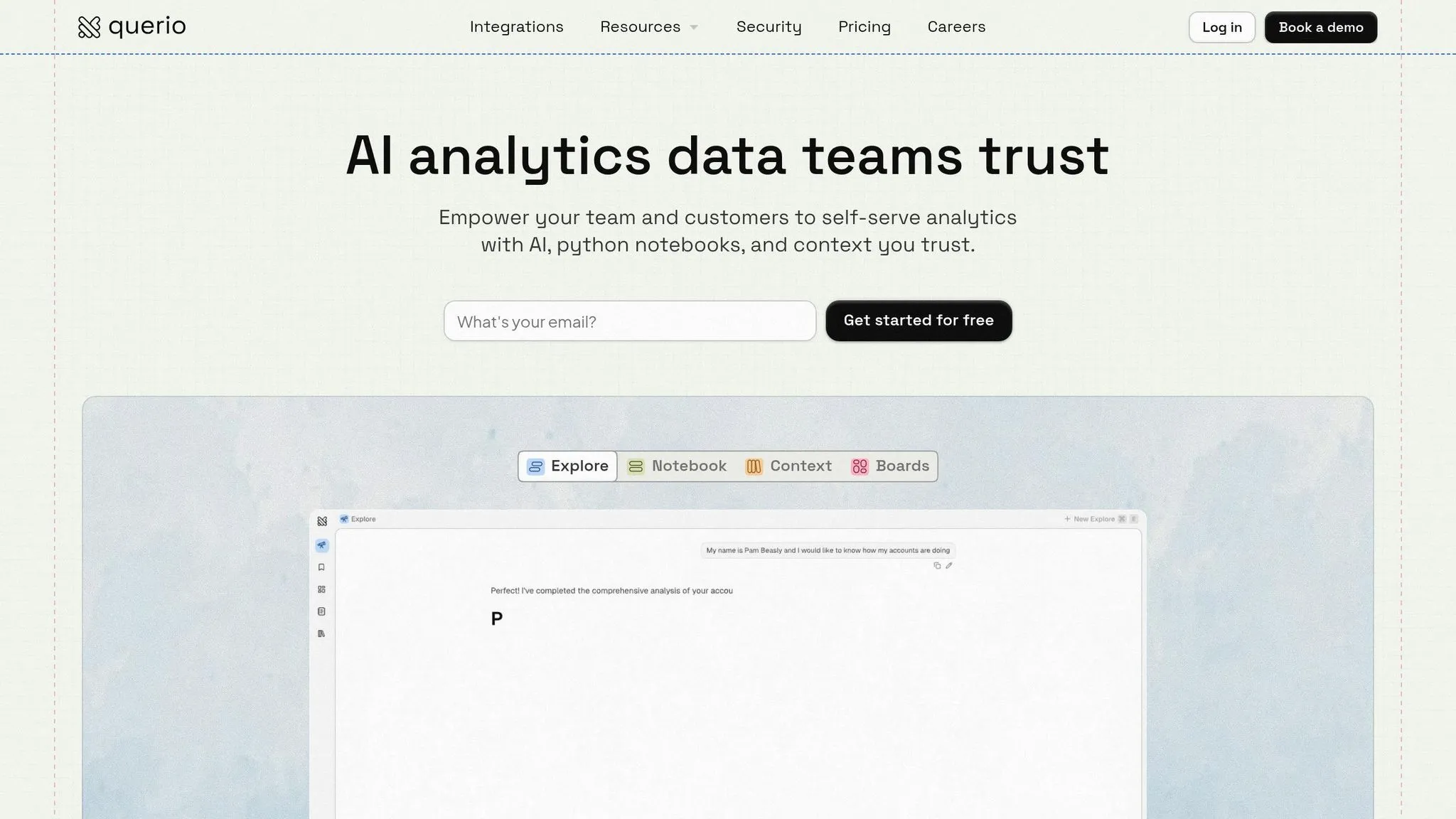
Querio is an AI-powered analytics workspace designed to make data exploration accessible to everyone. Instead of relying on dashboards or writing SQL queries, users can simply ask questions in plain English and get instant answers, complete with inspectable code. Launched in 2024, Querio aims to break down technical barriers, positioning itself as a conversational analytics tool that connects business users directly to their data.
AI/ML Capabilities
At its core, Querio leverages a generative AI engine that translates natural language inputs into precise SQL or Python code. For added transparency, the platform displays the code behind every query. Its standout feature, the "Metric Assistant", automatically identifies and defines key business metrics from connected data warehouses. This eliminates the need for manual setup, creating a semantic layer that simplifies complex calculations. For example, a finance team could ask, "What’s our ARR growth this quarter?" and not only get the answer but also see the detailed calculation logic for future use.
"Saved our team 20 hours/week on reporting" - Finance Director at Scale Ventures
Querio has received glowing feedback, earning a 4.8/5 rating on G2 from over 150 reviews and being named a G2 Grid Leader in Augmented Analytics in Fall 2025. Forrester Wave also recognized Querio as a leader in AI BI in Q1 2026, giving it a 4.7/5 score for innovation. While users appreciate its natural language interface, some initially faced challenges with complex multi-table joins - issues that were resolved with the v2.1 update.
Data Warehouse Integration
Querio integrates seamlessly with major cloud data warehouses like Snowflake, BigQuery, Redshift, ClickHouse, and Databricks. Using secure, read-only credentials, it connects directly to these warehouses, running queries in real time without requiring data extraction or duplication. It also supports relational databases such as PostgreSQL, MySQL, MariaDB, and Microsoft SQL Server, enabling federated queries across multiple sources. Teams can start analyzing data within hours of connecting their first warehouse, with no need for ETL pipelines or data migration.
Governance and Semantic Layer
The platform includes a shared context layer to define joins, metrics, and terminology once, ensuring consistent analysis across the organization. This versioned logic prevents the common issue of "metric chaos", where different teams use conflicting calculations for key metrics. Querio also prioritizes security, maintaining SOC 2 Type II compliance and adhering to GDPR standards. Features like row-level security, audit logs, and SSO integrations provide enterprise-grade access control. This setup empowers business users with self-service analytics while allowing data teams to maintain control over definitions and security protocols.
Pricing Model
Querio offers flexible pricing to meet the needs of different organizations:
- A free tier supports up to 5 users, 1 data source, and limited queries, making it ideal for small teams or early adopters.
- The Pro plan costs $49 per user per month (billed annually) and includes unlimited queries with standard integrations.
- Enterprise pricing starts at $10,000 per month for 50+ users, adding advanced governance tools and dedicated support.
Unlike traditional per-user licensing models, Querio uses a per-workspace pricing structure, removing usage limits or seat restrictions at higher tiers.
Best Use Cases
Querio stands out for its ability to save time and improve accuracy, particularly in finance, marketing, and sales analytics. It’s ideal for teams with 50–500 employees who rely on modern data warehouses. Here are some examples:
- Finance teams use it for FP&A forecasting and budget variance analysis.
- Marketing teams evaluate campaign ROI without waiting for analyst support.
- Sales teams forecast pipeline performance through conversational queries.
Many companies report saving over 20 hours a week previously spent on manual reporting, making Querio a valuable tool for scaling analytics access while maintaining consistency and precision.
2. ThoughtSpot
ThoughtSpot stands out as a search-driven analytics platform, designed to make data insights accessible to everyone - from top-level executives to frontline employees. By using a conversational interface, it simplifies the process of exploring business data, delivering instant visualizations and actionable insights.
AI/ML Capabilities
At the heart of ThoughtSpot’s AI features is its conversational assistant, Spotter. This tool allows users to ask questions in plain, everyday language and get immediate, clear answers. The platform also includes the SpotIQ engine, which automatically detects trends, anomalies, and root causes without needing predefined settings. For instance, if a key performance indicator (KPI) changes, SpotIQ digs into the data to uncover the factors behind the shift, saving teams from long, manual analyses. These AI-powered tools make understanding and leveraging data faster and more intuitive.
Data Warehouse Integration
ThoughtSpot connects directly to cloud-based data warehouses, ensuring users always work with the most current information while avoiding the hassle of duplicating data. Its embedded analytics feature, ThoughtSpot Everywhere, takes things further by integrating AI-driven insights into external apps. This transforms static dashboards into dynamic, interactive tools, making data more engaging and useful across a range of business operations.
Best Use Cases
ThoughtSpot proves particularly effective in scenarios like:
- Retail analytics: Store managers can dive into transaction-level data in real time, enabling quicker decisions without waiting for scheduled reports.
- Financial reporting: Teams can perform faster and more detailed analyses, leading to quicker, data-backed decision-making.
The platform’s ability to provide instant access to data for frontline workers makes it a powerful tool for organizations with widely distributed teams.
3. Tableau
Tableau, widely known for its advanced visual analytics, has stepped up its game with integrated AI features. Named a Leader in the 2025 Gartner Magic Quadrant for Analytics and Business Intelligence Platforms, Tableau continues to transform how users interact with and act on data through AI-driven tools [6]. These upgrades simplify data analysis, turning user input into actionable insights.
AI/ML Capabilities
Tableau Agent (formerly Einstein Copilot) is the platform's generative AI assistant designed to convert natural language into interactive visualizations and calculations. For instance, users can simply ask, "Show me monthly revenue trends by region", and the Agent will create the visualization instantly [5]. It also automates complex data prep tasks by generating multi-step workflows, cutting down on manual effort.
Tableau Pulse takes automation further by delivering insights directly to users. This AI-powered tool monitors key metrics and provides plain-language explanations for changes. For example, if sales decline, Pulse analyzes the root causes and sends alerts via Slack or Microsoft Teams [5][7][8]. This means users no longer need to constantly check dashboards - the insights find them.
In addition, Agentic Analytics, part of Tableau Next, introduces specialized autonomous skills. These include "Concierge" for root cause analysis and "Inspector" for trend monitoring, all safeguarded by the Agentforce Trust Layer [5][6].
Data Warehouse Integration
Tableau integrates seamlessly with cloud-based data warehouses, using a Data Index to interpret the context of your data. This index includes metadata, descriptions, and data types, helping Tableau Agent generate more accurate visualizations by understanding what each field represents [3]. Administrators can enhance results by hiding irrelevant fields, adding clear labels, and ensuring data types are correctly specified [3].
Governance and Semantic Layer
To support its AI capabilities, Tableau employs Tableau Catalog, an enterprise metadata system that indexes workbooks, data sources, and flows. This system ensures data discoverability and lineage. Combined with a governed semantic layer, it provides consistent metric definitions across the organization. This means when someone queries "revenue", the calculation is the same for everyone [8].
Best Use Cases
Tableau's features are ideal for organizations seeking custom, complex visualizations that go beyond basic charts. For example, RetailMax Inc., a mid-market fashion retailer, used Tableau in March 2026 to analyze customer journey data. They discovered that mobile users who visited stores within 48 hours had three times the lifetime value of other customers. This insight prompted a mobile app redesign, leading to a 28% increase in conversion rates. The marketing team achieved this without relying on IT, thanks to Tableau's intuitive drag-and-drop interface [9].
The platform also shines in proactive monitoring scenarios. Teams can rely on Tableau Pulse to track essential KPIs and receive automatic notifications when trends shift or thresholds are met, eliminating the need for constant dashboard checks [7].
4. Microsoft Power BI
Microsoft Power BI is a natural fit for organizations already invested in Microsoft tools like Microsoft 365, Azure, or Dynamics 365. Its seamless integration within the Microsoft ecosystem makes it a popular choice, and it has been recognized by Gartner for its enterprise-grade analytics capabilities - all at an accessible price point [11].
AI/ML Capabilities
Power BI offers a range of AI-driven tools that require no coding. For instance, the Key Influencers visual uses regression analysis to uncover factors impacting specific metrics, while the Decomposition Tree provides AI-guided root cause analysis. Features like Smart Narrative automatically generate plain-language summaries of data, and Anomaly Detection identifies outliers in time-series data [10].
The platform’s Copilot for Power BI takes these features even further. It can create multi-page reports based on natural language descriptions and generate DAX measures through conversational prompts. With support for prompts up to 10,000 characters, Copilot simplifies complex analysis. A real-world example: GlobalTech Solutions’ CFO, Sarah Martinez, used Power BI to monitor production efficiency in real time, uncovering a quality issue that saved the company $2 million in potential recall costs [9].
Data Warehouse Integration
Power BI's advanced AI features are complemented by its data integration capabilities. It uses OneLake as a unified data hub, bringing together disparate data sources into a single, governed system. This integration is a key part of Microsoft Fabric [11][13]. Power BI can handle petabyte-scale data ingestion and works seamlessly with Azure Synapse, Dynamics 365, and other Azure services. Additionally, its integration with Microsoft 365 ensures that insights are accessible directly within tools like Teams, Excel, PowerPoint, Outlook, and SharePoint, making it easy for users to explore data within their existing workflows [11][12].
"At Walmart, we use a myriad of different vendors in our technology stack, so having a tool like Power BI that can bring everything together was critical."
Walmart’s Director, Micah Dail, highlighted Power BI’s importance in unifying diverse vendor data and consolidating their technology stack [11].
Governance and Semantic Layer
Power BI is designed with governance in mind. It integrates with Microsoft Purview to provide automated data discovery, cataloging, and sensitivity labeling across the data estate [11]. The platform’s semantic modeling ensures consistent metric definitions, and routing queries through this semantic layer can reduce data errors by up to 66% [14].
This combination of strong governance and reliable data modeling makes Power BI a practical choice for businesses of all sizes.
Pricing Model
| Plan | Price (USD) | Target Audience |
|---|---|---|
| Free Account | $0 | Individual users creating personal reports [11] |
| Power BI Pro | $14.00 per user/month | Users publishing and sharing reports (included in M365 E5) [11] |
| Power BI Premium Per User | $24.00 per user/month | Individual users needing enterprise-level features [11] |
| Power BI in Microsoft Fabric | Variable (Capacity-based) | Teams sharing reports with non-paid users via shared capacity [11] |
Power BI’s flexible pricing ensures that organizations of all sizes can find a plan that fits their needs. Companies that integrate Power BI into their existing Microsoft environments report a 340% faster time-to-value compared to standalone implementations [9].
Best Use Cases
Power BI is particularly effective in healthcare analytics. For example, a Regional Medical Center led by Chief Medical Officer Dr. Lisa Park used Power BI to track patient outcomes across 12 facilities. By identifying readmission patterns, the center introduced new protocols that reduced readmissions by 23% [9].
The platform also excels in improving operational efficiency. At Lumen, Jerod Ridge, Director of Data Engineering, shared:
"In the last year alone, we've eliminated almost 10,000 manual hours through Microsoft-powered automation. That's time we now spend creating business value."
5. Looker
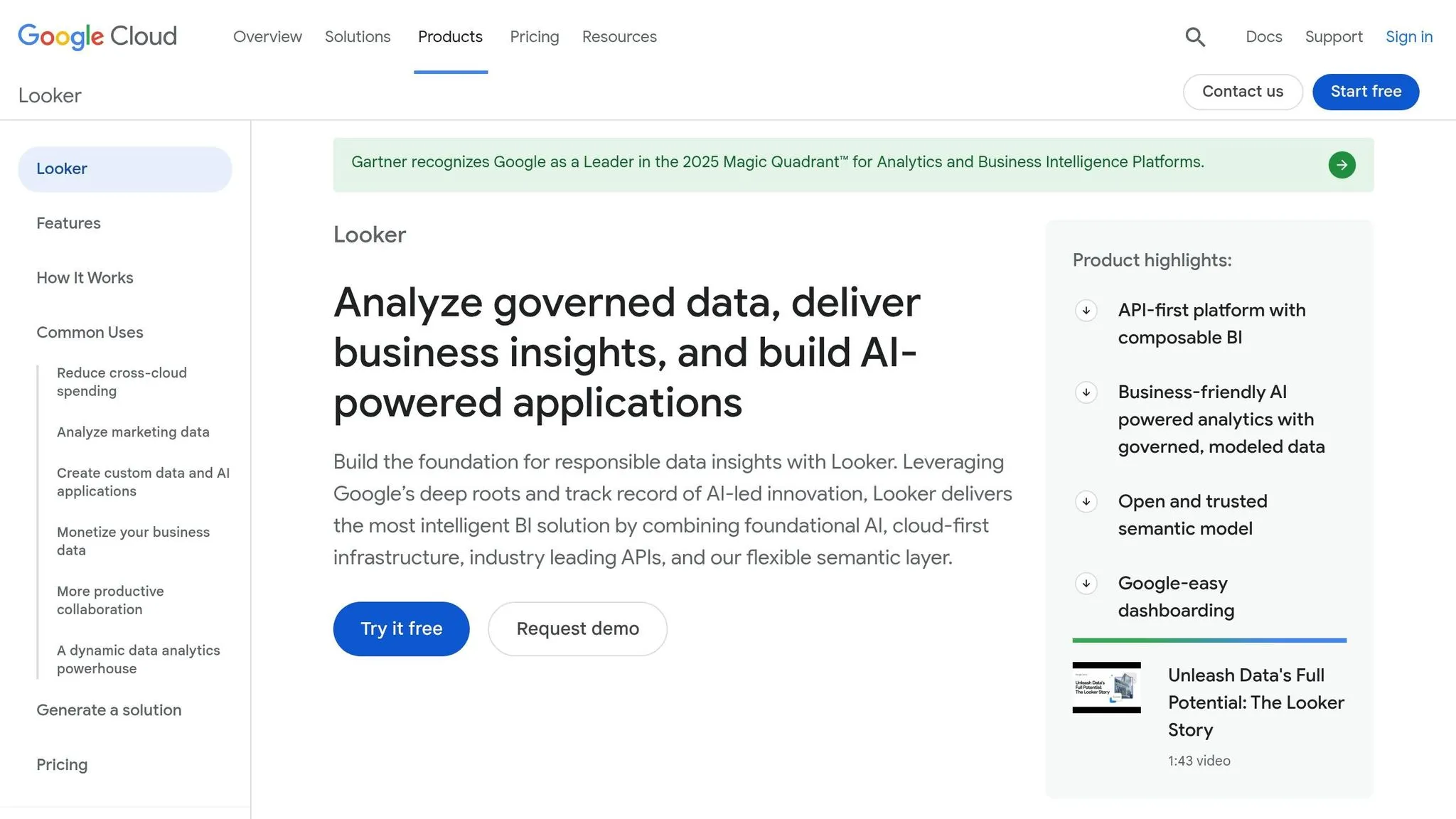
Looker’s code-based semantic layer, known as LookML, offers a centralized approach to managing metric definitions by using Git for version control. Peter Bailis from Google Cloud highlights its strength: “Looker’s unique foundation, combined with Google’s AI, delivers intelligent insights and automates analysis.” [15]
AI/ML Capabilities
The Looker suite, powered by Gemini, integrates AI to simplify everyday analytics tasks. It features tools like:
- Visualization Assistant: Create charts and dashboards using natural language commands.
- Formula Assistant: Enables non-technical users to build calculated fields easily.
- Code Interpreter: Assists with forecasting and anomaly detection through natural language inputs.
Additionally, Looker introduced Looker Reports, which include a drag-and-drop interface and direct connections to Excel and Google Sheets, making ad hoc analysis more accessible. [15]
Data Warehouse Integration
Looker’s in-database architecture processes queries directly within your cloud data warehouse, ensuring efficiency and scalability, especially when paired with Google BigQuery. It connects to over 1,000 data sources through Looker Studio connectors, and its Conversational Analytics API allows developers to embed natural language query features into custom applications. [15] [16]
Pricing Model
Looker’s pricing starts at approximately $35,000 annually (around $2,900 per month) for entry-level deployments. Enterprise-level plans begin at about $60,000 per year. Pricing is based on platform tiers - Standard, Enterprise, or Embed editions - and user-based licensing. For precise costs, contacting Google Cloud sales is recommended. [16] [17] [18]
Best Use Cases
Looker is particularly well-suited for embedded analytics, making it ideal for companies wanting to integrate white-labeled dashboards into their SaaS products. It’s also a strong choice for environments where consistent metric definitions are crucial, as well as for operations centered around Google Cloud Platform (GCP). The platform’s advanced governance features and seamless integration with BigQuery and BI Engine acceleration provide teams - from product managers to executives - with fast, actionable insights. [17]
Next, we’ll explore another platform that’s reshaping self-service analytics.
6. Amazon QuickSight
Amazon QuickSight taps into AWS's cloud infrastructure to deliver self-service analytics. With over 100,000 customers, it offers AI-driven business intelligence that turns scattered data into actionable insights [19]. Its advanced AI features simplify and accelerate data analysis.
AI/ML Capabilities
QuickSight's generative AI allows users to ask natural language questions like, "What were our top five products?" and receive instant, data-backed answers. This feature can make certain tasks up to 10 times faster compared to traditional spreadsheet methods [19][20][22].
The platform includes built-in AI agents, such as Quick Research and Quick Flows, which enable conversational data exploration and support over 40 application integrations [19][20]. Advanced tools like key driver analysis, forecasting, and narrative explanations help users uncover the reasons behind trends - no machine learning expertise required [19][22].
QuickSight's impact is clear in real-world examples. For instance, Docebo saw a five-fold increase in analytics adoption after embedding QuickSight, while Defontana accelerated its delivery of advanced analytics to customers by 2–3 times using the platform's embedded features [19].
Data Warehouse Integration
QuickSight seamlessly integrates with AWS services like Amazon Redshift, S3, and RDS, offering real-time and secure data access. Users can connect via auto-discovery or manual JDBC/ODBC connections [23][20]. Depending on their needs, they can opt for Direct Query for real-time analytics on large datasets or use the SPICE in-memory engine for fast, high-performance visualizations [23].
For secure data connections, QuickSight supports Virtual Private Cloud (VPC) setups and allows IP range configurations for added protection. It adheres to stringent compliance standards, including FedRAMP, HIPAA, PCI DSS, ISO, and SOC, ensuring enterprise-grade security [19][20][23].
Pricing Model
QuickSight offers a flexible pay-as-you-go model starting at $24 per user, per month [18]. Pricing varies based on user roles and access to advanced features:
| User Type | Standard Price | Pro Price (with GenAI) |
|---|---|---|
| Author | $24/user/month | $40/user/month |
| Reader | $3/user/month | $20/user/month |
| Admin | $24/user/month | $40/user/month |
For larger deployments, Reader Capacity Pricing provides predictable costs, with packages starting at $250/month for 500 sessions and scaling up to $258,000/year for 1,600,000 sessions [24][25]. Studies suggest QuickSight can reduce BI costs by up to 80% over three years while delivering a potential return on investment exceeding 600% [19].
This pricing structure makes QuickSight a cost-effective option for organizations seeking scalable embedded analytics.
Best Use Cases
QuickSight is an excellent choice for companies already invested in the AWS ecosystem, particularly those using Amazon Redshift for data warehousing. Its capacity pricing model is especially appealing for SaaS products requiring embedded analytics, where traditional per-seat licensing may not be practical for large user bases [24][25].
The platform's workflow automation capabilities allow users to take action directly from dashboards through integrated applications [19][21]. Additionally, its ability to process both structured and unstructured data via Quick Index makes it a strong fit for enterprises handling diverse data types [20].
Next, we'll dive into another self-service analytics platform to see how it compares.
7. Domo
Domo is a cloud-based business intelligence platform designed to integrate AI into daily decision-making. It centralizes data, making it accessible to teams without requiring advanced technical skills.
AI/ML Capabilities
Domo uses AI to simplify complex tasks, enabling users to make faster, data-driven decisions. Tools like the AI SQL Assistant and Beast Mode Assistant allow non-technical users to turn plain language requests into SQL queries and advanced calculations. This eliminates the need to learn complex query syntax - users can simply ask questions and receive formatted results [26].
The platform also features DomoGPT, a private model suite that processes sensitive data securely within the Domo Cloud. Users can query and summarize data without exporting it [26]. For forecasting, Domo leverages historical data to automatically identify trends, seasonality, and confidence ranges - no manual model building required [26].
Another standout feature, FileSets, uses AI to analyze unstructured data like images, documents, and transcripts, turning them into actionable insights [26]. Additionally, Domo supports integration with external AI models from providers such as OpenAI, Anthropic, Databricks, and Amazon Bedrock, while also offering management of Domo-hosted models [26] [28].
Governance and Semantic Layer
Domo takes a governance-first approach with its "Semantic-layer-aware AI." Instead of querying raw database tables, AI interacts with governed metric definitions, ensuring consistent and reliable answers [29]. The platform also supports Federation, enabling organizations to query data directly from sources like Snowflake and BigQuery without the need to move it [28].
"Domo provides a single version of the truth that is readily available to whoever needs it."
– David Damitz, Global Business Intelligence Team Lead [26]
Pricing Model
Domo uses a credit-based pricing system. Typically, one credit covers 1 million rows of stored data, with credits consumed based on data volume and refresh frequency [18]. On average, annual costs hover around $134,000, based on 84 analyzed deals, though enterprise-level contracts can climb to $1,555,000 annually [18]. A 30-day free trial is available for new users [27].
Best Use Cases
Domo is ideal for organizations needing real-time data access across departments. Companies using Domo have reported a 12% increase in attributed revenue and annual savings of $250,000 in shipping costs, thanks to its real-time capabilities [28]. Analysts estimate that businesses can achieve a payback period of under six months with Domo [28].
The platform is particularly suited for businesses that want to integrate their own AI models while ensuring strong data governance.
"Domo is the single thing that helps us make proper decisions day to day… We're very fortunate to have a tool we can look at every day to get the data we need to make decisions."
– Tanner Lamb, Chief Financial Officer at Cozy Earth [26]
Next, we’ll take a closer look at another self-service analytics platform.
8. Sisense
Sisense stands out in the realm of AI-powered self-service analytics by focusing on embedded analytics. This makes it a popular choice for software vendors and SaaS developers looking to integrate AI-driven analytics directly into their applications [33][35]. With over 400 data connectors and more than 500 5-star reviews, it’s recognized for its flexibility and performance [30][32].
AI/ML Capabilities
Sisense offers a suite of AI tools designed to simplify data analysis:
- AI Assistant: Enables conversational queries for intuitive data exploration.
- Sisense Narratives: Automatically generates text summaries for visualizations.
- Analyze It: Explains data changes, identifies trends, and provides forecasts.
- GenBI: Instantly creates multi-page dashboards with anomaly explanations.
- Semantic Enrichment: Uses AI to generate descriptions for data model tables and columns [31][32][33].
"With Sisense's AI capabilities, we are able to easily translate complex data, streamline interpretation by identifying gaps and trends, and quickly identify key impacts during clinical trials."
– Tanya du Plessis, Chief Data Strategist and Solutions Officer, Bioforum [32]
Data Warehouse Integration
Sisense integrates seamlessly with major data warehouses like Snowflake, Amazon Redshift, Google BigQuery, and Azure Synapse [34]. Its Direct Access feature allows users to query data in place, avoiding unnecessary duplication or movement [33]. Users can choose between:
- Live connections for real-time querying.
- Elasticube for high-performance caching and complex transformations.
- Hybrid approaches that combine the best of both methods [34].
These integrations are enhanced by advanced governance tools, ensuring data consistency and reliability.
Governance and Semantic Layer
Sisense employs an AI-powered Knowledge Graph to map relationships between data tables. This governance framework ensures that AI applies accurate business definitions, maintaining consistency across analytics outputs while allowing for flexible data exploration [33].
Pricing Model
Pricing for Sisense starts between $10,000 and $25,000 annually, with enterprise plans tailored to the scale of deployment and user requirements [33]. A 7-day free trial is available for those who want to explore the platform’s capabilities [30][32]. Security certifications include SOC 2 Type II, ISO 27001, and ISO 27701, reflecting its commitment to data protection [30].
Best Use Cases
Sisense is ideal for organizations aiming to embed AI-powered analytics within their applications. Its developer-first approach, featuring the Compose SDK and API-first architecture, enables teams to create interactive analytics experiences with minimal coding effort [30][35].
"We're trying to enable our teams and coaches around the country to think in new ways and to look at data in different ways, and Sisense is helping us to do that."
– Patrick Murphy, Senior Director of Data and Product, USA Swimming [32]
Platform Comparison: Strengths and Weaknesses
::: @figure 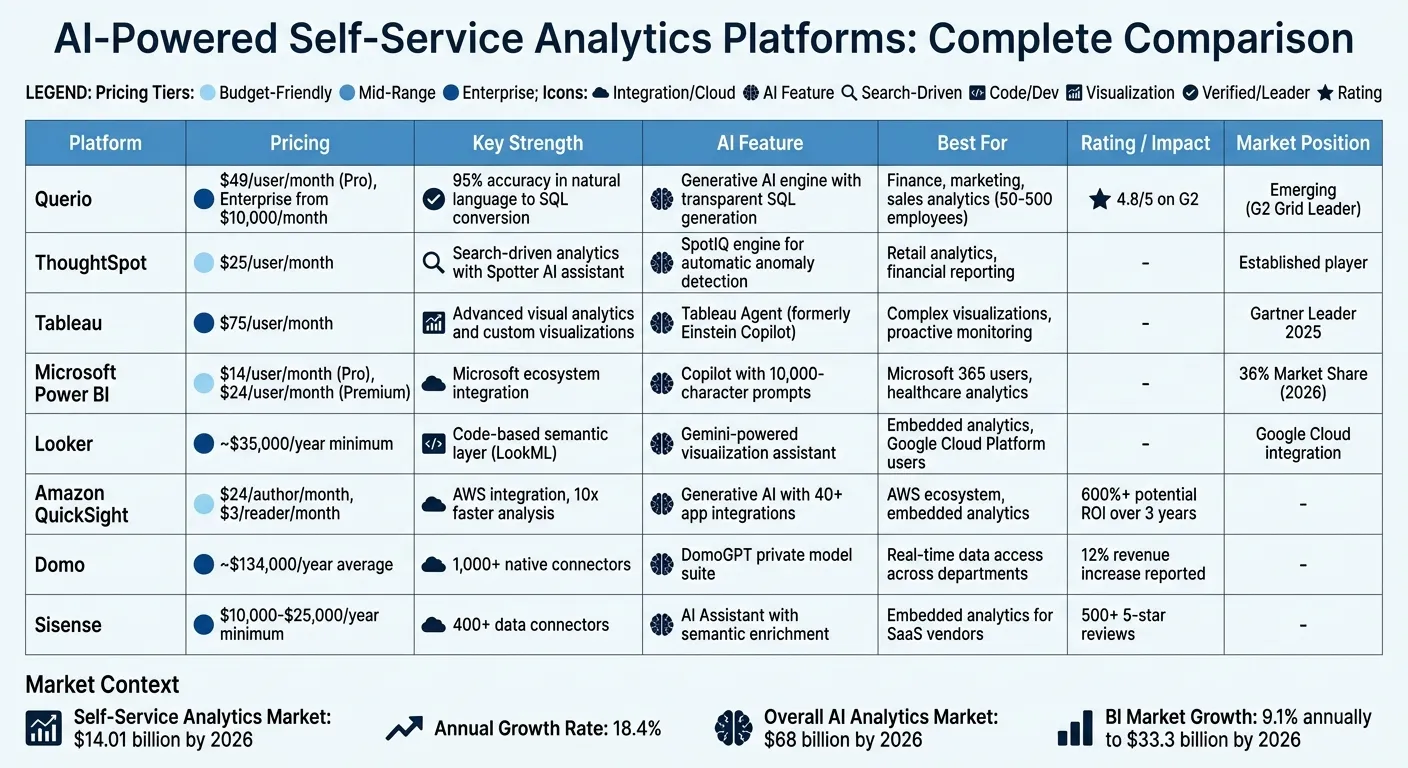 {AI-Powered Self-Service Analytics Platforms Comparison: Features, Pricing & Best Use Cases}
:::
{AI-Powered Self-Service Analytics Platforms Comparison: Features, Pricing & Best Use Cases}
:::
When it comes to AI-powered analytics platforms, each has its own strengths and trade-offs. Here's a closer look at some of the leading tools, helping organizations find the best fit for their needs.
Power BI commands an impressive 36% market share as of 2026, thanks to its strong integration with the Microsoft ecosystem and a competitive starting price of $14 per user per month [17]. However, its DAX modeling language can be a hurdle for beginners, and users may need familiarity with Microsoft's suite of tools to maximize its potential [17].
Tableau shines in visual storytelling and geospatial analysis. Priced at $75 per user per month, it’s a go-to for teams that need advanced visualization. That said, its workbook-centric governance model and higher costs could be a concern for budget-conscious teams [17][36].
Looker takes a unique approach with its "metrics as code" framework using LookML, which ensures consistency in reporting. It's highly compatible with Google Cloud and BigQuery, but its reliance on engineering expertise and limited ad-hoc flexibility might deter some users [17][36].
ThoughtSpot focuses on search-driven analytics with natural language processing capabilities. At $25 per user per month, it’s great for teams with well-structured data but may not suit those lacking robust data modeling.
Querio offers a transparent SQL generation feature with an impressive 95% accuracy in converting natural language to SQL. At $29 per user per month, it’s a solid choice for SQL-savvy teams, though its smaller user community could be a drawback compared to more established platforms [4].
Amazon QuickSight provides an affordable entry point at $3 per reader per month with session-based pricing, making it a cost-effective option for organizations with occasional analytics needs [1].
Domo excels in connectivity, offering over 1,000 native connectors for real-time dashboards. However, its pricing model and somewhat dated interface might pose challenges for some teams [3][36].
Sisense is tailored for embedded analytics, boasting over 400 data connectors. Starting at $10,000 annually, it’s particularly suitable for software vendors and SaaS developers [30][32][33].
The business intelligence market is projected to reach $33.3 billion by 2026, growing at an annual rate of 9.1%. AI features are becoming increasingly important, with their adoption tripling year-over-year [17]. However, the total cost of ownership for these platforms varies significantly, depending on add-ons and capacity requirements.
Choosing the right platform often comes down to aligning its strengths with an organization’s technical expertise and infrastructure. For example, companies deeply embedded in the Microsoft ecosystem may find Power BI to be the most seamless option, while those leveraging Google Cloud might prefer Looker [17][36]. Additionally, teams focused on governance should establish clear naming conventions and certify datasets early to avoid "governance sprawl", where unregulated reports proliferate [17].
Ultimately, the right choice empowers teams to make smarter, data-driven decisions tailored to their unique needs.
Conclusion
The world of AI-powered self-service analytics is evolving rapidly, and one tool seems to rise above the rest. With the self-service analytics market projected to hit $14.01 billion by 2026 [2] and significant adoption hurdles still present [1], finding a solution that fits seamlessly with your team's workflow is more important than ever.
Looking at the bigger picture, the broader AI analytics market is estimated to grow to $68 billion by 2026 [4]. Additionally, 81% of consumers believe AI is now a critical component of modern service and support [37]. This is where Querio shines. It empowers teams to ask questions and get actionable insights instantly - no need to wait for data experts. In 2026 benchmarks, Querio demonstrated an impressive 95% accuracy rate in converting natural language into SQL. Plus, its transparent SQL generation feature allows teams to review and understand how their queries are executed. A great example? A finance team using Snowflake and Querio in early 2026 reported a 70% reduction in the time analysts spent creating compliant forecasts, thanks to Querio's agentic notebooks [4].
FAQs
::: faq
How do I know if Querio is a good fit for my team size and data stack?
Querio works well for teams of any size and handles various data setups with ease. It allows unlimited viewers and connects effortlessly with popular data warehouses such as Snowflake and BigQuery. By prioritizing transparency, governance, and natural language queries, Querio is built to be simple to use, no matter how complex your data or team structure is. Its flexible pricing model and ability to deliver real-time insights make it a great fit for a wide range of organizations. :::
::: faq
What do I need to set up Querio with my data warehouse?
Getting Querio up and running with your data warehouse requires a few essential steps to ensure your data is ready, reliable, and secure. Here's what you need to do:
- Evaluate your data sources: Check if your data sources are compatible with Querio and ensure they are easily accessible.
- Connect Querio to your data warehouse: Querio works with platforms like Snowflake, BigQuery, and Databricks. Establish a connection with your chosen system.
- Clean and standardize your data: Make sure your data is accurate and consistent to avoid errors when generating insights.
- Focus on security and governance: Protect your data by adhering to security protocols and governance policies.
- Train your team: Help your team get familiar with Querio’s natural language querying tools so they can make the most of its features.
By following these steps, you’ll set the stage for smooth integration and uncover valuable insights from your data. :::
::: faq
How does Querio keep metric definitions consistent and secure?
Querio uses a centralized semantic layer to ensure that metric definitions remain consistent and secure across the organization. This layer acts as a single source of truth, applying data governance rules like row-level access controls and column masking.
By doing this, Querio ensures that every team works with reliable, unified data, reducing discrepancies and confusion. At the same time, sensitive information stays protected, striking a balance between accessibility and security. :::