Business Intelligence
Best Embedded Analytics Tools for SaaS (2026): Top Options Compared
Compare embedded analytics for SaaS: governance, AI transparency, warehouse-native connections, embedding fit, and pricing.

Looking for the best embedded analytics tools for SaaS in 2026? Here's what you need to know upfront:
The top tools - Querio, Looker, ThoughtSpot, Hex, Tableau, Power BI, Sisense, and GoodData - stand out for their ability to deliver reliable metrics, AI-powered features, and smooth integration with modern data warehouses like Snowflake and BigQuery. But not all tools are created equal, and the right choice depends on factors like governance, scalability, and pricing.
Key Highlights:
- Querio: AI-driven, governed analytics with flat-rate pricing and fast setup (2–4 weeks). Ideal for scaling SaaS teams.
- Looker: Strong governance via LookML but has a steep learning curve and high costs.
- ThoughtSpot: Search-first AI but requires pre-modeled data and has variable pricing.
- Hex: Great for SQL/Python analysts but lacks polished customer-facing dashboards.
- Tableau: Excellent visualizations but expensive per-user pricing for large deployments.
- Power BI: Affordable entry, strong Azure integration, but complex embedding for SaaS.
- Sisense: Developer-friendly with deep customization but high complexity and costs.
- GoodData: Strong governance via MAQL but challenging to scale due to workspace-based pricing.
Quick Comparison Table:
| Tool | Governance | AI Features | Warehouse Integration | Embedding Fit | Pricing Model | Setup Time |
|---|---|---|---|---|---|---|
| Querio | Strong | AI with inspectable SQL/Python | Live connections to Snowflake, BigQuery, etc. | API, iframe, SDK | Flat-rate unlimited users | 2–4 weeks |
| Looker | Strong (LookML) | AI aligned with LookML | BigQuery-native, broad support | iFrame, API | Per-user pricing | 4–8 weeks |
| ThoughtSpot | Moderate | Search-driven AI | Snowflake, BigQuery, Redshift | iFrame, SDK | Usage-based pricing | 4–8 weeks |
| Hex | Limited | AI for SQL/Python | Live connections | Limited embedding | N/A | Moderate |
| Tableau | Moderate | AI insights (add-ons) | Live connections | iFrame (Tableau Embedded) | Per-user pricing | 4–8 weeks |
| Power BI | Moderate | AI with GPT-4 (Copilot) | Strong in Azure ecosystem | Capacity-based embedding | Starts at $735.91/month | 2–4 weeks |
| Sisense | Moderate | Generative AI, NLP | ElastiCube engine (cached data) | SDK, iframe | Per-user licensing | 8–14+ weeks |
| GoodData | Strong (MAQL) | Governed AI | Snowflake, BigQuery, Redshift | iFrame, SDK, Web Components | Workspace-based pricing | 4–8 weeks |
Key Takeaway:
If you're a B2B SaaS company prioritizing governed, live analytics with predictable costs, Querio is a standout choice. It combines a governed semantic layer, AI transparency, and flat-rate pricing, making it perfect for scaling without breaking the bank. For more complex needs or larger teams, tools like Looker and GoodData offer advanced governance but require more resources to implement and maintain.
::: @figure 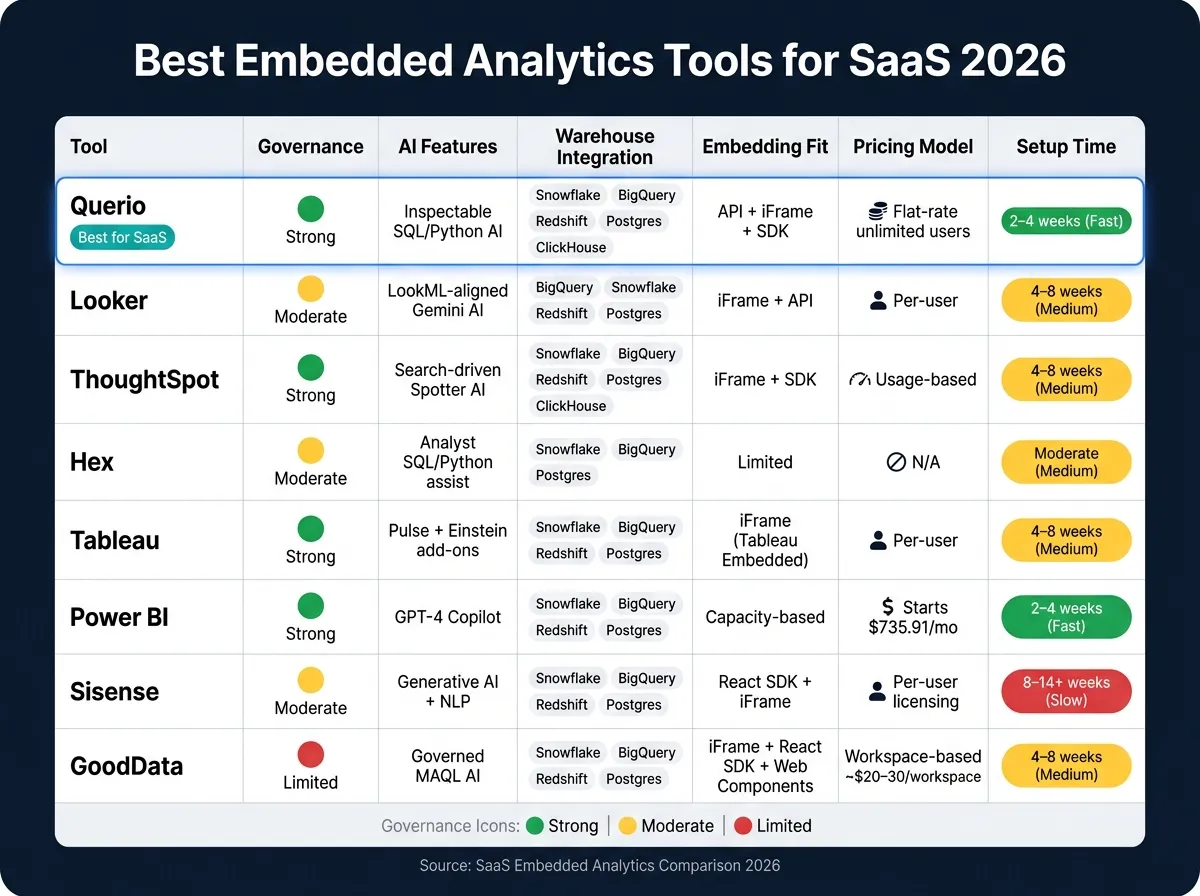 {Best Embedded Analytics Tools for SaaS 2026: Side-by-Side Comparison}
:::
{Best Embedded Analytics Tools for SaaS 2026: Side-by-Side Comparison}
:::
1. Querio
Querio is an analytics workspace designed with AI at its core, tailored for teams working with modern data warehouses. It connects directly to platforms like Snowflake, BigQuery, Amazon Redshift, ClickHouse, and PostgreSQL. This setup allows both analysts and non-technical users to ask questions in plain English and receive answers supported by real SQL or Python code.
Governance & Semantic Layer
Querio uses a shared context layer to ensure consistent governance. By defining joins, metrics, and business terms just once, it eliminates inconsistencies in analyses. For B2B SaaS companies managing multiple tenants, this consistency is crucial - avoiding metric mismatches across customer-facing reports helps maintain trust. This structure lays a solid foundation for reliable, AI-driven analytics.
AI Capabilities
Querio stands out by offering full transparency. Every AI-generated answer is paired with inspectable SQL or Python code, so users can see exactly what query was executed. If needed, they can tweak the code and reuse it. The AI translates natural-language queries into SQL or Python while adhering to your semantic layer, ensuring results align with your business rules. This approach prevents errors that might arise when AI generates technically correct but contextually inaccurate queries, reinforcing Querio's focus on clear and governed analytics.
Warehouse Integration
Querio connects directly to your data warehouse, ensuring insights are always based on live, up-to-date data. Using encrypted, read-only credentials, it queries the warehouse in real time. This live connection is essential for maintaining data freshness, which is a key factor in building trust with SaaS customers.
Embedding Fit
Querio makes it easy to embed analytics into your workflows. Its API, iframe, and SDK support reactive notebooks that automatically update when underlying logic changes. The same semantic layer used for internal analysis powers these embedded views, eliminating the need to maintain separate logic layers for internal and customer-facing analytics. This unified approach highlights Querio's dedication to delivering governed, transparent analytics.
Implementation Complexity
Querio offers a straightforward setup process, featuring SSO integrations, role-based access controls, and SOC 2 Type II compliance. Pricing starts at $400/month for 10 users, with most plans offering unlimited users - providing a predictable cost structure that scales as your customer base grows. For teams with stricter data residency needs, self-hosted deployment is also an option. These features make Querio a scalable solution for SaaS teams in need of governed analytics.
sbb-itb-284a532
2. Looker
After exploring Querio, let's dive into Looker, a key player in governed analytics and a part of Google Cloud. Looker offers powerful embedded analytics tailored for SaaS businesses. Its focus on governance and a warehouse-native architecture makes it appealing for teams aiming to maintain consistent and reliable data at scale.
Governance & Semantic Layer
At the heart of Looker's governance approach is LookML, a custom modeling language that centralizes your business logic, joins, and metric definitions. Metrics like MRR, churn, and retention are defined once in LookML, ensuring uniformity across all dashboards. This setup is supported by Git-based version control, allowing every change to undergo peer review and versioning. For teams with strict data quality requirements, this is a significant advantage. Additionally, LookML enforces multi-tenant security through row-level security, ensuring customer data remains securely isolated.
AI Capabilities
Looker integrates Google's Gemini AI to enhance its analytics capabilities. Features like the LookML Assistant, a Conversational Analytics API, and a Visualization Assistant make analytics more accessible. Since AI queries rely on pre-validated LookML definitions, the risk of incorrect answers is greatly reduced.
"Looker's semantic layer reduces data errors in generative AI natural language queries by as much as two thirds." - Vijay Venugopal, Director of Product Management, Google Cloud [3]
The LookML Assistant accelerates the process of defining dimensions and measures, while the Conversational API enables users to explore data through natural language queries. This can significantly boost self-service adoption within embedded analytics products. All these AI tools work seamlessly with Looker's live warehouse connections.
Warehouse Integration
Looker directly queries your data warehouse in real time, eliminating the need for data extracts or outdated copies. It supports a wide range of warehouses, including BigQuery, Snowflake, Amazon Redshift, PostgreSQL, MySQL, and Databricks. Since Looker relies on the warehouse for computation, query performance hinges on how well your warehouse is optimized. Teams using large Snowflake or BigQuery setups may experience slower performance if clustering and partitioning aren't properly configured.
Embedding Fit
Looker provides several tools for embedding analytics into SaaS applications, such as the Visual Embed SDK, REST APIs, and Connected Sheets. The Looker Embed edition allows up to 500,000 monthly query calls, which is sufficient for most mid-market SaaS needs [5]. The same LookML semantic layer underpins both internal and customer-facing reports, eliminating the need to maintain separate logic. This unified approach simplifies the process for product and data teams, though it does introduce some complexity during implementation.
Implementation Complexity
Setting up Looker isn't a quick task. LookML requires specialized knowledge, and initial deployments generally take 4–8 weeks. Pricing reflects its enterprise-level positioning, with cloud deployments starting around $5,000 per month and enterprise packages beginning at $60,000 annually [1][6]. For SaaS companies with 100–500 employees, this investment can feel substantial, particularly if the analytics feature hasn't yet achieved product-market fit.
3. ThoughtSpot
ThoughtSpot focuses on making analytics more intuitive with natural language search. Users can type questions like "revenue by region last quarter" and get immediate answers. This emphasis on natural language shapes its AI features and governance approach.
Governance & Semantic Layer
ThoughtSpot ensures data security with row-level security (RLS) and token-based authentication - key features for SaaS tools serving multiple clients. However, its semantic layer operates differently compared to Looker's LookML. To use ThoughtSpot effectively, business logic and metrics must first be modeled within your data warehouse (such as Snowflake, BigQuery, or Redshift). This setup demands more groundwork from the data team to establish a solid governance framework upstream.
AI Capabilities
AI is a core part of ThoughtSpot's design. The Spotter 3 feature performs multi-step analyses and creates shareable dashboards automatically [3]. Its SpotIQ engine can spot trends and anomalies without manual input, while SpotterCode generates SDK code for developers [3]. ThoughtSpot Sage, powered by GPT, ensures AI-generated queries align with your business rules, maintaining accuracy and reliability.
Warehouse Integration
ThoughtSpot connects directly to your data warehouse in real time, removing the need for extracts or scheduled updates. It supports platforms like Snowflake, BigQuery, Amazon Redshift, and Databricks. For dependable results, strong data modeling - preferably with tools like dbt - is critical. This reliance on pre-modeled data highlights the importance of a well-governed analytics setup, which sets ThoughtSpot apart.
Embedding Fit
With its Visual Embed SDK for JavaScript and React, ThoughtSpot enables seamless integration of analytics into SaaS applications. This allows teams to embed search-driven analytics directly into their platforms while maintaining a cohesive user experience. ThoughtSpot also meets compliance standards like SOC 2 Type II, HIPAA, and SOX, making it a solid choice for SaaS companies in regulated industries. However, successful embedding requires thoughtful implementation to ensure smooth integration.
Implementation Complexity
Setting up ThoughtSpot typically takes 8–14 weeks [4]. This timeline accounts for the need to configure search indexes and establish robust data models. Pricing is enterprise-level and available upon request. For SaaS companies with 100–500 employees, these factors are key to consider during the planning process.
4. Hex
Hex provides a notebook-based interface tailored for collaborative SQL and Python analysis, focusing heavily on code-centric workflows rather than traditional dashboards. This makes it an appealing choice for data teams that thrive in code-driven environments. However, this design also influences its suitability for embedded analytics, presenting both advantages and challenges.
Governance & Semantic Layer
Hex does not include a dedicated semantic layer. Instead, metric definitions and business logic reside within the notebooks themselves. This setup places the responsibility on teams to ensure consistency, which can be challenging without disciplined governance - especially when scaling SaaS operations.
AI Capabilities
Hex incorporates AI-assisted workflows to help analysts write and debug SQL or Python more efficiently, making exploratory analysis faster and smoother [7]. That said, these AI tools are designed with analysts in mind, rather than end users. There’s no natural language interface available for non-technical users, limiting its accessibility for broader audiences.
Warehouse Integration
Hex integrates seamlessly with modern data warehouses like Snowflake, BigQuery, Amazon Redshift, and Postgres. Analysts can execute live queries to work with the most current data. Additionally, Hex supports dbt integration, allowing teams to leverage documented models and ensure their analysis is rooted in well-governed data.
Embedding Fit
The notebook-style interface in Hex is primarily designed for internal use. While it’s functional for analysts, creating polished, white-labeled dashboards for customer-facing purposes requires additional development [7]. This makes it less ideal for teams seeking out-of-the-box solutions for embedded analytics.
Implementation Complexity
For internal analytics teams, Hex is relatively easy to deploy, thanks to its intuitive SQL and Python notebook setup. However, adapting Hex for customer-facing analytics can be a more complex process. Unlike platforms with built-in semantic layers, Hex caters to teams that are comfortable working in a code-heavy environment, which defines its niche appeal.
5. Tableau
Tableau has earned its reputation as a top-tier tool for data visualization. Its intuitive drag-and-drop interface and sleek dashboards make it a go-to choice for business users who want to explore data without diving into code. However, when it comes to embedded analytics for SaaS platforms, things get a bit trickier.
Governance & Semantic Layer
Tableau's governance capabilities are powerful but require significant manual setup or reliance on third-party tools. For SaaS teams starting fresh in 2026, this can slow down progress compared to platforms that come with a built-in semantic layer. For example, solutions like Querio simplify this process by providing an integrated semantic layer, ensuring consistent metrics with minimal effort [2][3].
AI Capabilities
Tableau offers AI-driven insights through tools like Tableau Pulse and Salesforce Einstein Discovery. However, these features feel more like add-ons than deeply embedded functionalities, which might limit their seamless integration into workflows.
Warehouse Integration
Tableau connects to modern data warehouses like Snowflake, BigQuery, Amazon Redshift, and Postgres. Its live query mode allows for real-time data access. That said, Tableau’s origins as a traditional BI platform mean its data integration capabilities were added over time. For teams running warehouse-native workflows, this can create extra operational challenges [4][8].
Embedding Fit
Developers working with Tableau can use the Embedding API v3 or iframe options, offering some flexibility. However, handling multi-tenancy - a critical need for SaaS products serving diverse customers - relies on row-level security (RLS) and user filters. This setup requires ongoing configuration and maintenance, which can be time-consuming. Additionally, Tableau’s per-user pricing structure can make large-scale embedded deployments costly [4][7]. For SaaS teams focused on warehouse-native, self-serve analytics, these hurdles often point to the need for solutions designed specifically for SaaS use cases.
Implementation Complexity
Compared to platforms with a pre-built semantic layer, Tableau demands more engineering effort. Embedding Tableau involves configuring RLS, setting up user provisioning, and customizing the platform - all of which can delay deployment. This added complexity highlights the trade-offs for teams considering Tableau versus solutions built with governed semantic layers in mind.
6. Power BI
Power BI, Microsoft's flagship analytics platform, is a popular choice in enterprise environments, particularly for those already using Azure, Microsoft Fabric, or the broader Microsoft 365 suite. For SaaS teams operating within this ecosystem, it often feels like a natural extension. However, for those outside of it, navigating the platform can introduce some challenges.
Governance & Semantic Layer
Power BI's semantic model - previously referred to as the dataset - offers features like calculated measures, row-level security, and reusable metric definitions across reports. That said, building and managing this model requires solid DAX (Data Analysis Expressions) skills, which can be a steep learning curve compared to newer low-code tools available today [9]. For teams lacking DAX expertise, this can slow progress. The recommended approach is to use a star-schema design with calculation groups, but developing such structured models takes both time and discipline [7].
AI Capabilities
As of 2026, Power BI's AI capabilities revolve around Copilot, which is powered by GPT-4. Copilot enhances the report-building process by allowing users to ask natural language questions and automatically generate visuals. While this feature is impressive, it relies heavily on a well-structured semantic model. Without it, the AI-generated answers can be inconsistent [7][9]. The integration of AI with analytics offers a promising pathway for connecting to robust data warehouses.
Warehouse Integration
Power BI integrates with several modern data warehouses, including Snowflake, BigQuery, Amazon Redshift, and Postgres. It supports two main connection modes: DirectQuery (live connections) and Import mode (cached data). Each mode has its own trade-offs, balancing between real-time data access and performance.
Embedding Fit
Power BI excels in embedding scenarios thanks to its seamless data integration capabilities. Power BI Embedded uses A-Series capacity SKUs, which are billed based on compute resources rather than per user. This pricing model can be particularly appealing for SaaS products with a large number of end users. Costs start at around $735.91 per month for an A1 node (1 vCore, 3 GB RAM) and scale up to approximately $23,542.94 per month for an A6 node (32 vCores, 100 GB RAM) [7]. multi-tenancy is supported through row-level security and workspace-per-tenant setups, though these require ongoing engineering effort to manage.
Implementation Complexity
Implementing Power BI Embedded is not without its challenges. It demands expertise in SQL and DAX, careful configuration of Azure Active Directory, and thorough capacity planning. For SaaS teams focused on governed, live analytics tied to data warehouses, these complexities underscore Power BI's enterprise-oriented design compared to simpler alternatives.
7. Sisense
Sisense is a platform designed with developers in mind, offering embedded analytics that can handle complex, multi-source datasets at scale. It’s particularly well-suited for SaaS teams working in intricate environments, thanks to its customizable features and multi-tenancy support.
Governance & Semantic Layer
Sisense comes with SOC 2 Type II, ISO 27001, and ISO 27701 certifications, ensuring a strong foundation for data security and compliance. However, its governance model at the semantic layer requires manual effort. Metric definitions and business logic are typically housed in the platform’s ElastiCube in-memory engine rather than a centralized, reusable semantic layer. As your data model grows, maintaining consistent metrics across dashboards can become a hands-on, ongoing task. This setup is essential for enabling Sisense’s AI tools to function effectively.
AI Capabilities
Under its Sisense Intelligence suite, the platform incorporates generative AI and natural language processing (NLP) features. Developers have significant flexibility to extend these AI-driven workflows, thanks to over 400 connectors and 450 REST API endpoints.
Warehouse Integration
Sisense integrates with modern data warehouses like Snowflake, BigQuery, and Amazon Redshift. However, its ElastiCube engine caches data in-memory instead of querying the warehouse live. For SaaS teams that prioritize real-time analytics and direct warehouse connections, this architecture might require closer evaluation, as it involves intermediate data movement that could affect seamless embedding.
Embedding Fit
Sisense supports multi-tenancy through Self-Contained, Multi-Instance, and Internal Capabilities architectures. Embedding options include iFrames, an Embed SDK, and a Compose SDK compatible with React, Angular, and Vue [4]. The pricing model is based on per-viewer or per-user licensing, meaning costs can shift as your user base scales [4].
Implementation Complexity
Setting up Sisense requires significant configuration, typically taking 8–14+ weeks. This timeframe reflects the effort needed to configure multi-tenancy, data modeling, and embedding. Teams without dedicated engineering resources may find the process challenging, but for those willing to invest the time and effort, the platform offers substantial rewards.
8. GoodData
GoodData is an enterprise-grade analytics platform that has grown into a comprehensive data intelligence solution. It specializes in delivering governed, multi-tenant analytics tailored for ISVs and large SaaS companies.
Governance & Semantic Layer
At the heart of GoodData's governance framework is its Logical Data Model (LDM), a centralized semantic layer that houses all metric definitions and business logic. Metrics are crafted using MAQL (Multi-Dimension Analytical Query Language), a proprietary language designed to ensure consistency across dashboards and tenants. The platform's workspace-based architecture guarantees strict tenant isolation by default. Additional features like access controls, audit logging, and compliance tools make it a strong choice for industries with stringent regulations [4].
However, MAQL comes with a steep learning curve, and managing multiple workspaces can be challenging for teams without dedicated BI engineers.
AI Capabilities
GoodData incorporates AI that not only answers queries but also adapts to its governed semantic layer. It supports the Model Context Protocol (MCP), enabling integration with external LLMs like Claude and ChatGPT [3]. The platform offers over 50 statistical functions, including forecasting and clustering, giving data teams the tools to create advanced analytical solutions [4]. While GoodData emphasizes consistency through MAQL, platforms like Querio provide inspectable and editable SQL/Python, offering transparency and control over queries.
Warehouse Integration
GoodData integrates seamlessly with modern cloud warehouses such as Snowflake, BigQuery, and Amazon Redshift. It leverages its LDM and MAQL layer to centralize business logic across these sources [4]. Unlike Sisense's ElastiCube engine, GoodData does not rely on in-memory caching as its core architecture. However, successful implementation requires careful workspace design and row-level security configuration, which can demand significant data engineering resources [4].
Embedding Fit
Developers can choose from iFrame, React SDK, and Web Components for embedding, offering flexibility in creating custom UIs rather than being tied to a single method [4]. Pricing is based on a workspace model, costing approximately $20–$30 per workspace, in addition to a platform fee starting at $1,500+/month [4]. For SaaS companies with a growing customer base, these per-workspace costs can add up quickly, making it essential to evaluate scalability before committing.
Implementation Complexity
GoodData typically requires 4–8 weeks to launch in production [4], which is faster than Sisense's 8–14+ week timeframe. However, the platform still demands a considerable investment of time and resources. It is best suited for teams with dedicated BI or data engineering professionals who can manage LDM modeling, MAQL definitions, and workspace configurations effectively. For teams without these resources, the platform may feel overly complex.
Next, we'll break down the strengths and challenges of each tool to help refine your SaaS analytics strategy.
Pros and Cons of Each Tool
When it comes to SaaS analytics, different tools cater to specific needs like data isolation, warehouse-native queries, scalable pricing, and embedded analytics with a native feel. The table below gives a quick overview of each tool’s strengths and challenges.
| Tool | Key Strength | Main Weakness | Governance | Warehouse Integration | Embedding Fit | Setup Time |
|---|---|---|---|---|---|---|
| Querio | AI-native, governed semantic layer, inspectable SQL/Python | Requires a modern data warehouse | Shared context layer, versioned logic | Snowflake, BigQuery, Redshift, ClickHouse, Postgres | API + iFrame, flat-rate unlimited viewers | 2–4 weeks |
| Looker | LookML semantic layer, mature governance | Steep LookML learning curve, per-user pricing | Strong (LookML) | BigQuery-native, broad support | iFrame + API | 4–8 weeks |
| ThoughtSpot | Search-driven AI, fast end-user queries | Requires pre-modeled data, unpredictable usage costs | Moderate | Snowflake, BigQuery, Redshift | iFrame + SDK | 4–8 weeks |
| Hex | Analyst-first notebooks, collaborative SQL/Python | Less polished for end-customer dashboards [7] | Limited for multi-tenant SaaS | Snowflake, BigQuery, Redshift, Postgres | Limited embedding | Moderate |
| Tableau | Rich visualizations, broad adoption | Per-user pricing erodes SaaS margins | Moderate | Broad, including live connections | iFrame (Tableau Embedded) | 4–8 weeks |
| Power BI | Low entry cost, deep Azure/Microsoft integration | Limited white-labeling, complex embedded setup | Moderate | Strong in the Azure ecosystem | Capacity-based embedding | 2–4 weeks |
| Sisense | Deep SDK customization, flexible embedding | High complexity, ~$137,000 avg. annual cost | Moderate | Broad, ElastiCube engine | React SDK, iFrame | 8–14+ weeks |
| GoodData | API-first, strong LDM semantic layer, agentic AI | MAQL learning curve, per-workspace costs add up | Strong (LDM + MAQL) | Snowflake, BigQuery, Redshift | iFrame, React SDK, Web Components | 4–8 weeks |
Key Takeaways
The right tool depends on your SaaS needs, but some trade-offs stand out. Tools like Looker and GoodData excel in governance, offering robust semantic layers, but they come with significant setup time and require skilled BI engineers for maintenance. ThoughtSpot provides an impressive AI-driven search experience but has unpredictable usage-based pricing, which can be risky when scaling to a larger customer base. Meanwhile, Hex is great for internal analytics but falls short for large-scale, customer-facing dashboards.
Querio, on the other hand, offers a governed semantic layer and live warehouse connections, making it a solid choice for growing B2B SaaS companies. Its flat-rate pricing and quick setup time make it particularly appealing for embedding analytics at scale.
Pricing Models Matter
Embedded analytics pricing models are just as important as the tool’s features. Per-user pricing, used by Tableau and Looker, can quietly chip away at your margins as your customer base grows. It’s a good idea to calculate costs at 10x your current customer base before committing to a tool [4]. Flat-rate or capacity-based pricing models are generally better for scaling SaaS embedding.
The Importance of a Governed Semantic Layer
A governed semantic layer is crucial for producing accurate, tenant-aware results. By centralizing and versioning metric definitions, these tools ensure AI-generated answers align with business needs. Without this foundation, results might seem statistically valid but fail to reflect the right context - potentially leading to critical errors in customer-facing analytics.
Conclusion
There's no universal solution for all SaaS teams. The right choice hinges on factors like your growth stage, governance needs, and embedding requirements.
Each alternative in this comparison brings its own advantages - whether it's advanced semantic layers, detailed visualizations, or seamless platform integrations. However, these often come with trade-offs: lengthy setups, per-user pricing that eats into margins as you scale, or configurations so complex they require dedicated BI engineering support. In this landscape, one option stands out for B2B SaaS teams prioritizing governed, warehouse-native analytics.
For teams seeking self-serve analytics embedded directly into their product with predictable flat-rate pricing, Querio offers a practical solution. It combines a governed semantic layer, inspectable SQL/Python, and live connections to warehouses like Snowflake, BigQuery, Redshift, and Postgres. This setup ensures consistent metrics, real-time data without costly duplication, and full transparency into what’s running behind the scenes. Plus, with a typical setup timeline of 2–4 weeks and flat-rate pricing, scaling becomes straightforward and manageable.
As user expectations for natural language and self-serve analytics grow, tools that emphasize governance, transparency, and warehouse-native designs will shape the future of embedded SaaS products. Querio is purpose-built to meet those demands.
FAQs
::: faq
How do I choose the right embedded analytics tool for my SaaS?
Selecting the right embedded analytics tool boils down to understanding your SaaS priorities - whether it's deployment speed, governance, scalability, or user experience.
Here are some key considerations to keep in mind:
- Integration with Data Warehouses: Look for tools that work effortlessly with platforms like Snowflake or BigQuery. This ensures your analytics are built on real-time, reliable data.
- Governance Features: Strong governance capabilities are essential to maintain data security and consistency, especially as your user base grows.
- Self-Service vs. Product Embedding: Decide if your focus is on empowering users with self-service analytics or embedding analytics deeply into your product for a seamless experience.
For example, a tool like Querio offers a quick setup process, live connections to data warehouses, and governed self-service capabilities. On the other hand, some platforms may provide advanced customization options but require more time and resources to implement. It all comes down to what aligns best with your SaaS goals. :::
::: faq
What is a governed semantic layer, and why does it matter?
A governed semantic layer acts as a centralized system that organizes and standardizes business terms, metrics, and data relationships across an organization’s analytics tools. Its primary goal is to ensure everyone interprets data the same way, minimizing errors and inconsistencies. This is particularly important for SaaS platforms that rely on shared data. By preventing metric drift, enforcing compliance, and securing multi-tenant environments, it ensures data aligns with established business rules. :::
::: faq
How should I think about pricing as my customer base scales?
As your customer base expands, it's crucial to adopt pricing strategies that can handle growth without skyrocketing costs. One effective option is flat-rate pricing, like the model used by Querio. This approach ensures consistent and predictable costs, no matter how many users or tenants you add. It's particularly well-suited for SaaS companies aiming to manage expenses efficiently.
On the other hand, pricing models based on per-user or capacity can quickly become costly as you scale. With flat-rate pricing, you can protect your profit margins and support steady growth. This is especially effective when combined with features like multi-tenancy and robust governance tools, which further streamline operations. :::