Business Intelligence
Natural Language Interfaces for Data: A Practical Guide
How Natural Language Interfaces turn plain English into accurate data queries, integrate with BI systems, enforce governance, and speed decision-making.

Natural Language Interfaces (NLIs) make querying data as simple as asking a question in plain English. Imagine typing, “What were our top five revenue products last quarter?” and instantly getting results - no SQL, no waiting on reports. NLIs use advanced AI to turn natural language into accurate database queries, enabling faster, AI-driven self-service analytics for teams.
Key takeaways:
- NLIs allow non-technical users to query data directly, saving 7–10 hours per week on average.
- Businesses using NLIs make decisions 5x faster and discover insights 40% faster than traditional methods.
- Advanced features like semantic layers and real-time data connections ensure accuracy and consistency across platforms.
- Proper data governance, clear business glossaries, and structured metadata are essential for success.
- Companies like Bank of America have seen significant results: a 30% drop in call center demand and a 25% rise in mobile engagement through NLI-powered systems.
This guide explains how NLIs work, how to integrate them into your systems, and how to measure their impact - helping you speed up decision-making and empower your teams with instant insights.
::: @figure 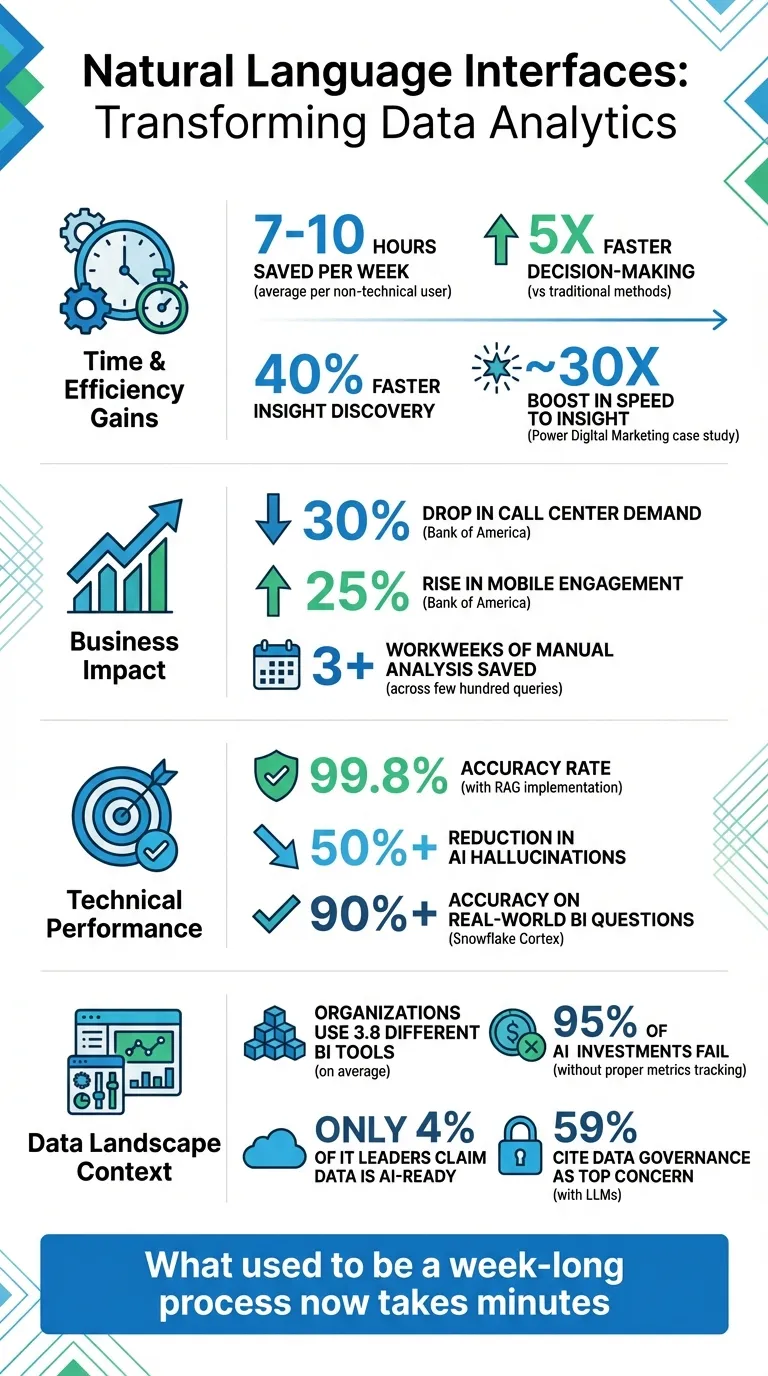 {Natural Language Interfaces Impact: Key Statistics and Benefits}
:::
{Natural Language Interfaces Impact: Key Statistics and Benefits}
:::
Natural Language to SQL: Transforming Conversational Data | #CopilotChronicles
::: @iframe https://www.youtube.com/embed/PtSNZxFlo24 :::
How Natural Language Interfaces Work
At the heart of every Natural Language Interface (NLI) lies a process that transforms everyday language into structured data queries. For instance, when you ask, "What were our top five revenue products last quarter?" the system doesn’t just latch onto keywords. Instead, it deciphers intent, identifies key entities, and translates this into precise database commands. This seamless interaction relies on three interconnected layers. Let’s dive into the first step: understanding your query.
Natural Language Processing for Query Understanding
The process begins with Natural Language Understanding (NLU), which interprets what you’re actually asking. The system determines your intent (e.g., "list" or "rank") and identifies entities like "revenue", "products", and "last quarter." To handle variations in phrasing - like "last quarter", "Q4", or "previous three months" - modern NLIs leverage advanced Large Language Models (LLMs) to personalize business intelligence.
To ensure accuracy and avoid hallucinations, many systems use Retrieval Augmented Generation (RAG). This technique grounds the LLM with real-time metadata, database schemas, and business definitions, achieving accuracy rates as high as 99.8% while cutting hallucinations by over 50%.
The Semantic Layer and Context Management
This is where things get more sophisticated. Modern NLIs incorporate a semantic layer to bridge the gap between user-friendly language (like "Customer" or "Revenue") and the underlying database structures. This ensures that data retrieval aligns with business logic.
The semantic layer serves as a single source of truth for the organization. It encodes complex business rules - like excluding trial accounts or distinguishing between gross and net revenue - so that the system retrieves data consistently and accurately.
"As a part of Atlan's AI labs, we are co-building the semantic layers that AI needs with new constructs like context products that can start with an end user's prompt and include them in the development process."
Joe DosSantos, Vice President of Enterprise Data & Analytics at Workday
This unified approach is especially crucial when organizations use an average of 3.8 different BI tools. Without a shared semantic layer, each tool might calculate metrics differently, leading to inconsistencies and eroding trust in the data.
Automated Query Generation and Execution
Once the system understands your intent and maps it to business concepts, it moves on to query generation. Instead of producing raw SQL, modern NLIs create intermediary requests using tools like MetricFlow or AQL.
"The reason for that is we're not asking the LLM to write a SQL query, which is prone to hallucinating tables, columns, or just SQL that's not valid. Instead, it generates a highly structured MetricFlow request."
Doug Guthrie, Solutions Architect at dbt Labs
This approach ensures database-agnostic logic. A compiler then translates the high-level request into the specific syntax required by systems like PostgreSQL, Snowflake, or BigQuery. The query is executed on live data, delivering results - whether as visualizations, tables, or summaries - in just seconds.
Integrating NLIs into Your Business Intelligence System
Setting up a Natural Language Interface (NLI) for your business intelligence system doesn’t mean overhauling everything you’ve already built. Instead, it integrates seamlessly with your existing tools to deliver answers in plain English. The process involves preparing your infrastructure, ensuring tight security, and making sure the system uses up-to-date data - not outdated exports. Standardizing and preparing your data is a crucial step to get the most out of your NLI.
Preparing Your Data for NLI Integration
For conversational analytics to work effectively, your data needs to be structured and contextualized. Start by curating your data sources, focusing on the fields that truly matter. This reduces confusion and speeds up data processing. Next, enrich your metadata by clearly describing every table and field. For example, define terms like "Total Compensation" or "Net Revenue" so the NLI can interpret them correctly within your business context.
Assign appropriate data types and establish logical hierarchies (e.g., City > State > Country; Year > Quarter > Month) to allow for detailed drill-down analysis. Set default aggregations to make querying easier - such as using SUM for sales data or AVG for test scores. Since most NLIs can’t handle complex calculations on the fly, pre-calculate key metrics like "Gross Margin %" or "Customer Lifetime Value" and include them in your data sources.
To prevent query errors, create "golden queries" - pre-verified SQL templates that reflect your business rules. Also, review your field names carefully. Avoid names like "True" or "2015", which could be mistaken for filter values instead of column names. Once your data is ready, the next step is to secure it before integrating it with the NLI.
Setting Up Data Governance and Security Protocols
Security and governance are essential when integrating NLIs. According to a survey by MIT, 59% of respondents identified data governance, security, or privacy as their top concern when working with large language models. Start by leveraging existing Role-Based Access Control (RBAC) systems. For instance, you can assign specific roles - like snowflake.cortex_user - to manage who can access NLI features.
Implement column- and row-level access controls based on user roles. This way, the finance team might see detailed revenue data, while other departments only access metrics relevant to their work. Configure the NLI to have read-only access, preventing accidental changes or deletions. Use data masking to hide sensitive information like Social Security numbers or credit card details while still enabling analysis of surrounding data.
Keep detailed logs of every query and user interaction, and set limits on usage - such as restricting the maximum data volume billed for a single query. To minimize risks, roll out the NLI in phases. Start with a couple of well-structured data models and a small user group to test accuracy before expanding its use across the organization. With security and governance in place, the next step is ensuring live connectivity to your data warehouses.
Connecting to Live Data Warehouses
Static CSV exports won’t cut it - NLIs work best with direct connections to live data warehouses like Snowflake, BigQuery, and PostgreSQL. This ensures queries always use the most current data, eliminating the need for disclaimers like "this report is outdated." Live connections also reduce security risks by avoiding the need to move or duplicate data.
When setting up these connections, use encrypted credentials and adopt a zero-trust architecture with mutual TLS (mTLS) for secure cross-region traffic. Protect cloud resources with VPC service controls to prevent unauthorized data access. If performance issues arise with live data sources, you can use pre-filtered extracts, but only as a last resort.
To enhance your NLI’s understanding, integrate it with a data catalog like Dataplex or Alation. This provides business context, tracks data lineage, and assigns quality scores. For example, it helps the system differentiate between "gross revenue" and "net revenue" or recognize that "Customer" in the CRM database is not the same as "Customer" in the billing system. With only 4% of IT leaders claiming their data is ready for AI, ensuring strong data governance is crucial to avoid the classic "garbage in, garbage out" problem.
Enabling Self-Service Analytics for Teams
Natural language interfaces (NLIs) are changing the game when it comes to accessing and using data. They don’t just make data easier to find - they put it directly into the hands of the people who need it most. Marketing managers, sales directors, and product leads can now get the answers they need without waiting days for a data analyst to create a custom report. Instead, they can ask their own questions and get instant results, turning data exploration into an interactive, real-time process. This capability is especially useful during team meetings, where immediate insights can drive better collaborations and quicker decisions.
Creating Dashboards and Visualizations Through Conversation
Building charts used to require SQL skills or waiting for analysts to step in, but NLIs have flipped that script. Now, users can simply type something like, "show me revenue by region for Q4 2025", and instantly see a bar chart. Want to switch things up? Add “as a pie chart” to the query, and the system adjusts. The interface automatically picks the best visualization for the data - line graphs for time-series trends, maps for geographic data, and bar charts for comparing categories.
What’s happening behind the scenes is pretty impressive: the NLI translates plain English into SQL or Python code, removing the technical hurdles that once stood in the way. For advanced tasks - like forecasting or analyzing correlations - some NLIs can even generate Python code, giving users access to deeper insights without needing to write a single line themselves.
Getting Real-Time Insights During Meetings
NLIs are particularly powerful during live discussions. Instead of postponing decisions to wait for data, teams can ask questions on the spot and get immediate, actionable answers. A great example of this is Power Digital Marketing’s integration of Snowflake Cortex into its marketing intelligence platform in May 2025. This move, led by John Saunders, VP of Product, allowed strategists and marketers to query data from multiple sources using plain language. The results were impressive: a ~30x boost in speed to insight and over three workweeks of manual analysis saved across just a few hundred queries (Source: Snowflake Blog, 2025).
This approach shifts business intelligence from static dashboards to real-time discovery. Custom data agents can even be tailored for specific departments - like sales data for sales meetings or financial metrics for budget reviews - ensuring the answers are always relevant to the conversation.
Reducing Data Bottlenecks in Decision-Making
Traditional business intelligence often creates bottlenecks, where non-technical teams rely on analysts to unlock insights. NLIs cut through this by letting marketing, sales, and HR teams query databases in plain language. This not only removes the need to learn SQL or navigate complex dashboards but also frees up analysts to focus on higher-level tasks like data modeling and optimization.
Modern NLIs also keep track of the conversation's context. For example, you could start with "sales by region" and then refine it with "only for the last quarter" without having to start over. By understanding user intent and automatically selecting the most appropriate visualizations, NLIs help teams make quicker, more agile decisions. Instead of waiting for the next reporting cycle, strategies can pivot in seconds, keeping businesses ahead of the curve.
Ensuring Accuracy and Context in NLI Queries
For Natural Language Interfaces (NLIs) to deliver accurate responses, they must truly grasp user intent. Misunderstandings can arise without proper context, especially in cases like distinguishing between "gross" and "net revenue." Well-structured, governed data plays a key role in ensuring queries yield meaningful insights.
Using Business Glossaries to Add Context
Business glossaries are a powerful tool for clearing up ambiguities. By defining terms and relationships - like equating "staff" with "employees" or clarifying that "gross revenue" refers to total sales before deductions while "net revenue" accounts for returns and discounts - NLIs can better map everyday language to precise database attributes. Michael Hetrick, Director of Product Marketing at Tableau, emphasizes the importance of clarity:
"More clarity in the metadata model means that NLP users can receive the right answer from the NLP system."
Incorporating synonyms, aliases, and default aggregations into the metadata ensures the system interprets queries correctly. For example, this prevents errors like summing customer IDs or averaging years, which would lead to nonsensical results.
Business intelligence best practices for data quality and governance
Clean, well-organized data is the backbone of effective NLI performance. If date columns are stored as text or field names are cryptic (e.g., "CustSummary"), the NLI may falter. Renaming fields and verifying data types improves usability and analysis flexibility.
Streamlining data sources is equally important. While Tableau's Ask Data can handle up to 1,000 fields, fewer fields reduce ambiguity and speed up parsing. Hide or remove unnecessary columns, and pre-calculate complex metrics like "Total Profit" or "Customer Lifetime Value" to save users from building them manually. For columns like Year, ID, or Age, setting properties like "Don't Summarize" ensures NLIs don’t generate meaningless totals. These practices establish a solid foundation for accurate query execution.
Audit Trails and Transparency in Query Execution
Strong governance paired with clean data enables detailed audit trails, which are critical for building trust in NLI results. Transparency is key - users should be able to see how their query was interpreted, including the SQL generated, the tables joined, and the origins of the data. This visibility allows users to verify results independently and fosters confidence in the system.
Snowflake's Cortex Analyst is a prime example of this approach. Its agentic retrieval model achieves over 90% accuracy on real-world business intelligence questions by grounding itself in the actual database schema using DDL statements. This approach prevents errors like hallucinating table names or relationships. For organizations deploying NLIs across multiple departments, combining precision with role-based access controls ensures conversational queries respect permissions and don’t inadvertently expose sensitive data.
Measuring the Impact of NLIs on Your Organization
Once you've deployed your Natural Language Interface (NLI), it's critical to demonstrate how it impacts your business intelligence efforts. Studies indicate that 95% of AI investments fail to deliver measurable returns when metrics aren't properly tracked. To avoid this, start by establishing a baseline, choose 3–5 meaningful performance indicators, and measure progress on a weekly basis. Use these metrics to calculate clear ROI and communicate the value to stakeholders.
Calculating ROI: Cost Savings and Efficiency Gains
Before your NLI goes live, gather 8 to 12 weeks of baseline data. Track metrics like time spent on tasks, labor costs, error rates, and the volume of reports generated. This will serve as your reference point. After deployment, monitor how many hours your team saves on tasks such as drafting reports, running queries, and conducting manual research. Calculate cost savings using a simple formula: (Hours Saved) × (Hourly Labor Cost).
For instance, if an AI assistant saves your team 1,875 hours annually at $125 per hour, that's a $234,375 yearly saving.
To further validate its impact, conduct surveys 60–90 days after implementation. These surveys can help measure time savings and improvements in work quality. Build multiple ROI scenarios - such as conservative, baseline, and optimistic models. For example, even a conservative 17.5% efficiency gain (compared to a baseline of 25%) could still lead to a two-year payback period. Share these findings with stakeholders using financial metrics like Net Present Value (NPV), Internal Rate of Return (IRR), and Payback Period to solidify the business case for your NLI.
Tracking Adoption and User Satisfaction
Adoption metrics are key to understanding whether your NLI is being effectively used. Keep an eye on the number of active users, query volume across departments, and how often employees engage with the system. Surveys can also help capture employee feedback on usage and satisfaction. Ask users to provide examples of tasks they’re accomplishing with the NLI to pinpoint which areas - like Marketing, HR, or Sales - are benefiting the most.
Incorporate real-time feedback tools within the NLI interface. Features like thumbs-up or thumbs-down buttons allow users to rate query results immediately. Track how often employees use "explainability" tools, such as viewing generated SQL or data lineage. High usage of these features indicates trust in the system. Also, identify barriers to adoption early on, such as insufficient training, lack of awareness about AI policies, or perceptions that the tool isn’t relevant to certain roles.
"The central piece in making AI successful isn't about the tech - it's about people."
Lattice
Accelerating Decision-Making with Faster Insights
One of the most impactful benefits of an NLI is its ability to reduce time-to-insight - the time it takes for teams to find answers and act on them. By removing the bottleneck of waiting on data analysts for reports, NLIs enable true self-service analytics. Track how long key workflows take before and after implementation. For example, if a process that once took a week now takes just minutes, quantify that improvement.
"What used to be a week-long process now takes minutes."
Jennifer Leidich, Co-Founder & CEO of Mercury
Make sure those reclaimed hours are put to good use. Set clear goals for how saved time will be reinvested in high-value activities like crafting proposals, improving customer support, or driving sales. Monitor broader outcomes, such as increased revenue capacity, improved Net Promoter Scores (NPS), or shorter project cycle times, to show how these efficiencies contribute to your organization’s overall success.
Conclusion
Natural Language Interfaces (NLIs) are changing the way we interact with data. By eliminating technical hurdles, they allow anyone - regardless of technical expertise - to ask questions and get instant answers, no SQL or data team required.
This technology has come a long way. Tasks that used to take weeks are now completed in minutes, giving data teams more bandwidth and empowering decision-makers to act quickly. Thanks to advanced LLMs and semantic layers, NLIs can now handle context-aware queries with impressive accuracy, delivering insights from a wide range of data sources.
"It's not just about saving time and money, it's about making data accessible."
- Enver Melih Sorkun, Co-founder & CTO, Growdash
However, to fully realize these advantages, strong data management practices are critical. Clear naming conventions, proper data curation, and solid governance - like those we’ve covered earlier - are essential for success. Tracking adoption metrics and measuring ROI through time savings and efficiency gains will help ensure the system delivers real value. Feedback from users is another key ingredient for refining and optimizing NLIs over time. When done right, NLIs can dramatically change how your organization uses data, fostering a culture where insights are easily accessible across every department.
With well-structured data and effective governance, conversational data access is no longer a future goal - it’s a reality. Companies embracing NLIs today are making faster, smarter decisions while enabling every team member to contribute. It’s time to embrace NLIs and unlock the power of data-driven decision-making for your entire organization.
FAQs
::: faq
How do Natural Language Interfaces help speed up decision-making?
Natural Language Interfaces (NLIs) make it possible for users to ask questions in plain English and get immediate, conversational answers. No more wrestling with complicated SQL queries or spending hours building dashboards - NLIs deliver insights in just seconds.
By making data easier to access, NLIs help teams quickly spot trends, pinpoint opportunities, and make smarter decisions without getting bogged down by technical hurdles. This speed and simplicity boost productivity, ensuring that essential business decisions happen faster and with greater ease. :::
::: faq
What are the steps to integrate natural language interfaces (NLIs) into your data systems?
Integrating natural language interfaces (NLIs) into your data systems can streamline how users interact with data, but it requires careful planning. Here’s how to get started:
-
Understand what users need: Start by identifying the questions your users frequently ask. For example, queries like "What were the top-selling products last month?" should be mapped to relevant business concepts. This ensures the NLI addresses the specific needs of your organization.
-
Get your data ready: Organize and clean your data sources. Standardize naming conventions and include user-friendly metadata. This makes the system easier to navigate and more intuitive for users.
-
Prioritize security and governance: Protect sensitive data by setting up role-based permissions and data masking. This ensures users only access information they’re authorized to see.
-
Pick the right NLI solution: Whether you’re building or buying, choose an NLI engine that integrates smoothly with your existing systems and aligns with your business requirements.
-
Test and improve: Run a pilot program, collect user feedback, and fine-tune the system. This step is crucial to ensure the interface is accurate and user-friendly.
By taking these steps, you can develop an NLI that not only simplifies data access but also boosts decision-making and makes analytics more accessible for everyone. :::
::: faq
How can businesses maintain data accuracy and security when using natural language interfaces?
To ensure precise and secure responses from natural language interfaces (NLIs), start by establishing solid data governance practices. Catalog your data sources, assign clear ownership, and document data lineage. This ensures queries are correctly matched to the appropriate datasets. Additionally, implement role-based access controls (RBAC) and row-level security to limit access based on user permissions, keeping sensitive information protected.
Incorporate data-quality checks directly into the NLI workflow. Make sure referenced columns are current, joins are accurate, and metrics adhere to established standards. Addressing common issues - like standardizing synonyms, normalizing date formats, and filling in missing values - can significantly reduce errors and improve response reliability. Automated monitoring systems can further help by flagging query failures or spotting unusual patterns early on.
Lastly, safeguard both your data and conversational logs with advanced security measures. Encrypt data both in transit and at rest, secure API gateways, and maintain detailed audit logs to track access activity. Regular security assessments, such as penetration testing and compliance audits, are essential to maintaining the reliability and safety of NLIs. By integrating these strategies, businesses can confidently leverage NLIs to support decision-making while maintaining high standards of security and accuracy. :::