Business Intelligence
Top 8 Agentic Analytics Tools (What 'Agentic' Actually Means)
Compare eight analytics tools that run multi-step, governed analysis on live warehouse data, with notes on governance, workflows, and pricing.

Most analytics AI tools are still just chat. If I use a strict bar, agentic means the tool can handle multi-step work, use live warehouse data, stay inside data permissions, and leave a clear audit trail.
If I boil this guide down, the short answer is this:
- Querio is the best fit if I want governed self-serve, live warehouse access, and inspectable SQL/Python across chat and notebooks, with definitions and dashboards kept as files in a git repo I own.
- Snowflake Cortex Analyst and BigQuery Conversational Analytics are best when my team already has a strong semantic model inside one warehouse.
- ThoughtSpot and Looker with Gemini are better for governed BI and self-serve than for cross-system action.
- Microsoft Fabric Copilot helps Power BI users, but it is still more BI assist than end-to-end agent work.
- Hex is strongest for analyst-led notebook workflows.
- Tellius stands out for automated root-cause analysis and anomaly investigation.
I’d judge these self-service analytics tools on the same 4 checks:
- Workflow depth: Can it do more than one prompt, one answer?
- Governed access: Does it follow warehouse or platform permissions?
- Analysis surface: Does it work in chat, notebooks, dashboards, or alerts?
- Audit and control: Can I see what it ran and review what changed?
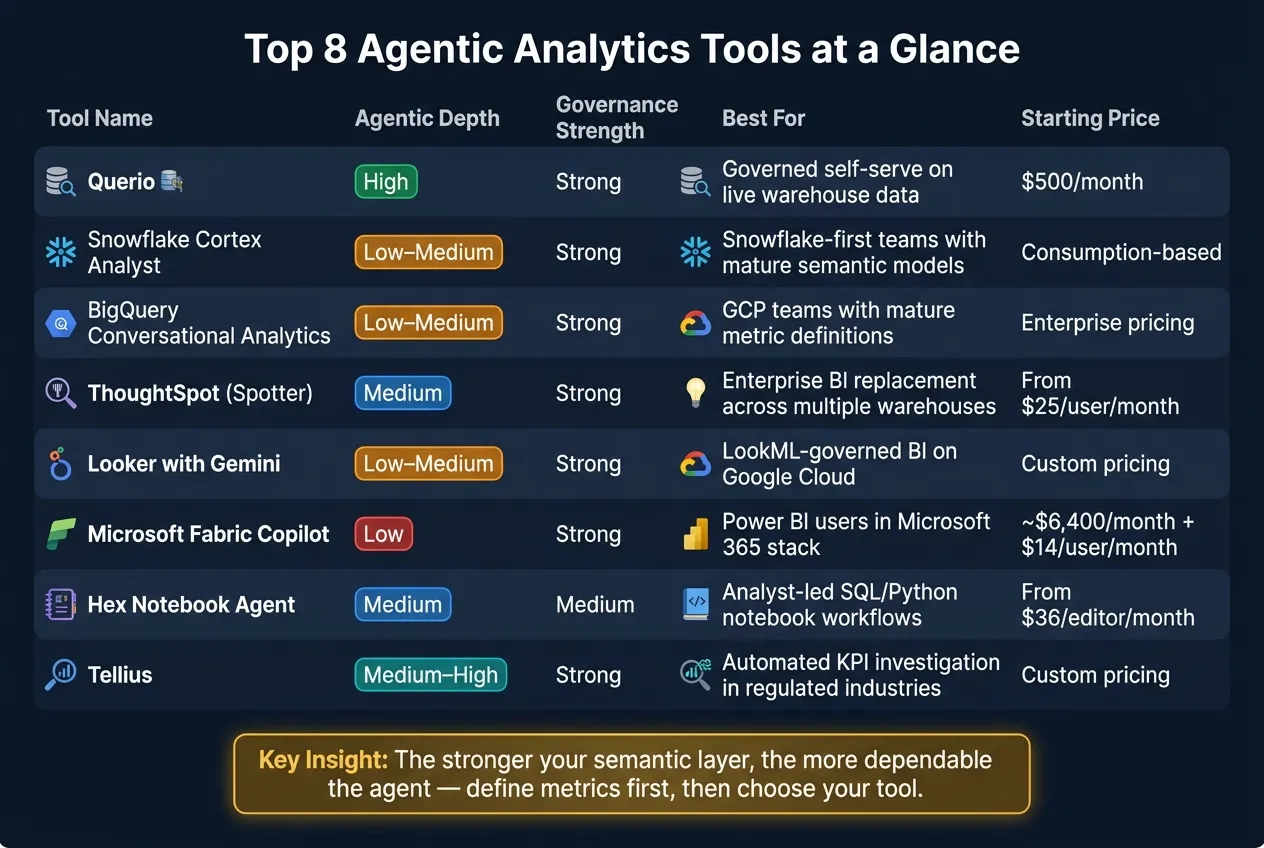
Quick Comparison
| Tool | Best For | Agentic Depth | Governance | Main Surface | Starting Price |
|---|---|---|---|---|---|
| Querio | Governed self-serve on live warehouse data | High | Strong | Chat + reactive notebooks | Free plan; Core $2,499/mo |
| Snowflake Cortex Analyst | Snowflake-first teams | Low to medium | Strong | Governed NL-to-SQL | Consumption-based |
| BigQuery Conversational Analytics | GCP teams with mature metrics | Low to medium | Strong | Governed metric Q&A | Enterprise pricing |
| ThoughtSpot | Search-led BI self-serve | Medium | Strong with semantic model | Search + BI app | $25/user/month |
| Looker with Gemini | LookML-based governed BI | Low to medium | Strong with LookML | BI layer + conversational analytics | Custom pricing |
| Microsoft Fabric Copilot | Power BI users in Microsoft stack | Low | Strong with Power BI model | Power BI | About $6,400/month + $14/user/month |
| Hex Notebook Agent | Analysts using SQL and Python | Medium | Medium | Notebook + apps | $36/editor/month |
| Tellius | KPI change investigation | Medium to high | Strong | NL query + alerts | Custom pricing |
My main takeaway: the tool matters, but the semantic layer matters more. If metric definitions are weak, the AI will drift. If definitions are clean, answers get far more consistent. That’s the lens I’d use for the full comparison below.
1. Querio
Querio is built to keep answers traceable and steady on live warehouse data. It connects straight to Snowflake, BigQuery, Redshift, ClickHouse, Postgres, MySQL, and other supported systems. That means no CSV exports, no copied datasets, and no extracts floating around. Answers show up as inspectable SQL or Python inside a reactive notebook, and connected cells keep charts synced without reruns.
It also goes past basic text-to-SQL tools. The reason is its governed semantic layer, which puts metric definitions, joins, and trusted queries first. That layer lives as plain files in a git repo your team owns, and it can sit in the same repo as your dbt project. So when a team defines “revenue” or “churn” once, every question asked in the Querio app, Slack, Claude, ChatGPT, Claude Code or Cursor (through MCP and the CLI) resolves the same way. The agent can suggest context updates, but each one opens a pull request that your reviewers approve before it goes live. That’s the piece that keeps downstream automation from going off the rails.
On the workflow side, Querio can run scheduled prompts or SQL and send the results to email, or to Slack on Core. A daily business health check can watch revenue, margin, or marketing efficiency, so the findings are waiting before the team even logs in. Slack questions can also spin up notebooks behind the scenes, which leaves a clear trail of what the agent ran and why. In plain English: this is more than a chat reply. It’s a governed workflow with receipts.
Access controls are tight too. Role-based access control means users only see what their warehouse permissions allow. MCP queries also inherit each user’s OAuth credentials, so agent-driven queries don’t run with extra access behind the curtain. Querio is SOC 2 Type II certified and HIPAA compliant, and it signs BAAs. For healthcare and finance teams, that stuff matters.
There is a tradeoff. Querio gets much of its power from the context layer, and that takes time to build. Week one can still be useful, but month three is much better as definitions stack up in the repo. Teams that want instant answers from an unmodeled schema may feel that ramp.
Querio has a free plan, and Core is $2,499/month (or $25,000/year billed annually). Every plan includes unlimited users and unlimited data connections.
2. Snowflake Cortex Analyst and Copilot
For teams that live in Snowflake, Cortex Analyst acts as a governed natural-language layer on top of warehouse data. It turns plain-English questions into SQL by using Snowflake Semantic Views, which define tables, metrics, and join paths in YAML. Since it runs inside the warehouse, it inherits Snowflake’s governance and security model. In practice, that makes the semantic layer the main control point for trust and consistency.
Cortex Analyst is built for governed question answering. It is not built for cross-tool planning or hands-off follow-up actions.
Snowflake reports 90% or higher accuracy when Cortex Analyst is paired with a mature semantic model [2]. If the schema is thin or the data model hasn’t been mapped well, that accuracy drops.
That tight focus is also the main tradeoff. It can’t natively connect systems like Salesforce or Zendesk unless that data already lives in Snowflake. It also doesn’t include a notebook environment or cross-system orchestration. So it stays firmly in the analysis lane, not the orchestration lane.
Pricing follows Snowflake’s consumption-based credit model [2].
| Capability | Snowflake Cortex Analyst |
|---|---|
| Governance | Strong - inherits Snowflake RBAC and security |
| Semantic consistency | High - grounded in Snowflake Semantic Views |
| SQL inspectability | Yes - generated SQL and definitions are visible |
| Cross-system orchestration | None - Snowflake-only |
| Notebook / reactive workflow | Not available |
| Business-user self-serve | Governed chat-to-SQL only |
| Pricing model | Consumption-based credits |
3. BigQuery Conversational Analytics and Data Agents
Snowflake tends to reward teams that standardize work inside the warehouse. BigQuery rewards teams that already run governed analytics in Google Cloud and Looker.
For GCP-native teams, BigQuery Conversational Analytics works best when the semantic model is already in good shape. If that layer is mature, people can ask for approved metrics in plain English and get answers that stay tied to the same metric definitions.
Access control comes from Google Cloud IAM, so users only see the data they already have permission to view. That’s a big plus for governed access. The tradeoff is pretty simple: the system is only as good as the semantic layer behind it. If that layer is messy, the experience gets shaky fast.
So where does it fit? It’s a strong choice for certified metric access and AI-driven self-serve analytics in a controlled setup. Where it falls short is multi-step investigation. It does not plan or carry out investigations across tools, and there’s little sign of autonomous multi-step work across dbt or other systems.
| Capability | BigQuery Conversational Analytics and Data Agents |
|---|---|
| Governance | Strong - inherits Google Cloud IAM |
| Semantic consistency | High when semantic model is mature |
| Multi-step orchestration | Limited - no autonomous workflows across dbt |
| Auditability | Good - grounded in approved metric definitions |
| Business-user self-serve on certified metrics | Governed natural-language access to certified metrics |
| Pricing model | Enterprise pricing |
BigQuery Conversational Analytics makes the most sense for teams that already trust LookML and want governed self-service analytics for the enterprise.
4. ThoughtSpot Agentic Analytics (Sage/Spotter)
ThoughtSpot takes a search-driven path to analytics. Spotter, which used to be called Sage, connects live to Snowflake, BigQuery, Redshift, Databricks, and Postgres. It can route work across modeling, visualization, code, step-by-step reasoning, and Python forecasting [1][2].
That means it can handle multi-step analysis inside the product. But it doesn't orchestrate actions across outside systems. So, in plain English: it's agentic within the BI layer, not a workflow engine.
When the semantic layer is kept in good shape, ThoughtSpot can answer routine ad hoc questions fast and cut down the time teams spend turning one-off questions into reports [5]. That said, as a standalone web app, it often asks more from business users than a chat-first tool does. Some training is usually part of the deal [1].
Its limits show up when work needs to move beyond analysis. ThoughtSpot is first and foremost an analytics layer, so it's less suited to outside follow-up actions or multi-step workflows that happen beyond BI [1]. It's strong for guided analysis. It's weaker when you want one tool to jump across systems and execute tasks.
Here's where ThoughtSpot fits in practice:
| Capability | ThoughtSpot Agentic Analytics (Sage/Spotter) |
|---|---|
| Warehouse connectivity | Snowflake, BigQuery, Redshift, Databricks, Postgres |
| Agentic depth | Step-by-step reasoning; specialized agents for modeling, visualization, and code |
| Semantic consistency | Strong when grounded in a governed semantic model |
| Multi-step orchestration | Limited; better for decision support than external workflow automation |
| Business-user self-serve | Strong search-driven interface, but typically requires more training |
| Pricing | Essentials: $25/user/month; Pro: $50/user/month; Enterprise: custom [1] |
ThoughtSpot fits best for enterprise teams replacing Tableau or Looker that want a governed, search-driven setup for business users and already have a clean semantic model in place. If your team leans more toward notebook-style analysis, deeper investigations, or hands-on Python and SQL work, it may feel a bit tight.
For teams centered on Google Cloud and Looker, the next section covers a more native path.
5. Looker with Gemini and Conversational Analytics
Like the other tools covered earlier, Looker is only as agentic as its semantic layer allows. In practice, that means the main driver here is LookML. Gemini can answer natural-language questions, but only if the metric definitions are already modeled well. So the accuracy of the answer depends far more on the quality of the LookML than on the model itself.
That also sets a clear boundary around what Looker can do. Its agentic role mostly ends at governed query answering. Looker supports governed BI, not multi-step orchestration. It can handle simple metric lookups, but analysts still need LookML to define more complex methods like funnels or retention. It doesn't plan investigations across tools or carry out bounded follow-up actions. Using this guide's framing, Looker is agentic for governed retrieval, not for autonomous investigation.
Looker makes the most sense for teams that already run on LookML. It carries over existing permissions and data policies, and it works with BigQuery, Snowflake, Redshift, and Postgres.
| Capability | Looker with Gemini |
|---|---|
| Warehouse connectivity | BigQuery, Snowflake, Redshift, Postgres |
| Agentic depth | Strong for descriptive queries; limited for multi-step diagnosis |
| Semantic consistency | High when LookML definitions are mature and well-governed |
| Multi-step orchestration | Limited; complex methodology still needs to be modeled in LookML |
| Business-user self-serve | Governed self-serve, but BI teams still need to define the metric logic |
| Pricing | Enterprise, with custom pricing [2] |
For teams that have already put serious work into LookML, Looker with Gemini can serve as a strong governed BI layer. But there's a catch: when LookML is weak, Gemini may compute the same metric in different ways, which starts to chip away at trust. That keeps Looker firmly in the governed BI camp. The next section moves to a tool built for more hands-on notebook analysis.
6. Microsoft Fabric Copilot for Power BI
Microsoft Fabric Copilot is BI help, not agentic analytics in the full sense. It adds natural language features on top of Power BI’s existing semantic models, so users can generate DAX, build report pages, and pull summaries inside Power BI and the Microsoft 365 stack. That makes it a solid fit for BI support. It does not act like a system that can run its own investigation from start to finish.
Its output depends heavily on the Power BI semantic model underneath. If your datasets are mature, Copilot can do a good job with descriptive questions about what happened, write DAX, and produce summaries. If the model logic is weak, though, it can still return answers that sound right but are wrong, especially for funnels, cohorts, and retention. That’s the catch: the language layer may look smooth, but the logic still lives in the model.
It also rarely handles multi-step investigation on its own without a person steering it. In practice, that means it works best when someone already knows the business context and can guide the prompts, check the numbers, and spot mistakes before they spread.
Copilot also tends to require Fabric capacity at F64 or higher, which runs about $6,400/month, plus Power BI Pro at about $14/user/month [2]. The next section shifts from report generation to notebook-driven analysis.
| Capability | Microsoft Fabric Copilot for Power BI |
|---|---|
| Primary surface | Power BI semantic models |
| Agentic depth | Descriptive questions; limited multi-step diagnosis |
| Semantic consistency | High when the semantic model is mature and well-governed |
| Multi-step orchestration | Rarely runs autonomous investigations without human guidance |
| Business-user self-serve | Strong within Power BI; limited outside the Microsoft ecosystem |
| Pricing | About $6,400/month for F64 capacity, plus about $14/user/month for Power BI Pro [2] |
7. Hex Notebook Agent
Hex brings SQL, Python, and AI into one shared notebook. Its Notebook Agent can generate code from your warehouse schema, handle multi-step analysis, and help analysts turn findings into an app. It can switch between SQL and Python and chain steps together, but it still lives inside the notebook workflow. So in practice, Hex is a better fit for analyst-led investigation than for governed self-serve.
Analysts can go from SQL to Python and then publish the result as an interactive app. Hex also offers optional dbt integration, which helps teams connect warehouse-based exploration with dbt models and governed metric definitions.
For business users, the experience is usually more passive. They tend to use the published apps, while ad hoc questions still come back to the data team. And because the notebook expects some comfort with SQL or Python, it isn't a direct self-serve layer for non-technical users.
Governance follows a similar pattern. Hex uses warehouse-level permissions and project permissions, but it doesn't offer a centralized semantic layer to keep metric definitions aligned across the company. Without dbt, metrics can drift from notebook to notebook. That's the tradeoff, especially if your main goal is keeping numbers consistent for many business users.
| Capability | Hex Notebook Agent |
|---|---|
| Primary surface | Notebook UI (SQL and Python cells); published data apps |
| Target user | Technical data analysts and data scientists |
| Agentic depth | Multi-step code generation, exploration grounded in warehouse schema and dbt models, app scaffolding |
| SQL transparency | Full - generated SQL and Python are visible and editable |
| Business-user self-serve | Limited; non-technical users usually consume published apps |
| Governance | Project permissions; warehouse-inherited permissions; no centralized semantic layer |
| Pricing | Community free (up to 5 notebooks); Professional $36/editor/month; Team $75/editor/month; Enterprise custom pricing. Paid plans include unlimited viewers [1] |
Hex fits analyst-led work best. The next tool does a better job when governed self-serve matters more.
8. Tellius
Tellius starts with automated insight generation and continuous monitoring. Its ML-driven root cause analysis can run multi-step variance decomposition across data sources to show which segments, dimensions, or combinations caused a KPI shift [4].
That’s the kind of multi-step investigation this guide calls agentic. Put simply, Tellius can spot a change, trace the driver, and explain what happened without forcing someone through a manual prompt chain. For teams that need a tool to investigate changes, not just answer questions, that’s a big deal.
Tellius can also work well in settings where scrutiny is part of the job. Finance teams can use it to track spend anomalies, forecast cash flow, and detect fraud. Healthcare teams can use explainable results when regulatory or safety review matters [4]. It also supports plain-English querying for business users, so people don’t need to live in SQL all day [4].
On the governance side, Tellius is built for regulated environments. It uses row-level security inherited from the underlying data layer [4].
| Capability | Tellius |
|---|---|
| Primary surface | NL-to-SQL querying, plain-English explanations, anomaly alerts |
| Target user | Business analysts and data teams in regulated industries |
| Agentic depth | Proactive anomaly detection, ML-driven root cause analysis, multi-step variance decomposition |
| Business-user self-serve | Strong for understanding why metrics changed without manual data wrangling [4] |
| Governance | Built for regulated environments; row-level security inherited from the underlying data layer [4] |
That monitoring-first design makes Tellius strongest in cases where automated investigation matters most. Next, the pros and cons show where that model helps and where it stays limited.
Pros and Cons by Tool
Here’s the shortest useful version: where each tool shines, what it trades off, and who it’s built for.
The table below compares the same thing across all eight tools: how much planning they can handle, how much control they keep, and how far the workflow can go.
| Tool | Best Pros | Main Cons | Best Fit |
|---|---|---|---|
| Querio | Governed context layer you own; inspectable SQL and Python; live warehouse connections; available in the app, Slack, and Claude and ChatGPT via MCP | Needs upfront setup to define joins, metrics, and trusted context before it reaches full accuracy | Mid-market data teams that want governed self-serve without building custom infrastructure |
| Snowflake Cortex Analyst and Copilot | Inherits Snowflake governance and row-level security; strong when Semantic Views are mature | Limited to Snowflake; depends on a mature semantic model for best results [2] | Snowflake-first enterprises with established semantic definitions |
| BigQuery Conversational Analytics and Data Agents | BigQuery-native with deep Google Cloud integration | Governance depends on mature metric definitions | GCP-native teams standardized on BigQuery and Looker |
| ThoughtSpot (Sage/Spotter) | Warehouse-independent across Snowflake, BigQuery, Databricks, Redshift, and Postgres; search-first UI | Pro is $50/user/month; enterprise pricing is custom; the search UI usually needs user training [1] | Enterprise BI replacement for teams spanning multiple warehouses |
| Looker with Gemini and Conversational Analytics | LookML enforces strict metric consistency | Best fit for Google Cloud-first teams; ongoing LookML maintenance matters | Enterprises where governed metrics are non-negotiable |
| Microsoft Fabric Copilot for Power BI | Best fit for Microsoft 365 teams already on Power BI; writes DAX and generates reports natively [4] | Full Copilot use requires Fabric capacity at F64 or higher, about $6,400/month [2] | Microsoft-committed enterprises already on Fabric |
| Hex Notebook Agent | Notebook-first copilot for analysts; strong for deep, multi-step work; Professional tier is $36/editor/month [1] | Not designed for non-technical business users [1] | Data teams and analysts who want a notebook-first copilot |
| Tellius | Automated root-cause analysis and variance decomposition | Custom enterprise pricing makes it less suited to broad self-serve BI [1][3] | Best for anomaly investigation in regulated teams |
One theme keeps showing up: the stronger the semantic layer, the more dependable the agent becomes.
That’s the thread running through all eight tools. Semantic layers drive accuracy. If your metrics are loose, the agent will be loose too. If your definitions are locked down, the tool has a much better shot at giving people answers they can trust.
So the order matters here: define metrics first, then compare tools.
Which Tool Should You Choose?
After comparing features, make the call based on where your data lives, who will use the tool, and how tightly access needs to be controlled. That’s the part that matters. The real test isn’t whether a tool can answer one neat question. It’s part of a broader shift in how AI is transforming data analytics from simple retrieval to autonomous reasoning. It’s whether it can handle multi-step work and still stay within your rules.
If you run on a single warehouse and the semantic layer is already mature, start with the warehouse-native tool. Snowflake says Cortex Analyst can reach 90% or higher accuracy when paired with a mature semantic model [2]. If your BI layer is locked down in LookML, Looker with Gemini or ThoughtSpot makes more sense if you want a full BI platform replacement. If your company is standardized on Power BI, Microsoft Fabric Copilot is the native choice, though full functionality requires Fabric capacity at F64 or higher [2].
For self-serve adoption, match the interface to where users already work. That sounds simple, but it’s easy to miss. Slack and Microsoft Teams reduce friction because people don’t have to learn a new place to ask questions. Querio takes a different angle: it opens a reactive notebook behind each answer, which keeps results auditable and tied to live warehouse data. That lines up with the plan, act, and stay governed standard.
For analyst-led work, notebooks are the right surface. If your team spends most of its time in SQL and Python notebooks, Hex is the best fit. Its Notebook Agent is built for analyst workflows that need AI support without leaving the notebook.
For investigation-heavy teams, put root-cause analysis near the top of the list. Tellius stands out here. Its ML-driven variance decomposition can trace a KPI shift without making someone walk through a long manual prompt chain.
A simple way to narrow the field:
- Start with governance
- Then check workflow depth
- Then look at the answer surface
If a tool can’t inherit your current permissions, you’re opening a governance gap that can take months to fix. Once that hurdle is cleared, check whether it can handle multi-step analysis rather than one-off answers. After that, look at where it actually delivers those answers - chat, notebook, BI layer, or somewhere else.
FAQs
What makes an analytics tool truly agentic?
An analytics tool becomes agentic when it can plan, pick the right tools, and carry out multi-step analysis, not just respond to one prompt and stop there.
That’s the key difference from basic text-to-SQL tools. A text-to-SQL tool might turn a question into a query. An agentic analytics tool goes further. It can dig into complex questions, take follow-up actions based on context, and keep track of business logic and earlier analysis steps with very little human input.
Why does the semantic layer matter so much?
A semantic layer matters because it gives your business metrics one source of truth. That means the same question returns the same answer for every user.
Without it, AI agents can define metrics like revenue or qualified pipeline in different ways. And that’s where things go sideways. One team sees one number, another sees something else, and now nobody trusts the report.
With governed metric definitions in place, AI-generated SQL and analysis become more consistent, easier to trust, and ready for audits.
How should I evaluate an agentic analytics tool?
Evaluate it on three things: whether it can handle multi-step analysis, keep up with conversational context, and work inside a governed setup - not just turn prompts into queries. SQL transparency should be high on your list, so you can inspect, edit, and verify what it runs.
Put it in front of actual business questions. Then check if it follows security rules and metric definitions, and whether it supports live warehouse connections, audit logs, and day-to-day workflow use in places like Slack or through an API.