Business Intelligence
Self-service Analytics: How It Works, Best Tools & Use Cases
How self-service analytics lets non-technical teams access trusted data fast using AI, semantic layers, governance, visual tools, and real use cases.

Self-service analytics lets non-technical users access and analyze data without relying on IT teams. By using intuitive tools like drag-and-drop interfaces and AI-powered queries, it speeds up decision-making and reduces delays. Key components include a centralized semantic layer for consistent metrics, data visualization tools for creating dashboards, and natural language interfaces for easy data exploration.
Why it matters:
- Faster insights: Teams can access data instantly, cutting analysis time by up to 50%.
- Empowered users: Business teams can independently analyze data without technical expertise.
- Improved collaboration: Shared dashboards and real-time updates enhance teamwork.
Challenges include:
- Ensuring data quality and security.
- Preventing report clutter.
- Training users to interpret data accurately.
Platforms like Querio combine AI and strong governance to simplify analytics while maintaining data integrity. They support integration with major data warehouses, making analytics accessible and reliable for all teams. Success depends on pairing the right tools with clear governance and user training.
How Self-Service Analytics Works
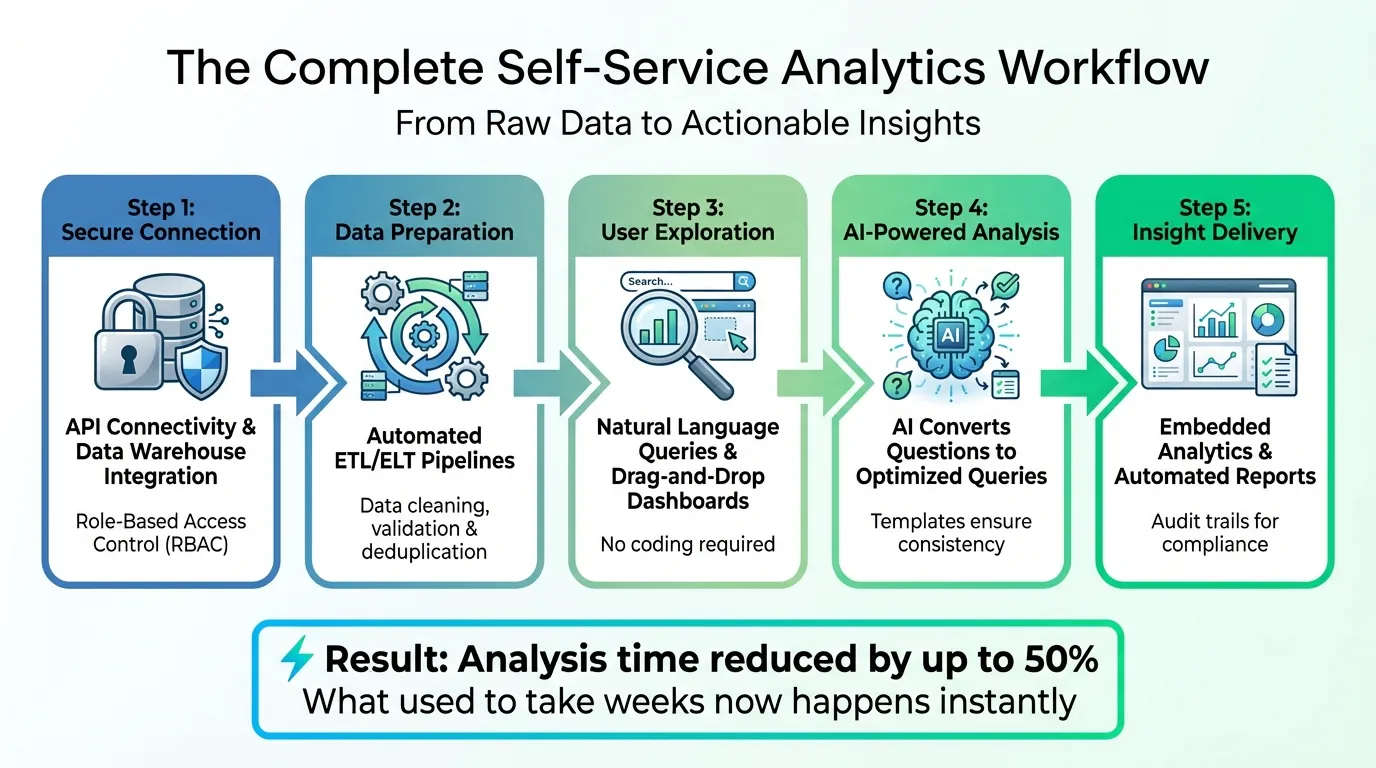
Self-service analytics bridges the gap between complex data and everyday users by securely connecting data sources and making insights accessible. It starts with API connectivity and connectors to data warehouses, ensuring smooth integration. Then, ETL/ELT pipelines take over, automatically cleaning and preparing the data - removing the manual grunt work. Users can then explore this data using tools like natural language interfaces or drag-and-drop dashboards, creating visualizations without needing to write a single line of code. The final step? Embedding these insights directly into workflows, delivering them right when and where they're needed. This process simplifies decision-making, cutting down on delays and improving reliability.
The Complete Workflow
A smooth workflow is what turns raw data into actionable insights quickly and effectively. The journey from data to decisions follows five main steps. First, platforms establish secure connections to data sources using role-based access control (RBAC). Automated tools then validate and prepare the data for analysis. Next, AI steps in, converting plain-English questions into optimized queries, while templates ensure consistency in reporting. To keep everything compliant, audit trails log all interactions. What used to take weeks can now happen almost instantly, thanks to this streamlined, tech-driven approach.
Balancing Access with Governance
Making data accessible is critical, but so is maintaining its security and integrity. Expanding access to non-technical users requires careful governance. For instance, data masking and encryption protect sensitive information, ensuring privacy. A shared definition - like what constitutes "monthly recurring revenue" - helps departments align their reports effortlessly. Data zoning further strengthens security by categorizing information based on sensitivity, whether public, internal, or restricted. Automated compliance checks for regulations like GDPR and SOC2 run continuously in the background. Plus, sandbox environments let users experiment and test ideas without risking production data.
How AI and Natural Language Processing Help
AI is reshaping how people interact with data, making it easier and more intuitive. Users can ask straightforward questions in plain language and get instant answers. Automated data profiling takes it a step further, summarizing connected data sources to help users uncover insights they might not even know to look for. Natural Language Generation (NLG) translates these findings into clear, easy-to-understand summaries for everyone. By January 2026, AI's value in analytics will be measured by its ability to deliver "economically useful action" - in other words, its capacity to handle real tasks effectively [5]. These tools are increasingly taking over routine analysis, tasks that once required specialized expertise [5].
"With AI, self-service analytics become democratized, enabling any user - even those without technical expertise - to generate insights, dashboards, and reports." - Oracle [4]
Benefits and Challenges of Self-Service Analytics
Business Benefits
Self-service analytics removes the traditional IT bottleneck, giving teams the freedom to act swiftly in response to market changes. Studies show that allowing teams direct access to key metrics can cut the time to insights in half [1]. This streamlined process means a small group of data professionals can effectively support a much larger user base.
Speed isn’t the only advantage. These tools improve accuracy and build trust by connecting users directly to reliable, vetted data sources. This reduces the manual errors often associated with spreadsheet workflows. Plus, modern platforms come equipped with robust visualization options, making it easier for non-technical users - like HR managers or sales directors - to interpret complex trends without needing to write a single line of code.
While the benefits are clear, self-service analytics also brings its fair share of challenges.
Common Challenges
Expanding data access to more users introduces certain risks. One key concern is data quality. When users rely on inaccurate or outdated information, it can lead to poor decision-making. Additionally, greater accessibility can expose sensitive information, increasing the risk of security breaches. Another common issue is report sprawl - the proliferation of redundant or unverified dashboards - which can clutter systems and create confusion.
Human factors also play a role. Some data teams, accustomed to handling queries directly, may resist transitioning into more of a curatorial role. On the other hand, business users without sufficient training might misinterpret data, leading to flawed strategies.
Overcoming these challenges requires thoughtful planning and execution.
Implementation Best Practices
Start with small, impactful wins. Focus on a frequently requested task - like evaluating campaign performance or tracking inventory turnover - to quickly show the value of self-service analytics and encourage adoption. Before opening access, IT teams should thoroughly validate, clean, and deduplicate data to ensure it’s ready for non-expert users. Collaborating with business leaders to standardize metric definitions (e.g., agreeing on what constitutes "leads" or "ARR") can also prevent misunderstandings.
To protect sensitive information, implement detailed role-based permissions that align with compliance requirements like GDPR or HIPAA. Training is equally vital - offer workshops, tutorials, and other resources to build users’ confidence and data literacy. Regularly reviewing dashboard usage can help identify under-utilized reports for removal and spotlight "data champions" who can mentor others.
"Don't let governance and standards concerns slow your embrace of self-service analytics. If business users cannot explore and analyze data on their own, overburdened IT and data science teams will always have a huge backlog of requests." - Mike Chen, Oracle [2]
Querio: An AI-Native Self-Service Analytics Platform
Querio takes self-service analytics to the next level, blending AI capabilities with governed semantics to make data accessible across your organization.
Querio's Core Features
Querio integrates seamlessly with your data warehouse - whether it's Snowflake, BigQuery, or Postgres - using secure, encrypted, read-only credentials. This ensures your teams always work with live, up-to-date data.
The platform's natural language query interface allows users to ask plain-English questions, which Querio translates into clear, verifiable SQL and Python. Unlike tools that rely on basic keyword matching, Querio is designed to understand the intent behind your queries, giving you more accurate and meaningful results. Plus, its full transparency means data teams can inspect and validate the logic behind every query, ensuring reliable outcomes [6].
A standout feature is Querio's governed semantic layer, where data teams define key metrics, joins, and business terminology in one centralized place. This ensures consistency across departments. For instance, when someone asks for "monthly recurring revenue" or "active customers", they’re pulling from standardized calculations, eliminating the risk of conflicting definitions.
With these features, Querio creates a unified, user-friendly analytics environment that empowers teams to make data-driven decisions.
How Querio Enables Self-Service Analytics
Querio combines AI-powered insights with a notebook-style interface, enabling step-by-step analysis. This collaborative environment allows teams to build on each other’s work. For example, a marketing manager can expand on a finance analyst’s findings without starting from scratch.
The platform also supports dashboards and scheduled reports that automatically update as your warehouse data changes. This eliminates the need for exporting spreadsheets or juggling multiple tools - everything stays connected to the original data source. Additionally, teams can embed analytics directly into customer-facing applications, offering a seamless, governed experience without duplicating infrastructure.
Because Querio generates real SQL and Python code, it integrates naturally into existing workflows. Data professionals retain oversight, stepping in when needed, while business users gain the freedom to explore and answer their own questions. The platform is SOC 2 Type II compliant and includes enterprise-grade access controls, addressing the security concerns that often accompany broader data access.
These features make Querio a strong contender for teams looking to streamline and enhance their analytics capabilities.
Selecting Querio for Your Organization
When considering Querio, start by ensuring it’s compatible with your existing data warehouse. The platform supports Snowflake, BigQuery, and Postgres, allowing for immediate integration without requiring a migration. If your organization deals with sensitive information, such as healthcare or financial data, verify that Querio’s role-based permissions align with your compliance requirements.
Next, evaluate how much AI support your team needs. If business users often struggle with SQL or rely heavily on data teams for answers, Querio’s natural language interface can provide instant value. Conversely, if your analysts are already proficient in writing queries, the notebook environment and semantic layer may be more appealing.
Lastly, think about scalability. As your organization grows and more users adopt self-service analytics, you’ll need a platform that can handle increased demand without compromising performance. Querio’s direct connections to your data warehouse ensure that performance scales with your infrastructure, while the semantic layer maintains consistency as usage expands.
Real-World Use Cases for Self-Service Analytics
Cross-Functional Applications
Self-service analytics has become a valuable tool across various departments, enabling teams to make data-driven decisions without relying heavily on IT. For example, sales and marketing teams can track campaign performance in real time, while finance departments analyze cash flow and expenses. HR teams use analytics to identify trends in employee attrition, and operations teams monitor inventory turnover or assess how external factors like weather affect delivery timelines [2][7].
In addition, product teams are embedding analytics directly into customer-facing applications. This allows users to access insights such as their usage patterns, performance metrics, or account health scores - all within the product interface itself.
AI-Driven and Embedded Use Cases
Advanced applications of self-service analytics, like those implemented by Rippling, highlight its potential. Rippling reported a 50% reduction in the time it takes their sales, marketing, and customer success teams to gain actionable insights [1]. Embedding analytics directly into everyday tools not only streamlines workflows but also encourages higher adoption rates [2]. However, these implementations must also align with regional standards and regulations to ensure compliance.
Implementation for US-Based Teams
For teams in the United States, standardizing data formats is essential to avoid confusion. This means using MM/DD/YYYY for dates, USD ($) for currency, and imperial measurements like miles, pounds, and gallons [2].
Compliance with regulatory requirements is another critical factor. Businesses handling healthcare-related information must adhere to HIPAA standards, while those serving California residents need to meet CCPA guidelines [8]. Additionally, implementing role-based access controls ensures that sensitive data, such as personally identifiable information (PII), is only accessible to authorized personnel. This not only safeguards security but also upholds legal obligations.
Conclusion
Self-service analytics empowers individuals to uncover insights on their own, cutting out the need for IT to act as a middleman for data access. As Holistics aptly describes it, "Self-service analytics is a state where the business is sufficiently data-driven, but the data org does not look like an army of English-to-SQL translators" [3]. This shift not only removes bottlenecks that hinder timely decision-making but also frees up data teams to tackle more impactful tasks, like building predictive models, instead of handling endless one-off requests.
But adopting self-service analytics isn’t just about having cutting-edge tools. Success hinges on a combination of the right technology, strong governance, and fostering a data-driven culture. Without these elements, even accurate data might be met with skepticism. Striking this balance ensures that analytics can truly support evidence-based decisions, a hallmark of the most effective analytics platforms.
Modern platforms equipped with AI and natural language processing take this a step further by automating analysis and delivering insights instantly [9]. By replacing guesswork with data-backed strategies, self-service analytics enables organizations to make fast, informed decisions, enhancing their ability to adapt to market changes in real time.
FAQs
How does self-service analytics maintain data security and quality?
Self-service analytics prioritizes both data security and data quality by embedding governance measures directly into the analytics workflow. With role-based access controls (RBAC), only authorized individuals can access, query, or modify specific datasets. Automated compliance checks further ensure adherence to regulations like GDPR or HIPAA, while audit logs and activity monitoring provide administrators with tools to spot and respond to any unusual activity swiftly.
On the data quality side, governed pipelines play a key role by cleansing, standardizing, and validating data before it's made available to users. This guarantees that analysts are working with accurate and consistent information. Features like templates, pre-built dashboards, and AI-powered profiling help users quickly identify anomalies or gaps in the data. Additionally, ongoing metrics - such as accuracy and completeness - are tracked to maintain reliability over time. These safeguards allow users to explore and analyze data with confidence, without sacrificing security or integrity.
How does AI enhance the capabilities of self-service analytics?
AI is changing the way we approach self-service analytics, making it simpler and more intuitive. With natural language processing, users can interact with data using plain English - no need to write SQL queries or wrestle with complicated interfaces. This means anyone, regardless of technical expertise, can dive into the data and find what they need.
On top of that, AI works in real time, analyzing datasets to spot trends, detect anomalies, and reveal actionable insights that might otherwise slip through the cracks.
AI-powered tools go even further by suggesting next steps, creating narrative summaries, and sending alerts when critical metrics shift. Features like predictive modeling and machine learning let users explore future scenarios and forecasts without requiring a background in data science. These tools speed up decision-making, reduce reliance on technical teams, and make data accessible to everyone in the organization.
What are the best practices for successfully implementing self-service analytics in an organization?
To make self-service analytics work effectively, start by building a strong data foundation. This means having dependable data pipelines, ensuring data quality, and putting clear governance policies in place to safeguard sensitive information. It’s important to involve both business and IT teams early in the process. Together, they can identify meaningful use cases, define measurable goals, and set up a governance framework that balances accessibility with security.
Kick things off with a small pilot project. This approach helps showcase quick successes and gives you a chance to fine-tune your strategy. When selecting a platform, choose one that matches your organization’s level of data expertise and the skills of your users. Look for features like AI-powered insights and intuitive tools that make analytics accessible to everyone. To support users, offer tailored training and resources - like reusable dashboards - and ensure expert help is available when needed.
Keep an eye on adoption rates, work to improve data literacy, and regularly check data quality to maintain momentum. By combining strong governance, a phased rollout, and ongoing education, you can foster a culture where data-driven decision-making thrives throughout your organization.