Business Intelligence
RLS for AI Analytics: Where Row-Level Security Leaks
We tested five ways to give an AI agent row-level security on PostgreSQL 18.6. The user's own login and a login per group held. One shared login that switched roles or read a session variable gave another user's rows to SQL the agent could write.
 Javier BonillaCo-founder & CTO

Row-level security works for AI analytics when the database knows who's asking from the login the query runs on: the person's own login, or one login per group. If everyone shares one login and the app tells the database who's asking, the agent's SQL can tell it something else. In our Postgres test, one SET statement from the agent handed alice bob's orders.
What is row-level security (RLS) for AI analytics?
RLS is short for row-level security: a filter the database adds to every query on a table, based on who's asking. Alice queries the orders table and gets her own orders, without ever writing WHERE rep = 'alice'. BigQuery's docs describe the filter as one that "functions like a WHERE clause".
With an AI analyst, or an agent working over MCP, a model writes the SQL, and nobody reads every query before it runs. So the filter can't depend on what the query says. It has to depend on who the database thinks is asking, and nothing in the query should be able to change that.
How is row-level security enforced for an AI assistant?
The database enforces it for whoever it thinks is asking. How it finds out is where setups differ, and where they leak. We tried to break five of them.
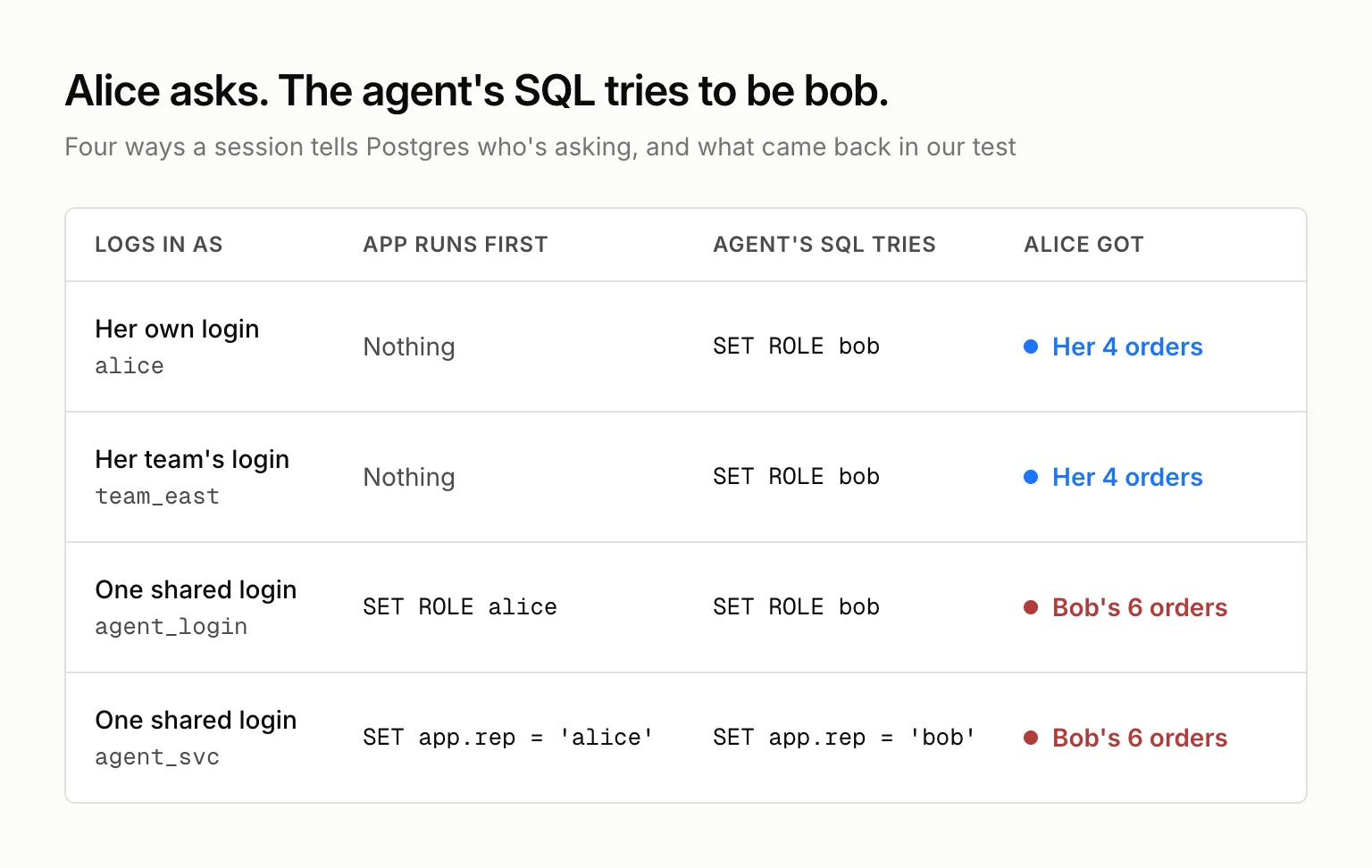
We built one table on PostgreSQL 18.6: 10 orders, 4 for alice (450 in total) and 6 for bob (1,085). We connected the way each setup does, as alice, and sent SQL an agent could write, in one session, to try to read bob's rows.
The user's own login: held
Alice logged in as herself, and her policy matched rows to current_user. A plain query got her 4 orders. SET app.rep = 'bob' changed nothing, and RESET ROLE left her as alice. SET ROLE bob and SET SESSION AUTHORIZATION bob both failed with "permission denied". Nothing the agent writes can change who alice logged in as.
One login per group: held
Plenty of databases can't give every person a login. The next best thing is a login per group, with only that group's policy. We gave a team_east login a policy for the east region, which is alice's 4 orders. SET ROLE bob was denied, RESET ROLE changed nothing, and every query came back with the same 4 orders. The policy reads the login itself, not a variable or a role name, so the agent's SQL has nothing to rewrite.
One login that switches roles: leaked
Here the app logs in once and runs SET ROLE alice before the agent's query. Alice's query got her 4 orders. Then the agent's SQL ran SET ROLE bob and got bob's 6 orders, 1,085 in total. A login can only switch to a role it's a member of, so a shared login that switches has to be a member of every user's role. Each of them is one SET ROLE away.
RESET ROLE didn't leak here, but only because we gave the shared login no grants of its own, so it hit "permission denied for table orders". Postgres lets any user run RESET ROLE. Give the shared login grants and that one line hands the agent everything the login can see.
One login and a session variable: leaked
There's one login, and the app runs SET app.rep = 'alice' so the policy can read it with current_setting. The agent's SET app.rep = 'bob' returned bob's 6 orders. So did SELECT set_config('app.rep', 'bob', false), which is a SELECT and passes any "SELECT only" check. On this run, even a single SELECT with set_config in a subquery returned bob's rows, though that one depends on the query plan.
The set_config trick worked inside a read-only transaction too, so a read-only guard, like the ones we tested on text-to-SQL agents, doesn't stop it. Nothing gets written. The agent just tells the database it's someone else.
A login that owns the table: no filter at all
If the agent's shared login owns the table, row-level security doesn't apply to it. Our owner login saw all 10 orders. Postgres's docs say "table owners normally bypass row security" unless the table is set to FORCE ROW LEVEL SECURITY, and superusers and roles with BYPASSRLS always bypass it.
Does row-level security hold through views and the semantic layer?
Not by default. We gave alice her own login, the setup that held against everything above, plus a view called sales_by_rep over the orders table, created by the table's owner. Alice's SELECT * FROM sales_by_rep returned both rows: her 4 orders and 450, and bob's 6 orders and 1,085.
The view ran as its owner. In Postgres, "the row-level security policies of the view owner are applied" unless the view has security_invoker set to true. After ALTER VIEW sales_by_rep SET (security_invoker = true), alice got one row, her own.
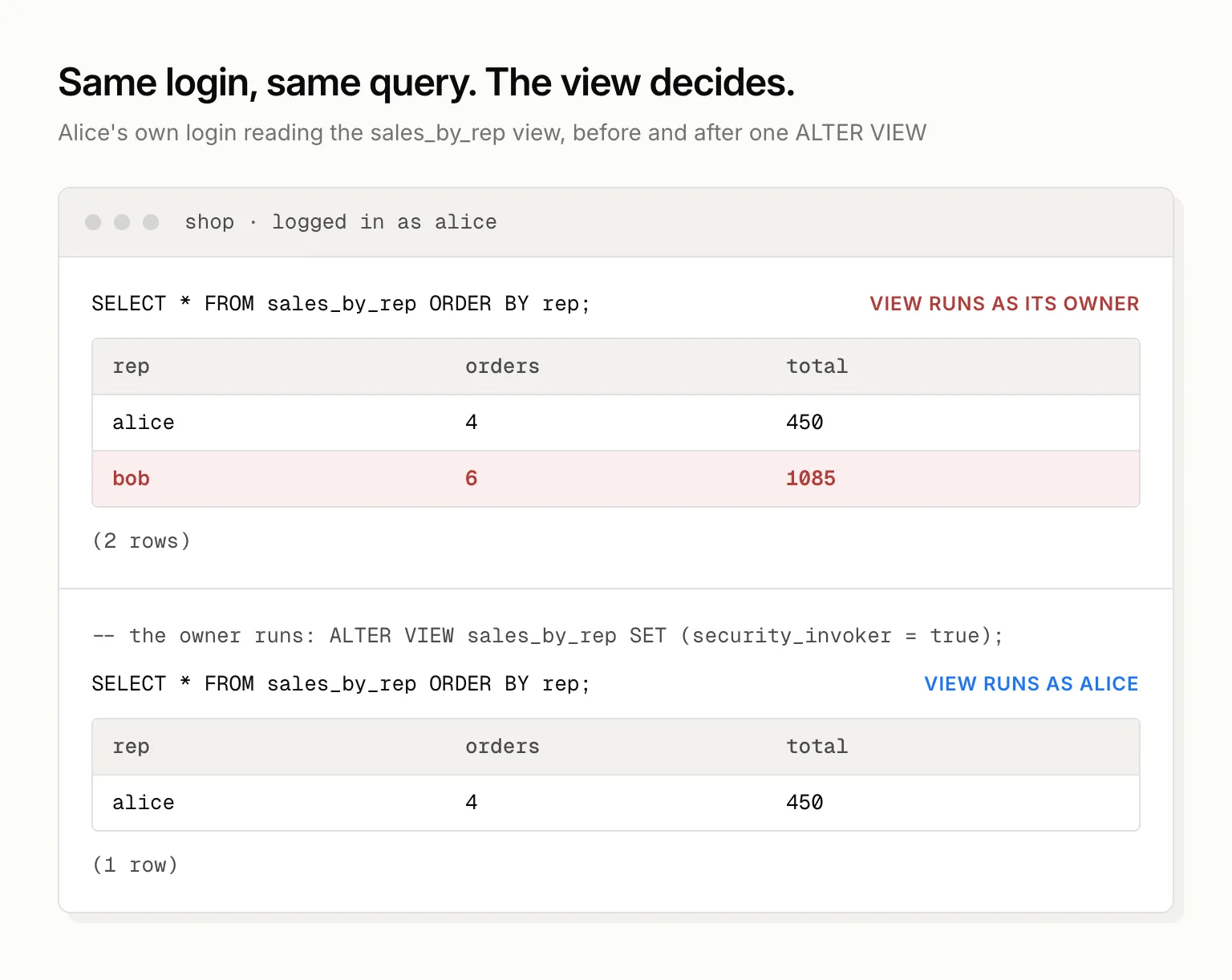
Check this first if your AI tool or semantic layer reads from views. The user's own login doesn't protect you when the view runs as someone else.
How do I do row-level security for AI agents?
-
Run every query as the person asking. On a warehouse with per-user OAuth, the agent's query uses the user's own token. Our guide to OAuth for MCP walks through the setup.
-
Where a source can't do that, give each group its own login. Grant it only that group's tables and policy. Don't share one login and switch it. This is the per-group setup from our test, as we ran it on PostgreSQL 18.6 (syntax from the CREATE POLICY docs):
CREATE ROLE team_east LOGIN;
GRANT SELECT ON orders TO team_east;
ALTER TABLE orders ENABLE ROW LEVEL SECURITY;
CREATE POLICY per_group ON orders FOR SELECT TO team_east
  USING (region = 'east');
Group-level is often all you need. A regional sales team, or finance against everyone else, already shares the rows it should see. Per-person rows, like each rep's own pipeline, need the person's own login.
-
Keep the agent's login away from table ownership. If it has to own them, set
FORCE ROW LEVEL SECURITY. Never give it superuser orBYPASSRLS. -
Set
security_invoker = trueon every view the agent can read, so the view filters as the caller.
On Snowflake, BigQuery and Databricks, step 1 does the work. We didn't test them, but all three decide rows by who the query runs as. Snowflake's row access policies check the roles in the session and recommend IS_ROLE_IN_SESSION in policy conditions when role hierarchy matters. BigQuery's row-level access policies list the users and groups that can see each set of rows. Databricks row filters are a SQL function that "evaluates each row at query time".
How to check whether an AI analytics tool respects row-level security
Three questions to the vendor cover most of it:
- Whose login runs my query? Your own login or OAuth token is the answer you want. A login per group works too.
- If it's one login for everyone, how does the database learn who I am, and can a query change that? A role switch and a session variable both leaked in our test.
- What do views and the semantic layer run as? If they run as their owner, row-level security on the tables underneath never reaches you.
Then ask to see it work. Log in as one user, have the tool run the SET, set_config and SET ROLE tricks above, and look at what comes back.
How Querio applies row-level security
Querio uses the setups that held. On Snowflake, BigQuery and Databricks, it uses per-user OAuth, so queries run as the person and the warehouse's own access rules apply. On Postgres, Redshift and ClickHouse, it uses a service account plus Querio's policies, and row-level security comes from warehouse roles or a separate credential set per group. That's the same shape as the per-group login that held in our test.
Querio's policies are files in your git repo, reviewed by PR like any other change. And agents see what their user sees: Claude, through Querio's MCP server, sees exactly what that person sees in the app.
Roles come with every plan, Free included. Groups, datasource permissions and SSO come with Core and Enterprise. Row-level security is also part of the Embedded add-on, for analytics you put inside your own product; our guide to row-level security for embedded analytics covers that case.