Business Intelligence
Why LLMs Hallucinate SQL: 7 Failure Modes and How to Catch Every One
LLMs often produce plausible but incorrect SQL—fix it with seven guardrails: schema grounding, semantic metrics, linting, dry runs, golden tests, and human review.

If you use AI to write SQL, the main risk is simple: the query can run and still be wrong.
I’d sum the article up like this: most SQL hallucinations fall into 7 repeatable failure modes, and each one needs its own check. The fix is not “better prompting,” but using the best tools for natural language to SQL. It’s a layered process: schema checks, metric rules, SQL linting, dry runs, golden tests, refusal rules, and human review for high-risk cases.
Here’s the full list in plain English:
- Made-up tables or columns
- Wrong joins
- Wrong metric logic
- Wrong SQL dialect
- Wrong filters or time grain
- Bad aggregations
- Answers based on model guesswork instead of warehouse context
A few points stand out right away:
- A bad SQL query may fail silently
- A golden test set of 50–100 known question-query-result cases can catch drift
- Queries tied to PII, finance, healthcare, or exec dashboards should go to review
- Read-only access helps stop write-side damage even if checks fail
Why LLMs Hallucinate (And How to Actually Reduce It)
::: @iframe https://www.youtube.com/embed/wU5NsIsX_qI :::
Quick comparison
| Failure mode | What goes wrong | First check to use |
|---|---|---|
| Invented schema | Fake tables or columns | Match SQL identifiers to live schema to prevent hallucinations |
| Broken joins | Valid SQL, wrong relationship | Check join path and key usage |
| Metric drift | Query math does not match business rules | Use semantic definitions |
| Dialect drift | SQL written for the wrong warehouse | Lint + EXPLAIN |
| Wrong slicing | Wrong date field, grain, or filter | Validate predicates and date logic |
| Bad aggregations | Math looks fine but answer is off | Check aggregate pattern vs. metric rule |
| Model priors | Query follows guesswork, not your data model | Re-ground to schema and trusted sources |
My takeaway: if you want SQL agents you can trust, treat them like a controlled system, not a free-form text tool. The article then walks through each failure mode, the first guardrail to apply, and when to stop automation and send the query to a person.
Why SQL Hallucinations Are Dangerous in AI-Driven BI
The main issue isn't broken SQL syntax. It's SQL that looks right but means the wrong thing. The query runs, returns a number, and that number can shape a decision.
When an agent hits live warehouse data in Snowflake, BigQuery, Redshift, or Postgres, a bad join or a missing filter can produce a result that seems fine at first glance. No error. No red flag. Just a plausible number that can move fast through Slack, Teams, notebooks, dashboards, and embedded analytics.
And once that number gets out, the damage depends on where it shows up.
| Distribution Channel | What Goes Wrong | Risk Level |
|---|---|---|
| Slack / Teams | Unverified numbers reach decision-makers | High |
| Dashboards (Looker, etc.) | KPIs persistently wrong | High |
| Notebooks (Hex, etc.) | Downstream analysis built on bad data | Medium |
| Embedded analytics | External users see incorrect data | Critical |
A wrong answer in chat is bad enough. A wrong answer in a dashboard is worse, because it sticks around and starts to look like fact. Put that same bad output into embedded analytics, and now people outside your team may be acting on false data.
It gets messier when metric definitions aren't governed. Sales, finance, and operations can all answer the same question in three different ways. At that point, the problem isn't just one bad query. It's a system where no one is working from the same math.
That's why the next section starts with the guardrail stack you need before trusting any SQL agent.
The Guardrail Stack You Need Before Trusting Any SQL Agent
There’s no single filter that catches every bad SQL query. You need layers. Each guardrail blocks a different kind of failure before a bad number reaches a dashboard, a report, or an exec meeting. The next sections tie each failure mode to the guardrail that stops it first.
The starting point is schema grounding. The agent should only work with real tables and columns. If you skip this step, an LLM can confidently make up schema objects that simply aren’t there.
Next comes the semantic layer. This is where metric definitions live, so the agent knows what terms like Revenue or Churn mean in your business, not what it infers from training data. Tools like dbt/MetricFlow already handle this in BI workflows. For agents, those same definitions need to be part of the context the model reads before it writes any SQL.
After the query is written, SQL linting helps catch dialect mistakes before anything runs. Then a warehouse dry run (EXPLAIN) checks the query plan against the target engine before execution. [1]
The last programmatic check is result validation. Use a versioned golden set of 50–100 real question-query-result cases as a regression test. [2] If a generated query drifts from a known-good answer for the same question, that’s a hard sign that something broke. When a check fails, or the query looks high risk, send it to an analyst before release. [2]
Querio uses this stack with governed context, inspectable SQL, live warehouse connections, and a clear refusal when the data isn’t there.
| Guardrail | What It Catches |
|---|---|
| Schema grounding | Invented tables/columns |
| Semantic layer | Metric definition drift |
| SQL linting | Dialect errors |
Warehouse dry run (EXPLAIN) |
Invalid query plans |
| Golden dataset regression | Result drift from known-good answers |
| Clear refusal | Hallucinated answers when data is missing |
| Human-review triggers | High-risk queries before release |
With that stack in place, the seven failure modes are much easier to spot, explain, and block.
1. Invented Tables and Columns
This failure mode happens when the model names tables or columns that don’t exist in your warehouse. It’s the easiest kind of error to catch before a query runs, which is why semantic metadata validation should happen first. Instead of using your live Snowflake, BigQuery, Redshift, or Postgres schema, the model leans on patterns it has seen before. So when someone asks about monthly recurring revenue, it might confidently write FROM mrr_summary even if that table isn’t there.
Large schemas make this problem worse. The bigger the gap between the prompt and the live catalog, the more likely the model is to guess missing identifiers. A shortened column name can also get “cleaned up” into a name that doesn’t exist. The SQL may still look valid at a glance, but it can produce a plausible - and wrong - answer. [1]
When evaluating text-to-SQL models, The fix is pretty direct: parse the SQL, check every table and column against information_schema, and block execution if anything doesn’t match. [2]
If validation fails, either fix the identifier using approved metadata or ask a clarifying question. If the names are correct but the relationships between them are off, the next failure mode is broken joins.
2. Wrong Joins and Broken Relationships
Once the tables and columns are real, the next thing that goes wrong is the join itself. A query can be perfectly valid SQL and still give the wrong business answer. That’s the trap. A model might join orders to customers on user_id when the right key is customer_id. The names look close, but they don’t mean the same thing.
Some join mistakes show up again and again:
- A
LEFT JOINon a column that is not a foreign key - A many-to-many join that blows up the row count
- A join based on the same column name even though that column means different things in each table
This tends to happen when the model sees only part of the schema because of context-window limits. It reasons from what’s in front of it and misses the full relationship graph. Names like consumer_1 and consumer_2 don’t help much, so the model fills in the blank with a join that looks reasonable but is still wrong. [1]
The fix is pretty plain: check the table and column names first, then test the join path against the question you’re trying to answer. Run relationship checks to make sure the join pattern matches the task, then do a dry run to inspect the plan before execution. Using AI tools that write SQL can help automate these checks. [1] If the keys are right and the answer still looks off, the next failure mode is a bad metric definition.
3. Misread Business Metrics and Definitions
Once the join is right, the next thing that goes wrong is meaning. A model can use the right tables, write clean joins, and still produce the wrong answer by business definition. The SQL runs. The numbers look fine. And that's exactly why this failure is so sneaky.
What happens under the hood is pretty simple: the model reads table and column names, then guesses the metric logic. But business rules often live somewhere else, like your glossary or semantic layer. If that context isn't present, the model fills in the blanks on its own.
Here’s how that shows up in practice. Ask an LLM for ARR, and it may SUM every row in the payments table, including refunds and one-time fees, instead of limiting the query to successful recurring transactions. Ask for "active users", and it may leave out a rule like is_deleted = FALSE or a recency condition such as last_login > 30 days. The hard part is that the SQL can still run cleanly, so the mistake doesn’t wave a red flag.
Before SQL runs: put the business glossary or dbt metric definitions into the prompt. That gives the agent the metric logic you’ve approved instead of letting it guess from column names. The semantic layer is the source of truth for what a metric means - not the model’s built-in assumptions.
After execution: use a golden dataset of verified (question, ground-truth SQL, expected result) tuples and run them as a regression suite. [2] Then add an LLM-as-Judge step to check whether the SQL matches the business intent. [2] These checks are about business meaning, not plain syntax or execution. They catch definition drift that schema checks and join checks simply won’t catch.
| Metric error | Bad SQL behavior | Pre-run fix | Post-run check |
|---|---|---|---|
| ARR miscalculation | Sums all payments rows, including refunds and one-time fees |
Inject dbt metric definition into the prompt | Compare against a golden query for the same time period |
| "Active users" filter missing | Omits is_deleted = FALSE or a recency filter |
Define "active" in the business glossary | LLM-as-Judge checks for mandatory filters |
If the metric definition is right but the query still fails in a given warehouse, the next failure mode is dialect drift.
4. Invalid Warehouse-Specific Syntax and Dialect Drift
A query can have the right joins and still break for a simple reason: it was written in the wrong SQL dialect.
Snowflake, BigQuery, Redshift, and Postgres don’t speak SQL in the exact same way. They differ on functions, casting, quoting, and date logic. In practice, the warning signs are easy to miss. Maybe the query uses a function from another engine. Maybe it leans on a keyword your warehouse handles differently. Everything can look fine until the SQL actually hits the warehouse.
The safest move is to catch those issues before execution with a warehouse dry run. Send the generated SQL through the warehouse’s EXPLAIN command before it touches live data. EXPLAIN checks syntax without running the query [1]. On top of that, use a dialect-aware parser to spot unsupported functions, reserved words, and bad type casts before execution.
If the query still fails at runtime, log the warehouse error, store the SQL and validation result, and update the context layer before retrying.
| Pre-execution check | What it catches | Tool or method |
|---|---|---|
| Dry-run | Invalid syntax, unsupported functions, type mismatches | Native warehouse EXPLAIN command [1] |
| Dialect-aware parsing | Unsupported functions, reserved words, bad type casts | SQL parser + dialect rules [2] |
| Execution logging | Failures that pass static checks | Warehouse error log + validation store |
Live warehouse connections and governed context help keep the agent tied to the target engine instead of falling back to generic SQL habits. And if the syntax checks out but the query still returns the wrong slice of data, the next problem usually shows up in filters, time grain, and slicing.
5. Wrong Filters, Time Grain, and Slicing
Once syntax and dialect are right, the next thing that breaks is logic. The query slices the data the wrong way. This is where LLMs often make up SQL by picking the wrong date field, time window, or filter. The query still runs. The problem is that it answers a different question.
This usually happens when the model guesses based on past examples instead of the actual warehouse context, or when it fills gaps in metadata with assumptions.
In plain terms, that can look like:
- filtering on
created_atinstead oforder_date - grouping by day when the question asks for monthly totals
- leaving out
is_active = TRUEfrom a user count
None of these will throw an error in Snowflake, BigQuery, Redshift, or Postgres. They pass cleanly. But the slice is wrong, so the answer is wrong too.
| Slicing mistake | Example |
|---|---|
| Wrong date field | Filters created_at instead of order_date |
| Wrong time grain | Groups by day when the question asks for monthly totals |
| Missing business filter | Leaves out is_active = TRUE |
The reason is SQL automation often fails is simple: business rules usually live in an analyst's head or in internal docs, not in the schema the model can read.
Before execution, check date fields, grain, and required predicates against the semantic layer and known business rules. Also test edge cases like "last month" vs. "last 30 days" - those are not the same query - and fiscal-quarter logic, where time phrases need clear rules to resolve the right way.[2]
If the result doesn't match the requested date range, grain, or segment, send it to human review before it reaches a dashboard or stakeholder.
Even when the slice is right, the answer can still mislead if the aggregation logic is wrong.
6. Logically Correct but Misleading Aggregations
Sometimes the filter is correct, but the math still goes off the rails. That’s one of the toughest errors to catch. The query runs, the numbers come back, and everything looks fine. But the aggregation can still be wrong. That makes this failure mode risky: the SQL succeeds and still gives you the wrong number.
A common mistake is averaging a ratio instead of calculating it from totals. For example, using AVG(conversion_rate) instead of SUM(conversions) / SUM(sessions). The model leans on a familiar aggregate pattern instead of the right business formula, and the result is hallucinated SQL that returns a plausible but quietly wrong answer.
To catch this before execution, parse the SQL and flag aggregate patterns that clash with the metric definition. Aggregate linting should be the first check.
After execution, compare the results against a golden dataset made up of aggregation-heavy questions and trusted outputs. Use fuzzy matching for rounded values. If there’s a mismatch, send it to human review.
A governed semantic layer with explicit aggregation rules helps stop the agent from guessing the math.
If the math is correct but the answer still seems right for the wrong reason, the next failure mode is model priors overriding warehouse context.
7. Answering From Model Priors Instead of Warehouse Context
This is the hardest kind of SQL hallucination to catch. The query runs. The columns look plausible. But the model is filling gaps from its training data instead of using your warehouse context. In plain English: this is hallucination by completion, not by syntax.
Large schemas can stretch across thousands of tables, and one prompt simply can't carry all that context. So when someone asks for something vague like "top customers", the model may lean on generic SaaS habits instead of your actual warehouse setup. It might reach for customer_id even though your schema uses uuid. [1]
The main pre-execution check here is schema fidelity. Parse every table and column in the generated SQL, then check each one against the live data dictionary before the query touches the warehouse. If any referenced object doesn't exist, block the query and re-ground the prompt with the right schema context. [1]
You also need a second-pass check that compares the SQL, the question, and the schema context side by side. If the query can't be tied to a documented metric or a trusted query, send it to human review. Review is required when the SQL can't be traced back to warehouse context, a semantic definition, or a trusted query. [2]
A governed context layer helps keep the model tied to approved schema, metric, and query context. When that context is missing, block the query and send it to review - the toolkit below shows how to automate SQL queries safely.
Detection Toolkit: Each Failure Mode Mapped to Its Fix
::: @figure 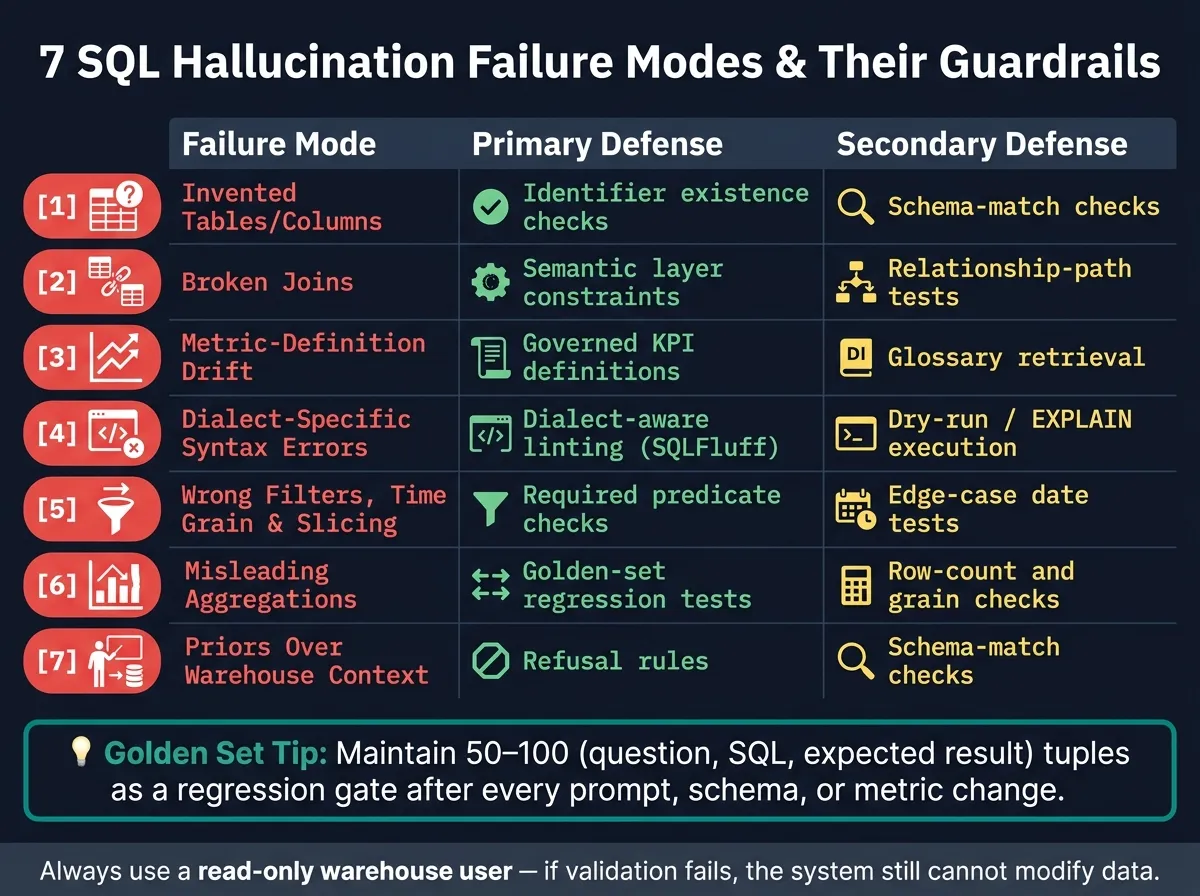 {7 SQL Hallucination Failure Modes: Guardrail Cheat Sheet}
:::
{7 SQL Hallucination Failure Modes: Guardrail Cheat Sheet}
:::
The seven failure modes above get a lot easier to handle when each one has a clear check before a query runs and another check after it runs. Think of this as your implementation checklist.
| Failure Mode | Primary Defense | Secondary Defense |
|---|---|---|
| Invented tables/columns | Identifier existence checks | Schema-match checks |
| Broken joins | Semantic layer constraints | Relationship-path tests |
| Metric-definition drift | Governed KPI definitions | Glossary retrieval |
| Dialect-specific syntax errors | Dialect-aware linting (SQLFluff) | Dry-run/plan-only execution |
| Wrong filters, time grain, and slicing | Required predicate checks | Edge-case date tests |
| Misleading aggregations | Golden-set regression tests | Row-count and grain checks |
| Priors over warehouse context | Refusal rules | Schema-match checks |
A golden set of 50–100 tuples - each with a question, ground-truth SQL, and expected result - gives you a practical way to catch drift early. Run that set after every prompt, schema, or metric change. In plain terms, it becomes the regression gate for every update you make.
Some checks are easy to automate. Others aren't. If a rule-based system can't tell whether the SQL matches the business intent, use a second-pass reasoning model to review intent.
Also, use a dedicated read-only warehouse user. That way, if validation fails, the system still can't change any data.
The next section shows one reusable example for each failure mode.
One Reusable Example Per Failure Mode
Each example below works as a test case for the guardrail stack above. The goal is simple: catch the issue before anything runs. The pattern stays the same each time: scenario, flawed SQL, check.
1. Invented Tables and Columns - Healthcare Encounters
A user asks, "What's the average patient age in our encounters table?" The LLM generates SELECT patient_age FROM encounters using a natural language to SQL engine. An INFORMATION_SCHEMA.COLUMNS check stops this before execution. If patient_age isn't in the schema, the query does not run.
2. Wrong Joins - Claims and Providers
The LLM joins on claims.p_name = providers.name instead of claims.provider_id = providers.npi_id (NPI). A join-path check that verifies foreign key links blocks this before the query reaches the warehouse.
3. Misread Business Metrics - MRR in U.S. Dollars
The LLM writes SELECT SUM(mrr_amount) FROM subscriptions. But the governed metric definition requires SUM(mrr) with WHERE status = 'active' AND is_trial = FALSE. A semantic-layer check cross-references the governed definition before the query runs.
4. Dialect Drift - Fiscal-Quarter Reporting
The LLM generates a fiscal-quarter filter with a date function the target warehouse does not support. A dialect-aware linting step or dry-run EXPLAIN plan surfaces the error before execution.
5. Wrong Filters - Active Customer Counts
Asked for "active customers in Q1 2026," the LLM generates WHERE signup_date > '2026-01-01', which filters by signup date instead of activity during the quarter. The right predicate filters on the activity date inside the reporting window and includes status = 'active'. A fiscal-calendar join or required-date-field check catches the mismatch before execution.
6. Misleading Aggregations - Duplicate Customer Counts
The LLM writes COUNT(customer_id) to count active customers. The right query uses COUNT(DISTINCT customer_id). A linting rule that flags COUNT on primary-key columns without DISTINCT is a simple check you can automate.
7. Answering From Priors - Wrong Source Table
Asked about active customers, the LLM queries FROM users instead of FROM analytics.fact_active_customers. That query reads raw users, not the governed metric. A schema-grounding rule that maps intent to the authoritative table through the semantic layer blocks the wrong source table. If the intent still can't be grounded, send it to human review.
If a check fails, route the query to human review before release.
How to Add Human Review Without Slowing the Team Down
Send a query to human review when it touches PII, introduces a new sensitive-domain join, defines a new metric, or feeds an executive dashboard. Human review should be the last check, not the first. Use it only when automated grounding, linting, and validation can’t show that the query is safe.
That means certain cases should go straight to review:
- PII
- First-time joins in finance or healthcare
- New metric definitions
- Executive-facing dashboards
Outside of those sensitive cases, complexity and cost (often evaluated when comparing text-to-sql query tools) become the final manual gate after schema, semantic, and syntax checks. If a query is expected to scan an unusually large amount of data in Snowflake or BigQuery, it should need manual approval. The same goes for queries with 4+ joins, subqueries, window functions, or CTEs. Instead of auto-executing, they should move into a manual-review queue.[2] The point is to turn review into a simple routing rule, not a bottleneck for an AI data analytics copilot.
| Scenario | Risk Level | Recommended Action |
|---|---|---|
| New metric definition | High | Mandatory review of the underlying SQL logic |
| First-time join across sensitive domains (PII, finance, healthcare) | High | Domain expert verifies correct keys and filters |
| Expensive warehouse scan | High | Requires manual approval |
| Executive dashboard update | Critical | Human sign-off on the known-good query before deployment |
| Answer differs materially from a trusted reference | High | Compare against a trusted result set |
This is what keeps review as a queue, not a blocker.
For lean teams, asynchronous review is usually the best fit. Log every generated query, then flag the risky ones by sensitivity tag, join count, or cost estimate for a daily review pass. Tools like LangSmith can capture every prompt and generated query, which gives a small team a clean way to audit the risky log at the end of the day.[3] Querio supports a similar setup through its context layer: the agent can propose new join paths or metric definitions, but only a logged-in human can approve and commit them to the shared repository. That keeps the approval step light and easy to audit.
Before release, compare flagged output against a small trusted reference set. The goal isn’t more review. It’s fewer bad queries reaching users.
Conclusion
SQL hallucinations don't happen out of nowhere. They tend to fall into seven repeatable failure modes: invented schema objects, broken joins, misread metrics, dialect drift, wrong filters, misleading aggregations, and answers pulled from model priors instead of your actual warehouse. The fix is pretty simple in principle: put a specific check in place for each failure mode before a query ever reaches a user.
Reliable text-to-SQL tools don't come from the model alone. They come from the guardrails around it: grounded schema, governed metric definitions, dialect checks, result validation, and human review for high-risk queries. A versioned golden set of 50–100 questions, ground-truth SQL, and expected result tuples gives you a clear benchmark for tracking whether those guardrails still hold up over time [2].
That's why governed context matters more than prompt length. What tends to work is an setup where AI operates from approved context and trusted queries, not free-form generation against an uncontrolled schema. Querio applies this with a governed semantic/context layer, inspectable SQL/Python, and live warehouse connections. The model is only one part of the system; the guardrails are what make it reliable.
FAQs
::: faq
Why isn’t better prompting enough?
Better prompting isn’t enough because SQL hallucinations usually come from missing context, not weak modeling. In plain English, the model is often flying half-blind.
An LLM usually can’t see your company’s definitions, approved table structures, or the tribal knowledge people pass around on Slack and in meetings. So even if the prompt looks strong, the model still has to guess.
And that’s where things go sideways.
It can’t reliably tell which tables are current, how terms like “revenue” are defined, or when a question has more than one possible meaning. A polished prompt may help at the edges, but it won’t solve the main problem.
To handle that kind of mess, you need an explicit, governed semantic layer. Without it, the model is just filling in blanks and hoping it lands on the right SQL. :::
::: faq
How large should a golden SQL test set be?
Start with 50 to 100 real questions from business users, and pair each one with checked SQL plus the result you expect. That’s often enough to tell the difference between a system that can hold up in production and a simple demo.
As the system gets better, add production failures and edge cases. As teams grow, they should build that set out to 500+ examples across different cohorts so they can cover tougher schema patterns and business logic. :::
::: faq
When should SQL go to human review?
SQL should go to human review when it touches sensitive data, high-impact actions, or new and complex questions. Tools in BigQuery or Snowflake can catch syntax issues, permission problems, and schema mismatches. But they can't tell whether the query matches the user's actual business goal.
Manual review should also kick in when someone asks for confidential data or makes a request that falls outside verified, expert-curated query patterns. It's the last check for semantic accuracy. :::