Business Intelligence
Why Inspectable SQL Beats Black-Box AI Analytics
Inspectable SQL—visible, auditable queries—ensures trustworthy analytics; black-box AI hides crucial joins, filters, and lineage.

If you can’t inspect the query, you can’t fully trust the number.
I’d sum up the article like this: inspectable SQL gives teams a clear way to review logic, trace metric definitions, and catch mistakes before they hit a dashboard or board deck. Black-box AI analytics may feel fast, but hidden joins, filters, and date logic can turn a clean-looking answer into a bad one. And that risk is not small: the article cites 95% of internal analytics errors as coming from business-definition mix-ups, stale definitions, and retrieval issues, while raw text-to-SQL on large schemas can fall to 40% accuracy.
Here’s the short version:
- Inspectable SQL shows the logic:
JOINs, filters, grouping, and time windows are open for review. - Black-box AI hides the logic: you see the output, but not how it was built.
- That matters most for core SaaS metrics like MRR, churn, ARR, pipeline, and active accounts.
- Visible SQL helps teams debug faster by spotting wrong join types, missing filters, grain issues, and stale fields.
- It also helps with governance because teams can trace results back to dbt models or a semantic layer.
- Self-serve works better with review: users can ask in plain English, while analysts check the SQL before sharing results.
- Querio’s role in the article is simple: it keeps AI-drafted SQL and Python visible and editable, tied to live warehouse data and to metric definitions stored as files in a git repo your team owns.
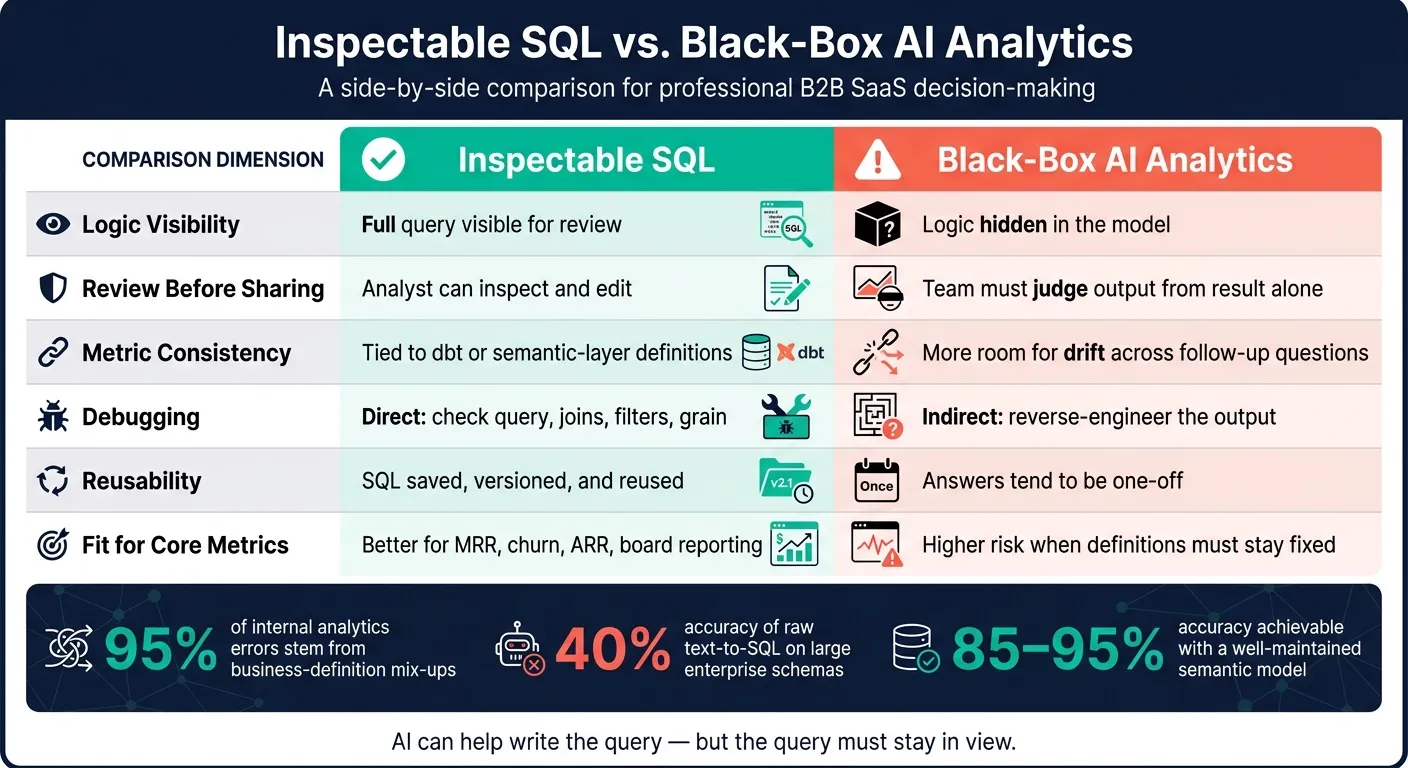
Quick Comparison
| Criteria | Inspectable SQL | Black-Box AI Analytics |
|---|---|---|
| Logic visibility | Full query is visible | Logic is hidden |
| Review before sharing | Analyst can inspect and edit | Team must judge output from the result alone |
| Metric consistency | Easier to tie to dbt or semantic-layer definitions | More room for drift across follow-up questions |
| Debugging | Direct: check query, joins, filters, grain | Indirect: reverse-engineer the output |
| Reuse | SQL can be saved, versioned, and reused | Answers tend to be one-off |
| Fit for core metrics | Better for MRR, churn, ARR, and board reporting | More risk when definitions must stay fixed |
So my takeaway is simple: AI can help write the query, but the query still needs to stay in view. That’s the line between getting an answer fast and getting an answer your team can stand behind.
Inspectable SQL vs. black-box AI analytics: the practical differences
Visible logic vs. hidden reasoning
Inspectable SQL gives analysts a receipt. They can open the query, check the JOIN, confirm the date filter, and verify the business rules before a number shows up in a revenue review. That simple check turns a number from “looks fine” into something a team can stand behind. It’s also what makes metric validation, debugging, and governance possible.
Black-box AI strips that away. The answer may look polished, but the logic sits out of view, so no one can confirm joins, filters, or the time window. General-purpose LLMs can write the right LEFT JOIN about 95% of the time, but the other 5% can slip back to an INNER JOIN and quietly leave out critical data from a churn report [4].
"In AI analytics, SQL is not implementation detail. SQL is the receipt that makes answers defensible." - Ambrus Pethes, Growth at Mitzu [1]
| Dimension | Inspectable SQL | Black-Box AI Analytics |
|---|---|---|
| Transparency | Full query visible for review | Logic hidden in the model |
| Business logic validation | Analysts verify joins, filters, and aggregations | Must trust output without seeing mechanics |
| Metric lineage | Traceable to versioned dbt models or semantic layers | Opaque; hard to trace to a source definition |
| Debugging speed | Fast; errors visible in the code | Slow; needs reverse-engineering of the output |
| Governance | Auditable; supports role-based review | Risk of bypassed access controls |
| Reusability | SQL saved, versioned, and templated | One-off answers; hard to standardize |
That leads straight to the next issue: the metric definitions behind MRR, churn, and active accounts.
Reusable code artifacts vs. one-off answers
A black-box answer is tough to reuse or reproduce. Inspectable SQL is different. Teams can save it, version it in Git, and connect it to dbt or semantic-layer definitions so the same metric logic runs again and again. That matters because raw text-to-SQL on enterprise schemas can drop as low as 40% accuracy, while a well-maintained semantic model can push accuracy to 85%–95% [7].
When the logic is repeatable, teams spend less time redoing work. They also avoid the mess of answering the same recurring question with slightly different definitions each time. Instead, everyone works from one governed definition.
That repeatable setup is what makes self-serve analytics safer for the next question.
How visible SQL improves trust, governance, and debugging
Validating business logic for metrics like MRR, churn, and active accounts
MRR, churn, and active accounts are exactly where hidden logic can blow things up.
Why? Because these metrics don’t stay inside the data team. They end up in finance reviews, product dashboards, and board decks. Once that happens, every filter and date rule starts to matter.
With inspectable SQL, an analyst can open the query and check the logic line by line. Is is_internal = false there? Is the date range tied to a calendar month, or is it just a rolling 30-day window? Is MRR excluding non-recurring charges? Those aren’t small details. They decide whether a metric can hold up under scrutiny.
"The AI did it is not an audit defense." - Mayank Mudgal, Colrows [6]
Tracing definitions and lineage back to dbt models and semantic layers
Visible SQL also helps preserve lineage.
When the SQL is out in the open, you can see what ran and where the logic came from. If the query is tied to a governed semantic layer, like a dbt YAML file, LookML, or another versioned definition, analysts can trace a result back to the exact source table and metric formula behind it.
That matters during audits. It also matters when definitions shift. Say your team updates the meaning of "churned customer" in dbt from 60 days of inactivity to 90 days. Inspectable SQL makes it plain which downstream queries need updates too. Without that trail, the same metric can quietly mean one thing in one report and something else in another. The semantic layer keeps everyone working from the same playbook.
Catching join and filter errors before stakeholders see bad numbers
Visible SQL also makes debugging much less painful.
If a number looks off, an analyst can inspect the query and spot the issue before a stakeholder ever sees it. Maybe it’s a bad join. Maybe the grain is off. Maybe a filter got left out. When the SQL is readable, those mistakes are easier to find. When it’s hidden, debugging turns into guesswork.
| Error Type | What Goes Wrong | How Inspectable SQL Helps |
|---|---|---|
| Wrong join type | INNER JOIN drops customers with no orders |
Analyst spots it in the query and corrects it immediately |
| Missing filter | Test accounts inflate conversion metrics | Reviewer sees the missing WHERE clause for is_internal = false |
| Grain mismatch | User-level counts inflate account-level totals | Analyst catches the wrong GROUP BY before it runs |
| Stale column reference | AI uses a deprecated table or renamed field | User edits the column name directly in the visible query |
How inspectable SQL supports safer self-serve analytics
That same visibility makes self-serve analytics safer, too. Stakeholders can ask questions in plain English, while analysts still check the exact logic before anything gets shared. You get speed, but you don't give up control over joins, filters, or metric definitions.
From natural-language questions to analyst-reviewed SQL
Inspectable SQL shifts AI from a black-box answer machine into a workflow people can actually review. A stakeholder asks a question, the AI drafts a SQL query, an analyst reviews or edits it, and the approved result becomes a reusable, trusted output. [2][1] In practice, the analyst is checking the logic instead of writing every query from scratch.
This happens against live warehouse data in Snowflake, BigQuery, Redshift, or Postgres, not a CSV export. [2][3] That matters because the answer comes from the same source your team already uses. And once that first answer gets approved, the next challenge shows up fast: do the follow-up questions stay aligned?
Why notebooks and governed context make iteration safer
That's where things often go sideways. Someone asks about churn, gets an answer, and then asks for that same metric by plan tier or cohort. If the second answer quietly changes the definition, you're dealing with metric drift. [2][5]
Notebooks help keep that from happening. They keep the original query, follow-up filters, and logic changes in one auditable place. So you're not just saving query history; you're keeping metric definitions steady across each round of analysis. [1]
The governed context layer is what keeps those rounds aligned. Business terms are defined once and then applied the same way across every analysis, so the AI doesn't have to guess what someone means from raw schema names. [2][5]
For data leaders and analysts at growing B2B SaaS companies, that kind of consistency is the line between self-serve that scales and self-serve that drifts. Basic SQL literacy also gives non-technical users a way to sanity-check results instead of taking them at face value. That's how small data teams can let more people self-serve without losing governance.
Where Querio fits for warehouse-native teams
That same visible-logic model is what makes Querio a good fit for warehouse-native teams. Querio keeps AI-generated SQL and Python visible and editable, so analysts can check the logic before results reach stakeholders.
In practice, that means live connections to Snowflake, BigQuery, Redshift, or Postgres - no CSV exports and no copied data. Business terms like "churn" or "active accounts" are defined once, as plain files in your git repo, and saving a change opens a pull request your reviewers approve. So core metrics stay defined the same way across ad hoc questions, scheduled automations, and agents like Claude or Cursor that work through Querio's MCP server and CLI. Reactive notebooks tie each revision back to the original analysis, which makes follow-up cuts auditable.
Why this model works for small data teams at growing B2B SaaS companies
At a 100–500-person B2B SaaS company, demand for analytics usually grows faster than the data team. Product managers, finance, and ops all need answers, but a two- or three-person team can't write every query the moment it comes in.
Querio's model helps close that gap without adding new risk. Non-technical users can ask questions in plain English, in the app or in Slack, and get an answer in a notebook with the SQL and Python behind it. An analyst can open, check, and rerun it before anything is shared. That review step is quick. AI-assisted SQL can cut a 12-minute manual query task down to about 30 seconds for generation plus 30 seconds for review - a 10x speed improvement without removing the human check. [4]
For lean data teams, that's the sweet spot: faster answers without losing control of the numbers. That's what makes governed self-serve workable for small data teams.
FAQs
When is inspectable SQL most important?
Inspectable SQL matters most when AI-generated analytics support critical business decisions, compliance, or financial reporting. In those cases, traceability and accuracy aren't nice to have. They're a must.
It matters most for:
- High-stakes planning, where teams need to check logic, joins, and metric definitions before acting on the numbers
- Audits and compliance, where you need to show exactly how a number was produced
- Debugging and trust, where people need to trace changes and resolve challenged results fast
When the output shapes budgets, forecasts, board reporting, or regulated workflows, being able to inspect the SQL makes a big difference. It gives teams a clear path from question to query to result, which helps cut confusion when the stakes are high.
How much SQL knowledge do business users need?
Business users don’t need to write code. But being able to read basic SQL helps a lot.
You don’t need deep technical skill here. Just recognizing simple syntax can help you check whether the analytics logic makes sense before anyone uses it to make decisions.
Even a few hours spent learning how to spot joins, filters, and GROUP BY clauses can make a big difference. Instead of just accepting black-box outputs at face value, non-technical users can play a more active role in checking data accuracy.
How do teams keep metric definitions consistent over time?
Teams keep metric definitions consistent by grounding AI analytics in a governed semantic layer instead of leaning on LLM guesswork. That shared source of truth holds approved formulas, join paths, and business logic that AI has to use when it builds SQL.
When definitions shift, teams update them in a controlled way through versioning, review AI outputs that missed the mark, and feed those fixes back into the semantic model.