Business Intelligence
Can You Trust AI to Write SQL? How Governed Context Prevents Wrong Answers
Governed semantic layers and warehouse controls stop AI from producing plausible but incorrect SQL and metric drift.

Yes - but only if the AI writes SQL inside a governed layer. Without approved metrics, trusted joins, and warehouse-level access rules, AI can return SQL that runs cleanly and still gives you the wrong answer. That matters when bad data quality already costs companies $12.9 million per year, and top models scored only about 10.1% to 17.1% on enterprise-style SQL tasks in Spider 2.0.
If I had to sum up the article in plain English, it’s this:
- SQL syntax is not the hard part. Business meaning is.
- The biggest failure points are bad joins, KPI drift, wrong field choice, old tables, and weak permission controls.
- The fix is governed context: semantic models, metrics layers, schema docs, and warehouse-enforced security.
- AI SQL should still be checked with schema validation,
EXPLAIN, row-count checks, and human review for risky cases. - Raw text-to-SQL is fine for demos. It should not be the default for production reporting.
What stood out to me is how simple the pattern is: when AI guesses, numbers drift. When rules are defined up front, failure is easier to catch because the model has less room to invent logic.
Here’s the short version of the article’s core point:
| Topic | What the article says |
|---|---|
| Main claim | AI-written SQL is only safe to trust when business logic is governed before query generation |
| Main risks | Fan traps, chasm traps, missing bridge tables, metric drift, wrong columns, stale tables, and data exposure |
| Main controls | Semantic layer, metrics layer, certified views, schema docs, lineage, row-level security, and masking |
| Main outcome | More consistent answers, fewer silent errors, and lower reporting risk |
Bottom line: I’d trust AI to write SQL only when the warehouse gives it a fixed map of what metrics mean, how tables join, and what data it can access.
Where AI-Generated SQL Goes Wrong Without Governance
Wrong Joins, Missing Bridge Tables, and Duplicate Rows
The worst SQL mistakes are often the quiet ones.
The query runs. It returns rows. And the numbers are wrong.
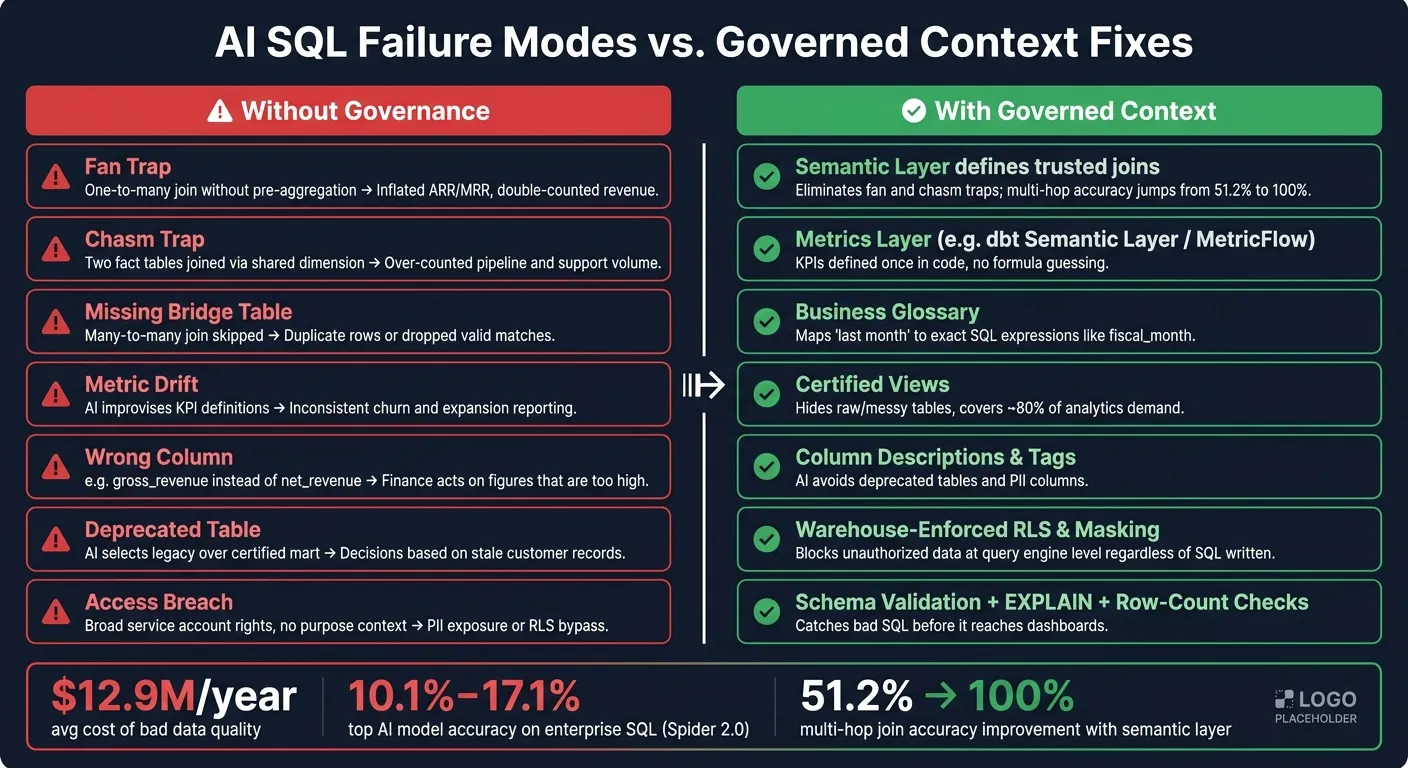
In a Snowflake, BigQuery, or Redshift warehouse, one bad join can throw off an entire report. Say an AI joins an orders table to an order_items table without aggregating first. Each order row gets repeated for every line item. So a $100 order with five line items turns into $500 in a SUM(amount) query. That's the fan trap.
The same thing happens with the chasm trap. For example, if AI joins orders and support_tickets through customers, each fact table can multiply the other. Revenue gets inflated. Ticket counts get inflated too.
Many-to-many relationships have their own problem. If a bridge table is needed and the AI skips it, you'll either get duplicate rows or lose valid matches.
On multi-join questions, raw text-to-SQL accuracy can drop to just 51.2% [7].
A query can be valid SQL and still produce bad analytics.
There’s another common issue in BigQuery and Redshift schemas: table selection. If the warehouse has customer_dim, customer_legacy, and customer_staging, the AI may grab the wrong one for ARR or MRR work [2][6]. That can pull in stale records or duplicate customer data without any obvious error.
Bad joins are one way this goes sideways. Undefined KPI logic is another.
Metric Drift From Undefined KPIs
If KPI definitions aren't governed, AI starts filling in the blanks on its own.
Ask for MRR twice, and you may get two different formulas. Why? Because exclusions, time windows, and field choices usually aren't spelled out in raw schema metadata.
Most of the drift comes from missing business filters. Internal test accounts, pending refunds, and subscription activation cutoffs rarely show up in raw schema DDL. So the AI often falls back to a plain SUM(amount) on whatever field name looks closest. That might mean using gross_revenue instead of net_revenue and skipping the needed filters altogether.
Time logic drifts too. One query may use a 28-day window. Another may use calendar-month logic. Those differences look small at first, but they stack up fast in cohort metrics like Net Revenue Retention.
Once the formula starts drifting, field selection tends to drift with it.
Misused Fields, Deprecated Tables, and Broken Access Rules
Enterprise warehouses are full of similar-looking fields. A human analyst who knows the business usually sees the difference right away. created_at and booked_at are not the same. gross_revenue and net_revenue are not the same either.
But to an AI reading schema metadata, those fields can look close enough.
Without governed context, the model often picks the most literal match. It may use activated_at when the business actually tracks events by booked_at. It may use gross_revenue when refunds should be excluded. The SQL runs fine, but the date logic is off and the revenue number is wrong.
Older Redshift or BigQuery environments make this worse. It's common to see customer_legacy, customer_archive, and a certified mart sitting next to each other. AI often picks the legacy table because the name looks like a closer match to "customers" in the prompt [2][6]. That leads to stale or duplicated records in reporting.
Access control is another weak spot. If a service account has broad permissions, an agent can expose PII or get around row-level security when it doesn't have enough purpose context. At that point, the problem isn't just data quality. It's compliance too.
That's why the next layer needs to define business rules, trusted joins, and permissions before SQL gets written.
| Failure Mode | Technical Cause | Business Impact |
|---|---|---|
| Fan Trap | One-to-many join without pre-aggregation | Inflated ARR/MRR; double-counted revenue |
| Chasm Trap | Two fact tables joined via a shared dimension | Over-counted pipeline and support volume |
| Missing Bridge Table | Many-to-many join without bridge table | Duplicate rows or dropped valid matches |
| Metric Drift | AI improvises KPI definitions | Inconsistent churn and expansion reporting |
| Wrong Column | Picking gross_revenue instead of net_revenue |
Finance acts on figures that are too high |
| Deprecated Table | AI selects legacy over certified mart | Decisions based on stale customer records |
| Access Breach | Broad service account rights, no purpose context | PII exposure or row-level security bypass |
Governed context stops these failures by locking down joins, metrics, and access rules before SQL is generated.
How Governed Context Makes AI-Generated SQL Reliable
The failures in the last section all come back to the same issue: the AI writes SQL without a solid grasp of what your business terms mean. Governed context changes that. It gives the model a limited, approved set of rules before it writes a single line of SQL.
Metrics Layers Stop Inconsistent Formulas
Without a metrics layer, every AI-generated query for "net revenue" becomes a new guess. The model might make up a formula or choose the wrong field from a group of similar column names. That's how two analysts can pull the same KPI and end up with different numbers.
A metrics layer like the dbt Semantic Layer or MetricFlow defines business logic once, in code. Net revenue stops being a guess. It becomes a set formula with approved filters and field references. So when the AI generates SQL, it pulls from that defined metric instead of making something up on the fly. The output is repeatable.
"With text-to-SQL, failure looks like a plausible but incorrect answer. With the Semantic Layer, failure looks like an error message." - dbt Labs [7]
Semantic Layers Define Trusted Joins and Business Terms
Formulas are only part of the problem. Joins and business terms need guardrails too.
Governed semantic models define joins up front, so the AI follows the join graph instead of guessing. That's what stops fan traps and chasm traps from quietly multiplying rows. For multi-hop joins, accuracy has been shown to jump from 51.2% to 100% when a semantic layer is in place [7].
Semantic layers also cut down language confusion. A business glossary maps natural language terms like "last month" to exact SQL expressions and standardized attributes like fiscal_month [4][3]. It also helps the AI tell apart similar fields such as gross_revenue, adj_revenue, and booked_revenue [2][6].
Runtime Context Adds Documentation, Policies, and Access Controls
Semantic rules help, but they don't solve everything. AI also needs warehouse-enforced policies and trusted documentation.
In Snowflake and BigQuery, row-level security and column masking can be enforced at the query engine level instead of the application layer. So even if the AI writes a broad query, the warehouse itself blocks data the user isn't allowed to see. Put simply, the model can't return data outside the user's access, no matter how the SQL is written [4][2].
Runtime context also includes schema documentation, such as:
- table wikis
- column descriptions
- certified dataset tags
- column-level lineage
That matters because enterprise schemas can exceed 3,000 columns [6]. Without documentation, the AI is basically moving through the warehouse in the dark. A tag like revenue_metric on a table or pii on a column gives the model a clear hint about what to use and what to avoid.
"An AI agent that confidently returns the wrong revenue number is more dangerous than one that returns no number at all." - Dremio [2]
These layers make AI-generated SQL inspectable and repeatable. The next step is to enforce them before the query ever reaches a dashboard.
Safeguards Analytics Teams Should Put in Place Before Trusting AI SQL
Before AI writes production SQL, your warehouse needs to expose certified definitions, joins, and access rules. Then you need to make the warehouse itself readable by machines, not just by analysts.
Model Your Warehouse for AI, Not Just Human Analysts
AI needs business context spelled out in the warehouse. It won't figure things out from tribal knowledge, vague table names, or half-documented models. Three moves matter most:
- Build curated certified views that hide raw, messy tables and expose only certified business concepts. Start with the 20 business questions people ask most often - revenue, churn, pipeline, and headcount - and create clean, documented views for them. That can cover about 80% of analytics demand [2][3].
- Define explicit grain by declaring join relationships in dbt models or a semantic layer, with clear grain definitions so the AI knows the level each table represents.
- Mark authoritative and deprecated sources so the assistant uses the right table instead of an old or stale one.
There’s also a simple shortcut: let AI draft the first version of column descriptions by sampling data distributions. Then have a person review anything tied to a key metric before it goes live [2][4].
Once that structure is in place, every generated query still needs a check before users see it.
Validate Generated SQL Before It Reaches a Dashboard
Even with a solid semantic layer, AI-generated SQL should not land in an executive dashboard without validation. The point is simple: catch bad SQL before it shows up in reporting [5].
For Snowflake, BigQuery, Redshift, and Postgres teams, a practical checklist looks like this:
- Schema check: Use
INFORMATION_SCHEMAto confirm that every referenced table and column exists and that the user is allowed to access it [1]. - Dry run: Use
EXPLAINto catch expensive scans before they eat into compute spend [5]. - Row-count check: Flag row counts that look off after execution so join problems show up early.
- Human review: For high-risk requests - anything involving PII, triggering a data export, or needing elevated access - require human review before sharing the result [5][4].
One test people often miss is consistency. Ask the same natural-language question three times and compare the results. If the answers change, that's a big problem. Inconsistent answers are more dangerous than answers that are just plain wrong, because they’re harder to spot and trust fades bit by bit [1].
Comparison Table: Governed AI Analytics Approaches Side by Side
These safeguards vary based on where governance sits in the stack.
| Approach | Governance Location | Best Fit |
|---|---|---|
| Platform-native semantic layer | Inside the warehouse platform (e.g., Snowflake Cortex Analyst semantic views) | Teams that want low-friction, platform-native governance |
| Code-first metrics layer | YAML definitions in Git, version-controlled alongside dbt models | Teams that need portable, auditable metric definitions |
| Engine-level governance | Virtual datasets enforced at the query engine | Teams prioritizing query acceleration alongside governance |
| Governed self-serve context layer | Shared context layer for joins, metrics, and business definitions, with inspectable SQL | Teams running live warehouse queries with non-technical users |
| Raw text-to-SQL | None | Fast to prototype; not suitable for production reporting |
Conclusion: AI SQL Becomes Reliable When Logic Is Governed, Inspectable, and Warehouse-Native
With those safeguards in place, AI-generated SQL stops feeling risky and starts feeling dependable. AI can write SQL well, but governed context is what keeps it right. On its own, AI can't read your business logic the way your team does. It doesn't know your revenue definition, your join logic, your deprecated tables, or your access rules unless those things are clearly set and enforced. That's where bad answers sneak in.
The fix is governed context: metrics defined once, trusted joins, and warehouse-enforced access rules. That's why what a semantic layer is matters most.
"Text-to-SQL without a semantic layer is a useful demo. Text-to-SQL grounded in a well-maintained semantic model is an enterprise capability." - Alex Merced, Developer Advocate [4]
Governed context has a clear effect on text-to-SQL reliability. For teams running Snowflake, BigQuery, Redshift, or Postgres, that means fewer bad queries making their way into dashboards, more consistent numbers across teams, and less risk when a metric lands in an executive report.
In practice, this means a governed, warehouse-native context layer. Querio keeps that context, the metric definitions and the dashboards as files in a git repo your team owns, and changes to them go through a pull request your reviewers approve. Its agent answers on live warehouse data with SQL and Python you can inspect, and Claude, ChatGPT and Cursor work from the same definitions through its MCP server and CLI.
Governance isn't overhead. It's the part that makes AI SQL reliable.
FAQs
What is governed context in AI SQL?
Governed context sits between your data warehouse and an AI agent. Its job is simple: help stop inaccurate or inconsistent SQL before it happens.
It gives the model approved metric definitions, valid joins, table relationships, and business rules. So instead of guessing, the model works from grounded metadata.
That leads to queries that are more precise, auditable, consistent, and aligned with company standards and data access policies.
How can I tell if AI wrote the wrong SQL?
Look for silent failures: SQL that runs fine but gives you plausible, misleading numbers. That’s a common trap with AI-written SQL. The syntax may be valid, yet the query can still miss business rules like filtering out test accounts, excluding refunds, or using the right join.
A few red flags tend to show up again and again:
- Inflated totals from one-to-many joins
- Ambiguous or old columns
- No clear audit trail for metric definitions, dimensions, or lineage
That last point matters more than it seems. If no one can trace how a metric was defined, which fields were used, or where the data came from, the result may look right while still being off in ways that are hard to spot.
What should teams set up before using AI for SQL?
Before a team leans on AI for SQL, it needs a governed setup, not a pile of raw, undocumented schemas that force the model to guess.
That usually means having:
- Canonical metric definitions
- A documented join graph
- A business glossary and data catalog
- Access and policy controls
- Lineage tracking
Why does this matter? Because AI is only as good as the context it gets. If the data layer is messy or unclear, the SQL can drift fast. One table might define revenue one way, another might define it another way, and now the model has to make a call it should never be making.
With the right setup, AI can generate SQL based on approved business rules instead of shaky inference. That shifts the model’s job from figuring out what your business means to using the rules you’ve already set.