Business Intelligence
What Is Text-to-SQL? How Natural Language Becomes SQL
Explains how text-to-SQL turns plain English into SQL, where it succeeds, common failure modes, and governance safeguards.

Text-to-SQL lets you ask a data question in plain English and get SQL back. But the hard part is not writing SQL syntax. It’s making sure the query uses the right metric, the right joins, and the right time logic.
Here’s the short version: text-to-SQL works well on clean, modeled warehouse data and gets risky on messy schemas or fuzzy business terms. In late 2025, top systems scored 81.67% on the BIRD benchmark, while human experts reached 92.96%. That gap is why review, read-only access, and inspectable SQL matter.
If I had to sum up the article in a few points, it would be this:
- Text-to-SQL follows three steps: understand the question, map it to schema and metric logic, then generate and check SQL.
- Accuracy depends on context: schema names, table docs, metric definitions, and valid join paths.
- Common failure points include: grain inflation, unclear metric meaning, and category mismatches.
- It fits between manual SQL and BI tools: faster for ad hoc questions than analyst-written SQL, but less safe than governed dashboards unless data governance guardrails are in place.
- Good guardrails include: read-only permissions, row-level security, dry runs, and analyst review.
- It should sit next to tools like dbt and BI models, not replace them.
A quick example: if someone asks, “What was revenue by month last quarter?” the system still has to decide what “revenue” means and whether “last quarter” means the prior calendar quarter or the trailing 90 days. That’s why clean-looking SQL can still produce the wrong answer.
| Approach | Best for | Main tradeoff |
|---|---|---|
| Manual SQL | Analysts handling edge cases | Slow, but usually checked by a person |
| Governed BI | Standard reports and shared metrics | Consistent, but less flexible |
| Text-to-SQL | Ad hoc business questions | Fast, but needs strong context and review |
So if you want the plain answer: text-to-SQL is a useful layer on top of a warehouse, not a substitute for data modeling or governance.
AI & Text to SQL: How LLMs & Schema Power Data Analytics
::: @iframe https://www.youtube.com/embed/S5ezVVJhQmE :::
sbb-itb-284a532
How Natural Language Becomes SQL
::: @figure 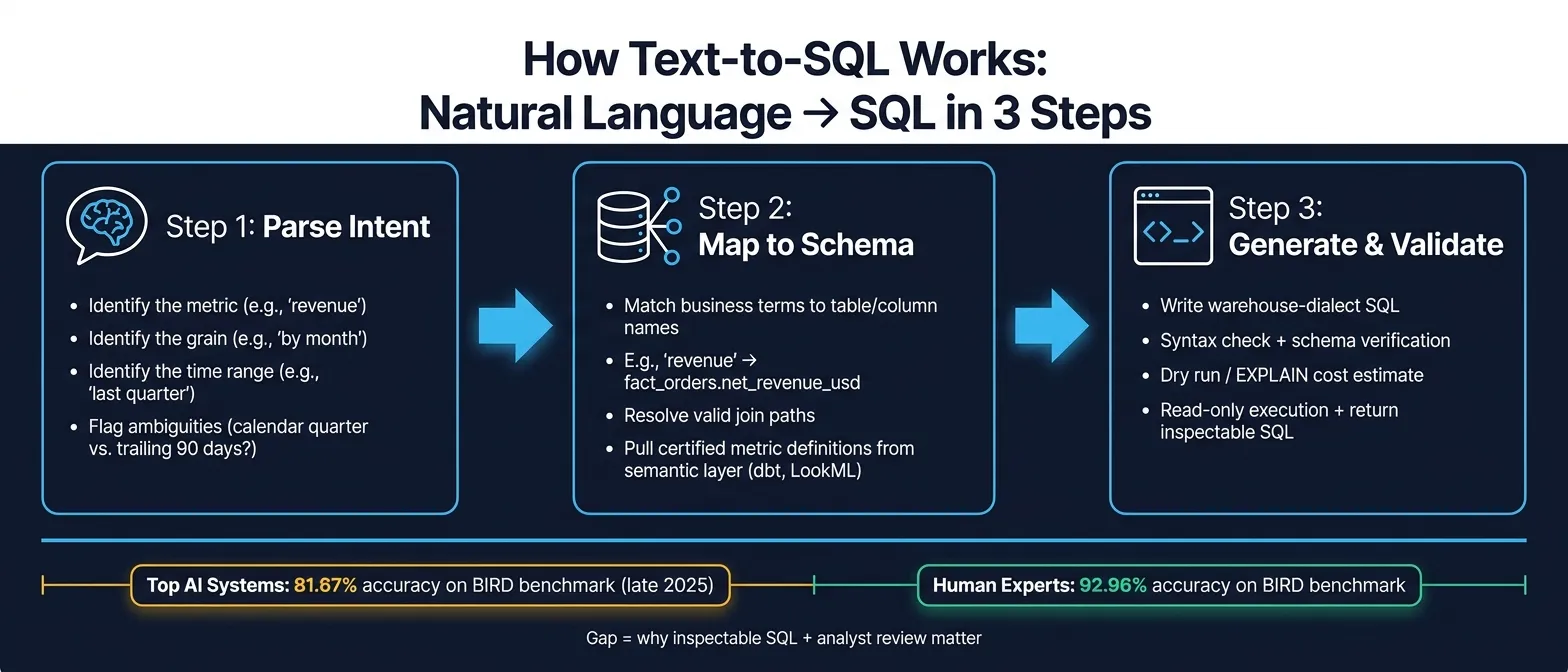 {How Text-to-SQL Works: 3 Steps from Natural Language to SQL}
:::
{How Text-to-SQL Works: 3 Steps from Natural Language to SQL}
:::
Text-to-SQL keeps the business meaning intact in three moves: understand the question, connect it to the right schema and metric logic, then write and check the SQL before it runs.
Step 1: Understand the Question and Business Intent
The first job is to figure out the metric, the grain, and the time range. In the example "What was revenue by month last quarter?" the system needs to split that into revenue, by month, and last quarter.
That sounds simple, but this is where things can go sideways. The biggest gray area is "last quarter." Does it mean the previous calendar quarter, or the trailing 90-day window [2]? In U.S. reporting, you want that spelled out. If it isn't, the system may choose the wrong date filter and return a clean-looking answer that's still off.
"Revenue" has the same issue. A label by itself isn't enough. The system needs your business definition of revenue, not just a column with a similar name.
Step 2: Map Terms to Schema, Joins, and Metrics
Once the intent is clear, the system maps business language to the actual database structure: tables, columns, joins, and metric definitions. For instance, "revenue" may map to fact_orders.net_revenue_usd instead of a broad gross_amount field [4]. That mapping usually comes from schema metadata, column descriptions, and semantic layers like dbt metrics or LookML.
Joins are often the trouble spot. Raw warehouse schemas can get messy fast, and the system has to follow valid join paths across related tables. If it guesses based on similar column names, you can get grain inflation, where the numbers are multiplied but still look believable [2].
Good documentation helps a lot here. Pinterest improved its relevant-table search hit rate from 40% to 90% after increasing the weight of table documentation in retrieval [1].
Once the system maps the question the right way, the next step depends on whether the warehouse architecture is modeled well enough to prevent join and grain mistakes.
Step 3: Generate, Validate, and Run the SQL
With the intent sorted out and the schema mapped, the system generates SQL for the target warehouse dialect. The exact syntax changes by platform.
A Postgres-style version of the example could look like this:
SELECT
  DATE_TRUNC('month', o.order_date) AS revenue_month,
  SUM(o.net_revenue_usd)            AS total_revenue
FROM fact_orders o
WHERE o.order_date >= DATE '2026-01-01'
  AND o.order_date <  DATE '2026-04-01'
GROUP BY 1
ORDER BY 1;
Before the query runs, a well-built system checks the syntax, verifies that the tables and columns exist in the schema, and uses EXPLAIN or a dry run to estimate cost. In production, teams usually keep access read-only and limit execution to SELECT statements. If the query breaks, the system can send the error back through a correction pass. LinkedIn reported that 80% of SQL Bot sessions use a "Fix with AI" workflow to repair initial errors [1].
It also helps to return the SQL with the result. That gives analysts a way to inspect joins, filters, and metric logic instead of taking the answer on faith. That visibility matters most on governed, warehouse-native data, where text-to-SQL either works well or falls apart.
That workflow tends to work best when the warehouse model is clean and the business terms are clearly defined.
Where Text-to-SQL Helps and Where It Falls Short
Use Cases Where Text-to-SQL Works Well
Once a natural-language question turns into SQL, the next test is simple: does it stay right when it hits messy warehouse data? Text-to-SQL tends to work best when the warehouse already has clean models, clear column descriptions, and defined metrics. In plain English, the sweet spot is governed data, stable definitions, and narrow schemas.
That’s why the best SaaS use cases are pretty easy to spot. Finance, GTM, and product teams lean on it for fast answers about churn, revenue, adoption, and feature usage.
The pattern is consistent. These wins usually depend on small, well-documented schemas. That’s where text-to-SQL can produce useful first drafts fast.
Common Failure Modes in Real Business Data
The failure modes are just as predictable as the wins, and they usually hit the metrics people care about most.
Grain inflation is the biggest risk. Say a query joins a customers table to an invoice_line_items table without the right aggregation logic. “Active users” can get multiplied by the number of line items per invoice, which can lead to errors of up to 7x [2]. The result looks believable, but it’s wrong. For revenue or funnel metrics, that kind of silent error is a serious production risk.
Ambiguous metric definitions cause a different problem. If there’s no explicit semantic definition, the model may pick the wrong meaning. For example, it might count total events instead of unique users at each funnel step. That can make activation rates look higher than they are.
Categorical mismatches are more subtle, but they show up all the time. If the database stores "Lane A" as LN-A-2024, the query may return zero rows even though the data is there.
This is where benchmark results start to matter. Top systems reached 81.67% on BIRD, a benchmark built on messy business data, in late 2025. The human-expert baseline was 92.96% [3]. That gap matters in production, where a wrong churn rate or a miscounted funnel can send teams in the wrong direction.
Manual SQL vs. Governed BI vs. AI-Native Text-to-SQL
These tradeoffs are easier to see when you compare speed, governance, and ad hoc analysis side by side.
| Dimension | Manual SQL | Governed BI Tools | AI-Native Text-to-SQL |
|---|---|---|---|
| Ideal User | Data analysts, engineers | Business users, analysts | Non-technical stakeholders, analysts |
| Speed | Slow (hours to days) | Moderate (fast for pre-built reports, slower for new ones) | Fast (seconds for generation) |
| Accuracy | High (human-verified) | High (governed metrics) | Variable, depending on context quality |
| Flexibility | Unlimited | Limited to pre-modeled dimensions | High for ad hoc questions |
| Governance | Low or manual | High (centralized modeling) | High when backed by a governed semantic layer |
| Complexity Handling | Handles edge cases well | Handles modeled logic well | Struggles with unmodeled complexity |
| Setup | Low | High | Moderate |
| Key Tradeoff | High effort, high accuracy | High setup, high consistency | Low effort, needs validation |
Governed BI tools are strong on consistency and governance for standard reports. If the model already exists, the answer is dependable. The downside is rigidity. Anything outside the pre-modeled dimensions usually needs an analyst to extend the model first.
Manual SQL sits at the other end. It can handle edge cases and deep complexity, but it doesn’t scale well for non-technical users.
AI-native text-to-SQL fits in the middle. It’s fast, flexible, and easy to use, but its output is only as good as the data model and context behind it.
The next question is what makes those answers accurate or risky in production.
What Makes Text-to-SQL Accurate or Risky
The gap between a useful answer and a bad one usually isn't speed. It's whether the system can sort out the business meaning before it writes SQL. In production, text-to-SQL is only as good as the metadata behind it: schema names, certified metrics, and the context it pulls in.
What Drives Accuracy: Schema Quality, Semantic Layers, and Context
dt2 is opaque; signup_date is readable. That small difference adds up fast when the system has to move across table after table. Pinterest reported that table search hit rates jumped from 40% to 90% after increasing the weight of table documentation in its retrieval system [1]. That tells you a lot.
This is where dbt models and a semantic layer come in. If a business term like "revenue" maps to a certified metric definition, such as fact_orders.net_revenue_usd, the system can pull that definition and use it the same way every time instead of guessing from a column name.
But even strong metadata has limits. If the system can't stop ambiguous or risky queries before they run, you're still in dangerous territory.
Guardrails: Handling Ambiguity, Security, and Review Workflows
Some questions need a follow-up before any SQL should be written. Take the earlier example: "last quarter" could mean the previous calendar quarter or a trailing 90-day window. A solid system asks which one you mean before it builds the date filter, not after it gives you the wrong number.
A few guardrails make a big difference:
- Use a read-only warehouse user
- Enforce row-level security
- Keep generated SQL inspectable so analysts can review or edit it
- Save validated queries and reuse them for repeat questions
The practical difference isn't just that SQL gets generated on its own. It's whether the system can explain what it's doing, limit risk, and reuse trusted logic without cutting corners.
Ungoverned LLM SQL vs. Governed Semantic-Aware Text-to-SQL: A Comparison
| Dimension | Ungoverned LLM SQL | Governed Semantic-Aware Text-to-SQL |
|---|---|---|
| Traceability | LLM guesses from column names; no clear link to definitions | Uses certified metric definitions (e.g., dbt, Cube); SQL is inspectable and editable |
| Correctness | High risk of runnable but wrong queries | Pre-validated logic, lower silent-error risk |
| Security | Relies on the LLM to behave | Enforced via database-level row-level security |
| Persistence | Stateless; forgets corrections | Corrections saved to the context layer; validated queries reused for repeat questions |
| Operational Risk | High; potential for expensive or incorrect queries | Lower; read-only access, cost checks, dry-run validation |
How Querio Supports Governed Text-to-SQL on Live Warehouse Data
Live Warehouse Connections and Inspectable SQL
Querio connects straight to Snowflake, BigQuery, Redshift, Postgres, MySQL, SQL Server, ClickHouse, and MotherDuck with read-only credentials. Your data stays in your warehouse. There are no CSV exports, and no copied datasets.
That matters for a simple reason: the queries run where the data already lives. So before anyone acts on an answer, the output is easier to audit and check.
Querio also returns inspectable SQL or Python for every answer it generates. Analysts can review the logic, spot issues, and edit the query directly if needed.
Shared Context Layer and Reactive Notebooks
Generating a query is only part of the job. Consistency comes from using the same business definitions across the board.
Querio’s governed context layer stores joins, metrics, and business terms once, then reuses them across answers, dashboards, and notebooks. That cuts down on the usual mess where one metric means one thing in a dashboard and something slightly different in an ad hoc query.
When a question needs deeper analysis, the same logic can move into a notebook. Analysts can open the query in a reactive notebook without exporting data, and the notebook stays connected to the live warehouse. If the logic changes, the results update too.
There’s still an important catch: Querio works best when the data model is well defined and the business logic is documented. The context layer helps keep that structure in place, but it doesn’t replace the work of modeling the data well in the first place.
Conclusion: When to Use Text-to-SQL and How to Use It Responsibly
Text-to-SQL turns a business question into SQL by interpreting intent, mapping terms to schema, and generating logic that can run. It works best when the underlying data is well modeled and clearly documented.
The safest setups pair question-to-SQL generation with a semantic layer, inspectable outputs, read-only warehouse access, and analyst review.
Used the right way, text-to-SQL extends trusted SQL workflows. It should not replace data modeling or governance.
FAQs
::: faq
How accurate is text-to-SQL in production?
Text-to-SQL can work well in production, but the hit rate can swing a lot. Public tests like Spider show strong scores on simpler tasks. In enterprise settings, though, accuracy can drop to 10–20% if the setup is weak.
What makes the difference? Context and control.
A Text-to-SQL system needs the right schema and semantic context so it knows what the data means, not just what the table names say. It also needs SQL validation, correction loops, and human review. Otherwise, you’re asking the model to guess its way through business logic, and that’s where things go off the rails.
A governed semantic layer helps keep definitions steady across teams. Editable SQL matters too. It lets people inspect, adjust, and audit the query instead of relying on black-box generation. That means logic stays more consistent, easier to check, and less likely to drift over time. :::
::: faq
When should teams trust text-to-SQL results?
Teams should trust text-to-SQL output when it comes from a system grounded in governed business context - like a semantic layer - not from a raw model trying to infer meaning from column names alone.
That distinction matters. A model can spot patterns, sure. But if it’s just guessing what rev, cust_type, or status_flag mean, things can go sideways fast. A semantic layer gives the system the business logic behind the data, so the SQL is tied to how the company actually defines metrics and entities.
Trust also comes from guardrails, not blind faith. Good setups usually include:
- Read-only database connections, so generated queries can’t change data
- Visible SQL, so people can inspect what’s being run
- Validation checks before execution, to catch issues early
For more involved analysis, it’s smarter to treat generated SQL as a draft, not a final answer. It can save time and get you close, but a human should still review the logic before anyone acts on it. :::
::: faq
What data setup helps text-to-SQL work best?
Text-to-SQL works best when your data has a clear physical schema and a governed semantic layer that ties tables and columns to actual business meaning.
A few things make the setup much smoother:
- Descriptive table and column names
- Defined business terms and metrics
- Validated question-to-SQL examples and feedback history
- Retrieval that pulls only the schema that matters
- Read-only access and SQL you can inspect and edit
That last point matters more than it might seem. If people can see the SQL, check it, and tweak it when needed, the system feels less like a black box and more like a tool they can trust and use day to day. :::