Business Intelligence
Inspectable SQL vs Black-Box AI: Why It Matters for Business Intelligence
Visible SQL ensures trusted, auditable KPIs—governed metrics, reproducible queries, and fewer reporting errors vs opaque AI outputs.

If I can’t see the SQL, I shouldn’t trust the KPI.
That’s the whole point of this article. In BI, a number without visible query logic is hard to check, hard to explain, and hard to reuse. When AI shows the SQL, I can review joins, filters, metric rules, and date logic before you analyze churn, MRR figures, or pipeline numbers affect a plan, forecast, or board deck.
Here’s the short version:
- Inspectable SQL lets me audit the exact query behind an answer
- Black-box AI gives me an output, but not the logic behind it
- For teams using Snowflake, BigQuery, Redshift, and Postgres, that difference affects governance, reuse, and reporting accuracy
- Common BI errors - like bad joins, missing filters, or timezone issues - are much easier to catch when SQL is visible
- Shared metrics and semantic layers like dbt Semantic Layer or LookML help keep KPIs like MRR, NRR, churn, and pipeline coverage aligned across dashboards and notebooks
- Without visible logic, even small prompt changes can lead to different answers for the same business question
A recent point the article makes is simple: many teams have already seen AI outputs cause business issues when traceability is missing. For revenue reporting, even a small KPI error can affect decisions tied to $1,000s or $1,000,000s in forecasted revenue.
Quick comparison
| Area | Inspectable SQL | Black-box AI |
|---|---|---|
| Query logic | Visible | Hidden |
| KPI definitions | Fixed and reviewable | Often guessed from the prompt |
| Debugging | Direct | Mostly guesswork |
| Reuse in dashboards, Python, or dbt | Yes | Limited |
| Governance | Works with warehouse controls | Harder to check |
I see this as a BI control issue, not just an AI feature choice. The article explains why visible SQL leads to more trust, better team review, and fewer reporting mistakes - and how Querio fits into that model by showing the SQL and, when used, the Python behind each answer.
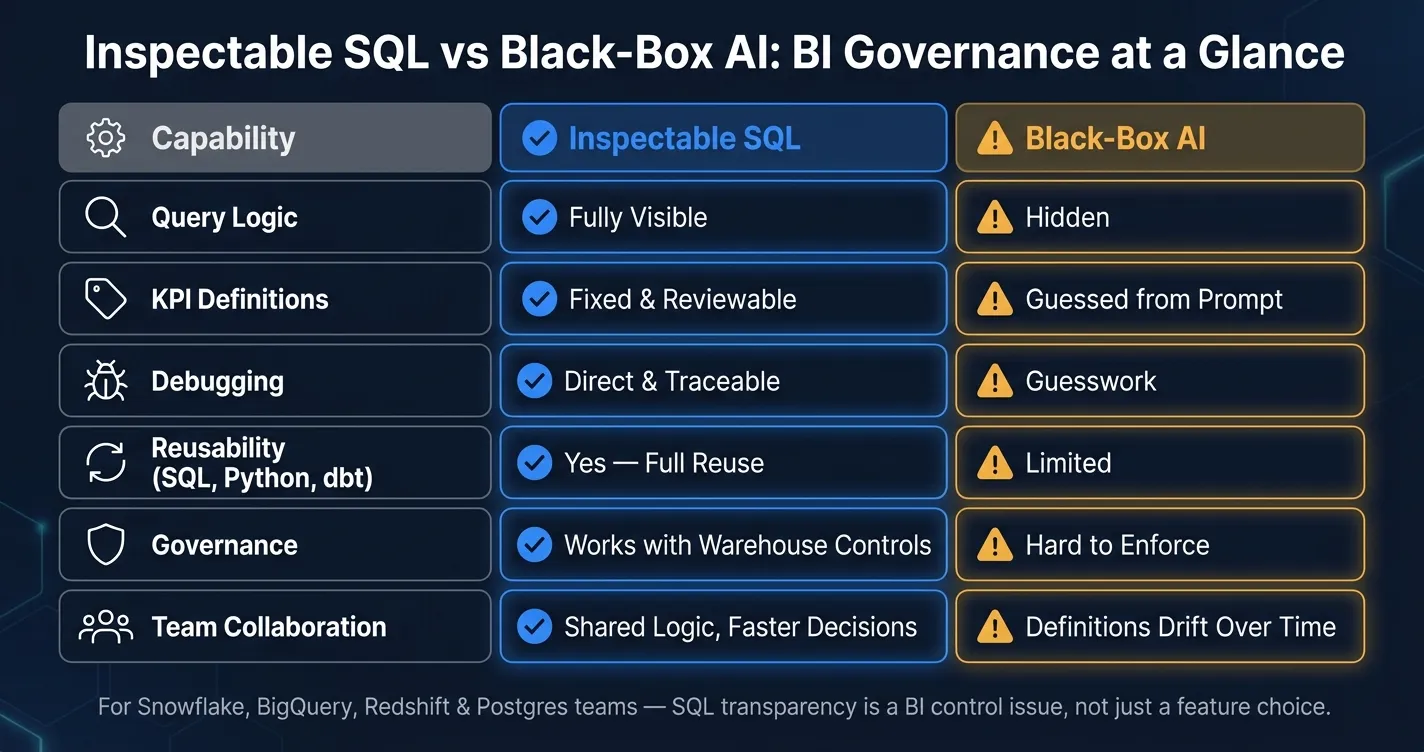
How inspectable SQL workflows differ from opaque AI answers
Live warehouse queries vs. opaque processing
In BI, the big difference comes down to one thing: can your team inspect the logic before trusting the answer?
When SQL runs straight against Snowflake, BigQuery, Redshift, or Postgres, the query stays inside the warehouse your team already governs. No data leaves the warehouse. That matters. It means teams can trust the answer before they make a call based on it.
Black-box AI tools often add hidden processing steps between the user's question and the warehouse. And that's where things can go sideways. The data might be stale. Access controls might not line up with your warehouse roles. And the logic might not reproduce if someone asks the same question again tomorrow.
For metrics like MRR or pipeline coverage, freshness and traceability aren't nice extras. They're part of the answer.
Visible metric logic vs. inferred KPI definitions
Once the query stays in the warehouse, the next issue is just as important: is the KPI definition vs. traditional data models governed?
A governed metric layer, such as dbt Semantic Layer (MetricFlow) or LookML, defines KPIs once and applies them everywhere. So when an analyst queries MRR, ARR, net revenue retention, or activation rate through that layer, the calculation logic, filters, and dimensions are already encoded.
AI can't guess your company's definition of "active customer" with any certainty. That definition needs to be explicit and shared.
Here's why that matters. Ask a black-box AI tool for "active customers", and it may count anyone with a transaction in the last 30 days. But your business may define active as a paid account with a login event and an open contract. Ask for monthly revenue, and it may default to calendar months even though your team reports on fiscal months.
Those mismatches often stay hidden until two reports show different numbers for the same KPI. By then, the damage is done: people stop trusting the data.
Reviewable SQL vs. outputs you can't debug
In an inspectable SQL workflow, an analyst can open the query and check every moving part:
- source tables
- join keys and join types
WHEREclauses- date filters
- deduplication logic
- aggregation grain
CASEstatements or window functions
Three failure modes show up all the time in warehouse-native work.
A join explosion multiplies rows and inflates revenue totals. A missing WHERE clause pulls in canceled accounts or internal test data. A timezone mismatch shifts records across day boundaries and throws off daily reporting.
These are the kinds of issues analysts deal with every day. The good news is that they're easy to spot when the SQL is visible. In a black-box output, you usually see only the final number, which turns debugging into guesswork.
That’s the heart of it: SQL workflows are built for inspection. Black-box AI is built for output.
These differences show up most clearly in KPI tracing, metric debugging, and self-serve governance.
| What analysts can inspect | Inspectable SQL | Black-box AI output |
|---|---|---|
| Source tables and column references | ✅ Visible | ❌ Hidden |
| Join type and join keys | ✅ Visible | ❌ Hidden |
| WHERE clauses and date filters | ✅ Visible | ❌ Hidden |
| Deduplication and aggregation logic | ✅ Visible | ❌ Hidden |
| Metric definition (dbt / LookML) | ✅ Inherited | ⚠️ Inferred from prompt |
| Debuggable when numbers don't match | ✅ Traceable | ❌ Guesswork |
These differences show up most clearly in KPI tracing, metric debugging, and self-serve governance.
Inspectable SQL vs. black-box AI: a side-by-side comparison across core BI use cases
Black-box AI can give you an answer fast. Trusting that answer is another story.
That gap shows up most when teams need to trace KPIs, figure out why numbers don’t match, and let people self-serve without losing control.
| Use case | Inspectable SQL workflows | Black-box AI outputs |
|---|---|---|
| KPI tracing across dashboards | Shared definitions keep numbers aligned across reports | Can vary depending on how the question is asked |
| Metric mismatch debugging | Trace joins, filters, and date grain directly | Hard to isolate the cause from the output alone |
| Governed self-serve access | Controlled by approved logic and warehouse access roles | Harder to govern |
| Reusability of analysis | SQL or Python can be reused in later work | Not reusable |
Tracing KPI definitions across dashboards and reports
If your finance team pulls MRR from a dashboard and your RevOps team checks that same metric in a notebook, both queries should return the same number.
But that only happens when they share the same dbt-defined calculation, date grain, and exclusion rules.
With a black-box AI tool, small wording changes can lead to different answers. One version may use a different date field. Another may skip a filter. And the output usually doesn’t show which logic was used.
That’s where things start to drift. Once definitions drift, mismatched numbers usually follow. This is why many organizations are exploring semantic layers in business intelligence to maintain a single source of truth.
Debugging metric mismatches before they affect decisions
Metric mismatches aren’t just frustrating. They can affect revenue, pipeline, and customer reporting.
With inspectable SQL, an analyst can put both queries next to each other and spot the issue fast. Maybe one query used the wrong date field. Maybe it missed an exclusion filter. Maybe it joined the wrong table. You can see the logic, trace the problem, and fix it.
Without the SQL, you’re stuck staring at two numbers and trying to guess which one is right - or why they’re different.
And this isn’t a small reporting headache. A meaningful discrepancy in pipeline reporting can change resource allocation, hiring decisions, or board-level guidance.
The next test is simple: can business users ask questions on their own without creating new metric logic every time?
Governing self-serve access without slowing teams down
Self-serve BI only works when plain-English questions map back to approved metric logic.
Say a marketing manager asks how many qualified leads converted to opportunities in a given month. The answer should use the same conversion logic, stage definitions, and exclusion filters already defined in dbt or your semantic layer - the same logic your RevOps team uses.
If the AI creates its own version of that metric, that’s not governance. It’s guessing.
For teams using Snowflake, BigQuery, Redshift, or Postgres, inspectable SQL workflows give business users speed while letting data teams keep control. Warehouse access controls still apply. And that mix of speed, consistency, and auditability makes transparent SQL the base for reuse and team collaboration.
How transparent SQL improves trust, collaboration, and reuse
When teams can inspect the SQL, the upside goes beyond accuracy. The same logic becomes easier to trust, reuse, and talk through. It also helps turn one-off AI answers into analysis the team can keep using.
Auditability for revenue-impacting decisions
When leaders need to act on retention, pricing, or pipeline forecasting, the result has to be defensible. If the SQL is inspectable, they can trace how the metric was built before signing off on a decision.
That matters when the stakes are high. If an executive asks why a number moved, the team can point to the exact logic behind it instead of relying on risky black-box AI outputs.
Reusable analysis across SQL, Python, and dashboards
Analysts can save the SQL, extend it in Python, and carry the same logic into dashboards. That cuts review time and helps teams build on work they’ve already checked instead of starting from a new prompt every time.
In plain English: one good query can keep doing work in more than one place.
Better collaboration between analysts and business teams
Shared visibility also makes cross-functional review smoother. Business users and analysts can look at the same assumptions together, like joins, attribution windows, and cohort definitions.
That tends to cut back-and-forth and move decisions along faster. Instead of debating what the AI meant, teams can discuss what the SQL actually does.
Where Querio fits for warehouse-native, governed AI analytics
Inspectable SQL and Python for every AI-generated answer
The main issue is simple: how do you keep AI helpful without giving up SQL-level control?
Querio handles that by tying AI answers to live warehouse data and showing the SQL behind every result. When it makes sense, it also shows the Python behind the answer. That gives BI teams a way to check, reuse, and govern the logic before anyone acts on it.
Querio connects directly to Snowflake, BigQuery, Amazon Redshift, and PostgreSQL. And every answer exposes the SQL, plus the Python when that code is part of the result.
So an analyst can look at the join path, review the date filter, and change the logic before sharing anything. The query can then be reviewed, versioned, and reused in reactive notebooks and dashboards. A black-box answer doesn't give you that kind of control.
A governed context layer for consistent business metrics
Querio also carries governed metric definitions into AI-driven questions, so MRR, churn, and activation all use one approved logic across questions, dashboards, and notebooks.
You define a metric once, including joins, formulas, naming conventions, and approved data sources. From there, that same logic applies across ad hoc questions, dashboards, and embedded analytics. That helps stop the all-too-common mess where different teams report different numbers for active customers. And that's what keeps governed self-service BI instead of slowly drifting team by team.
The tradeoff looks like this:
| Governance concern | Without it | With it |
|---|---|---|
| Metric definitions | Rebuilt differently by each analyst | Defined once and reused consistently |
| Business logic | Easy to drift across dashboards | Shared joins, metrics, and business definitions |
| Access control | Hard to apply consistently to AI-generated queries | Role-based permissions applied at query time |
| Team collaboration | Analysts must recreate the same logic repeatedly | Versioned logic maintained by data teams |
Key takeaway: AI is useful in BI only when teams can verify the logic behind it
For warehouse-native BI teams, Querio makes AI answers inspectable, editable, and governed before they shape a decision. That's why inspectable SQL matters in every AI-generated BI answer.
FAQs
Why is visible SQL important for KPI trust?
Visible SQL helps teams trust KPIs because it turns AI answers into something people can inspect, check, and use again. Instead of relying on an answer that sounds right, you can see the SQL behind it and verify how the number was produced.
When KPI logic - like joins, filters, date ranges, and metric definitions - lives in a governed semantic or context layer and shows up in clear SQL, everyone works from the same playbook. That cuts down on metric drift, keeps definitions aligned across teams, and makes it much easier to track down mismatches when numbers don’t line up.
What BI errors are easiest to catch in SQL?
The BI mistakes that are easiest to spot in SQL usually come down to bad joins, aggregation errors, and filters that are missing or used the wrong way. In plain English, those issues tend to show up as broken links between tables, wrong totals, or results that point people in the wrong direction.
A quick look at the SQL often tells the story. Analysts can check whether the AI picked the wrong tables, handled GROUP BY poorly, or skipped key WHERE clauses. That makes it much easier to confirm business rules and keep metrics like monthly recurring revenue and customer churn in line.
How does inspectable SQL govern self-serve analytics?
Inspectable SQL helps keep self-serve analytics under control. AI-generated answers stay transparent, auditable, and editable, so natural language queries can stay in line with verified business logic.
With readable SQL and Python, Querio gives analysts a clear view of joins, filters, and metric calculations. That makes it easier to spot mismatches, fix them fast, and keep self-serve insights in sync with the centralized semantic layer.