Business Intelligence
Data Encryption for Embedded BI Dashboards
Secure embedded BI dashboards with TLS, AES-256, signed tokens, centralized key management, and RBAC to reduce exposure and meet compliance.

Embedding BI dashboards from various vendors into SaaS applications can expose sensitive data if not properly secured. Encryption is the cornerstone of protecting this data, ensuring compliance with regulations like GDPR and HIPAA while minimizing risks during data transit, storage, and processing.
Key Takeaways:
- Data in Transit: Use TLS/HTTPS and signed tokens (e.g., JWT) to secure communication between servers and browsers.
- Data at Rest: AES-256 encryption and Transparent Data Encryption (TDE) safeguard stored datasets and database files.
- In-Memory Data: Limit processing to schema metadata or aggregated results to reduce exposure.
- Key Management: Employ centralized systems (e.g., AWS KMS, Azure Key Vault) for key storage, rotation, and revocation.
- Embedding Security: Use token-based authentication and secure iFrames to prevent unauthorized access and attacks like clickjacking.
Encryption is not a one-time setup - it requires regular audits, key rotation, and monitoring. Platforms like Querio demonstrate how to reduce risks by connecting directly to data warehouses and enforcing role-based access controls without duplicating sensitive data.
Core Encryption Techniques for Embedded BI Dashboards
To secure embedded BI dashboards, it’s essential to encrypt data during transit, at rest, and while it’s being processed. Each stage presents unique vulnerabilities, and the right encryption measures can help block potential attacks. Let’s dive into how these techniques work at each stage.
Data in Transit: TLS and HTTPS
TLS (Transport Layer Security) and HTTPS are your frontline defenses, encrypting communication between your data warehouse, BI server, and user’s browser. This prevents attackers from intercepting or altering data mid-transit. Every component of your dashboard should travel through secure, encrypted channels to ensure data integrity across your stack.
To ensure data integrity, HMAC 256 (Hash-based Message Authentication Code) signs payloads, verifying that transmitted information hasn’t been tampered with. JSON Web Tokens (JWT) add another layer of security by authenticating requests and confirming the data received matches what the server sent. For added privacy, cookie-less embedding aligns with private browsing policies [5].
When connecting to backend data warehouses like Snowflake, BigQuery, or Postgres, RSA Key-Pair authentication (2,048-bit or 4,096-bit) offers stronger protection than passwords alone. Always generate signed embed URLs on the server side - never in the browser - to keep secret keys hidden. This is particularly important when using embedded analytics with natural language capabilities to ensure that query generation remains protected. Use short-lived tokens that expire within 24 hours to limit exposure if a token is compromised.
Data at Rest: AES-256 and Transparent Data Encryption (TDE)
AES-256 encryption is the gold standard for protecting stored data, ensuring that datasets, dashboards, and report assets are unreadable without the correct decryption keys. For instance, Power BI employs AES-256 in its Storage Service Encryption to safeguard datasets, cached data, and transient buffers during active sessions [6]. This reduces risks like memory-dump theft.
Transparent Data Encryption (TDE) works at the database layer, encrypting the entire database, including metadata and customer data, without requiring changes to your application code. While AES-256 focuses on protecting files and cached assets, TDE secures the physical database storage itself.
To maintain security, manage encryption keys through centralized systems like Azure Key Vault and rotate them regularly.
Protecting In-Memory and Cached Data
Data isn’t safe only in storage or transit - processing introduces its own vulnerabilities.
In-memory and cached data can be exposed through memory dumps or session hijacking. To counter this, session reference tokens in cookie-less embedding environments should always be stored on the host server and never exposed to the client-side browser [9].
Before data enters processing or caching layers, limit it to schema metadata, summaries, or pre-aggregated results instead of raw, sensitive records [2]. Apply the principle of least privilege by restricting BI engine access to only the necessary tables or views [7]. Service accounts should have read-only, SELECT-only permissions when connecting BI tools to data warehouses.
A promising development in this area is homomorphic encryption, which keeps data encrypted even during computation. This technique, though still evolving, could transform secure data analytics by ensuring sensitive information remains encrypted throughout the entire analysis process [8].
sbb-itb-284a532
Key Management Strategies for Embedded BI Dashboards
Encryption keys are the backbone of your security system. If they’re compromised, everything else falls apart. That’s why key management isn’t just a technical detail - it’s the core of your security architecture. Strong encryption depends on effective key management, which reinforces the measures already in place for your BI dashboards.
Platforms like Snowflake use hierarchical key models to reduce risk by layering security. These models include root keys stored in cloud-based Hardware Security Modules (HSMs), account master keys, table master keys, and file keys. This layered approach ensures that even if one key is compromised, the damage is limited to a specific part of the data environment [10]. Let’s dive into some strategies to manage keys effectively while building a secure embedded BI stack.
Bring Your Own Key (BYOK) and Customer-Managed Keys (CMK)
BYOK and CMK options allow you to control master keys through your own cloud key management service, such as AWS KMS, Azure Key Vault, or Google Cloud KMS [10][11]. This control puts you in charge of data access. One of the biggest advantages is the ability to revoke access instantly. For instance, if you need to leave a service or respond to a security issue, revoking the encryption key immediately renders all associated data unreadable. In Power BI, for example, data becomes inaccessible to the service within 30 minutes of key revocation [11].
Power BI’s BYOK feature requires RSA or RSA-HSM keys with a 4,096-bit length [11]. Some platforms, like Snowflake, take this further with solutions like Tri-Secret Secure. This combines a Snowflake-managed key with a customer-managed key, adding an extra layer of isolation at the account level [10].
When setting up key management, follow best practices like using service principals with limited permissions (e.g., “Wrap Key” and “Unwrap Key”) instead of granting full admin access. Additionally, enabling the "soft-delete" property in your key vault safeguards against accidental deletions that could result in permanent data loss [11].
Key Rotation and Storage Best Practices
Key rotation and secure storage are just as important as controlling access. Regular rotation ensures that no single key version remains active for too long, reducing exposure. For example, Snowflake automatically rotates its managed encryption keys every 30 days [10]. This aligns with the National Institute of Standards and Technology (NIST) recommendations to limit the cryptoperiod.
"Limiting the lifetime of a key is recommended by the National Institute of Standards and Technology (NIST) to enhance security." - Snowflake [10]
It’s essential to understand the difference between rotation and rekeying. Rotation retires old keys but still allows decryption of historical data, while rekeying re-encrypts data with new keys, making retired keys obsolete [10]. Annual rekeying is a good practice, as it allows you to adopt stronger encryption algorithms as standards evolve.
For root keys, use dedicated HSMs to ensure secure key generation and automate rotation [10]. Most cloud providers offer automatic rotation features that create new cryptographic versions without manual effort. Monitoring key availability is equally important - Snowflake, for example, can handle temporary key unavailability for up to 10 minutes before halting data operations [10]. This kind of proactive monitoring ensures encryption remains uninterrupted.
Secure Embedding Techniques for BI Dashboards
Once encryption and key management are in place, the next step is ensuring dashboards are embedded securely in your application. This requires authenticated and verified access to safeguard both data and user interactions. Two key methods - token-based authentication and secure iFrame configurations - serve as critical layers of protection. Here's how they work.
Token-Based Authentication for Embedded Dashboards
Token-based authentication verifies every dashboard request before data is delivered. Instead of relying on static credentials or session cookies, many platforms employ signed embedding. This method encodes user permissions, identifiers, and attributes into a URL that's signed with a secret key. The result? Users can't manipulate URL parameters to gain unauthorized access to data [9][1].
Here’s how it works: your server generates a signed payload containing the user's identity, permissions, and a timestamp. When the BI platform receives the request, it checks the signature. If the signature doesn’t match, the request is denied.
To prevent replay attacks, include a random GUID (embed_nonce) and a UNIX timestamp in the token payload. This ensures the URL is both recent and unique, making it unusable for attackers [9][15]. For external users, consider using a Service Principal to create scoped, short-lived tokens. This approach avoids the need to provision individual user accounts while keeping access secure [12][14]. For example, Databricks includes an external_viewer_id field in its audit logs, which tracks which external partner or customer accessed specific data points [12][14].
Keep in mind that Databricks enforces a rate limit of 20 dashboard loads per second [12]. If you anticipate hundreds of concurrent users, you’ll need to implement caching or queuing strategies to stay within these limits.
Together, these measures ensure that only authorized requests reach your BI server, maintaining the integrity of your data.
Using Secure iFrames for Embedding
iFrames naturally provide an isolation layer, as they can’t read or write data from the host application or website. This makes them a straightforward, dependency-free way to integrate dashboards without complex CORS configurations [9][16].
That said, iFrames can still be vulnerable to clickjacking and cross-site scripting (XSS) if not properly configured. To enhance iFrame security:
- Use the
sandboxattribute withallow-scriptsandallow-same-originto enable functionality, and addallow-formsorallow-downloadsonly if necessary for filters or exports [16]. - Set
X-Frame-OptionsorContent-Security-Policy: frame-ancestorsheaders to restrict embedding to authorized domains, which helps prevent clickjacking [9][13]. - Enforce
SameSite=LaxorSameSite=Stricton cookies to mitigate cross-site request forgery (CSRF) attacks [9][13].
For added security, include authentication tokens after a # in the URL (e.g., https://dashboard.example.com/embed#token=abc123). This keeps sensitive information client-side and out of server logs [16].
Lastly, configure the BI server to allow iFrame rendering only on approved domains and IP addresses. Even if someone obtains a signed URL, they won’t be able to render the dashboard on unauthorized domains [15][12]. While clickjacking remains a concern, signed embedding minimizes this risk by ensuring URLs are unique and tied to specific user sessions [9].
Querio's Approach to Secure Embedded Analytics
Querio addresses the essential features of modern BI tools to address security challenges by reducing data movement and centralizing security controls. Instead of duplicating data into external systems - a process that can increase vulnerabilities by 3–5 times - Querio connects directly to your existing data warehouse. Using encrypted, read-only credentials, it executes queries within your warehouse, seamlessly aligning with encryption and key management strategies. This design cuts down external data transfer risks by as much as 90% [4].
Encryption and Live Data Queries
To safeguard live queries, Querio utilizes trusted TLS/HTTPS protocols, ensuring data remains protected from unauthorized access during transmission [4]. Importantly, query results stay within your infrastructure perimeter unless absolutely necessary. The platform generates real SQL queries, runs them against your warehouse, and returns only the data needed for visualizations - avoiding full data extracts or duplicate storage. This approach helps prevent GDPR residency violations and HIPAA safeguard breaches caused by external data transfers [4].
For cached results and metadata, Querio employs AES-256 encryption at rest. By processing only metadata and keeping raw data within your infrastructure, the risks associated with external data transmission are significantly reduced [4].
Governance and Context Layer for Consistent Security
Beyond encryption, Querio ensures consistent security through a robust governance framework. Its shared context layer applies security rules, metrics, and data definitions uniformly across all analytics components, including dashboards, notebooks, and embedded views. Data teams define joins, business logic, and access policies once, and these rules govern all analytics outputs indefinitely. This eliminates the inconsistencies that arise when different dashboards implement access controls independently.
Querio’s governance layer integrates seamlessly with existing role-based access control (RBAC) systems. Users can only access data they’re authorized to see, and every interaction is logged for compliance [17]. By using a unified semantic layer for security, Querio avoids the manual errors and inefficiencies of mapping security models into external BI tools [4].
Embedding with Security and Flexibility
Querio extends its security-first approach to embedded analytics, supporting both iframe-based embedding and API integration for customer-facing applications. Iframe embedding uses sandboxing techniques to prevent cross-site scripting (XSS) and clickjacking, while API integration enables full white-labeling with advanced JWT and SSO authentication [18]. Both methods rely on Querio’s governed context layer, ensuring embedded dashboards enforce the same security policies as internal analytics.
Authentication tokens carry user identity, roles, and permissions, which are validated server-side with every request. This setup prevents token tampering and ensures only authorized users can access specific data segments. Since Querio's embedded analytics use the same governance rules as internal dashboards, security remains consistent without the need to duplicate policies across systems.
Best Practices for Secure Dashboard Integration
Integrating encrypted BI dashboards into SaaS products is a balancing act between security, performance, and user experience. With 81% of users expecting embedded analytics, getting this right is crucial for staying competitive. Plus, data-driven features can boost SaaS contract values by 20–25% in enterprise markets [20].
Reducing Performance Impact of Encryption
Once encryption is in place, the next step is to ensure it doesn’t slow things down. One effective strategy is using SDK-based embedding. By leveraging native JavaScript or React components instead of standard iframes, you can achieve faster load times and better customization [19]. Pair this with direct connections to data warehouses like Snowflake or BigQuery, which handle the heavy lifting and deliver encrypted results to your application.
For permissions, JWT-based tokens are a smart choice. They embed user roles and permissions efficiently, cutting down on lookup delays. A well-designed semantic layer can further enhance performance by caching frequently-used queries and optimizing complex calculations. While this might slightly increase the workload on your system, the trade-off is faster query responses for users.
Implementing Role-Based Access Control (RBAC)
Encryption alone isn’t enough; controlling access is just as important. RBAC determines which dashboards users can see, while Row-Level Security (RLS) ensures they only view the data they’re authorized to access. For example, a user might have access to a sales dashboard, but RLS ensures they only see data for their specific region or accounts.
To enforce these controls, rely on server-side logic. UI filters won’t cut it - they’re too easy to bypass. Instead, use signed tokens to inject user attributes (such as tenant ID, region, or role) at query runtime [21]. Dynamic SQL filters (e.g., WHERE org_id = 123) enforce these rules automatically, scaling seamlessly to thousands of users. Static filters, on the other hand, are prone to errors and don’t scale well [21].
When combined with robust encryption, RBAC creates a strong security framework for embedded dashboards.
Regular Security Audits and Monitoring
Maintaining a secure integration isn’t a one-and-done task - it requires constant vigilance. Regular audits and real-time monitoring are key. Real-time monitoring can detect unusual activity, such as failed login attempts, odd query patterns, or unexpected data usage spikes, allowing you to catch potential breaches early [2]. For AI-driven analytics, logging every natural language query is critical to prevent prompt-based data leaks [2].
JavaScript event listeners can also be used to verify that data moving between your app and embedded iframes is coming from trusted sources [3]. To further minimize risk, consider isolating customer analytics on separate instances from internal dashboards [2][3].
"Analytics without a clear owner often drift into insecure territory" - Martin Atanasov from Reveal [2]
Assign clear ownership of analytics security, schedule quarterly audits, and document every change to your security configurations. These practices ensure your integration remains secure over time.
Comparison of Encryption Methods for Embedded BI
::: @figure 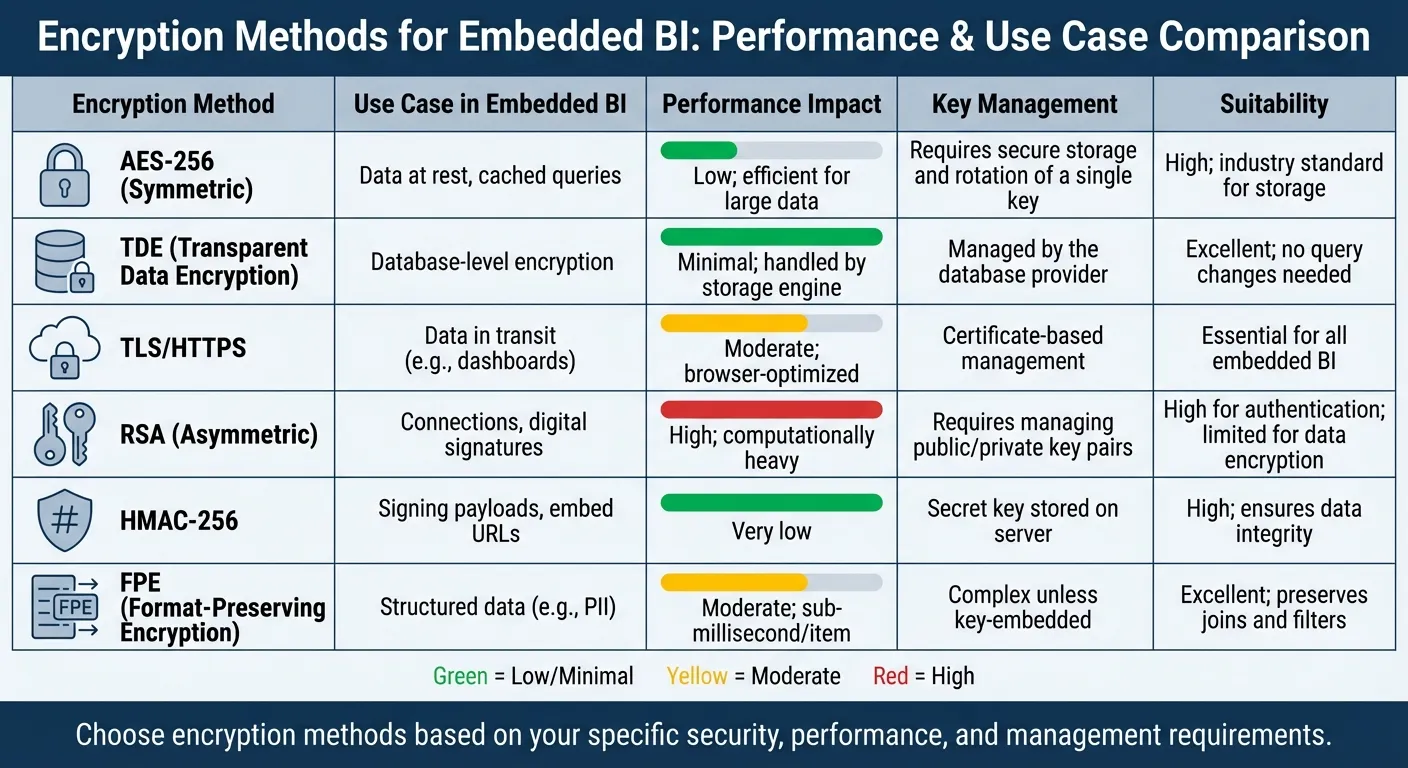 {Encryption Methods Comparison for Embedded BI Dashboards}
:::
{Encryption Methods Comparison for Embedded BI Dashboards}
:::
This section dives into the strengths of various security features of modern BI tools tailored for embedded analytics. Your choice of encryption depends on balancing security, performance, and management requirements.
AES-256 is a go-to for encrypting data at rest, such as cached query results and stored dashboard configurations. While encryption secures the data, moving beyond outdated dashboards ensures that the insights remain relevant and actionable. It's incredibly efficient when handling large datasets, with minimal impact on performance. The security it offers is unparalleled - breaking even a 128-bit AES key through brute force could take thousands to trillions of years [22].
Transparent Data Encryption (TDE) works at the database file level, encrypting both data and log files without requiring adjustments to SQL queries or dashboards. The encryption process is seamlessly handled by the database engine.
"TDE doesn't impact business intelligence at all. As the name infers, it's transparent, and we highly recommend it." – Yurbi [22]
TLS/HTTPS ensures secure data transmission, leveraging optimizations in modern browsers. Meanwhile, HMAC-256 provides a lightweight method for verifying payload integrity, as long as the secret key is securely stored on your server.
Format-Preserving Encryption (FPE) is ideal for structured data like emails or SSNs, as it maintains the original data format. This allows for uninterrupted joins and filters, though it does introduce moderate overhead.
"FPE introduces some overhead compared to plain text. Performance can vary significantly depending on how encryption is implemented and enforced." [23]
One critical factor to consider is resource consumption. Encryption, while essential, can be demanding on compute power.
"Encryption operations consume CPU credits in your Snowflake Warehouse. Batch your encrypt transformations during non-peak hours." [24]
Encryption Method Comparison Table
Here’s a quick breakdown of the methods discussed:
| Encryption Method | Use Case in Embedded BI | Performance Impact | Key Management | Suitability |
|---|---|---|---|---|
| AES-256 (Symmetric) | Data at rest, cached queries | Low; efficient for large data | Requires secure storage and rotation of a single key | High; industry standard for storage |
| TDE (Transparent Data Encryption) | Database-level encryption | Minimal; handled by storage engine | Managed by the database provider | Excellent; no query changes needed |
| TLS/HTTPS | Data in transit (e.g., dashboards) | Moderate; browser-optimized | Certificate-based management | Essential for all embedded BI |
| RSA (Asymmetric) | Connections, digital signatures | High; computationally heavy | Requires managing public/private key pairs | High for authentication; limited for data encryption |
| HMAC-256 | Signing payloads, embed URLs | Very low | Secret key stored on server | High; ensures data integrity |
| FPE (Format-Preserving Encryption) | Structured data (e.g., PII) | Moderate; sub-millisecond/item [25] | Complex unless key-embedded | Excellent; preserves joins and filters |
This comparison highlights the trade-offs between performance, security, and ease of management, helping you choose the right encryption method for your embedded BI needs.
Conclusion
Encryption forms the backbone of trust in embedded BI. Whether it's safeguarding data at rest with AES-256, protecting data in transit through TLS/HTTPS, or ensuring payload integrity using HMAC-256, these techniques are essential for keeping sensitive information safe from unauthorized access.
The industry is moving toward live warehouse connections and adopting a zero-trust model, signaling a shift away from risky data duplication. By relying on encrypted, read-only connections that maintain a single source of truth, organizations can reduce vulnerabilities and stay compliant with regulations.
Querio's architecture serves as a strong example of this approach. By connecting directly to major data warehouses using encrypted credentials, Querio eliminates the need for duplicating data. Its governance layer ensures consistency in joins, metrics, and business logic across dashboards and embedded analytics. Additionally, features like embedded analytics security features like role-based access control and signed URLs enforce a least-privilege model.
Encryption isn’t a one-time setup - it’s an ongoing effort. Practices like regular key rotation, security audits, and continuous monitoring are just as critical as selecting the right encryption methods. When paired with strong governance, encryption enables secure, real-time analytics without sacrificing functionality. By following these practices, you can ensure your embedded BI dashboards remain both secure and reliable.
FAQs
::: faq
What should I encrypt first: transit, rest, or in-memory?
To keep your data safe, start by encrypting it in transit - this protects information as it moves between systems or networks. Then, secure data at rest, making sure stored files or databases are protected from unauthorized access. Lastly, don’t overlook encrypting in-memory data, which shields sensitive information while it’s actively being processed. Covering these three stages helps create a well-rounded approach to data security. :::
::: faq
How do I rotate keys without breaking embedded dashboards?
To securely rotate encryption keys without causing disruptions to embedded dashboards, follow these steps:
- Generate a new encryption key: Start by creating a fresh key for encryption purposes.
- Update embed configuration or token generation: Modify your settings or processes to incorporate the new key.
- Test dashboards: Ensure all dashboards function correctly using the updated key.
- Deactivate the old key: Once everything is confirmed to work seamlessly, disable the previous key.
By following this process, you can maintain secure and uninterrupted access to dashboards during key rotation. :::
::: faq
How can I prevent signed embed URLs from being shared or replayed?
To keep signed embed URLs safe from being shared or reused, rely on restricted or time-sensitive links. Use tools like short-lived tokens (such as OAuth or JWTs) and set user-specific permissions. By combining signatures, expiration times, and secure tokens, you can make sure that embed URLs are only valid for their intended use and can't be exploited maliciously. :::