Business Intelligence
Best Embedded Dashboards Tools for 2025
Compare Querio, Looker, and Tableau for embedded dashboards—AI features, embedding methods, security, pricing, and best use cases for 2025.

Embedded dashboards are transforming how businesses leverage data by integrating real-time analytics directly into applications. For developers, learning how to embed dashboards is the first step toward building data-rich user experiences. This guide evaluates the top tools for 2025 - Querio, Looker, and Tableau Embedded Analytics - based on features, pricing, scalability, and ease of use. Here's a quick summary:
- Querio: Focuses on AI-driven analytics with real-time data access, unlimited viewers, and seamless integration via headless APIs. It has a free plan, and embedding is an add-on starting at $1,500/month.
- Looker: Optimized for Google Cloud users, offering strong governance with LookML and advanced AI features. Pricing starts around $180,000 annually for embedded use.
- Tableau Embedded Analytics: Known for its user-friendly design, flexible embedding options, and AI-powered insights. Costs vary based on licenses and usage.
Each tool caters to different needs, from AI automation to user-friendly design and centralized governance. Below is a comparison for quick reference.
Quick Comparison
| Feature | Querio | Looker | Tableau Embedded Analytics |
|---|---|---|---|
| Ease of Setup | High | Requires LookML setup | High |
| Embedding Options | Headless APIs, tokens | iFrame, APIs | iFrame, JavaScript APIs |
| AI Features | Advanced NLP, Python | Gemini-powered AI | Tableau Agent, Pulse |
| Starting Cost | Free plan; embedding from $1,500/mo | ~$180,000/year | Custom quote |
| Best For | Unlimited viewers | Governance-focused | Visual flexibility |
Your choice depends on your priorities - AI automation, governance, or ease of use. Querio is ideal for teams prioritizing real-time insights with minimal setup. Looker suits organizations needing strong governance and Google Cloud integration, while Tableau excels in visual design and user experience.
::: @figure 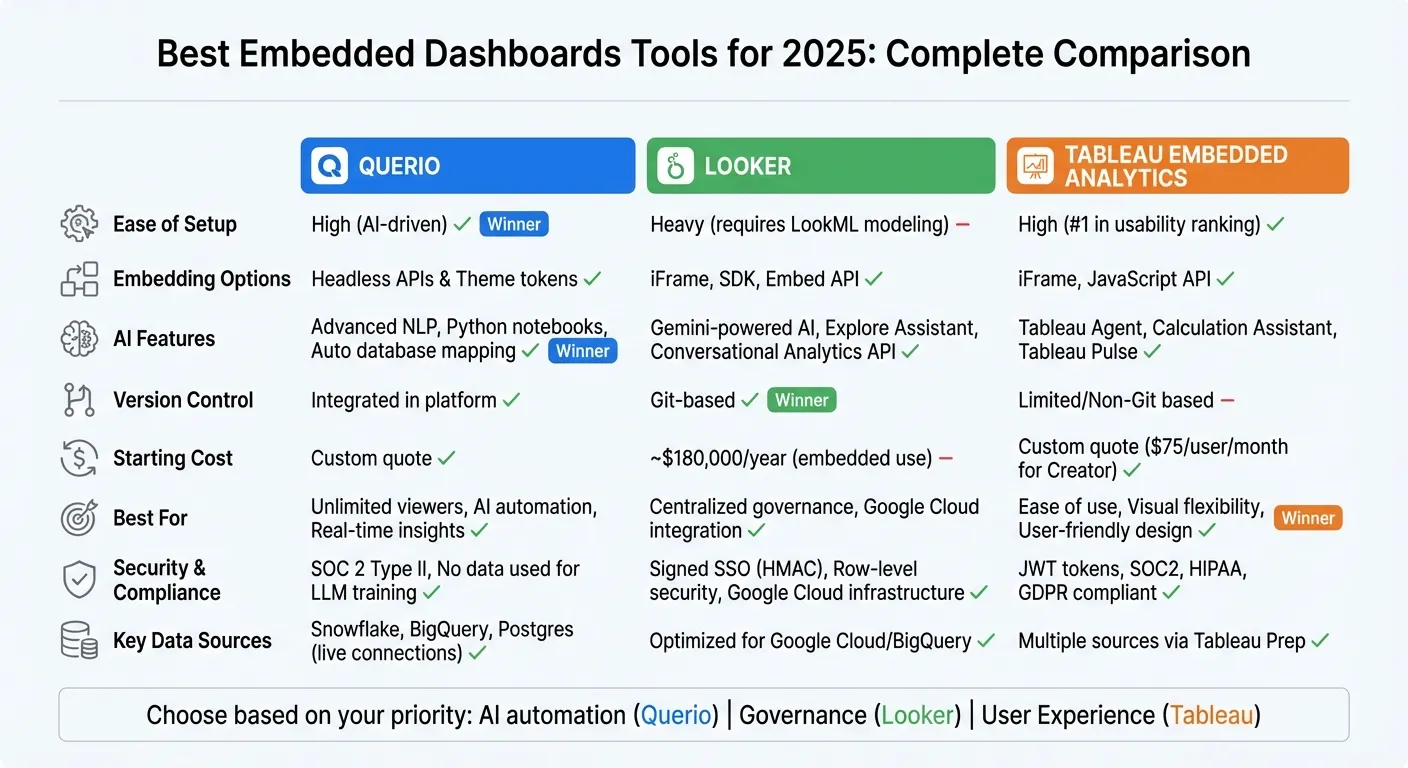 {Comparison of Top 3 Embedded Dashboard Tools for 2025: Querio vs Looker vs Tableau}
:::
{Comparison of Top 3 Embedded Dashboard Tools for 2025: Querio vs Looker vs Tableau}
:::
The Most In-Depth BI Tools Comparison
::: @iframe https://www.youtube.com/embed/1e6CZ16e4f8 :::
1. Querio
Querio offers a fresh way to approach embedded analytics by connecting directly to live warehouse data - including Snowflake, BigQuery, and Postgres - without duplicating or caching anything. This setup ensures that users get real-time insights straight from the source, while data teams avoid the hassle of managing duplicate datasets. With read-only access and encrypted credentials, the risk of accidental changes to production data is eliminated.
AI-Driven Features
Querio’s AI engine allows users to ask questions in plain English and receive accurate charts in seconds, thanks to its context-aware natural language processing. The platform also performs an automatic initial mapping of connected databases, creating a centralized, governed source of truth that the AI references for every query.
Jennifer Leidich, Co-Founder & CEO of Mercury, shared: "What used to be a week-long process now takes minutes."
For deeper analysis, Querio includes Python notebooks powered by AI agents, so users don’t need SQL or Python expertise to explore complex data.
Guilia Acchioni Mena, Co-Founder of Zim, stated: "I immediately started saving 7-10 hours a week!"
These AI tools integrate seamlessly into your application’s ecosystem, making advanced analytics accessible to everyone.
Integration and Data Sources
Embedding Querio into your application is straightforward. The platform offers Headlines APIs and theme tokens that align perfectly with your design system, ensuring the analytics interface looks and feels like a natural part of your product. Data teams can define joins, metrics, and business glossaries once, governing all queries efficiently.
Enver Melih Sorkun, Co-Founder & CTO of Growdash, remarked: "It's not just about saving time and money, it's about making data accessible."
This ease of integration supports a secure and well-governed analytics environment.
Security and Compliance
Querio prioritizes embedded analytics tools security and compliance with SOC 2 Type II certification and regular external audits. Granular access controls allow you to tailor data visibility for different user groups or tenants. Additionally, Querio ensures that no customer data is used for LLM training, a policy that applies to all plans, not just enterprise-level accounts.
Pricing and Scalability
Querio’s AI features are included in every plan, with no per-user charges. AI usage past the included credits is billed per credit, and admins can set a spending cap. A free plan is available, and the pricing is designed to remain competitive. The platform is built to scale effortlessly, supporting multi-tenant architectures with data isolation and offering a 99.9% uptime SLA for reliability.
2. Looker
Looker is tailored for API-first organizations using Google Cloud, making it a natural fit for those already leveraging platforms like BigQuery. While it's optimized for Google Cloud users, non-Google setups require additional configuration to get started. Its design sets the stage for advanced analytics powered by AI.
AI-Driven Capabilities
Looker takes full advantage of its API-first foundation by seamlessly incorporating AI through Gemini-powered analytics. Users can interact with the platform using natural language, and the LookML framework ensures consistent and well-governed AI-generated insights. Key features include a Gen AI extension, available on GitHub, and an Explore Assistant that facilitates natural language interfaces. Developers can also integrate Vertex AI directly into Looker to design custom AI workflows. Additionally, the Conversational Analytics API allows embedding Google's latest Gemini models into tailor-made applications. Notably, Gartner has recognized Google as a Leader in the 2025 Magic Quadrant™ for Analytics and Business Intelligence Platforms, highlighting Looker’s expanding AI capabilities.
Integration and Data Sources
Looker’s API-first approach lets developers dynamically generate dashboards, automate workflows, and embed analytics into custom applications using a perfect embedded analytics architecture. The platform’s full Git integration supports analytics-as-code, aligning with standard software development practices. However, organizations with data stored outside Google Cloud may face a more complex setup process to achieve full integration.
Security and Compliance
Looker prioritizes security with features like signed SSO embedding using HMAC, which creates tamper-proof URLs that encrypt user permissions and apply data filters. Its row-level security ensures granular access control, making it ideal for multi-tenant embedded analytics architecture where users need tailored access to data subsets. API access is secured with client ID and secret keys tied to specific permissions, and a cookieless embedding option addresses browser restrictions on third-party cookies. Beyond these features, Looker benefits from Google Cloud's robust security infrastructure, including advanced access controls and data governance tools.
Pricing and Scalability
Looker offers three pricing tiers: Standard, Enterprise, and Embed. Entry-level pricing starts at about $30 per user per month, with enterprise solutions ranging from mid five-figure to low six-figure annual investments. The Embed Edition includes up to 500,000 query-based API calls and 100,000 administrative API calls each month. User roles are divided into Developer Users (with full LookML and API access), Standard Users (access to dashboards and exploration), and Viewer Users (view-only access with filtering capabilities).
sbb-itb-284a532
3. Tableau Embedded Analytics
Tableau Embedded Analytics brings dynamic, in-app visualizations to life. Pricing starts at $75 per user/month for Creator licenses and $42 per user/month for Explorer licenses. There’s also a usage-based pricing option for "analytical impressions", which scales with dashboard interactions.
AI-Driven Capabilities
Tableau’s AI, powered by Tableau Agent (formerly known as Einstein Copilot), makes working with data more intuitive. Users can prepare datasets, create visualizations, and perform calculations simply by typing in plain English. The Calculation Assistant translates natural language into Tableau syntax, making data preparation accessible even to non-technical users.
Another standout feature is Tableau Pulse, which delivers personalized metric updates and explanations directly into tools like Slack or email. This shifts analytics from static dashboards to actionable insights embedded in daily workflows. Additionally, the VizQL Data Service enables a headless BI approach by separating the analytics engine from the front-end interface. This allows developers to integrate AI-driven insights into chatbots and automated workflows using APIs. All these AI tools operate on the Einstein Trust Layer, ensuring customer data stays secure and is not repurposed for training language models.
In 2024, Southwest Airlines launched "Southwest Business Assist" using Tableau's embedded capabilities. This tool helps corporate travel buyers track sustainability metrics and streamline back-office processes. Dave Harvey, Vice President of Southwest Business, shared, "Southwest Business Assist is a transformative tool for corporate travel buyers and business travel decision makers. It makes back office operations more efficient and helps them track their sustainability reporting – a huge win."
These AI features, combined with embedding options, create a seamless and enhanced user experience.
Integration and Data Sources
Tableau’s embedding options are designed for flexibility and ease of use. Developers can embed Tableau visualizations using iFrames, APIs, and JavaScript. The Embedding API v3 offers web components like <tableau-viz> and <tableau-authoring-viz>, which work with frameworks such as React, Angular, or Vue. For those looking to test and customize embedded components, the Embedding Playground provides a no-code/low-code environment.
On the data preparation side, Tableau Prep automates cleaning and organizing complex datasets, reducing the need for manual ETL processes. However, performance can take a hit when working with large datasets or multiple live connections, so optimizing configurations for high-volume use cases is key.
Security and Compliance
Tableau ensures secure integration with Connected Apps, leveraging JSON Web Tokens (JWT) to establish trust between applications and Tableau Cloud or Server. Tokens, which last between 5–15 minutes, can be scoped for specific functionalities like tableau:views:embed or tableau:views:embed_authoring.
The platform also supports row-level security, ensuring users only access the data relevant to them - an essential feature for multi-tenant applications. For Single Sign-On (SSO), Tableau integrates with SAML, OpenID Connect, Active Directory, and Kerberos. It adheres to compliance standards such as SOC2, HIPAA, and GDPR, with data centers located in North America, Europe, and APAC to meet regional data residency requirements. Tableau’s REST API also allows programmatic management of users, content, and permissions, syncing security policies with host applications.
Pricing and Scalability
Tableau provides three licensing models:
- Role-based licensing: Creator licenses start at $75 per user/month, Explorer at $42 per user/month, and Viewer at $15 per user/month.
- Usage-based licensing: Analytical impressions for Tableau Cloud scale based on dashboard interactions.
- Core-based licensing: For on-premise Tableau Server, starting at approximately $72,000 annually.
For embedded viewers, costs average around $420 per viewer annually, with discounts available for higher volumes. Enterprise Creator licenses are priced at $115 per user/month. While Tableau is often recognized for its usability - it ranked #1 in the Fall 2024 Grid Report for Embedded Business Intelligence - it does come with a higher price tag and a steeper learning curve compared to some competitors.
Advantages and Disadvantages
This section highlights the main strengths and challenges of each platform, helping you weigh their potential for embedding analytics into your applications. Each solution offers unique benefits and trade-offs, which can influence how businesses adopt AI-driven business intelligence and expand their data strategies.
Querio excels with its AI-focused design and unlimited viewer capacity, making it a cost-effective choice for customer-facing use cases. Its built-in version control and headless APIs with theme tokens provide flexibility for embedding. Pricing is public: a free plan, Core at $2,499 a month and embedding from $1,500 a month. Only Enterprise needs a custom quote.
Looker shines with its LookML semantic layer, offering centralized, Git-based version control that supports strong data governance. That said, it requires a significant initial investment in LookML modeling and has a steep learning curve. On average, costs are around $83,665 annually, with embedded-specific pricing starting at approximately $180,000 per year.
Tableau Embedded Analytics is known for its user-friendly setup and intuitive design, earning the #1 spot in the Fall 2024 Grid Report for Embedded Business Intelligence. Its Embedding API v3 simplifies integration with modern web components and supports frameworks like React, Angular, and Vue. However, Tableau's pricing for embedded analytics is only available via custom quotes, and it may struggle with large datasets or multiple live connections.
Here's a quick comparison of the platforms across key features of modern BI tools:
| Feature | Querio | Looker | Tableau |
|---|---|---|---|
| Ease of Setup | High (AI-driven) | Heavy (requires LookML modeling) | High (#1 in usability ranking) |
| Version Control | Integrated in platform | Git-based | Limited/Non-Git based |
| Embedding Method | Headless APIs & Theme tokens | iFrame, SDK, Embed API | iFrame, JavaScript API |
| Starting Cost | Free plan; embedding from $1,500/mo | ~$180,000/year (embedded) | Custom quote |
| Best For | Unlimited viewers, AI automation | Centralized governance | Ease of use, visual flexibility |
All three platforms comply with major industry standards. Ultimately, your decision will hinge on whether you prioritize AI-driven automation, centralized governance, or user-friendly visual design.
Conclusion
In today’s fast-paced world of AI-driven insights, picking the right dashboard tool isn’t just a matter of convenience - it’s about finding a solution that fits your workflow and technical needs. If your goal is to empower non-technical users with easy data exploration while keeping governance tight and reliable, Querio offers a solution tailored to those demands.
Querio stands out with its governed business context, ensuring dependable and consistent insights. For embedded analytics, its headless APIs and theme tokens make integrating embedded analytics into your application’s design seamless. Organizations like Zim are already seeing results. As Co-Founder Guilia Acchioni Mena shared:
"I immediately started saving 7-10 hours a week!"
Think about your current challenges. Are ad-hoc requests overwhelming your data team? Do simple reports take days to create? If so, Querio’s free plan might be worth a try. Its agentic notebooks can help reduce delays and amplify your team’s efficiency. For a quick recap, check out the comparison table above or our embedded analytics vendor selection guide to see how each tool measures up.
As AI-powered analytics continues to evolve, your choice of platform should match your priorities - whether that’s embedded self-serve analytics, flexible design options, or centralized governance. Each tool has its strengths, and understanding your organization’s specific needs will help you pick the right one. The right solution can transform how you visualize data and make decisions, keeping your business ahead in 2025.
FAQs
::: faq
What are the main advantages of using Querio for embedded analytics?
Querio brings a robust embedded analytics solution that transforms how data is experienced within your applications. Its no-code agentic notebooks make data exploration and visualization accessible to everyone - whether you're a seasoned tech expert or a non-technical user. At the same time, it ensures insights remain trustworthy and secure, thanks to its governed context that prioritizes accuracy and compliance.
With Querio’s AI-powered conversational interface, users can interact with data naturally. They can ask questions in plain language, refine their queries with follow-ups, and instantly create visualizations - all without leaving your application. This white-labeled analytics layer integrates seamlessly, making it feel like a native part of your software and removing the need for standalone BI tools.
The platform goes even further with multi-level data exploration, offering dynamic dashboards, interactive reports, and real-time insights tailored to individual user needs. This approach simplifies decision-making, reduces the hassle of complex integrations, and enables businesses to deliver smarter, faster analytics directly within their applications. :::
::: faq
How does Querio keep my data secure and compliant?
Querio prioritizes the security of your data with a strong governance layer that enforces strict access policies and audit protocols. This ensures that every query and visualization not only meets your organization’s security requirements but also delivers precise, actionable insights.
To further protect your data, the platform incorporates advanced features like encryption and access controls. Additionally, it holds compliance certifications that align with enterprise-level security standards, keeping your sensitive information safe and in line with current data protection regulations. :::
::: faq
How do Querio's AI-driven features enhance embedded dashboards?
Querio’s AI-powered tools take embedded dashboards to the next level, turning them into interactive and dynamic analytics experiences. With features like natural-language querying, users can simply ask questions in plain language, receive instant answers, and dive deeper into the data - no coding skills required. The platform smartly interprets what users mean, ensuring the data they see is accurate, current, and aligned with governance standards.
Beyond conversational queries, Querio’s AI enhances the experience by suggesting visualizations, spotting anomalies, and offering recommendations for next steps. This intuitive approach fosters collaboration, accelerates decision-making, and minimizes the need for specialized BI experts. Querio streamlines data exploration, allowing teams to concentrate on what truly matters: actionable insights. :::