Business Intelligence
ChatGPT vs Claude vs Gemini for Data Analysis: The 2026 Benchmark
Benchmarks of ChatGPT, Claude, and Gemini on SQL, chart reading, and multi-step analysis under governance and semantic layers.

If I had to boil this benchmark down to one answer, it’s this: Gemini led SQL and governed metric work, Claude did best on multi-step analysis, and ChatGPT was strongest at chart reading.
Here’s what matters if you’re choosing a model for data work in 2026:
- Gemini had the top BIRD text-to-SQL score: 76.13
- Gemini + Looker cut text-to-SQL errors by 66%
- Claude was the top pick for notebook-style, multi-step reasoning
- ChatGPT stood out for chart summaries and dashboard narration
- The big lesson: context, semantic layers, and access rules matter as much as the model
This test was not a general chatbot face-off. I’m looking at five data tasks teams deal with every week:
- SQL generation tools
- Large-schema Q&A
- Chart reading
- Metric investigation
- Multi-step notebook analysis
The benchmark used the same prompts, data, tools, and scoring across Snowflake, BigQuery, Redshift, and Postgres. It also checked whether answers stayed tied to approved business logic from dbt docs, Looker, and MetricFlow.
::: @figure 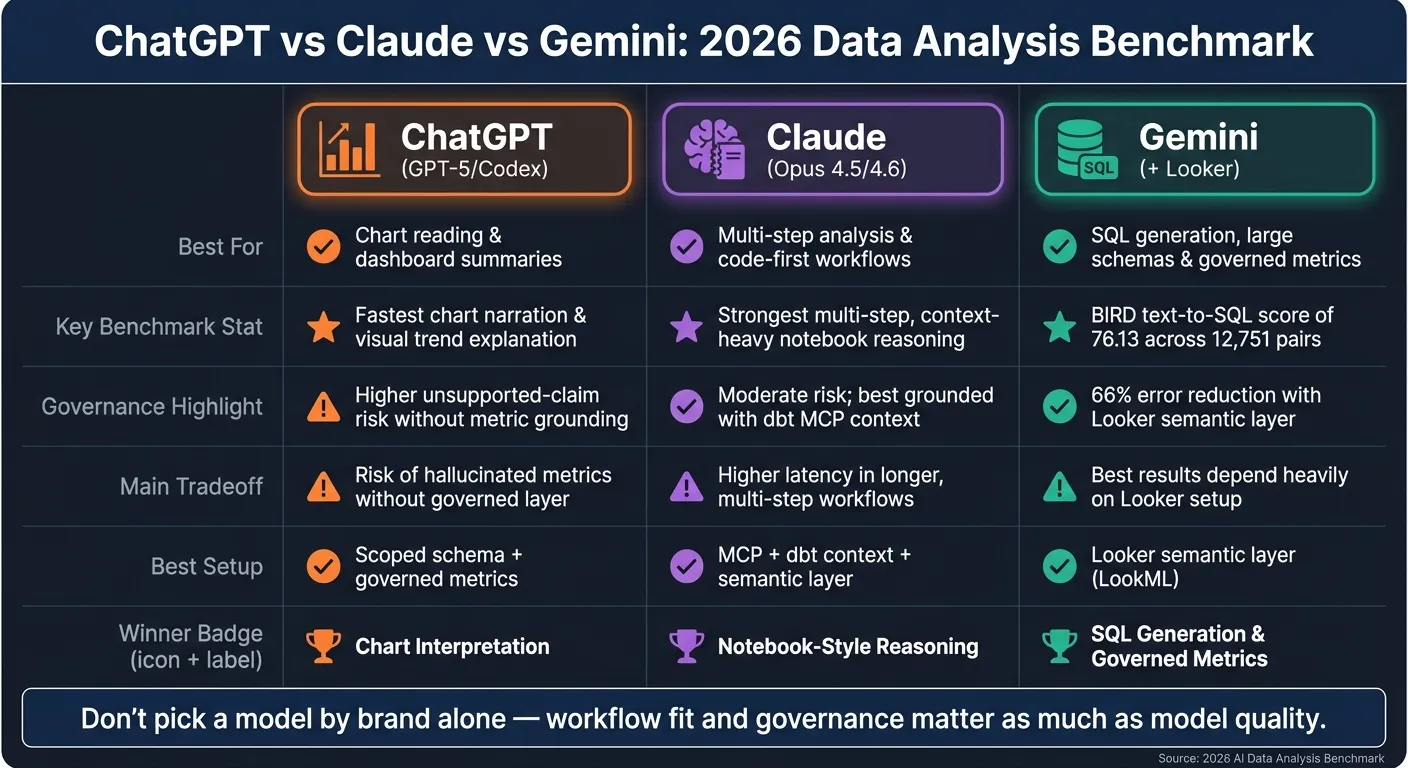 {ChatGPT vs Claude vs Gemini for Data Analysis: 2026 Benchmark Results}
:::
{ChatGPT vs Claude vs Gemini for Data Analysis: 2026 Benchmark Results}
:::
Quick Comparison
| Model | Best For | Main Tradeoff | Best Setup |
|---|---|---|---|
| ChatGPT | Chart reading and dashboard summaries | Higher risk of unsupported claims without metric grounding | Scoped schema + governed metrics |
| Claude | Multi-step analysis and code-first workflows | More latency in longer workflows | MCP + dbt context + semantic layer |
| Gemini | SQL, large schemas, and governed metric questions | Best results depend a lot on Looker setup | Looker semantic layer |
For me, the takeaway is simple: don’t pick a model by brand alone. If you use Looker, Gemini makes the most sense. If your team works in dbt with MCP, Claude is a strong fit. If you need fast chart explanation, ChatGPT is still a solid option. But without inspectable SQL, read-only access, and stable metric definitions, any model can give you an answer that sounds right and is still wrong.
sbb-itb-284a532
Benchmark setup: Same data, same prompts, same scoring
Every model worked from the same data, prompts, tools, and scoring rules. That means the benchmark follows a checklist for evaluating text-to-sql models to track model performance, not prompt-writing skill or setup bias. No model got extra prompt tuning or special help. The sections below lay out how the benchmark was built, scored, and controlled.
Datasets, schemas, and task design
The test environments covered Snowflake, BigQuery, Redshift, and Postgres, connected through read-only credentials or MCP [3][2]. Answers relied on semantic definitions from dbt, Looker, and MetricFlow, so models were checked against approved business logic [5][2].
BIRD added more realism to the test. It includes 12,751 question-SQL pairs across 95 databases and 37 domains [5].
Scoring rubric, latency, and cost tracking
Each output was scored on SQL validity, business-logic match, and silent failure rate [2][6]. Latency measured the time from prompt to a usable answer. Cost followed each product's published pricing model [6][2].
Those rules matter. Access limits and governance controls can shift results just as much as raw model quality.
Tooling rules and governance constraints
All systems used scoped, read-only access through MCP or credentials [3][2]. Governance checks covered row-level security, column-level security, audit logs, BigQuery policy tags, and Snowflake controls [5][2].
That turns semantic grounding into a test condition, not a nice-to-have feature. With those evaluation rules in place, the next section can focus on what each model actually scored.
Results: Scores, tradeoffs, and winner by task
No model wins every analytics task. Gemini comes out ahead for governed SQL and metric work. Claude does best on multi-step reasoning. ChatGPT leads on chart interpretation. The key point is simple: these winners were judged under the same warehouse, schema, and governance rules.
Overall benchmark scores
Gemini posted the top BIRD text-to-SQL score: 76.13 across 12,751 pairs [5]. That matters most when you're dealing with large, messy, schema-heavy warehouses, where one bad table pick can throw off the whole answer. And when Gemini is paired with Looker's semantic layer, text-to-SQL errors drop by 66% compared with direct generation [6].
| Task Category | Winning Model | Key Advantage |
|---|---|---|
| SQL generation & large-schema QA | Gemini | 76.13 BIRD score across 12,751 pairs [5] |
| Business-metric investigation | Gemini + Looker | 66% error reduction via semantic layer [6] |
| Chart interpretation | ChatGPT | Fastest at reading charts and explaining dashboard trends [6] |
| Notebook-style reasoning | Claude | Strongest on multi-step, context-heavy analysis [3] |
Raw accuracy tells part of the story. But runtime and token use shape the actual cost once these systems move into day-to-day use.
Latency, cost, and token efficiency
Claude's stronger reasoning often comes with more latency because it needs more context and more tool calls. That can be fine for one-off deep work. But in repeated workflows, the extra overhead can eat up the value of a slightly better answer.
So while the table shows who wins each task, it doesn't show how expensive or risky those answers become in production.
What the score tables do not capture
The biggest risk isn't an answer that looks obviously wrong. It's an answer that sounds right but uses the wrong join or the wrong metric logic. That's the kind of mistake that slips through.
Without grounding in dbt docs, LookML, or MetricFlow, models drift on definitions. And in production, scoreboards that look only at accuracy miss a lot. Holistic evaluations that include latency and reliability predict success much better than accuracy-only scores (ρ = 0.83 vs. ρ = 0.41) [4].
Task-by-task breakdown: Where ChatGPT, Claude, and Gemini actually differ
In day-to-day data work, the best model depends on the job in front of you. Gemini leads on SQL and governed metrics, ChatGPT does the best job reading charts, and Claude stands out in multi-step analysis.
SQL generation and large-schema question answering
If your team works with large dbt-backed schemas, one issue matters more than almost anything else: are joins defined ahead of time, or does the model have to guess them on the fly?
Gemini has the edge for large-schema SQL when it's paired with Looker's semantic layer. ChatGPT and Claude can still write strong SQL, but they usually need scoped schema context or dbt metadata to avoid made-up columns and bad joins.
| Dimension | ChatGPT (GPT-5/Codex) | Claude (Opus 4.5/4.6) | Gemini (Looker) |
|---|---|---|---|
| Syntactic correctness | High | High | High |
| Large-schema grounding | Moderate | Moderate | High |
| Join-path reliability | Moderate | Moderate | High |
| Best context method | dbt MCP + scoped schema | dbt MCP + scoped schema | LookML semantic layer |
This gap shows up most when the warehouse is big, messy, and changing fast.
Chart interpretation and business-metric investigation
For executive dashboard walkthroughs, the main question isn't just whether a model can describe a chart. It's whether that description stays tied to the approved metric definition.
ChatGPT is the strongest at chart narration, which makes it a good fit for dashboard summaries. But there's a catch: without governed metric definitions, it can suggest a likely reason for an anomaly that sounds convincing but isn't tied back to warehouse data.
Claude handles the investigation flow well, but it still works better with a clear source of truth so business definitions don't drift. Gemini is the safest pick for governed metric analysis because certified definitions keep the explanation tied to warehouse logic.
| Dimension | ChatGPT (GPT-5) | Claude (Opus 4.6) | Gemini (Looker/GCP) |
|---|---|---|---|
| Visual interpretation | Strong | Strong | Strong |
| Unsupported-claim risk | Higher | Moderate | Lowest |
| Metric consistency | Low | Moderate | High |
| Best fit | Narrative summaries | Reasoned investigation | Governed metric analysis |
That's the part that separates a slick summary from a dependable one: not whether the model can talk about the chart, but whether it sticks to the approved metric definition.
Notebook-style reasoning and multi-step analysis
For iterative analyst notebooks, Claude is the strongest fit. It keeps track of the thread well across multiple steps and works with MCP-connected context tools that let it inspect dbt docs and local context [1].
The trade-off is reproducibility. Without a persistent semantic layer, Claude can still choose different tables or logic from one session to the next. Gemini handles that in a more fixed way through the LookML layer. ChatGPT also works well in notebook-style flows when it's connected to a local dbt project [1].
| Dimension | ChatGPT (Codex) | Claude (Code/Cowork) | Gemini (Looker) |
|---|---|---|---|
| Multi-step consistency | Moderate | Strong | High |
| Reproducibility across sessions | Moderate | Moderate | High |
| Context method | Manual/session-based | MCP-connected context tools [1] | LookML semantic layer [6] |
Those task-level gaps start to shape workflow decisions, which the next section maps to specific team needs.
Which model to choose by use case
Best model for each analytics workflow
Some teams need clean SQL across huge schemas. Others need sharper analysis on messy business questions. And sometimes the job is simpler: explain what a chart is saying, fast.
That’s why the “best” model depends on the workflow.
| Workflow | Best Model | Key Reason |
|---|---|---|
| Large-schema SQL and governed metric questions | Gemini + Looker | LookML pre-defines joins and business logic, reducing text-to-SQL errors by as much as 66% [6] |
| General BI assistant / executive metric questions | Claude + governed semantic layer | Strong reasoning, grounded in consistent metric definitions [3] |
| Code-first analytical deep dives | Claude + MCP-connected dbt context | MCP reads dbt docs and manifest files, keeping complex joins and metric definitions grounded [1][2] |
| Chart interpretation and dashboard narration | ChatGPT | Fastest at explaining visual trends [6] |
There’s a catch, though: even the right model can still miss the mark if your metric definitions drift or the data access setup is weak.
Buying guidance by team stage:
- Looker already in your stack → Gemini is the natural fit
- dbt repo + MCP → Claude with MCP-backed context
- Governed semantic layer → safer default for any model
That’s the bigger point here. Model choice matters. But governance and context matter just as much.
Where model quality alone is not enough
Model quality, by itself, won’t keep metrics consistent.
Without building a semantic layer, any model - Claude, ChatGPT, or Gemini - can define “revenue” or “active users” differently from one session to the next. That’s not a small problem. A polished answer built on the wrong metric is worse than no answer at all, especially in finance or healthcare workflows where one bad number can trigger the wrong decision.
This is where the setup around the model does the heavy lifting. Live warehouse connections, instead of CSV exports, keep answers tied to current data. Inspectable, editable SQL and Python give analysts a way to check and fix what ran. A governed semantic and context layer keeps metric definitions steady across queries, users, and sessions. And read-only access should be the default, with write access treated as a deliberate, audited opt-in [2].
The 2026 verdict for data teams
Claude is the safest default for teams that care most about reasoning quality and need one model that handles a range of analytical questions well, as long as it’s paired with a governed semantic layer that keeps metric definitions steady [3]. Gemini stands out when long context windows, large schemas, and Looker-based governance are the main constraints; its LookML tie-in reduces data errors by as much as 66% [6]. Claude with MCP is the code-first pick for dbt-heavy workflows, where agentic access to docs and manifest files helps keep the model grounded [1][2].
In practice, workflow fit matters more than model brand when the data layer is already governed.
FAQs
::: faq
Which model is the safest default for most data teams?
For most data teams, the safest default isn’t a standalone LLM. It’s a governed, warehouse-native platform like Querio.
Tools like ChatGPT, Claude, and Gemini are strong at reasoning. But when they connect straight to a warehouse without native data governance, things can get messy fast. Teams can end up with mismatched metric definitions, and direct access can introduce security risk.
Querio takes a different route. It gives teams a shared context layer, read-only warehouse connections, and role-based access control. That helps keep metrics aligned across the organization instead of letting every prompt create its own version of the truth. :::
::: faq
How much do semantic layers affect benchmark results?
Semantic layers can lift benchmark results in a big way because they ground models in verified business logic, join relationships, and metric definitions instead of leaving them to guess from raw schema introspection.
That matters because schema mix-ups are one of the main reasons queries fail in complex data setups. With a semantic layer in place, teams can reduce those errors, cut data mistakes by up to two-thirds, handle more than 90% of common edge cases, and keep metrics like revenue or active users consistent from one query to the next. :::
::: faq
What setup do I need for reliable AI data analysis?
Use a governed, warehouse-native setup instead of ad hoc schema introspection. Connect the agent straight to your warehouse - such as Snowflake, BigQuery, or Postgres - with read-only credentials, not static file uploads.
Then add a semantic layer, such as Querio’s context layer or Looker’s LookML, so your business logic, metric definitions, and joins live in one place. That matters because once those rules are scattered across prompts, scripts, and one-off fixes, things get messy fast.
From there, keep access tight, log queries for audit trails, and test outputs against known-answer benchmarks before full deployment. It’s a simple idea: give the agent direct access to the source of truth, but keep guardrails firmly in place. :::