Business Intelligence
Best Natural Language to SQL Tools (2026): A Fact-Based Comparison
Compare top natural language-to-SQL tools by accuracy, governance, warehouse support, SQL transparency, and usability.

In 2026, natural language to SQL tools have become essential for analytics teams, enabling business users to ask questions in plain English and receive accurate SQL queries. These tools reduce reliance on analysts by offering production-ready solutions that integrate with platforms like Snowflake, BigQuery, and Redshift. However, performance varies widely across tools, especially in handling complex schemas and ambiguous queries. Here's a quick overview of the top tools evaluated based on accuracy, governance, warehouse support, SQL transparency, and usability:
- Querio: High accuracy (95%), strong governance, supports multiple warehouses, fully editable SQL and Python, user-friendly for non-technical users. Plans start at $680/month.
- ThoughtSpot: Great for pre-modeled data, robust security, and search-driven UI. Limited SQL transparency in newer versions.
- Looker: Excellent for governed analytics with LookML but requires significant setup. Best for structured data environments.
- Hex: Ideal for collaborative analytics with SQL and Python integration. No centralized governance layer.
- Snowflake Cortex Analyst: High accuracy within Snowflake, strong governance, but limited to Snowflake users.
- BigQuery Gemini: Optimized for BigQuery, strong governance, and SQL transparency, but exclusive to Google Cloud users.
- Amazon Redshift AI: Tailored for Redshift, solid governance, but lacks multi-platform support.
- AI2SQL: Affordable and user-friendly, great for simple SQL generation but lacks governance and live warehouse connections.
Quick Comparison
| Tool | Accuracy | Governance | Warehouse Support | SQL Transparency | Usability (Non-Technical) |
|---|---|---|---|---|---|
| Querio | 95% | High | Multiple (Snowflake, BigQuery, etc.) | Fully editable | High |
| ThoughtSpot | 4.6/5 | High | Major cloud warehouses | Limited (version-dependent) | High |
| Looker | High (with LookML) | Very High | BigQuery, Snowflake, others | Limited (LookML abstraction) | Moderate (requires setup) |
| Hex | High (with context) | Moderate | Snowflake, BigQuery, Redshift | Fully editable | High |
| Snowflake Cortex Analyst | 90%+ | High | Snowflake only | Fully editable | Moderate |
| BigQuery Gemini | High | High | BigQuery only | Fully editable | Moderate |
| Amazon Redshift AI | High | High | Redshift only | Fully editable | Moderate |
| AI2SQL | ~90% | None | 10+ dialects (limited live support) | Fully editable | High |
Each tool has strengths and trade-offs depending on your team's needs. Querio stands out for its balance of governance, flexibility, and ease of use, making it a strong choice for B2B SaaS teams looking for scalable analytics solutions.
::: @figure 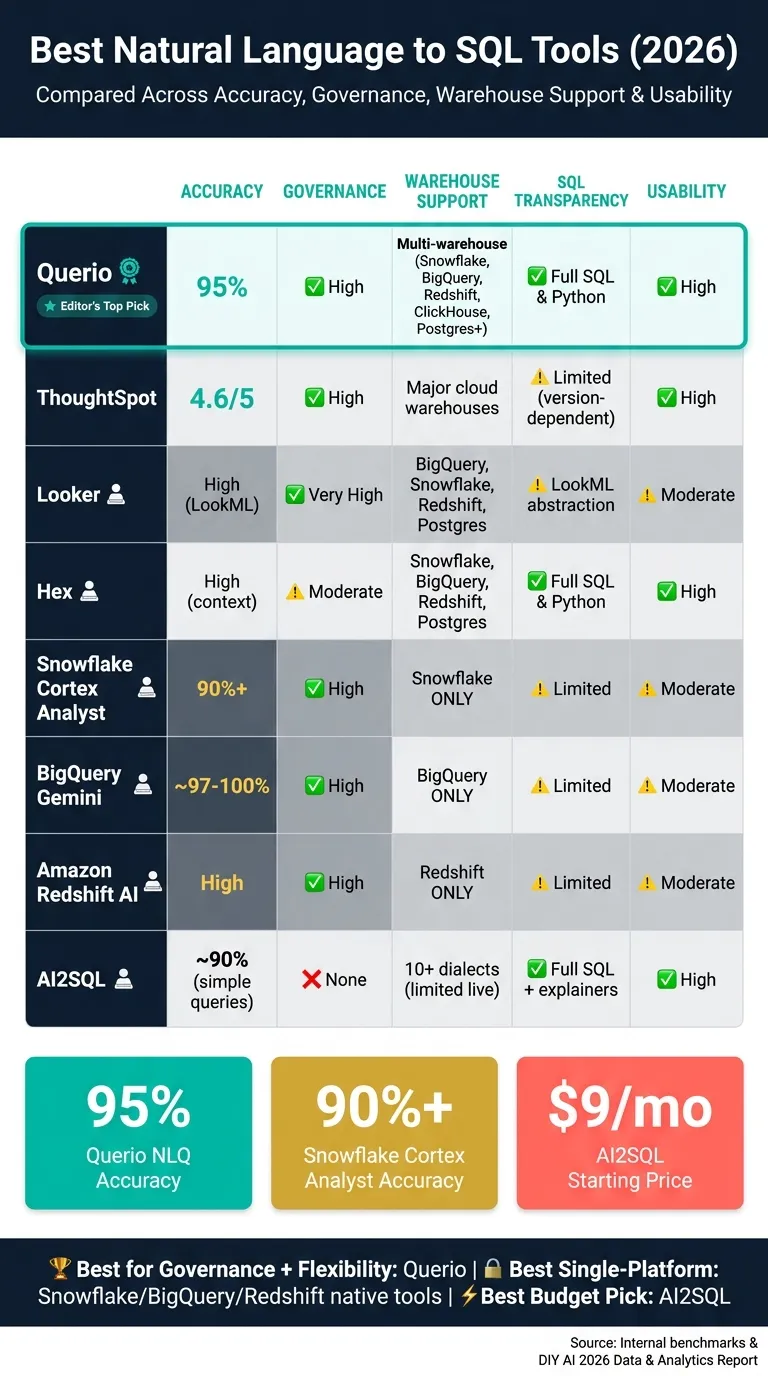 {Best Natural Language to SQL Tools 2026: Side-by-Side Comparison}
:::
{Best Natural Language to SQL Tools 2026: Side-by-Side Comparison}
:::
Building an AI Agent for Natural Language to SQL Query Execution on Live Databases
::: @iframe https://www.youtube.com/embed/aK_rFcKW4mY :::
1. Querio
Querio is an AI-powered analytics workspace designed for data teams that need quick access to self-serve analytics. It connects directly to your existing data warehouse and generates real SQL and Python for every query - no hidden processes or data exports. Its governed semantic layer ensures that metrics remain consistent across all analytical outputs.
Accuracy
Querio takes a unique approach to accuracy by grounding every query in your actual warehouse schema, avoiding the standard pattern-matching methods of many language models. It supports advanced models like Claude 4.6 (Sonnet/Opus), Gemini 2.5 Pro/Flash, and GPT-4.1[2], allowing users to select the best model based on schema and query complexity. A standout feature is Skills, which enables data teams to define reusable analysis patterns (such as period-over-period comparisons) using markdown instruction files[2]. Querio’s internal benchmarks boast 95% NLQ accuracy[2], though actual performance depends on the complexity of your schema.
This level of precision helps to establish a strong foundation for maintaining a governed data environment.
Governance
Governance is a key strength of Querio. Its shared semantic and context layer allows data teams to define joins, metrics, and business terms once, ensuring consistency across ad-hoc queries, notebooks, dashboards, and AI-generated answers. Role-based access controls (RBAC) and audit logs help manage access, while compliance with SOC 2 Type II standards and SSO integrations add an extra layer of security.
This structured approach works seamlessly with its live warehouse connectivity.
Warehouse Support
Querio connects directly to a wide range of data warehouses, including Snowflake, BigQuery, Amazon Redshift, ClickHouse, MotherDuck, PostgreSQL, MySQL, MariaDB, MongoDB, and Microsoft SQL Server. It uses encrypted, read-only credentials to ensure security while running live queries, eliminating the need for CSV exports or data duplication.
SQL Inspectability
Every answer Querio generates comes with fully inspectable SQL and Python code. Users can review and edit this code, ensuring transparency and making it easy to validate results or integrate queries into other workflows.
Usability
Querio is designed for quick and easy setup, with most installations taking just 15 minutes[2]. The interface revolves around a notebook environment, letting analysts refine queries with real-time feedback. Non-technical users can ask questions in plain English, while analysts have full access to notebooks and SQL - all within the same governed context layer. Pricing starts at $680/month (billed annually) for the Startup plan, $1,699/month for the Core plan, and $3,699/month for the Enterprise plan[2].
2. ThoughtSpot
ThoughtSpot uses its AI-powered Spotter search interface to let business users query data without needing SQL knowledge. Over time, the platform has advanced significantly, now offering three generations of the Spotter interface.
Accuracy
ThoughtSpot delivers a 4.6/5 NLQ accuracy when working with pre-modeled data. However, its performance drops when dealing with ad-hoc exploration of unmapped data, making its accuracy heavily reliant on robust data modeling. The newer Spotter Agent (v2) and Spotter 3 (currently in early access) introduce features like explainable formulas and analyst-level reasoning, improving upon the original token-based search method. This highlights the importance of a well-structured semantic layer, an area where platforms like Querio excel.
Governance
The platform includes strong role-based access controls and prioritizes security by default. It only exchanges metadata with its underlying language model (LLM), keeping actual data values confidential unless users explicitly opt to share them. This default setting aligns well with the needs of security-conscious organizations.
Warehouse Support
ThoughtSpot connects directly to major cloud data warehouses like Snowflake, BigQuery, and Redshift, running queries live against the source. By avoiding data imports, it ensures up-to-date results and eliminates data duplication concerns.
SQL Inspectability
The level of transparency varies depending on the version of Spotter being used. The original Spotter Classic provides inspectable SQL, while Spotter Agent offers explainable logic, and Spotter 3 introduces a verifiable reasoning plan. Here's a breakdown of SQL inspectability across the different Spotter versions:
| Feature | Spotter Classic (v1) | Spotter Agent (v2) | Spotter 3 (Early Access) |
|---|---|---|---|
| Data Sharing with LLM | Metadata only (default) | Opt-in for data values | Opt-in for data values |
| Query Logic | Token-based search | Explainable formulas | Analyst-grade reasoning |
| Transparency | Inspectable SQL | Explainable logic | Verifiable plan/reasoning |
Usability
ThoughtSpot's search-driven interface is intuitive for users familiar with Google-style search. However, the platform requires a significant initial investment in data modeling. The more structured and well-governed your semantic layer is, the better your experience will be. While it shines in environments with clean, pre-modeled data, it can feel restrictive for teams dealing with messier datasets or exploratory analytics needs. Overall, ThoughtSpot is a strong choice for organizations that prioritize governance and work with warehouse-native data analysis tools.
3. Looker
Looker takes a unique approach by combining natural language queries with LookML, its own semantic modeling language. Instead of allowing users to query raw warehouse tables directly, Looker adds a natural language interface on top of pre-modeled data, making data exploration more structured and consistent.
A standout feature of Looker is its focus on governed, warehouse-native analytics. By using LookML, Looker ensures that metric definitions remain consistent across the board.
Accuracy
When it comes to accuracy, Looker performs exceptionally well within the scope of its modeled data. If your data team has already set up metrics, dimensions, and relationships in LookML, Looker can reliably convert natural language questions into SQL queries that produce consistent results. However, any queries that fall outside of the LookML framework may lead to incomplete or less reliable outcomes. The key to achieving high accuracy is ensuring that your LookML setup is thorough and comprehensive.
Governance
Governance is one of Looker’s strong suits. By centralizing metric definitions in LookML, it ensures that everyone calculates metrics like revenue the same way. This consistency, combined with robust role-based access controls, makes Looker particularly appealing for organizations that prioritize compliance. Every query operates through the same semantic layer, eliminating discrepancies in calculations between analysts.
Warehouse Support
Looker integrates directly with major data warehouses like Snowflake, BigQuery, Redshift, and Postgres, running live queries against the source warehouse. This direct connection ensures that results are always current, without the need to manage additional data pipelines or separate BI storage.
SQL Inspectability
Looker’s SQL is generated from LookML definitions and can be viewed by users with the appropriate permissions. While most business users interact with Looker’s interface rather than the raw SQL, data teams can inspect and audit the generated SQL when needed. This balance allows for a controlled environment while maintaining transparency for technical users.
Usability
Looker is designed for enterprise use, which means it requires a significant upfront investment in LookML modeling. There’s no way to bypass this step, but for teams willing to invest the time, the reward is a highly consistent and governed self-service analytics platforms for enterprise use. For smaller teams or those looking for quick, exploratory analysis on unmapped data, this modeling requirement might feel like a hurdle. To get the most out of Looker, focus on modeling your most critical data in LookML first, then enable natural language access [3].
4. Hex
Hex is a platform designed for collaborative analytics, combining SQL, Python, and visualizations in one notebook-style environment. Its AI assistant, Hex Magic, integrates directly into the workflow, processing natural language queries as part of a broader analytical process rather than treating them as isolated SQL generation tasks.
Accuracy
Hex Magic stands out for its ability to handle complex queries with precision, thanks to its deep context awareness. It analyzes SQL cells, Python cells, and charting steps across a project, reducing the chances of incorrect assumptions. Its performance improves significantly when used within an established Hex project, where the richer context enhances its query generation capabilities [4].
Governance
Governance in Hex is managed at the workflow level through shared analytics apps and interconnected Hex projects. Instead of relying on a centralized metric-definition layer, this setup makes it an excellent choice for teams dealing with intricate warehouse logic and governed business data [4].
Warehouse Support
Hex connects directly to major data warehouses and supports live query execution on platforms like Snowflake, BigQuery, and Redshift [4].
SQL Inspectability
Hex Magic generates SQL directly within notebook cells, ensuring the output is fully visible and editable. This level of transparency allows technical analysts to review, tweak, and integrate the generated SQL into subsequent Python-based transformations seamlessly [4]. This approach fosters a more cohesive and flexible workflow for users.
Usability
Hex earned an overall score of 8.1/10 in the DIY AI 2026 Data & Analytics AI dataset, praised for its capabilities in notebooks, data apps, and collaborative analytics. However, it’s best suited for teams already familiar with Hex notebooks, making Hex Magic particularly appealing to technical analysts [4].
sbb-itb-284a532
5. Snowflake Cortex Analyst
Snowflake Cortex Analyst is a built-in natural language to SQL tool designed specifically for the Snowflake platform. It combines an AI-driven system with a semantic model layer that maps business terminology directly to database structures. This tight integration ensures precise analytics and highlights the importance of a semantic model for governed, production-ready insights.
Accuracy
Cortex Analyst boasts over 90% SQL accuracy for practical use cases. Independent testing shows an 81% success rate on first attempts, 84% accuracy for time-based aggregates, and 75% accuracy for multi-join queries. However, performance drops to 60% for JSONB and nested columns [1][3]. The tool's agentic refinement system can enhance accuracy by approximately 20% compared to standard language models that lack semantic integration [3].
"Snowflake's Cortex Analyst demonstrates what semantic layer integration achieves: 90%+ SQL accuracy on real-world use cases by coupling agentic AI systems with comprehensive semantic models." - Promethium Guide [3]
Governance
Governance is a standout feature. Cortex Analyst enforces role-based access control (RBAC), row-level security, and column-level security dynamically during query execution. Business metrics, such as "Daily Active Users", are embedded in the semantic model, ensuring every query adheres to consistent calculations [3]. While this consistency requires upfront effort to build the semantic model, it ensures governed, self-serve analytics that align with organizational standards [3].
Warehouse Support
A limitation of Cortex Analyst is that it only works within Snowflake. If your data resides in other warehouses like BigQuery, Redshift, or Postgres, you'll need to migrate it into Snowflake first. This lack of cross-platform compatibility is a non-issue for teams fully committed to Snowflake but could be a dealbreaker for those operating in a mixed warehouse environment [3].
SQL Inspectability
The SQL generated by Cortex Analyst is fully accessible and reviewable. This feature is especially useful for data teams that need to validate query logic before presenting results to stakeholders. The SQL reflects the governed definitions within the semantic model, avoiding ad hoc interpretations.
Usability
Cortex Analyst works best for teams already immersed in the Snowflake ecosystem. Setting it up requires a technical approach, as building and maintaining a detailed semantic model is crucial for accurate results. Once established, business users can ask questions in plain English and receive consistent, governed answers. However, this approach may increase the risk of vendor lock-in compared to tools that support multiple warehouses [3].
6. Google BigQuery Gemini
Google BigQuery Gemini is a tool designed to translate natural language into SQL queries, specifically tailored for use within BigQuery. It performs best when all your data resides in BigQuery.
Accuracy
Studies indicate that reasoning models in BigQuery process 44.5% fewer bytes while maintaining an impressive accuracy range of 96.7–100%. On the other hand, queries generated by standard large language models (LLMs) can introduce cost inefficiencies, with some executions processing over 36GB of data - leading to up to 3.4 times the cost variation [3].
Governance
BigQuery Gemini integrates seamlessly with Google Cloud's security framework, implementing role-based access controls (RBAC) alongside dynamic row- and column-level security at the time of query execution. It also allows embedding business metric definitions within a semantic model, ensuring consistent calculations across queries. However, building this semantic layer requires careful planning to avoid misinterpretations of company-specific logic [3]. The security measures align with the standards seen in other leading natural language to SQL tools.
Warehouse Support
This tool is exclusively designed for BigQuery. If your data is spread across platforms like Redshift, Snowflake, or Postgres, you’ll need to consolidate it into BigQuery to use BigQuery Gemini effectively [3]. Its design ensures optimal performance when data is centralized within BigQuery.
SQL Inspectability
One of the standout features of BigQuery Gemini is its transparency. The SQL it generates is fully visible and editable, allowing users to review query logic, optimize performance, and adjust manually before running the query. This level of control is vital, as poorly optimized queries can lead to significantly higher cloud costs [3].
Usability
BigQuery Gemini is a natural fit for teams already using the Google Cloud ecosystem. For BigQuery users, setup is straightforward, though configuring the semantic layer requires technical expertise. Once everything is set up, business users can ask questions in plain English. However, it’s worth noting that query costs will depend on the amount of data processed [3].
7. Amazon Redshift-native AI
Amazon Redshift-native AI is Amazon's built-in natural language to SQL feature, tailored specifically for teams using Redshift as their data warehouse. Similar to BigQuery Gemini, it’s designed to operate seamlessly within its ecosystem, making it highly optimized for Redshift environments.
Accuracy
This tool uses platform metadata to deliver precise results, especially when metadata integration, self-correcting mechanisms, and source-specific context are properly established [4]. When these conditions are met, it performs effectively on native Redshift data.
Governance
Amazon Redshift-native AI follows AWS governance standards, including role-based access controls and semantic models. These models connect business terminology to the underlying table structures, ensuring consistent calculations for metrics like "Monthly Recurring Revenue" or "Active Accounts" [3]. However, setting up and maintaining these semantic mappings requires an initial investment of time and resources.
Warehouse Support
This tool is built exclusively for Redshift, allowing real-time query execution without the need for exporting data [3]. For companies with a multi-platform setup - such as using Snowflake for analytics or Postgres for operational data - it will only support those sources if the data is centralized in Redshift first.
SQL Inspectability
One of its standout features is the ability to view the SQL it generates. This transparency allows teams to review and edit queries before running them, helping to manage costs when working with large datasets.
Usability
Within the AWS ecosystem, the tool is relatively easy to set up. Once data engineers configure the semantic layer for SaaS, business users can query data in plain English. While it works well for teams fully committed to Redshift, those with multi-cloud or hybrid setups might find its limited scope a challenge. For AWS-centric teams, however, Redshift-native AI offers a focused and efficient solution as we continue this comparison.
8. AI2SQL
AI2SQL focuses on speeding up SQL generation without positioning itself as a full analytics platform. Instead, it serves as a structured tool designed to help users draft SQL more efficiently. Let’s break down its performance across key areas like accuracy, governance, warehouse support, SQL inspectability, and usability.
Accuracy
AI2SQL reports an impressive 90% accuracy in internal tests [2]. However, this accuracy tends to hold up better for straightforward queries - like selects, filters, and joins - while it struggles with more complex, multi-step analytical queries often encountered in daily workflows [2]. In 2026, it earned an 8.2/10 SQL workflow score, showcasing its strength in drafting SQL rather than handling advanced enterprise analytics [4].
Governance
AI2SQL faces challenges here. It lacks a centralized semantic layer or shared business definitions, meaning users must manually verify metrics to ensure consistency [4]. For production-level reporting or metrics that need to remain uniform across teams, a data engineer's manual review is essential [4]. This makes it less suitable for teams requiring strict governance.
Warehouse Support
AI2SQL supports over 10 SQL dialects, including MySQL, PostgreSQL, Microsoft SQL Server, SQLite, BigQuery, and Snowflake [2]. This flexibility benefits teams working across different databases. However, live connections to modern analytics stack components like data warehouses are only available with higher-tier plans. Users on lower-tier plans must manually upload schemas or copy-paste DDL [4].
SQL Inspectability
One of AI2SQL's standout features is its transparency. It provides access to the raw SQL it generates, includes detailed explainers, and even offers optimization suggestions [4]. Steven Jones, a technical analyst at DIY AI, highlights this advantage:
"The practical strength is guided query building. Instead of asking a general-purpose model to guess your intent, you can work within a product designed around SQL tasks." [4]
Usability
AI2SQL is priced at $9/month for the Starter plan and $49/month for the Team plan [2], making it accessible to individual developers and small teams. The interface is described as "beginner-friendly" [4], which aligns with its purpose. It’s a great resource for data analysts looking to speed up SQL drafting or learn the nuances between different SQL dialects like Postgres and BigQuery. However, for larger data teams that require consistent metrics, live warehouse access, and governed analytics, AI2SQL falls short.
While AI2SQL shines in simplifying SQL generation and providing transparency, its lack of a centralized semantic layer highlights the trade-offs between agility and the governance needed for enterprise-level analytics.
Pros and Cons of Each Tool
Each tool in this comparison has its strengths and weaknesses, making the right choice highly dependent on your priorities - whether that's governance, flexibility, ease of use, or raw SQL capabilities. Below, you'll find a table summarizing key features across tools, followed by an analysis of their trade-offs.
| Tool | Accuracy | Governance | Warehouse Support | SQL Inspectability | Usability (Non-Technical) |
|---|---|---|---|---|---|
| Querio | Up to 95% [5] | ✅ High - semantic/context layer | Snowflake, BigQuery, Redshift, ClickHouse, Postgres, and more | ✅ Full SQL & Python, editable | ✅ High |
| ThoughtSpot | High (4.6/5) | ✅ High - RBAC, security controls | Major cloud warehouses | ⚠️ Limited - inspector only | ✅ High - search-driven UI |
| Looker | High (with LookML) | ✅ Very high - LookML semantic layer | BigQuery-native + others | ⚠️ Limited - LookML abstraction | ⚠️ Moderate - steep learning curve |
| Hex | High (notebook context) | ⚠️ Moderate - no centralized semantic layer | Snowflake, BigQuery, Redshift, Postgres | ✅ Full SQL & Python | ✅ High - collaborative notebooks |
| Snowflake Cortex Analyst | 90%+ with YAML [5] | ✅ High - native Snowflake governance | Snowflake only | ⚠️ Limited | ⚠️ Moderate - requires technical setup |
| Google BigQuery Gemini | High (95% query time reduction at Suzano) [6] | ✅ High - IAM-native | BigQuery only | ⚠️ Limited | ⚠️ Moderate - GCP expertise needed |
| Amazon Redshift AI | High (within Redshift) | ✅ High - IAM/VPC-native | Redshift only | ⚠️ Limited | ⚠️ Moderate - AWS-native complexity |
| AI2SQL | ~90% on simple queries [2] | ❌ None - no semantic layer | 10+ dialects (schema paste or live on paid plans) | ✅ Full SQL + explainers | ✅ High - user-friendly interface |
Key Takeaways
Tools that are built directly into a single warehouse - like Snowflake Cortex Analyst, Google BigQuery Gemini, and Amazon Redshift AI - offer tight security and deep integration. However, they come with a trade-off: you're locked into one platform, and technical setup can be a barrier. Meanwhile, tools like AI2SQL focus on SQL transparency but lack the shared business definitions and live connections essential for consistent, production-grade reporting.
Querio, ThoughtSpot, and Looker emerge as the most governance-complete options. Looker's LookML is undeniably powerful but requires a significant engineering effort to maintain. Teams can also use AI in Looker to streamline this process through natural language querying. ThoughtSpot shines with its search-driven exploration and robust RBAC controls. Querio strikes a balance by providing a governed semantic layer along with editable SQL and Python, empowering non-technical users to explore data while ensuring data teams retain control over metric definitions.
Hex occupies a middle ground, appealing to analyst-heavy teams who value collaborative notebooks but don’t need strict enterprise governance.
Ultimately, tools with governed metrics and live warehouse connectivity are essential for consistent, production-grade analytics. Querio stands out in this regard, offering inspectable SQL and Python workspaces that combine governance with flexibility.
Conclusion
Querio stands out as a leading natural language to SQL tool tailored for B2B SaaS teams. Its strengths lie in offering a governed semantic layer, fully editable SQL and Python, and live connections to major data warehouses. When choosing the right tool, it’s all about understanding your team’s specific needs - and different scenarios call for different solutions.
For teams deeply integrated with their data warehouse platforms or those relying on notebooks and lightweight SQL tools, the market offers various options with trade-offs between integration and flexibility. But for B2B SaaS analytics teams that demand consistent, self-serve analytics at scale - where terms like "revenue" and "active users" are defined the same way across every report - the decision requires more thought. As noted by Promethium Enterprise Solutions Evaluation, "Architecture matters more than the model." [3] A strong semantic layer is the backbone of accurate, repeatable analytics, and that’s exactly what Querio provides.
In a crowded field, what sets Querio apart is its focus on governed, scalable analytics. It combines a governed context layer with fully editable SQL and Python, live connections to platforms like Snowflake, BigQuery, Redshift, ClickHouse, and Postgres, and a collaborative notebook environment designed for both analysts and non-technical users. It’s built for teams that need to expand data access without losing control over how metrics are defined.
If your team is still stuck with manual exports and one-off queries, Querio offers a clear path forward. For $680 per month, the Startup plan provides an accessible entry point for growing B2B SaaS teams ready to leave inefficient workflows behind.