Business Intelligence
Databricks Genie Alternatives for Warehouse-Native AI Analytics (2026)
Choose tools that run queries on certified warehouse metrics — SQL visibility and governance location determine trusted AI analytics.

If I had to boil this down to one point, it’s this: the best Databricks Genie alternatives in 2026 are Querio, ThoughtSpot, Sigma Computing, and Hex - but the right pick depends less on chat and more on where metric control lives, who will use the tool, and how visible the generated SQL is.
Here’s the short version:
- Querio fits data teams that want governed self-serve on live warehouse data, with visible SQL and Python and definitions kept in a git repo they own.
- ThoughtSpot fits companies that want search-led BI with guardrails.
- Sigma fits finance and ops teams that prefer a spreadsheet-style workflow on top of the warehouse.
- Hex fits analyst-heavy teams that work in SQL and Python notebooks.
- Databricks Genie still makes the most sense for teams already centered on Databricks Lakehouse and Unity Catalog.
The main issue is simple: can the AI answer from certified metrics and shared business logic, or is it guessing from raw tables? That’s the line between answers you can use and answers that just look right.
A few facts stand out fast:
- Querio has a free plan, and Core is $2,499/month
- ThoughtSpot starts around $1,250/month
- Hex was SaaS-only as of May 2026
- Sigma and Databricks Genie keep warehouse row- and column-level controls closer to the source
- In one early 2026 benchmark across 14 analytics agents, Genie was among the few that answered a multi-table churn question correctly
If you’re comparing these tools, I’d focus on four things first:
- Warehouse execution - does it query live data or use copied data?
- Metric control - are joins, KPIs, and definitions shared across use cases?
- Workflow depth - is it built for business users, analysts, or both?
- SQL visibility - can your team inspect what the AI ran?
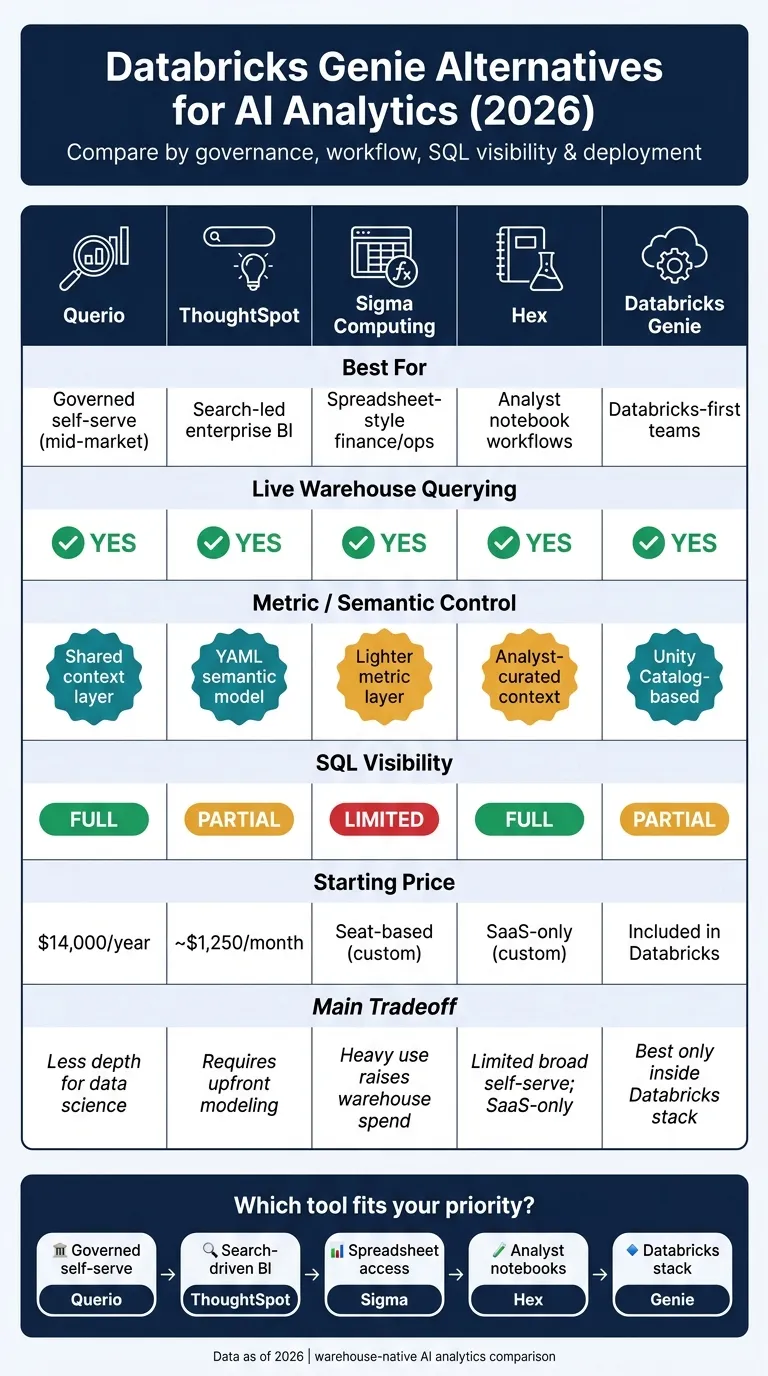
Quick Comparison
| Platform | Best for | Live warehouse querying | Metric control | SQL visibility | Main tradeoff |
|---|---|---|---|---|---|
| Querio | Governed self-serve for data teams and their AI agents | Yes | Context and metrics as files in a git repo | Full | Less focused on deep data science work |
| ThoughtSpot | Search-led BI | Yes | Semantic model | Partial | Needs setup and modeling first |
| Sigma Computing | Spreadsheet-style analysis | Yes | Lighter metric layer | Limited | Heavy usage can push warehouse spend up |
| Hex | Analyst notebook workflows | Yes | Analyst-managed context | Full | Less suited to broad business self-serve |
| Databricks Genie | Databricks-first companies | Yes, in Databricks | Unity Catalog-based | Partial | Best fit mostly inside the Databricks stack |
So if you want the plain answer: choose Querio for governed self-serve, ThoughtSpot for search BI, Sigma for spreadsheet analysis, Hex for analyst notebooks, and Genie for Databricks standardization.
That’s the lens I’d use for the rest of this comparison.
1. Querio
Querio is git-native analytics for data teams and their AI agents. It answers from live warehouse data, without exports or copied datasets. It connects straight to Snowflake, BigQuery, Amazon Redshift, ClickHouse, MotherDuck, and PostgreSQL, and it generates real SQL and Python behind the scenes.
Warehouse Execution
Querio runs queries directly on live warehouse data in Snowflake, BigQuery, Amazon Redshift, ClickHouse, MotherDuck, and PostgreSQL. On Snowflake and BigQuery, per-user OAuth means each query runs as the person asking, so the warehouse's access rules apply. That direct setup supports both self-serve questions and analyst follow-up work.
AI Analysis Workflow
Users ask questions in plain English. Querio then generates editable SQL or Python, runs it against the warehouse, and shows the code for review inside a reactive notebook environment. That means analysts can keep working on the analysis in the same place instead of bouncing between tools. Claude, ChatGPT, Claude Code and Cursor can do the same work through Querio's MCP server and CLI.
Semantic Governance
Querio keeps joins, metrics, and business definitions as plain files in a git repo your team owns. The data team defines logic once, and the app, Slack, notebooks, dashboards, and AI agents all answer from it. Agents propose changes, and saving context or promoting a dashboard opens a pull request under the repo's own reviewers. As a result, ad hoc questions, dashboards, and notebooks stay tied to the same metric definitions.
Enterprise Deployment
Querio is SOC 2 Type II compliant and offers SSO on Core and Enterprise. It has a free plan (Core is $2,499/month), no per-seat pricing, and unlimited users on every plan. Teams that want more control can choose Enterprise, which has single-tenant hosting and offers on-prem deployment as an add-on.
The next section shows how ThoughtSpot approaches governed self-serve analytics.
2. ThoughtSpot
ThoughtSpot works well for teams that want governed, search-led BI on live warehouse data. It’s a warehouse-native analytics platform with LLM-powered natural-language querying that runs directly on Snowflake, BigQuery, Databricks, and Redshift. That means it queries live warehouse data without extracts or copies. Governance and permissions stay inside the warehouse boundary you already use, which is helpful for teams that have put serious work into warehouse-level controls [9][1].
AI Analysis Workflow
Spotter and Sage turn plain-English questions into SQL and return Liveboards [9][10]. So if someone asks a direct question in everyday language, ThoughtSpot can translate that into something the warehouse can run.
There is a catch, though. More advanced diagnostic work, like funnels or retention analysis, still depends on pre-modeled logic [1][10]. In other words, the AI can help you move faster, but it doesn’t remove the need for setup behind the scenes.
"In practice, it often behaves like an analytics platform with AI capabilities rather than a lightweight autonomous analytics agent." - Ambrus Pethes, Growth at Mitzu [9]
Semantic Governance
ThoughtSpot uses a semantic layer to tie answers to business definitions, which helps keep results aligned with how the company defines metrics [9][10]. But there’s no magic wand here. Data still needs to be modeled into ThoughtSpot’s worldview before search starts returning results you can trust [9][10].
It scores well for governance and enterprise maturity [10][4]. That makes it a solid pick for teams that want self-serve questions with guardrails, without giving up warehouse controls.
Enterprise Deployment
ThoughtSpot is generally a better fit for larger teams with established BI programs. Pricing starts at about $1,250 per month, and enterprise rollouts usually need a custom quote plus a longer implementation cycle [10][8].
ThoughtSpot stands out when governed search and BI adoption are the top priorities. The next platform leans more toward analysts and their day-to-day warehouse work.
3. Sigma Computing
Where ThoughtSpot leans on search-led BI, Sigma goes in a different direction. It’s built around spreadsheet-style analysis, which makes it a natural fit for finance and operations teams. Sigma puts that familiar grid interface on top of Snowflake, BigQuery, Redshift, Databricks SQL, and Postgres [4].
Warehouse Execution
Sigma uses a zero-copy setup that pushes compute down to the warehouse [4]. Row- and column-level permissions from the warehouse carry through as well [4]. The upside is clear: users work with live data in a format that feels familiar. The catch is cost. Because every click and interaction runs against the warehouse, heavy ad hoc usage can drive compute spend up over time [4]. So while the interface feels like a spreadsheet, usage discipline still matters.
AI Analysis Workflow
Sigma Assistant and Sigma Agents help users dig into data, but they don’t replace the spreadsheet experience [12][3]. They can speed up query generation, which is handy when someone wants to get moving without writing everything from scratch [12][3]. But when the work gets more involved, especially around complex modeling, teams still need analyst-built logic [5].
Semantic Governance
Sigma’s semantic layer is lighter than what you get from governance-first tools [12][3]. It can automatically detect schema changes, including dropped or renamed columns [4]. That said, consistent business metrics still rely on analysts to define the logic by hand [4]. In plain English: Sigma makes analysis easy to access, but it puts less weight on strict metric control. That tradeoff tends to work best when ease of use matters more than centralizing every KPI.
Enterprise Deployment
Sigma is used by more than 2,000 enterprises worldwide, and its Sigma Embedded product is one of the more developed options in the market for customer-facing analytics [4][3]. Pricing is usually seat-based, with enterprise quotes required for larger rollouts [1]. Sigma makes sense for teams that want spreadsheet-native analysis on live warehouse data.
Next, Hex shows how notebook-first teams combine analysis, apps, and AI on warehouse data.
4. Hex
Hex is a notebook-first analytics platform built for analysts who work on live warehouse data in Snowflake, BigQuery, Redshift, Databricks, and Postgres.
Warehouse Execution
Hex connects straight to the warehouse. But its notebook runtime can shift work into Hex's own compute layer. When that happens, warehouse-native row- and column-level security may not carry over. In practice, admins may have to rebuild those controls inside Hex.
There’s another catch. Schema changes, like renamed or dropped columns, can break notebook cells and force manual refactoring [4]. That tradeoff hits hardest when a team needs warehouse security rules to stay intact all the way through the analytics layer.
AI Analysis Workflow
Notebook Agent sits at the center of Hex’s AI workflow [10]. It can edit code cells and run investigations right inside the analyst’s existing workflow [10]. That’s a big plus for teams that already live in notebooks.
Hex also includes Threads, which gives non-coders a chat interface, and Data Apps, which turn notebook work into shareable apps [10]. But self-service still leans on logic written by analysts. So Hex tends to fit expert-led teams better than broad rollouts for business users [10]. The upside is speed. The tradeoff is simple: output quality depends on how well the context has been curated.
Semantic Governance
Hex relies on analyst-curated context, so AI accuracy rises or falls with the quality of the team’s documented business logic [10]. If your team needs strict metric definitions to stay consistent across lots of users, that dependency is a serious tradeoff when repeatable metrics matter.
Enterprise Deployment
As of May 2026, Hex is SaaS-only [10]. That limits deployments that need VPC support or strict data residency rules [10]. So Hex is a better fit for analyst-led notebook workflows than for broad, business-user self-serve.
"Hex is strongest in analyst-led environments where SQL, Python, and reproducible notebooks are central to decision-making." - Ambrus Pethes, Growth, Mitzu [5]
The next section shows how Databricks Genie compares as the native option for Databricks-first teams.
5. Databricks Genie
Databricks Genie is the native AI analytics layer for Databricks-first teams. If your team already lives in Databricks, Genie is the default point of comparison when you stack it up against best AI data analytics tools.
Warehouse Execution
Genie runs queries natively inside Databricks, which keeps data within the Databricks security perimeter [7]. That matters for teams that don't want data bouncing between systems.
Setup can also move fast when warehouse models are already in place [9]. If the data warehouse groundwork is done, there’s less extra plumbing to deal with.
AI Analysis Workflow
Users ask questions in plain English through a chat interface. Genie then writes SQL behind the scenes, runs the query, and returns the result in the same interface [7].
That flow is simple on the surface, but the harder test is whether it can handle messy business questions. In early 2026 benchmarks across 14 analytics agents, Genie was one of the few tools that correctly answered complex multi-table churn questions, with response times of about 20 seconds [11].
Semantic Governance
Genie builds context from Unity Catalog metadata, including table descriptions, tags, and access policies [7]. Teams can also use Genie spaces to layer in business logic and access restrictions.
There’s a catch, though: Genie is only as good as the metadata it reads. If descriptions are stale, tags are messy, or policies fall out of date, answer quality can slip. So the system works best when teams keep that metadata clean and current [7].
"Integration with Unity Catalog avoids duplicating governance layers, and the ability to use the same environment for business queries and model training simplifies operations for teams with a strong ML culture." - Isabella Machado, BIX Tech [7]
Enterprise Deployment
Genie inherits Unity Catalog RBAC and centralized audit logs, which cuts down on extra security setup [7]. For teams already using Unity Catalog, that can make rollout much simpler.
At the same time, SQL transparency is only partial. Genie shows its reasoning, but the generated SQL is less open to inspection than what you get in SQL-first tools [11]. So if your analysts like to check every query line by line, this may feel a bit more closed off.
"Genie is usually strongest for Databricks-first organizations optimizing within one platform boundary, and relatively less compelling for teams prioritizing broad cross-warehouse interoperability." - Ambrus Pethes, Growth at Mitzu [2]
The table below shows where that tradeoff matters most.
Feature Comparison Table
Every platform makes a different tradeoff between governance, workflow depth, and transparency. This table makes the big differences easier to scan: live execution, metric control, and how much of the AI's logic you can actually see.
| Platform | Warehouse Execution | AI Analysis Workflow | Semantic Governance | SQL Transparency | Best Fit |
|---|---|---|---|---|---|
| Querio | Live (Snowflake, BigQuery, Redshift, Postgres) [8] | Natural language → inspectable SQL/Python [8] | Shared context layer for joins, metrics, and business definitions [8] | Full - inspectable SQL/Python [8] | Data teams and business users who want self-serve from one set of definitions |
| ThoughtSpot | Live (Snowflake, BigQuery) [1] | Search-driven + LLM via Spotter/Sage [1][10] | YAML-based semantic model [5][3] | Partial - model-bound [3] | BI-heavy enterprises with dedicated analytics teams |
| Sigma Computing | Live (direct warehouse model) [5] | Spreadsheet-first self-service [5] | Inherits warehouse RLS/CLS natively [4] | Limited - spreadsheet abstraction [4] | Spreadsheet-native finance and ops teams |
| Hex | Live (direct connectivity) [5] | SQL/Python notebook; AI generates visible, editable code [10] | Analyst-curated context; manual security rebuild required [4] | Full - notebook cells are open [10] | Analyst-led teams doing exploratory or narrative-driven work |
| Databricks Genie | Live (Databricks SQL / Lakehouse only) [5][7] | Conversational chat; SQL partially visible [7][11] | Unity Catalog + Knowledge Store [6][7] | Partial - reasoning shown, SQL less open [11] | Databricks-first organizations |
One difference stands out fast: security handling is not the same across these tools. Sigma and Databricks Genie inherit warehouse RLS and CLS natively, while Hex needs more manual security reconstruction. That matters a lot for teams in regulated industries or teams working with multi-tenant data [4][6].
SQL transparency is another clear dividing line. Some platforms let analysts read, edit, and verify each generated query. Others keep more of that logic behind the curtain. When people can inspect the query, it's easier to catch silent errors before they land in front of business stakeholders.
That same tradeoff carries into the pros-and-cons breakdown below.
Pros and Cons by Platform
The feature comparison gives you the full picture. This section strips things down to what most teams care about first: the biggest strength, the biggest drawback, and where each tool tends to fit best.
| Platform | Main Pros | Main Cons | Best-Fit Scenario |
|---|---|---|---|
| Querio | Governed semantic/context layer; inspectable SQL/Python; live warehouse connections to Snowflake, BigQuery, Redshift, and PostgreSQL [8] | Less depth for complex data science workflows than notebook-first platforms [8] | Data teams and their AI agents that need trusted self-serve from definitions in a git repo |
| ThoughtSpot | Mature enterprise-grade search-driven BI; rated 4.6/5 from 408 reviews [8] | Requires upfront modeling and rollout effort | Larger organizations with dedicated, centralized BI teams |
| Sigma Computing | Spreadsheet-native UI on live warehouse data; handles large warehouse datasets; native warehouse RLS/CLS inheritance [4] | AI augments, rather than drives, the workflow; single-tenant design limits more advanced agent workflows | Finance and Ops teams who prefer Excel-style logic directly on live data |
| Hex | Notebook-first workflow for SQL and Python; full code transparency; strong fit for technical analysts and data scientists | Limited self-serve access for non-technical users; primarily SaaS-only; warehouse security controls may need to be rebuilt in Hex [4][10] | Analyst-heavy teams focused on exploratory research and reproducible work |
| Databricks Genie | Native Unity Catalog integration; Trusted Assets for verified SQL; strong fit for teams already standardized on Databricks [7] | Best only for Databricks-standardized teams; LLM-generated SQL can struggle with complex behavioral logic such as funnels or retention windows [6] | Teams already standardized on Databricks Lakehouse |
If you want a simple way to narrow the field, start with governance and security location. That tends to rule tools in or out fast.
After that, look at who will use the product day to day. Is it built mostly for business users? Analysts? Or a mix of both?
That’s where the gap starts to show. ThoughtSpot and Hex usually ask for more technical setup. Querio and Sigma make the path shorter for business users who want to get answers without leaning on a BI team every time.
How to Choose the Right Platform
Start with one simple question: where does governance live? In the warehouse? In the semantic layer? Inside a notebook? Or inside the Databricks boundary?
That answer shapes everything else.
Use the same four filters from above: governance, workflow, transparency, and deployment boundary. Once you do that, the options get easier to sort because each platform lines up with a different way of working.
If your warehouse already runs on Snowflake, BigQuery, or Redshift and you want governed self-serve without remapping logic for every question, Querio is a strong fit. Its context and metric definitions live in a git repo you own, so metrics stay consistent whether someone asks a question in plain English, an analyst works in a notebook, or an agent asks through MCP.
ThoughtSpot works well for search-driven self-serve aimed at non-technical users. Sigma fits teams that like spreadsheet-style analysis, especially finance and ops groups working on live warehouse data. Hex makes sense for analyst-heavy teams that need SQL, Python, and narrative in one shared notebook workflow. If your stack is standardized on Databricks Lakehouse and Unity Catalog, Databricks Genie is the best match.
A good test is to ask each platform an ambiguous metric question. Then look closely at what happens. Does it return certified metrics? Or does it generate SQL against raw tables without certified metrics? That's often where the gap shows up.
The table below turns those tradeoffs into a short list.
| Your Priority | Best Fit |
|---|---|
| Governed self-serve for business users | Querio |
| Enterprise search-driven BI | ThoughtSpot |
| Spreadsheet-native warehouse access | Sigma Computing |
| Analyst SQL/Python notebook workflows | Hex |
| Databricks Lakehouse standardization | Databricks Genie |
FAQs
How do I test metric accuracy before buying?
Before you buy, put SQL transparency near the top of your checklist. Your analysts should be able to inspect the generated SQL and sign off on it against your business definitions.
You’ll also want to verify outputs against your current semantic layer or other known ground truths. And make sure the platform connects straight to your dbt models or warehouse metadata, so it works from governed metrics instead of trying to guess its way through raw schemas.
Which tool is best for business users vs. analysts?
It depends on what your team needs most: spreadsheet-style ease, deep technical analysis, or governed self-service.
For business users, Sigma Computing works well for teams that want a familiar spreadsheet-like setup. ThoughtSpot is a better fit for search-first BI at enterprise scale.
For analysts, Hex is the stronger choice for deep-dive, reproducible work.
And for teams that want governed, transparent self-service, Querio stands out with natural-language access and fully inspectable, editable SQL.
When does SQL visibility matter most?
SQL visibility matters most when you need to check analytical accuracy, trust AI-generated insights, and troubleshoot with less guesswork.
When teams can see the exact SQL or Python behind a natural-language query, they can verify the logic instead of taking the output at face value. That makes it much easier to spot problems like fan-out joins, incorrect metric definitions, or shaky calculations before those issues spread.
It also gives people a way to refine the work when needed. The AI stays useful, but the analysis doesn’t turn into a black box.