Business Intelligence
Querio vs Databricks Genie (2026)
Compare Querio and Databricks Genie: choose Querio for live-warehouse governed analytics; pick Genie if your stack is Databricks-native.

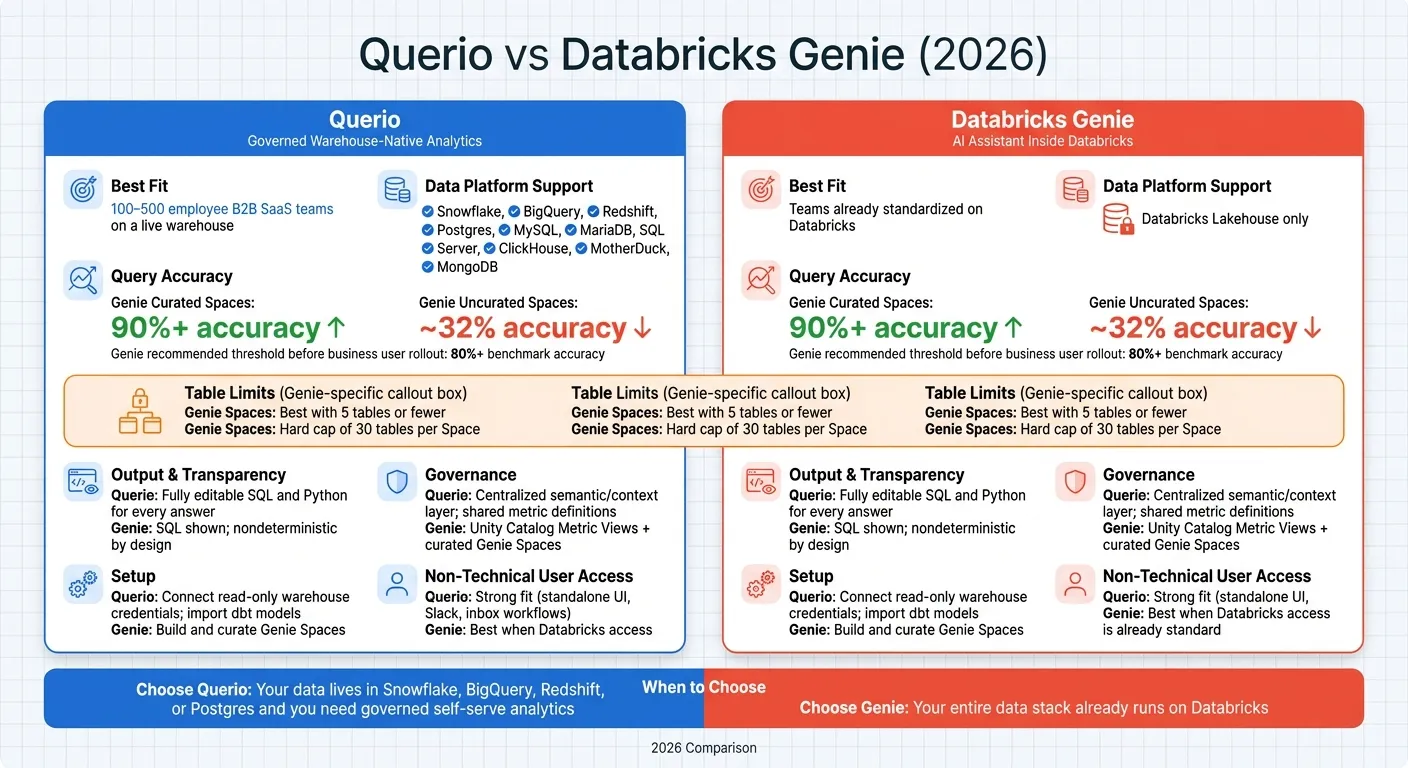
If your team uses Snowflake, BigQuery, Redshift, or Postgres, I’d pick Querio. If your company already runs on Databricks, I’d look at Genie first.
That’s the short answer. From what I see, this comparison comes down to a few plain questions:
- Where does your data live?
- Do you need shared metric definitions across teams?
- Who needs to use the tool day to day: analysts, business users, or both?
- How much setup and curation can your team handle?
Here’s the core takeaway in simple terms:
- Querio is built for governed self-serve analytics on a live warehouse.
- Databricks Genie is a chat-based analytics layer inside Databricks.
- Querio supports many data warehouses. Genie is for the Databricks Lakehouse.
- Querio gives teams editable SQL and Python for each answer.
- Genie can work well, but Databricks says curated Spaces can get 90%+ query accuracy, while uncurated setups may land around 32%.
- Databricks also says teams should reach 80%+ benchmark accuracy before giving Genie to business users.
- Genie Spaces work best with 5 tables or fewer, with a hard cap of 30 tables per Space.
If I boil it down even more:
- Pick Querio for live-warehouse BI, shared metrics, and non-technical access.
- Pick Genie if your data, security, and team workflows already sit inside Databricks.
Quick Comparison
| Criteria | Querio | Databricks Genie |
|---|---|---|
| Best fit | 100–500 employee B2B SaaS teams on a live warehouse | Teams already standardized on Databricks |
| Data platforms | Snowflake, BigQuery, Redshift, Postgres, and more | Databricks Lakehouse only |
| Product type | Standalone analytics workspace | Databricks feature |
| Setup | Connect read-only warehouse access; can import dbt logic | Build and curate Genie Spaces inside Databricks |
| Metrics | Shared context layer for joins, metrics, and business terms | Unity Catalog Metric Views plus Space setup |
| Output review | SQL and Python are visible and editable | SQL is shown; results vary by curation |
| Non-technical use | Strong fit | Best when Databricks access is already normal |
| Main tradeoff | Separate product | Works best only inside Databricks |
I’d use the rest of the article to confirm one thing: whether you need a warehouse-native analytics product or an AI helper inside Databricks.
What each platform is built to do
Querio is a standalone analytics workspace built for governed, live-warehouse BI. Databricks Genie is an AI assistant that sits inside Databricks for teams that already run on the Lakehouse. That one difference changes a lot: how governance works, how people trust the answers, and how analytics fits into daily work.
Querio: governed, warehouse-native analytics
Querio connects straight to your current warehouse with encrypted, read-only credentials. It supports Snowflake, BigQuery, Amazon Redshift, PostgreSQL, MySQL, MariaDB, Microsoft SQL Server, ClickHouse, MotherDuck, and MongoDB. There are no extracts and no duplicate data copies.
What sets Querio apart is its governed context layer. This is a shared place where data teams define joins, metrics, and business terms once. Those definitions then carry through to AI-generated answers, reactive notebooks, and dashboards.
That matters more than it may seem at first. If Finance asks for MRR and Product asks for MRR, they should get the same number. With Querio, they do, because the definition lives in one place. And every answer includes SQL or Python that people can inspect and edit. Nothing is hidden behind a black box.
Databricks handles this differently. Governance and access remain inside the Lakehouse.
Databricks Genie: AI assistance inside Databricks
Databricks Genie is built to help users query Delta tables and Lakehouse data with natural language. It works best when your data stack already lives in Databricks. Analysts set up Genie Spaces by choosing specific Unity Catalog tables, adding example SQL queries, and writing instructions that guide the AI. Business users then work through a chat interface that produces SQL, charts, and summaries, with permissions inherited from Unity Catalog.
The setup matters a lot here. Curated Genie Spaces can reach over 90% query accuracy, compared with 32% for uncurated setups, but those results depend on careful setup and curation inside Databricks [3]. In 2026, iFood standardized its data on Unity Catalog Metric Views to support Genie and saw query performance gains of up to 10x [2].
| Querio | Databricks Genie | |
|---|---|---|
| Product type | Standalone analytics workspace | Embedded AI assistant feature |
| Warehouse support | Snowflake, BigQuery, Redshift, Postgres, and more | Databricks Lakehouse only |
| Governance layer | Shared metric definitions and business terms | Unity Catalog (metadata-centric) |
| SQL access | Fully inspectable and editable | Generated by Genie; inspectable by admins |
| Best for | Multi-warehouse, governed self-serve | Teams standardized on Databricks |
Setup, data stack, and day-to-day workflows: a side-by-side look
Setup requirements and warehouse compatibility
Getting started with Querio is pretty direct: you connect your current warehouse using encrypted, read-only credentials. Querio can also import dbt models, which means your current logic comes along instead of needing to be rebuilt. The setup stays warehouse-native, so your data remains where it already lives.
Genie works inside Databricks and relies on a configured workspace plus curated Genie Spaces. Databricks says each Space should stay at five tables or fewer for best results, and each one has a hard limit of 30 tables [3]. If your team uses Snowflake or BigQuery, you first need to move data into Databricks before you can use Genie. That extra setup work affects how much curation the team needs to keep up over time.
Natural-language analytics and SQL generation
Both tools let people ask plain-English questions like "MRR by plan type" or "churn rate by acquisition channel." But the big split shows up after the question is asked.
With Querio, the question runs against a governed context layer where metrics like MRR and churn are already defined. The result comes back as editable SQL or Python. For analysts, that means they can inspect the logic. For business users, it makes the answer easier to check and use.
Genie leans on well-documented Unity Catalog metadata, so the quality of the curation has a direct effect on the quality of the output. If the setup is clean, results tend to be better. If not, things can get messy fast.
Workflow fit for analysts and business teams
| Dimension | Querio | Databricks Genie |
|---|---|---|
| Primary users | Business teams and analysts | Databricks-native analysts and engineers |
| Access point | Standalone UI, Slack, and inbox workflows | Databricks workspace UI and APIs |
| Analyst role | Define metrics once in the context layer | Curate Spaces, add instructions/example queries, and review flagged responses |
These workflow gaps start to matter more once a team moves past one-off questions and starts leaning on governed metrics and repeatable analysis. At that point, the issue isn't just getting an answer - it's getting the same answer each time, in a way teams can reuse and audit.
Metrics, governance, and iterative analysis
Once teams move past one-off questions and into shared reporting, metric consistency becomes the hard part.
Metric consistency and semantic governance
What matters most is simple: does the same metric return the same answer every time?
With Querio, metric logic sits in a centralized context layer. The data team writes core business definitions once, and those definitions carry across ad hoc questions, notebooks, and dashboards.
Databricks Genie does this with Unity Catalog Metric Views and curated Genie Spaces. The catch is day-to-day upkeep. Teams have to keep metric definitions aligned across Spaces, or metric drift starts to creep in. In practice, it works best when those Spaces are kept on a tight leash.
Inspectable outputs and auditability
Governance doesn't mean much if analysts can't check the logic behind an answer.
Outputs need to be easy to inspect. Querio generates editable SQL and Python for every answer, so analysts can open the code, review the logic, and sanity-check results before sharing them.
Genie also shows the SQL it generates. And with Genie Code, analysts can edit SQL or Python using natural-language prompts. But there's a practical wrinkle: Genie is nondeterministic by design [3], and Databricks says teams should get above 80% benchmark accuracy before rolling it out to business users [1].
| Dimension | Querio | Databricks Genie |
|---|---|---|
| Output format | Editable SQL and Python | SQL, charts, and natural-language summaries |
| Accuracy consistency | Governed by semantic layer definitions | Varies with Space curation quality [3] |
| Review mechanism | Pre-governed definitions in context layer | "Ask for Review" feedback loop for admins [1] |
| Black-box risk | Low - code is always visible | Low for SQL, but nondeterministic by design [3] |
Notebook-style analysis and reuse
The last test is whether teams can take those governed answers and use them in deeper analysis.
Querio's reactive notebooks are built for that kind of iterative work. When logic or source data changes, results update on their own. That makes them a good fit for analysts working through SaaS KPIs across Snowflake, BigQuery, or Redshift.
Genie Spaces support iteration inside Databricks. But for live-warehouse self-serve work without a Databricks login, Querio is the better match.
Which platform fits your team in 2026
Choose Querio when you need governed self-serve analytics on a live warehouse. Choose Databricks Genie when your data already sits in Databricks and you want AI help inside that setup.
The decision comes down to two things: where your data lives and who needs to trust the answer.
Choose Querio if you need governed self-serve on a live warehouse
If your team has already standardized metrics and wants business users to self-serve without going off the rails, Querio is the default pick. It keeps metric definitions consistent through a centralized semantic layer, and it can import logic from dbt. So finance and product can work from the same definitions instead of arguing over whose number is right.
Your data stays put in Snowflake, BigQuery, Redshift, or Postgres. That’s a big deal for finance teams, ops leads, and founders who need accurate answers without moving data out of the warehouse.
Choose Databricks Genie if your company already runs on Databricks
If your team already works inside Databricks, Genie adds AI help to the environment you already use instead of bringing in a separate tool. That’s a good fit when Unity Catalog governance and Databricks-native workflows already shape how your team operates day to day.
Genie also inherits Unity Catalog permissions. For teams working with sensitive data, that matters a lot, especially when row-level and column-level security are part of the job.
Genie fits teams already standardized on Databricks. Querio fits teams that need governed, self-serve analytics on a live warehouse.
FAQs
How much curation does Genie need?
Genie needs a lot of steady upkeep to stay accurate.
Its output depends on clean data docs and hands-on setup inside Genie Spaces. That means data teams have to keep schemas, column descriptions, example queries, and instructions up to date.
And that work doesn’t stop after setup. As data models change, teams need to keep updating each space. If that maintenance slips, configs can sprawl and metric definitions can start to drift.
Can Querio use our existing dbt models?
Yes. Querio lets you import your existing dbt models, so AI-powered analytics use the same business logic your team already relies on.
That means your metrics and context stay consistent. Natural-language queries line up with your internal standards, and non-technical users can get trusted insights without writing SQL.
Which option is better for business users?
Querio is a better choice for business teams that want a standalone, easy-to-use interface that works across different data warehouses. Databricks Genie makes more sense if your company is all-in on the Databricks Lakehouse and people do all of their work there.
One of the biggest differences comes down to flexibility. Querio’s governed semantic layer works across Snowflake, BigQuery, Postgres, and Databricks. Databricks Genie, by contrast, is tied to Unity Catalog and the Databricks UI.