Business Intelligence
How Businesses Use AI to Turn Data into Insights
NLP, semantic layers, and AI agents turn live warehouse data into governed, consistent insights, enabling faster, self-serve decision-making across teams.

Businesses are overwhelmed with data but struggle to convert it into actionable decisions. AI solves this by analyzing both structured and unstructured data, enabling faster and smarter decision-making. Key advancements include:
- Natural Language Processing (NLP): Teams can ask questions in plain English and get instant answers, eliminating the need for technical expertise.
- Semantic Layers: Ensure consistent metrics across departments by defining a unified data framework.
- AI-powered tools for data analysis: Reactive notebooks and AI agents automate repetitive tasks, enabling deeper analysis and faster insights.
Examples like Walmart's AI platform and Siemens Energy's chatbot show how AI transforms industries by delivering real-time insights, improving efficiency, and driving revenue growth. Tools like Querio integrate AI directly with data warehouses, ensuring live, secure, and accurate analytics while reducing manual effort. Businesses adopting AI see reduced delays, smarter predictions, and enhanced decision-making.
Why Generative BI Is Replacing Dashboards | The Future of Business Intelligence with AI
::: @iframe https://www.youtube.com/embed/qnLkkZ_RIO0 :::
AI Technologies That Transform Data Analysis
Three key AI technologies are revolutionizing how raw data is turned into actionable insights, making data analysis more efficient and accessible - even for non-experts.
Natural Language Processing for Data Queries
Natural Language Processing (NLP) allows users to ask questions in plain English and receive accurate answers, bypassing the need to learn complex query languages like SQL or Python. For instance, a sales manager can type, "What were our top-performing products in Q4?" and instantly get results. The system translates the question into database queries, executes them, and delivers the answer within seconds.
NLP also supports multi-turn conversations, making it easier to refine queries. For example, after seeing Q4 results, the manager might follow up with, "What about North America?" and receive the updated data just as quickly.
Siemens Energy provides a compelling example of this technology in action. Tim Kessler, Head of Data, Models & Analytics at Siemens Energy, highlighted the transformative impact of their AI-powered chatbot:
"This chatbot … has been a game changer for Siemens Energy. The ability to unlock and democratize the data hidden in our data treasure trove has given us a distinct competitive edge" [3].
Their solution gave 25 specialized R&D engineers near-instant access to insights buried in over 700,000 pages of documents [3]. NLP’s ability to convert plain language queries into actionable code is at the heart of this transformation.
Semantic Layers for Consistent Metrics
While user-friendly query tools simplify access, semantic layers ensure the accuracy and consistency of metrics across an organization. A common issue in businesses is varying definitions for key metrics - like "customer lifetime value" - between departments. Semantic layers vs. traditional data models solve this by creating a unified source of truth for all business metrics. When AI generates a query for "total revenue", it uses a consistent calculation every time, no matter who asks [5].
These layers go beyond defining metrics. They teach AI how a business operates by incorporating elements like synonyms (e.g., "customer" and "client"), table relationships, and verified query examples. This reduces errors and prevents AI from making incorrect assumptions when generating SQL.
The benefits are clear: AI platforms using semantic layers deliver more accurate and reliable results compared to those relying on raw database schemas [5]. In fact, by July 2025, 751 of the Forbes Global 2000 companies had adopted AI solutions featuring semantic layers, drawn by the consistency and reliability these systems offer [3].
Reactive Notebooks for In-Depth Analysis
For deeper exploration, reactive notebooks provide an AI-powered environment that acts like a co-analyst. These tools automate routine tasks like data retrieval and initial visualizations, allowing analysts to focus on interpreting results [1]. The "reactive" nature means that as analysts explore different angles, visualizations and calculations update automatically, ensuring accuracy throughout the process.
Unlike traditional notebooks where every line of code must be written manually, reactive notebooks understand natural language instructions. An analyst can describe what they want to see, and the system generates the necessary code, executes it, and presents the results. This shift allows analysts to concentrate on strategy while AI handles repetitive tasks, delivering speed and scale.
The move from static dashboards to conversational business intelligence (BI) is gaining momentum. Modern platforms are evolving beyond simply showing what happened to explaining why it happened and suggesting next steps. This makes data analysis a self-service tool that every department can leverage [1].
How Querio Powers AI-Native Analytics
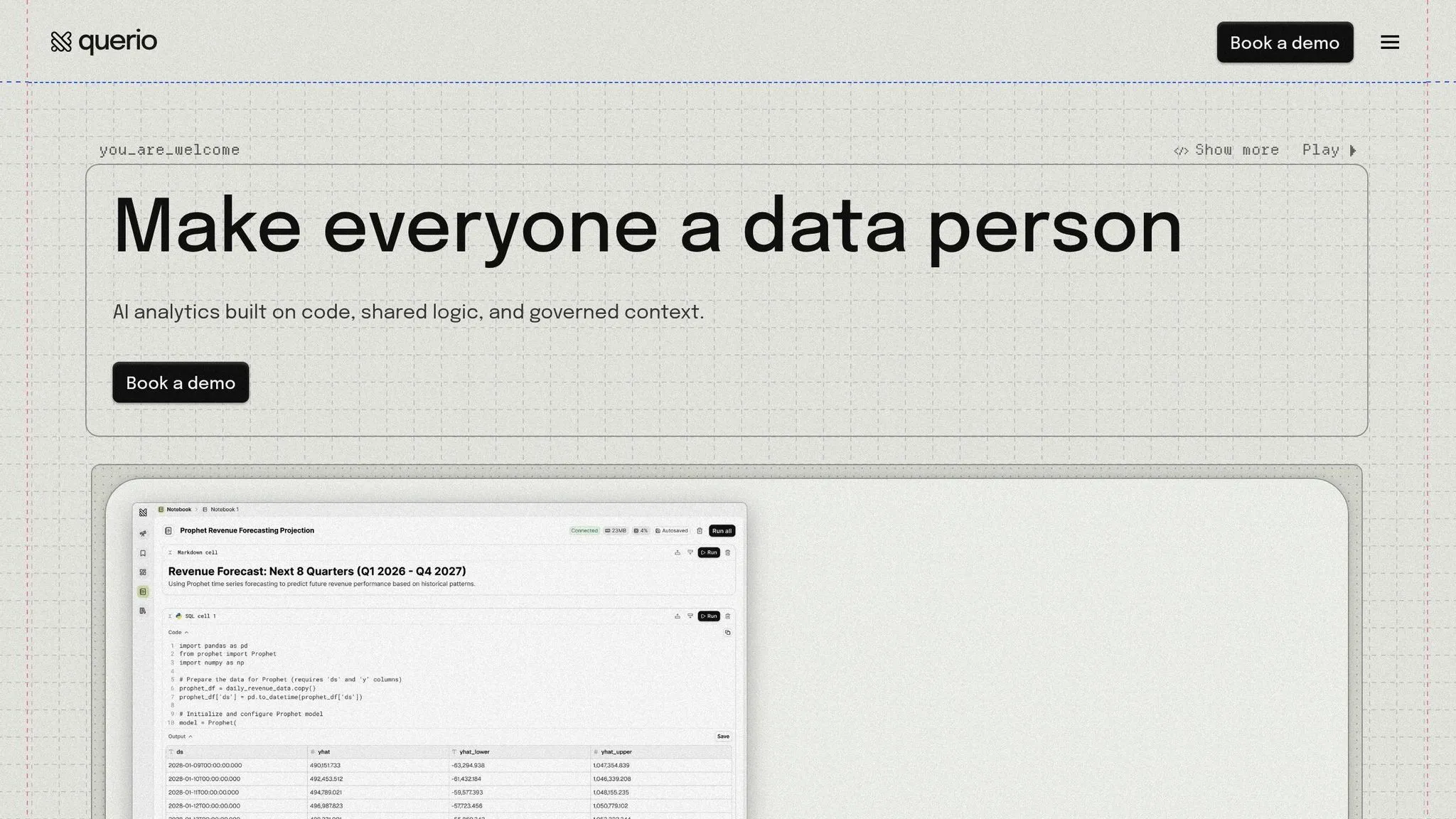
Querio is designed as an AI-native analytics workspace to tackle the challenges that traditional BI tools often struggle with - slow response times, inconsistent metrics, and limited accessibility for non-technical users. By connecting directly to your data warehouse and leveraging AI agents to generate inspectable SQL and Python code, Querio provides real-time, governed insights. Here's how Querio's AI-driven approach is changing the game in data analytics.
Live Warehouse Connections for Real-Time Data
Querio connects directly to data warehouses like Snowflake, BigQuery, Amazon Redshift, and ClickHouse using encrypted, read-only connections. This eliminates the need for data extracts or duplication, ensuring that every query works with the freshest data available. The results? Faster query performance. In fact, AI-powered SQL queries can be 3 to 7 times faster than traditional manual pipelines due to optimized direct engine access [6].
Take Eaton, for example - a power management company led by Chief Data Officer Ross Schalmo. In November 2025, they implemented an AI-powered SQL solution for customer sentiment analysis. By shifting to an integrated warehouse AI system, they slashed processing time by 900% and saved $500,000 annually [6]. Querio’s AI agents also excel at analyzing both structured and unstructured data simultaneously, pulling insights from live sources [3] [4].
AI Agents for Accurate, Governed Results
Querio’s AI agents transform natural language queries into inspectable SQL and Python, ensuring transparency and auditability. These agents follow a reasoning loop to plan and execute multi-step tasks, choosing the right tools to query the warehouse directly [7] [8]. Unlike black-box systems, Querio displays the logic behind every result, allowing technical teams to verify the process.
With agentic semantic models, Text-to-SQL accuracy improves by over 20% [8]. Additionally, all AI-generated queries run securely within your data warehouse, adhering to existing Role-Based Access Control (RBAC) policies [2] [4]. This means governance isn’t an afterthought - it’s embedded into every interaction.
Governed Analytics for Consistency
Consistency is a cornerstone of Querio’s design. A shared context layer allows data teams to define joins, metrics, and business terminology once, ensuring uniformity across all analytics outputs. For example, when someone requests "total revenue", the system applies the same calculation every time, no matter who asks or where the query comes from.
This centralized system acts as a single source of truth, integrating consistent metric definitions into every query. It also prevents AI agents from misinterpreting raw database schemas or generating inaccurate insights [2] [3].
Querio vs. Traditional BI Tools
Here’s how Querio’s AI-native analytics stack up against traditional BI tools:
| Feature | Querio AI-Native Analytics | Traditional BI Tools |
|---|---|---|
| Data Access | Live warehouse connections (Snowflake, BigQuery, etc.) | Often requires data extracts or silos |
| Query Method | Natural language converted to SQL/Python | Manual SQL coding or drag-and-drop |
| Speed to Insight | Near real-time via conversational exploration | Time-consuming; relies on manual dashboard updates |
| Consistency | Centralized context layer (defined once) | Metrics are often redefined across reports |
| Reasoning | Multi-step reasoning | Static, single-step execution |
| Governance | Integrated with native RBAC | Fragmented security across tools |
Traditional BI tools often produce static reports that lead to more questions than answers. Querio, on the other hand, enables users to interact with their data conversationally - asking follow-up questions and diving deeper into anomalies without waiting for a data analyst to create a new dashboard.
sbb-itb-284a532
How Businesses Use AI-Driven Insights
AI is reshaping how companies operate. By 2024, 78% of organizations have incorporated AI into at least one area of their business, while 21% of those using generative AI have completely revamped their workflows [9]. This transformation is particularly evident in industries like SaaS, fintech, and e-commerce, where accuracy and speed are directly tied to revenue. These advancements are enabling tools that provide every department with access to real-time, well-managed insights.
Self-Serve Analytics for Teams
AI's ability to process raw data into actionable insights has opened the door to self-serve analytics, allowing teams to make quicker decisions. A common challenge for businesses has been the delay caused by waiting for data teams to answer critical questions. AI eliminates this bottleneck by enabling users to query data in plain English, without needing technical skills or filing support tickets.
For instance:
- Marketing teams can evaluate campaign performance.
- Sales teams can track pipeline trends.
- Operations teams can monitor essential metrics.
"Self-service is a priority because it breaks [users] off from being completely dependent on IT and IT developers." - David Stodder, Former Senior Director of Research for BI
Instead of relying on static dashboards that often lead to more follow-up questions, teams can interact directly with live data. They can ask follow-ups, dive into anomalies, and explore trends instantly. This approach has led to an 80% reduction in analyst backlogs, empowering organizations to make faster, more informed decisions [10].
Anomaly Detection and Predictive Analysis
AI goes beyond answering questions - it actively identifies unusual patterns. By constantly monitoring live data, AI can detect anomalies in real-time, allowing teams to address issues as they emerge [10]. Predictive models take this further by forecasting future trends, such as pinpointing customer segments at risk of churning. With these insights, companies can take preemptive actions to improve outcomes.
Embedding Analytics into Customer Applications
SaaS companies are taking analytics a step further by embedding them directly into their platforms, turning data into a competitive edge. Whether it’s a CRM, ERP, or custom software, AI-powered insights are delivered right within the tools customers already use. This eliminates the need to switch between systems or wait for updates, ensuring that live, actionable insights are available exactly when and where they’re needed. As a result, SaaS providers can enhance customer engagement, satisfaction, and retention - key factors that elevate the overall value of their products [10].
How to Implement AI-Powered Insights in Your Business
::: @figure 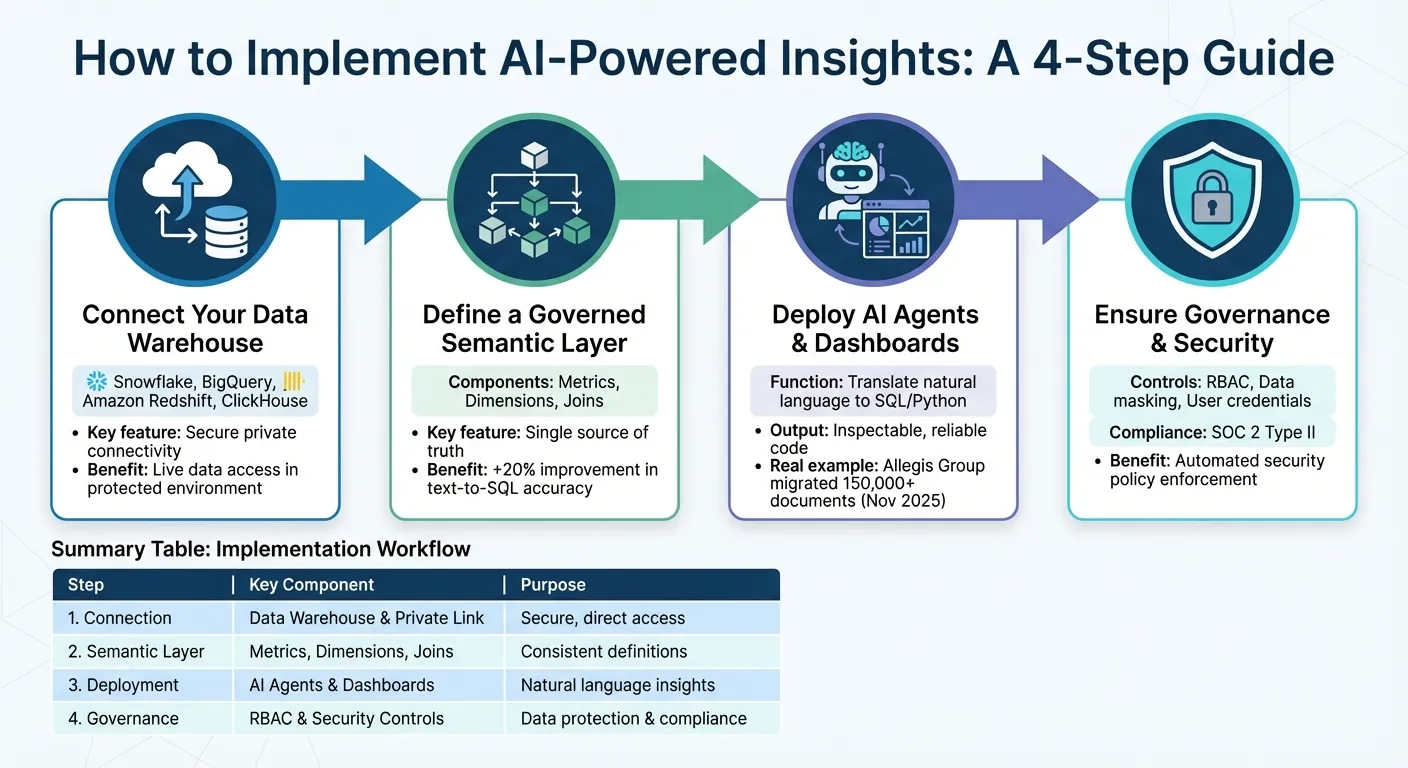 {4-Step Implementation Guide for AI-Powered Analytics in Business}
:::
{4-Step Implementation Guide for AI-Powered Analytics in Business}
:::
Bringing AI-powered insights into your business involves integrating your current data warehouse, business logic, and workflows into an AI-native platform. By following these steps, you can simplify analytics, enhance governance, and make your data work harder for you.
Step 1: Connect Your Data Warehouse
The first step is to securely connect your data warehouse to an AI-native platform like Querio. Whether your business relies on Snowflake, BigQuery, Amazon Redshift, or ClickHouse, ensure the connection is established through secure private connectivity. This keeps your data within a protected environment, away from the public internet, while allowing AI agents to access live data directly and securely [4].
Step 2: Define a Governed Semantic Layer
Once your data is connected, set up a semantic layer. This layer organizes your metrics, dimensions, and joins into a single, consistent framework. It acts as your "source of truth", ensuring that both AI agents and dashboards interpret data uniformly [5]. Adding synonyms and sample values - like clarifying that "revenue", "sales", and "income" all represent the same metric - helps the AI handle ambiguous queries more effectively. In fact, this step alone can boost text-to-SQL accuracy by over 20% compared to systems that lack schema understanding [8].
Step 3: Deploy AI Agents and Create Dashboards
With a solid semantic foundation, the next step is to deploy AI tools to generate actionable insights. Use AI agents to translate natural language queries into SQL or Python using text-to-SQL tools, leveraging the governed definitions for accuracy. These agents create inspectable, reliable code that teams can trust. You can also turn frequently used queries into dashboards for regular reporting, giving teams the ability to ask follow-up questions against live data. For example, in November 2025, Jack Vorsteg, Director of Enterprise Data & Integration at Allegis Group, used AI document processing to migrate over 150,000 documents, saving tens of thousands of hours of manual work [6].
Step 4: Ensure Governance and Security
Finally, reinforce governance and security measures. Apply role-based access controls (RBAC) to ensure AI-generated queries respect your existing data permissions. Implement data masking to safeguard sensitive information like personally identifiable information (PII) [3]. Configure AI agents to operate under individual user credentials, ensuring that security policies are followed automatically [4]. For added accountability, platforms with SOC 2 Type II compliance and tools like OpenTelemetry provide real-time auditing of AI decisions, combining security with transparency [8].
| Implementation Step | Key Component | Purpose |
|---|---|---|
| Step 1: Connection | Data Warehouse & Private Link | Secure, direct access to enterprise data [4] |
| Step 2: Semantic Layer | Metrics, Dimensions, Joins | Ensures consistent definitions across AI and BI [5] |
| Step 3: Deployment | AI Agents & Dashboards | Translates natural language into insights [8] |
| Step 4: Governance | RBAC & Security Controls | Protects sensitive data and ensures compliance [3] |
Conclusion
Key Takeaways for Data Leaders
AI analytics takes raw data and turns it into actionable insights. With agentic analytics, workflows - from data preparation to visualization - are automated [12]. This shift offers three main benefits: greater efficiency through automated processes, consistent metrics thanks to a unified data model, and less manual effort by enabling teams to ask questions in plain English rather than building reports from scratch.
The impact of being data-driven is clear: organizations are 23 times more likely to acquire customers and 19 times more likely to be profitable [11]. However, success in this area depends on trust. A staggering 92% of analytics and IT decision-makers agree that trustworthy data is more critical than ever for AI to succeed [11]. This makes governance, security, and transparency essential - not optional - for any AI analytics platform. These elements lay the groundwork for systems designed to meet the demands of modern businesses.
Why Querio is Built for Modern BI
AI-native platforms represent a major step forward in data management, and Querio is designed to tackle one of the biggest challenges data teams face today: scaling analytics access while maintaining accuracy and control. Unlike AI BI tools vs. traditional BI platforms that separate data preparation, querying, and visualization, Querio brings everything together in a single AI-native workspace. This includes natural language queries that generate executable SQL or Python and live connections to data warehouses, ensuring no outdated data slows teams down.
Brad Peters, CEO of Scoop, puts it best:
"Agentic Analytics uses the coding and programmatic capabilities of an AI model to guide a real BI infrastructure - so your outputs aren't just approximations, they're correct" [12].
FAQs
::: faq
How does AI help businesses make better decisions?
AI empowers businesses to make quicker, smarter decisions by processing massive amounts of data to identify patterns, trends, and anomalies that might escape human observation. This shift allows companies to rely on real-time insights grounded in data, rather than guesswork, resulting in more precise and timely decision-making. For instance, AI can predict market trends, streamline supply chains, and personalize customer interactions, boosting efficiency and driving growth.
Beyond decision-making, AI takes on repetitive tasks and offers predictive recommendations, giving teams more bandwidth to concentrate on strategic priorities. By reducing errors and accelerating response times, businesses can adapt more effectively to shifting markets, evolving customer needs, and operational challenges. This technology enables organizations to mitigate risks, capitalize on opportunities, and maintain a competitive edge in today’s fast-paced, data-centric world. :::
::: faq
How does Natural Language Processing (NLP) enhance data analysis for businesses?
Natural Language Processing (NLP) is changing the way businesses interact with data, making it easier and more intuitive to analyze. Instead of requiring technical skills like SQL, NLP lets users ask questions in plain English and get clear, actionable answers. This means that anyone - from executives to team leaders - can access and understand data without hurdles, leading to quicker and smarter decision-making.
What makes NLP even more powerful is its ability to handle unstructured data - think emails, social media posts, and customer feedback. These types of data are often tricky to process, but NLP tools can interpret human language to reveal hidden patterns, automate routine reports, and simplify decision-making processes. By doing so, NLP not only boosts the accuracy of business intelligence but also enhances efficiency, helping organizations tap into insights they might otherwise miss. :::
::: faq
How can businesses use AI to maintain consistent and reliable data?
To ensure AI delivers consistent and reliable results, businesses need to prioritize strong data governance and quality management. This means clearly defining who owns the data, standardizing its definitions, and implementing consistent processes for how data is entered and managed.
Another key step is building a unified data infrastructure. By using reliable tools and platforms, businesses can simplify how they collect, store, and process data. This ensures that AI models are always working with accurate and up-to-date information. Viewing data as a strategic resource and focusing on its quality helps reduce errors, reveal trends, and improve decision-making.
By combining solid governance, standardized workflows, and integrated systems, businesses can unlock the full potential of AI to generate actionable insights. :::