Business Intelligence
9 ThoughtSpot Alternatives Ranked by AI Capability
Compare nine ThoughtSpot alternatives by text-to-SQL, multi-turn reasoning, semantic governance, and live warehouse fit.
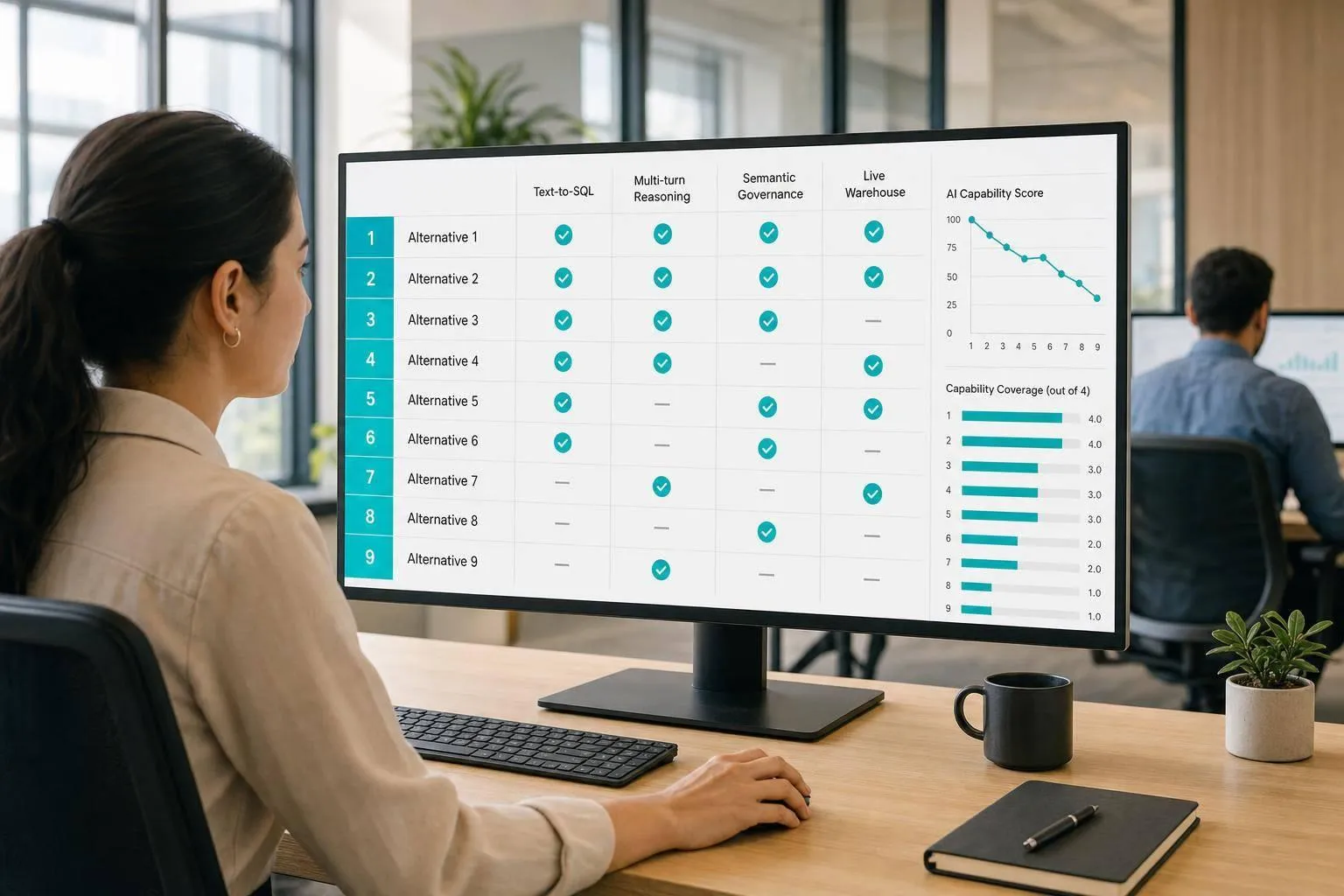
If I had to cut this list down fast, I’d start here: Power BI with Copilot for Microsoft teams, Looker with Gemini for BigQuery shops, Holistics or Lightdash for dbt-first teams, Hex or Sigma for analyst-led work, and Metabase for low-cost self-serve.
I’d judge these tools on 4 checks that matter most:
- Text-to-SQL quality: does the AI map plain English to the right query?
- Multi-turn reasoning: does it keep context across follow-up questions?
- Metric governance: does it use fixed KPI definitions instead of making them up each time?
- Live warehouse access: does it query Snowflake, BigQuery, Redshift, or Postgres where the data already lives?
The short version is simple: tools tied to a semantic layer tend to give safer answers, while notebook and workbook tools give analysts more room but need more review. In this list, 9 products split into 3 groups:
- Governed BI: Power BI, Tableau, Looker, Qlik
- Analyst-first warehouse work: Sigma, Hex
- Light self-serve or dbt-led analytics: Metabase, Holistics, Lightdash
If you want the fastest way to scan the field, this table does the job.
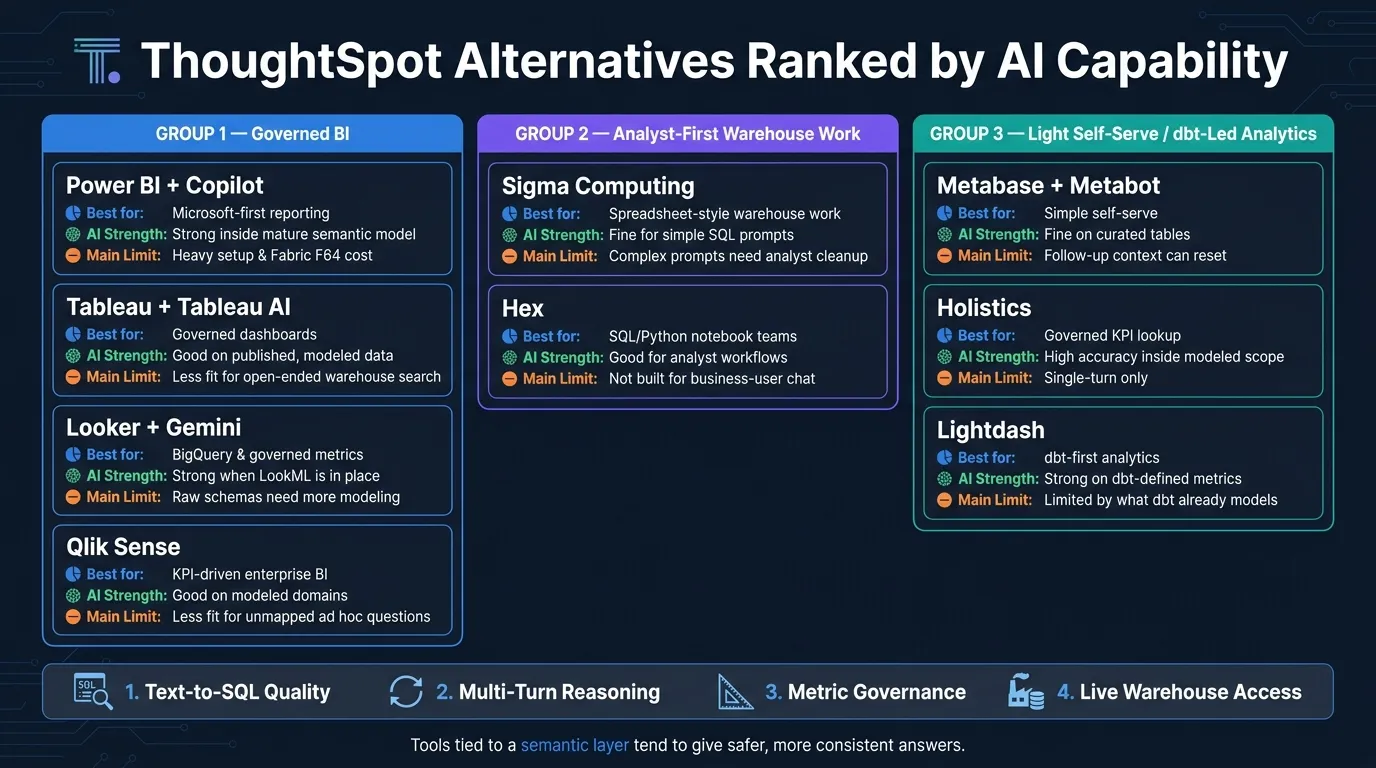
Quick Comparison
| Tool | Best for | AI strength | Main limit |
|---|---|---|---|
| Power BI + Copilot | Microsoft-first reporting | Strong inside a mature semantic model | Heavy setup and Fabric cost |
| Tableau + Tableau AI | Governed dashboards | Good on published, modeled data | Less fit for open-ended warehouse search |
| Looker + Gemini | BigQuery and governed metrics | Strong when LookML is in place | Raw schemas need more modeling |
| Qlik Sense | KPI-driven enterprise BI | Good on modeled domains | Less fit for unmapped ad hoc questions |
| Sigma | Spreadsheet-style warehouse work | Fine for simple SQL prompts | Complex prompts often need analyst cleanup |
| Hex | SQL/Python notebook teams | Good for analyst workflows | Not built for business-user chat |
| Metabase + Metabot | Simple self-serve | Fine on curated tables | Follow-up context can reset |
| Holistics | Governed KPI lookup | High accuracy inside modeled scope | Single-turn only |
| Lightdash | dbt-first analytics | Strong on dbt-defined metrics | Limited by what dbt already models |
The big takeaway: AI alone is not enough. I’d trust tools more when they combine live warehouse queries, inspectable SQL, and fixed metric definitions. That’s the lens this ranking uses from top to bottom.
1. Power BI with Copilot
Power BI with Copilot ranks near the top for Microsoft teams that already have a mature semantic model. But it’s a different story with raw warehouse schemas. This tool shines in governed enterprise reporting, not in ThoughtSpot-style free-form warehouse search.
That difference matters. Power BI’s edge comes from control at the semantic layer, not from raw text-to-SQL range. So Copilot can work well for governed reporting, but it’s less convincing for open-ended search across a live warehouse.
DAX Generation Quality
Copilot generates DAX and semantic-model queries, not raw SQL. That means output quality depends a lot on the semantic layer underneath it.
When the model is set up well, AI-assisted querying can be highly accurate. Point it at a raw Snowflake or BigQuery schema without a well-built model, and things tend to get less reliable.
Semantic-Layer Governance
Power BI’s semantic model applies row-level security through Azure Active Directory. In plain English, access rules and metric definitions stay in sync across reports and Copilot interactions.
That’s a big deal for teams that care about tight control. People aren’t just seeing data - they’re seeing it through the same rules each time.
Live Warehouse Fit
Power BI connects to Snowflake, BigQuery, and Redshift, but it performs best when data is pre-modeled inside Microsoft Fabric or Power BI instead of queried live across raw schemas [2].
There’s also a cost and setup angle. Full Copilot access requires Fabric F64 capacity plus Pro licenses, which adds friction for teams that don’t already live inside the Microsoft stack.
If your team wants more flexible self-serve exploration on top of a live warehouse, the next text-to-SQL query tools bring a different set of trade-offs into view.
2. Tableau with Tableau AI
Tableau with Tableau AI ranks high for governed enterprise BI, not for open-ended warehouse-native AI search. Its AI tends to work best when Metrics Layer definitions and Published Data Sources are already set up. That makes Tableau a strong fit for governed dashboards, but less useful for open-ended warehouse search.
Natural-Language Query Quality
Tableau Pulse maps natural-language questions to governed insights [2]. It also supports follow-up questions inside the same governed context through Tableau Agent, which is available in the Tableau+ bundle [1]. That said, unmapped questions or method-heavy requests still need an analyst to step in [3].
Semantic-Layer Governance
Tableau’s main AI edge isn’t model sophistication. It’s governed metric consistency. Its AI features are tied to the Metrics Layer and Published Data Sources, so KPIs can be defined once and then used the same way across queries [2][7]. Permissions and user filters also carry through that governed model, which helps keep access control in place.
Put simply: Tableau is strong on governed metrics and permission-based reporting, and weaker on open-ended warehouse Q&A.
Embedding and Integration
Tableau has a mature embedding setup through a Visual Embed SDK and REST APIs, which makes it easier to integrate analytics into custom applications [6]. The next tools matter more when the focus shifts away from governed BI and toward warehouse-native self-serve exploration.
3. Looker with Gemini
Looker with Gemini pairs LookML with generative AI so people can ask plain-English questions against warehouse data, with governance built in [1]. It tends to fit teams that already run on Google Cloud and BigQuery [1]. It shines when the semantic layer already spells out the business logic. It’s less dependable if people want to search raw, unmodeled warehouse data.
### Text-to-SQL Quality
Looker performs best on modeled data and is less dependable on raw or unmodeled sources [2]. If you want answers for funnels or retention, that logic needs to be set up in LookML first. Without that setup, Gemini is more likely to miss the mark [7].
Follow-up Reasoning
Looker supports multi-turn conversations, which means users can refine a question without starting over [1]. Each follow-up stays in the same LookML context, so the thread doesn’t lose track of the business logic behind the answer [1].
Semantic-Layer Governance
This is where Looker stands out. The LookML layer is version-controlled, which keeps metric definitions auditable and consistent across users and queries [1]. Warehouse permissions also carry through in a natural way, so answers stay limited to each user’s access level [1].
A simple rule here: get the LookML model into good shape before turning on Gemini. If the definitions are shaky, the output will be shaky too [1].
Live Warehouse Fit
Looker queries data in place and connects with BigQuery, Snowflake, Databricks, and Redshift [1][4][3].
That makes Looker a strong fit for teams that already have their metric layer nailed down. The next option leans more toward lighter modeling and more open-ended exploration.
4. Qlik Sense with Insight Advisor
Qlik Sense sits in the same governed BI lane as the tools above. Its AI works best when the data model is already set up. Insight Advisor adds natural-language questions on top of an existing semantic model, and the quality of the answers depends on how good that model is [2][1].
Text-to-SQL Quality
Insight Advisor does its best work with a curated semantic model. If your team already has set metrics and dashboards, Qlik can answer those metric-based questions fast. It performs well on governed metrics, but it’s not the right fit for raw warehouse questions that haven’t been mapped yet. Once the model is in place, Qlik handles conversational follow-ups better than plain ad hoc search.
Follow-up Reasoning
Qlik supports follow-up questions without dropping context. Permissions also carry through the session [1][2]. That said, accuracy tends to slip when the conversation moves outside the modeled domain [2].
Semantic-Layer Governance
Qlik defines KPIs once in the semantic layer and then applies them across queries. That means the same metric stays the same for every user [2]. Role-based security is enforced at query time, so people only see data they’re allowed to access [2].
The tradeoff is setup time. Building the semantic model takes real engineering work before non-technical users get much out of it [6].
Live Warehouse Fit
Qlik connects to Snowflake, BigQuery, Redshift, and Postgres, but it still works inside a pre-modeled BI setup [2]. It does not create new datasets from unmapped sources for ad hoc questions [2][5]. In plain English, that makes Qlik a strong choice for governed dashboards and a weaker one for the kind of open-ended, self-serve search you get with ThoughtSpot.
If your team needs more open-ended warehouse exploration, the next platforms trade some governance for more flexible AI workflows.
5. Sigma Computing
Sigma takes a different path. Instead of starting with governed dashboards and then layering on AI, it leans into workbook-first analysis. It runs straight on live data in Snowflake, BigQuery, Redshift, and Postgres, so teams can work with warehouse data in a spreadsheet-like interface without pulling it out of the source system.
Text-to-SQL Quality
Sigma can turn plain-English questions into SQL, but it's at its best when an analyst checks the output. It does a solid job with simple questions. Once prompts get more complex, though, an analyst will often need to clean up the query.
Follow-up Reasoning
Follow-up work in Sigma is driven by the workbook, not by a chat flow. You can do time comparisons and cohort-style analysis, but those setups need to be defined on purpose. Sigma won't infer them through back-and-forth prompts the way chat-based assistants do when they carry context from one turn to the next.
Semantic-Layer Governance
Sigma can work with dbt metrics or warehouse semantic models, but it doesn't control the semantic layer itself. That means metric consistency depends on how well the dbt models or warehouse models are maintained underneath. Row-level permissions also stay with the warehouse access controls, which keeps governance tied to the data platform.
Warehouse-Native Automation
Sigma's biggest edge is query pushdown to warehouse compute. It also supports input tables, which let users write data back to the warehouse from a workbook for light writeback workflows.
So in practice, Sigma fits best for analyst-led warehouse work, not chat-first analysis.
6. Hex
Hex ranks lower for self-serve AI because it supports analysts inside notebooks, not business users in chat. While Sigma stays workbook-first, Hex goes deeper into collaborative SQL and Python analysis. It’s built around collaborative SQL and Python notebooks, which makes it a good fit for analyst teams that turn analysis into interactive apps instead of dashboards [4].
Text-to-SQL Quality
Magic helps analysts write and complete SQL and Python faster. It works on live warehouse data. The catch is simple: Hex is built for technical users, not business stakeholders who want to ask ad hoc questions on their own.
Follow-up Reasoning
That coding-first setup changes how iteration happens. Follow-up work takes place in new cells, not in chat. An analyst can move fast by adding new SQL or Python blocks, but it still takes someone who can read SQL or Python.
Semantic-Layer Governance
Hex can use dbt models and metrics, but metric consistency still depends on dbt or warehouse definitions. Governance sits in dbt or the warehouse, not in Hex itself, so answer reliability depends on how well those upstream definitions are maintained.
Warehouse-Native Automation
Scheduled runs and shareable apps help teams distribute finished analysis, but the workflow still starts with an analyst. Hex is better at packaging work that’s already been done than letting non-technical users self-serve from scratch.
That makes Hex strong for inspectable analyst work, but weaker for direct business-user Q&A.
Hex is best for analyst-led notebook workflows, not self-serve search for business users.
7. Metabase with Metabot
Metabase with Metabot is a good fit for teams that want plain-English answers from already-modeled warehouse data. It does best when the groundwork is already in place. But once questions get more open-ended, or people want back-and-forth analysis with context that carries over, it starts to show its limits. The same goes for governed metrics. Compared with tools that hold context better and apply tighter semantic controls, it comes up short.
Metabase does well on simplicity. That’s a big plus. But it trails on follow-up reasoning and governed metric consistency, which are two of the main trust signals in this ranking.
Text-to-SQL Quality
Metabot works well on curated tables. If your data model is clean and mapped, the results can be solid. But when questions turn ad hoc or touch unmapped tables, SQL quality tends to drop. At that point, analyst review is often needed.
Follow-up Reasoning
Follow-up questions often reset context instead of continuing the same thread. That’s a problem in a chat-style UX, where people expect the tool to remember what they just asked and build on it. In notebook-based tools, this issue stands out less because each cell is already separate by design.
Semantic-Layer Governance
Metabase lacks the deeper semantic governance found in enterprise BI tools. So if you want stable KPI definitions and permission-aware answers, a lot depends on upstream modeling discipline. In plain terms: the tool can only be as reliable as the structure behind it.
Workflow Scope
Metabot fits simple self-serve questions. It is not a strong option for governed, multi-step analysis.
Metabase is strong for simple self-serve use, but it falls short when teams need governed metrics or multi-turn analysis. For teams that want more structure without leaving the warehouse, the next option moves a bit closer to governed analytics.
8. Holistics
Holistics ties AI questions to a governed semantic layer, so it leans on certified metrics instead of letting users roam through raw schema. Compared with more open-ended tools, it has tighter guardrails. That can feel rigid next to chat-first products, but there's a reason for it: metric answers stay consistent.
Text-to-SQL Quality
Holistics delivers very high SQL accuracy inside the scope of its modeled layer because it queries the governed semantic layer, not raw warehouse tables [8]. When a question lands outside that scope, Holistics is built to say it doesn't know instead of making a guess [8].
Follow-up Reasoning
Holistics doesn't support multi-step validation or back-and-forth refinement [8]. It's made for single-turn questions that map to existing metrics. In plain English, it's better for governed KPI lookups than conversational analysis.
Semantic-Layer Governance
Governance is where Holistics stands out most. Metrics like revenue or churn are calculated the same way across every query and every user [8]. That's a strong match for teams that already run on defined KPIs, such as revenue, churn, or pipeline stage.
Warehouse-Native Automation
Holistics is one of several warehouse-native data analysis tools that works with Snowflake, BigQuery, and PostgreSQL without moving data [8]. If your team already uses dbt-managed pipelines, it fits neatly on top of those dbt-managed models for governed analytics.
Holistics makes the most sense for governed warehouse analytics. The next option gives up some of that structure in exchange for a lighter exploration workflow.
9. Lightdash
Lightdash ranks lower for AI search because it works best inside existing dbt models, not in open-ended warehouse exploration. It’s less chat-first than some of the tools above. Instead, it leans on dbt definitions that are already in place.
That setup connects straight to the article’s main standard: if you want answers you can trust from live warehouse data, you need a solid semantic base. For Lightdash, that base is dbt.
### Text-to-SQL and Follow-up Reasoning
When a question lines up cleanly with modeled metrics and dimensions, Lightdash can answer with confidence. That’s because it uses existing dbt docs and model metadata instead of trying to guess logic from raw tables [9].
If the question goes beyond what’s already modeled, the dbt model needs more work before the answer can be trusted [1][9]. Same story with follow-up questions. If a follow-up relies on a metric, join, or dimension that dbt doesn’t already cover, the conversation hits a wall and an analyst has to step in [1].
Semantic-Layer Governance
Lightdash’s main edge is pretty simple: it reuses dbt-defined metrics and dimensions, which helps keep answers consistent across users and queries [1].
It’s strongest when dbt already covers the metrics and dimensions people need. So it makes the most sense for teams already running dbt-based analytics on Snowflake, BigQuery, Redshift, or Postgres and treating dbt as the source of truth.
The next section separates where each alternative wins or falls short.
Where Each Alternative Wins or Falls Short
Across all nine tools, the best AI results come from a governed semantic layer, not just the model by itself. That’s why the ranking landed where it did.
The same four factors from the start shape the results here:
- text-to-SQL quality
- follow-up reasoning
- semantic-layer governance
- live warehouse execution
The first place this shows up is text-to-SQL accuracy.
Text-to-SQL Quality
Looker with Gemini and Holistics lead this category because both tie questions to predefined business logic before the AI writes SQL. In Looker, that logic lives in LookML. In Holistics, it lives in AQL. That setup cuts down on mistakes before query generation even starts.
Power BI Copilot also does well, especially in Microsoft-heavy setups. But there’s a catch: full AI capability depends on a fairly heavy Fabric capacity setup. Sigma and Metabase handle simpler questions well enough, but they get less steady as metric logic becomes more involved.
| Tool | Best use or limit |
|---|---|
| Power BI + Copilot | High accuracy inside Microsoft environments; requires Fabric setup |
| Tableau + Tableau AI | Best on pre-modeled data |
| Looker + Gemini | Excellent; LookML grounding reduces NLQ errors significantly [5] |
| Qlik Sense | Stronger on governed datasets |
| Sigma Computing | Best for straightforward, formula-driven questions |
| Hex | Strong for complex SQL workflows |
| Metabase | Solid for basic questions and charting |
| Holistics | High; definitions enforced before query generation |
| Lightdash | High; strongest inside modeled dbt definitions |
Accuracy matters. But context retention matters just as much.
Follow-up Reasoning
Follow-up reasoning matters when a user asks something that takes more than one step. One query is easy. A chain of related questions is where tools start to split apart.
Hex does the best job of holding context because its notebook-native workflow is built for back-and-forth analysis. Looker’s Gemini setup also stays steady across follow-ups because it remains inside LookML. Metabase and Sigma lose context the fastest, which makes them a better fit for one-off questions than longer reasoning chains.
Semantic-Layer Governance
Governance is what separates tools you can hand to a non-technical business user from tools that still need an analyst close by. If the model drifts from agreed metric definitions, things can go sideways fast.
Looker, Holistics, and Lightdash all enforce definitions at the model layer. So the same metric stays the same no matter who asks for it. Metabase leans more on folder-based context, which gives users less protection against inconsistent metric definitions. From there, the last screen is simple: does the tool run directly on live warehouse data?
Warehouse-Native Automation
| Tool | Warehouse-Native? | Best-Fit Use Case |
|---|---|---|
| Power BI + Copilot | Partial | Governed enterprise reporting |
| Tableau + Tableau AI | No | Governed enterprise reporting |
| Looker + Gemini | Yes (BigQuery-native) | Governed reporting and embedded analytics |
| Qlik Sense | Partial | Governed enterprise reporting |
| Sigma Computing | Partial | Self-serve business questions |
| Hex | Yes | Agent workflows |
| Metabase | Partial | Self-serve business questions |
| Holistics | Partial | Governed enterprise reporting |
| Lightdash | Yes (dbt/warehouse) | Governed enterprise reporting |
The next section turns these strengths and limits into a simple pros-and-cons summary.
Pros and Cons
This table cuts the noise and focuses on the tradeoffs that matter most: governed metrics, SQL you can inspect, live warehouse access, and how much human review each tool still needs. Use it to narrow your shortlist based on AI reliability, not just feature volume.
| Product | Pros | Cons | Best-Fit Use Case |
|---|---|---|---|
| Power BI + Copilot | Strong governed reporting inside Microsoft environments | Requires Fabric F64, so setup stays heavy and Microsoft-centric | Enterprises already committed to Microsoft Fabric |
| Tableau + Tableau AI | Consistent governed metrics through Published Data Sources | High cost and steep learning curve | Salesforce/Tableau shops with visual-heavy reporting needs |
| Looker + Gemini | LookML sharply reduces NLQ errors | Tightly aligned with Google Cloud; weaker in multi-cloud setups [1][5] | Google Cloud and BigQuery teams needing governed reporting |
| Qlik Sense | Stable KPI definitions across complex, multi-source environments | Dated UI; steep learning curve from proprietary scripting | Enterprises with messy, multi-source data environments |
| Hex | Best for analyst-built data apps, not business-user ad hoc Q&A | AI targets analysts; business users still need SQL or Python skills [4][3] | Analyst teams building notebook-driven data apps |
| Metabase + Metabot | Fast setup; solid for simple self-serve questions | Context resets on complex follow-up questions [9] | Teams using Metabase for lightweight self-serve |
| Sigma Computing | Spreadsheet-like interface on live warehouse data; supports writeback | Text-to-SQL quality drops on complex prompts; no native semantic layer | Analyst-led warehouse exploration |
| Holistics | Enforces metric definitions before query generation; high SQL accuracy [8] | Single-turn only; no multi-step conversational reasoning [8] | Governed KPI reporting on Snowflake, BigQuery, or Postgres |
| Lightdash | Reuses dbt-defined metrics for consistent, auditable answers [1][9] | Limited to what dbt already models; open-ended questions hit a wall [1][9] | dbt-first teams on Snowflake, BigQuery, Redshift, or Postgres |
A clear pattern shows up here: the strongest tools don't rely on AI alone. They pair AI with governed metric definitions and warehouse-native permissions. That combo tends to keep answers more stable, especially when people ask the same question in slightly different ways.
Warehouse-native systems also tend to handle permissions more cleanly because they inherit access rules straight from the data platform. That's a big deal. It means less duct tape, fewer surprises, and a lower chance that someone sees data they shouldn't.
Conclusion
After looking at AI quality, governance, and fit for live warehouse work, the shortlist is pretty clear. If you need governed enterprise BI, start with Power BI with Copilot or Looker with Gemini. If your team is dbt-first, go with Holistics or Lightdash. If analysts lead the work, Hex or Sigma make the most sense. And if you want simple self-serve without a lot of overhead, Metabase is the best fit.
For Microsoft-heavy teams, Power BI with Copilot is the best place to start. That said, Fabric F64 adds meaningful capacity cost. If your stack runs on Google Cloud or BigQuery, Looker with Gemini is a strong governed choice. Teams that just need simple self-serve usually get the most mileage from Metabase.
Across all of these tools, the setup matters more than the model itself. Governed semantics, live warehouse access, and inspectable SQL tend to lead to more reliable answers. If you're replacing ThoughtSpot, match the tool to your warehouse and governance model first. Test AI quality second.
Use the shortlist below when you need a fast starting point for vendor evaluation.
| If you are... | Start here |
|---|---|
| Microsoft-first | Power BI with Copilot |
| Google Cloud / BigQuery | Looker with Gemini |
| dbt-first governed metrics | Holistics or Lightdash |
| Notebook-driven analyst workflows | Hex |
| Spreadsheet-first warehouse analysis | Sigma Computing |
| Simple self-serve on a budget | Metabase |
FAQs
How should we test AI accuracy before switching from ThoughtSpot?
Run a proof of concept with your actual enterprise data, not polished vendor demos. Bring in real business questions too - from simple lookups to multi-step analysis - and score the answers by category.
Look closely at a few things:
- Semantic-layer consistency
- Inspectable output in SQL and Python
- Follow-up context
- Permissions and audit controls
- How the system deals with ambiguous questions
That last point matters more than people think. A tool can look sharp in a canned demo, then fall apart the moment someone asks a messy, half-formed question the way people do at work every day.
Which option is safest for governed metrics and permissions?
For governed metrics and permissions, the safest options are platforms with a centralized, code-based semantic layer and native warehouse security. Querio, Looker, and Cube stand out for consistency and access control.
Querio keeps metrics and context as files in a git repo the team owns (or reads metrics from dbt), so they're defined once. On Snowflake, BigQuery and Databricks, queries run as the user under the warehouse's own access rules. Looker uses LookML as a governed source of truth, and Cube lets agents query certified definitions instead of raw SQL.
Do we need a semantic layer before using AI BI tools?
It depends on how much metric consistency and data governance your team needs.
Tools like Querio, Basedash, and Hex can surface useful insights straight from a raw schema. That said, they often work better with light metric definitions added over time. Think of it like giving the tool a better map instead of asking it to guess every turn.
A semantic layer matters most when teams need to define terms like revenue the same way across departments. Without that shared definition, AI can misread business logic or misunderstand the schema structure.