Business Intelligence
The Ultimate Comparison: Cube vs Transform vs MetricFlow
Compare Cube, MetricFlow, and Transform to weigh OLAP pre-aggregation speed versus dbt-native metrics-as-code for performance, governance, and AI workflows.

Confused about which semantic layer tool is right for your data strategy? Here's a quick breakdown:
- Cube: Best for fast, high-concurrency analytics with sub-second query speeds (50–500ms) using pre-aggregations. Ideal for embedded dashboards and AI-driven workflows.
- MetricFlow: Perfect for teams using dbt, focusing on consistent metric definitions across tools via YAML-based semantic and metrics modeling. Performance depends on your data warehouse (e.g., Snowflake, BigQuery).
- Transform: Now integrated into dbt Labs, it extends MetricFlow's capabilities for centralized metric governance.
Quick Comparison:
| Feature | Cube | MetricFlow (dbt) | Transform (dbt) |
|---|---|---|---|
| Primary Use | OLAP Acceleration, APIs | Metrics-as-Code in dbt | Part of dbt Semantic Layer |
| Caching | Pre-aggregations (Cube Store) | Relies on warehouse caching | N/A |
| AI Integration | Agentic Analytics Platform | Semantic Layer for LLMs | N/A |
| Performance | 50–500ms latency | 2–12s (Snowflake), 30–60s (complex queries) | N/A |
| Warehouse Support | 25+ sources | Snowflake, BigQuery, etc. | Same as MetricFlow |
| License | Open Core/Proprietary Cloud | Apache 2.0 (Open Source) | Integrated into MetricFlow |
Key Takeaway:
- Choose Cube for speed and scalability in external apps or AI workflows.
- Opt for MetricFlow if you need centralized metric consistency within dbt.
- Use Transform through MetricFlow for compatibility with dbt's latest features.
Read on for deeper insights into architecture, performance, and use cases.
::: @figure 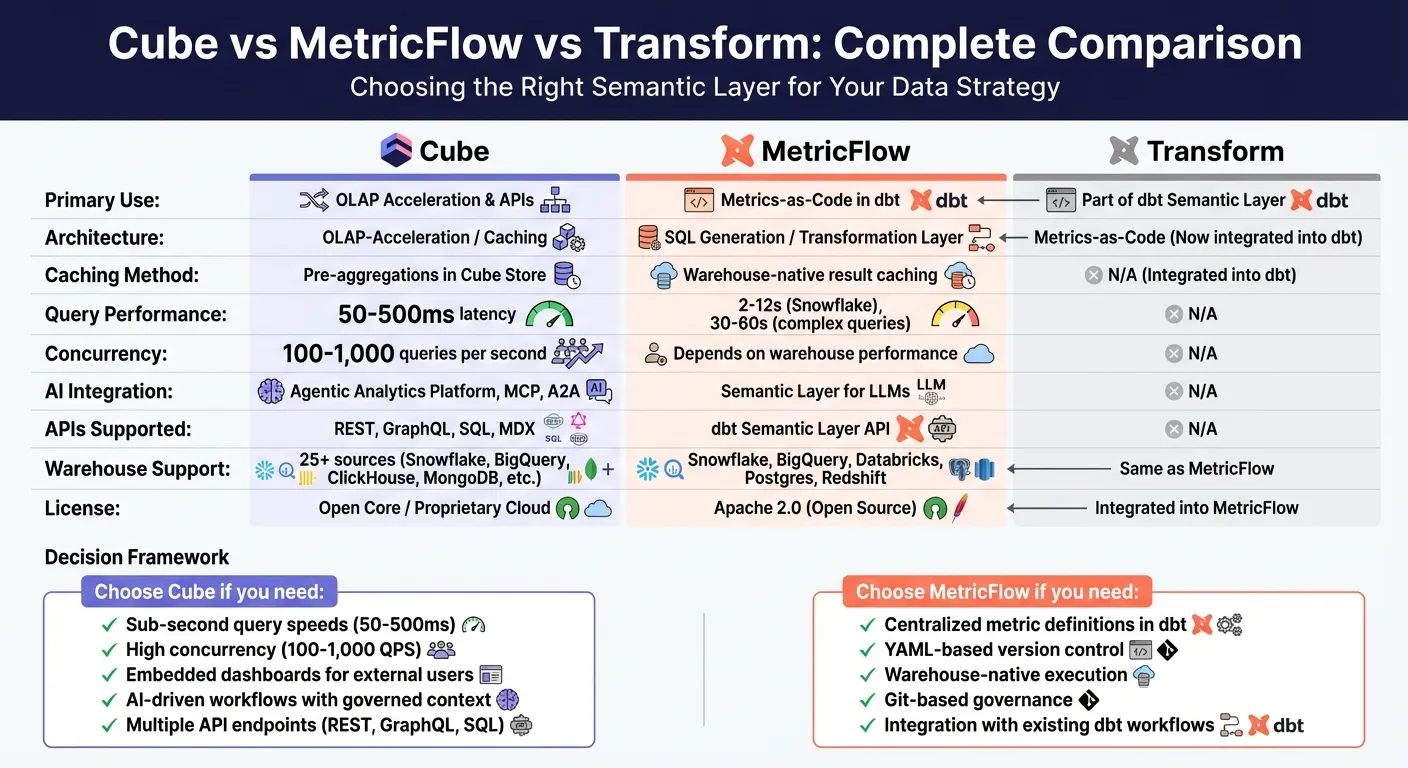 {Cube vs MetricFlow vs Transform: Feature and Performance Comparison Chart}
:::
{Cube vs MetricFlow vs Transform: Feature and Performance Comparison Chart}
:::
Architecture: Cube vs Transform vs MetricFlow

Cube: OLAP Acceleration and Pre-Aggregation
Cube acts as a middleware layer that bridges your data warehouse and analytics tools. It handles tasks like data modeling, access control, caching, and API delivery. A standout feature is Cube Store, which pre-aggregates data to deliver lightning-fast query responses - typically within 50 to 500 milliseconds. By storing pre-calculated summaries, such as monthly rollups derived from daily data, Cube significantly reduces the computational load on your data warehouse. This setup can handle between 100 and 1,000 queries per second.
Cube uses "aggregate awareness" to route queries to the most efficient pre-aggregated table. For example, Jobber, a home service software provider, used Cube to embed dashboards in your SaaS product without needing to build a full data pipeline. As Architect Jc Weinrich explained:
"Cube really stood out as a great fit for our use case. We were able to level‑up our data infrastructure without needing to build a full‑blown and expensive data pipeline."
Next, let’s explore how MetricFlow’s metrics-as-code approach takes a different path from Cube’s caching strategy.
Transform and MetricFlow: Metrics-as-Code and Governance
MetricFlow (formerly Transform) integrates with the dbt Semantic Layer and takes a distinct approach by acting as a SQL query generation engine within your dbt project. Instead of caching, MetricFlow defines a semantic graph in YAML. This graph maps relationships between entities, dimensions, and measures, managing complex joins and avoiding errors like fan-out joins. The result? Every team accesses a consistent, version-controlled source of truth.
When you update a metric definition in YAML, the change automatically applies across all connected BI tools. MetricFlow requires dbt version 1.6 or higher and runs queries directly in your data warehouse, such as Snowflake, BigQuery, or Databricks. Unlike Cube, MetricFlow doesn't rely on its own caching layer, instead leveraging the native performance of your cloud infrastructure.
How the Architectures Differ
The main distinction lies in where computations take place. Cube processes queries within its caching layer, making it a strong choice for high-concurrency embedded analytics where hundreds of users need near-instant responses. In contrast, MetricFlow generates SQL queries that execute directly in your data warehouse, meaning performance depends on the speed and cost-efficiency of your cloud infrastructure.
Cube supports integration through REST, GraphQL, and Postgres-compatible SQL APIs, offering broad flexibility. MetricFlow, on the other hand, is deeply embedded in the dbt ecosystem and adheres to the Open Semantic Interchange (OSI) standard. For AI-driven workflows, Cube provides a "Meta API" that allows AI agents to autonomously discover metrics. MetricFlow, meanwhile, uses its structured YAML framework to help downstream tools understand data relationships without requiring manual SQL.
These differences also impact cost and performance. One Cube customer reported cutting their warehouse costs in half by shifting rollup management to Cube Store. MetricFlow users benefit from governance features like Git-based version control and peer-reviewed metric definitions.
These architectural contrasts will become even more relevant as we dive into feature performance in the next section.
sbb-itb-284a532
Feature and Performance Comparison
Feature Comparison Table
Cube and MetricFlow approach analytics differently, catering to varied use cases. Cube leverages OLAP acceleration with caching, offering APIs like REST, GraphQL, and a Postgres-compatible SQL API. This flexibility makes it well-suited for building a modern data layer for custom AI applications and front-end development. MetricFlow, on the other hand, relies on SQL generation through dbt and integrates with the dbt Semantic Layer API, requiring dbt version 1.6 or higher.
In terms of why AI is the missing layer in your modern data stack, Cube stands out with its "Agentic Analytics Platform", providing native tools for natural language queries and Model Context Protocol (MCP) integration. MetricFlow focuses on semantic modeling using YAML definitions, leaving execution to the connected data warehouse. Both platforms support major cloud data warehouses like Snowflake, BigQuery, Databricks, and Redshift, but Cube goes further, supporting over 25 data sources, including streaming engines and NoSQL databases. If BigQuery is your warehouse, see our guide to the BigQuery MCP server for Claude and Cursor.
| Feature | Cube | MetricFlow (dbt) | Transform |
|---|---|---|---|
| Primary Architecture | OLAP-Acceleration / Caching | Transformation-Layer / SQL Generation | Metrics-as-Code (Now part of dbt) |
| Caching Method | Pre-aggregations in Cube Store | Warehouse-native result caching | N/A (Integrated into dbt) |
| AI Integration | Native "Agentic Analytics", MCP, A2A | Semantic Layer for LLM context | N/A |
| APIs | REST, GraphQL, SQL, MDX | dbt Semantic Layer API | N/A |
| Metric Types | Measures (Sum, Count, etc.) | Simple, Ratio, Cumulative, Derived, Conversion | N/A |
| Warehouse Support | 25+ sources (Snowflake, BigQuery, ClickHouse, MongoDB, etc.) | Snowflake, BigQuery, Databricks, Postgres, Redshift | N/A |
| License | Open Core / Proprietary Cloud | Apache 2.0 (Open Source) | N/A |
Next, let’s dive into performance benchmarks to see how these features translate into real-world usage.
Performance Benchmarks
The design differences between Cube and MetricFlow significantly impact their performance. Cube’s pre-aggregation layer enables ultra-fast query latencies, ranging from 50 to 500 milliseconds, while handling high concurrency - up to 1,000 queries per second. MetricFlow’s performance, however, relies heavily on the underlying data warehouse. For example, simple metric queries in Snowflake typically take 2–3 seconds, but more complex queries with multi-hop joins can extend to 8–12 seconds. On Databricks, MetricFlow can process 10 million rows in 1–2 seconds, while scaling up to 10 billion rows takes 30–60 seconds with a Large warehouse and the Photon engine. Snowflake’s warm cache can deliver sub-second query results, though performance depends on warehouse size and query complexity.
| Platform | Dataset Size | Latency | Concurrency |
|---|---|---|---|
| Cube (with Cube Store) | Variable | 50 ms – 500 ms | 100–1,000 QPS |
| Snowflake (MetricFlow) | 500M Rows | 2 s – 12 s | Dependent on warehouse performance |
| Databricks (MetricFlow) | 10M Rows | 1 s – 2 s | Dependent on warehouse performance |
| Databricks (MetricFlow) | 10B Rows | 30 s – 60 s | Dependent on warehouse performance |
In 2025, Simon Data demonstrated Cube's capabilities by launching analytical products without requiring additional infrastructure. They focused on enhancing data and user interfaces while minimizing backend maintenance. Ultimately, choosing between Cube and MetricFlow depends on whether you value independent caching for speed and concurrency or prefer warehouse-native execution within the dbt ecosystem.
Use Cases and Recommendations
When to Choose Cube
Cube is an excellent option for delivering fast, embedded analytics in customer-facing dashboards, especially when speed is a priority. If your application provides data to external users through REST or GraphQL APIs or manages hundreds of simultaneous queries, Cube's pre-aggregation layer ensures top-tier performance. With sub-second latency ranging from 50 to 500 milliseconds and the ability to handle 100 to 1,000 queries per second, Cube is built for real-time applications.
A great example of this is how companies like Jobber and Simon Data enhanced their data systems using Cube's pre-aggregation and embedded analytics architecture.
Cube is also particularly effective for AI-driven workflows. Its "Agentic Analytics" platform offers governed context for LLMs and AI agents, boosting accuracy by 3–5× compared to querying raw schemas. If you're developing AI applications that need to interact with data without producing faulty SQL, Cube's semantic layer provides a solid, dependable foundation.
Next, let’s explore how MetricFlow caters to teams focused on centralized metric management.
When to Choose MetricFlow
MetricFlow is a strong fit for teams that already rely on dbt for data transformation and need a centralized approach to managing metrics. It ensures consistent metric definitions across data warehouses like Snowflake and BigQuery, saving analysts from spending excessive time reconciling metrics instead of focusing on analysis. On Snowflake, here's how MetricFlow and Snowflake semantic views fit together.
"The dbt Semantic Layer serves as the translation layer between your business and data teams and optimizes governance and productivity for both teams."
MetricFlow's semantic graph simplifies operations by automatically determining join paths between tables and maintaining uniform metric definitions across various departments, such as Finance, Marketing, and Sales, all within your existing dbt workflow.
Transform's Current Status
Building on MetricFlow's strengths, it's worth noting that Transform's technology now integrates smoothly into the dbt ecosystem. dbt Labs acquired Transform in 2023, and Transform's metric-layer functionality is now fully embedded within the dbt Semantic Layer powered by MetricFlow. If you're using the older dbt_metrics package, you'll need to migrate to the dbt Semantic Layer powered by MetricFlow to stay compatible with dbt versions 1.6 and beyond. This update streamlines your analytics stack into a unified ecosystem.
Cut Costs, Not Queries: The Case for a Universal Semantic Layer
::: @iframe https://www.youtube.com/embed/Ew5KDIVH94E :::
Conclusion: Choosing the Right Tool for Your Data Workflow
Let’s break down the key points that set these tools apart and help you decide which one fits your needs.
Key Takeaways
Cube stands out for its high-performance analytics, delivering sub-second latency (50–500ms) and handling 100 to 1,000 queries per second. Its OLAP-acceleration architecture, combined with a pre-aggregation layer, makes it a go-to for embedded dashboards and AI-powered workflows. If you need to serve data through REST, GraphQL, or SQL APIs, Cube is an excellent option. It also provides "Agentic Analytics" capabilities, ensuring your LLMs work with consistent, governed data.
MetricFlow, the backbone of the dbt Semantic Layer, emphasizes a metrics-as-code approach. It’s perfect for teams already using dbt Cloud and looking to centralize metric definitions across their data warehouse. Its performance relies on the compute power of your warehouse, and its semantic graph ensures consistent join paths and definitions across departments.
Transform now operates within the dbt Semantic Layer via MetricFlow. If you’re using the older dbt_metrics package, migrating to this updated setup is necessary for compatibility with dbt v1.6+.
Decision Framework
When choosing between these tools, think about your performance requirements, current infrastructure, and specific use cases when comparing BI tools:
-
Pick Cube if you need lightning-fast response times for external data products, high-concurrency AI agents, or multiple API endpoints. Its flexibility can lead to a lower total cost of ownership, making it ideal for advanced, scalable analytics.
-
Go with MetricFlow if your team is already invested in dbt Cloud and prioritizes internal metric consistency across BI tools. Its YAML-based version control and seamless integration with dbt workflows make it a natural fit. For organizations working within a single cloud warehouse system, like Snowflake or Databricks, MetricFlow’s warehouse-native semantic views simplify governance without requiring extra infrastructure.
Ultimately, the right choice depends on aligning your tool with your broader AI-driven analytics strategy. By doing so, you can streamline your workflows and maintain strong data governance.
FAQs
::: faq
How does Cube manage high-concurrency analytics compared to MetricFlow?
Cube tackles high-concurrency analytics by leveraging pre-aggregations and caching. By preparing results ahead of time, Cube eases the strain on the data warehouse and delivers quick response times, even when multiple users are querying the same metrics simultaneously. This method enables Cube to manage demanding workloads effectively while maintaining performance.
On the other hand, MetricFlow takes a different approach by calculating metrics on-the-fly. It translates metric definitions into SQL at the time of the query, providing flexibility and ensuring consistent metric logic. However, since it lacks built-in pre-aggregation or caching, its performance depends entirely on the underlying data warehouse.
In essence, Cube excels in handling heavy user traffic with its proactive caching system, while MetricFlow focuses on real-time metric calculations but doesn’t include specific features to optimize for high-concurrency scenarios. :::
::: faq
What are the main advantages of using MetricFlow with dbt to ensure consistent metrics?
Using MetricFlow alongside dbt’s Semantic Layer helps maintain consistent metrics across various analytics tools and workflows. By defining metrics just once in dbt (using YAML files), MetricFlow takes care of converting these definitions into optimized, easy-to-read SQL. This eliminates the hassle - and the risk - of manual calculations, ensuring that reports, dashboards, and AI tools all rely on the same governed metric definitions.
On top of that, MetricFlow streamlines query building and manages complex joins, saving data teams valuable time and effort. With metric logic centralized within the dbt project, organizations gain a single source of truth, enabling faster self-service analytics and dependable insights that support better decision-making. :::
::: faq
Why was Transform integrated into the dbt Semantic Layer?
Transform became part of the dbt Semantic Layer thanks to its powerful engine, MetricFlow, which brings advanced tools for defining and calculating metrics. This integration creates a smooth connection between raw data in warehouses and business-ready metrics, ensuring everything stays consistent and accurate.
When dbt Labs acquired Transform in 2023, they rebuilt the Semantic Layer around MetricFlow. This upgrade allows data teams to define metrics once within dbt models and automatically apply them across all downstream tools. The result? Less duplication of effort and more consistent metrics everywhere. Plus, by centralizing metric logic and governance, it makes AI-driven business intelligence workflows faster, safer, and more dependable. :::