Business Intelligence
Embedded AI Analytics for Agencies & SaaS: White-Label Guide
Embedded AI analytics only works when branding, tenant-safe permissions, a single semantic metric layer, and audit trails all align.

If I want white-label embedded AI analytics to work, I need more than a dashboard embed. I need live warehouse access, tenant-safe permissions, one shared metric layer, branded UX, and logs for every AI answer.
Here’s the article in plain English:
- White-label means clients see my brand, my domain, and my support path
- Multi-tenant safety means each client can only see their own data
- Governed metrics mean dashboards, chat, and reports all use the same definitions
- AI answers should run on real SQL, follow row-level and column-level rules, and stay reviewable
- SSO and JWT mapping should tie each user to the right tenant and role
- Deployment choice depends on buyer risk, especially in healthcare and finance
- Rollout time is often 30–90 days if warehouse access, KPI definitions, and security rules are ready
- Performance matters: if loads go past 3 seconds for 95% of requests, usage can fall
If I had to boil the full guide down to one point, it would be this: embedded AI analytics only works well when branding, permissions, metrics, and audit trails all line up. Without that, I don’t have a client-ready analytics product. I just have a widget.
| Area | What I need to get right |
|---|---|
| Data | Live access to Snowflake, BigQuery, Redshift, or Postgres |
| Security | Warehouse-level RLS, masking, short-lived access, no shared service account |
| Consistency | One semantic layer tied to dbt or the same business logic source |
| UX | Custom domain, theme, assistant name, branded emails and exports |
| Embedding | Iframe for dashboards; SDK/API for in-app AI flows |
| Compliance | SOC 2 Type II, BAA if PHI is involved, audit logs, data separation where needed |
| Launch | Approved KPIs, tenant tests, internal pilot, small customer rollout |
That’s the standard I’d use before putting AI analytics in front of clients.
Embedded Analytics: White Label Solutions for ISVs, Solution Providers, and Enterprises
::: @iframe https://www.youtube.com/embed/zjFooOFnDFI :::
Core Architecture for Multi-Tenant Embedded AI Analytics
Once white-label covers branding and access control, the next job is keeping each client boxed into its own data while still serving live results. That multi-tenant embedded analytics architecture comes down to four parts: live warehouse access, tenant isolation, a governed semantic layer, and explainable outputs. Start with tenant boundaries first, because every other layer depends on them.
Tenant Isolation on Snowflake, BigQuery, Redshift, and Postgres
Set tenant boundaries at the warehouse level with row filters and a tenant key on every embed request or AI query. Connect straight to Snowflake, BigQuery, Redshift, or Postgres with read-only access, and skip exports. In healthcare and finance, teams often need stronger isolation patterns so those boundaries are easy to show during review. The goal is simple: each client sees only its own rows, whether the request comes from a dashboard, a chat assistant, or a notebook.
Isolation stops cross-client exposure. The semantic layer stops cross-team metric drift.
Semantic and Context Layers That Keep Metrics Consistent
Keep metric definitions in one governed semantic layer so dashboards, chat, and reports all use the same numbers. Match that layer to dbt instead of redefining metrics in different places. Querio stores that context as plain SQL, Markdown, and Python files synced to GitHub in the same repo as your dbt project. Users can review and commit changes in GitHub. That keeps business logic with your team instead of burying it inside the UI.
When the same logic powers every surface, clients get the same answer whether they use a dashboard, assistant, or notebook.
Dashboards, Chat Analysis, and Reactive Notebooks
A white-label analytics product needs three connected surfaces:
- Embedded dashboards for recurring reporting
- A branded analytics assistant for natural-language questions
- Reactive notebooks for deeper investigation
Across all three, one rule matters most: answers should be inspectable, editable, and reusable, not hidden inside a black box.
In Querio, answers from the app, Slack, Microsoft Teams, or an embedded assistant run as real SQL and Python inside a reactive notebook. Charts update automatically when the underlying SQL changes, and connected cells mean you don’t have to rerun everything from scratch. That makes outputs easier to trust, review, and pass into the next step of the workflow.
Permissions, Governance, and Trust for Client-Facing AI
Architecture only matters if every dashboard, chat reply, and notebook follows the same access rules. Once tenant boundaries and metric definitions are set, the next job is simple to describe and hard to fake: every AI response must honor them too.
Identity, SSO, and User-to-Tenant Mapping
It starts with identity. The analytics layer should rely on the host app’s identity system. When someone opens a dashboard, asks the AI assistant a question, or runs a notebook, the system should validate the host app session token or JWT, map that person to their tenant and role, and issue a short-lived warehouse identity with the least access needed.
That closes the door on role drift, where product permissions and analytics permissions slowly stop matching.
Use SAML for enterprise SSO, OIDC for modern web auth, and OAuth 2.0 for delegated API access. In Querio, MCP uses OAuth so every agent query inherits the requesting user’s data permissions automatically, with no shared service account sitting in the middle.
Agencies and SaaS teams usually need different role setups. Agencies often need account, client, and internal roles. SaaS products often need end user, tenant admin, and global admin roles. A strong pattern here is a central entitlements table - user_id, tenant_id, role, `scopes`` - that both the host app and analytics layer use to decide what a user can query.
Row-Level and Column-Level Security That Also Applies to AI
If AI sends queries through an elevated service account, row-level security is out the window. That’s the whole problem.
The fix is warehouse-native enforcement. Snowflake’s row access policies and masking policies, BigQuery’s row-level security and policy tags, and Postgres/Redshift’s native RLS all apply controls at the query layer no matter which tool is asking. The AI should run queries under the end user’s effective warehouse role.
That way, dashboards, exports, scheduled reports, and chat answers all work from the same governed semantic views, never straight from raw tables.
This matters most in cases like these:
- Healthcare: Mask PHI and limit AI to aggregated, non-PHI views.
- SaaS pricing: Mask deal-level fields and expose only summary pricing views.
- Finance: Limit client portals to top-line metrics and keep cross-client detail internal.
Audit Trails, Trust Levels, and Honest Answers
If users can inspect answers, admins need to trace them. For every AI answer, log the question, SQL, warehouse role, and rows returned. Snowflake’s QUERY_HISTORY, BigQuery’s audit logs, and similar warehouse-level tools keep the low-level record, while the analytics layer adds notebook lineage on top.
In Querio, conversations are private by default and shared only when explicitly published. Answers from the app, Slack, or an embedded assistant run as real SQL and Python in a reactive notebook. That means admins can open any AI-generated chart and see the exact query behind it.
Assets should also carry clear trust labels: trusted, experimental, or team-specific. Only certified assets belong in client-facing embeds. Experimental assets should stay hidden or be clearly marked.
And when the AI can’t give a sound answer because data is stale, a query fails, or the question would require disallowed data, it should say that plainly instead of inventing something that looks right. Refusal isn’t a bad outcome here. It’s part of the trust model. Customer onboarding should make that expectation clear, and only certified, traceable outputs should make it into client portals.
Branding, Embedding, and Deployment Options
With tenant safety and metric governance in place, the next question is simple: does the product feel like yours? Once governance is set, branding shapes whether the embedded analytics architecture feels native to clients.
How Deep White-Labeling Needs to Go
White-labeling goes far past swapping in a logo. The domain, navigation, theme, exports, assistant identity, and support flow all need to line up with your product.
URL and domain are the starting point. A portal at analytics.youragency.com feels like part of your product. A vendor subdomain usually feels bolted on.
Navigation and feature naming should use the same language you already use elsewhere in the product. "Insights" or "Performance" will feel more natural to clients than "BI" or "Reports." The UI theme should also match your design system, including colors, typography, chart palettes, and button styles. Most platforms make this possible with CSS overrides or design tokens.
A lot of teams get tripped up on exports and alert emails. That's where white-labeling often slips. PDFs, scheduled report emails, and anomaly alerts should all use your logo, your sender domain, and your legal disclaimers. For U.S. users, formatting should stay consistent too:
- Dates in MM/DD/YYYY
- Time in a 12-hour clock with time zone
- Currency in USD with the $ symbol
- Commas for thousand separators
The AI assistant's identity matters more now than it used to. The name, avatar, greeting, and error messages should all sound and look like they belong in your product. That also includes response templates and the way the assistant handles uncertainty, not just the label on the chat box.
Help links, escalation paths, and help-center routing should point to your support team, not the analytics vendor's.
For agencies running a shared portal, a two-tier branding model usually works best: a steady parent-agency layer for the domain, global nav, main theme, and support links, plus per-client overrides for the client logo, accent color, and client name in emails and exports. Those client-specific settings can load from tenant configuration at runtime.
Once the surface looks right, the next call is how to embed it.
Iframes vs. API/SDK Embedding
Branding and delivery are two different choices. You can make both feel polished, but iframes and API/SDK embedding come with very different tradeoffs.
| Aspect | Iframe Embedding | API/SDK Embedding |
|---|---|---|
| Time-to-market | Fastest; often live in days with minimal code | Slower upfront; still fits a 30–90 day rollout plan |
| UX control | Limited; theme and layout configurable, but deep interactions are constrained | High; full control over layout, state, and interactions |
| Maintenance load | Lower for features; harder for cross-frame events and CSS edge cases | Higher for versioning; more predictable within your own codebase |
| Security | Relies on embed tokens, origin restrictions, and iframe sandboxing | Aligns with your existing auth and RBAC patterns; more responsibility on your team |
| Fit for dashboards | Strong for traditional dashboards and static reports | Ideal when dashboards are a core product feature |
| Fit for AI assistants | Acceptable for simple standalone chat widgets | Strongly preferred; context-aware reasoning needs tight UX integration |
The practical rule is straightforward: use iframes for dashboards. Use API/SDK embedding for AI assistants that need shared state, in-app context, and workflow actions.
There is one tradeoff that's easy to miss. SDK-based embedding can add 200–500 KB to initial page weight versus a simple iframe, so page performance needs to stay on the radar [2].
A common path is to launch dashboard embeds with iframes for speed, then move the AI assistant to SDK embedding after the team has proof that clients will use it.
That embedding choice also needs to fit the deployment model, especially when you're selling into regulated industries.
Cloud SaaS, Single-Tenant, and Self-Hosted Deployment
This is where product preference starts taking a back seat to risk and compliance. For agencies and SaaS teams selling analytics under their own brand, the deployment model is often shaped by what customers will approve.
Multi-tenant SaaS fits most B2B SaaS teams. The vendor runs the infrastructure, updates ship automatically, and launch time is the fastest. Tenant separation comes from row-level security and tenant IDs, not from separate infrastructure.
Single-tenant or dedicated cloud deployment means a separate database and compute environment, or a dedicated cloud account. This setup is common in U.S. financial services and larger enterprise SaaS deals where buyers want physical separation. The vendor still runs the environment, but change controls are tighter and deployment timelines are longer.
Self-hosted deployment puts the analytics platform inside the customer's own VPC. This is often the right fit for healthcare groups handling PHI, financial institutions with data residency rules, or any company whose security team won't approve external data egress. It helps meet stricter residency and isolation needs, but the tradeoff is much more operational work.
For healthcare and finance buyers, the baseline checks stay the same no matter which model they choose. They usually want SOC 2 Type II certification, a signed BAA for any system touching PHI, encryption at rest with customer-managed keys when needed, and full audit logging for every query that touches sensitive data. Querio holds SOC 2 Type II, signs BAAs, and offers custom deployments, including self-hosting and physical data separation, for teams that need those controls.
Build vs. Buy, Implementation Checklist, and Conclusion
::: @figure 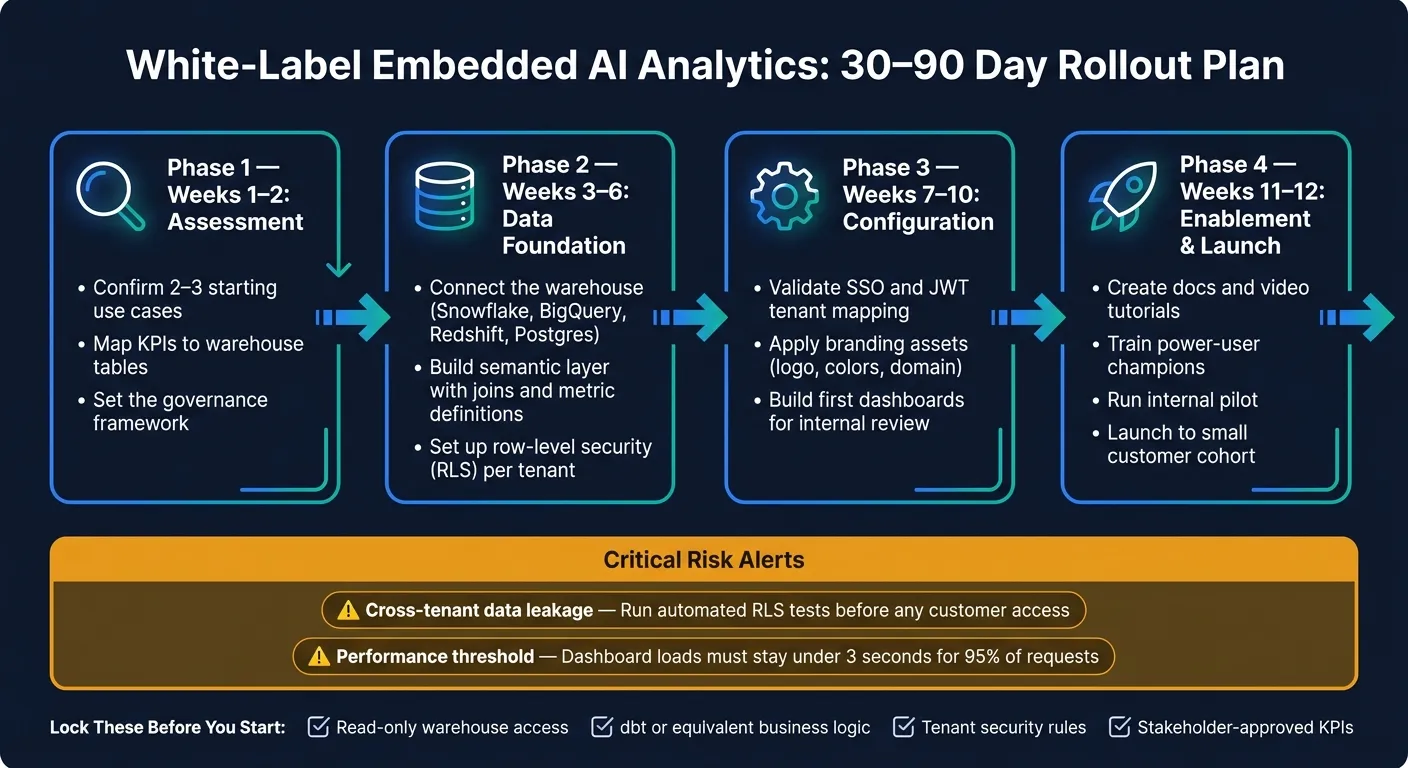 {White-Label Embedded AI Analytics: 30–90 Day Rollout Plan}
:::
{White-Label Embedded AI Analytics: 30–90 Day Rollout Plan}
:::
With governance, branding, and deployment options in place, the last call is simple: build, buy, or use a platform that already fits the workflow.
Build In-House vs. Generic Embedded BI vs. Querio
This decision comes down to control, speed, and operating cost. Building in-house gives you the most control, but it also means custom work for multi-tenancy, security, semantic consistency, and AI workflows. Generic embedded BI tools can work fine for internal teams. But once you push them into external client portals, licensing and setup often become a headache.
| Build In-House | Generic Embedded BI | Querio | |
|---|---|---|---|
| Build effort | Extremely high (months to years) | High (complex modeling required) | Low (30–90 day rollout) [1] |
| Metric consistency | Hard to maintain manually | Tool-specific (e.g., LookML) | Centralized semantic/context layer |
| Multi-tenancy | Custom code | Complex to configure | Native RLS and tenant isolation |
| AI readiness | Requires custom LLM development | Limited or add-on | Native chat-to-SQL and Python |
| White-label depth | Custom UI ownership | Limited theming and embed control | Brandable embeds with multiple integration paths |
| Auditability | Custom logging | Varies by tool | Traceable SQL and Python |
| Total cost | High (ongoing dev salaries) | High (per-user licensing) | Predictable usage-based or flat-rate |
That’s the real split in the table. It’s not about who has the longest feature list. It’s about how much day-to-day burden each route puts on your team. Querio makes the most sense when you need governed, live analytics on top of your current warehouse, with outputs that clients and reviewers can inspect and trust.
Implementation Requirements and a 30–90 Day Rollout Plan
Once you pick the delivery path, lock the launch inputs before implementation starts. There are four you need to settle early:
- Read-only warehouse access
- dbt or equivalent business logic
- Tenant security rules
- Stakeholder-approved KPIs for the first release
That last one matters more than people think. If first-release KPIs aren’t approved up front, pilot scope tends to drift fast.
A realistic rollout usually happens in four phases:
- Weeks 1–2: Assessment. Confirm 2–3 starting use cases, map KPIs to warehouse tables, and set the governance framework.
- Weeks 3–6: Data foundation. Connect the warehouse, build the semantic layer with joins and metric definitions, and set up row-level security for each tenant.
- Weeks 7–10: Configuration. Check SSO and JWT tenant mapping, apply branding assets, and build the first dashboards for dashboard access, AI questions, and KPI drill-downs for internal review.
- Weeks 11–12: Enablement and launch. Create docs and video tutorials, train power-user champions, run an internal pilot, and then launch to a small customer cohort.
Two risks deserve extra attention. Cross-tenant data leakage is the highest-stakes failure mode, so automated testing of RLS filters should run before any customer gets access. And if dashboard load times go above 3 seconds for 95% of requests, adoption can drop fast. [1]
Conclusion: The Practical Standard for White-Label AI Analytics
If the rollout stays disciplined, the payoff is clear: client-facing analytics can cut manual requests without weakening governance. Start with live warehouse data. Define metrics once in a semantic layer. Enforce tenant isolation at the data layer. Make AI outputs inspectable.
Then match deployment depth to the security and data-separation needs your buyer requires. Get those two calls right, and the rest becomes setup work: clients get self-serve answers they trust, and the data team spends a lot less time handling ad hoc requests by hand.
FAQs
::: faq
How do I test tenant isolation before launch?
Run proof-of-concept tests with real multi-tenant data. Every embed and API request should include a tenant or org ID. Then verify that row-level security (RLS) filters results the right way.
You also need to test short-lived, backend-generated JWTs that include the user ID and org or tenant ID. Those tokens should not allow access to another tenant’s dashboards, drill-downs, or direct links. If someone swaps a link, tweaks a request, or tries to jump across accounts, access should stop there.
Check both of these layers:
- RLS rules in your semantic layer
- Asset permissions for dashboards, charts, and linked views
After that, roll things out incrementally by tenant instead of turning it on for everyone at once. That makes it much easier to catch edge cases before they spread. If there’s a gap, you want to find it with one tenant, not your whole customer base. :::
::: faq
When should I choose iframe vs. SDK embedding?
Choose iframes when you want the fastest, simplest way to get dashboards on a page and you only need light customization. Choose SDK embedding when you want a more native, polished experience with tighter control over charts, components, and styling.
Iframes are the fast route. You can get something live with less setup. The tradeoff is that they can look a bit separate from the rest of your app, and they may bring responsiveness or scrolling headaches.
SDK embedding takes more dev work, but it gives you deeper control. It also helps you avoid the visual and layout limits that often come with iframes. :::
::: faq
What data should I log for every AI answer?
Log every action tied to each AI answer. That includes data access, query execution, and permission changes. Then send those records to tools like Splunk or Datadog.
Each query log should also include tenant-specific identifiers. That helps keep tenants separate and makes it much easier to trace what happened for a given customer.
It’s also smart to track gaps in your telemetry. If a metric is undefined, capture that too instead of letting it slip by quietly. And review audit logs on a regular basis to make sure you have end-to-end coverage, not just partial visibility.
This helps with security, compliance, and product improvement all at once. :::