Business Intelligence
How to Actually Query GA4 (Without Crying): SQL + AI Methods
Model sessions, flatten params, and map channels in GA4 export, then use AI to draft and debug reliable BigQuery SQL.

GA4 export is not a reporting table. It’s raw event data, and that’s why simple questions can turn into messy SQL.
If I want GA4 numbers I can trust, I need to do three things first: build sessions, flatten nested fields like event_params and items, and set one shared layer for conversions, landing pages, ecommerce, and channels. After that, AI can help me write and debug queries, but it should not make up the logic.
Here’s the article in plain English:
- Why GA4 is hard to query: one row = one event, nested fields need
UNNEST, and BigQuery timestamps are in UTC, not your GA4 property time zone. - What breaks reports: using
COUNT(*)for users, countingga_session_idby itself, and expanding all params without a filter. - What to model first: sessions, engaged sessions, landing pages, conversion steps, purchase data, and channel rules.
- How to write funnels: use one CTE per step, keep users who drop off with
LEFT JOIN, and enforce event order with timestamps. - How to handle channels: build your own mapping from source / medium / campaign in dbt or warehouse views.
- Where AI fits: drafting SQL, fixing
UNNESTissues, and translating between BigQuery and Snowflake. - Where AI fails: made-up columns, wrong KPI math, duplicate rows, and wrong SQL dialect.
- Best workflow: write shared logic once, store it in Git-backed models, then let AI work from those approved definitions.
A few facts matter right away: the article notes that AI can cut early query drafting time by up to 70%, but bad session logic or bad UNNEST logic can still wreck counts, revenue, and conversion rates. So the point is not faster guesses. It’s SQL you can inspect, reuse, and defend.
If I had to boil the whole piece down to one line, it’s this: treat GA4 like raw warehouse data first, and only then use AI to help with the typing.
::: @figure 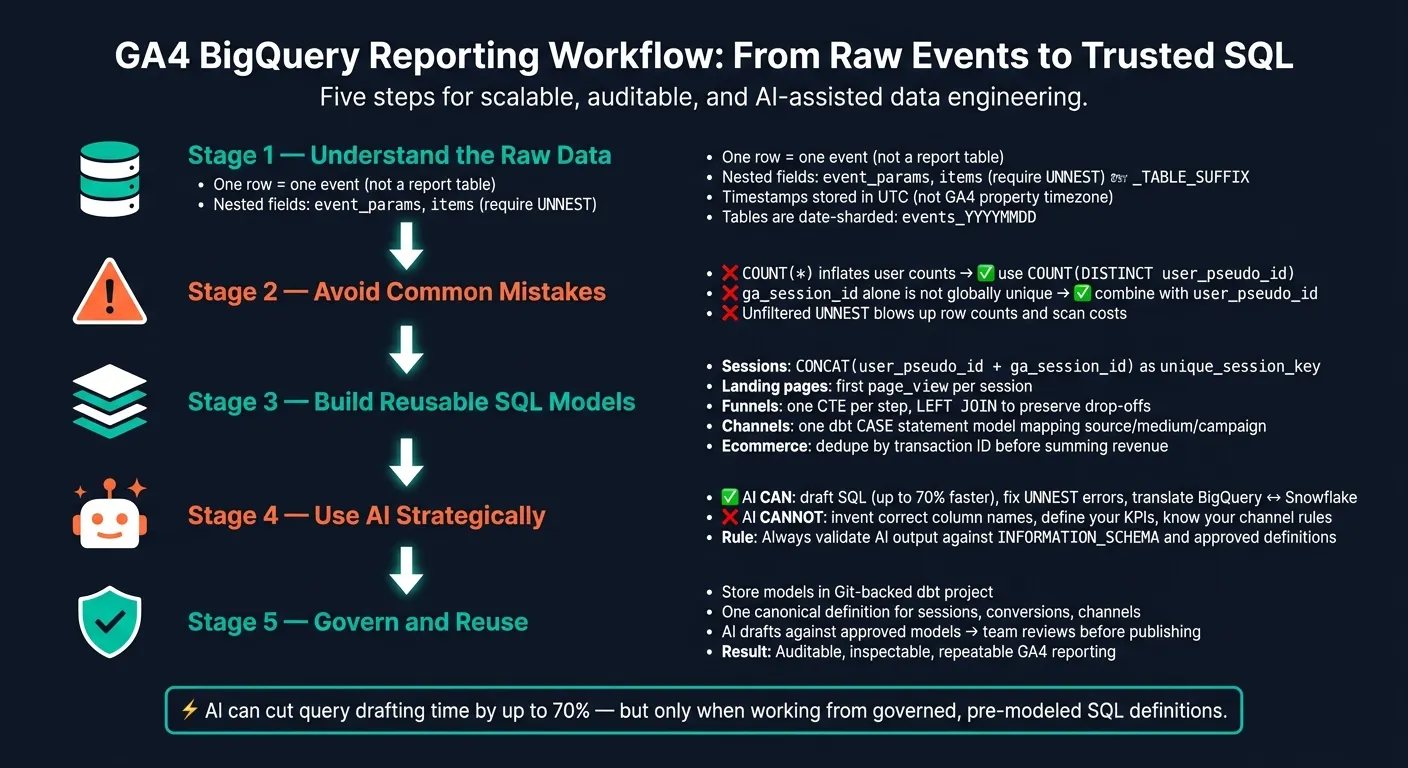 {GA4 BigQuery Reporting Workflow: From Raw Events to Trusted SQL}
:::
{GA4 BigQuery Reporting Workflow: From Raw Events to Trusted SQL}
:::
Simple SQL Code For GA4 Sessions Anyone Can Use!
::: @iframe https://www.youtube.com/embed/16ZYz6tmqfM :::
Why GA4 export is hard to query in BigQuery
GA4 is tough to query in BigQuery for three main reasons: it stores event rows instead of report tables, it uses nested parameters, and it handles timezones differently.
Put simply, the GA4 BigQuery export is raw event data. It is not ready-made reporting data. One row equals one event, which means metrics like sessions, landing pages, conversions, and channels don’t exist out of the box. You have to build them in SQL.
GA4's event model vs. what stakeholders ask for
When a stakeholder asks, "How many sessions did we have last week?", the export doesn’t hand you that answer. There’s no built-in sessions table in BigQuery. To answer that question, you need to rebuild sessions yourself with user_pseudo_id and the ga_session_id value inside event_params [1][3].
The same problem shows up with conversion rates, landing pages, and channel reporting. In the GA4 interface, that logic is already handled for you. In BigQuery, it isn’t.
The schema details that matter most
GA4 data arrives in BigQuery as date-sharded tables named events_YYYYMMDD. Use _TABLE_SUFFIX in your WHERE clause so BigQuery scans only the dates you need. If you skip that step, costs can climb fast.
event_params and items are repeated records. That means you can’t just select values like page_location or session_id as if they were flat columns. You need to UNNEST the array and filter by key. If you don’t, you’ll either miss data or blow up your row counts.
A few fields tend to trip people up right away:
| GA4 Schema Element | Technical Challenge | Business Impact of Error |
|---|---|---|
user_pseudo_id |
Anonymous vs. identified user stitching | Fragmented funnels and incorrect retention cohorts [1] |
ga_session_id |
Nested within event_params; not a globally unique ID |
Incorrect session counts if not combined with user_pseudo_id [3] |
event_timestamp |
Microsecond precision; stored in UTC [3] | Mismatches between BigQuery results and GA4 UI reports |
There’s also the timezone issue. GA4 UI uses the property’s local timezone, while BigQuery stores event_timestamp in UTC. So if you compare day-level totals without adjusting for that offset, the numbers can look off even when your query is working as written.
These fields shape whether your SQL produces session counts, funnels, and channel reports you can trust.
The most common query mistakes
Some mistakes look small but can throw off the numbers people use to make decisions.
One of the biggest is using COUNT(*) when you mean to count users. COUNT(*) counts event rows, not people. If one user triggers page_view five times, that’s five rows. COUNT(DISTINCT user_pseudo_id) counts that as one user. Mix those up, and audience totals get inflated while conversion rates look lower than they should [2].
Another common issue is session counting. ga_session_id is not globally unique, so you need to combine it with user_pseudo_id before counting sessions.
And then there’s UNNEST(event_params). If you run it without a filter, BigQuery expands each row by every parameter. That can inflate scan costs and muddy your results. A filtered UNNEST or a targeted subquery is usually the safer move.
Once you understand these limits, the next step is using SQL patterns that turn raw events into sessions, landing pages, conversions, ecommerce reporting, and channel reporting.
SQL patterns that make GA4 usable
These patterns turn GA4 events into reusable session, funnel, and channel models. This is the warehouse-native layer that makes GA4 reporting stable enough for dashboards and self-serve analysis.
Sessions, engagement, and landing pages
This is the first reusable model layer. Because ga_session_id alone isn't globally unique, pair it with user_pseudo_id to build a stable session key [2]:
SELECT
  user_pseudo_id,
  (SELECT value.int_value FROM UNNEST(event_params) WHERE key = 'ga_session_id') AS session_id,
  CONCAT(
    user_pseudo_id,
    '-',
    CAST((SELECT value.int_value FROM UNNEST(event_params) WHERE key = 'ga_session_id') AS STRING)
  ) AS unique_session_key,
  MIN(event_timestamp) AS session_start_ts
FROM `your_project.your_dataset.events_*`
WHERE _TABLE_SUFFIX BETWEEN '20260901' AND '20260913'
GROUP BY 1, 2, 3
From there, use the first page_view in each session to get the landing page URL and timestamp. Mark a session as engaged when any event in that session carries session_engaged = '1', or apply your own duration rule once in a modeled layer.
When session keys and landing pages are stable, funnel logic gets much simpler. It becomes a step-order problem instead of a guessing game.
Conversions, ecommerce, and funnel queries
Start by choosing the right funnel grain. Session-level funnels fit short web paths like landing page → sign-up. User-level funnels make more sense for longer journeys like trial start → paid conversion, since people often come back across multiple sessions [1].
A clean way to build funnels is simple: use one CTE per step, capture the first timestamp for each step, then join forward in order. Save that pattern as a dbt model or reusable CTE, not a one-off query [1]:
WITH step_1 AS (
  SELECT user_pseudo_id, MIN(event_timestamp) AS sign_up_ts
  FROM `your_project.your_dataset.events_*`
  WHERE _TABLE_SUFFIX BETWEEN '20260801' AND '20260913'
    AND event_name = 'sign_up'
  GROUP BY 1
),
step_2 AS (
  SELECT user_pseudo_id, MIN(event_timestamp) AS trial_start_ts
  FROM `your_project.your_dataset.events_*`
  WHERE _TABLE_SUFFIX BETWEEN '20260801' AND '20260913'
    AND event_name = 'trial_start'
  GROUP BY 1
),
step_3 AS (
  SELECT user_pseudo_id, MIN(event_timestamp) AS purchase_ts
  FROM `your_project.your_dataset.events_*`
  WHERE _TABLE_SUFFIX BETWEEN '20260801' AND '20260913'
    AND event_name = 'purchase'
  GROUP BY 1
)
SELECT
  COUNT(DISTINCT s1.user_pseudo_id) AS signed_up,
  COUNT(DISTINCT s2.user_pseudo_id) AS started_trial,
  COUNT(DISTINCT s3.user_pseudo_id) AS purchased
FROM step_1 s1
LEFT JOIN step_2 s2
  ON s1.user_pseudo_id = s2.user_pseudo_id
  AND s2.trial_start_ts >= s1.sign_up_ts
LEFT JOIN step_3 s3
  ON s2.user_pseudo_id = s3.user_pseudo_id
  AND s3.purchase_ts >= s2.trial_start_ts
A couple of details matter here:
- Use
LEFT JOINso users who didn't finish a step still stay in the count [2]. - Keep step filters in
ON, notWHERE, so non-converters don't get dropped from the result set [2]. - Set a fixed completion window so you don't credit a conversion that happened much later in the journey [1].
For ecommerce, aggregate on purchase events and dedupe by transaction ID before summing revenue or item counts [2].
Traffic source and channel reporting
Channel reporting needs modeled logic. The raw export does not include GA4's final channel labels. First, pick the right grain: use user-level logic for long consideration cycles and session-level logic for short web conversion paths [1].
| Dimension | GA4 UI Logic | Raw BigQuery Export | Custom Warehouse Logic |
|---|---|---|---|
| Channel grouping | Pre-defined, rigid categories | Requires manual CASE statements on UTMs |
Governed via a dbt model or semantic layer |
| Session definition | Automatic 30-minute timeout | Must be derived from ga_session_id + user_pseudo_id |
Customizable to match your business rules |
| Attribution | Primarily modeled attribution logic | User- and event-level source/medium available | Custom (first-touch, linear, etc.) via window functions |
Build one dbt model for channel mapping that applies your business's CASE statement logic. That model should map source, medium, and campaign combinations to channel labels and expose a clean channel column downstream [3].
Then every report that touches traffic attribution can pull from that one model instead of rebuilding the logic in every query. That's how you avoid channel definitions that drift across dashboards.
With these SQL models in place, AI can help generate and debug queries without deciding the business logic for you.
How AI helps with GA4 SQL while keeping logic visible
AI helps with GA4 SQL when it speeds up drafting, debugging, and explanation without changing the metric logic. That makes it useful for warehouse-native teams, as long as every query stays inspectable and tied to trusted definitions.
Good AI use cases: generate, debug, and explain
AI works well for repetitive SQL, dialect translation, and error diagnosis. For exploratory work, it can cut query drafting time by up to 70% [4].
Prompts like these tend to work best:
- "Write a BigQuery SQL query that counts sessions by landing page for the last 30 days using the GA4 export schema. Make the session grain explicit and avoid double-counting."
- "Explain why this
UNNESTcauses duplicate purchase events and how to fix it." - "Rewrite this BigQuery query for Snowflake's
FLATTENsyntax."
The pattern is pretty simple: the more specific the prompt, the better the SQL. If you include the actual table structure, the event names in use, and the grain you need, the output gets much closer to something you can use.
But speed only matters if the query still matches your warehouse schema and metric rules.
What AI gets wrong with GA4
GA4’s nested schema is where AI tends to stumble. It often invents columns, skips ga_session_id, or treats repeated fields like flat tables.
| GA4 Failure Mode | Technical Cause | Governed Fix |
|---|---|---|
| Invented schema | Model guesses column names | Validate against INFORMATION_SCHEMA before running |
| Metric drift | AI improvises KPI formulas | Inject dbt metric definitions into the prompt |
| Duplicate counts | Missing deduplication on repeated records | Explicit UNNEST with filters |
| Dialect drift | SQL written for wrong warehouse | Dialect-aware review; test with EXPLAIN dry runs |
| Wrong slicing | Using created_at instead of event_date |
Map intent to authoritative tables via semantic layer |
Generated SQL should always be checked against your team’s trusted definitions, not run straight against production data. AI doesn’t know that your business may define “conversion” in a way that differs from GA4’s default event label. It also won’t know that your channel mapping lives in a specific dbt model unless you tell it.
That’s why prompts alone fall short. The fix is governed context, not guesswork.
A governed workflow for warehouse-native self-serve
Trustworthy AI answers need live warehouse access, editable SQL or Python, and a governed context layer for metric definitions.
AI becomes much more useful after the team has already modeled sessions, funnels, and channels once. With that base in place, Querio connects directly to your live warehouse - BigQuery, Snowflake, Redshift, or ClickHouse - and every answer it returns is real, reviewable SQL or Python in a reactive notebook. If the logic is off, your team can edit it directly.
The context layer keeps GA4 definitions consistent. Joins, metric formulas, and channel logic live in approved SQL, Markdown, and Python files synced to GitHub, in the same repo as your dbt project. So when a stakeholder asks, “what were conversions by channel last month?”, the agent uses those approved definitions instead of guessing. Your team stays in control of what gets committed.
That workflow turns AI from a fast draft tool into a dependable part of GA4 reporting.
Next, that same governance needs to show up in a repeatable GA4 reporting workflow.
A GA4 reporting workflow data teams can actually repeat
What to model once and reuse everywhere
Once your session, funnel, and channel SQL patterns are set, the next issue is keeping them the same across the board.
Model sessions, canonical conversion events, landing pages, and channel groups once in dbt or warehouse views, then reuse those same definitions everywhere. Build them on top of your GA4 export in BigQuery and make them the approved source for dashboards and self-serve queries. If a stakeholder asks why conversion rate changed last Tuesday, the answer should point back to one auditable definition, not a pile of mismatched versions.
Querio's context layer keeps those definitions synced to GitHub and available in notebooks, Slack answers, and reports. The same definitions should also drive notebooks, alerts, and scheduled reports.
That’s the difference between AI answers you can inspect and ad hoc answers that change from one place to the next.
When to write SQL by hand vs. ask AI first
Use the same governed models either way. The main choice is how you draft the query based on who it’s for and how long it needs to live.
Write SQL by hand for dashboards, finance reports, and recurring metrics. Use AI first for exploration, debugging, and one-off questions.
| Criteria | Hand-Written SQL | AI-Assisted, Governed |
|---|---|---|
| Speed | Slower to draft | Faster first pass |
| Trust | High - logic is explicit | Depends on review rigor |
| Auditability | Easier to audit over time | Requires prompt discipline |
| Best for | Canonical metrics, finance-grade reporting | Exploration, debugging, documentation |
AI helps only when it runs against approved models and gets reviewed before anything gets published.
The path to trustworthy GA4 answers
The goal isn’t faster guesses. It’s faster answers that still line up with your approved definitions.
AI can speed up the work without replacing the logic underneath it. It drafts faster and can help fix errors sooner. But it can’t know your business’s definition of a conversion, your channel grouping rules, or which dbt model is the approved source of truth. Your team has to supply that context.
The pattern that holds up over time is simple: model the hard parts once, let AI draft and debug against those models, and keep the definitions in a governed layer your team can inspect.
FAQs
::: faq
Why doesn’t the GA4 BigQuery export match the GA4 UI?
Because the GA4 UI applies internal processing, like session stitching and attribution modeling, that the raw BigQuery export simply doesn’t include.
The UI gives you a cleaned-up, user-friendly view. BigQuery, on the other hand, gives you granular, nested event data that you need to transform by hand. That’s the trade-off.
Without a governed semantic layer for things like sessions, conversions, and channels, teams often end up writing brittle SQL. And even then, the numbers may still not line up with the UI. :::
::: faq
What should I model first before querying GA4?
Before you query GA4, map your business journey and define your metrics in a governed semantic layer so reporting stays consistent.
Start with one clear flow, like checkout or onboarding, and tie each stage to data in your warehouse. Then set the metric grain, entry rules, and completion windows before you analyze anything. That way, AI can produce SQL you can inspect and trust instead of making things up. :::
::: faq
How can I use AI for GA4 SQL without breaking metrics?
Ground the AI in a governed semantic layer instead of letting it hit raw GA4 event data on its own. AI-generated SQL is only as good as the rules behind it. If you want numbers people can trust, the model needs approved metric definitions, trusted join paths, and plain business rules to work from.
That setup helps protect your metrics in a few simple ways:
- Define metrics once
- Keep SQL inspectable
- Run schema checks and dry runs
- Validate against verified question-query pairs
For high-impact work, treat AI output as a draft. A person should still review it before anything goes live. :::