Healthcare Analytics
AI Analytics for Healthcare Teams: What a BAA Actually Covers
Map PHI touchpoints and verify your BAA explicitly covers prompts, logs, caches, subprocessors, and support access for AI analytics.

A signed BAA is not a blanket yes for AI analytics. If PHI touches a dashboard, prompt, cache, log, export, support session, or outside model service, that exact flow needs to be inside the contract.
Here’s the short version: a BAA covers only what it names. That usually means the vendor, listed services, listed subprocessors, PHI uses, breach notice terms, and data return or deletion rules. It does not automatically cover every AI feature, every beta tool, or every connected system in your stack.
If I were reviewing an AI BI tool for healthcare, I’d check these points first:
- PHI scope: patient-level data, free-text notes, claims fields, diagnosis codes, prompts, and outputs
- Systems in scope: warehouse, BI layer, semantic layer, AI assistant, logs, backups, caches, exports, support tools
- Outside parties: LLM hosts, observability tools, vector stores, ticketing systems, and other subprocessors
- Shared duties: vendor handles contract-listed safeguards; your team still handles IAM, RBAC, masking, reviews, and staff training
- Time limits: HIPAA breach notice can run up to 60 days, and many teams keep audit records for 6 years
A fast way to think about it: if PHI can be queried, stored, summarized, pasted, viewed, or exported, check whether the BAA names that step. If it doesn’t, treat it as a gap until proven otherwise.
| Area | What I’d verify fast | Common miss |
|---|---|---|
| AI prompts | Prompts and outputs are in scope | Prompt logs treated like generic product data |
| Query results | Cache and temp storage are covered | Only live warehouse access is named |
| Subprocessors | Every outside service is listed | LLM or logging vendor left out |
| Support access | Approval and logging rules exist | Broad engineer access |
| Deletion | Logs, backups, embeddings, chats removed | Only primary data store mentioned |
Bottom line: a BAA is a scope document, not a HIPAA shortcut. Before rollout or renewal, I’d map each PHI touchpoint and match it line by line to the contract.
Beyond the BAA: Privacy-Preserving Tech That Wins in Healthcare AI
::: @iframe https://www.youtube.com/embed/JgQfitK-T1o :::
What a BAA Actually Covers in AI Analytics
A BAA applies only when a vendor creates, receives, maintains, or transmits PHI for your organization, requiring HIPAA-ready data analysis tools that can scale with these requirements. And it applies only to the services and data flows named in the contract. In plain English: scope needs to be defined at the service level, not assumed across an entire platform.
The agreement also needs to spell out the basics in clear terms. That includes permitted uses of PHI, Security Rule safeguards, breach notification timelines, subcontractor flow-down terms, and how PHI will be returned or destroyed when the contract ends. That last part matters more than many teams think. PHI can linger in cached dashboards, stored prompts, and log archives long after a project looks "done."
Which Data Counts as PHI in Analytics Workflows
One of the most common blind spots is treating "operational" or "aggregate" data as if it falls outside PHI. Often, it doesn't. Under HIPAA, PHI is individually identifiable health information tied to a person's health status, care, or payment, and it includes one or more of the 18 defined identifiers.[4]
In a typical healthcare analytics stack, PHI shows up in places people use every day. It can sit in a clinic-schedule dashboard. It can appear in ICD-10 diagnosis fields joined to a patient dimension in Snowflake or BigQuery. It can also end up in free-text notes pasted straight into an AI prompt. That's where things get messy fast.
Fully identifiable data is PHI. De-identified data sits outside HIPAA. Limited data sets usually need a Data Use Agreement, not just a BAA.[3]
Which Systems and Features Must Be Explicitly Listed in Scope
A signed BAA does not mean every product, feature, or subprocessor a vendor runs is covered. Once you've nailed down the data definition, the next move is simple: map every system the vendor touches.
| System or Feature | Why Explicit BAA Coverage Matters |
|---|---|
| Data warehouse (Snowflake, BigQuery, Redshift, Postgres) | PHI in clinical and claims tables is in scope if the vendor connects to or manages these |
| BI dashboards (Looker, ThoughtSpot, Hex) | Vendor-hosted environments that render patient-level data must be named |
| Semantic layers and dbt models | Joins between PHI tables and patient dimensions expose PHI to any AI feature that queries them |
| Natural-language interfaces and AI assistants | SQL generators and chat-based query tools running against PHI sources require explicit coverage |
| Model inference services | External LLM hosts or subcontractors receiving PHI prompts must be bound by subcontractor flow-down terms |
| Support tooling and admin consoles | Vendor engineers who access customer environments to troubleshoot are handling PHI |
| Logs, backups, and caching layers | PHI can appear in query strings, error traces, cached results, and backup archives |
If Snowflake is named, but the vendor's AI logs are sent to a separate observability service, the BAA is incomplete. That system map becomes the working checklist for finding where PHI appears across the workflow.
Where PHI Shows Up in AI BI Workflows
PHI exposure usually starts in the query path, not only in the dashboard. Once the BAA names the systems in play, the next step is simple: figure out where PHI moves during day-to-day work.
Dashboards, Warehouse Queries, and Cached Results
A dashboard that lets users drill through to row-level patient data is handling PHI the second that drill-through runs. The same goes for ad hoc SQL against production claims or clinical tables. Analysts often query names, member IDs, diagnosis codes, and visit dates for one-off reviews, and those checks often happen outside tightly controlled reporting flows.
BI platforms also cache result sets outside the main warehouse for days or even months. That means cached PHI has to be named in scope. Scheduled reports create the same issue. If a nightly job stores output outside the warehouse boundary, it creates a new PHI copy even when nobody is looking at it.
Exports push the exposure even further. A CSV download of a patient list, a PDF report sent to a distribution group, or an embedded dashboard shown inside an intranet portal can each create a PHI copy that moves through systems the analytics vendor may not control or cover [4][6]. So it helps to map the full path:
- Views
- Queries
- Exports
- Embedded reports
Then check where each copy is stored and whether the BAA reaches all of them.
Prompts, Model Outputs, Logs, and Support Access
Natural language querying changes the pattern. A user might paste PHI into a prompt or ask the assistant to build a PHI-heavy query without noticing how much data the result reveals. In warehouse-native AI analytics tools that generate SQL against Snowflake, BigQuery, Redshift, or Postgres, the query string itself - and often the result too - can end up in query history logs. Vendors may keep those logs for autocomplete or performance tuning. If the logs also flow into a third-party observability stack, the BAA has to cover that destination as well.
Prompts are their own direct PHI entry point. Staff may paste patient notes, lab values, or care histories into AI chat tools to get summaries or explanations. Those prompts and conversations may be stored apart from query logs, including in vector databases or chat services, and they may feed tuning or evaluation unless they are excluded [5][8]. Application logs add another layer of risk. An API error can log the full request body, and performance traces can capture URLs with PHI sitting in query parameters.
Support access is another area teams often miss. When a vendor engineer gets temporary elevated access to reproduce a broken dashboard or troubleshoot an AI assistant issue, that person may end up viewing prompt histories, query logs, or live warehouse data that contains PHI [7][9]. A HIPAA-aligned BAA should spell out who on the vendor side is allowed to access that data, limit access to the minimum needed for the specific issue, and require documented customer approval before anyone touches production.
Be direct about the details. Spell out whether support staff can view prompts or query logs, what approval path they need to follow, and how that access is logged.
Those exposure points decide which jobs stay with the vendor and which stay with your team.
What the Vendor Owns vs. What Your Team Still Owns
Once PHI touches the platform, split the review in two: what the vendor secures and what your team configures. That line matters. A BAA divides responsibility, but it does not make every AI workflow compliant.
Vendor Responsibilities Under the BAA
The vendor needs to encrypt PHI in transit and at rest, keep platform audit logs, and detect, investigate, mitigate, and notify you of PHI incidents no later than 60 days after discovery.[2][10][11]
Subprocessors matter too. If the AI analytics platform sends queries through a model provider or a third-party logging service, those subprocessors need to carry the same protections downstream. And when the relationship ends, the vendor must return or destroy PHI, including cached results, logs, embeddings, and conversation histories.
That applies to the AI BI artifacts already in scope: logs, prompts, cached results, and support access. If any of those flows move outside the services and data flows named in the BAA, you have a gap.
Customer Responsibilities the BAA Does Not Remove
On your side, the BAA does not replace access design. Your team still owns IAM, RBAC, and row- or column-level security. In Snowflake, that includes masking policies and secure views. If broad analyst roles can view patient-level encounters, that's your misconfiguration. The BAA won't save you from bad access control.
Audit log retention sits with your team too, often for six years, along with deciding who reviews those logs and how they feed into your SIEM, whether that's Splunk, Elastic, Sentinel, or Datadog.[12] Workforce training and prompt hygiene are also fully on you.
Use those controls as a gut check. They show whether the platform stays inside BAA scope or drifts outside it.
Common Assumptions That Break Compliance Reviews
Named as HIPAA-eligible in the vendor's current service list does not mean every feature is covered. Major cloud and AI vendors name specific products, SKUs, and sometimes even single features as HIPAA-eligible. Preview features, beta AI connectors, and consumer-tier plans are often left out, even when the vendor offers a strong BAA for its core products.
A BAA shifts all liability. It doesn't. Your organization still owns how PHI is configured, accessed, and used on top of that platform. In cloud analytics, most HIPAA issues come from customer access design: broad roles, unmasked identifiers, or AI prompts with little guardrails. The problem is often the setup, not the vendor's infrastructure.
If the warehouse has a BAA, every connected tool is covered. That's not how it works. A Snowflake or BigQuery BAA covers those warehouses. It does not extend to a downstream AI BI tool or another connected analytics workflow. Every third-party tool that creates, receives, maintains, or transmits PHI needs its own BAA. This is especially critical when deploying secure conversational analytics for healthcare environments. And each BAA should explicitly name the features and data flows in scope.
A Practical BAA Review Checklist for AI BI Platforms
::: @figure 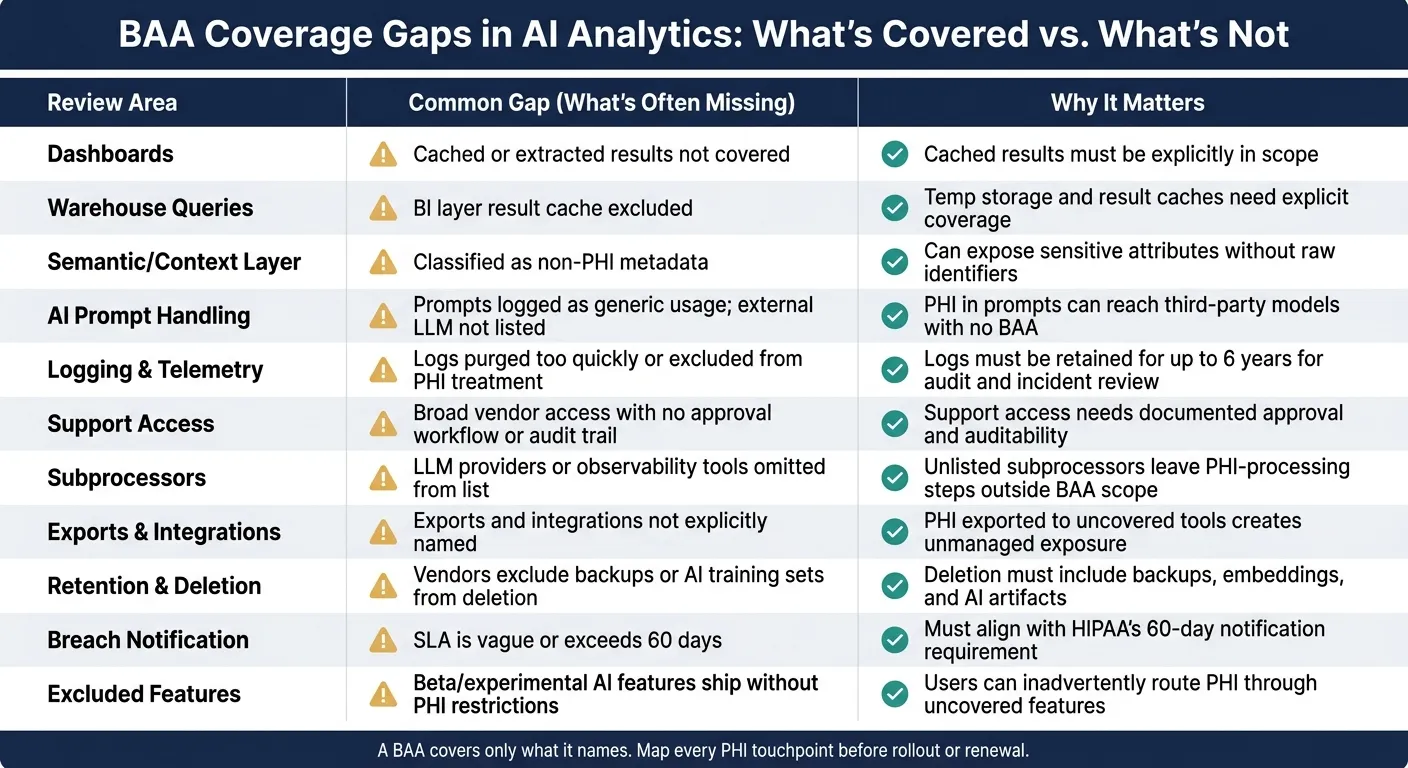 {BAA Coverage Gaps in AI Analytics: What's Covered vs. What's Not}
:::
{BAA Coverage Gaps in AI Analytics: What's Covered vs. What's Not}
:::
Use this checklist during procurement and renewal to make sure every PHI touchpoint is named in the BAA. The table below turns that scope review into a practical buying checklist. Start with the data path, then check each touchpoint against the contract.
Comparison Table: Questions to Ask Before Sending PHI to an AI Analytics Tool
| Review Area | What to Confirm in the BAA | Common Gap | Why It Matters |
|---|---|---|---|
| Dashboards | Are interactive dashboards, embedded reports, and precomputed or cached results explicitly covered? | Dashboards are covered, but cached or extracted results are not. | Cached or extracted results must also be in scope. |
| Warehouse Queries | Does the BAA cover live connections to clinical/claims warehouses (Snowflake, BigQuery, Redshift) and any temporary query-result storage? | The warehouse is in scope, but the BI layer's result cache is not. | Result caches and temp storage need explicit coverage. |
| Semantic/Context Layer | Is the governed metrics layer - including patient-level dimensions, diagnosis filters, and provider attributes - treated as PHI in scope? | Semantic layers are classified as non-PHI metadata. | Semantic layers can expose sensitive attributes even without raw identifiers. |
| AI Prompt Handling | Are prompts and outputs explicitly in scope? Is the external LLM provider a named subprocessor? | Prompts are handled under generic usage logs with no explicit PHI treatment; external models are not listed. | PHI in prompts can reach third-party model providers that have not signed a BAA. |
| Logging & Telemetry | What is logged for each AI action? Who can access logs? Are they retained for at least 6 years? [13][14] | Logs are purged too quickly, or telemetry is excluded from PHI treatment entirely. | Logs support audit and incident review. |
| Support Access | Under what conditions can vendor staff view your environment or query data? Is support access approved and logged? | Support has broad environment access with no documented approval workflow or audit trail. | Support access needs approval and auditability. |
| Subprocessors | Are all subprocessors - LLM providers, vector DBs, logging services, ticketing tools - listed and bound by equivalent HIPAA terms? | External model providers or observability tools are omitted from the subprocessor list. | An unlisted subprocessor leaves a PHI-processing step outside documented BAA scope. |
| Exports & Integrations | Are data exports, API outputs, and third-party integrations covered? | Exports and integrations are not explicitly named in scope. | PHI exported to an uncovered downstream tool creates an unmanaged exposure path. |
| Retention & Deletion | What are the retention periods and deletion procedures for production data, logs, backups, AI embeddings, and support artifacts? Does deletion include disaster-recovery copies? | Vendors promise data deletion but exclude backups or AI training sets. | Deletion must include backups and AI artifacts. |
| Breach Notification | What is the contractual notification SLA? Does it align with HIPAA's 60-day requirement? [1] | Contractual SLA is vague or longer than 60 days. | Notification timing must match your contract requirements. |
| Excluded Features | Which features are explicitly not covered by the BAA - public/beta AI labs, community content, open model endpoints, sample datasets, trial integrations? | Experimental AI features ship without clear PHI restrictions or UI-level warnings. | Users can inadvertently route PHI through uncovered features during normal workflows. |
Run this table as a structured questionnaire during RFPs. Then run it again at renewal to catch new AI features, model changes, or subprocessor additions that showed up after the original contract was signed.
How Querio Fits a Governed, Warehouse-Native Healthcare Analytics Stack
For a warehouse-native platform, these controls should show up in the product architecture, not just in the contract. That matters because the checklist above maps straight to how the platform handles warehouse access, metrics, logs, and support.
Live warehouse connections keep PHI in your governed environment - Snowflake, BigQuery, or Redshift - instead of copying it into a separate vendor store. That cuts down on extra PHI repositories and keeps BAA scope tied to the data controls your team already uses.
The governed semantic/context layer lets teams define standard metrics, patient cohorts, and dimension filters in one place. So AI features query through controlled definitions instead of going straight into raw clinical tables. In practice, that supports minimum-necessary access for both technical and non-technical users.
Inspectable and editable SQL/Python makes security review and incident analysis much more concrete. If an AI-generated query touches an encounters table with MRN and visit ID, your team can see exactly which columns and filters were used. That's directly useful during a breach investigation or compliance audit.
Reactive notebooks record prompts, code, outputs, and user actions in sequence, which creates a provenance chain tied to BAA duties for logging and monitoring. Governed self-serve access applies role-based permissions and data scopes, so non-technical users can get AI-driven insight without sidestepping PHI segmentation.
These controls make scope easier to verify. They do not replace the BAA.
Conclusion: Treat the BAA as a Scope Document, Not a Blanket Guarantee
A BAA defines which services, data flows, and vendor duties are covered - nothing more. PHI shows up in more places than many teams expect: dashboards, query caches, prompt logs, semantic layers, support sessions, subprocessor pipelines, and backup media. Shared responsibility still applies across all of them.
Before rolling out any AI analytics platform in a healthcare setting, walk through actual workflows: building a PHI dashboard, asking an AI assistant about readmission trends, exporting a patient cohort, or bringing in vendor support. Then verify that each touchpoint is explicitly named in the BAA. If it isn't named, don't assume it's covered.
Use the checklist during procurement and renewal, and revisit it whenever the platform's AI features change.
FAQs
::: faq
Do prompts and AI outputs count as PHI?
Yes. Prompts and AI outputs can count as PHI when they include identifiers or show details tied to a patient’s health status, care, or payment. Under HIPAA, any communication that contains PHI has to follow the same rules as the source data.
That matters for AI tools because they handle both the text you send in and the results they send back. So if an AI analytics tool touches PHI at either step, it belongs in your BAA scope. :::
::: faq
Does a warehouse BAA cover connected AI tools?
No. A warehouse BAA does not automatically cover connected AI tools.
Your warehouse BAA applies to data stored at rest. It does not extend to a third-party AI platform that processes that data. Healthcare teams should make sure the analytics vendor signs a separate BAA that spells out its HIPAA responsibilities for protecting PHI during analysis, dashboarding, and query execution. :::
::: faq
What should we verify before rollout or renewal?
Before rollout or renewal, run a risk assessment to find every place PHI lives and map how that data moves through your systems.
Also verify:
- Permissions remove broad roles, stale accounts, and inherited access that goes beyond least privilege
- Audit logs record user IDs, specific queries, and AI outputs
- Dataset owners have certified metrics, and security assumptions for new data sources or compliance requirements are documented :::