Business Intelligence
Top 7 Semantic Layer Tools in 2026
Compare seven semantic-layer options by metrics governance, warehouse support, AI fit, and upkeep to pick the right tool for your stack.

If I had to boil this guide down to one point, it’s this: the right semantic layer depends on where you want metric logic to live and who needs to use it. In this list, I’m looking at 7 tools: Querio, Looker, dbt Semantic Layer (MetricFlow), Cube, AtScale, Omni, and Transform.
Here’s the short version:
- Querio fits teams that want metric definitions as files in a git repo they own, reviewed in pull requests, and used the same way by people and AI agents.
- Looker fits BI-led teams that want strict governance inside the BI layer.
- dbt Semantic Layer fits dbt-first teams that want metrics stored next to transformation code.
- Cube fits teams serving metrics to apps, APIs, BI tools, and AI systems at the same time. This often involves embedded self-serve analytics to ensure data reaches every end-user.
- AtScale fits large companies with mixed BI tools, especially Excel and Power BI.
- Omni fits analyst-led teams that want live workbook analysis plus shared metric models.
- Transform fits dbt-centered teams that want Git-controlled KPI definitions for many downstream users.
I’d judge these tools on 4 things:
- Metrics governance
- Warehouse support
- AI use
- Upkeep
A semantic layer sounds technical, but the idea is simple: it keeps metrics like revenue, churn, and net retention defined in one place so dashboards, notebooks, apps, and AI tools don’t all calculate them differently.
Quick Comparison
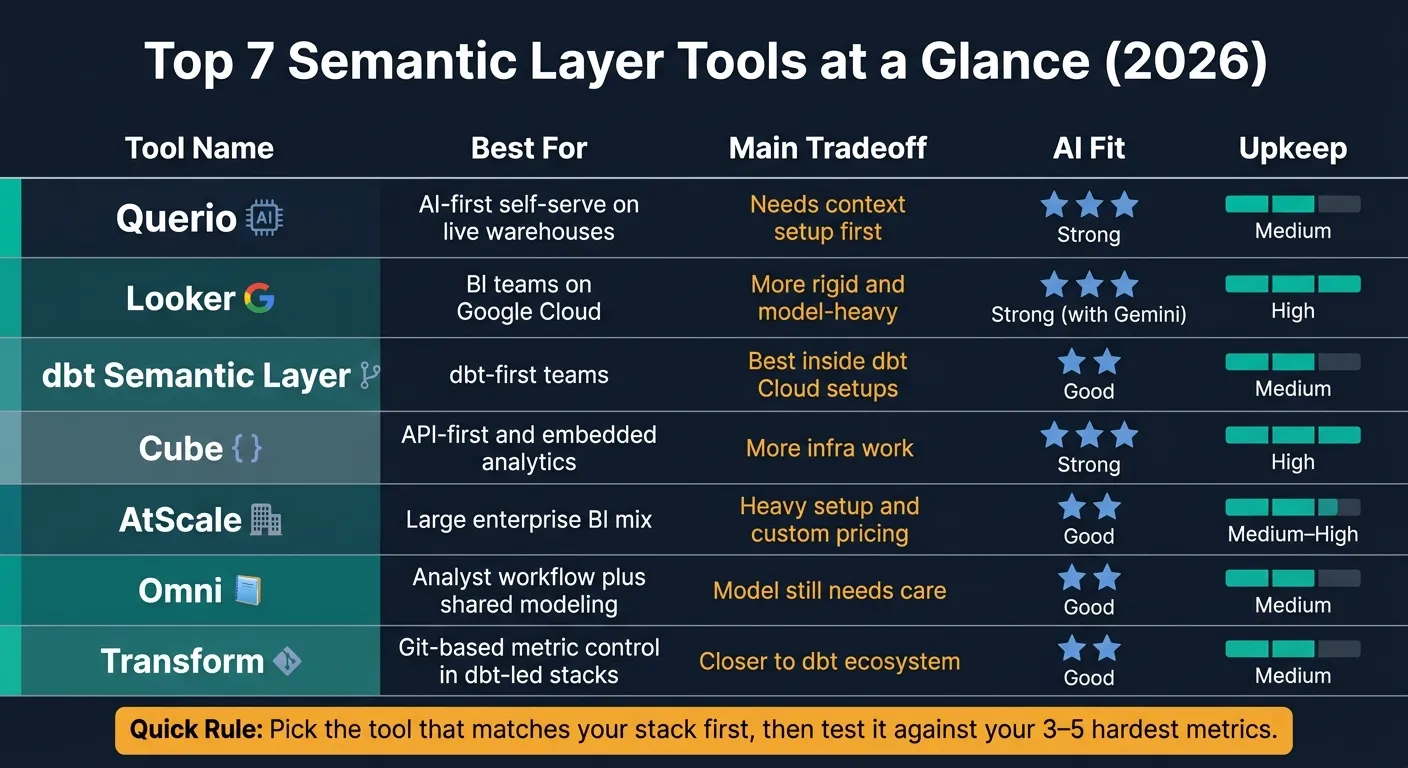
| Tool | Best for | Main tradeoff | AI fit | Upkeep |
|---|---|---|---|---|
| Querio | Metrics as code in your own git repo, for people and AI agents | Needs context setup first | Strong | Medium |
| Looker | BI teams on Google Cloud | More rigid and model-heavy | Strong with Gemini | High |
| dbt Semantic Layer | dbt-first teams | Best inside dbt Cloud setups | Good | Medium |
| Cube | API-first and embedded analytics | More infra work | Strong | High |
| AtScale | Large enterprise BI mix | Heavy setup and custom pricing | Good | Medium to High |
| Omni | Analyst workflow plus shared modeling | Model still needs care | Good | Medium |
| Transform | Git-based metric control in dbt-led stacks | Closer to dbt ecosystem | Good | Medium |
If you want one fast rule: pick the tool that matches your stack first, then test it against your 3 to 5 hardest metrics. That usually tells you more than any feature list.
1. Querio
Querio keeps your semantic layer, which it calls the context layer, as code in a git repo you own. Metric definitions, shared business context, saved queries, dashboards and notebooks are plain files in your GitHub repo, and changes reach production through pull requests your team reviews. People in the app and AI agents over MCP work from those same files.
Metrics Governance
Sync runs both ways. An edit in Querio, by a person or the agent, is written back to the repo as a file, and an edit made in the repo from VS Code, Cursor, Claude Code or CI syncs back into Querio. The repo is the system of record, so if you ever leave, you keep it.
Changes go through review. The agent can propose a context update, but a person saves it. Saving context or promoting a dashboard opens a pull request on your repo, your own branch protections and reviewers apply, and merging makes the change live in Querio. CI catches breakage too: rename a dbt model and every dashboard, query and context file that uses it gets flagged before the PR can pass.
Dashboards are marked by trust level:
- trusted
- team
- experimental
That tells non-technical users what they're looking at, and whoever can merge to main decides what gets promoted to trusted.
Warehouse Compatibility
Querio connects live to Snowflake, BigQuery, Amazon Redshift, Databricks, ClickHouse, PostgreSQL, MySQL, and MotherDuck. There’s no data movement, which is a big deal if you want analysis without copying data all over the place.
On Snowflake, BigQuery and Databricks, each person signs in with their own warehouse OAuth, so queries run as them and the warehouse's own access rules apply. On Postgres, Redshift and ClickHouse, Querio uses a service account plus its own access policies, which are files in the repo, reviewed by PR like everything else. Either way, an agent working through Claude via MCP sees only what its user can see. One catch: vague questions on very large tables can still trigger full scans, so guardrails in the context layer still matter. That live connection is what makes the AI workflow useful for governed analysis, not just chat.
AI Readiness
Every answer shows up as editable SQL or Python in a reactive notebook, and charts update as the logic changes. The logic stays visible, which helps people check what the system is doing instead of taking results on faith.
The context layer grounds Querio's agent, and outside agents like Claude and ChatGPT, in your actual business terminology. That cuts down on hallucinations in complex joins.
dbt Alignment
Querio reads dbt's semantic_manifest.json, so MetricFlow metrics you define once in dbt YAML are the ones its agent uses, with no second copy to keep in sync. No dbt? Metrics you define in Querio are committed to the repo as files in MetricFlow format. Querio's files can also sit inside your dbt repo, so a model change and the context that describes it ship in one PR. And an outside agent connected through Querio's MCP can query those metrics by name. Put together, that makes Querio a good fit for teams that want self-serve analytics without giving up code review.
Best fit: 100–500-employee B2B SaaS, healthcare, and finance teams on Snowflake, BigQuery, or Redshift that need governed self-serve without extra semantic infrastructure.
2. Looker
Looker’s semantic layer is built around LookML, its own modeling language. In plain terms, LookML puts metrics, dimensions, joins, and access rules in version-controlled code. That’s why people often connect Looker with strict, code-based governance.
Metrics Governance
The main tradeoff with Looker is pretty simple: you get a lot of control, but less flexibility.
LookML keeps metrics, dimensions, joins, and access controls in one place. That setup can make reporting more consistent across a team. But there’s a catch. Someone has to keep those models in shape as the business changes, or things can drift.
Warehouse Compatibility
Looker runs queries directly against the warehouse using live data. It doesn’t depend on extracts or copied datasets. That makes it a strong match for teams already set up on BigQuery [1].
| Capability | Looker |
|---|---|
| Warehouse Connections | BigQuery, Snowflake, Redshift, Databricks |
| Query Approach | Warehouse-native (Live querying, no extracts) |
| Semantic Layer | LookML (Code-defined, Git-native) |
| AI Integration | Gemini (Grounded in LookML) |
| Governance Level | Very High |
| Data Freshness | Real-time (Live warehouse data) |
AI Readiness
Looker’s AI experience runs through Gemini, which is grounded in LookML models. Those LookML definitions can also be exposed to external AI agents and apps through Looker Modeler APIs.
That said, Looker stays more closely tied to its own ecosystem than headless tools do. And if your team likes digging into SQL directly, you may find inspection options more limited than in notebook-first tools.
dbt Alignment
Looker tends to fit BI-led teams better than dbt-first teams. In dbt-first setups, metric governance often stays closer to the transformation layer instead of the BI layer.
Best fit: Organizations standardized on Google Cloud and BigQuery, especially BI teams that need strict, code-enforced metrics governance.
For teams that want governed metrics closer to the transformation layer, the next section covers dbt Semantic Layer.
3. dbt Semantic Layer (MetricFlow)
For teams that want metric governance closer to transformation than BI, dbt Semantic Layer is the next logical pick. If your team already uses dbt, this is often the simplest place to define metrics. Analytics engineers can set up metrics like revenue and churn in dbt YAML, which means those definitions stay in Git and are version-controlled and auditable from day one.
Metrics Governance
Metrics sit right next to the transformation logic. You define each metric once in dbt, then reuse it downstream. That cuts down on conflicting numbers across dashboards, reports, notebooks, and AI workflows. The tradeoff is pretty simple: as business logic shifts, someone still has to keep the YAML up to date [3].
Warehouse Compatibility
It works well with Snowflake, BigQuery, Redshift, and Databricks [3]. Its APIs expose those metrics to BI tools, notebooks, apps, and AI agents. So instead of copying logic from place to place, dashboards, notebooks, and AI assistants can all pull from the same metric definitions.
AI Readiness
When people query raw tables, they often end up re-building business logic in slightly different ways. That’s where a governed semantic layer helps. It improves text-to-sql accuracy by grounding queries in approved metric definitions and join paths. In plain English, analysts and AI agents are more likely to answer the same question with the same logic.
dbt Alignment
This is the best fit for dbt-native teams that want metrics managed in the same Git workflow as transformations [3]. It’s less suited to teams that want a more vendor-agnostic layer. The main limit is the dbt Cloud dependency if your stack isn’t already tied to that ecosystem [3].
Best fit: Data and analytics engineering teams that run dbt as the core of their stack and want metrics version-controlled alongside transformation code.
4. Cube
Cube is an API-first semantic layer that sits between your warehouse and the tools that use your data. While dbt Semantic Layer stays close to transformation, Cube lives further downstream as a serving layer for BI tools, apps, and AI agents.
Metrics Governance
With Cube, you define a metric like Revenue or Churn once, and every downstream tool uses that same definition. If those metrics already live in dbt, though, Cube's dbt import doesn't bring them in, so you'd define them again in Cube. Tableau, Power BI, apps, and AI agents all pull from one source of truth. Cube also manages row-level security and access control in one place, so permissions stay the same no matter where the metric shows up. The catch is pretty simple: your team still has to handle model design and upkeep [3].
Warehouse Compatibility
Cube connects to Snowflake, BigQuery, Redshift, Databricks, and Postgres [3]. It exposes metrics through SQL, REST, GraphQL, and MCP (Model Context Protocol), which makes it a strong fit when your stack includes several kinds of tools [3]. Cube Store adds caching and pre-aggregations to help speed up embedded and customer-facing analytics [3].
AI Readiness
Cube fits well with AI agent use cases because AI agents can query a governed semantic layer instead of going straight to raw tables. That matters. It gives agents cleaner inputs and cuts down on the mess that comes from inconsistent table logic. The MCP interface is especially useful for AI agent use [3].
dbt Alignment
Cube usually sits downstream of dbt. A common stack in 2026 looks like this: Warehouse → dbt (transformation) → Cube (semantic layer) → BI tools and AI agents [3]. So no, Cube doesn't replace dbt. It works alongside it.
The main thing to think about before adopting Cube is infrastructure. It takes more work to run and maintain than a warehouse-native semantic view, and that extra load can hit smaller data teams hard [3]. Pricing is reported to start in the mid-four figures per year [2][1].
Best for teams serving consistent metrics across BI tools, apps, and AI agents.
Teams that need deeper OLAP-style governance can compare AtScale next.
5. AtScale
AtScale comes at the problem from a different direction than Cube. Cube is more API-first and geared toward developers. AtScale is built for large companies that want one governed semantic layer across a mixed BI setup, with tools like Excel, Power BI, Tableau, and Looker all reading from the same metric definitions. [3]
Metrics Governance
AtScale puts business logic for KPIs like Revenue, Churn, and Net Retention in one place, so every downstream tool uses the same definition. That’s the big draw.
What makes it stand out is how it serves those metrics in the native language of each tool:
- MDX for Excel
- DAX for Power BI
- SQL for Tableau and Looker
So teams can keep working in the BI tool they already know and still see governed, consistent numbers. [3]
To keep query speed up on large datasets, AtScale uses autonomous aggregations that optimize queries automatically, without your team having to tune things by hand. [3]
Warehouse Compatibility
AtScale connects to Snowflake, BigQuery, Redshift, and Databricks. It works as a virtualization layer, which means there’s no need to move or extract data. [3]
AI Readiness
AtScale exposes governed metrics to AI assistants and agents through SQL, Python, and REST APIs. In plain English, that means AI systems use the same approved business definitions as your analysts. That helps cut down on metric drift when agents query raw tables on their own. [3]
dbt Alignment
In modern analytics stacks, AtScale often sits downstream of dbt. dbt handles transformation. AtScale handles query-time semantic governance and metric serving. It doesn’t replace dbt. It extends what dbt produces into a governed layer that non-technical users and AI agents can use. [3]
The tradeoff is pretty clear: AtScale is a heavyweight enterprise tool. Setup usually takes a big upfront investment in semantic modeling, and maintenance tends to be more demanding than with lighter options. Pricing is custom and aimed at enterprise buyers. [3]
Best for large enterprises with mixed BI tool environments, heavy Excel and Power BI usage, and multi-warehouse setups.
6. Omni
Omni gives analysts a simple setup: explore data in agentic notebooks, then move proven metrics into a shared, Git-versioned semantic model. That means governance grows from how people actually work, instead of sitting around until someone has time for a separate modeling step.
This setup tends to fit best when your team already works in a live warehouse, not in exported spreadsheets.
Warehouse Compatibility
Omni connects to Snowflake, BigQuery, Redshift, Databricks, and Postgres. Queries run live in the warehouse, with no data extracts.
AI Readiness
Omni’s AI features rely on its semantic layer. When a business user asks a question, the AI uses certified metrics and defined join paths to return consistent answers. The catch is pretty simple: teams still need the habit of keeping promoted metrics up to date.
dbt Alignment
Omni treats dbt as a peer source, not a separate layer that needs to be copied all over again. That cuts duplicate work and helps analysts use the same governed definitions.
Best for analytics teams that want workbook-style exploration and governed modeling in one place.
If you need a different mix of governance and operating structure, the next option leans more toward transformation work.
7. Transform
Transform keeps metric definitions in Git and reuses them across BI tools, apps, and AI agents.
Metrics Governance
Metric definitions live as YAML in Git, so every change is version-controlled and peer-reviewed there too. That gives teams a clear audit trail. It also makes it easier to test whether a KPI update will break downstream reports or AI outputs before it hits production.
Warehouse Compatibility
Transform is tuned for Snowflake, BigQuery, Redshift, and Databricks. It generates queries at runtime and runs them right in the warehouse. So performance comes down to your warehouse compute and how mature your semantic model is.
AI Readiness
When an AI agent needs to answer a business question, it can use certified metric definitions instead of guessing from raw SQL or cryptic column names. That matters a lot. A mature semantic layer can improve AI-generated SQL accuracy, and Transform’s big advantage here is consistency. The tradeoff is simple: someone still has to keep that model in good shape.
dbt Alignment
Transform is tied more closely to the dbt Cloud ecosystem than some standalone options. That means it tends to fit best in dbt-centered stacks. If Git-based metric control matters more to your team than broad tool choice, this setup makes sense.
Best for analytics engineering teams that are dbt-first, need consistent KPIs across multiple downstream consumers, and want Git-based change control over metric definitions.
Where Each Tool Wins and Where It Falls Short
No single tool works for every case. The table below is a fast way to narrow the field. After that, the scenarios help match each option to your stack and day-to-day setup.
| Tool | Strengths | Limitations | Best Team Fit | Maintenance Overhead |
|---|---|---|---|---|
| Querio | Metrics and context as files in your own git repo, reviewed in PRs; live warehouse access; AI agents query the same metrics over MCP | Context layer requires upfront setup | 100–500-employee B2B SaaS, healthcare, or finance teams wanting governed self-serve | Moderate |
| Looker | Rigorous BI-native governance; strong Google Cloud integration | Tightly coupled to Google Cloud; significant modeling expertise required | BigQuery-centered orgs with dedicated data engineering capacity | High |
| dbt Semantic Layer (MetricFlow) | Metrics version-controlled alongside transformations | Requires dbt Cloud; limited fit outside dbt-first stacks | Analytics engineering teams standardized on dbt | Moderate |
| Cube | API-first design; fits multiple BI tools and AI agents simultaneously | Higher infrastructure and operations burden | Teams building embedded or customer-facing analytics products | High |
| AtScale | Consistent metrics across mixed BI environments; no data movement | High entry complexity; enterprise-grade pricing | Large enterprises with complex governance needs and mixed BI tool usage | Moderate |
Scenario Guidance
In most cases, the right pick comes down to your main workload: BI, dbt, embedded delivery, enterprise governance, or AI-led self-serve.
If you're a dbt-native team, go with dbt Semantic Layer (MetricFlow) when your stack already runs on dbt Cloud. If not, that dependency can add more friction than it saves.
For a single-BI-tool organization, Looker makes sense when governance discipline matters more than flexibility and your team is all-in on Google Cloud.
If you need embedded or API-first analytics, Cube is a strong match for serving metrics to customer-facing apps or several BI tools at once. Just go in with your eyes open: the infrastructure and ops load is heavier.
For complex enterprise governance, AtScale fits large companies dealing with mixed BI setups. Mid-market teams should look hard at the entry complexity before signing up for it.
And for AI-first, warehouse-native analytics with metrics reviewed like code, Querio stands out. Definitions live in your git repo and change through pull requests, AI agents query them by name, and each answer comes back as inspectable SQL inside a reactive notebook.
The tradeoffs are on the table. The next section turns that into a simple way to choose.
How to Choose the Right Tool for Your Team
Start with your warehouse and day-to-day workflow, not a long feature list. In practice, your data platform, the way your team already works, and who will own the model will cut the list down fast.
Use the comparison above to sort tools based on how they fit your stack. If your team lives in one BI system, a BI-native layer usually makes the most sense. If you need to serve dashboards, apps, and other downstream users, a headless layer is often the better pick. And if metrics should sit next to transformation code, go with a dbt-native layer.
Then pressure-test each option with your 3–5 hardest metrics. This is where things get real. If your BI tools or AI agents give different answers for the same metric, that layer isn't ready.
| Your Situation | Best Fit | Why |
|---|---|---|
| dbt-first Snowflake/Redshift team | dbt Semantic Layer (MetricFlow) | Metrics live as code in Git, alongside your dbt models |
| Looker-standardized BI team | Looker (LookML) | Mature governance; Gemini AI is grounded in LookML |
| Tableau + Power BI + apps | Cube | Headless, API-first; serves SQL, REST, and GraphQL APIs |
| Excel/Power BI-heavy enterprise | AtScale | Native MDX/DAX support and high-performance Excel connectivity |
| Team that wants metrics in its own git repo, reviewed in PRs and used by AI agents | Querio | Definitions are files in your repo (your dbt metrics or MetricFlow-format files), changes go through your PR reviews, and agents query the same metrics over MCP |
The last screen is ownership: who keeps the model up to date, and how often will it change? That part matters more than many teams expect. Regulated teams need inspectable, reproducible answers. If your stack already feels fragmented, it's usually smarter to center on one governed semantic layer instead of adding one more point tool. And when two tools seem close, pick the one with clearer metric ownership and less upkeep.
FAQs
How do I choose between a BI-native, dbt-native, and headless semantic layer?
Choose based on where metric governance lives, how many tools need those metrics, and whether you need high-concurrency serving.
BI-native is a good fit for teams all-in on one BI platform. dbt-native makes sense for teams that run on dbt. Headless is the best match when the same governed metrics need to power multiple tools, embedded apps, and AI agents, especially when caching and pre-aggregation matter.
What should I test before rolling out a semantic layer?
Before rollout, validate the semantic layer against your actual business questions and metrics, not vendor benchmarks.
Test metric governance, version control, BI compatibility, security, extensibility, and performance. A semantic layer won’t fix poor data quality, so start with the business decisions you need to support. Then launch in small steps by certifying existing dbt models and adding definitions as new questions come up.
Which semantic layer keeps metric definitions in git and reviewed in pull requests?
Querio does, and for the whole analytics stack, not only the metrics. Metric definitions, context, saved queries and dashboards are files in a repo you own. Saving context or promoting a dashboard opens a pull request, and your branch protections decide what goes live. Looker (LookML) and the dbt Semantic Layer also keep their definitions as code, as covered above.
Who should own metric definitions after implementation?
Data teams should own metric definitions and work closely with business stakeholders, so the logic matches how the business actually runs.
That matters because metric accuracy depends on the semantic model. If logic lives in too many places, teams end up with metric drift and reports that don’t match. The fix is simple: keep business logic in one place.
For dbt-first teams, that usually means keeping metric definitions close to dbt modeling. It makes governance part of the workflow people already use instead of a separate process that gets ignored.