Business Intelligence
What AI Agents Actually Need from a Semantic Layer
Semantic layers must enforce approved metrics, safe joins, and permissions; testing (not documentation) proves results.

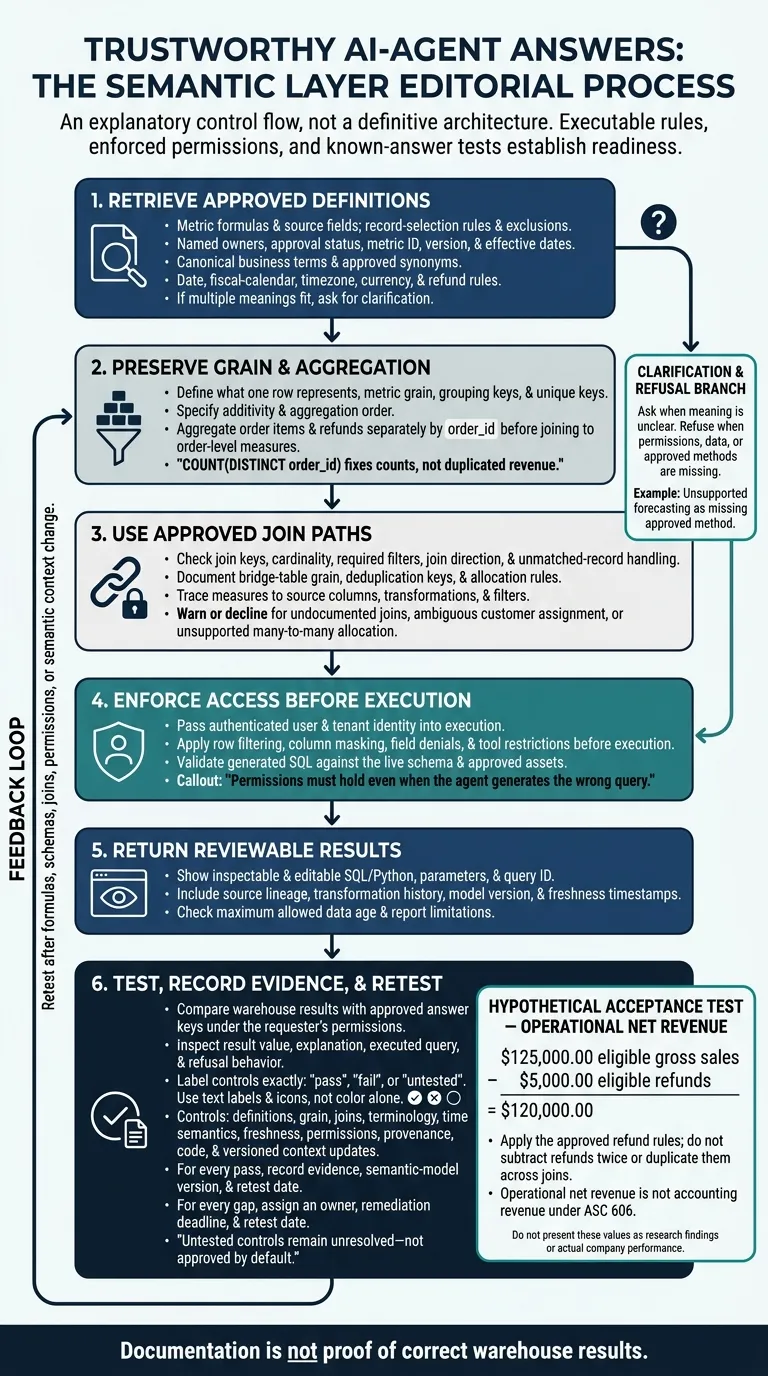
I don’t judge an AI query by whether it runs. I check whether it uses approved rules, returns the right numbers, and respects your permissions. For example, $125,000 in eligible sales minus $5,000 in eligible refunds should return $120,000 - without counting refunds twice.
Here’s what I look for in a semantic layer:
- Approved definitions: Standardized SaaS metrics, business terms, owners, versions, and rules for dates, currencies, and refunds.
- Safe calculations: Clear row meanings, aggregation rules, and approved joins that prevent double counting.
- Access checks: User and tenant permissions enforced before a query runs.
- Reviewable results: SQL/Python, source history, data-age checks, and query details you can inspect.
- Clear limits: Questions when meaning is unclear and refusals when data, permissions, or approved methods are missing.
My final check is testing, not documentation. I compare results with known answers, record each control as pass, fail, or untested, and retest after rules, schemas, or permissions change.
Checklist: Define Metrics and Business Terms
Approve Formulas, Owners, and Terms
Store each metric as one approved definition - not just a label. Keep its definition fields together so the agent can retrieve the approved rule before writing SQL.
- [ ] Formula and sources: Executable calculation, source tables and columns, grain, aggregation method, and approved filters.
- [ ] Record selection: Included statuses and transaction types, plus rules for cancellations, duplicates, taxes, discounts, credits, chargebacks, test transactions, and intercompany sales.
- [ ] Ownership and approval: Named business owner, technical owner, approver, approval date, and certification status.
- [ ] Version history: Version identifier, effective dates, changes, and whether historical results were restated.
- [ ] Canonical terms: Canonical definition, entity type, entity identifiers, synonyms, and relationships that distinguish customers, accounts, and organizations.
| Requirement | Failure prevented |
|---|---|
| Formula and sources | Ambiguous net revenue calculated from the wrong sources or rules |
| Record selection | Canceled, duplicate, or ineligible transactions included in results |
| Ownership and approval | Uncertified logic presented as authoritative |
| Version history | Outdated definitions applied to the wrong reporting period |
| Canonical terms | Customer counts misrouted to subscriptions or CRM accounts |
Test ambiguous requests against these definitions. In SaaS, “customers” must map to the approved entity - not shift between paying organizations, active subscriptions, and CRM accounts. In healthcare, distinguish patient counts from covered-member counts. In finance, keep operational net sales, cash collections, and recognized revenue separate.
If more than one approved meaning fits, the agent should ask for clarification. Inspect the selected metric ID, time field, filters, SQL, and result explanation.
Business net revenue is an operational metric; accounting revenue follows ASC 606 and may include refund liabilities. Label operational metrics clearly so the agent doesn’t present sales-minus-refunds as recognized revenue.[7][8][9]
Test Net Revenue After Refunds
Hypothetical acceptance test: Eligible gross sales of $125,000.00 minus eligible refunds of $5,000.00 must return $120,000.00 under the approved business rule. Identify each refund’s original transaction, status, currency, and partial-refund treatment. Do not assume refunds are negative revenue rows or subtract them twice.
Verify the approved metric ID and version, refund-period assignment, timezone, fiscal calendar, exchange-rate source and conversion date, rounding rule, and freshness timestamp. Check the SQL for compatible sales and refund grains, and look for refunds duplicated across joins. If the query doesn’t reconcile to $120,000.00, flag it for review.[4][6]
Once the metric’s meaning is fixed, check whether row grain and join paths preserve counts as part of your semantic layer strategy.
Checklist: Document Table Grain and Join Paths
Before generating SQL, require the agent to retrieve table grain, aggregation rules, and approved relationships from metadata in Snowflake, BigQuery, Redshift, or PostgreSQL. These rules help prevent double counting when calculating net revenue after refunds or revenue by segment. Column names and constraints alone don’t explain how rows roll up or which joins are safe.[11][12] Once metric meaning is fixed, the next risk is row multiplication from incorrect grain or joins.
Specify Row Meaning and Aggregation Rules
- [ ] Table grain: Define what one row represents: an order, an order item, or a refund transaction. Include time grain and rules for revisions and duplicate rows.
- [ ] Metric grain: Define the calculation grain, grouping keys, and allowed dimensions.
- [ ] Unique keys: Identify the full key, including composite keys, expected uniqueness, and nullability.
- [ ] Additivity: Explain where sums are valid. Balances usually shouldn’t be summed across time; rates should be recalculated from their components.
- [ ] Aggregation order: Aggregate order items and refunds separately by
order_idbefore joining them to order-level measures.
Here’s the counting trap: COUNT(DISTINCT order_id) fixes counts, not duplicated revenue. Repeated order totals still enter SUM(order_total). Require both counts and dollar totals to reconcile to an approved order-grain baseline for the reporting period.[14][15]
Treat dbt model descriptions, lineage, and unique, not_null, relationships, and accepted_values tests as supporting evidence only. Passing tests doesn’t prove that an order-level measure remains safe after a join.[13][16]
Approve Join Paths and Cardinality
- [ ] Join keys: Store approved key pairs, required filters, and key nullability.
- [ ] Cardinality: Define each relationship as one-to-one, one-to-many, many-to-one, or many-to-many.
- [ ] Bridge tables: Document their grain, deduplication keys, and approved allocation rules.
- [ ] Join direction: Specify the starting population, join type, and how to handle unmatched records.
- [ ] Field lineage: Trace exposed measures to source columns, transformations, and filters.
- [ ] Unsafe-path warnings: Flag joins that duplicate measures, combine incompatible grains, or bypass approved models.[14][17]
Make these rules available through a documented API or MCP tool with stable fields, validation status, and review timestamps. Keep declared relationships separate from tested evidence.
Use the following test to catch join errors that inflate revenue after refunds or customer-segment rollups.
Test revenue by customer segment for January 1–31, 2026 with customers, orders, multiple order items per order, completed and canceled refunds, and one unmatched or null customer key. Verify the approved customer-to-order path, aggregate items and refunds separately to order grain, and reconcile gross revenue, refunds, and net revenue. Document how unmatched records are handled.
When a request requires an undocumented join, ambiguous customer assignment, or unsupported many-to-many join allocation, the agent should warn or decline rather than improvise.
Checklist: Enforce Access and Show Query Logic
Once metric, grain, and join rules are set, the next check is runtime governance. Permissions must hold even when the agent generates the wrong query. Agents need policy context they can retrieve and enforce at query time - not just labels written for people.[18][19]
Enforce Permissions and Decline Unsupported Requests
- [ ] Row and column restrictions: Apply filtering, masking, and field denials before execution.
- [ ] Sensitive-data classification: Specify which roles can view, aggregate, mask, or read personal email addresses, payment details, and protected health information in full.
- [ ] User and tenant identity: Pass authenticated identity into execution. Check the agent’s service account, permitted tools, and allowed operations.
- [ ] Approved assets: Check generated SQL against the live schema and reject unsupported statements.
- [ ] Freshness timestamps: Include the last refresh, maximum allowed data age, owner, and validation status in the query result.
Test the same request as an administrator, analyst, and restricted user across two tenants. Inspect the returned data, generated SQL, and audit logs.
Compare Requirements and the Failures They Prevent
These checks separate what a person can see from what an agent can execute.
| Agent requirement | Failure prevented | Evidence to inspect |
|---|---|---|
| Retrievable metric formula, exclusions, owner, and approved synonyms | Invented or inconsistent calculations | Metric definition, owner, and reconciled totals |
| Explicit row meaning and aggregation rules | Double-counted orders or revenue | Model documentation and row-count tests |
| Approved join paths, keys, and cardinality | Fanout and duplicated measures | Join metadata and generated SQL |
| Business definitions, synonyms, fiscal/calendar rules, time zone, and period completeness | Results that look correct but use the wrong concept or period | Glossary entry, time-zone setting, date filter, completeness timestamp |
| Identity-aware enforcement for rows, columns, tenants, and tools at query time | Disclosure of rows or columns without permission | Role-based tests, policy decision, audit log |
| Source lineage, transformation history, freshness, confidence, model version, and query ID | Answers that cannot be verified or rely on stale data | Lineage record, timestamps, dbt/model version, query ID |
| Clarify ambiguity, deny requests without permission, and identify missing metrics or datasets | Fabricated, overbroad, or unsupported answers | Conversation test, refusal reason, policy log, limitation message |
| Inspectable and editable SQL/Python | Hidden filters, wrong joins, fields accessed without permission, and results that cannot be reproduced | Generated SQL/Python, parameters, execution result, reviewer approval |
Review Governed Context in Querio
Querio’s reactive notebooks let people inspect and edit SQL/Python to review and revise query logic. Context and metric definitions live as files in a git repo your team owns, so a context change an agent proposes goes through a pull request under your own reviewers. Live warehouse connections avoid CSV exports. Per-user OAuth on Snowflake, BigQuery and Databricks keeps MCP queries tied to the requesting user.[10]
Conclusion: Test Readiness with Business Questions
After the metric, grain, join, and access checks above, readiness means the agent can choose the right metric, build the right query, validate the result, explain its logic, and refuse unsupported requests. Run known-answer tests in your warehouse, such as Snowflake or BigQuery. Compare each result with an approved answer key under the requester’s permissions.[20][4][21]
Mark every sign-off control as pass, fail, or untested: definitions, grain, joins, terminology, time semantics, freshness, permissions, provenance, code, and versioned context updates. For every pass, record evidence, the semantic-model version, and a retest date. Untested controls remain unresolved - not approved by default.[4][21]
Run warehouse-native acceptance tests for wrong net revenue, double-counted orders, unauthorized access, and unsupported forecasting.
Include tests for net revenue after refunds in September 2026, order counts across line-item, payment, and refund joins, a request outside the user’s permissions, and a forecasting request when no forecasting definition is approved.[4][22][23][20][21][5]
Check the result value, explanation, executed query, and refusal behavior. An answer that sounds reasonable isn’t enough.
Give each gap a named owner, a remediation deadline, and a retest date. Require reviewed, versioned changes to the semantic context. Then rerun the acceptance suite after changes to formulas, schemas, joins, permissions, or context. Documentation is not proof of correct warehouse results.[4][21][23]
FAQs
How do we prioritize semantic-layer gaps for AI agents?
Start with metrics that often cause confusion or get defined differently across teams: revenue, churn, pipeline, and headcount. Gather their existing definitions and use them as your source of truth. Don’t create a separate set for AI.
Build curated, certified views for your top 20 business questions. After every schema or metric change, test 50–100 questions against ground-truth SQL and expected results. Require manual review for high-risk requests.
Who should approve changes to agent-accessible metrics?
A designated metric owner, such as the Head of Finance, should approve changes - not the entire team [1][2]. Assign each metric to a named person who’s responsible for its accuracy and resolving issues [2][3].
Use Git-based pull requests to manage definition changes. This lets an analytics lead review the logic, check that dbt tests pass, and keep an audit trail showing who approved each change and why [1][2].
How can we detect semantic drift before it affects answers?
Keep a versioned set of 50–100 canonical questions, each paired with trusted SQL and expected results. Run the set after every schema, metric, or model update. Check AI-generated SQL against governed metric definitions, join paths, and grain.
Run warehouse diagnostic checks, then compare results with trusted dashboard totals or source tables. Investigate variance above 0.5%–1% before sharing answers. Require SQL or Python that analysts can inspect so they can trace the logic.