Business Intelligence
Omni Analytics Pricing: Plans, AI Credits and Hidden Costs
Breakdown of Omni Analytics pricing: AI credit overages, warehouse compute, migration and support costs beyond the contract.
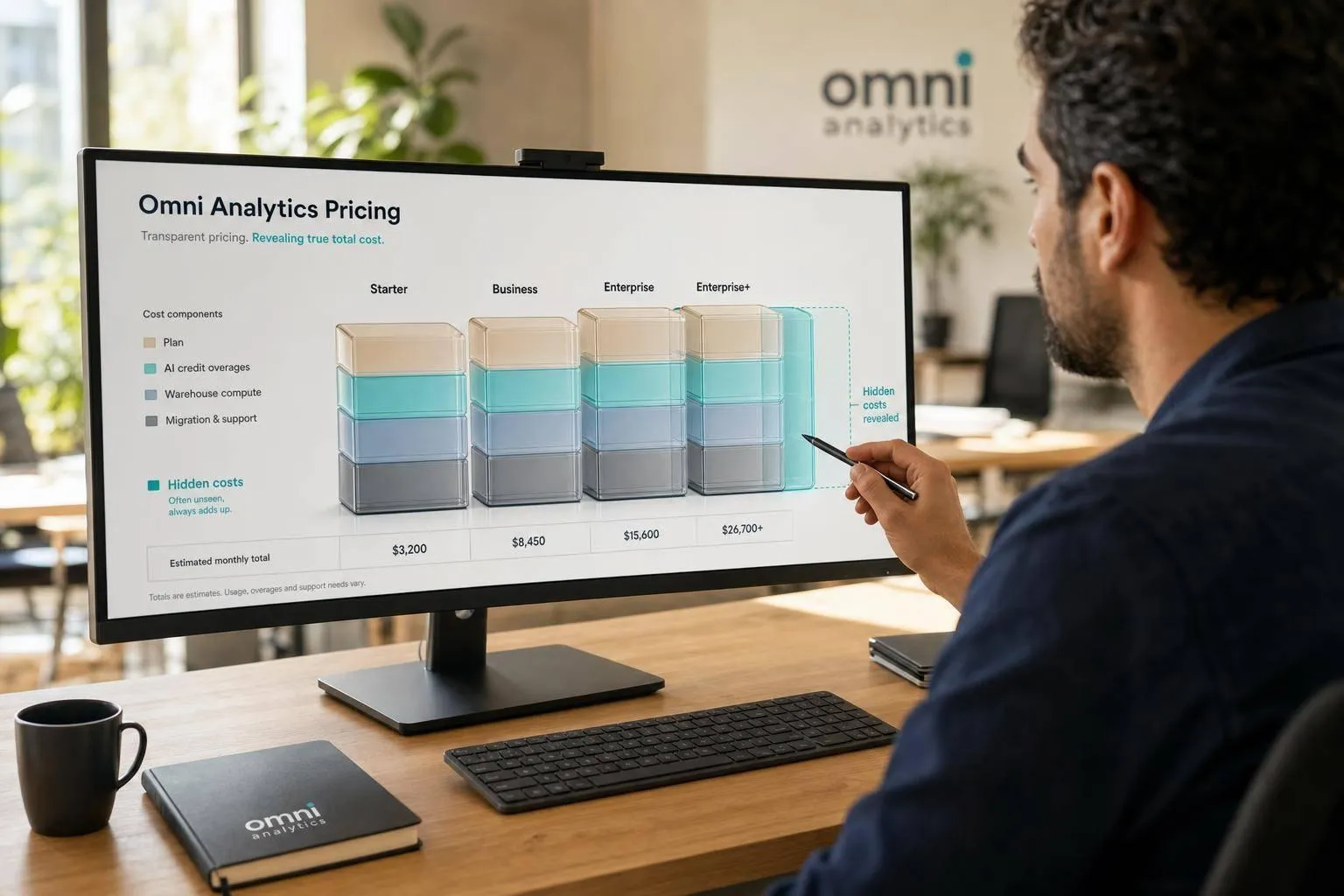
Omni’s quote is only the starting point. If you budget for the contract alone, you can miss AI overages, warehouse compute, migration labor, and support fees that push first-year spend much higher.
Here’s the short version:
- Omni uses custom pricing, so you won’t get a public list price.
- Your total cost can shift based on AI credit use, not just seat count.
- If you run on Snowflake, BigQuery, or Redshift, AI-generated SQL can add warehouse costs outside the Omni contract.
- First-year spend can also grow from dashboard rebuilds, model migration, dual-run testing, and staff training.
- Compared with other AI tools that write SQL, Querio has public prices, no per-seat pricing and spending caps, ThoughtSpot mixes seats with usage, and Snowflake Cortex is compute- and usage-based.
If I were pricing Omni for a U.S. team today, I’d focus on four questions right away:
- How many AI credits are included?
- Which actions use credits?
- What do overages cost?
- How much extra warehouse spend should I expect during rollout and after launch?
That’s the core issue: Omni can look simple at the contract level, but the full bill depends on how often your team uses AI and how much internal work it takes to support the rollout.
::: @figure 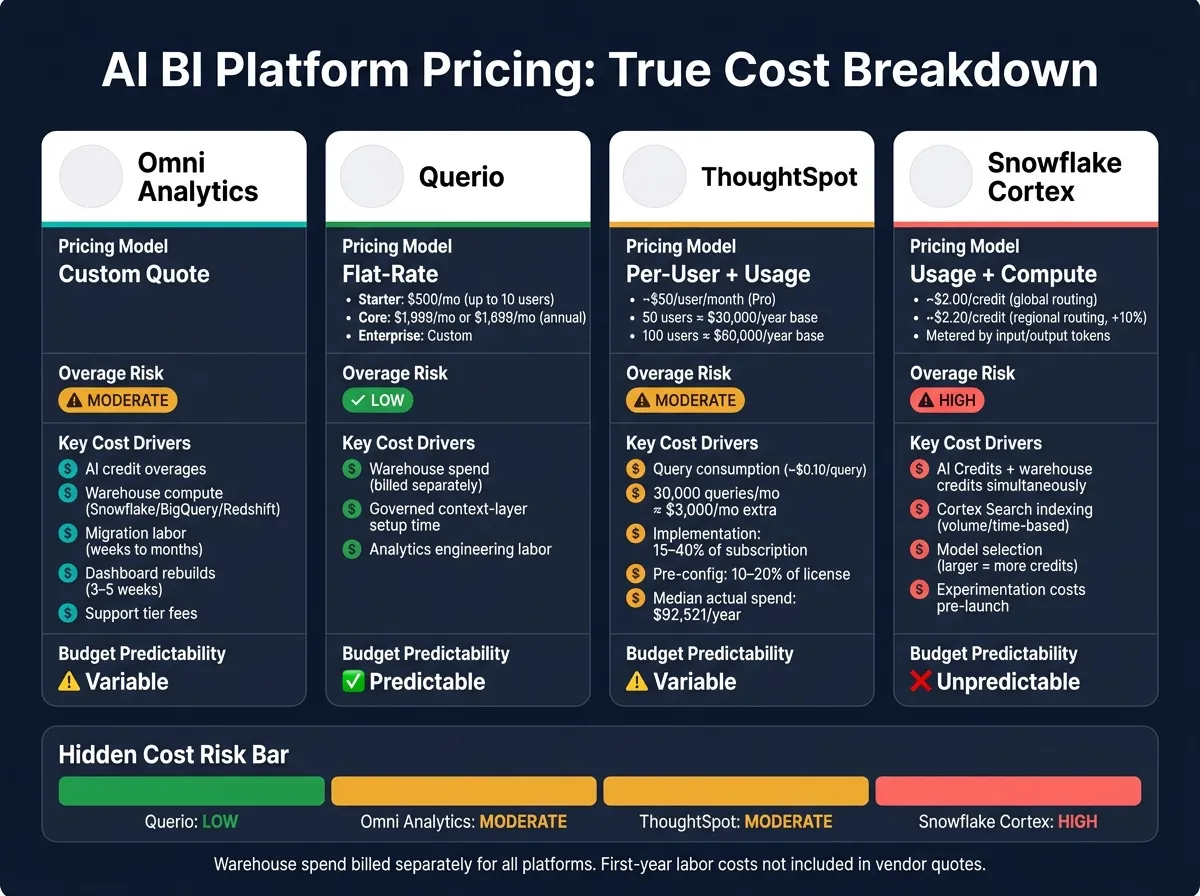 {AI BI Platform Pricing Comparison: Omni vs Querio vs ThoughtSpot vs Snowflake Cortex}
:::
{AI BI Platform Pricing Comparison: Omni vs Querio vs ThoughtSpot vs Snowflake Cortex}
:::
Quick Comparison
| Platform | Pricing model | Main cost risk |
|---|---|---|
| Omni | Custom quote | AI overages, migration labor, warehouse spend |
| Querio | Free plan; Core $2,499/mo; included AI credits | Setup time for governed SQL and GitHub-based context |
| ThoughtSpot | Per-user + usage | Query volume, setup fees, support add-ons |
| Snowflake Cortex | Usage-based / compute-based | AI credits + warehouse credits at the same time |
In plain English, Omni sits in the middle: less transparent than Querio's public pricing, and not as direct usage-heavy as Cortex, but still exposed to monthly cost shifts as adoption grows.
If you want a clean budget, the smart move is simple: treat the Omni quote as one line item, not the full price.
1. Omni Analytics
Omni sells custom annual contracts instead of public list pricing. So the final number usually comes down to seat count, feature access, and the support tier you pick.
That makes budgeting a little tricky. If your team grows later, you may need to renegotiate the pricing structure instead of just adding seats at a posted per-user rate.
A smart move here is to ask three direct questions up front:
- How many AI credits are included?
- Which actions use those credits?
- What do overages cost?
The contract price is only one part of the total spend. Implementation brings its own labor cost, and that can add up fast. Moving to Omni may mean translating existing LookML or YAML models, rebuilding dashboards, and checking that core metrics match before cutover.
Typical migration work looks like this:
| Migration Phase | Estimated Duration | Primary Labor |
|---|---|---|
| Audit & inventory | 1–2 weeks | Analytics engineer |
| LookML/YAML translation | Weeks to months | Analytics engineer |
| Dashboard rebuild | 3–5 weeks | BI analyst |
| Metric parity validation | 4 weeks (concurrent) | Finance review |
| User retraining | 1–2 weeks | Enablement lead |
| Dual-run / cutover | 30–90 days | Analytics, BI, and data stakeholders |
If your team runs on Snowflake, BigQuery, or Redshift, there’s another cost bucket to watch: testing and dual-run query spend. That sits outside Omni’s contract. The same goes for the internal hours your team puts into the migration.
The next section breaks down AI credit usage and where overages can start.
2. Querio
Compared with the hidden costs of traditional BI and custom enterprise pricing, Querio is easier to budget for because the list prices are public. The company lists a Free plan, Core at $2,499/month or $2,099/month billed annually ($25,000 a year), and Enterprise as custom for single-tenant hosting, on-prem deployment, or other more complex deployments. Every plan has unlimited users and unlimited data connections.
Each plan includes monthly AI credits (500 on Free, 10,000 on Core). Past that, extra credits cost $0.50 each on Free and $0.25 each on Core. Querio also offers usage alerts and optional hard caps, which can stop spend at a set limit [1].
Querio connects live to Snowflake, BigQuery, Redshift, and Postgres, so warehouse spend sits outside the platform fee. In plain English, your Querio bill and your data warehouse bill are two separate things.
There’s another cost bucket to plan for: internal setup time. Querio stores trusted definitions, joins, and queries as SQL and Markdown in GitHub. That means teams need time to build and maintain that governed context layer before a broad rollout. For many companies, that work falls to analytics engineering or data teams.
So if you're modeling total cost of ownership, Querio gives you a useful baseline across subscription cost, usage cost, and internal rollout time.
| TCO Component | What to Expect |
|---|---|
| Subscription | Free plan; Core at $2,499/month or $2,099/month billed annually; Enterprise custom; extra AI credits past the included allowance |
| Warehouse or database spend | Billed separately by Snowflake, BigQuery, Redshift, Postgres, or another connected data platform |
| Governed context-layer setup | Internal time to define and maintain metrics, joins, and trusted queries in the GitHub-synced layer |
| Rollout and governance | Analytics engineering time for permissions, definitions, and change management |
3. Snowflake Cortex
Snowflake Cortex charges separately for standard Snowflake credits and AI Credits. AI Credits cover LLM calls, embeddings, and Cortex Analyst. In the U.S., teams usually pay about $2.00 per credit for global routing or $2.20 per credit for regional routing. Regional routing keeps requests pinned to a specific geography for data residency and compliance.[2][4][8][10]
For teams implementing AI-powered business intelligence, the main issue is simple: as usage grows, AI Credits and warehouse credits can climb at the same time.
AI usage is metered by input and output tokens, and pricing changes by model. More capable models cost more per million tokens than smaller ones. Cortex Analyst and Cortex Agents also tend to cost more than basic inference because one request can set off multiple model calls and retrieval steps.[5]
There’s another layer here. Every AI-generated SQL query still runs on a Snowflake virtual warehouse, which means it also uses standard platform credits.[6][10][11] If you add Cortex Search, indexing can become its own charge because billing is based on data volume or time, not tokens.[12][13][14] Regional routing adds about 10% to the per-credit price.[2][4] And during early testing, prompt tuning and model comparisons can eat through AI Credits before anything goes live.[3][7][9][11]
| Hidden Cost Driver | What to Watch |
|---|---|
| Warehouse compute | AI-generated queries still run on virtual warehouses and consume platform credits |
| Cortex Search indexing | Search-heavy use cases can add separate volume- or time-based charges |
| Model selection | Larger models can cost much more credits per million tokens than smaller options |
| Regional routing | About 10% higher per credit than global routing for residency and compliance |
| Governance overhead | Budget tracking, access controls, and usage reviews take data engineering and FinOps time |
| Experimentation | Prompt tuning and model comparisons consume AI Credits before production launch |
These are the cost drivers to map out before rollout, alongside limitations of AI in real-time decision making. A good starting point is to standardize on one default model, set AI Credit budgets by role or app, and keep a close eye on usage in Snowflake dashboards. The next section covers a different pricing structure.
4. ThoughtSpot
ThoughtSpot is a good example of how AI BI pricing can look neat at first and then climb once people start using it. The company usually sells tiered plans - Essentials, Pro, and Enterprise - with pricing split between seats and usage. For a 50-user team on a Pro plan at about $50 per user per month, the base license cost lands around $2,500 per month or $30,000 per year.[15][16][17] Double that to 100 users, and you're already near $60,000 per year before usage fees even show up.
The harder part to plan for is consumption. ThoughtSpot can meter AI and analytics activity through credits or tokens. If a 50-person team runs 20 queries per user per day, that adds up to about 30,000 queries per month. At $0.10 per query, that's roughly $3,000 per month in query charges.[18] And this is where things can get messy. Natural-language search makes analysis easier, but it can also kick off broad scans across full fact tables when users aren't careful. One reported benchmark found a median actual annual spend of $92,521, with totals ranging from $36,736 to $231,060. That's a big gap, and it shows how fast spend can drift from the starting contract.[19]
The biggest cost risk usually isn't the seat price. It's the pileup from usage, setup, and governance. Implementation services often cost 15% to 40% of first-year subscription value, while pre-configuration can add another 10% to 20% of license costs.[19] In plain English, getting ThoughtSpot ready for production often means a lot of behind-the-scenes work: connecting source systems, setting row-level security and access controls, tuning joins across large tables, and building Liveboards. That work can eat up several weeks of BI and data engineering time. On top of that, monthly usage changes can push the bill up or down by another 5% to 15%.[19]
| Hidden Cost Category | What Drives It | Budget Impact |
|---|---|---|
| Implementation services | Data modeling, RLS setup, Liveboard configuration | 15–40% of first-year subscription |
| Pre-configuration & setup | Source connections, join tuning, semantic layer definitions | 10–20% of license costs |
| Query consumption variability | Natural-language queries and higher usage volumes | 5–15% month-to-month variance |
| Governance & compliance overhead | Audit logs, access reviews, AI behavior monitoring | Ongoing internal labor, higher in regulated industries |
| Premium support & professional services | Dedicated success management, SLAs, partner consulting | Separate line item, especially in year one |
If you're budgeting for ThoughtSpot, the seat count is only part of the story. The bill can shift through query volume, setup work, and the day-to-day effort needed to keep access, audit trails, and AI behavior under control.
AI Credits, Usage Scenarios, and Overage Risk
After Omni's base contract, AI credits are the main cost variable that can push total spend up from month to month. Because Omni uses usage-based AI pricing, costs can climb even if your seat count stays flat. So the main question isn't the starting quote. It's whether your team stays inside the included credit pool.
Omni's usage-based AI pricing creates moderate overage risk as adoption grows, unlike transparent pricing models that prioritize predictability.
| Platform | Metering | Risk |
|---|---|---|
| Omni Analytics | Usage-based | Moderate |
| Querio | Included credits, then per credit, with spending caps | Low |
| Snowflake Cortex | Consumption | High |
| ThoughtSpot | Per-user / usage-based | Moderate |
What drives that risk? Adoption, not seat count.
A light-use team that uses AI mostly for dashboard summaries will probably stay within the base credit pool. A team running daily analyst Q&A will burn through credits more steadily, especially when prompts get long or users retry often. And a high-use team that builds AI into recurring workflows can watch spend creep up even when headcount doesn't change.
That's only one part of the bill.
For Omni, the other big variable is warehouse spend created when AI-generated SQL runs in Snowflake, BigQuery, Redshift, or Postgres. This occurs when teams use AI to auto-generate SQL directly against their data warehouse. Put simply: the budget question isn't just how much AI costs on paper. It's how often people will use it in day-to-day work.
Next: the non-credit costs that can move Omni's first-year total far above the contract price.
Hidden Costs, Pros and Cons, and Total Cost of Ownership
The quote is just the entry point for year-one cost when comparing business intelligence software. With Omni, the difference between the listed price and the amount you end up paying usually shows up in five spots: warehouse query spend, implementation and semantic-model setup, governance labor, seat minimums, and support tiers.
Warehouse query spend: Every live query, refresh, and scheduled report adds to your warehouse bill.
Implementation and semantic-model setup: Moving existing logic from LookML or dbt into Omni’s YAML-based model can take weeks or even months of analytics engineering time. And during migration, teams often run both systems at once. That means duplicate licenses and duplicate compute until the old system is fully turned off.
Governance labor: Governance adds steady analytics engineering work after launch. Git-based model changes need review, testing, and deployment every time the model changes. That’s an operating cost you won’t see on the vendor invoice.
Put together, these costs shape how far Omni’s real first-year spend can climb above the original quote.
Use these buckets to connect quoted price to total annual spend:
| Category | Year 1 Cost Factors | Year 2+ Cost Factors |
|---|---|---|
| Licensing | Subscription + overlap during migration | Annual subscription + seat growth |
| Infrastructure | Initial warehouse compute spike (testing, parallel runs) | Ongoing query spend tied to adoption |
| Labor | Model setup, dashboard rebuilds, staff training | Ongoing maintenance, new model views |
| Support | Implementation / onboarding fees | Premium support tier renewals |
| Governance | Security mapping, Git workflow setup | Audit logs, compliance monitoring |
Budget for the quote, then add migration overlap, warehouse spend, and ongoing governance labor.
Conclusion
Omni’s price isn’t just the contract. The full cost also includes usage-based charges and the day-to-day work needed to keep the platform running.
It tends to fit best for teams already on Snowflake or BigQuery that have enough in-house capacity to handle data modeling upkeep, governance, and rollout. The big catch is budgeting. As adoption grows, total spend grows with it, and the gap between the quoted price and the final bill usually comes from AI credits, warehouse compute, implementation, and support.
For buyers, When you compare business intelligence tools, the choice comes down to a simple tradeoff: how much variable spend and operational work can your team take on? If you need spend to stay predictable, Omni calls for tighter usage controls and more careful TCO planning, because costs go up as more people use it.
The practical takeaway is simple: don’t budget from the quote alone. Build in room for AI credits, warehouse usage, and support before you buy.
FAQs
::: faq
How can I estimate Omni AI credit usage before I sign?
Ask Omni’s sales team for a custom projection. Its pricing isn’t public, and the company uses a bespoke model.
Request a multi-year estimate based on your team size, data complexity, query volume, and any embedded analytics needs. To cut down on surprise overages, review your warehouse query logs first. Then ask Omni to model costs using those actual usage patterns. :::
::: faq
What should I ask Omni to include in the pricing quote?
Ask for a multi-year cost projection based on your team’s planned growth and expected usage. Since Omni uses custom enterprise pricing, pin down how costs change beyond base licenses, especially for live query compute, AI token use, and embedded analytics distribution.
You should also ask for a clear breakdown of what triggers overages. That includes things like seat minimums, added data connections, and any usage thresholds that could push your bill higher than expected.
And don’t skip Topics. Ask how Topics or added model complexity might change total cost of ownership over time. A setup that looks fine at the start can get a lot more expensive once your team adds more logic, more users, and more data sources. :::
::: faq
How much first-year cost usually comes from migration and rollout?
Migration and rollout usually take 6–16 weeks. In year one, migration costs can climb to as much as 50% of the original platform spend.
For smaller mid-market setups, the work often lands in the 6–10 week range. Larger estates - especially those with embedded analytics or complex semantic layers - more often take 10–16 weeks.
The main cost drivers are pretty straightforward:
- Dual-run periods, where you pay for overlapping licenses and duplicate warehouse compute
- Internal effort for rebuilds and validation
- Hiring or training staff with the right specialized skills
That’s why the sticker price rarely tells the whole story. The platform may be one line item, but the move itself can take a big bite out of budget and team time. :::