Business Intelligence
The Real Cost of AI Credits in BI Tools (Omni, Hex, Sigma Compared)
How AI credits drive BI costs: per-action charges, per-seat bundles, and warehouse compute—practical budgeting by workflow.
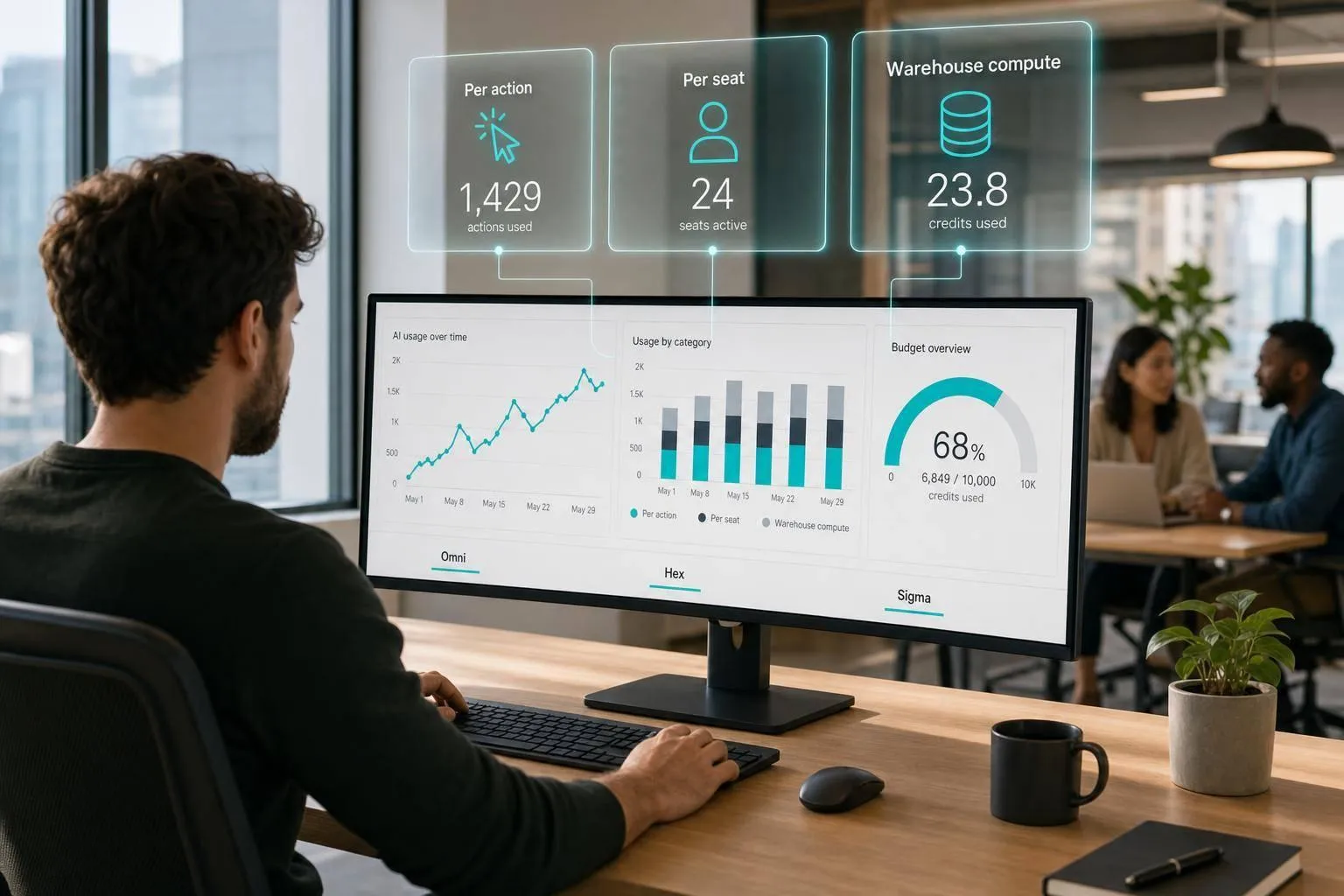
AI in BI tools is not one line item. From what I see in this comparison, your monthly cost usually comes from three places at once: seat fees, AI usage, and warehouse compute.
If you want the short answer, here it is:
- Omni tends to cost more as prompt volume grows because AI is tied to per-action credit use
- Hex is easier to estimate at first because AI is bundled into editor seats starting at $36/editor/month or $75/editor/month
- Sigma can be the hardest to forecast because much of the AI bill shows up in Snowflake, BigQuery, Databricks, or Redshift compute
- For heavy use, all three can get expensive - just in different ways
Put another way: if your team asks more questions, runs more follow-ups, or chooses AI-driven data exploration over manual SQL, the bill moves. The pricing page alone will not tell you enough. You also need a checklist for evaluating text-to-SQL models to understand how accuracy and governance impact these hidden costs.
What this article covers:
- How Omni meters AI actions and where overages show up
- How Hex bundles credits into seats, and why non-pooled credits matter
- How Sigma shifts much of AI cost into warehouse usage
- What monthly spend tends to look like for:
- small teams
- department-level teams
- heavy-usage teams
Quick Comparison
| Tool | Main AI billing model | Main cost driver | Best for cost planning when... | Main budget risk |
|---|---|---|---|---|
| Omni | AI credits per action | Prompt volume + warehouse queries | AI use is light and steady | Follow-up chains drain credits |
| Hex | Seat price with bundled credits | Editor count + overages + compute | Headcount is stable | Active users burn through credits fast |
| Sigma | Platform fee + warehouse AI/compute | Query volume, data size, warehouse activity | Warehouse usage is tightly watched | Compute spikes hit outside the BI bill |
A few numbers stand out right away:
- Hex Professional: $36/editor/month
- Hex Team: $75/editor/month
- Sigma with Snowflake Cortex Analyst: 67 Snowflake credits per 1,000 messages
- Department teams and heavy-use teams face the most budget pressure across all three tools
My takeaway is simple: budget by workflow, not by vendor label. If your team uses text-to-SQL, dashboard Q&A, notebook help, Threads, or agents every day, AI spend can climb well past the base subscription.
Omni: how AI credits are metered and where overages happen
Omni charges for AI in two parts: action-based credits and the warehouse compute used when generated SQL runs on Snowflake, BigQuery, Redshift, or Postgres [2][4]. That split matters. You’re not just paying for the AI step itself - you’re also paying when the query hits your warehouse.
How Omni meters AI credits
Omni uses a monthly AI credit allowance. Simple, single-turn text-to-SQL requests tend to use fewer credits, while multi-step workflows use more. Each follow-up in an investigation counts as another AI action, so credits can disappear faster than teams expect.
In practice, the type of workflow drives monthly spend more than almost anything else. A one-off query is easier to plan for. A back-and-forth analysis session is where credit use starts to pile up.
Which Omni workflows consume credits
Dashboard Q&A and repeated follow-ups use the most credits. Those flows often turn into a chain of prompts, and each step adds to usage. Single-turn text-to-SQL queries are usually easier to predict and tend to use fewer credits [2].
Omni monthly spend by team size
The cost pattern shifts as usage grows.
| Scenario | Team Size | Typical Analyst Behavior | Likely Spend Pressure | Budget Risk |
|---|---|---|---|---|
| Small analytics team | Small team | Occasional text-to-SQL and light Q&A | Mostly AI credits | Low |
| Department team | Department-sized team | Regular dashboard Q&A and iterative follow-ups | AI credits plus some warehouse compute | Medium |
| Heavy-usage team | Large, high-activity team | Daily multi-step investigations | AI credits and warehouse compute both rise | High |
For small teams, occasional use is usually easier to forecast. At the department level, regular Q&A and follow-up chains make spend less predictable. For heavy-usage teams running warehouse queries at scale, both cost layers can climb at the same time [2][4].
Once a team goes past the monthly allotment, overages start pushing the bill up. It makes sense to plan AI usage as its own budget line, separate from seat price.
Hex handles AI in a different way, bundling credits into editor seats instead of metering each action.
Hex: bundled AI credits across notebooks, Magic, and Threads
Hex rolls AI into per-seat monthly grants. On Professional, each editor gets Standard credits. On Team, each editor gets Extended credits. Once a user burns through that monthly grant, the team either buys add-on credits or pays overages. [3][1]
How Hex bundles AI credits by plan
At list price, Professional costs $36 per editor per month and includes the Notebook agent plus Standard credits. Team costs $75 per editor per month and adds Threads and the Semantic Model agent, along with Extended credits. [3][1]
One detail matters a lot here: credits aren’t pooled. So if one analyst leans hard on Hex AI, that person can hit the limit fast, even if everyone else on the team still has credits left sitting unused. [3]
Which Hex tasks use credits and compute
Hex AI spend tends to show up in a few day-to-day workflows. Hex Magic uses credits when it generates SQL or Python and when it helps debug code. The Notebook agent uses credits for notebook help. Threads uses credits for conversational analytics. [3][1]
But credits are only part of the bill. Paid plans come with Medium compute, while Large and GPU profiles are billed by the hour when notebooks run against Snowflake, BigQuery, Redshift, or Postgres. So if your team is running heavier notebooks and using agents at the same time, both AI credit charges and compute charges can stack up in the same month. [1]
Hex monthly spend by editor count
Professional tends to fit solo analysts. Team makes more sense for groups that want Threads and the Semantic Model agent. [3][1]
| Scenario | Editors | Plan | Est. Monthly Base | Key Cost Risks |
|---|---|---|---|---|
| Small team | 3–5 | Professional | $108–$180 | Per-seat grants can run out fast for active users |
| Department | 10–20 | Team | $750–$1,500 | Threads usage and per-seat overages can push spend higher |
| Heavy usage | 20+ | Team / Enterprise | $1,500+ | Advanced compute and AI overages can add to seat fees |
Sigma takes a different approach, combining platform credits with warehouse AI costs.
Sigma: platform credits, warehouse AI costs, and how they stack
Sigma takes a different route from per-action or per-seat credit models. Unlike Hex's bundled seat credits, Sigma puts most AI cost into warehouse compute. Its AI pricing is warehouse-native: AI runs on your Snowflake, BigQuery, Databricks, or Redshift compute, so the bill usually comes in two parts - Sigma's platform fee and warehouse usage.
How Sigma tracks usage and AI consumption
Sigma pricing is sales-led and custom-quoted. That makes early budgeting harder to pin down than a fixed per-seat model. AI usage also shows up in the warehouse bill instead of a separate AI meter.
Which Sigma workflows create BI and AI charges
Sigma's AI features include Ask Sigma and Sigma Agents for Q&A and multi-step workflows. Because these features run against live warehouse data, costs grow with query volume and data size, not just seat count. Live filters, drills, and group-bys also trigger warehouse queries, so active exploration adds to compute usage.
In Snowflake-centered deployments, Snowflake Cortex Analyst may be used alongside Sigma and is billed at 67 Snowflake credits per 1,000 messages [2].
Sigma monthly spend when warehouse AI is included
Because Sigma pricing is custom-quoted and warehouse costs vary by deployment, exact monthly spend depends on how heavily a team uses live exploration and AI-assisted workflows. A practical budgeting view looks like this:
| Scenario | Sigma Spend Components | Predictability | Main Cost Drivers |
|---|---|---|---|
| Small team (~10 users) | Custom platform fee + warehouse compute | Low | Initial custom quote + ad hoc query volume |
| Department (~100 users) | Custom platform fee + scaled warehouse compute | Moderate | User adoption of Sigma Agents and live drills |
| Heavy-usage org | Enterprise license + high warehouse AI/compute | Low | Data volume, row-level analysis, and Snowflake/BigQuery credits |
Sigma costs scale on two axes: the platform contract and warehouse usage. That means it's useful to compare Sigma's budget predictability against Omni and Hex by usage pattern. Next, compare which pricing model is easiest to budget across occasional, steady, and heavy AI use.
Side-by-side: which AI pricing model is easiest to budget
::: @figure 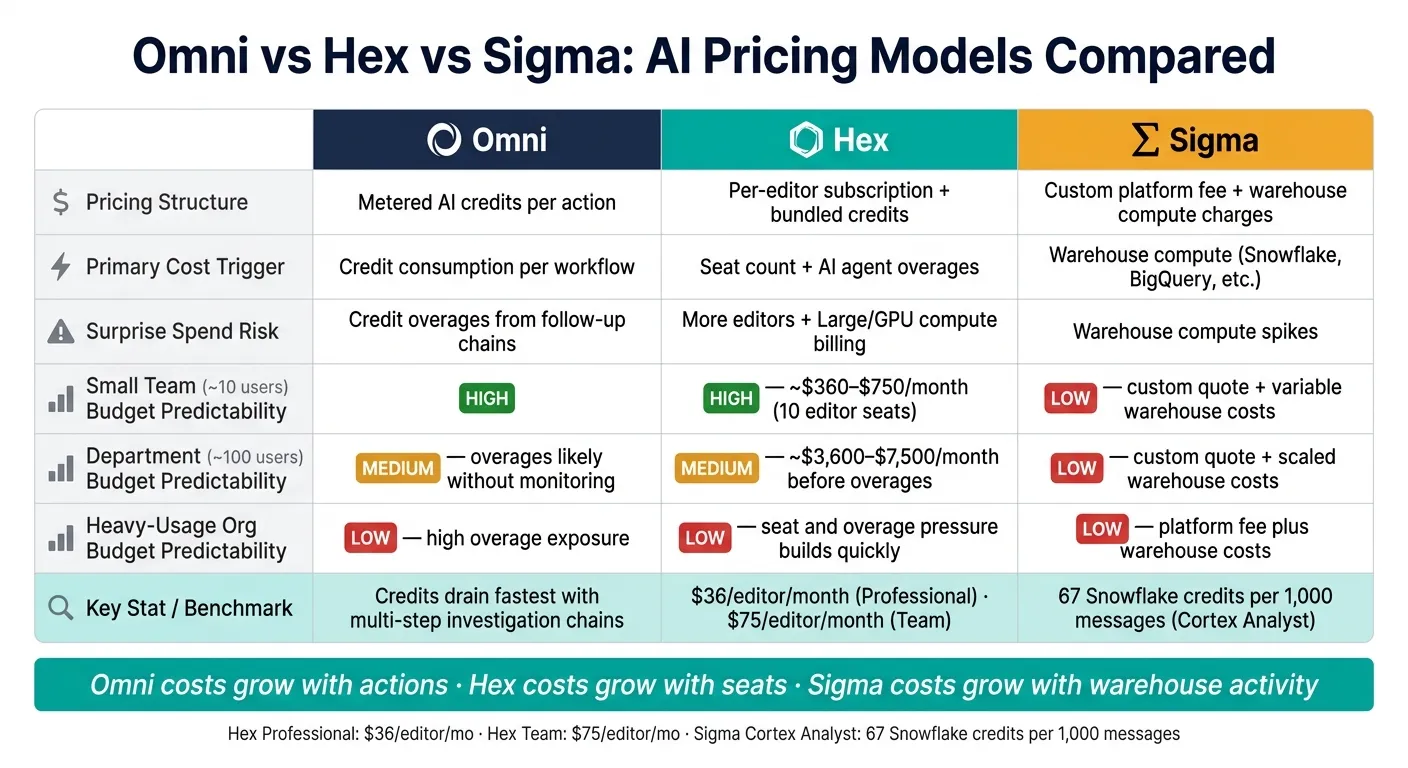 {Omni vs Hex vs Sigma: AI Pricing Models Compared}
:::
{Omni vs Hex vs Sigma: AI Pricing Models Compared}
:::
Comparison table: credit mechanics, cost drivers, and monthly spend by scenario
Omni uses a usage-based model. Hex uses seats. Sigma pushes much of the cost swing into warehouse compute.
That’s the part that matters when you’re building a budget. The question most teams care about isn’t just What does this cost? It’s: How easy is this to forecast month after month?
| Omni | Hex | Sigma | |
|---|---|---|---|
| Pricing structure | Metered AI credits per action | Per-editor subscription + bundled credits | Custom platform fee + warehouse compute charges |
| Primary cost trigger | Credit consumption per workflow | Seat count + AI agent overages | Warehouse compute (Snowflake, BigQuery, etc.) |
| Most predictable | Lowest when usage is light and stable | Fixed analyst headcount | Platform fee is predictable, but warehouse spend stays variable |
| Surprise spend risk | Credit overages | More editors and Large/GPU compute billing [1][3] | Warehouse spikes [2] |
| Small team (~10 users) | Budget predictability: high | Budget predictability: high - about $360–$750/month if 10 users are editors [1][3] | Budget predictability: low - custom quote + variable warehouse costs |
| Department (~100 users) | Budget predictability: medium - overages likely without monitoring | Budget predictability: medium - about $3,600–$7,500/month before overages [1][3] | Budget predictability: low - custom quote + scaled warehouse costs |
| Heavy-usage org | Budget predictability: low - high overage exposure | Budget predictability: low - seat and overage pressure builds quickly [1][3] | Budget predictability: low - platform fee plus warehouse costs |
Put simply, each vendor makes cost grow in a different way. Omni rises with actions, such as when you use AI to auto-generate SQL. Hex rises with seats and extra compute. Sigma may look calm at the platform level, but warehouse bills can move around more than teams expect.
The next step isn’t picking the one that looks cheapest in a pricing snapshot. It’s matching the pricing model to how often your analysts use AI and where that usage shows up.
Which model fits occasional, steady, or heavy AI usage
For occasional use, Hex Professional at $36/editor/month is the easiest way to keep costs contained if the team stays inside the bundled credit limits [1][3]. That works well for smaller groups that want a clear monthly number and don’t plan to lean on AI all day.
For steady notebook and agent workflows, Hex can still fit, but there’s a catch: teams need to watch compute profiles. Large and GPU options are billed hourly, so the base seat price doesn’t tell the whole story [1][3].
For heavy AI usage across broad self-serve analytics, none of these models stays easy to predict. They just get expensive in different ways:
- Hex overages can stack up fast [1][3]
- Omni credits can drain quickly at scale
- Sigma adds warehouse compute charges on top of existing Snowflake or BigQuery costs [2]
For data leaders, that’s the real budgeting lens. Do costs grow with headcount, prompt volume, or warehouse activity? That one distinction often tells you more than any pricing page.
Conclusion: budget for analyst workflows, not marketing labels
Budget for prompt volume, editor count, and warehouse load, not vendor labels. If usage is sporadic, fixed seats are the easiest to cap. If usage is open-ended and high-volume, warehouse-linked pricing is the hardest to forecast.
FAQs
::: faq
How should I estimate AI costs before rollout?
Don’t stop at seat prices. Look at the actual billing trigger: per seat, per question, compute time, warehouse query volume, or some mix of those.
You should also check whether AI is included in the base price or billed on its own. And ask if the vendor gives you hard caps to stop overages before they happen.
For a practical estimate, review usage limits, expected notebook or query activity, and the effect on your warehouse in Snowflake, BigQuery, or Redshift. It also helps to ask whether the generated SQL is inspectable, so you can keep a close eye on performance and cost. :::
::: faq
Which workflows drive the most AI overages?
In practice, the biggest AI overages usually come from multi-step causal investigations, scheduled agent tasks, and heavy compute work like GPU-backed notebook analysis.
A question like why revenue dipped can set off a chain of linked queries, so it costs more than simple Q&A. Recurring reconciliations or metric checks can also add spend quietly in the background. And complex notebook runs can push costs well past base seat licenses. :::
::: faq
What should I monitor each month to avoid surprises?
Monitor three things: usage caps, per-minute compute usage, and active seats.
Start with AI query limits. Some tools put a hard cap on how many AI requests you can run, and that can hit sooner than you'd expect.
Then look at advanced compute profiles. Large instances or GPU-based workloads can push costs up fast, especially if pricing is tied to per-minute compute use.
Also check seat counts and user roles. Pricing often climbs as headcount grows, and Enterprise viewer requirements can add to the bill too.
That’s why the headline seat price only tells part of the story. If you want a solid budget, you need to look at the full pricing setup. :::