Business Intelligence
Top AI-Powered Metabase Alternatives for Smarter BI
Compare six AI-powered Metabase alternatives that add natural-language queries, live data connections, semantic governance, and predictive analytics for teams.

Looking for smarter BI tools than Metabase? Here’s the deal: Metabase is a solid open-source option, but it lacks built-in AI capabilities, natural language querying, and struggles in fragmented data environments. If you want tools that are more user-friendly for non-technical teams and offer real-time insights, there are better options.
Key Takeaways:
- Metabase is great for basic reporting but falls short on AI, real-time data, and governance.
- Modern BI tools now feature AI-driven querying, live data connections, and governed analytics to simplify access and improve accuracy.
6 Alternatives to Metabase:
- Querio: AI turns plain English into SQL/Python queries; no per-seat pricing (free plan; Core $2,499/mo).
- Power BI with Copilot: AI for natural language querying and DAX formula generation; starts at $5,000/month.
- ThoughtSpot Sage: Search-focused analytics with predictive features; pricing varies.
- Tableau Agent: Conversational AI for visualizations; requires Tableau+ subscription.
- Qlik Sense: Flexible data discovery with predictive analytics; steeper learning curve.
- Oracle Analytics Cloud: One-click predictive tools, 35+ connectors; starts at $162.30/month.
Quick Comparison:
| Platform | AI Querying Features | Pricing | Key Limitation |
|---|---|---|---|
| Querio | English-to-SQL/Python | Free plan; Core $2,499/mo | Needs existing data warehouse |
| Power BI Copilot | Natural language + DAX | $5,000/month+ | Requires high-tier capacity |
| ThoughtSpot Sage | Search-based analytics | Custom pricing | Limited BYOK for AI models |
| Tableau Agent | Conversational insights | Requires Tableau+ | Lacks transparency in reasoning |
| Qlik Sense | Associative engine | Varies | Steeper learning curve |
| Oracle Analytics | Predictive tools, AI chat | $162.30/month+ | Higher cost for smaller teams |
Bottom Line: Choose based on your team's skills, data infrastructure, and budget. Tools like Querio simplify querying for non-technical users, while Power BI and Oracle Analytics are better for enterprise needs. Test free trials before committing.
::: @figure 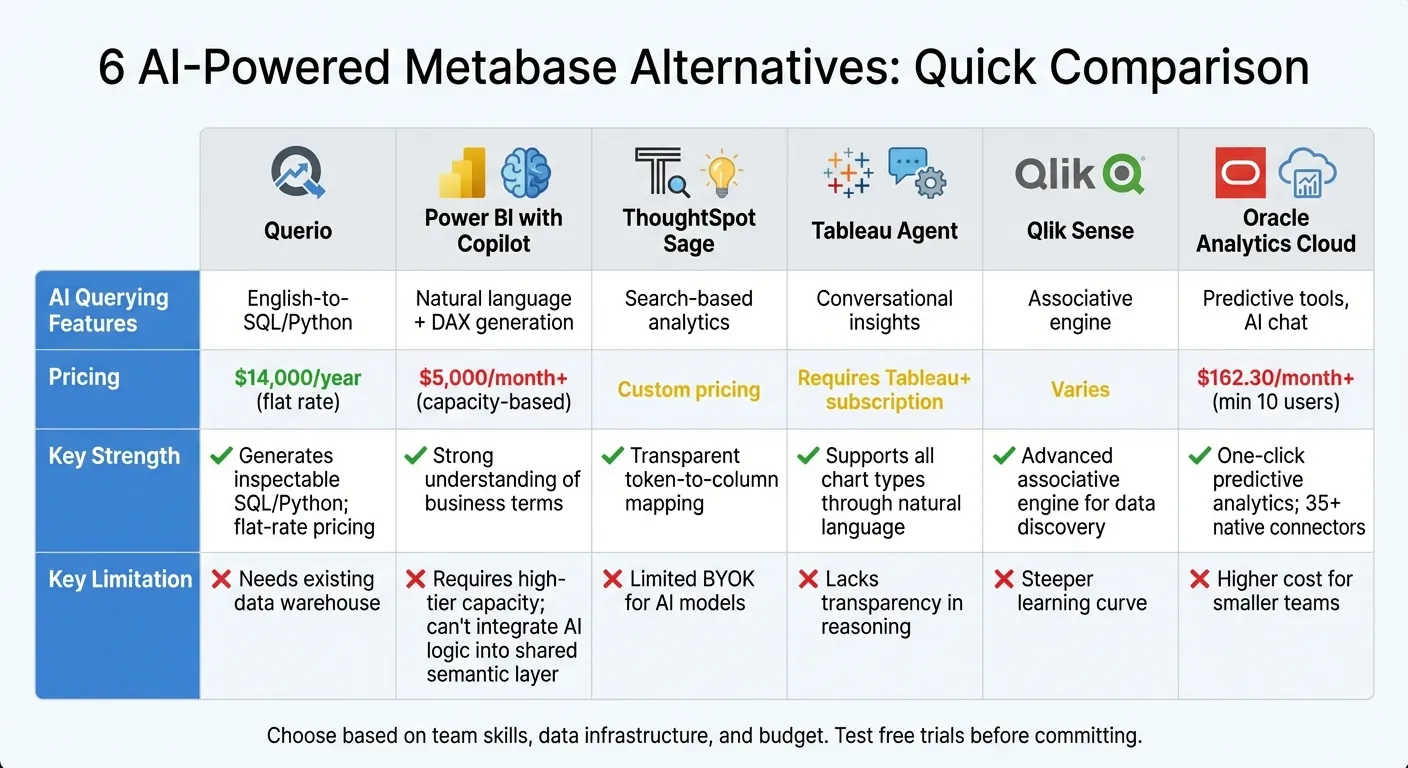 {AI-Powered BI Tools Comparison: Features, Pricing, and Limitations}
:::
{AI-Powered BI Tools Comparison: Features, Pricing, and Limitations}
:::
Tableau AI vs Power BI: The Ultimate AI Battle! 🔥 2025?
::: @iframe https://www.youtube.com/embed/figWtb4OMVY :::
1. Querio
Querio is reshaping business intelligence (BI) by removing technical hurdles and delivering real-time insights with ease.
AI-Driven Querying
With Querio, you can turn plain English questions into precise SQL or Python code. Simply ask your question, and the platform generates inspectable, executable queries tailored to your live data warehouse. This means you’re not working with outdated exports - your answers reflect the latest business conditions.
These capabilities are seamlessly paired with strong data warehouse connections, ensuring a smooth and reliable experience.
Data Warehouse Integration
Querio integrates directly with platforms like Snowflake, BigQuery, and Postgres using encrypted, read-only credentials. There’s no need to copy or move data - queries are run directly against your live data warehouse, providing up-to-date insights while eliminating the need for ETL pipelines.
The platform also features a semantic layer in business intelligence, allowing data teams to define joins and business logic once and apply them consistently across all queries. This makes it easier to analyze data from multiple sources without redundancy or inconsistency.
Governance and Security
Querio is built with security and compliance in mind, meeting standards like SOC 2 Type II, HIPAA, GDPR, and CCPA [2]. This makes it a great fit for industries where data integrity is critical. Its shared context layer ensures that everyone in your organization uses the same approved metrics. For example, when someone asks about "revenue", they get the exact calculation validated by your finance team - not a guess or improvised formula. This balance of governance and accessibility empowers users to explore data confidently while maintaining consistency.
Pricing Transparency
Querio offers a straightforward pricing model: a free plan and Core at $2,499 a month (or $25,000 a year billed annually), with unlimited users on every plan. Unlike competitors that charge per user or require expensive high-capacity plans, Querio has no per-seat pricing, and included AI credits plus spending caps make budgeting simple and encourage widespread use of analytics across your team.
2. Power BI with Copilot
Power BI with Copilot highlights the growing trend of integrating AI into business intelligence, enhancing the way we approach advanced analytics platforms.
With Copilot, Microsoft brings its AI expertise directly into Power BI, allowing users to ask questions in plain language and instantly receive visualized answers - no need to wrestle with complex dashboards. If the existing visuals don’t quite cut it, Copilot creates new ones based on the underlying semantic model. This AI-driven approach redefines traditional BI, setting a high standard for comparison with other leading tools. This is particularly evident when evaluating AI-powered analytics platforms for teams that prioritize natural language interfaces.
AI-Driven Querying
Copilot’s querying features take analysis to the next level.
By tapping into your semantic model and metadata, it generates queries aligned with your business needs. For more technical users, Copilot simplifies advanced calculations by generating, explaining, and validating DAX formulas. This makes even complex calculations more accessible [4]. Plus, responses are cached for 24 hours, ensuring quick results for repeated queries as long as the data model hasn’t changed [3].
Data Warehouse Integration
Copilot seamlessly integrates with the Microsoft Fabric ecosystem, supporting workloads across Data Engineering, Data Science, and Data Warehousing [3]. It also respects existing workspace roles, item permissions, and Row-Level Security (RLS), ensuring data security and compliance [5][6].
Governance and Security
Microsoft takes data security seriously with Copilot. Your business data is kept separate from the training of large language models and is hosted securely on Azure OpenAI. For U.S.-based tenants, data processing remains within the U.S. compliance boundary by default. Administrators have full control, managing Copilot at the tenant level and enabling or disabling access for specific security groups. Additionally, prompts and grounding data are cached for 48 hours in the tenant's home region to support auditing needs.
Pricing Transparency
To use Copilot, you’ll need a Fabric capacity of F2 or higher, or a Power BI Premium capacity of P1 or higher. Usage is billed in token-based increments, with dedicated capacity starting at around $5,000 per month [3][5][7].
3. ThoughtSpot Sage
ThoughtSpot Sage stands out among AI-powered BI tools by making data analytics accessible through natural language queries. With Sage, users can ask questions in plain English and receive instant insights - no technical expertise required. By simplifying analytics, it helps organizations turn data into actionable decisions.
AI-Driven Querying
Sage takes a search-focused approach to data analysis. Users simply type their questions, and the AI understands their intent, crafts the necessary queries, and generates visualizations automatically. For advanced users, the Spotter 3 Agent can execute Python code, opening the door to complex modeling without needing a data science background.
Predictive Analytics Features
The SpotIQ ML engine goes beyond basic analysis by forecasting trends, identifying anomalies, and uncovering key drivers behind metrics. These features enable teams to plan ahead and quickly diagnose issues when they arise.
Data Warehouse Integration
Sage seamlessly connects with modern cloud data warehouses, but its most advanced AI features - like SpotIQ Auto Analyze, Monitor & Anomaly Detection, and ThoughtSpot Sync - are exclusive to ThoughtSpot Cloud. The on-premise software version offers fewer capabilities compared to the cloud-based deployment.
Pricing Transparency
ThoughtSpot doesn’t provide detailed pricing on its website. Instead, they offer custom quotes tailored to factors like data volume, number of users, and deployment needs. Businesses should anticipate enterprise-level pricing that adjusts based on the features and usage required.
4. Tableau Agent
Tableau Agent introduces conversational AI data analyst capabilities into the world of data analysis, making it easier to explore information using natural language instead of complex technical queries. Simply type your question in plain English, and the AI translates it into visualizations or calculations on the spot. This means you don't need to know SQL or have advanced technical expertise. By integrating AI, Tableau Agent makes data exploration accessible to everyone, whether you're a seasoned analyst or just starting out.
AI-Driven Querying
With features like the Concierge skill, Tableau Agent can pinpoint the root causes behind data trends and suggest the most relevant visualizations. Meanwhile, Tableau Pulse keeps you informed by delivering personalized metrics and natural-language KPI summaries directly through tools like Slack or Microsoft Teams [8][11][13]. If you ask about changes in a metric, the AI helps clarify your request and provides detailed insights.
For tasks like data preparation, Tableau Agent goes a step further by creating multi-step transformation plans, generating calculations instantly, and even pivoting tables when needed - all with just a few commands [8][11]. Instead of navigating dashboards, you can receive conversational summaries of key performance indicators, making data exploration faster and more intuitive [8][13].
As Southard Jones, Chief Product Officer at Tableau, puts it:
"AI in Tableau is not just a single feature - it's seamlessly integrated across the entire analytics experience" [12].
Data Warehouse Integration
Tableau works seamlessly with major data warehouses like Snowflake, Google BigQuery, and Amazon Redshift, enabling live querying without the hassle of scheduled refreshes. The VizQL Data Service allows AI agents to directly access published data sources in your warehouse, while the Model Context Protocol (MCP) acts as a universal connector, linking any AI model to Tableau's analytical engine [12]. This ensures the AI’s responses align with your organization’s semantic layer, including metrics, joins, and business logic, maintaining consistency and accuracy.
Governance and Security
All AI features in Tableau operate on the Einstein Trust Layer, ensuring customer data is secure and never stored by external language model providers. Organizations can run AI within their own network boundaries and even use their own language models, giving them full control over data residency [9][10][12]. Tableau also enforces existing permission structures, so users only access data they're authorized to see.
Pricing Transparency
Tableau Agent's pricing model is straightforward. Certain AI features, like assisted visualization authoring in Tableau Desktop, require a Tableau+ subscription and a connection to Tableau Cloud [10]. For those interested, Tableau offers a free trial to test these AI capabilities before committing [8][9]. AI features can be enabled through site settings in Tableau Cloud or Server [10].
sbb-itb-284a532
5. Qlik Sense
Qlik Sense takes a unique approach to data exploration with its Associative Engine. This feature allows users to explore data freely, without being confined to predefined query paths. Unlike traditional BI tools that rely on fixed joins, Qlik keeps the entire context of your data intact, making it easier to uncover unexpected connections. This approach aligns with the goal of giving teams more flexibility and agility in their data analysis. The Insight Advisor, an AI-powered assistant, complements this by turning natural language queries into visualizations and recommending charts based on data trends.
Predictive Analytics Features
With Qlik AutoML, even users without coding experience can create classification, regression, and time-series models through guided workflows. It features SHAP-based visualizations that explain the reasoning behind AI recommendations, helping build confidence in the results. Additionally, it supports what-if scenarios, enabling businesses to simulate conditions and assess potential strategies.
Qlik’s Intelligent Alerting system goes beyond monitoring specific charts - it keeps an eye on your entire data environment. It automates workflows when changes are detected and updates models automatically with new inputs and feedback, removing the need for manual retraining. These predictive tools are built on a solid governance framework to ensure reliability and compliance.
Governance and Security
Qlik Sense doesn’t just excel in analytics - it also prioritizes data integrity with strong governance features. Phil Gould, Head of Analytics at Zurich Australia, highlighted this by saying:
"Transparency leads to governance, which leads to trust. [Qlik is] ticking all of the boxes for me." [14]
A striking example of Qlik's enterprise capability comes from Bank of America, which used the platform to build an automated data ecosystem for regulatory testing. This innovation slashed test development time from 1,700 hours to just 1 hour - a staggering 99.94% reduction in manual effort [14]. Qlik also includes built-in tools for tracking model lifecycles and generating automated documentation, ensuring compliance and transparency throughout AI-driven workflows. By combining predictive analytics with robust governance, Qlik Sense emerges as a powerful choice for AI-driven business intelligence.
6. Oracle Analytics Cloud
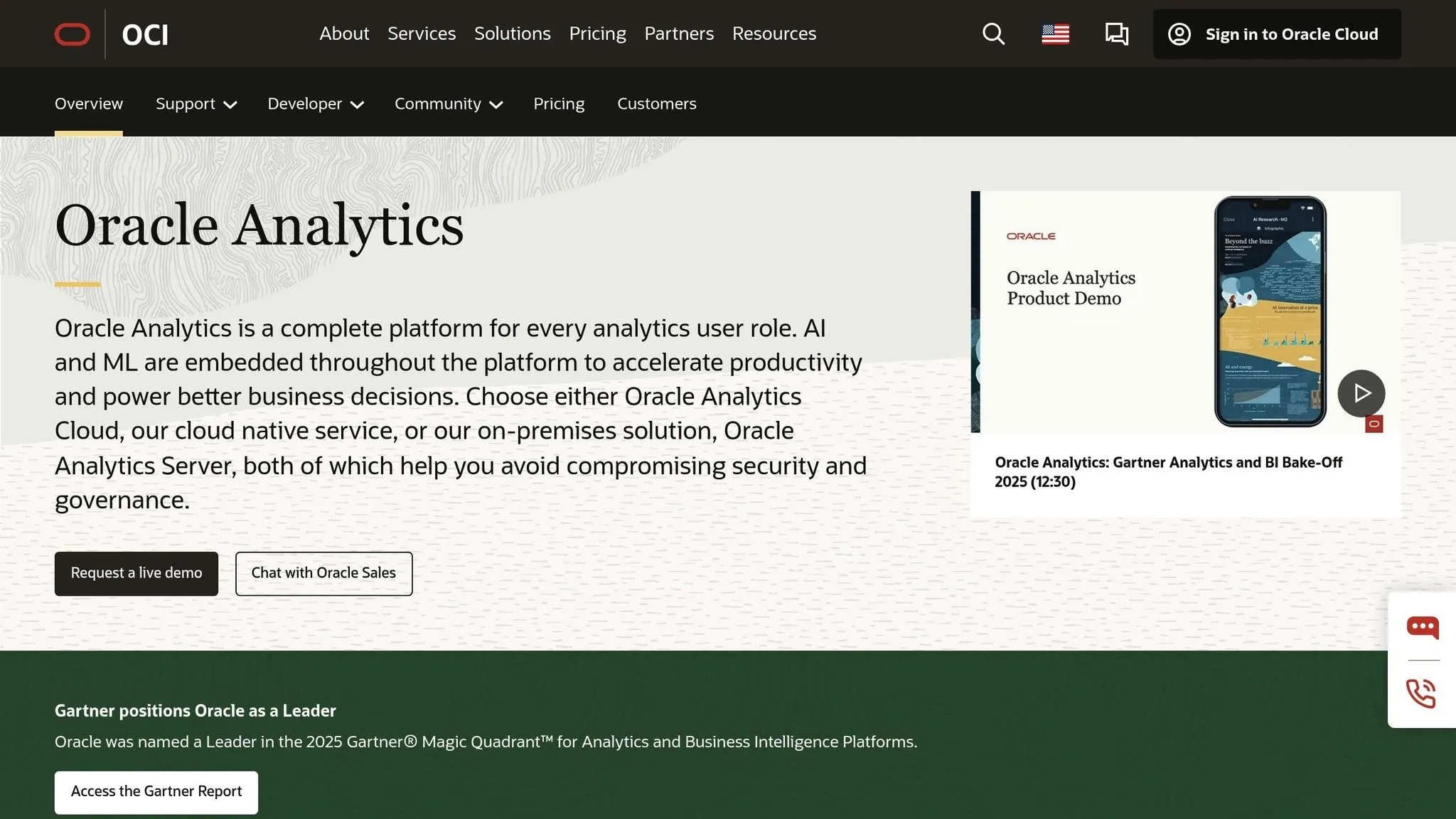
Oracle Analytics Cloud introduced its AI Assistant on November 26, 2025, bringing conversational AI capabilities to the platform [15]. This tool uses large language models to create visualizations by responding to simple queries like "Show me sales" or "Profits by city" [16]. It supports natural language interaction in seven languages, including English, German, French, Italian, Portuguese, Spanish, and Thai, while its mobile app expands support to 28 languages [23,25]. By grounding user queries in a semantic model, Oracle translates complex database structures into business-friendly terms, making analytics more accessible [24,25]. These features pave the way for advanced predictive analytics.
Predictive Analytics Features
Oracle Analytics Cloud simplifies predictive analytics with one-click tools that generate forecasts, trend lines, and clusters - no coding required [19]. The Explain feature leverages machine learning to analyze datasets, identifying key business drivers and anomalies, while Auto Insights reveals hidden patterns and creates detailed visualizations [28,29]. For teams needing tailored solutions, the data flow editor enables analysts to build, fine-tune, and deploy custom models. These include numeric predictions, multi-classifiers, binary classifiers, and clustering models, which can be applied to new datasets [19]. The platform also integrates with OCI Vision for tasks like monitoring parking lot occupancy and OCI Document Understanding for extracting data from invoices or PDFs [28,29].
Data Warehouse Integration
Oracle Analytics Cloud seamlessly connects with Oracle Autonomous AI Lakehouse and Oracle Database 26ai, enabling in-database machine learning with minimal data movement and robust security [26,27]. It supports over 35 native connectors for Oracle and non-Oracle data sources, as well as a JDBC connector for legacy systems [17]. In 2025, Clopay Garage Doors utilized these integrations to manage millions of unique SKUs, replacing manual spreadsheet analysis with AI-driven insights that predicted dealer churn and highlighted emerging market trends [18].
Governance and Security
The platform ensures consistency and security with its shared semantic model, which standardizes data definitions across users, and fine-grained controls that limit access to authorized personnel [20]. It also supports federated identity management for single sign-on and includes built-in tools to track content usage. A Director of Enterprise Data Services in the government sector described Oracle Analytics Cloud as offering "the best of both worlds in governed and ungoverned data" [20]. The AI Assistant is powered by an embedded language model specifically optimized for analytics to minimize errors, and Oracle ensures customer data is not used to train its foundation models. All AI operations occur within Oracle's secure Cloud Infrastructure [16].
Pricing Transparency
Oracle Analytics Cloud Professional Edition starts at $162.30 per month for at least ten users, with flexible pricing options based on OCPU consumption or a per-user model [20]. Existing Oracle Business Intelligence customers can reduce costs through the Bring Your Own License (BYOL) program [20]. In recognition of its capabilities, Oracle was named a Leader in the 2025 Gartner Magic Quadrant for Analytics and Business Intelligence Platforms and the IDC MarketScape for Worldwide BI and Analytics Platforms [20].
Strengths and Weaknesses
After analyzing the main features and limitations of each platform, here’s a breakdown of their strengths and weaknesses.
Power BI with Copilot shines in its ability to create reports and generate DAX formulas through chat-based interactions. It also demonstrates a solid understanding of business concepts like "trends" and "drivers" [1]. However, it requires high-tier organizational capacity (Fabric F2+ or Premium P1+) [3][1] and does not allow AI-generated logic to be integrated into a shared semantic layer [1].
ThoughtSpot Sage stands out for its natural language search and transparency, as it maps user queries directly to specific data columns [1]. On the downside, it does not support "Bring Your Own Key" (BYOK) for large language models, and temporary AI-generated metrics cannot be promoted to a governed semantic layer [1].
Tableau Agent excels at generating a wide variety of chart types - bar, line, map, and more - based on natural language inputs. It also supports all chart types within its worksheets [1]. However, it lacks transparency in showing the intermediate reasoning that leads to its visualizations, leaving users without insight into how the final outputs are derived [1].
Qlik Sense offers a powerful associative engine for data discovery, enabling users to explore data relationships effectively. That said, it comes with a steeper learning curve, which might be challenging for those new to the platform.
Oracle Analytics Cloud is known for its one-click predictive analytics, extensive connectivity (with over 35 native connectors) [17][19], and robust enterprise-grade security. It was recognized as a Leader in the 2025 Gartner Magic Quadrant for Analytics and Business Intelligence Platforms, and its AI Assistant supports natural language interaction in seven languages [16]. However, these features often come with a higher upfront cost and require more technical expertise, making it a less accessible option for smaller teams.
Here’s a quick comparison of the platforms:
| Platform | Key Strength | Key Weakness |
|---|---|---|
| Querio | Generates inspectable SQL/Python; no per-seat pricing | Requires existing data warehouse connection |
| Power BI with Copilot | Strong understanding of business terms [1] | Cannot integrate AI logic into shared semantic layer [1] |
| ThoughtSpot Sage | Transparent token-to-column mapping [1] | No BYOK support for LLMs [1] |
| Tableau Agent | Supports all chart types through natural language [1] | Lacks transparency in intermediate reasoning [1] |
| Qlik Sense | Advanced associative engine for data discovery | Steeper learning curve |
| Oracle Analytics Cloud | One-click predictive analytics; 35+ native connectors [17][19] | Higher cost for smaller teams |
This summary provides a clear view of each platform's strengths and limitations, helping you narrow down the natural language data querying tools for your organization.
Conclusion
When choosing an AI-powered BI platform, it's crucial to align your selection with your team's skillset, existing data infrastructure, and governance priorities.
For teams without technical expertise, tools like Querio simplify the process by translating plain language into executable SQL and Python. This shift toward AI-driven self-serve analytics allows non-technical users to generate insights without waiting on data teams. Additionally, make sure the platform integrates seamlessly with your data warehouse. Look for secure, live connections to major warehouses such as Snowflake, BigQuery, and Postgres. A compelling example comes from Siemens Energy, where a Snowflake-based chatbot delivered near-instant insights to 25 R&D engineers, processing over 700,000 pages of documents. Tim Kessler, Head of Data, Models & Analytics at Siemens Energy, shared:
"This chatbot … has been a game changer for Siemens Energy. The ability to unlock and democratize the data hidden in our data treasure trove has given us a distinct competitive edge" [21].
For organizations where governance is a top priority, focus on platforms that offer governance-first AI access and a strong semantic layer [22]. These features allow AI insights to integrate directly into your semantic layer, elevating enterprise tools above basic query solutions.
Before committing to an enterprise license, take advantage of free or startup tiers to test AI functionality with your data warehouse and governance requirements. By ensuring technical simplicity, secure integration, and strong governance features, your team can harness AI to make smarter, faster business decisions.
FAQs
::: faq
What AI-powered features make these Metabase alternatives smarter for business intelligence?
AI-powered alternatives to Metabase bring a fresh approach to data exploration, making it easier for teams to access and understand their data. Many of these platforms let users ask questions in plain English, automatically converting them into optimized SQL queries. This bridges the gap for non-technical users, giving them the ability to work with data without needing deep technical expertise. By using natural language processing (NLP), these tools also support conversational analytics, delivering quick and context-aware insights.
On top of that, features like predictive modeling, trend forecasting, and anomaly detection take raw data and turn it into actionable insights with minimal effort. Many platforms also include AI-driven governance tools, such as automated data cataloging and permission-aware query generation, ensuring both compliance and security while keeping workflows efficient. Altogether, these capabilities help teams make informed decisions faster and with greater confidence. :::
::: faq
What pricing models do AI-powered BI tools use, and how can I plan my budget effectively?
AI-powered BI tools generally come with three main pricing approaches: per-user subscriptions, flat-fee enterprise licenses, and usage-based pricing. Per-user subscriptions are widely used, offering monthly or annual rates that can add up quickly as your team grows. Flat-fee licenses, on the other hand, provide steady, predictable costs for consistent usage. Usage-based pricing is a flexible option, especially if your workloads tend to fluctuate.
When planning your budget, think about your team size, how you'll deploy the tool, and any additional costs - like onboarding, training, or accessing advanced features. For organizations experiencing rapid growth, it’s wise to explore subscription plans that allow for expansion without drastically increasing costs. Choose a pricing model that fits your current needs while leaving room for future growth to get the most value. :::
::: faq
What security and governance features should I prioritize in AI-powered BI tools?
When assessing AI-powered BI tools, it's essential to focus on features that safeguard data and uphold governance standards. Here are some critical areas to consider:
-
Access controls: The tool should include role-based permissions, single sign-on (SSO), and multi-factor authentication (MFA) to manage access and protect user credentials. Row-level security is another must-have, ensuring that only authorized users can view specific data.
-
Data protection: Prioritize tools with end-to-end encryption - covering both data in transit and at rest - and compliance with recognized standards like SOC 2, ISO 27001, or GDPR. Features like activity logs and auditing capabilities are invaluable for tracking who accessed data and when, promoting transparency and accountability.
-
Governance and consistency: A strong governance layer is crucial for standardizing metrics, business definitions, and data relationships, minimizing inconsistencies. Tools that offer data lineage tracking and enforce policies, such as data masking or retention rules, help maintain control and accuracy throughout the organization.
By selecting a platform with these features, you can protect sensitive information while leveraging AI-driven insights to make smarter, more informed decisions. :::