Business Intelligence
7 Mode Analytics Alternatives After the ThoughtSpot Acquisition
Compare seven Mode replacements by governance, notebooks, AI, live warehouse access, and migration effort.

If you’re rethinking Mode after the ThoughtSpot deal, the short list is clear: Querio, Hex, Looker, Metabase, ThoughtSpot, Deepnote, and Omni. I’d sort them by one question: what do you need next? If you want SQL-first notebooks, look at Querio, Hex, or Deepnote. If you need tighter metric control, look at Looker or Omni. If your goal is easy self-serve BI, start with Metabase or ThoughtSpot.
I’d compare them on six points: price, semantic layer support, live warehouse access, notebook depth, governance, and AI. That matters because a tool can look good in a demo and still create cleanup work later if your metrics live in too many places. Before switching, I’d keep KPI logic in dbt or another shared model so your team doesn’t rebuild the same numbers twice.
Here’s the fast takeaway:
- Querio: SQL-first, notebook-based, governed self-serve, live warehouse access
- Hex: strong for analyst notebooks and interactive apps
- Looker: best when metric control matters more than analyst freedom
- Metabase: low-cost self-serve dashboards for smaller teams
- ThoughtSpot: search-led BI for business users and execs
- Deepnote: closest fit for shared SQL/Python notebook work
- Omni: SQL-first BI with governed metrics for dbt-heavy teams
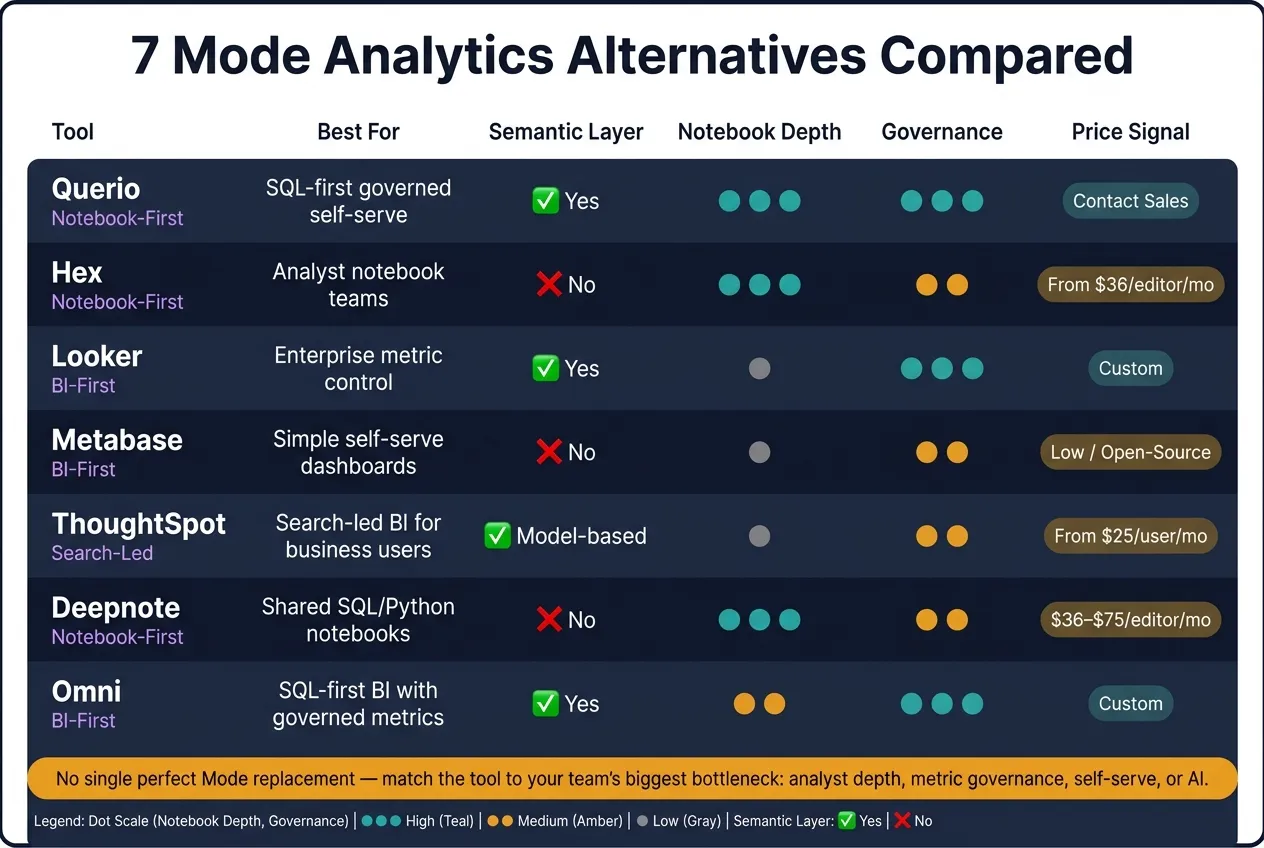
Quick Comparison
| Tool | Best For | Semantic Layer | Live Warehouse | Notebook Depth | Governance | AI | Price Signal |
|---|---|---|---|---|---|---|---|
| Querio | SQL-first teams that want notebooks + self-serve | Yes | Yes | High | High | Inspectable SQL/Python | Free plan; Core $2,499/month |
| Hex | Analyst-heavy notebook teams | No | Yes | High | Medium | SQL/Python help | From $36/editor/month |
| Looker | Enterprise metric control | Yes | Yes | Low | High | Gemini on LookML | Custom |
| Metabase | Simple self-serve dashboards | No | Yes | Low | Medium-low | Query-visible AI answers | Low-cost / open-source path |
| ThoughtSpot | Search-led BI for business users | Model-based search layer | Yes | Low | Medium-high | NLQ, forecasting, reasoning | From $25/user/month |
| Deepnote | Shared SQL/Python notebooks | No | Yes | High | Medium-low | Text-to-SQL | $36–$75/editor/month |
| Omni | SQL-first BI with governed metrics | Yes | Yes | Medium | High | Present, but BI-led | Custom |
My read: there isn’t one perfect Mode replacement. The right pick depends on whether your team is blocked by analyst workload, metric drift, dashboard needs, or AI workflow. That’s the frame I’d use before any migration.
1. Querio
Querio is git-native analytics for data teams and their AI agents. It's a strong fit for teams moving off Mode when they still want SQL-first analysis, notebooks, dashboards, and governed self-serve on live warehouse data. People can start questions in the app, Slack, or Claude and ChatGPT through MCP, and the agent sends back inspectable SQL and Python inside a reactive notebook.
Workflow Fit
Querio keeps SQL and Python at the core, but it also opens the door for business users through Slack, and Claude and ChatGPT via MCP. Analysts can work in a reactive notebook where charts update on their own when SQL changes. At the same time, business users can get answers that still rely on the same governed logic.
For Mode teams, this makes Querio a good match when the goal is to keep SQL-centric analysis while giving non-technical users a governed way to self-serve. It works well for data teams that already run on a real warehouse and are getting swamped with ad hoc requests. That setup helps when analysts need reusable notebook logic, but business users still need a safe way to ask one-off questions.
That kind of workflow falls apart fast if metric logic drifts. Querio's governance model is built to stop that drift.
Governance Model
Querio stores context, metric definitions and saved queries as plain files in a GitHub repo your team owns, and they can live in the same repo as dbt. The agent can propose updates, but saving context opens a pull request, and the repo's own reviewers decide what merges. That keeps metric definitions aligned across the app, Slack, and dashboards.
Dashboards can be marked as trusted, experimental, or team, and promoting one opens a pull request too. Role-based access control applies across the app, including MCP, so agent queries follow each user’s permissions.
The next piece is whether Querio keeps data live in the warehouse.
Warehouse Compatibility
Querio connects live, with no extracts or CSV exports, to Snowflake, BigQuery, Redshift, ClickHouse, Postgres, and MySQL. It also delivers results through Slack, browser dashboards, MCP, and scheduled automations to email or Slack.
When the source of truth stays live, the notebook layer becomes the place to inspect, check, and explain the analysis.
AI and Notebooks
The AI agent writes inspectable SQL and Python for every answer. Notebooks run in a sandbox with no internet access, and every query and agent action is logged. For teams that need reliable and auditable analysis, that matters more than a polished chat response.
2. Hex
Hex is a notebook platform built for analyst-heavy teams moving off Mode. If your team spends most of its time in SQL and Python and wants a polished way to share analysis with stakeholders, Hex is worth a look.
Workflow Fit
Hex offers a polished notebook experience for SQL and Python analysts. The big difference from Mode is how sharing works: Hex notebooks can be published as interactive apps, so analysts turn their work into live data applications instead of static dashboards [3].
That changes the handoff quite a bit. Instead of sending over a fixed report, teams can ship something stakeholders can click through and explore on their own. For analyst-led teams, that's a strong match.
Hex is built for analysts, not non-technical self-serve users. That setup tends to work best when metric definitions are managed somewhere else.
Governance Model
Hex does not include a centralized semantic layer, so teams need to standardize metrics in dbt or another shared layer. For teams coming from Mode, that can mean rebuilding metric logic outside the notebook. If that work gets skipped, migration can get messy fast.
The next thing to look at is whether those notebooks stay live on your warehouse.
Warehouse Compatibility
Hex connects live to Snowflake, BigQuery, Databricks, and Redshift [5][3].
AI and Notebooks
Hex includes AI features that help analysts generate and refine SQL and Python inside notebooks [5][6]. Professional starts at $36 per editor per month, and the free tier is limited [5].
The biggest shift in a move from Mode is the workflow itself: teams go from Mode reports to interactive notebooks and apps [1]. If you need broader BI governance or executive reporting, the next options move away from notebook-first workflows.
3. Looker
Looker makes sense when your company needs tight governance and the same metrics across teams. It comes at the problem from a very different angle than Mode. Mode is more flexible and code-first. Looker is model-first, with LookML at the center.
That difference matters. If your Mode team cares more about governed reporting and shared metrics than notebook-style analysis, Looker is the clearest enterprise path. And if you're moving off Mode because leadership wants stronger reporting controls, Looker is the most model-driven option in this group.
Workflow Fit
Looker is built for governed self-service, so it tends to work better for business users who need steady dashboards and consistent answers than Mode's analyst-heavy setup [1]. That's a big deal when finance, RevOps, and leadership all need to see the same numbers.
The tradeoff is less SQL freedom. Teams used to Mode's open-ended workflow often find Looker rigid [1]. Put simply, Looker gives up free-form SQL in exchange for upfront LookML modeling.
Governance Model
This is where Looker pulls ahead. LookML puts metrics into the model itself, so teams query the same governed definitions [4]. If consistency and control sit high on your list, that's a strong point in Looker's favor.
The catch is migration effort. Moving from Mode usually means rebuilding queries and Datasets as LookML models [1]. This isn't a lift-and-shift move. It's a modeling project.
Warehouse Compatibility
Looker connects live to:
- Snowflake
- BigQuery
- Redshift
- Postgres
That makes it a strong match for teams already standardized on one of those warehouses, especially BigQuery [4].
AI and Notebooks
Looker uses Gemini for plain-English questions on top of LookML [4]. In practice, the quality of those answers depends on how well your LookML models are built. If the semantic layer is shaky, the AI output will be shaky too. So it's smart to stabilize that layer before leaning hard on AI features.
If your analysts use Python or R in Mode today, you'll need to move those workflows into an external setup or into Looker's BI workflows [1].
Looker is enterprise-priced, while Looker Studio is available at no cost for smaller teams [4]. If you want something with less modeling work upfront, the next option is easier to adopt.
4. Metabase
Metabase takes a more self-serve BI path than Mode. Mode leans on SQL, Python, and R notebooks for analyst work. Metabase, by contrast, is one of several open source self service BI tools built more for non-technical users. If your main goal is routine reporting, Metabase is a solid pick. For Mode teams that want fewer repeat analyst requests without moving out of the warehouse, Metabase is one of the clearest self-serve choices [1].
Workflow Fit
Metabase lets business users build charts and dashboards without writing SQL. That makes it a good fit for finance, marketing, and operations teams that need fast answers.
The tradeoff is depth. Metabase does not replace Python or R notebook workflows for statistical modeling or more advanced transformations. You get speed, but with less control over shared metrics.
Governance Model
Metabase does not have a central semantic layer, so metric consistency depends on how carefully people build questions and dashboards. At scale, governance is more limited, which can lead to inconsistent dashboards and metric drift as usage grows [1].
For warehouse-native teams, that gap matters even more when answers stay live.
Warehouse Compatibility
Metabase connects live to Snowflake, BigQuery, Redshift, and Postgres [1].
AI and Notebooks
Metabase includes AI answers that show the underlying query, which gives teams more visibility into AI-generated results. It does not include a deep notebook environment, so analysts who need SQL and Python in one workflow will need another tool [1].
Migration note: Moving from Mode means exporting SQL, rebuilding dashboards and governed datasets in Metabase, and shifting notebook work to another platform. That makes Metabase strongest for self-serve reporting, not analyst notebooks.
5. ThoughtSpot
ThoughtSpot is the best fit here for teams that care more about executive reporting and business-user self-serve than SQL, Python, or R notebooks.
Workflow Fit
ThoughtSpot works best for executive reporting and business-user self-serve. It can cut down on repeat ad hoc questions that usually land on analysts' desks.
The tradeoff is pretty clear: it's less suited to analyst-led work that depends on SQL, Python, or R notebooks. Setup also takes more modeling, because reliable search depends on clean data mapping. If you're moving from Mode, you'll usually need to rebuild notebook workflows as Liveboards and search models.
Governance Model
SpotterModel uses synonyms and relationships to ground natural-language queries in governed definitions [2][4]. In practice, that means teams coming from Mode will often need to rebuild SQL and Python workflows in Liveboards and search models.
Warehouse Compatibility
Like the other warehouse-native tools in this list, ThoughtSpot connects live to Snowflake, BigQuery, Redshift, Databricks, and Postgres without requiring data extracts [3][4].
AI and Notebooks
ThoughtSpot's AI suite covers natural-language queries, forecasting, and step-by-step reasoning through Spotter, SpotterViz, and SpotterCode [3][4].
A WEX Field Service Management case study reported 65% AI adoption in 90 days and report generation in under 3 seconds [2].
Pricing starts at:
- Essentials: $25/user/month
- Pro: $50/user/month
- Enterprise: Custom [5]
This tradeoff shows up most clearly for teams replacing Mode notebooks. ThoughtSpot is a strong match for teams putting business-user self-serve and executive reporting first. But if your team leans on Mode-style notebook exploration, you'll usually need a second tool.
If analyst notebooks matter more than executive search, the next option is a better fit.
6. Deepnote
Deepnote is a code-first notebook environment for SQL and Python analysis. If your team used Mode mainly for notebooks, this is probably the closest match in day-to-day workflow.
Workflow Fit
Deepnote works well for analysts and data scientists who need shared SQL/Python notebooks for custom analysis, modeling, and open-ended work that standard dashboards usually can't answer well. If most of your Mode usage happened inside notebooks, Deepnote is the clearest migration path.
The catch is reuse. A lot of the work stays one-off, which makes shared metrics and repeatable workflows harder to manage than they are in a semantic-layer platform.
Governance Model
Governance here is mostly people-driven. Teams lean on code review and QA instead of a built-in semantic layer. That setup can work fine for smaller analyst teams, but it doesn't stretch as well for broad self-serve use. In plain English: consistency depends on team discipline, not on a shared model.
Warehouse Compatibility
Deepnote connects live to Snowflake, BigQuery, Redshift, and Postgres [7].
AI and Notebooks
Deepnote AI adds AI to auto-generate SQL inside notebooks, which helps speed up cell authoring without hiding the query itself [6]. AI notebooks usually cost $36 to $75 per editor per month [7].
If you're moving off Mode, the most direct first step is to move Python and R notebooks into Deepnote's environment so analysis lives in one place [1]. If you also need stronger dashboards and BI for executives, Omni is the next tool worth comparing.
7. Omni
If Deepnote is notebook-first, Omni is the BI-first pick for teams that still want SQL at the center. It’s a good match for Mode teams that want SQL-led analysis and governed self-serve analytics and dashboards in a single warehouse-native BI layer.
Workflow Fit
Analysts can stay in SQL, while business users query governed metrics through the semantic model. That setup works well for teams where SQL-first analysts and non-technical users need to rely on the same definitions.
Governance Model
Omni’s semantic model puts metric definitions in one place. If your team already uses the dbt Semantic Layer, it’s worth checking how closely those definitions line up.
Warehouse Compatibility
Omni connects live to Snowflake, BigQuery, Redshift, and Postgres.
AI and Notebooks
Omni is strongest when your focus is SQL-first BI and governed dashboards. If notebooks drive most of your Mode workflow, look closely at the migration cost before making a move. Omni makes more sense when Mode was used mainly for SQL and dashboards, not as your main notebook setup. That tradeoff is easiest to judge in the comparison table below.
Pros and Cons at a Glance
After the tool-by-tool breakdown, this summary helps you compare the seven options based on fit, governance, and migration effort. Migration complexity refers to the work needed to rebuild SQL, metrics, and workflows.
| Tool | Primary Strength vs. Mode | Key Tradeoff | Ideal Team & Use Case | Migration Complexity |
|---|---|---|---|---|
| Querio | governed semantic/context layer plus inspectable AI-generated SQL/Python in a reactive notebook; live warehouse connections | Newer platform | Data teams and their AI agents that want governed self-serve on live warehouse data | Low - AI can draft editable SQL/Python, and the context layer cuts rebuild time |
| Hex | Strong notebook UI and collaborative data apps for analyst-heavy teams | High technical barrier for business users | Analyst-heavy teams doing collaborative analysis and interactive data apps | Moderate - notebook DNA is similar to Mode, but metrics and workflows still need rebuilding |
| Looker | Industry-leading governance via LookML; strong fit for Google Cloud shops | Rigid modeling and higher enterprise cost | Large enterprises with dedicated BI engineering teams | High - LookML rewrites take real time and coordination |
| Metabase | Easiest setup; open-source option keeps costs low | Limited Python/R integration; basic semantic modeling | Small teams needing simple self-serve dashboards | Low - intuitive to adopt, but advanced Mode-style workflows do not map cleanly |
| ThoughtSpot | Search-driven self-serve for non-technical users | Modeling-heavy setup and variable cost | Enterprises replacing legacy BI with search-first access | Moderate - setup and modeling are a bigger shift from SQL-first Mode workflows |
| Deepnote | Real-time notebook collaboration; flexible Python environment | Not built for standard BI dashboards; no meaningful semantic layer | Python-first data science teams | Low - Python work migrates more easily, while dashboard workflows need rework |
| Omni | SQL-first BI for dbt-heavy teams; governed metrics with a workbook-based model | Workbook-centric workflow | dbt-heavy analyst teams that want SQL and governed self-serve in one place | Moderate - workbook-based modeling means some workflow changes |
The pattern is pretty clear. Some tools stay close to Mode’s SQL-first workflow, while others ask your team to work in a very different way.
If your team lives in notebooks and writes a lot of code, Hex or Deepnote will feel more familiar. If governance is the top concern, Looker, Omni, and Querio stand out. And if the main goal is simple self-serve with a light setup, Metabase and ThoughtSpot make that pitch in different ways.
Next, match these tradeoffs to your team's primary workflow.
Which Tool Should You Pick?
Pick the tool that fits your next workflow, not what Mode used to do best. Since the Mode acquisition adds uncertainty around the product roadmap, the smart move is simple: match your replacement to the bottleneck you need to fix right now. And when you use the table above, focus on migration effort as much as feature fit.
Start with the workflow that matters most.
If you need governed self-serve with AI, choose Querio. Its GitHub-synced context layer reads metric definitions from dbt, so answers in Slack, Claude, and notebooks all follow the same logic.
If your team is analyst-heavy and notebook-first, Hex or Deepnote will likely feel like a natural fit. Hex works well for teams that publish interactive data apps. Deepnote makes more sense for teams that care most about shared notebook collaboration.
For metric governance and executive reporting, Looker and Omni are the strongest options. Omni is a better fit for dbt-heavy teams that want SQL-first flexibility without LookML rewrites. Use Metabase if you want simple dashboards at a lower price point. Use ThoughtSpot if your team wants enterprise search-based self-serve and embedded analytics.
Choose based on the bottleneck in front of you:
- analyst depth
- metric governance
- self-serve
- embedded analytics tools
- AI
FAQs
How hard is a Mode migration, really?
Usually moderate for teams that already work SQL- or Python-first. It gets harder when you need governed, consistent KPIs and self-serve access for non-technical users.
The setup leans on analyst-written SQL and Python. Its lighter Definitions layer can let metrics drift if the team doesn’t keep a tight grip on naming, logic, and reporting rules. Moving into the tool often means re-creating key reports and datasets. Moving out tends to mean exporting dashboards and rebuilding semantic logic somewhere else.
Which option is best for dbt-based metric governance?
Cube and Looker are the top picks for teams that care about dbt-based metric governance. They’re built to serve certified metric definitions across different surfaces.
If you want your dbt metrics used as-is across SQL, notebooks, and dashboards, Querio is built for that. It reads dbt's semantic manifest, so there's no second copy to keep in sync. And if your team wants warehouse-native governance with native dbt integration, ThoughtSpot is another strong choice.
Do I need a separate notebook tool after switching?
It depends on how your team works day to day.
A lot of organizations don’t rely on just one analytics tool. They use one tool for deep, team-based ad hoc analysis and another for governed, self-serve reporting.
If your team leans on complex, code-heavy work or specialized modeling, a notebook-first tool like Hex may still be the better fit. But if you want to cut down on tool sprawl and make analysis easier for more people, platforms like Querio bring together reactive SQL, Python notebooks, live warehouse access, and governance in one place.