Business Intelligence
9 Deepnote Alternatives for Data Science Teams
Pick the right notebook platform by prioritizing collaboration, governance, or live warehouse analytics.

If I had to narrow this list fast, I’d do it like this: choose Hex for shared notebook work, Querio for governed warehouse analysis, Mode for report-led analyst workflows, Databricks for notebooks plus jobs, and JupyterHub if you need self-hosting.
This guide compares 9 tools for teams of roughly 100 to 500 people: Querio, Hex, Noteable, Databricks, Mode, JupyterHub, CoCalc, JetBrains Datalore, and Google Colab Enterprise. I’m looking at the things that usually decide the purchase: collaboration, permissions, notebook flow, AI help, reproducibility, sharing, and live access to Snowflake, BigQuery, Redshift, or Postgres.
The short version:
- Querio: best when you want live warehouse analysis with editable SQL and Python, plus audit trails
- Hex: best for multi-user notebooks that turn into apps
- Noteable: best for notebook-first teams that want simple collaboration and RBAC
- Databricks: best when analysis needs to connect to jobs and production work
- Mode: best for analyst teams building repeatable reports
- JupyterHub: best for on-prem or air-gapped notebook setups
- CoCalc: best for research-heavy notebook work
- JetBrains Datalore: best for hosted Jupyter-style collaboration
- Google Colab Enterprise: best if your team wants Colab with Google Cloud ties, but needs to verify governance fit
Quick Comparison
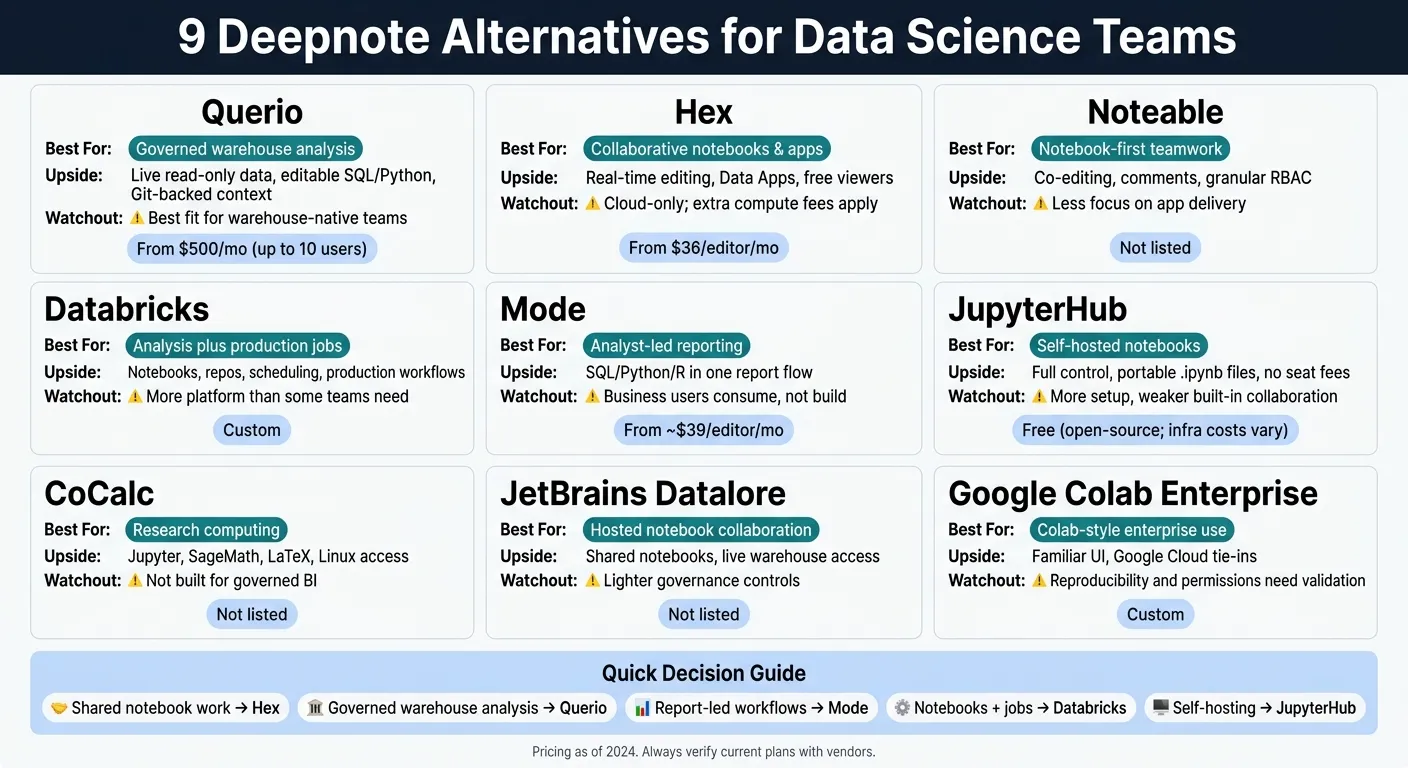
| Tool | Best for | Main upside | Main watchout |
|---|---|---|---|
| Querio | Governed warehouse analysis | Live warehouse data, editable SQL/Python, context in a git repo | Best fit is warehouse-native teams, not pure notebook labs |
| Hex | Collaborative notebooks and apps | Real-time editing, Data Apps, free viewers | Cloud-only; extra compute fees can add up |
| Noteable | Notebook-first teamwork | Co-editing, comments, granular RBAC | Less focus on app delivery |
| Databricks | Analysis plus jobs | Notebooks, repos, scheduling, production workflows | More platform than some teams need |
| Mode | Analyst-led reporting | SQL/Python/R in one report flow | Business users mainly consume, not build |
| JupyterHub | Self-hosted notebooks | Full control, portable .ipynb files, no seat fees |
More setup, weaker built-in collaboration |
| CoCalc | Research computing | Jupyter, SageMath, LaTeX, Linux access | Not built for governed BI |
| Datalore | Hosted notebook collaboration | Shared notebooks, live warehouse access | Lighter governance controls |
| Colab Enterprise | Colab-style enterprise use | Familiar UI, Google Cloud tie-ins | Reproducibility and permissions need a close check |
A few pricing points stand out right away: Querio has a free plan with unlimited users (Core is $2,499/month), Hex starts at $36 per editor/month, Mode starts around $39 per editor/month, and JupyterHub is free software but comes with infra and admin costs.
If you’re replacing Deepnote, I’d keep one question front and center: Do you mainly need better notebook collaboration, tighter control, or a cleaner path from analysis to shared outputs? This often involves mastering AI data analytics to bridge the gap between raw data and business insights. That question cuts the list down fast.
1. Querio
Querio is git-native analytics for data teams and their AI agents, running on live warehouse data. What stands out is the paper trail: every answer maps back to editable SQL and Python, and the definitions behind it live as files in a git repo your team owns. That matters if your team needs to check, tweak, or approve what the system produces.
The rest of this section focuses on how Querio handles notebooks, automation, and warehouse governance when you're looking at a Deepnote replacement for a warehouse-native setup.
Notebook and App Workflows
Querio runs on reactive SQL and Python notebooks. When something upstream changes, the cells and charts below it update too. That makes the notebook feel more like a living workspace than a static file.
Notebooks and dashboards are plain files in the git repo too. The agent can save a result as a dashboard tile, and promoting a dashboard opens a pull request your reviewers approve.
AI Assistance and Automation
The AI agent can write and edit notebook cells, and users can review the SQL or Python it generates before moving forward. That's a practical setup for teams that want help without giving up control.
Querio also runs automations, which are scheduled prompts or SQL delivered to Slack or email. For example, a prompt can check revenue or margin every morning and send its automated root-cause findings to the team. Automation runs use no AI credits. The same work is open to Claude, ChatGPT, Claude Code and Cursor through Querio's MCP server and CLI.
Governance and Live Data Connectivity
Querio keeps context (table docs, business terms), metric definitions, and saved queries as plain files in a git repo on GitHub, and they can sit in the same repo as your dbt project. If you use dbt's MetricFlow, Querio reads those metrics directly. That puts business logic in a place your team already knows. Agents propose changes, and saving context opens a pull request under your repo's own reviewers, so nothing goes live until it's merged.
On the data side, Querio queries live data in:
- Snowflake
- BigQuery
- Redshift
- Postgres
- ClickHouse
- Databricks
- MySQL
- MSSQL
An agent sees only what its user sees: on Snowflake, BigQuery and Databricks, queries run as the person through per-user OAuth. Querio also logs every query, agent action, and promotion, which is the kind of nuts-and-bolts detail teams usually care about once a tool moves past a demo.
These are the details that matter when replacing Deepnote in a warehouse-native team.
| Feature | Querio |
|---|---|
| Primary Interface | Reactive SQL and Python notebooks, plus Slack |
| AI Role | Agent writes and edits notebook cells |
| Governance | Context, metrics, and saved queries as files in a git repo, changed by pull request |
| Data Connectivity | Snowflake, BigQuery, Redshift, Postgres, ClickHouse, Databricks, MySQL, MSSQL |
| Sharing | Dashboards, Slack, iFrame embedding, API, MCP, CLI |
| Security | SOC 2 Type II, HIPAA compliant, per-user OAuth on Snowflake, BigQuery and Databricks, audit logs |
| Pricing | Free plan; Core $2,499/month; no per-seat pricing (unlimited users on every plan) |
2. Hex
Hex is a collaborative analytics platform that brings SQL, Python, and no-code cells into one notebook workspace. It works well for data science teams that already live in notebooks and want an easy way to turn that work into interactive apps for other teams. Put simply, Hex is a good match for teams that want shared notebooks and a smooth handoff to stakeholder-facing apps.
Collaboration and Permissions
Hex supports real-time multi-user editing, inline comments, and an approval workflow before updates go live. Permissions use role-based access control, so editors can build and change notebooks, while the Explorer seat gives non-technical users a way to use published apps without touching code.[2]
Notebook and App Workflows
In Hex, notebooks can be published as interactive, shareable Data Apps with custom layouts, input blocks, and buttons. Version control runs through Git and the CLI, and the Team plan adds scheduled runs.[2]
AI Assistance and Automation
Hex includes Notebook Agent, Threads Agent, and Agent Tasks for code generation, conversational analysis, and recurring delivery through Slack or email. Context Studio and Semantic Model Sync help keep outputs tied to dbt or LookML definitions.[2]
Governance and Live Data Connectivity
The main tradeoffs are pretty clear: Hex is cloud-only, it doesn't support R or Julia, and higher-compute profiles come with extra hourly charges ranging from $0.32/hr to $4.06/hr.[2]
| Feature | Hex |
|---|---|
| Pricing | Free (Community); $36/editor/mo (Professional); $75/editor/mo (Team); Custom (Enterprise)[4] |
| AI Assistance | Notebook Agent, Threads Agent, Agent Tasks |
| Governance | Context Studio, Semantic Model Sync (dbt/LookML), row-level security |
| Connectivity | Snowflake, BigQuery, Redshift, Postgres, Databricks, dbt |
| Deployment | Cloud-only |
| Viewers | Unlimited and free on paid plans[4] |
Next, Noteable looks at a more notebook-first route for teams that want less app-layer complexity.
3. Noteable
Noteable is a notebook-first collaboration platform for data science teams that want shared SQL, Python, and AI in one workspace. Put simply, it centers on notebooks and adds conversational AI right where people are working.
Collaboration and Permissions
Noteable uses Spaces-based team organization, along with real-time co-editing, inline comments, and granular RBAC at the workspace, space, and notebook levels. That makes it a strong pick for teams where collaboration matters more than app-layer complexity.
Notebook and App Workflows
It works best for teams that want shared notebook analysis with controlled access. If you're comparing notebook collaboration, permissions, and AI in the same workspace, Noteable fits best when simplicity matters more than platform breadth.
AI Assistance
Noteable includes conversational AI in the notebook experience, so natural-language help stays close to the work itself.
Governance and Team Fit
| Feature | Noteable |
|---|---|
| Collaboration | Real-time co-editing, inline comments, Spaces-based team organization |
| Permissions | Granular RBAC at workspace, space, and notebook levels |
| AI Assistance | Conversational AI in the notebook workspace |
| Best Fit | Technical teams wanting notebook-first collaboration with AI |
| Main tradeoff | Strong notebook collaboration, with less emphasis here on app delivery or broader workflow automation. |
If your team needs a broader platform layer beyond notebook collaboration, the next option expands the scope.
4. Databricks
Databricks goes beyond shared notebooks. It gives data teams a single place for notebooks, jobs, and production workflows, which makes it a strong fit for teams that need all three in one platform.
Collaboration and Permissions
Databricks supports notebook collaboration and includes Repos for version control and reproducibility. It also offers SSO and role-based access, so teams can manage who can view, edit, and run work.
It connects to Snowflake, BigQuery, Redshift, Postgres, and dbt-managed models. That means teams can work with live data across the stack instead of bouncing between tools.
Notebook and App Workflows
The workflow is centered on notebooks, but it doesn't stop at analysis. Teams can move from ad hoc work to scheduled jobs without leaving the platform.
App sharing helps with delivery, though Databricks still leans code-first. So if your team likes working close to the code, it feels natural. If not, it may feel like more platform than you need.
AI Assistance and Automation
Databricks includes AI assistance for code-first workflows. That can help speed up routine coding tasks and keep work moving when teams are building inside notebooks and production pipelines.
Governance and Live Data Connectivity
| Feature | Databricks |
|---|---|
| Collaboration | Notebook collaboration, Repos, app sharing |
| Permissions | SSO and role-based access |
| AI Assistance | AI assistance for code-first workflows |
| Data Connectivity | Live connections to Snowflake, BigQuery, Redshift, Postgres, and dbt-managed models |
| Best Fit | Data science and analyst teams with production-oriented workflows |
| Main Tradeoff | Powerful for technical work, but broader than teams that only need collaborative notebook analysis |
Use Databricks when notebook work also needs to support jobs and production workflows.
5. Mode
If Databricks feels like more platform than your team needs, Mode is the narrower pick for analyst-led reporting. Mode is one of several AI-integrated analytics platforms for SQL, Python, and R work that turns queries into reusable reports and dashboards. Business users can read published reports, but they can’t create new analyses. That tradeoff tells you pretty fast whether Mode is a match.
Collaboration and Permissions
Mode gives analysts one workspace where SQL, Python, and R live in the same project. The workflow is built around reports first, which works well when analysts do the analysis and share the results with business teams.
Notebook and App Workflows
The main flow goes from SQL query to parameterized report to reusable dashboards and reports. That makes Mode a good fit for recurring ad hoc questions, because analysts can turn one-off work into structured, interactive outputs instead of sending static files around. Its AI help sits inside SQL-first workflows, so the setup still feels familiar for analyst teams.
Governance and Live Data Connectivity
Mode connects straight to your warehouse, so analysts work with live data and outputs stay tied to a single source of truth. Non-technical stakeholders can read published reports, but they can’t create new analyses.
| Feature | Detail |
|---|---|
| Primary Fit | Analyst teams building recurring reports and dashboards |
| Key Strength | SQL, Python, and R in one report-first workspace |
| Main Tradeoff | Business users can consume outputs, not author them |
| Pricing | Starts at approximately $39/editor/month [2] |
If your team needs self-hosted notebooks instead of a reporting layer, JupyterHub is the next option.
6. JupyterHub
JupyterHub is the self-hosted, open-source pick for teams that need on-premises or air-gapped notebooks. There’s no per-seat licensing, which can be a big plus. But the cost doesn’t disappear - it moves to infrastructure and admin time. You get more control, but you also take on more setup and maintenance.
Collaboration is pretty bare-bones. There’s no real-time co-editing, no inline comments, and access control depends on how your admins set things up. So if your team uses JupyterHub, workflow portability matters a lot more than built-in team features.
JupyterHub keeps teams on standard .ipynb files, which makes notebook workflows portable. That’s useful if you want to avoid getting boxed into one vendor. But it doesn’t come with native app publishing for governed business outputs.
There’s also no built-in AI copilot. If your team wants AI help, you’ll need to add extensions or use outside tools.
Connections to Snowflake, BigQuery, Redshift, and Postgres usually need manual Python or SQL setup. dbt runs through the CLI or libraries. Row-level security (RLS) and SSO also depend on how you deploy and configure the platform, not on built-in controls. That’s the tradeoff in plain English: more control, more admin work, and less governance out of the box.
| Feature | Detail |
|---|---|
| Primary Fit | Code-centric teams that need self-hosted or air-gapped notebook environments |
| Key Strength | Full infrastructure control, portable .ipynb workflows, no vendor lock-in |
| Main Tradeoff | Manual collaboration, no native app publishing, no built-in AI, more admin overhead |
| Pricing | Open-source and free; infrastructure and admin costs vary |
The next option shows what a managed platform looks like when you want less overhead.
7. CoCalc
CoCalc is the most research-focused option on this list. It makes the most sense for teams that care more about scientific computing than warehouse governance.
At its core, CoCalc is a collaborative notebook environment built for research-heavy work. It supports Jupyter, SageMath, LaTeX, and Linux terminal access. So if your team spends most of its time in notebooks, math-heavy workflows, or technical research, CoCalc will feel like a better match than a governed analytics tool.
Collaboration and Permissions
CoCalc supports collaboration and permission controls for shared scientific work. For Deepnote users, the main question is pretty simple: do you need shared scientific computing, or do you need governed self-service BI delivery?
Notebook and Workflow Fit
It works well for notebook-heavy scientific workflows. But it isn’t built for governed BI delivery or warehouse-native analytics.
Governance and Live Data Connectivity
For live data access, CoCalc relies on Python and R libraries like pandas and SQLAlchemy. That includes connections to Snowflake, BigQuery, Redshift, and Postgres.
| Feature | Detail |
|---|---|
| Primary Fit | Research and technical computing |
| Key Strength | Jupyter, SageMath, LaTeX, and Linux terminal access |
| Main Tradeoff | Not designed for governed BI |
| Data Connectivity | Python/R library connections to live warehouse data |
That makes CoCalc a solid option for technical collaboration, but not the right pick for teams that need governed analytics on live warehouse data.
8. JetBrains Datalore
JetBrains Datalore is a good match for teams that want a hosted Jupyter workspace for shared notebook analysis without the hassle of self-hosting. The main call here is pretty simple: does your team just need shared notebooks with warehouse access, or do you also need a more governed analytics layer?
For mid-market data teams, that distinction matters. Hosted notebooks can work well, but they may not be enough if your team also cares about governance and repeatable workflows built into the product.
Collaboration and Permissions
Datalore supports real-time editing, commenting, and shared workspaces, so multiple people can work in the same notebook at once. That setup is great for team analysis. But permissions and reproducibility often take more manual setup than they do in platforms built with tighter governance from the start.
Notebook and App Workflows
Datalore works best for teams that want to stay inside notebooks and share analysis with other analysts. If that's how your team already works, it can feel like a natural fit.
Governance and Live Data Connectivity
| Feature | Detail |
|---|---|
| Primary Fit | Teams that want a hosted Jupyter notebook environment |
| Key Strength | Real-time collaboration in shared notebooks |
| Main Tradeoff | Lighter governance and permissions than some teams need |
| Data Connectivity | Live connections to Snowflake, BigQuery, Redshift, and Postgres |
That makes Datalore a solid fit for hosted notebook collaboration. The next option matters more for teams that need enterprise-grade notebook delivery.
9. Google Colab Enterprise
Google Colab Enterprise is a fit for teams that prefer a notebook-first way of working but still need to check governance, permissions, and warehouse access before rolling it out.
Governance and Live Data Connectivity
Start by checking whether Colab Enterprise lines up with your team’s access controls and warehouse connection needs.
| Feature | Detail |
|---|---|
| Primary Fit | Teams weighing a notebook-first workflow against enterprise data requirements |
| Key Strength | Familiar notebook environment with Google Cloud integration |
| Main Tradeoff | Governance, reproducibility, and live-connection fit need validation before production use |
| What to Check | Native connectivity to Snowflake, BigQuery, Databricks, and Postgres[4][3] |
That gives Colab Enterprise its place in the rest of the decision matrix below. Use that matrix to compare notebook-only teams, governed analytics teams, and teams that need stakeholder-facing delivery.
Pros and Cons by Team Need
Use this matrix to line up each tool with your team’s main bottleneck: governance, lower ops load, or end-to-end reporting. The key is to read it by primary constraint, not by how many features a product lists. That makes it much easier to separate notebook UX from governance and delivery needs.
| Team Need | Best-Fit Products | Main Advantages | Cautions |
|---|---|---|---|
| Notebook-first collaboration | Hex, Noteable, JetBrains Datalore | Real-time co-editing, AI-assisted analysis, shared workspaces | No on-prem option for Hex [2]; heavy AI usage can create overage risk [2] |
| Warehouse-native analytics | Querio, Mode | Live connections to Snowflake, BigQuery, and Redshift; no CSV round-trips | Validate native connectivity and permissions against your warehouse before committing |
| Stakeholder-facing dashboards | Mode | Strong fit for reporting and sharing with business users | Dashboard-first workflows may not be enough for deeper analysis; SSO, SAML, and audit logs are often enterprise-gated [2] [1] |
| AI-assisted analysis with transparency | Querio | Inspectable, editable SQL and Python; answers from live warehouse data; reactive notebook output | Audit the generated query before you trust the result |
| Regulated environments | Querio, Hex | SOC 2 Type II, HIPAA-oriented controls, audit trails, and permissions | Confirm BAA and access requirements before the pilot |
| Full pipeline control | Databricks | integrated ingestion and transformation | Steeper learning curve for non-technical users; plan for implementation effort early |
Governance tends to be the late-stage blocker that trips teams up, especially when admin and security features sit behind enterprise plans. This is where a flashy demo can hide a lot of friction. Use these tradeoffs to shrink your shortlist based on collaboration, governance, AI transparency, and delivery.
Conclusion
The best Deepnote alternative comes down to the one problem your team needs to fix first. If your biggest issue is collaborative notebook work, Hex is the better fit. If your team needs governed analytics on live warehouse data, Querio stands out.
Use the table below to line up each option with your main constraint.
| If you need… | Choose… | Why |
|---|---|---|
| Collaborative notebook workflows | Hex | Collaborative apps and scheduling. |
| Governed analytics on live warehouse data | Querio | Live Snowflake, BigQuery, and Redshift access with editable SQL/Python and a governed semantic layer kept in a git repo. |
One last check matters more than most teams expect: governance. Live data access, permissions, and auditability can make or break the rollout. Before you commit, confirm live warehouse connectivity and make sure SSO, RBAC, and audit logs are part of the plan you can actually buy.
FAQs
How should we evaluate governance before switching?
Prioritize platforms with a centralized, governed semantic or context layer so metric definitions and business logic stay consistent.
Also look for inspectable, editable SQL and Python, strong RBAC, SOC 2 compliance, live connections to Snowflake, BigQuery, or Databricks, and audit logs for query history and data access.
Which option is best for live warehouse analysis?
For live warehouse analysis, Querio is the best fit because it connects straight to live warehouse data in Snowflake, BigQuery, Amazon Redshift, and Postgres. That means notebook results stay tied to the source data instead of drifting away in stale CSV exports.
It also keeps metric logic consistent because the definitions live as files in a git repo (or come straight from dbt), so people and agents answer from the same ones, while teams still work with SQL and Python they can inspect and edit.
What should we budget beyond seat pricing?
Beyond seat pricing, plan for a few other cost buckets:
- Governed platform modules, like dashboard add-ons and extra database connections
- AI usage or compute allowances
- Deployment and infrastructure costs, including self-hosting
- Integration or data pipeline fees for recurring warehouse-to-warehouse movement
For example, Querio has a free plan, and Core is $2,499/month, with no per-seat pricing, AI credits included on every plan (extra credits are billed per credit), and dashboards included on every plan.