Business Intelligence
Looker vs Querio: What changes when your BI is actually AI-native
AI-native BI vs traditional tools: instant natural-language queries, inspectable SQL, faster setup, and lower BI costs.
AI-native BI tools like Querio are transforming analytics by eliminating manual setups, enabling natural language queries, and delivering faster insights compared to traditional platforms like Looker.
Here’s what you need to know:
Looker relies on LookML for semantic modeling, which ensures consistent metrics but requires weeks of setup and ongoing maintenance. It’s ideal for technical users but creates barriers for non-technical teams.
Querio, built with AI at its core, allows users to ask questions in plain English. It generates instant, inspectable SQL, cutting query times by up to 80%. No manual setup or outdated dashboards.
Querio automates insights, detects anomalies, and forecasts trends, letting teams focus on strategic work.
Quick Comparison
Feature | Looker | Querio |
|---|---|---|
Setup Time | Weeks (manual LookML modeling) | Instant (zero-config connections) |
Natural Language Query | Limited via LookML extensions | Full AI-native NLQ |
Code Transparency | Requires manual LookML editing | AI-generated SQL, fully inspectable |
Governance | Manual role-based configuration | AI-driven, automatic PII detection |
Pricing | $5,000–$10,000/year per user | Usage-based ($0.10/query or $99/month flat rate) |
Bottom line: Querio simplifies BI workflows and reduces costs, making it a strong alternative to Looker for faster, more accessible analytics.
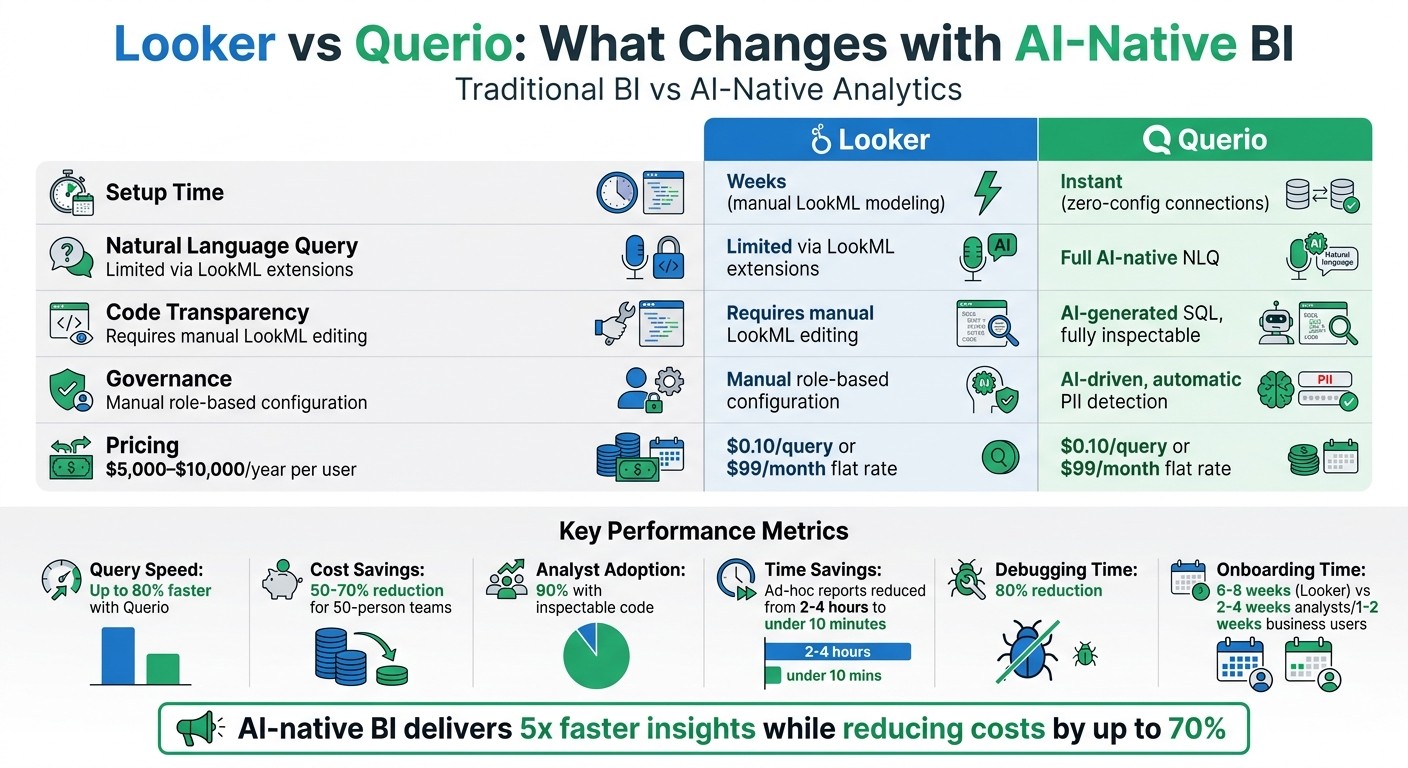
Looker vs Querio: Feature Comparison and Cost Analysis
Building an AI Assistant for BI: The Good, the Bad, and the Ugly
How Looker Works: Strengths and Weaknesses
Looker uses LookML to establish a centralized semantic layer, ensuring consistent definitions for key metrics across an organization. With proper setup, everyone - from marketing to finance - can rely on the same definitions for terms like "customer lifetime value" or "monthly recurring revenue."
"Looker's semantic layer acts as a single source of truth for business metrics and dimensions, helping to ensure that your organization and tools are leveraging consistent and well-defined terms." - Richard Kuzma, Group Product Manager, Data Agents, Google Cloud [1]
But this precision comes with challenges. The setup process can take weeks or even months. Data teams must manually write and maintain LookML code for every metric, dimension, and relationship. Even with AI tools like Gemini, developers still need to curate the semantic layer by adding labels, descriptions, and synonyms to ensure accurate AI responses [3].
Looker's Semantic Modeling
Looker offers strong governance, but maintaining LookML definitions is an ongoing task that can lead to technical debt. While Git-based version control helps track changes and ensure quality, any business logic defined in custom fields or dashboard-level table calculations is invisible to Looker's governance tools unless manually converted into LookML dimensions and measures [3].
As business requirements shift, LookML definitions can become outdated or redundant, requiring developers to step in frequently to keep the semantic layer relevant. This constant upkeep highlights the need for advancements in BI tools, especially in leveraging AI to ease these burdens [3].
Manual Workflows and User Experience
Looker’s code-first approach is ideal for technical users familiar with development workflows, but it creates hurdles for business users who need quick access to insights. Learning LookML is a must, which can slow down onboarding for non-technical teams.
"Success with Looker depends on mastering LookML... This slows onboarding and creates barriers for teams without that expertise." - Martin Atanasov, Reveal BI [2]
Performance is another sticking point. Looker may struggle with large datasets or dashboards containing many visual elements, requiring frequent tuning as data volumes grow [2]. Embedding Looker into other applications also involves manual management of iFrames, signed URLs, authentication flows, and session handoffs, limiting customization and front-end control [2].
These manual workflows highlight the growing interest in AI-native vs AI-enhanced solutions that could simplify and accelerate data processes.
Querio's AI-Native Design: How BI Changes with AI
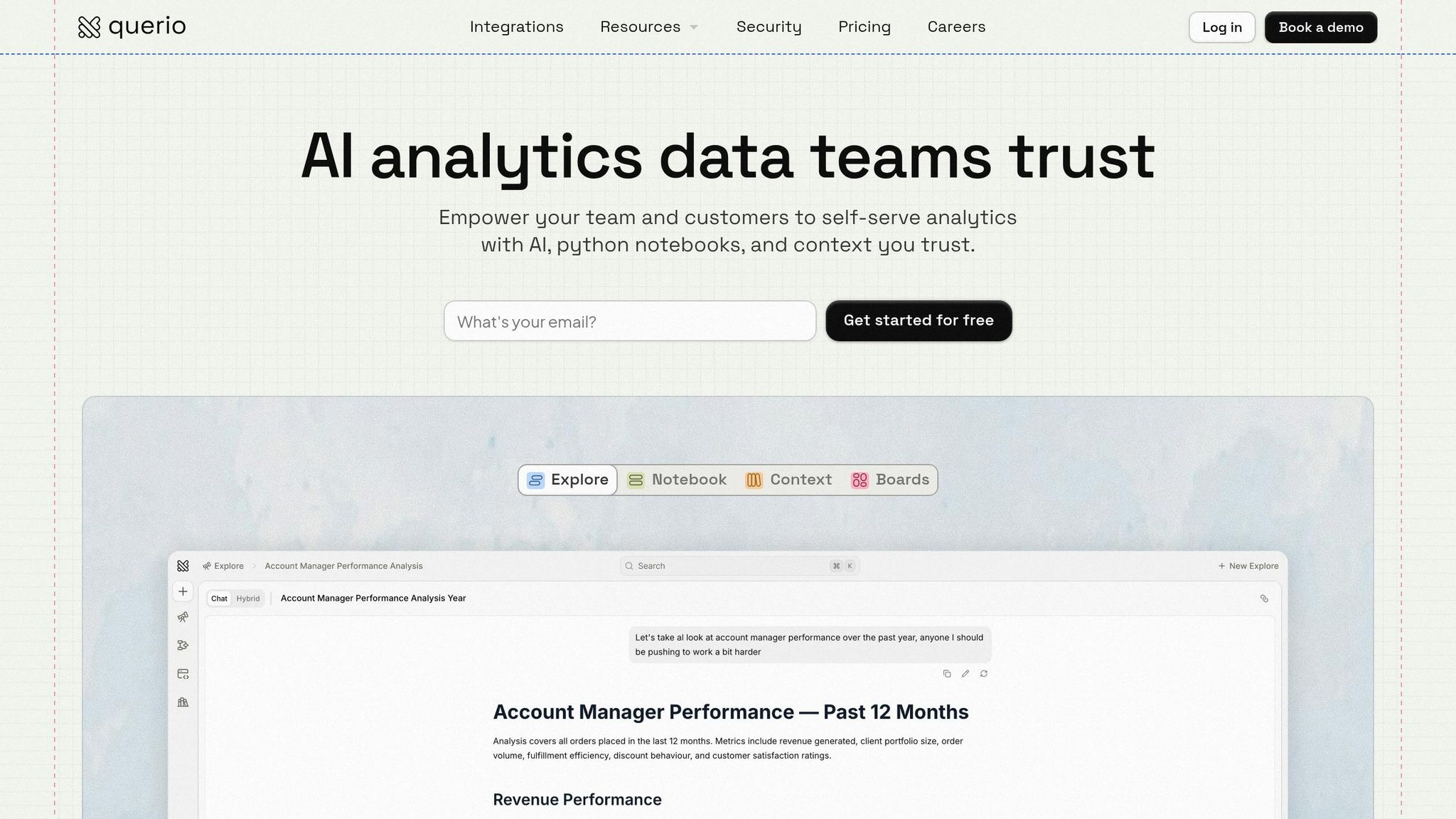
Querio is reshaping business intelligence (BI) by removing the need for manual setups and delivering instant, code-backed answers. With its AI-native design, Querio allows users to ask questions in plain English and get immediate responses. The AI translates these conversational queries into executable code within seconds.
This isn't just an AI chatbot layered over an outdated system. Querio directly connects to your data warehouse - whether it's Snowflake, BigQuery, Redshift, or PostgreSQL - and runs queries natively on live data. There are no extracts, no duplicates, and no outdated dashboards. This direct connection guarantees real-time analytics, forming the foundation for all of Querio's advanced features.
Natural Language Queries to Transparent Code
Imagine typing, "Show me sales by region for Q1 2024 in the US", into Querio. It instantly generates SQL like this:
SELECT region, SUM(sales) FROM sales_data WHERE date >= '2024-01-01' AND date < '2024-04-01' GROUP BY region;
You not only get the results but also the exact code used to calculate them. This means non-technical users get quick answers, while technical users can inspect, edit, or reuse the code to validate its accuracy.
This transparency fosters trust. For example, a Fortune 500 finance team achieved 90% analyst adoption with Querio's inspectable code feature. They highlighted the ability to verify logic before sharing insights with stakeholders as a critical benefit. Similarly, a marketing agency reduced errors by 40% by incorporating code verification into their workflows. These examples show how AI-driven BI can revolutionize traditional data processes.
AI-Driven Automation and Insights
Querio takes things further with built-in automation. Beyond generating queries, it detects anomalies, forecasts trends, and creates visualizations automatically. Predictive modeling is now 5x faster - a retail team, for instance, cut forecasting time from days to just 15 minutes.
The platform leverages machine learning to understand your data and its context. Ask a question like, "What's our next quarter revenue forecast?" and Querio analyzes historical patterns to provide an instant prediction. Users report cutting manual SQL writing by up to 80%, allowing analysts to shift their focus to strategic tasks. Ad-hoc reports that used to take 2-4 hours are now completed in under 10 minutes.
Feature Comparison: Looker vs. Querio
Comparison Table: Features and Benefits
Here's a side-by-side look at how Looker and Querio compare on essential features of modern business intelligence tools that are critical for data-driven teams:
Feature | Looker | Querio |
|---|---|---|
Limited via LookML extensions | Full AI-native NLQ with instant SQL generation | |
Inspectable Code | Manual LookML editing required | AI-generated SQL/Python that is fully inspectable and editable |
Warehouse Integrations | Supports Snowflake, BigQuery, Redshift (2–4 weeks setup) | Zero-config connections to 20+ warehouses |
Governance & Security | Role-based via LookML (manual configuration) | AI-driven governance with automatic PII detection and audit trails |
Deployment Options | Cloud-only (Google Cloud) | Cloud (AWS/GCP) or self-hosted Kubernetes |
Pricing Model | Per-user licensing starting at $5,000–$10,000/year | Usage-based pricing at $0.10 per query or a $99/month flat rate |
Analysis: Querio's Advantages
Querio's AI-native approach brings a fresh perspective to BI workflows, offering significant improvements in speed, cost, and usability. Here's a closer look at how Querio stands out.
Faster Setup and Analysis:
Looker requires weeks of LookML modeling before teams can start querying, which can slow down workflows. In contrast, Querio's zero-configuration warehouse connections allow teams to dive into analysis right away. For example, e-commerce teams using Querio have reported analyzing sales data up to 10 times faster compared to traditional semantic modeling tools.
Cost Efficiency:
The pricing model is another area where Querio shines. For a 50-person team, Looker’s per-user licensing could cost between $250,000 and $500,000 annually. Querio, with its usage-based pricing, can save teams 50–70% on BI expenses. One retail company reduced its BI costs by 60% while also cutting query response times from 30 minutes to just 2 seconds for tasks like identifying underperforming products.
Enhanced Governance and Security:
Querio simplifies governance with AI-driven features that automatically detect sensitive data and apply dynamic access controls. This reduces compliance risks by 40%, making it especially appealing to finance teams that need secure, real-time collaboration across departments.
Streamlined Code and Debugging:
Looker relies on manual LookML editing, which can slow down productivity. Querio, on the other hand, generates SQL with one-click editing options, reducing debugging time by 80%. With a 90% accuracy rate in AI-generated queries, teams can achieve results 20–30% more efficiently compared to manual configurations.
These advantages make Querio a strong contender for teams looking to optimize their BI operations with faster, more secure, and cost-effective solutions.
How Querio Changes Workflows for Data Teams
Faster Analytics Processes
Querio transforms the way data teams handle analytics by cutting out the need for time-consuming manual query writing. Tasks that used to take 2–3 hours can now be completed in mere minutes using natural language BigQuery insights. This shift gives analysts back 1–2 days each week to focus on strategic work, speeding up the entire decision-making process by reducing the time it takes to go from a question to actionable insights.
The platform also changes the game by moving from a pull-based system - where teams manually build dashboards and monitor data - to a push-based approach. Querio's AI identifies patterns, detects anomalies, and delivers insights automatically. For example, if customer churn spikes or a product category experiences unusual growth, the platform sends alerts with context and possible explanations. This happens without any human intervention, allowing teams to make faster and more accurate decisions.
Organizations using Querio report a 40-60% reduction in time spent on routine analytics tasks. Additionally, self-service analytics ease the workload for analysts by cutting request queues by 30-50%. Business users can resolve many of their own queries, which frees analysts to tackle more complex projects, like predictive modeling and strategic initiatives that directly impact business goals.
These improvements pave the way for better collaboration across teams.
Better Collaboration Between Teams
With analytics running more efficiently, Querio helps teams work together more effectively by ensuring everyone operates from the same data foundation. Its shared context layer standardizes metrics, business logic, and data lineage, making it accessible to both technical and non-technical users. For example, if someone asks, "What is our customer acquisition cost?" the platform automatically uses the organization's predefined metric, eliminating inconsistencies that often arise in traditional BI systems. This ensures decisions are based on reliable data.
Querio also addresses a common pain point: communication breakdowns. When business users request metrics that don’t align with static definitions, the platform bridges the gap. A business user can ask a question, Querio generates the query, and if adjustments are needed in the data, engineers immediately see what’s required. This reduces rework cycles from weeks to just days. Plus, all teams gain a shared understanding of the analytical intent behind requests, cutting down on lengthy back-and-forths and speeding up the path to actionable insights.
Another standout feature is Querio's inspectable SQL code, which simplifies onboarding and supports compliance. New team members can quickly learn how analyses are constructed by reviewing the generated code. This reduces onboarding time significantly - from the usual 6-8 weeks with traditional BI tools to just 2-4 weeks for analysts and as little as 1-2 weeks for business users.
Why Teams are Switching to AI-Native BI
Switching to AI-native BI is helping companies tackle challenges that come with rapid growth. As data volumes explode and teams expand, businesses need tools that can keep up. By 2025, it's expected that 75% of enterprise data will be processed by AI platforms, offering query speeds up to 40–60% faster and slashing analytics costs by 30% [6][7][12].
Companies are embracing these platforms because they adapt to growth rather than fight against it. This shift transforms analytics from a process that takes days into one that delivers insights in minutes, enabling teams to work smarter, not harder. This is made possible by modern natural language data querying tools that bridge the gap between users and databases.
Scalability for Growing Data Demands
Traditional BI tools often falter under the weight of growing data. Take, for example, a SaaS company with 50 analysts: querying 2TB of data took an average of 45 seconds, leading to delays and frustration. After adopting Querio, those same queries were completed in under 2 seconds, allowing for real-time dashboards even as their user base expanded by 200% [9].
The secret lies in the architecture. Querio can process 1 billion rows in just 1.2 seconds, compared to 28 seconds with traditional tools on similar hardware [10]. A mid-sized e-commerce company scaled its data from 500GB to 5TB without upgrading its infrastructure, while cutting costs by 70% using automated optimization and vector-based indexing [8]. Meanwhile, a retail chain handling seasonal data spikes up to 10× their usual volume maintained 99.9% uptime thanks to Querio's auto-scaling AI [9].
For growing companies, rebuilding analytics systems every time data needs increase isn’t practical. Beyond speed and scalability, maintaining control over data governance is just as critical as data complexity rises.
Better Control and Governance
Scaling isn’t only about speed - it’s also about ensuring data remains trustworthy as it grows more complex. Traditional BI tools often cause governance issues. Decentralized models can require over 20 hours of weekly maintenance to keep data definitions consistent, leading to "shadow analytics" where different departments report conflicting numbers [11].
Querio takes a different approach with governed AI, ensuring 100% lineage traceability. Every query produces inspectable SQL code with versioned, auditable logic. Role-based access allows non-technical users to query data safely while administrators enforce policies centrally. These features reduce errors by 80% in scaled environments. Built-in data cataloging and automated schema enforcement also support compliance with standards like SOC 2 [11].
"AI-native BI platforms like Querio shift governance from reactive to proactive, enabling 5x faster scaling without compliance risks - essential for enterprises hitting data complexity walls with legacy tools." - Gartner analyst
Conclusion: The Future of Business Intelligence is AI-Native
The move from traditional BI tools to AI-driven platforms isn’t just a step forward - it’s a complete reimagining of how businesses interact with data. According to Gartner, by 2026, 40% of BI deployments will be AI-native, a sharp rise from less than 10% in 2023. This shift is already reshaping the analytics landscape[4].
Querio sets a new benchmark for this evolution, offering a natural language interface that allows users to ask questions in plain English and get clear, inspectable answers. The result? Decision-making that once took days can now happen in minutes. Businesses using AI-native BI report queries being resolved five times faster, with user adoption rates tripling compared to older systems[5]. Querio’s approach highlights how AI can make data more accessible and actionable for everyone.
Speed isn’t the only advantage - automation is transforming operational workflows. By removing the need for manual semantic modeling and query creation, data teams can cut routine reporting time by 40–60%. This frees up resources for more strategic analysis rather than being bogged down by maintenance tasks[9]. On top of that, Querio’s robust governance features, such as transparent audit trails and role-based access, address the scaling challenges that come with managing ever-growing data volumes.
For organizations dealing with high analyst workloads and slow query turnaround times, the benefits are clear. Many analytics teams - 85%, to be exact - cite scalability and governance as the main reasons for adopting AI platforms. Plus, manual modeling efforts can be slashed by up to 80%, making the return on investment both rapid and substantial[7].
FAQs
How does Querio ensure accuracy without manual modeling?
Querio uses advanced AI features, such as natural language querying, to deliver accurate answers. This means users can simply ask questions in plain English and get clear, precise insights. By combining automation with continuous learning, Querio ensures consistent and correct data, removing the hassle of manual modeling.
What data warehouses can Querio connect to, and how fast is setup?
Querio integrates effortlessly with top data warehouses such as Snowflake, BigQuery, and Postgres, making it easy to fit into existing analytics workflows. The setup is designed to be simple and fast, allowing teams to begin analyzing their data in just minutes - no complicated configurations required. This streamlined approach ensures that organizations can quickly access actionable insights without unnecessary hassle.
How does Querio handle security, PII, and audit trails?
Querio prioritizes security with SOC 2 Type II compliance, offering peace of mind through strict safeguards. It implements role-based access controls to ensure only authorized users access specific data and uses encrypted connections to protect information during transmission. Additionally, Querio enhances data privacy and accountability with automated audit logs, keeping sensitive information secure and traceable.
Related Blog Posts