Business Intelligence
Best embeddded analytics platforms compared 2026
Compare five embedded analytics platforms by AI, integration, governance, setup time, and pricing to pick the right fit for SaaS products.

In 2026, embedded analytics is a must-have for SaaS products, with the market expected to reach $77.52 billion. Choosing the right platform depends on your needs for AI, data integration, governance, scalability, and pricing. Here's a quick breakdown:
- Querio: Fast setup (2–4 weeks), natural language AI, unlimited viewers, and flat-rate pricing. Ideal for modern SaaS companies.
- Omni: AI tied to semantic models, tenant-safe, and integrates with dbt. Requires a solid data warehouse.
- Qrvey: Built for SaaS with a native data layer and flat-rate pricing. Great for semi-structured data but less customizable.
- Sisense: Highly customizable with developer tools but complex and time-intensive (8–14+ weeks).
- Looker: Strong governance with LookML but has a steep learning curve and usage-based pricing.
Quick Comparison
| Platform | Key Strength | Main Limitation | Setup Time | Pricing Model |
|---|---|---|---|---|
| Querio | AI-powered insights, flat-rate pricing | Needs modern data warehouse | 2–4 weeks | Flat-rate |
| Omni | Semantic model AI, tenant-safe | Requires warehouse setup | Moderate | Custom |
| Qrvey | SaaS-native, flat-rate pricing | Limited customization | 2–4 weeks | Flat-rate |
| Sisense | Deep customization options | Long implementation time | 8–14+ weeks | Custom |
| Looker | Governance-focused, AI-ready | Steep learning curve | 4–8 weeks | Usage-based |
Each platform has its strengths and trade-offs. When you compare Querio and Looker, Querio stands out for its ease of use, quick deployment, and predictable costs, making it a top choice for SaaS companies looking to scale efficiently.
::: @figure 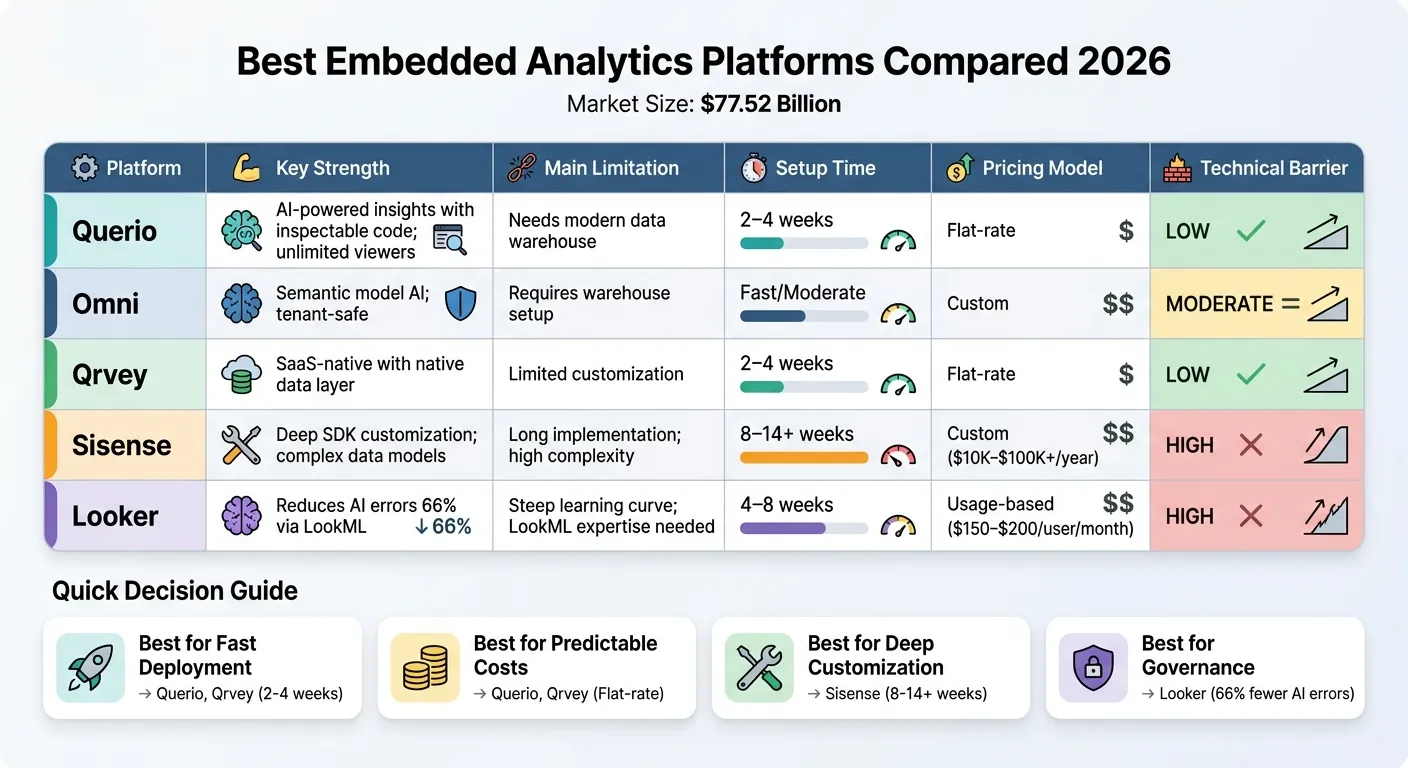 {Embedded Analytics Platforms Comparison 2026: Features, Pricing & Implementation Time}
:::
{Embedded Analytics Platforms Comparison 2026: Features, Pricing & Implementation Time}
:::
The Best Embedded Analytics Strategy Isn’t Just Build or Buy
::: @iframe https://www.youtube.com/embed/eAOv6BJfPiM :::
sbb-itb-284a532
1. Querio
Querio is an AI-powered analytics workspace designed to connect directly to your data warehouse. It translates plain-English questions into precise SQL and Python queries, offering both speed and accuracy. The platform supports nine major data sources, including Google BigQuery, Snowflake, Amazon Redshift, ClickHouse, Motherduck, PostgreSQL, MySQL, MariaDB, and Microsoft SQL Server [3]. Let’s dive into how Querio uses AI to deliver reliable insights.
AI Capabilities
Querio's AI agents transform natural language questions into fully inspectable SQL and Python queries, ensuring transparency in every response. By using a shared context layer - where joins, metrics, and business terms are defined once - the platform ensures that all insights align with established business logic. This approach eliminates inconsistencies and keeps analysis aligned with organizational standards.
Data Integration
Querio connects to live warehouse data using encrypted, read-only credentials, which removes the need for data extracts or duplication. A great example of its efficiency is SpotDraft, which replaced Looker with Querio in just four weeks. This switch saved $300,000 and avoided nine months of LookML development, all while enabling real-time data access [2].
Governance Features
Querio includes a versioned semantic layer, helping data teams maintain consistent definitions across various use cases - whether it’s ad-hoc analysis, dashboards, or embedded analytics. Its governance tools include row-level security and role-based access controls, ensuring multi-tenant isolation. With SOC 2 Type II compliance and standard SSO integrations, Querio is well-suited for enterprises managing sensitive customer data. This comprehensive governance framework supports its scalable pricing model.
Pricing
Querio uses a flat-rate pricing model, eliminating seat limits and usage caps. This ensures costs remain predictable as your user base grows. For those interested, a free trial is available, along with a money-back guarantee.
2. Omni
Omni is a warehouse-native analytics platform that connects AI to a semantic model, ensuring AI-generated answers align with your business rules and defined metrics.
AI Capabilities
Omni's AI operates on a semantic layer that enforces your business logic, joins, and metric definitions. This ensures analytics outputs remain consistent and accurate. Users can inspect, edit, and refine the SQL generated by the AI, giving them more control over the process. The platform also includes tenant-safe AI, meaning responses respect row-level security and tenant boundaries. This ensures users only access data they're authorized to see. Omni's AI is fully integrated with its data connection framework, making the entire process secure and transparent.
"AI does not remove the need for semantic modeling. AI makes semantic modeling more important." - Omni Analytics [4]
Data Integration
Omni connects seamlessly with major data warehouses like Snowflake, BigQuery, and Postgres using encrypted, read-only credentials. It also supports existing dbt models, making it an excellent fit for teams already utilizing modern data stacks. However, Omni requires a centralized data warehouse and a stable data model to function effectively. If your organization lacks this foundation, Omni may not be the right choice.
Governance Features
Omni enables teams to define shared business logic and integrates with dbt semantic layers. This allows metrics to be reused consistently across dashboards, self-serve tools, and AI workflows. The platform also supports multi-tenancy through row-level security and tenant isolation. That said, setting up complex multi-tenant SaaS configurations may demand more effort compared to platforms specifically designed for SaaS-only use cases.
Pricing
Omni follows a BI-style pricing model that scales based on internal usage and the extent of embedded distribution. Instead of flat-rate plans, pricing is typically customized to match the specific needs of each deployment.
3. Qrvey
Qrvey is a cloud-based analytics platform tailored for SaaS applications. It features an Elasticsearch-powered data lake that eliminates the need for external warehouses or complicated ETL pipelines. This makes it especially adept at managing semi-structured data like JSON files and API responses.
AI Capabilities
With Qrvey, users can leverage natural language queries and AI-driven insights to ask questions in plain English. The platform also includes predictive analytics that provides proactive recommendations, helping businesses make smarter decisions. These features are embedded directly into the platform, offering users advanced analytics without leaving their workflow. This seamless integration complements Qrvey's data management capabilities.
Data Integration
Qrvey’s Elasticsearch data lake can handle both structured and semi-structured data without requiring traditional ETL processes. This makes it an excellent choice for businesses that frequently work with complex JSON data or rely on API integrations. The platform also supports embedding through its API suite, ensuring analytics become a natural extension of your application instead of feeling like an added layer.
Governance Features
Qrvey takes security seriously with its multi-tenant architecture, which enforces data isolation at the tenant, user, and data levels. This ensures that each customer in your SaaS application only sees their own data. The platform’s native security model reduces the need for manual configuration, even when managing thousands of customers, making it a scalable solution for growing SaaS businesses.
Pricing
Qrvey offers a flat-rate pricing model, which is ideal for SaaS companies anticipating rapid growth. With unlimited users and tenants, you won’t face additional costs tied to user or tenant numbers. The platform runs on AWS, Azure, or GCP, leveraging Kubernetes for scalability in the cloud.
4. Sisense
For over two decades, Sisense has carved out a niche in the analytics space, offering an Analytics-Platform-as-a-Service designed for developer-led custom solutions. Its platform is packed with developer-centric tools aimed at creating tailored embedded analytics experiences, making it ideal for organizations with the technical expertise to support its implementation.
AI Capabilities
Sisense Intelligence, the platform's AI framework, brings natural language processing to the table. Users can ask questions in plain English and get AI-generated visualizations, such as charts and models, in response. The platform also includes features for detecting anomalies and identifying trends automatically, helping teams uncover insights without manual effort. According to Sisense, this AI-powered system "helps application builders prototype faster, generate charts and models using natural language, and enable governed self-service experiences for end-users" [5]. It works seamlessly alongside Sisense's advanced data management engine, enhancing its overall functionality.
Data Integration
At the core of Sisense's data integration capabilities is its ElastiCube in-memory engine, which manages data from multiple sources. With over 450 REST API endpoints, the platform supports extensive automation and integration, offering flexibility for developer-driven teams [2]. Sisense also provides a Compose SDK that works with major front-end frameworks, allowing developers to embed analytics as native components rather than relying on simple iFrames. However, the platform has a steep learning curve. Jim Thomas of Silutions Consulting LLC likens it to a "50-blade Swiss Army Knife for business analytics" [6]. Implementation typically takes anywhere from 8 to 14+ weeks [2].
Governance Features
Sisense prioritizes governance with three multi-tenancy architectures to accommodate different deployment needs. It also provides enterprise-grade security features, including single sign-on (SSO), row-level security (RLS), and advanced role-based access control, ensuring data is managed securely and efficiently.
Pricing
Sisense follows a custom pricing model, with annual fees ranging from $10,000 to over $100,000 depending on data volume and selected features. The platform offers two tiers: Launch, which provides entry-level, view-only analytics, and Grow, which includes white-labeling and self-service capabilities. However, costs can rise significantly with per-viewer licensing as the number of users increases [2].
5. Looker
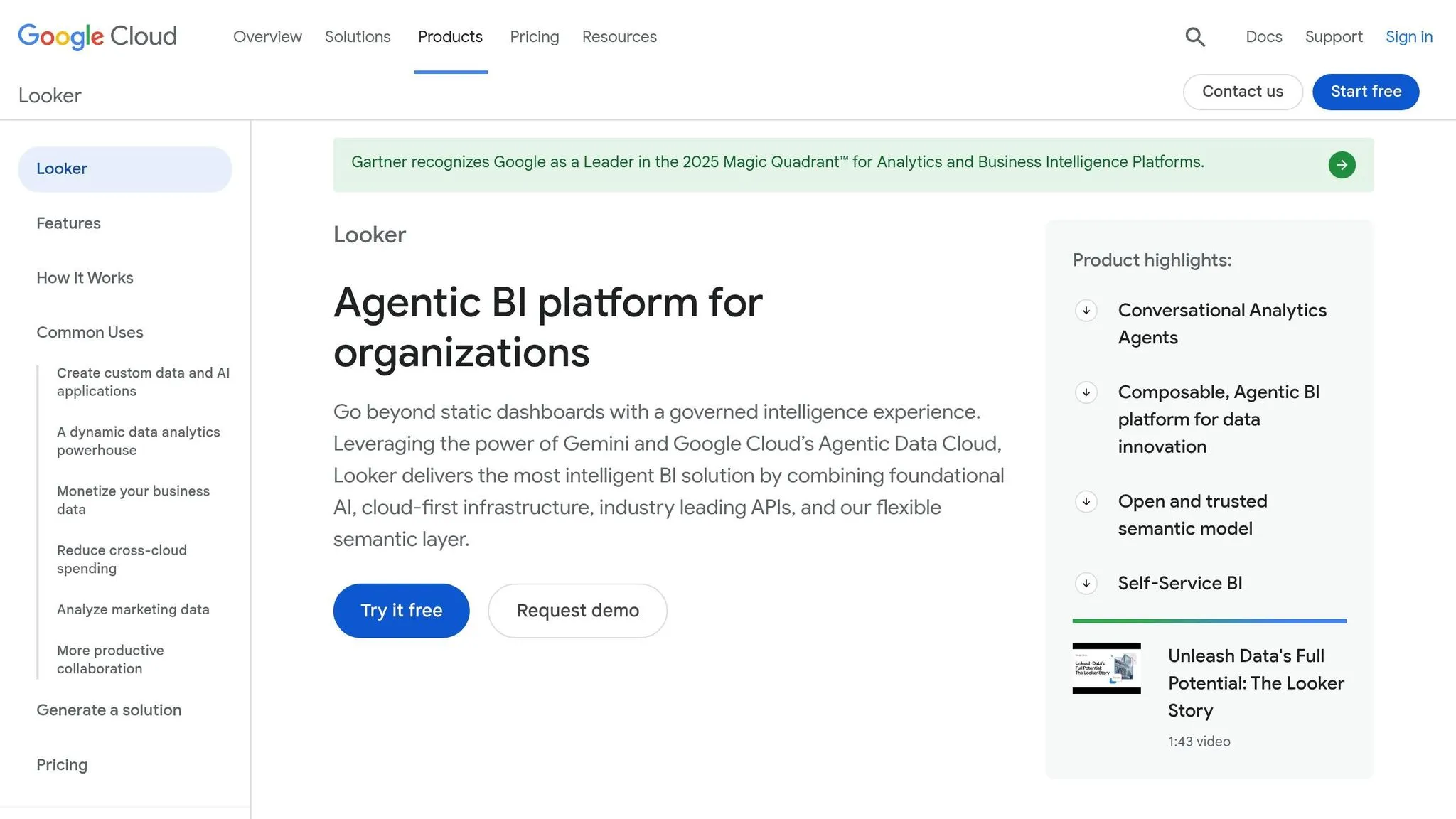
In 2019, Google acquired Looker for $2.6 billion, establishing it as a platform focused on governance-first embedded analytics. Looker stands out for organizations that prioritize data accuracy and control, acting as a semantic layer with embedded dashboards rather than just a visualization tool. This makes it especially useful for managing centralized data in environments that rely heavily on AI-driven analytics.
AI Capabilities
Looker’s AI capabilities are built on its LookML-validated business logic, which reduces AI errors by 66% compared to systems without a semantic layer [7]. By requiring AI models to use pre-validated definitions, the platform effectively minimizes hallucinations and misinterpretations. As AI:PRODUCTIVITY notes, "Looker excels at data governance and reducing AI hallucinations through its LookML semantic layer" [7]. It integrates seamlessly with Google’s Vertex AI and BigQuery ML, allowing users to create predictive models directly within their analytics workflows. This integration, paired with Looker’s real-time data connections, ensures a smooth AI-driven experience.
Data Integration
Looker’s warehouse-native architecture enables it to query underlying databases directly, ensuring real-time data consistency without duplicating information. While it’s optimized for Google Cloud’s BigQuery, Looker also supports other databases like Snowflake, PostgreSQL, MySQL, Redshift, and Databricks. The LookML semantic layer centralizes data relationships, creating a single source of truth across all integrated sources. However, performance can depend on how well the data warehouse is optimized. Organizations using Looker’s pre-built dashboards have reported reducing reporting time by 40% [8]. Implementing Looker usually takes between 4 to 8 weeks, but the steep learning curve of LookML requires SQL expertise [2].
Governance Features
Looker’s governance features are built on real-time data access and robust security measures. The platform enforces multi-tenancy through row-level security and data isolation rules defined in LookML, ensuring users only access relevant data. Git-based version control allows analytics code to be managed with the same precision as software development [7]. The platform is compliant with certifications like HIPAA, SOC 2 Type II, and GDPR, providing reassurance for organizations with strict regulatory requirements. These governance capabilities support Looker’s structured pricing model.
Pricing
Looker uses a custom pricing model, with costs typically ranging from $150–$200 per user per month [7]. Enterprise packages start at around $60,000 annually, usually requiring a minimum of 50 users and a yearly contract [9]. High-volume embedded use cases can cost up to $120,000 per year [8]. For cloud deployments, pricing begins at $5,000 per month, with standard usage often falling between $5,000 and $10,000+ monthly, depending on data volumes and usage levels [10]. However, the usage-based model can be unpredictable, as it includes platform fees, user licenses, and API quotas.
Strengths and Weaknesses
Every platform has its own set of benefits and challenges, shaped by its architecture and design choices.
Querio delivers a streamlined setup with its API-driven, no-iframe design, typically taking just 2–4 weeks to implement. This approach minimizes technical hurdles while offering a natural language interface combined with inspectable SQL and Python code. It provides AI-powered self-service capabilities while maintaining strong governance. Plus, it scales effortlessly with unlimited viewers through your existing data warehouse, keeping costs predictable.
Omni stands out by anchoring AI outputs in a semantic model rather than raw tables, ensuring tenant data remains secure[1]. However, it requires a warehouse-first setup, which can add moderate technical complexity. Its integration with dbt allows teams to work with established business logic, and its implementation is relatively quick.
Qrvey is tailored for multi-tenant SaaS applications, offering a full-stack solution with a native data layer deployed directly into your cloud environment[1]. It also boasts a swift 2–4 week implementation timeline. However, its customization options are more limited compared to platforms that rely on developer-led approaches.
Sisense offers extensive customization through its Compose SDK, allowing for component-based embedding and the ability to handle complex data models. But this level of flexibility comes at a cost - it requires 8 to 14+ weeks for implementation and demands significant data engineering expertise[2][1].
Looker reduces AI errors by 66% through its LookML semantic layer[7]. However, the platform's steep learning curve and the need for specialized LookML expertise can be a barrier. Its implementation typically takes 4–8 weeks, which can delay achieving value[2][1].
Here’s a quick comparison of the platforms' strengths, weaknesses, implementation timelines, and technical challenges:
| Platform | Key Strength | Main Limitation | Implementation Time | Technical Barrier |
|---|---|---|---|---|
| Querio | Natural language AI with inspectable code; unlimited viewers | Requires modern warehouse | 2–4 weeks[2] | Low |
| Omni | AI grounded in a semantic model; tenant-safe[1] | Requires a warehouse-first foundation[1] | Fast/Moderate[1] | Moderate |
| Qrvey | Purpose-built for multi-tenant SaaS[1] | Limited customization flexibility | 2–4 weeks[2] | Low |
| Sisense | Deep SDK customization; handles complex data models | Long implementation; high complexity | 8–14+ weeks[2] | High |
| Looker | Reduces AI errors 66% via LookML[7] | Steep learning curve; LookML expertise required | 4–8 weeks[2] | High |
Conclusion
Querio emerges as a standout choice for businesses looking for AI-driven analytics that are quick to implement, transparent, and scalable without breaking the bank. It’s particularly well-suited for modern SaaS companies and data-focused teams aiming to streamline their operations.
The results speak for themselves: companies like Freightify, SpotDraft, and BerryBox have successfully deployed Querio in just 1–4 weeks, saving between $100,000 and $300,000, all while bypassing months of engineering work[2].
With its natural language interface that generates inspectable SQL and Python code, Querio offers transparency without compromising speed. The platform’s unlimited viewer model and predictable pricing models remove the uncertainty of rising costs as your user base grows. Features like programmatic multi-tenancy, row-level security, and SOC 2 Type II compliance ensure it scales effortlessly while maintaining top-tier governance standards.
For teams focused on fast deployment, predictable costs, and AI-powered self-service analytics, Querio combines ease of use with robust functionality, making it a strong contender for 2026 and beyond.
FAQs
::: faq
Do I need a data warehouse to use Querio?
No, you don’t need a data warehouse to use Querio. It connects directly with popular platforms like Snowflake, BigQuery, and Postgres. This direct integration lets you work with your data without creating duplicates, streamlining your processes and making data access more efficient. :::
::: faq
How does Querio keep AI answers accurate and auditable?
Querio focuses on making AI-generated answers both reliable and easy to verify. It achieves this by using a semantic layer that ensures metrics remain consistent. The platform also prioritizes governance and security, offering tools like natural language querying and Python notebooks. These features make it possible to trace and validate insights derived from AI, promoting a higher level of transparency. :::
::: faq
How does Querio handle multi-tenant security for embedded analytics?
Querio uses Row-Level Security (RLS) to maintain multi-tenant security for embedded analytics. This approach limits data access directly at the database level, ensuring that users can only view the data they are authorized to see. By working seamlessly with databases like Snowflake and PostgreSQL, it applies tenant-specific filters and session contexts to keep data separated.
This method not only prevents accidental data exposure but also makes compliance easier to manage. Plus, Querio supports scalable and secure configurations, offering robust APIs that ensure dependable tenant data isolation. :::