Business Intelligence
5 bets AI platforms for Embedded Analytics: Full Comparison
Compare five AI-powered embedded analytics platforms by AI features, embedding options, security, integrations, and pricing.

Looking for the best AI-powered embedded analytics platform? Here’s what you need to know.
We’ve compared five top platforms - Querio, ThoughtSpot, Looker, Sisense, and Power BI Embedded - to help you pick the right one. These platforms offer features like natural language queries, predictive insights, and seamless integration with popular data warehouses. Each has its strengths, but the best choice depends on your specific needs, such as pricing, ease of integration, and AI capabilities.
Key Takeaways:
- Querio: Affordable and user-friendly with natural language queries and AI Python notebooks. Starts at $500/month.
- ThoughtSpot: Focuses on search-driven analytics and anomaly detection but has usage-based pricing.
- Looker: Strong on enterprise-level modeling and AI-driven workflows but requires technical expertise.
- Sisense: Offers deep customization for developers but demands significant resources for setup and maintenance.
- Power BI Embedded: Ideal for Microsoft environments, though pricing can be unpredictable for larger deployments.
Quick Comparison:
| Platform | Key Feature | Pricing Model | Best For |
|---|---|---|---|
| Querio | Natural language queries, AI notebooks | Tiered ($500/month) | Cost-effective, scalable needs |
| ThoughtSpot | Anomaly detection, search-driven | Usage-based | Real-time insights |
| Looker | Enterprise-level AI modeling | Usage-based | Advanced workflows |
| Sisense | Customizable SDKs | License-based | Developer-heavy projects |
| Power BI Embedded | Azure ML integration, flexible embedding | Capacity-based | Microsoft-focused setups |
For businesses seeking simplicity and cost predictability, Querio stands out with its transparent pricing and AI-powered tools. Dive into the full article for more details on each platform.
::: @figure 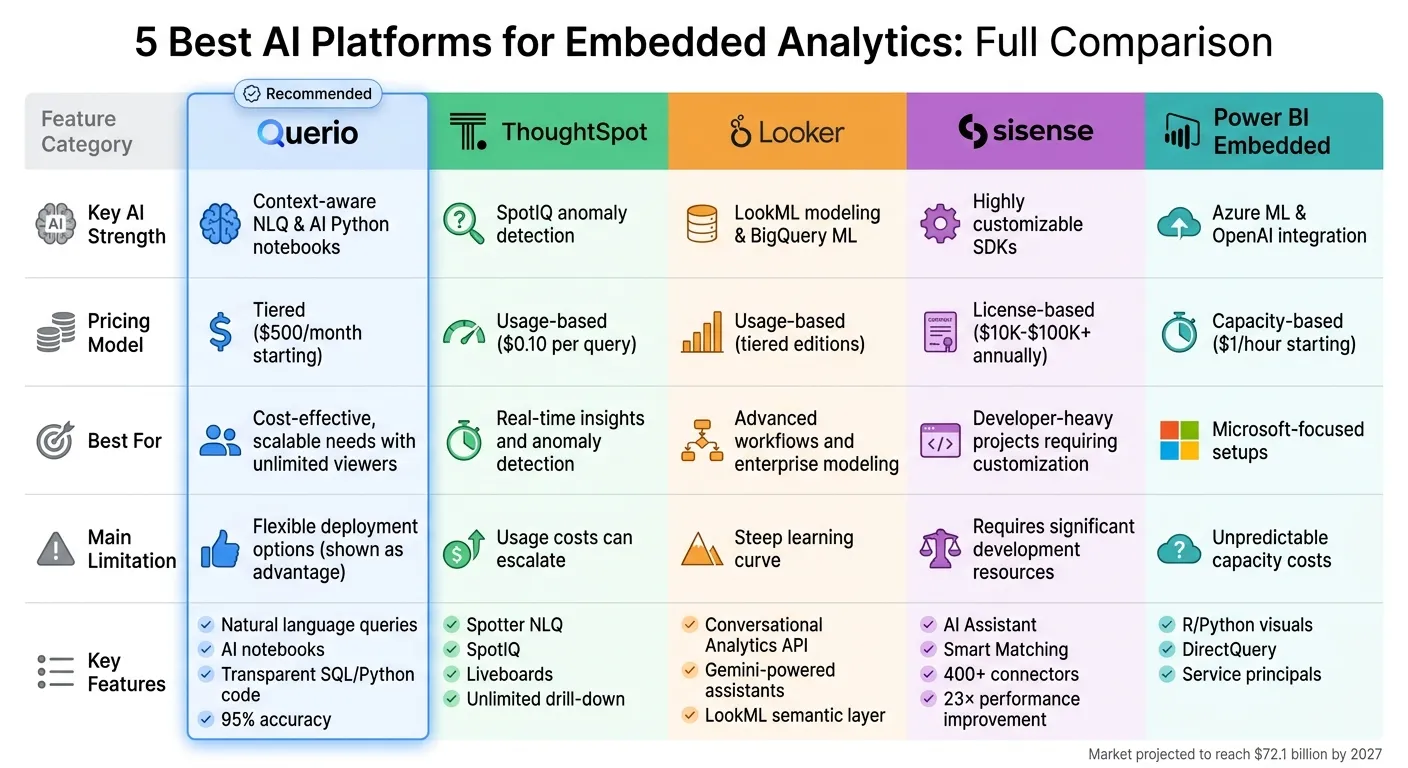 {AI Embedded Analytics Platforms Comparison: Features, Pricing & Best Use Cases}
:::
{AI Embedded Analytics Platforms Comparison: Features, Pricing & Best Use Cases}
:::
1. Querio
AI Capabilities
Querio specializes in natural language generation (NLG), turning complex data queries into clear, automated insights with narrative explanations. Its machine learning capabilities can detect real-time anomalies - like unexpected sales drops - and generate instant explanations. According to case studies, this approach has reduced manual analysis efforts by 70%, freeing teams to focus on strategic initiatives.
What sets Querio apart is its transparency. Every AI-generated answer is accompanied by explicit SQL or Python code, which technical users can review, edit, or adapt. This level of openness builds trust, especially when compared to opaque "black-box" AI systems. Additionally, Querio offers AI-powered reactive notebooks, enabling teams to create reusable "skills" for consistent and reliable outcomes. For standard business queries, the platform achieves an impressive 95% accuracy, though datasets exceeding 10 million rows may require fine-tuning for optimal performance.
Embedding Options
Querio makes integration into your applications straightforward. It supports JavaScript SDK, iFrame embedding, and RESTful APIs, all with white-labeling options for seamless brand alignment. Pre-built templates simplify the process, allowing some implementations to go live in under four hours, while more complex setups typically take 1-2 weeks. Teams only need basic JavaScript skills to embed Querio, following a simple workflow: set up an API key, configure the dashboard in Querio’s UI, and insert a JavaScript snippet.
The platform also supports responsive design for both mobile and desktop, making it easy to integrate interactive dashboards into tools like CRM systems. This ensures users can query data directly within their existing workflows, accessing live warehouse insights without switching between tools.
Data Warehouse Integration
Querio connects directly to major data warehouses, including Snowflake, BigQuery, Amazon Redshift, ClickHouse, and MotherDuck, as well as relational databases like PostgreSQL, MySQL, MariaDB, and Microsoft SQL Server. These integrations use encrypted, read-only credentials to query live data, eliminating the need for data extracts or duplication. This setup keeps data fresh, reduces storage expenses, and enhances security.
Governance and Security
Querio takes data security and compliance seriously. It offers row-level security (RLS), OAuth 2.0, and adheres to SOC 2 Type II standards with audit logs and role-based access controls. The platform ensures compliance with regulations like GDPR, HIPAA, and CCPA, and conducts weekly vulnerability scans using Snyk, alongside annual third-party penetration tests. Hosted on AWS (SOC 3 Certified), Querio also requires all customers to sign a Data Processing Agreement (DPA) upon onboarding.
Pricing Model
Querio uses a usage-based pricing structure, starting at $500/month for up to 10,000 sessions, with enterprise tiers available for larger needs. Premium AI features are billed at $0.01 per 1,000 requests. For instance, a mid-sized SaaS company using 50,000 sessions spent approximately $2,800/month. Querio also offers a free trial with no restrictions and a money-back guarantee, giving users a risk-free opportunity to explore its capabilities.
sbb-itb-284a532
AI-Powered Embedded Analytics
::: @iframe https://www.youtube.com/embed/HEwV9iV5LnE :::
2. ThoughtSpot
Continuing our exploration of AI-powered embedded analytics, ThoughtSpot showcases how features like natural language processing and automated insights can drive real-time decision-making.
AI Capabilities
ThoughtSpot includes several AI-driven tools designed to simplify analytics. Its Spotter feature allows users to perform natural language searches, making it easy to ask questions in plain English and get visual answers. SpotIQ automatically identifies anomalies, trends, and correlations in datasets without requiring manual setup. For advanced users, Analyst Studio supports data modeling with SQL, Python, and R, while SpotterCode offers AI-assisted coding to streamline embedding logic. The platform also provides Liveboards, which are real-time, interactive dashboards with unlimited drill-down options, helping users dive deeper into their data. These features collectively make embedding analytics into applications straightforward.
Embedding Options
ThoughtSpot supports embedding through its SDK and API, giving developers the flexibility to integrate analytics into existing applications. It also offers white-labeling and customization to match specific branding needs. This functionality is complemented by its smooth integration with data warehouses.
Data Warehouse Integration
ThoughtSpot connects seamlessly with major data warehouses like Snowflake, BigQuery, Databricks, Azure Synapse, and AWS S3, along with various SQL and NoSQL databases [1][2]. These connections allow live querying without duplicating data, though optimizing performance may require careful data modeling. This integration also highlights ThoughtSpot's emphasis on data security and governance.
Governance and Security
The platform includes CORS/CSP controls to ensure secure cross-domain embedding and protect against unauthorized scripts [3]. It also offers role-based access controls and row-level security, though specific compliance certifications are not outlined in the documentation.
Pricing Model
ThoughtSpot's pricing starts at $0.10 per query for the Embedded Enterprise tier, with internal plans ranging from $25 to $50 per user/month [1]. Dashboards may cost around $5–$6 per load, depending on query complexity [1]. The Essentials Plan is priced at $1,250/month (billed annually) for up to 20 users and 25 million rows. Average annual contracts are approximately $137,000 [3]. A free developer tier is available for up to 5 users [3].
3. Looker
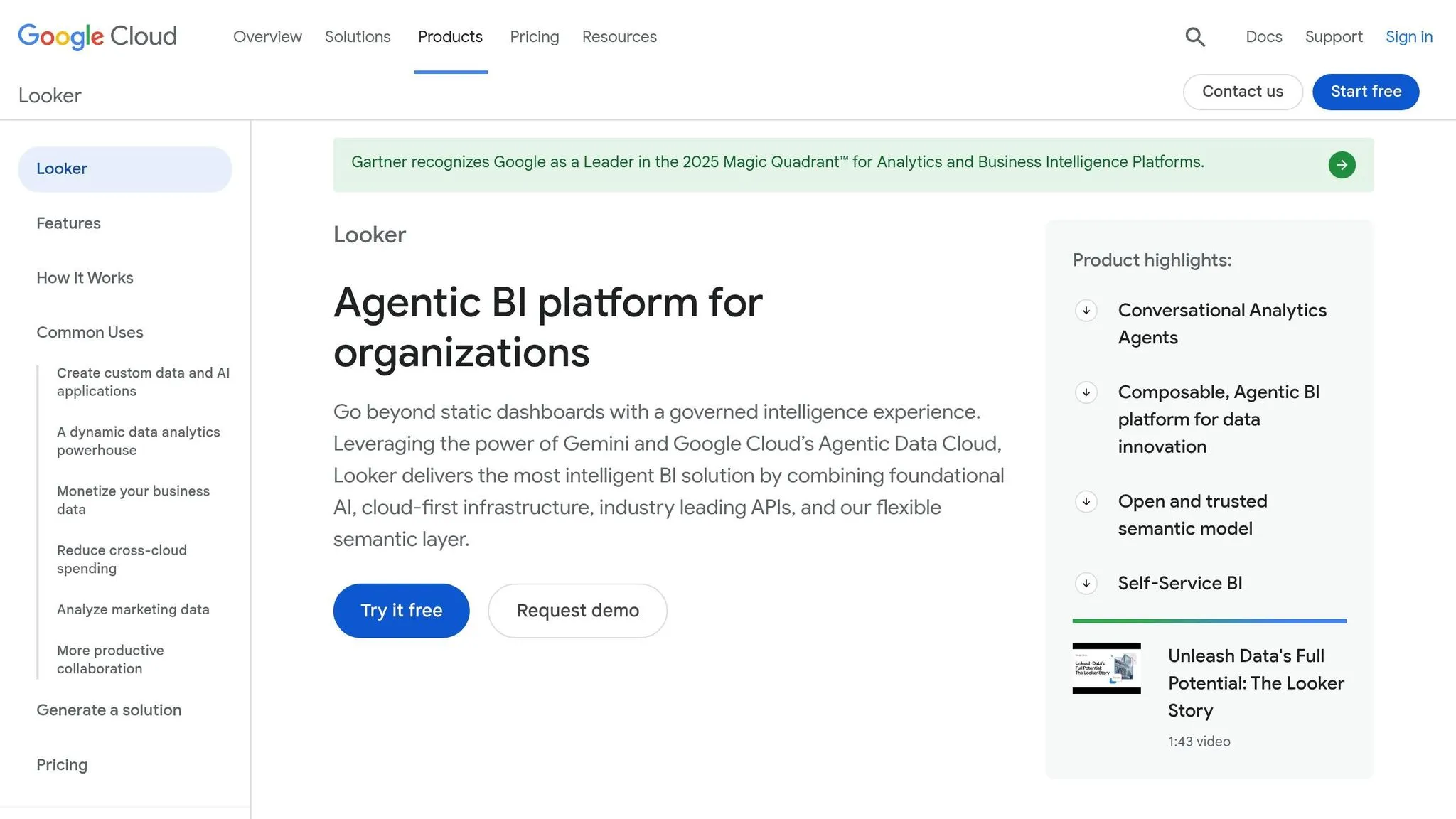
Looker takes a bold step with its "Agentic BI" approach, turning static dashboards into dynamic tools that drive operational processes. This innovation, referred to by Google Cloud as a "System of Action", enables AI agents to initiate downstream business actions seamlessly [4][5].
AI Capabilities
Looker’s Conversational Analytics API is now available, empowering developers to create custom, multi-turn workflows and embed AI-driven recommendations directly into their applications [5]. With Gemini-powered assistants, users can generate visualizations, write custom expressions, and perform in-depth analyses effortlessly [4]. The LookML semantic layer acts as a bridge between complex SQL queries and plain business language, serving as a "trustworthy brain" for both human users and large language models. This feature helps prevent AI from generating inaccurate or misleading results [4][5].
"Conversational Analytics in Looker transforms static dashboards into active workspaces where governed agents don't just show data - they interpret and execute on it." - Google Cloud [4]
These capabilities make Looker a powerful tool that integrates seamlessly into various workflows.
Embedding Options
Looker provides flexible integration options for developers, including low-code iframes, SDKs, and a robust REST API [4][5][7]. The platform ensures secure data handling with multi-tenant isolation, making it an excellent choice for SaaS applications. It also adheres to key compliance standards like GDPR, HIPAA, and SOC2 [6][7]. This adaptability is further enhanced by Looker’s direct connectivity to data warehouses.
Data Warehouse Integration
Looker works directly with data warehouses, using Persistent Derived Tables (PDTs) to pre-calculate complex joins and streamline processing times [7][8][9][11]. Its Aggregate Awareness feature automatically identifies and utilizes the most efficient summary tables, significantly speeding up queries on large datasets [9][10]. Additionally, Looker’s caching system, managed via datagroups, can synchronize with ETL processes to optimize performance, with healthy cache scores typically ranging from 50% to 70% [10].
Pricing Model
Looker is available in three editions: Standard (for small teams with up to 1,000 API calls per month), Enterprise (supporting up to 100,000 calls per month), and Embed (allowing up to 500,000 calls per month) [4]. Licenses are divided into Developer, Standard, and Viewer roles, each tailored to specific user permissions.
4. Sisense
Sisense follows Looker’s lead with a developer-friendly platform for embedded analytics, blending powerful AI tools with flexible deployment options. With more than 500 5-star reviews [15], it’s recognized for its ability to handle complex data modeling while maintaining reliable performance, even for large user bases.
AI Capabilities
The Sisense Intelligence suite offers natural language queries, automated narratives, and predictive forecasting. Its AI Assistant operates via an enhanced semantic layer, where developers can add column descriptions to provide context and ensure governed data access. In 2024, aerospace company Barrios adopted Sisense to deliver real-time reporting for clients like NASA, supporting over 300 active monthly users and cutting strategic board meetings by half [12].
"With Sisense's AI capabilities, we are able to easily translate complex data, streamline interpretation... and identify key impacts with speed that is changing the way we can react (while managing the risks) during clinical trials."
– Tanya du Plessis, Chief Data Strategist and Solutions Officer, Bioforum [15]
The platform also includes AI Smart Matching for semantic data exploration and AI-powered code generation to speed up development tasks.
Embedding Options
Sisense offers four main integration methods:
- iFrame: The simplest way to embed analytics.
- Embed SDK: A JavaScript wrapper for added flexibility.
- Sisense.JS: Enables direct DOM rendering.
- Compose SDK: Allows developers to use headless components with frameworks like React, Angular, and Vue.
The Compose SDK stands out by letting developers embed analytics directly into application code, giving them more control over design and scalability. However, advanced customization tools can be challenging to master, and iFrame-based embedding may suffer from performance issues.
Data Warehouse Integration
Sisense uses a hybrid connectivity model with Live Connect and ElastiCube. Live Connect directly queries cloud data warehouses like Snowflake, Amazon Redshift, and Google BigQuery. Meanwhile, ElastiCube employs "In-Chip" technology, a high-performance cached engine for faster data processing. The Elastic Data Hub combines data from various sources, including both cloud and on-premises SQL databases. With over 400 connectors [13], Sisense supports a wide range of integrations. For example, Casumo, an online gaming platform, saw a 23× improvement in report processing times by linking Amazon Redshift data to an ElastiCube [14].
Governance and Security
Sisense offers enterprise-grade security features, including SSO (SAML, LDAP, OAuth) and JWT-based web tokens for secure integrations. Row-level security ensures users only access data they’re authorized to see, using policies, filters, and security formulas. Multi-tenancy is supported either through separate ElastiCubes for each tenant (physical isolation) or a shared model with row-level security (logical isolation). The platform is ISO 27701 certified and supports GDPR compliance with features like data deletion.
"We went from custom application development to the ability to rapidly change something on the dashboard and then publish it again in real-time within the production environment - without sacrificing any of the security."
– Devin Vyain, Senior Solutions Architect, Barrios [15]
Pricing Model
Sisense follows a flexible "no-surprise" pricing approach, tailored to fit a business’s specific needs and growth plans. Small deployments typically cost between $10,000 and $20,000 annually, while enterprise solutions range from $50,000 to over $100,000 per year [16][17]. This pricing structure allows businesses to scale by adding data, users, or projects without rigid limits.
5. Power BI Embedded
Wrapping up our review, Power BI Embedded integrates real-time analytics directly into your applications. This Microsoft solution allows you to embed Power BI reports and dashboards using two approaches: "Embed for your customers" (App owns data), designed for external users without requiring individual licenses, and "Embed for your organization" (User owns data), tailored for internal employees who need individual Power BI licenses [18]. Let’s break down its AI features, embedded analytics architecture, security measures, and pricing.
AI Capabilities
For internal deployments, Power BI Embedded supports R and Python visuals, enabling advanced statistical analysis [18]. However, these AI-driven features are unavailable for customer-facing applications.
Embedding Options
Power BI Embedded provides flexibility depending on your audience. For external users, service principals help reduce licensing costs. For internal users, authentication is handled via Microsoft Entra ID, and each user must have a Power BI license [18]. The platform also supports DirectQuery, enabling near real-time data access so users can make decisions based on the most up-to-date information from your data warehouse [18].
Governance and Security
The platform’s security approach varies based on the deployment model. For customer-facing applications, non-interactive authentication with service principals is used, enhancing security while eliminating the need for individual Pro licenses [20]. On the other hand, internal deployments require Microsoft Entra ID authentication for each user. If using the F64 SKU or higher, internal deployments can bypass individual viewer licenses, though this option comes with higher capacity costs.
Pricing Model
Power BI Embedded offers flexible pricing options:
- Azure A SKUs: Pay-as-you-go pricing, starting at $1 per hour for customer-facing solutions [19].
- Fabric F-SKUs: Monthly pricing ranges from $262 for the F2 tier (development) to $8,384 for the F64 tier (enterprise), as Microsoft transitions from older Premium P-SKUs to Fabric-based SKUs [20].
Additionally, Power BI Pro license fees have increased by 40%, now costing $14 per user per month, up from $10 [20]. Deployment costs can grow significantly, from around $3,650 in the first year to over $103,000 by year four, with hidden costs potentially adding another 15–25% [20]. To avoid over-provisioning, it’s crucial to monitor Capacity Unit consumption closely before upgrading resources.
Advantages and Disadvantages
Here’s a streamlined look at the strengths and challenges of the platforms discussed earlier, highlighting their standout features and potential drawbacks.
Querio stands out with its context-aware NLQ and AI Python notebooks, making it a leader in advanced analytics. It offers a tiered pricing model with predictable costs and unlimited viewer access, alongside flexible deployment options (cloud-based or self-hosted).
ThoughtSpot shines with its SpotIQ anomaly detection, but its usage-based pricing can lead to higher costs over time.
Looker is known for its LookML modeling and BigQuery ML integration, but its steep learning curve often necessitates dedicated developer support.
Sisense provides customizable SDKs for fine-tuned control, though this requires significant development and maintenance efforts.
Power BI Embedded integrates seamlessly with Azure ML and OpenAI, but its capacity-based pricing can be unpredictable.
The business intelligence market is booming, with projections estimating it will hit $72.1 billion by 2027. This growth reflects the rising demand for advanced analytics tools as companies increasingly embrace data democratization and cloud-native technologies [21].
Summary Comparison:
| Platform | Key AI Strength | Main Limitation | Pricing Model |
|---|---|---|---|
| Querio | Context-aware NLQ & AI Python notebooks | Flexible deployment (cloud or self-hosted) | Tiered, unlimited viewers |
| ThoughtSpot | SpotIQ anomaly detection | Usage-based costs can escalate | Usage-based |
| Looker | LookML modeling & BigQuery ML | Steep learning curve for LookML | Usage-based |
| Sisense | Highly customizable SDKs | Requires significant development resources | License-based |
| Power BI Embedded | Azure ML & OpenAI integration | Unpredictable capacity-based costs | Capacity-based |
Conclusion
After reviewing top embedded analytics solutions, Querio emerges as a standout choice for its focus on simplicity and value. Its AI-native natural language engine removes the need for SQL expertise, empowering non-technical teams in areas like Finance and Operations to access insights effortlessly. The platform’s unlimited viewer pricing model ensures your margins stay intact as your user base grows - an essential advantage for SaaS providers embedding analytics into their offerings. With features like transparent AI-generated code and AI-powered reactive notebooks, Querio fosters trust while enabling teams to create reusable skills for consistent, reliable outcomes.
While other platforms may offer comparable features, Querio excels in delivering a cost-effective and scalable solution. Its tiered pricing model, starting at $500/month, provides predictable costs, addressing the common pain points of fluctuating expenses and operational complexity. For teams with limited engineering resources, Querio’s built-in semantic layer simplifies data workflows by eliminating the need for complicated ETL pipelines, all while ensuring data accuracy.
Querio’s warehouse-native architecture integrates seamlessly with major data warehouses like Snowflake, BigQuery, and Amazon Redshift. It also offers flexible deployment options - whether cloud-based or self-hosted - to fit diverse infrastructure needs. By combining context-aware natural language queries with enterprise-grade security features such as SOC 2 Type II compliance, row-level security, and OAuth 2.0, the platform ensures both usability and robust protection.
For organizations facing growing analytics demands, prioritizing platforms with fixed or tiered pricing is key to avoiding runaway costs. Querio meets these needs with its transparent pricing, easy integration, and scalable features, making it an ideal choice for businesses looking to lighten the load on analysts while expanding their embedded analytics capabilities.
FAQs
::: faq
How do I embed Querio into my app?
To integrate Querio into your app, you’ll need to use its Embedded API, which allows you to incorporate advanced data analysis features effortlessly. Start by authenticating your API requests using the credentials provided by the Querio team. Once authenticated, send a POST request to the API endpoint, including your authorization token and a JSON payload. From there, handle the response to display Querio’s insights, visualizations, or conversational outputs directly within your app. This setup enables real-time data exploration and natural language querying for your users. :::
::: faq
Will Querio work with my data warehouse?
Yes, Querio works effortlessly with your data warehouse. It establishes direct connections to platforms such as Snowflake and BigQuery, allowing for real-time data analysis tailored to your business requirements. :::
::: faq
How predictable is Querio pricing at scale?
Querio offers a flat-rate pricing model designed for simplicity and predictability. Starting at $14,000 per year, it eliminates per-user charges and provides unlimited viewer access, making it easier to manage budgets even as your user base or data connections grow. This pricing approach makes Querio an affordable and scalable option for businesses incorporating embedded analytics into their applications. :::