Business Intelligence
The Context Lock-In Problem in Modern BI
Preserve metric definitions, joins, and access rules during BI migrations so dashboards and agents return trusted answers.

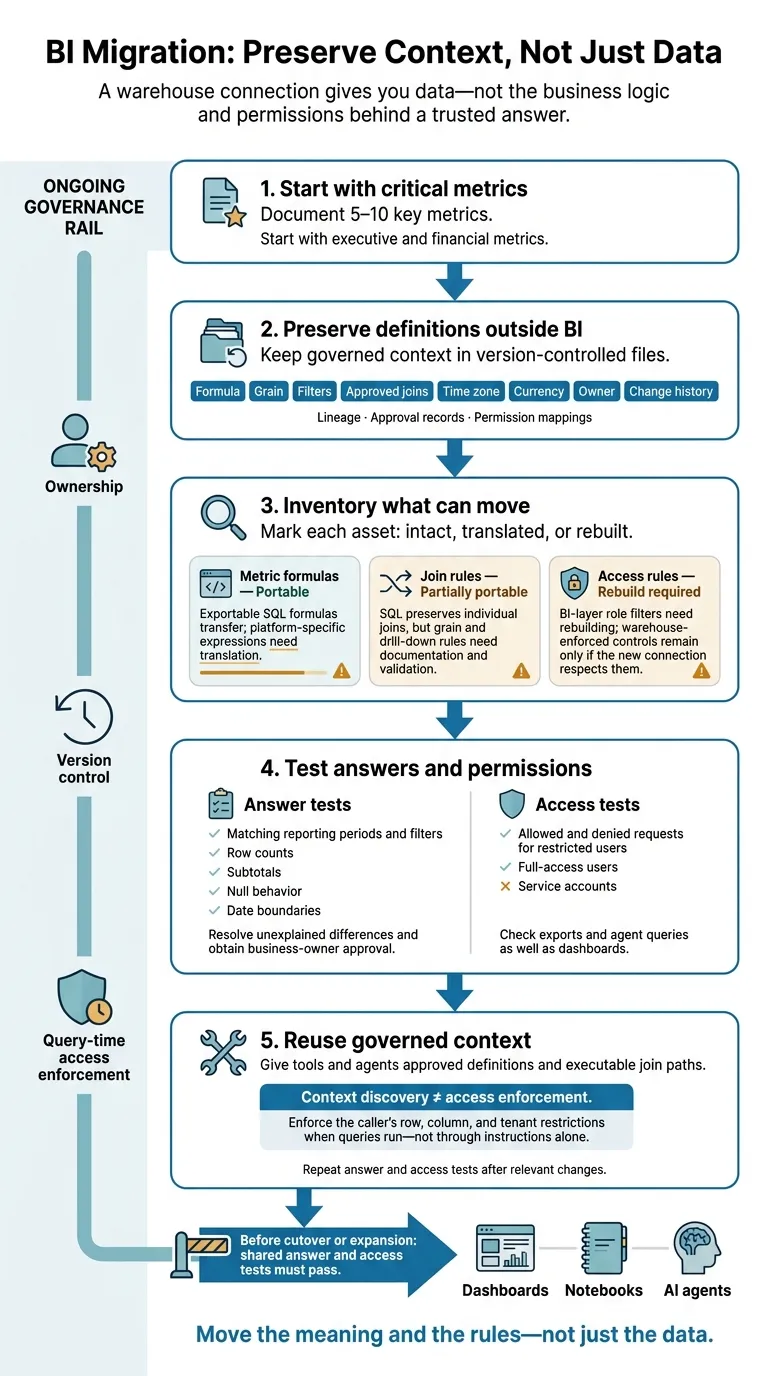
Before switching modern business intelligence tools or connecting an AI agent, I’d document 5–10 key metrics and test both their results and access rules. A warehouse connection gives you data - not the business logic and permissions behind a trusted answer.
That’s context lock-in: your data can move while its meaning stays inside the BI platform. In the article’s hypothetical example, two revenue definitions produce a $150,000 gap from the same warehouse.
My starting checklist:
- Keep definitions outside the BI tool: Store formulas, approved joins, filters, owners, and approval records in version-controlled files.
- Check what can move: Mark each asset as portable, partly portable, or needing a rebuild.
- Test answers and permissions: Compare results across tools, and check that users and service accounts see only what they’re allowed to see.
- Give agents governed context: Supply approved definitions, but enforce restrictions when queries run - not through instructions alone.
Move the meaning and the rules - not just the data. That’s the standard I’d use before trusting a new dashboard or agent.
How BI Context Gets Locked In
BI platforms store context in calculations, filters, lineage, and access rules that don’t travel with warehouse data.[2][7] Metric definitions and permission rules are the clearest points where that context can get lost.
| Context asset | Portability | What transfers - and what needs work |
|---|---|---|
| Metric formulas | Portable | Exportable SQL formulas transfer; platform-specific expressions need translation. |
| Join rules | Partially portable | SQL preserves individual joins, but grain and drill-down rules need documentation and validation. |
| Access rules | Rebuild required | BI-layer role filters need rebuilding; warehouse-enforced controls remain only if the new connection respects them. |
Hidden Metric Definitions and Join Rules
Hypothetical example: A 250-employee SaaS company stores invoices, refunds, subscriptions, and sales opportunities in Snowflake. Finance reports $1.20 million in monthly net revenue: recognized invoice revenue minus refunds, excluding canceled invoices and using Eastern Time. Sales reports $1.35 million in gross billings before refunds and credits. The $150,000 difference reflects different definitions - not necessarily bad data. Reconnecting to Snowflake does not establish which measure belongs in a financial report.
The definition needs to move with the metric - not just the data behind it, a core function of semantic layers for AI.
Joining invoice lines to multiple sales opportunities can duplicate invoice amounts. A dashboard might avoid this by aggregating before the join and using a saved filter to exclude test accounts. Entity grain controls safe aggregation. Store aggregation rules, exclusions, date fields, and the time zone with each metric. An exported query alone won’t preserve drill-down logic.[4][5][6]
The same gap affects who can see the results.
Platform-Specific Permissions and Trust Labels
Correct SQL isn’t enough. Authorization must travel with the metric, too. Row-level filters may rely on user attributes, while inherited roles control access to fields or reports. Approval labels and role filters are part of the trusted answer, not separate admin metadata. Treat certified content as approval metadata, rather than just a label. Document the approver, effective date, audience, and role-to-filter mapping.
Healthcare SQL may reference patient identifiers without carrying the rules that limit who can view them. Financial SQL may reproduce a revenue total without its controller approval or reporting-period status. Document where each restriction is enforced - the warehouse, BI layer, or both - and preserve those controls in any new connection.
What Transfers and What Must Be Rebuilt
Portability depends on where context lives and what the target system can run. That’s why migration carries risk: some context transfers intact, some needs rebuilding, and some needs testing before use.[9][10][14]
| Context asset | What transfers intact | What needs mapping or rebuilding | Migration risk | Effect on AI-agent reuse |
|---|---|---|---|---|
| Warehouse tables and views | Tables, columns, and views if the warehouse and schemas stay unchanged | Connections, credentials, and environment references | Low to medium: access failures | Schema is available; business meaning may not be |
| SQL | Exported or version-controlled query text | Dialect, functions, parameters, and session settings | Medium to high: failed execution or changed results | Requires compatible SQL and approved execution patterns |
| dbt models and tests | Model files, YAML, tests, documentation, and version history | Adapters, packages, variables, materializations, targets, and deployment jobs | Medium: runtime behavior changes | Useful context if the system can run and find it |
| Metric formulas | Exportable formula text | Grain and filters; expressions that don’t transfer need translation | High: metric drift | Requires a complete definition the system can execute |
| Semantic models and joins | Exportable metadata or configuration | Target-specific entity and relationship mappings | High: inconsistent totals | Approved join paths must remain usable |
| Dashboard calculations, layouts, and filters | Exportable workbook or report files | Expressions, layouts, interactions, and filter scope | Medium to high: changed calculations or behavior | Dashboard logic rarely transfers as-is; convert it into governed definitions |
| Access policies | Exportable policy descriptions or configuration | Target-specific policy syntax and enforcement | Very high: disclosure to users without permission | Must constrain queries for the caller |
| Role mappings | Exportable role names and group lists | Identity, group, and service-account mappings | High: excessive or denied access | Links callers to access policies |
| Lineage, ownership, and certification | Exportable catalog metadata | Asset IDs, owners, approval status, and certification workflows | Medium: lost trust and accountability | Identifies trusted assets |
Validate Metrics and Access When Switching Tools
Reconnecting is the start of validation, not the finish. To check that tools produce the same trusted answer, compare critical metrics with matching reporting periods and filters. Check row counts, subtotals, null behavior, and date boundaries. Resolve unexplained differences and get business-owner approval before publishing.
Test both allowed and denied requests for restricted users, full-access users, and service accounts.[3][12][13] After those checks pass, store the definitions and tests outside the BI tool.
AI Agents Need Context, Not Just Schemas
Schema access alone isn’t enough. An agent needs approved metric definitions, join paths, and access rules. Make metric definitions, join logic, aggregation rules, access mappings, and certification status available for the agent to ingest.[8][11]
Keep context discovery separate from access enforcement. Definitions explain the answer. Query-time controls enforce the caller’s row, column, and tenant restrictions. dbt files, tests, and documentation supply structured context, but the consuming system must find that metadata and enforce restrictions - not just read instructions about them.[9][10][3][12]
The context agents read must match the governed context humans trust for agents to stay correct. Assign owners to definitions and tests, and keep them under version control so that consistency can be checked.
Reduce Lock-In With Owned Context and Tests
Version-Control Metrics and Share Definitions
Store metric definitions outside the BI layer, in GitHub alongside the dbt models they use. That makes the context reusable. Include each metric’s formula, grain, filters, joins, time zone, currency, owner, and change history.
Require pull requests for updates. One reviewer checks execution; the finance or domain owner approves changes to meaning. Keep earlier versions so results can be reproduced.
Publish approved definitions and join paths through a shared semantic layer, using stable metric names and executable query paths. Validate definitions in development and CI, with execution and integration tests for every interface that uses them.
Map Permissions and Test Shared Answers
Definitions help only when the right users can access them. Maintain a permission map covering identity groups, application roles, warehouse roles, row filters, column restrictions, and allowed actions. Include inheritance, exceptions, service accounts, and what happens when access is denied.
Test Finance, Sales, and Operations identities, plus a user who should be denied access. Check exports and agent queries to confirm that access restrictions hold after the switch. Repeat these checks after changes to identities, connectors, the warehouse, or the semantic layer.
Next, test the answers those access paths should produce. Maintain regression tests for refunds, duplicate customers, and reporting-period boundaries. Run them across SQL, dashboards, notebooks, and agents, using fixed snapshots or aligned query times to check that every interface returns the same governed answer.
Record the data interval, generated SQL, applied filters, and expected output. This lets reviewers tell the difference between a logic change and newly available data.
How Querio Makes Context Reviewable
Store context as plain files (table docs, business terms, metrics, dashboards) in a git repo your team owns, beside dbt, and let a pull request approve every agent-proposed update; use a governed semantic layer, live warehouse queries rather than CSV exports, and the SQL and Python in reactive notebooks to review self-serve logic. If you leave, you keep the repo.
Dashboards, identity mappings, warehouse roles, and permissions still need explicit changes and access testing. These controls make switching safer, but you still need to preserve context before migration.
Conclusion: Preserve Context Before Switching Tools
Accessible data is not portable context.
Start with five to ten executive and financial metrics. Build a portability inventory that records canonical definitions, approved joins, ownership, lineage, and permission mappings. Keep this context outside the BI layer, and mark each asset as intact, translated, or rebuilt.
Before cutover - or expansion to less critical reports or AI agents - require shared answer and access tests to pass. Agents inherit the same risk of incorrect answers as human users.
Preserve governed context first. Then rebuild only the platform-specific features that support consistent, auditable answers across tools.
FAQs
How can we measure our BI context lock-in risk?
Start by listing your dashboards, reports, calculated fields, and semantic models. Score each by how much decisions depend on it, who owns it, and how often it’s used. Check for inconsistent KPI definitions, embedded business logic, duplicated permissions, and undocumented dependencies.
Then compare headline totals, row counts, and drill paths in your current system with those in a potential target system. Business logic locked in proprietary metadata points to higher migration costs and a greater risk of inconsistent AI answers. Keeping metric definitions under version control in SQL or dbt helps reduce that dependence.
How should we resolve conflicting metric definitions?
Check reports and notebooks for conflicting definitions, then put metric logic in a governed semantic layer. Move core transformations into version-controlled SQL models, such as dbt. In Git, document each metric’s name, formula, grain, null handling, and time zone assumptions.
Have dashboards, notebooks, and AI agents use these approved definitions. Update business rules in one place, then compare the old and new systems side by side for 30 days to check consistency.
How do we prevent AI agents from bypassing access rules?
Enforce security in the warehouse, not through app-layer checks. Use OAuth to run queries as the requesting user, following the warehouse’s role-based access control (RBAC), row-level security (RLS), and column masking policies [1][2].
Avoid service accounts with broad permissions. Connect directly to your live warehouse so policies apply at the source. Require AI-generated SQL that you can inspect and edit to maintain a clear audit trail [1][2].