Business Intelligence
How to Version Your Analytics Logic with Git
Store SQL, dbt models, and metric definitions in Git; branch, test, review, tag releases, and deploy reviewed commits to production.

I version analytics logic by storing SQL, dbt models, and metric definitions in Git - not warehouse data. For a change like excluding fully refunded invoices from revenue, I test the numbers, get approval, and deploy the exact reviewed commit.
Here’s the workflow I follow:
- Store and protect: Keep code, tests, and business rules together. Leave out credentials and data extracts, and limit production deployment access.
- Change and check: Work on a branch, compare old and new results against the same data snapshot, and test affected models.
- Review and release: Record the business reason, reporting impact, approvals, and rollback plan. Tag the approved commit and log its deployment.
- Trace and undo: Link production logic to its commit and pull request. Use a reviewed revert when needed, then check whether stored data also needs repair.
The key distinction: merging code does not update the warehouse. I treat deployment and result checks as separate steps - and keep shared metric definitions aligned with what actually runs.
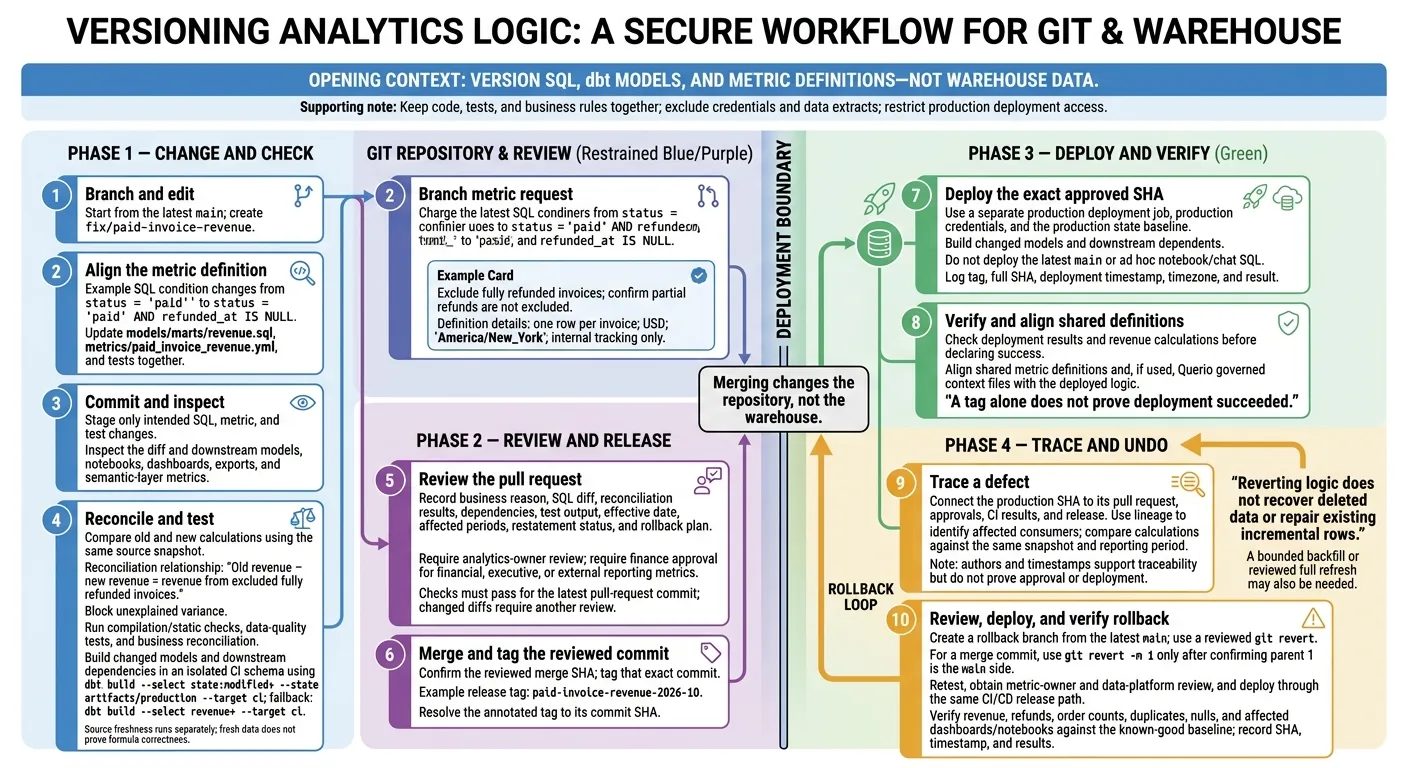
Change a Revenue Metric on a Branch
With the repository in place, make the revenue change on a short-lived branch.
Create a Branch and Edit the Metric
This fix excludes fully refunded invoices from paid-invoice revenue. Start with the latest main, then create a branch for the change.[8]
git switch main
git pull --ff-only origin main
git switch -c fix/paid-invoice-revenue
In models/marts/revenue.sql, update the condition inside SUM to count only paid invoices that are not fully refunded.
 SUM(
   CASE
-    WHEN status = 'paid'
+    WHEN status = 'paid' AND refunded_at IS NULL
     THEN amount_usd
     ELSE 0
   END
 ) AS paid_invoice_revenue
Update metrics/paid_invoice_revenue.yml and the SQL header comment together. Keep the YAML metric name, type, label, filter, and description aligned with the SQL logic. Set the grain to one row per invoice, use USD for amounts, and set the reporting timezone to America/New_York. Note that the metric is for internal tracking only.[9][10]
Commit the Change and Check Its History
Add tests for the updated revenue logic. Review your edits, then stage only the changed SQL, metric, and test files.[8]
git diff
git add models/marts/revenue.sql \
  metrics/paid_invoice_revenue.yml \
  tests/paid_invoice_revenue.sql
git diff --cached
git commit -m "fix: exclude fully refunded invoices from paid-invoice revenue"
Use git log, git blame, and git show to check the commit history, line authorship, and commit details: who changed the metric, what changed, and when. Replace <commit-sha> with an ID from the log. Authors and timestamps support traceability, but they do not prove approval or deployment.[7][8]
git log -- models/marts/revenue.sql
git blame models/marts/revenue.sql
git show <commit-sha>
Next, review the diff and test the revenue change before approval.
Review the Diff and Test the Revenue Change
Compare the SQL and Reconcile Results
Before requesting review, verify that the branch changes only the intended revenue logic. Use a three-dot comparison to inspect changes since the branch’s common ancestor with origin/main.[5]
git diff origin/main...HEAD -- models/marts/ metrics/
Check filters, joins, grouping grain, null handling, currency conversion, refund treatment, comments, metric documentation, and downstream references. Trace the change through downstream dbt models, notebooks, dashboards, exports, and metrics and semantic layers.
Run both calculations against the same source snapshot. The revenue difference should equal the revenue from excluded fully refunded invoices. Confirm that the refund logic excludes full refunds - not partial refunds. If you need true net revenue, document whether refunds apply by invoice, by line item, or in the period they occur. Block approval on unexplained variance.
Once the numbers reconcile, validate the change in CI.
Run Checks Before Approval
Use artifacts/production/manifest.json as the state baseline, and run CI builds in an isolated schema.[4][14] Build the modified revenue model and its downstream dependencies. Without a production baseline, select the models explicitly:
dbt build \
  --select state:modified+ \
  --state artifacts/production \
  --target ci

# Fallback when no production baseline exists:
dbt build --select revenue+ --target ci
| Check | What it catches | Execution environment | Merge-blocking policy |
|---|---|---|---|
| SQL compilation and static checks | Invalid references, configuration errors, formatting violations, and policy violations | CI container or temporary warehouse connection | Block compilation failures and required policy failures |
| Data-quality tests | Duplicate invoice keys, null identifiers, broken relationships, and invalid values | CI target | Block critical test failures |
| Business reconciliation | Unexplained revenue changes, refund misclassification, and join fanout | Development or CI target using one source snapshot | Block unexplained variance or breached tolerance |
Run source freshness separately when configured; dbt build does not run it automatically. Up-to-date data doesn’t prove the formula is correct. Require GitHub checks to pass for the latest pull-request commit, not an earlier version.[11][12]
dbt source freshness --target ci
Record the Impact in the Pull Request
After the checks pass, gather the evidence for review. Push the branch, then open a pull request:
git push -u origin fix/paid-invoice-revenue
Include the approved business reason, SQL diff, reconciliation results, impacted dependencies, test output, restatement status, and rollback plan.
State the effective date, affected periods, and whether dashboards and published reports will be recomputed. Explain intended historical restatements, and investigate unexplained historical changes as regressions.
Require analytics-owner review and finance approval for metrics used in financial, executive, or external reporting. Configure protected-branch rules to require those reviews and checks. If the diff changes, require another review.[13][12][15]
Merge and Deploy the Approved Metric
Merging changes the repository, not the warehouse. Run a separate deployment job against production data before the new revenue metric goes live.[6][8]
Merge the Pull Request and Tag the Release
Once the pull request is approved and merged, sync your local branch. Use the reviewed merge commit - not a later commit on main.
git switch main
git pull --ff-only origin main
git rev-parse HEAD

git tag -a paid-invoice-revenue-2026-10 \
  -m "Exclude fully refunded invoices"
git push origin paid-invoice-revenue-2026-10

# Resolve the annotated tag to its commit SHA:
git rev-parse paid-invoice-revenue-2026-10^{commit}
Before tagging, confirm that HEAD points to the reviewed merge commit containing the version that passed reconciliation and checks. If it doesn't, tag that merge SHA explicitly.
Set the deployment job to trigger from the release tag or event and deploy the exact resolved commit SHA, not the latest main. Log the tag, full SHA, deployment timestamp, timezone, and result. A tag alone doesn't prove the deployment succeeded.[8][9]
Keep the tag and commit SHA as the production reference for audits and rollback.
Deploy Models and Update Governed Context
Run the deployment job against the production target using production credentials. For state-based selection, supply the production baseline so dbt builds and tests changed models and their downstream dependents:[8]
dbt build \
  --select state:modified+ \
  --state artifacts/production \
  --target prod
Deploy only the tagged commit. Don't rerun ad hoc SQL from notebooks or chat. Check the deployment results and verify the revenue calculation before marking the release successful.[8]
If you use Querio, its context files and metric definitions are plain files in a Git repository you own, and they can live in your dbt repo, so update them in the same pull request as the model change. This keeps self-serve users and AI agents querying the same metric logic.[16]
Use the same tag and SHA to identify the release to revert if the metric needs a rollback.
Trace Changes and Roll Back Faulty Logic
Find Who Changed the Metric and When
When a released metric breaks, trace the exact commit that reached production. Link it to its pull request, approvals, CI results, and approved release SHA.[18]
git log --follow --date=iso --stat -- models/marts/revenue.sql
git blame -L 20,45 models/marts/revenue.sql
git show <commit-sha> -- models/marts/revenue.sql
Use dbt lineage to map affected models. Then check the versioned metric, dashboard, and notebook definitions that use them. Compare both calculations against the same warehouse snapshot and reporting period to confirm the production defect and identify which consumers it affects.
Once you’ve confirmed the bad commit and its blast radius, revert only that logic. Then retest the same metric path.
Review and Deploy a Rollback
Create a branch from the latest main. Use git revert -m 1 only for a merge commit - and only after confirming that parent 1 is the main side. Otherwise, revert the commit directly. Resolve any conflicts with care.[3][19]
git switch main
git pull --ff-only origin main
git switch -c rollback/revenue-definition

git show --no-patch --pretty=raw <merge-commit-sha>
# Only after confirming parent 1 is the main side:
git revert -m 1 <merge-commit-sha>

dbt build --select revenue+ --target ci
git diff main...HEAD
git push -u origin rollback/revenue-definition
| Approach | Safe on shared branches | Best use |
|---|---|---|
git revert |
Yes; adds a reversal commit | Undo a change already merged or deployed |
git reset |
No, if force-pushed | Adjust private, unpublished work |
| Corrective commit | Yes; adds a fix | Fix the defect with a new change |
Have the metric owner and a data-platform reviewer approve the rollback, its reconciliation results, and any dependent changes. Deploy it through the same CI/CD job and reviewed release path used for the original metric change.
Reverting metric logic doesn’t recover deleted data or repair existing incremental rows. When needed, plan a bounded backfill or a reviewed full refresh.
After deployment, compare revenue, refunds, order counts, duplicates, and nulls against the known-good baseline for the same period. Check affected dashboards and notebooks, align Querio’s governed context files with the known-good dbt commit, and record the deployed SHA, timestamp, and results.[17][20]
Conclusion: Make Metric Changes Reviewable
Store the logic in Git, create a branch, edit, commit, inspect the diff, test, review, merge, and deploy. When a change fails, use a reviewed revert. Keep tracing, testing, reverting, and redeploying metric logic tied to a single approved source of truth.
FAQs
How should I organize my analytics Git repository?
Keep dbt models, metric formulas, business rules, and supporting SQL/Python together in versioned code, YAML/config, and Markdown. Use context/source_of_truth.yml to map every metric, dimension, and join to its exact dbt objects.
Review changes through pull requests. Require dbt tests and lineage checks in CI before merging, and deploy only tested artifacts. Put breaking changes in versioned models, such as *_v2.sql, with a deprecation_date so those changes stay reviewable and reversible.
How do I test metric changes without a frozen data snapshot?
Compare your proposed logic with the approved, existing logic using the same live warehouse data, a fixed reporting period, and identical date bounds [1]. Normalize labels, then check revenue by segment, row counts, and null counts against expected results. Block release until all unexplained differences are resolved [1].
Keep metric definitions and SQL under version control in Git. Validate changes through pull requests and automated tests before they affect production [1][2].
When does a rollback require a backfill?
A rollback needs a backfill when a change affected historical calculations, not just current logic. This can happen after revising a metric definition, transformation, or warehouse mapping.
If updated filters, attribution rules, or joins changed revenue or ARR for past dates, reverting the code isn’t enough. Recompute the affected date ranges using the last known-good version. If historical calculations weren’t affected, restore the prior logic without rewriting past results [1][2].