Business Intelligence
9 Best Natural Language to SQL Tools
Choose NL2SQL based on where your data lives, how metrics are governed, and whether the generated SQL is inspectable.

If you want NL2SQL that people can trust, start with governed metrics and visible SQL - not the chatbot demo.
I’d sum this article up like this: the right tool depends on where your data lives, how your metrics are defined, and whether your team can inspect the generated SQL. Across these 9 tools, the pattern is clear: warehouse-native options fit best when your stack is already centered on Snowflake, Databricks, or BigQuery, BI-layer options fit best when you already use Looker, ThoughtSpot, or Metabase, and specialist tools fit best when you need cross-database access, Slack or Teams workflows, or draft SQL fast.
Here’s the short version:
- Querio: best for cross-platform teams that want governed self-serve, live warehouse access, and inspectable SQL/Python
- Snowflake Cortex Analyst: best for Snowflake-only teams with a mature semantic model
- Databricks Genie: best for Databricks teams using Unity Catalog and domain-based setup
- BigQuery Gemini + Looker: best for BigQuery teams that already trust LookML for shared metrics
- ThoughtSpot Sage: best for search-led BI across more than one warehouse
- Seek AI: best for enterprise teams that want SQL visibility and strict review flows
- Numbers Station: best for internal analyst and data-agent workflows
- AI2SQL: best for solo analysts who want fast SQL drafts for $9/month
- Metabase Metabot: best for teams already working inside Metabase
The main buying checks are simple:
- Warehouse and BI support
- Semantic-layer and governance setup
- SQL transparency
- Answer reliability
- Setup time
One theme shows up again and again: accuracy comes more from the semantic model than the model generating the text. A tool may claim 90%+ accuracy, but that usually depends on clean joins, metric definitions, and access rules already being in place.
Quick Comparison
::: @figure 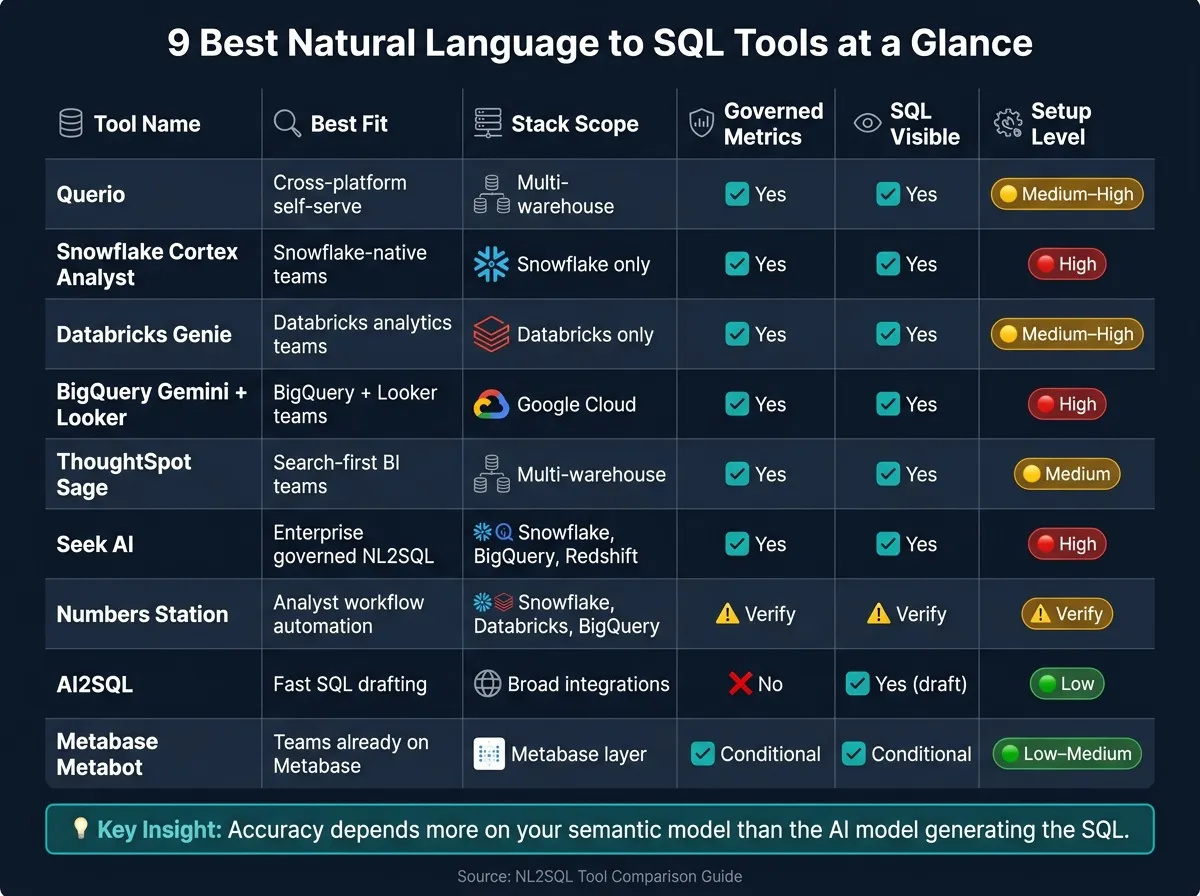 {9 Best NL2SQL Tools Compared: Features, Stack Fit & Setup Level}
:::
{9 Best NL2SQL Tools Compared: Features, Stack Fit & Setup Level}
:::
| Tool | Best Fit | Stack Scope | Governed Metrics | SQL Visible | Setup Level |
|---|---|---|---|---|---|
| Querio | Cross-platform AI self-serve analytics | Multi-warehouse | Yes, via semantic context layer | Yes | Medium to high |
| Snowflake Cortex Analyst | Snowflake-native teams | Snowflake only | Yes, via Semantic Views | Yes | High |
| Databricks Genie | Databricks analytics teams | Databricks only | Yes, via Unity Catalog + Genie Spaces | Yes | Medium to high |
| BigQuery Gemini + Looker | BigQuery + Looker teams | Google Cloud | Yes, via LookML | Yes | High |
| ThoughtSpot Sage | Search-first BI teams | Multi-warehouse | Yes, via ThoughtSpot model | Yes | Medium |
| Seek AI | Enterprise governed NL2SQL | Snowflake, BigQuery, Redshift | Yes, via dictionaries + guardrails | Yes | High |
| Numbers Station | Analyst workflow automation | Snowflake, Databricks, BigQuery | Verify with vendor | Verify with vendor | Verify with vendor |
| AI2SQL | Fast SQL drafting | Broad app integrations | No | Yes, draft SQL output | Low |
| Metabase Metabot | Teams already on Metabase | Metabase layer | Yes, if Metabase model is clean | Tied to Metabase setup | Low to medium |
If I were narrowing a shortlist, I’d start with the tool already closest to the governed layer your team trusts today, then test it against 100+ actual business questions before making a call.
1. Querio
Querio works well for teams that want self-serve analytics on live warehouse data, but with guardrails in place and code they can inspect. It uses a GitHub-synced context layer so metric definitions, join logic, and approved queries stay consistent no matter how people ask.
Warehouse and Stack Fit
Querio connects live to Snowflake, BigQuery, Redshift, PostgreSQL, MySQL, SQL Server, ClickHouse, MotherDuck, and MongoDB, so there’s no need for CSV exports. It also fits neatly into dbt-based stacks. Teams can ask questions in the Querio app, Slack, or Microsoft Teams, which makes it easy to meet people where they already work.
OAuth means each query inherits the permissions of the person running it. That matters a lot. It helps keep access tied to the same rules your team already uses instead of creating a separate permission mess.
Governance and Semantic Layers
Data teams set up joins, metrics, and repeatable analysis patterns once, then use them across every surface. The agent can suggest changes to the context layer, but a logged-in human has to approve and commit those updates.
Querio is SOC 2 Type II compliant and includes role-based access controls (RBAC)[2]. It also supports HIPAA with BAAs for healthcare teams. That said, there’s no magic here: if the context layer is wrong, the answers will be wrong.
And that level of control only goes so far unless analysts can check the generated code for themselves. Querio handles that by showing the code right in its notebooks.
SQL Transparency and Output Quality
Every answer shows up as real, inspectable SQL and Python inside a live notebook. Connected cells stay in sync when the underlying SQL changes, so analysts can follow the logic without piecing things together by hand.
They can also:
- Read the generated code
- Edit it directly
- Re-run it on the spot
Outputs include SQL, Python, charts, and shareable dashboards built from notebooks. And if the data isn’t there, Querio returns no answer instead of making something up. That alone will matter to teams that are tired of polished nonsense.
Implementation Effort
The tradeoff is setup time. Strong governance doesn’t appear out of thin air. It takes real work on schemas, metric logic, and join relationships.
Initial connections can be done in days, but dependable production use takes longer because the context layer needs solid investment in those building blocks[5]. Querio also includes Workspace Memory, which stores prior findings and instructions across sessions. Querio has a free plan, Core is $2,499/month (or $25,000 a year billed annually), and Enterprise pricing is custom.
2. Snowflake Cortex Analyst
Snowflake Cortex Analyst works best for teams that are already deep into Snowflake and want natural-language querying without sending data outside the warehouse.
Warehouse and Stack Fit
Cortex Analyst is Snowflake-only, so it makes the most sense for Snowflake-centered teams. It works with dbt, Looker, Sigma, and Hex as a governed query layer inside Snowflake. Internal apps can also connect through API or MCP and pick up Snowflake’s native permissions automatically.
That tight fit matters most when governance and metric definitions already live in Snowflake.
Governance and Semantic Layer
The main constraint isn’t the interface. It’s the semantic model underneath it.
Cortex Analyst inherits Snowflake RBAC, row-level security, and column-level security, with access controls enforced at query time. On paper, that’s strong. In practice, answer quality depends on Semantic Views: YAML models that define metrics, synonyms, and join paths.
If that semantic layer is weak, the tool gets less dependable. Snowflake reports 90%+ SQL accuracy when Cortex Analyst is paired with a mature semantic model [1][4].
SQL Transparency and Output Quality
Cortex Analyst is built for auditability. It shows the SQL and the definitions behind each answer. That gives analysts a clear way to inspect the logic instead of treating the result like a black box.
That lines up well with the article’s core criteria: inspectable SQL and governed metrics.
Most of the hard work sits in model design and rollout discipline.
Implementation Effort
Demos can come together in days. Production rollouts usually take 3–6 months. Most of that time goes into encoding business rules, metrics, and joins in YAML.
| Feature | Snowflake Cortex Analyst |
|---|---|
| Warehouse support | Snowflake only |
| Semantic layer | YAML-based Semantic Views |
| Accuracy | 90%+ with a mature model [1][4] |
| SQL transparency | High - shows SQL and definitions |
| Implementation timeline | 3–6 months for production readiness [4] |
3. Databricks Assistant and Genie
Databricks breaks this into two tools: Assistant for SQL help and Genie for plain-English analytics. That split is pretty simple in practice. Assistant helps people writing queries, while Genie is built for people who want to ask business questions in everyday language.
Like other warehouse-native assistants, Genie does its best work when metadata and metric definitions are already clean. If names, descriptions, and business logic are messy, the answers can drift off course.
Warehouse and Stack Fit
Genie is Databricks-only, so it does not query Snowflake, BigQuery, or Redshift natively [4][1]. For teams that also depend on those platforms, that’s a clear limit. Those sources stay outside Genie’s native query scope.
Governance and Semantic Layer
Governance comes through Unity Catalog, including row-level and column-level security [1][3]. That gives teams the same guardrails they already use in Databricks.
One catch: Databricks does not generate table or column descriptions automatically, so the data team has to add that business context themselves [1]. In plain terms, Genie needs help understanding what the data means.
To keep answers on track, teams set up Genie Spaces by domain. Each space includes the right tables, instructions, and example queries. Databricks recommends keeping each space to about 30 tables [3][2]. That setup makes Genie a stronger fit for teams that can shape one domain carefully instead of throwing the whole warehouse at it.
SQL Transparency and Output Quality
Genie shows the SQL it generates, which is a big plus for analysts who want to check the logic instead of trusting a black box [3]. Assistant and Genie also play different roles:
- Assistant helps authors debug SQL
- Genie helps business users ask questions in plain English
When Genie Spaces are scoped poorly, answers tend to get noisy. So the tool can be helpful, but the setup work matters a lot.
Implementation Effort
Databricks AI/BI Genie is included with the Databricks platform [1][3]. That said, “included” doesn’t mean “ready out of the box.”
Teams still need to:
- document schemas
- curate metadata
- scope Genie Spaces by domain
- add verified example queries
Without that work, results may not feel dependable enough for business users.
| Feature | Databricks AI/BI Genie |
|---|---|
| Warehouse support | Databricks only |
| Semantic layer | Genie Spaces + Unity Catalog metadata |
| Governance | Inherited from Unity Catalog |
| Table limit per space | ~30 tables |
| SQL transparency | High - shows generated SQL |
| Cost | Included with Databricks |
4. BigQuery Gemini and Looker Conversational Analytics
Google splits this into two products, and that split matters.
BigQuery Gemini is built for warehouse-native AI help inside Google Cloud. Looker Conversational Analytics brings that same idea into a governed BI setup for business teams. Put simply: one is for asking questions closer to the warehouse, while the other is for asking questions through a governed metrics layer. That gives Google a strong position for teams that want warehouse-native answers or BI answers based on certified metrics.
Warehouse and Stack Fit
Gemini makes the most sense when your data already sits in BigQuery. It uses the existing BigQuery and GCP governance model, which can cut setup work for teams already centered on Google Cloud[1].
Looker Conversational Analytics fits better when your team has already put time into a mature LookML semantic layer. Instead of querying raw tables, it queries that model, which helps keep metric definitions aligned across users[1][3].
Governance and Semantic Layer
The main difference comes down to where metric and semantic layer definitions live.
With Looker, metrics like Revenue or Active Users come from certified LookML definitions instead of raw tables[1][3]. That matters a lot when different teams need to see the same number and trust that it means the same thing every time. For regulated teams, that can be a big deal, especially when AI-generated answers are shown to executives or boards without manual checking.
SQL Transparency and Output Quality
Both tools show the generated SQL and the definitions behind each answer. That gives data teams a clear way to review and audit results[1].
Implementation Effort
Getting to a production-ready setup usually takes 3–6 months for mid-sized teams. For more complex enterprises, it often takes longer because LookML modeling takes time.
| Feature | BigQuery Gemini + Looker |
|---|---|
| Best fit | Google Cloud-native teams |
| Semantic layer | LookML |
| Governance | Inherited from BigQuery / GCP IAM |
| Implementation effort | 3–6 months for semantic modeling |
| Cost | Enterprise pricing (Google Cloud) |
5. ThoughtSpot Sage
ThoughtSpot Sage is a good fit for teams that want search-first analytics built on top of a governed BI model. Instead of going straight to raw warehouse tables, it adds a BI layer on top of governed metrics. In plain terms, that makes it a stronger option for self-serve business users than for people who want to dig around in raw tables.
Warehouse and Stack Fit
ThoughtSpot works well for teams that query across multiple warehouses. As of mid-2026, it also integrates with Snowflake Cortex through the Model Context Protocol (MCP), which lets it use Snowflake's native AI features when Snowflake is already part of your stack [3].
Governance and Semantic Layer
Before business users can ask questions in plain English, the data team has to set up business logic and join paths inside ThoughtSpot's semantic model. So the quality of the answers comes down to how complete and consistent that model is. If the model is well built, ThoughtSpot reports accuracy of 90% or higher [1][3].
That matters because rollout quality depends on modeling discipline, not just the strength of the model itself. If the setup is loose, the answers will be too.
SQL Transparency and Output Quality
ThoughtSpot does more than generate SQL. It also shows the SQL, explains the answer rationale, and adds forecasting, anomaly detection, and proactive insights [3][7]. So it acts less like a simple query box and more like an analytical assistant that can surface trends on its own.
Implementation Effort
Typical deployments take 1–3 months, while more complex rollouts can take 3–6 months [7][4].
| Feature | ThoughtSpot Sage |
|---|---|
| Best fit | Multi-warehouse search-driven BI |
| Semantic layer | ThoughtSpot's own BI semantic model |
| Governance | Accuracy depends on semantic model maturity |
| SQL transparency | SQL + rationale |
| Warehouse fit | Multiple warehouse sources; integrates with Snowflake Cortex via MCP [3] |
| Implementation effort | 1–3 months; longer for complex rollouts |
6. Seek AI
Like the warehouse-native tools above, Seek AI works best when governance is set before users start asking questions. It’s a focused NL-to-SQL layer for enterprise teams that want governed answers and SQL they can inspect, without rebuilding the analytics stack.
Warehouse and Stack Fit
Seek AI supports Snowflake, BigQuery, and Redshift. It also offers a native Snowflake deployment for teams with strict security or data residency needs.
Governance and Semantic Layer
Seek AI uses auto-generated data dictionaries, Seek Guardrails, and analyst review to stop invalid or policy-breaking queries before they run. The platform is SOC 2 Type II compliant. In practice, how much you get from it depends on whether your team already has clear dictionaries and access rules in place.
SQL Transparency and Output Quality
Every answer includes the underlying SQL, and analysts can review and edit the query directly. SEEKER-1 is the platform’s text-to-SQL model for more complex schemas. When evaluating text-to-SQL models for BI, accuracy across complex schemas is a primary benchmark.
Implementation Effort
Seek AI takes serious upfront setup. Teams need to configure data dictionaries, guardrails, and access controls first. That means business users usually can’t rely on it until the data team has done the groundwork.
| Feature | Seek AI |
|---|---|
| Best fit | Governed enterprise NL2SQL on Snowflake, BigQuery, or Redshift |
| Semantic layer | Auto-generated data dictionaries + Seek Guardrails |
| Governance | Analyst review workflow; SOC 2 Type II |
| SQL transparency | Full SQL visibility; analyst-editable |
| Implementation effort | Serious upfront configuration; data team ownership required |
The next tool moves from governed query layers into broader analytics workflows.
7. Numbers Station
Numbers Station is a good fit for teams that want to automate analytics work around Snowflake, Databricks, and Google BigQuery. Unlike the previous tool, it leans more toward workflow automation than direct BI querying. That makes it a stronger match when the main goal is internal data-agent workflows and analyst tasks.
Warehouse and Stack Fit
Numbers Station integrates natively with Snowflake, Databricks, and Google BigQuery. If your data stack already runs on one of those platforms, the setup makes sense.
Governance and Semantic Layer
Governance details are not documented in the available sources, so teams should verify those during evaluation.
SQL Transparency and Output Quality
SQL transparency is not documented in the available sources, so teams should verify that before buying.
| Feature | Numbers Station |
|---|---|
| Best fit | Internal data-agent workflows; analyst tasks |
| Warehouse support | Snowflake, Databricks, Google BigQuery |
| Semantic layer | Verify with vendor |
| SQL transparency | Verify with vendor |
Next, the focus shifts from workflow automation to other AI tools that write SQL.
8. AI2SQL
If you want fast SQL drafts and don't need governed analytics, AI2SQL is the lightest tool in this group. It's a good match for individual analysts who need to move fast. It is not built for team reporting or for teams trying to keep business metrics in sync.
Workflow Fit
AI2SQL works in the browser, VS Code, Slack, and Tableau. So the setup feels simple for analysts who just want a quick way to write queries without changing how they already work.
Governance and Semantic Layer
AI2SQL does not include a governed data model. That means metric definitions can drift from one session to the next, so it works better as a drafting tool than as a source of truth. If you're using business terms that can mean different things - like "revenue" - spell out the logic in your prompt [6].
SQL Transparency and Output Quality
AI2SQL says it delivers about 90% accuracy in internal tests, but that number has not been independently verified [5]. It tends to do well with standard CRUD queries, but it can struggle with more complex analytical SQL [5]. Because of that, you should review every generated query before using it in reporting.
Implementation Effort
Setup is quick. Pricing starts at $9/month, with Pro at $24/month, Team at $49/month, and a 7-day free trial.
| Feature | AI2SQL |
|---|---|
| Best fit | Individual analysts drafting SQL quickly |
| Integrations | Browser, VS Code, Slack, Tableau |
| Accuracy | About 90% in internal tests; not independently verified [5] |
| Governance | No governed data model; metric definitions can drift across sessions [1] |
| Starting price | $9/month |
Use AI2SQL when speed matters and you need a draft fast. For shared metrics and executive reporting, go back to a governed warehouse or BI layer with a semantic layer in place.
9. Metabase Metabot
Metabot is Metabase’s natural-language query layer. It makes the most sense for teams that already run on Metabase and want a simple way to ask questions in plain English. Instead of swapping out tools or reworking the analytics setup, teams can get conversational access to governed dashboards and saved questions right inside the stack they already use.
Warehouse and Stack Fit
Metabot sits on top of the Metabase model your team already maintains. So people can ask questions in natural language without changing the BI architecture or rebuilding how reporting works.
Governance and Semantic Layer
In plain terms, Metabot follows the rules Metabase already has in place. That means its output leans on the dashboards, saved questions, and metric definitions your team has already set up. If those are clean and well managed, Metabot is much more likely to give solid answers.
SQL Transparency and Output Quality
The quality of the answers depends on how mature the Metabase model is underneath it.
That’s the tradeoff. Metabot adds a conversational layer, but it won’t clean up weak BI definitions for you.
| Feature | Metabase Metabot |
|---|---|
| Best fit | Teams already using Metabase with curated dashboards and metrics |
| Stack fit | BI-layer conversational interface layered on an existing Metabase model |
| Accuracy | Depends on the maturity of the underlying semantic layer [1][3] |
| Governance | Inherits existing Metabase dashboards, saved questions, and metric definitions |
Pros and Cons of Each Tool
No tool wins on every front.
Some give you tighter control over governance. Others make setup easier. Some keep metrics in line across teams, while others move faster but can drift over time. And yes, platform lock-in is a real thing.
The table below boils those tradeoffs down to the buying-level view.
| Tool | Key Pros | Key Cons | Best-Fit Team |
|---|---|---|---|
| Querio | Inspectable SQL and Python in reactive notebooks; plain-file context synced to GitHub; live warehouse connections; returns no answer when data is missing | Full value requires building out the context layer | Small regulated data teams that want governed self-serve |
| Snowflake Cortex Analyst | Inherits Snowflake security and governance automatically; 90%+ accuracy with a mature semantic model [1][3] | Snowflake-only; accuracy drops sharply without a well-maintained semantic layer [1][3] | Snowflake-native data teams |
| Databricks Genie | Inherits Unity Catalog governance; supports multi-step reports [3] | Databricks-only; 30-table limit per Genie Space; tightly coupled to one platform [3][4] | Databricks-native engineering and analytics teams |
| BigQuery Gemini + Looker | LookML-backed metric consistency; natural fit for GCP-native stacks [1][3] | Tightly coupled to GCP and Looker [1][3] | Teams running BigQuery with an existing Looker deployment |
| ThoughtSpot Sage | Best for multi-cloud or hybrid teams that want a standalone BI layer [4] | Higher enterprise cost and usage caps on lower tiers | Enterprises that want a standalone self-serve layer |
| Seek AI | Full SQL visibility; analyst-editable queries; SOC 2 Type II; native Snowflake deployment for strict data residency | Requires upfront configuration of data dictionaries and guardrails before business users can rely on it | Enterprise teams on Snowflake, BigQuery, or Redshift that need governed NL2SQL |
| Numbers Station | Native integration with Snowflake, Databricks, and BigQuery; suited for internal data-agent workflows | Governance and SQL transparency details require vendor verification | Data teams automating analyst workflows on major cloud warehouses |
| AI2SQL | Fast setup; works in browser, VS Code, Slack, and Tableau; $9/month starting price | No governed data model; metric definitions can drift across sessions; complex analytical SQL may be unreliable [5] | Individual analysts drafting SQL quickly without shared reporting needs |
| Metabase Metabot | Adds conversational access to existing Metabase dashboards and saved questions with no stack changes | Answer quality depends entirely on the maturity of the underlying Metabase model [1][3] | Teams already on Metabase with curated dashboards and clean metric definitions |
A simple way to read this: the more freedom a tool gives users, the more your team usually needs to manage definitions, guardrails, and review. On the flip side, tools tied closely to Snowflake, Databricks, BigQuery, or Looker often feel easier to govern, but you give up flexibility.
Use these tradeoffs to narrow your shortlist in the selection guide below.
How to Choose the Right Tool for Your Team
Pick the tool that fits your warehouse, semantic model, security rules, and the way your team works day to day.
Start with the platform that already stores your governed data model. If your warehouse setup is standardized, begin with the native option that already lives there. That usually gives you the cleanest path, with less setup and fewer moving parts.
Next, set your metrics in one central place. Then make read-only access, row-level security, and query logging non-negotiable. If a tool can't work within those guardrails, it's probably not the right fit.
If your team needs cross-warehouse access or wants question-answering across many surfaces, go with a tool that keeps governed context intact and shows the SQL. That matters more than flashy demos. If people can't inspect what's happening under the hood, trust tends to fall apart fast.
Use the matrix below to map your stack to the first tool worth testing.
| Your Situation | Best Starting Point |
|---|---|
| All data in Snowflake, governance already in place | Snowflake Cortex Analyst |
| All data in Databricks with Unity Catalog | Databricks AI/BI Genie |
| BigQuery stack with an existing Looker deployment | BigQuery Gemini + Looker |
| Multi-warehouse, Postgres, or cross-platform needs | Querio |
| Need inspectable SQL, GitHub-synced context, and Slack access | Querio |
| Quick SQL drafting for an individual analyst | AI2SQL |
Once you have a shortlist, test each option against 100+ real questions from your own data. That's where the gaps show up. A tool might look great in a sales call, then stumble on your actual metric logic, security setup, or messy naming conventions. Use these rules to trim the list first, then validate everything with your own data.