Business Intelligence
Top 10 AI Tools for Data Analysis in 2026
Not one platform fits all—this guide compares AI analytics tools for dashboards, forecasting, and real-time monitoring.
In 2026, businesses are leveraging AI tools to make sense of growing data complexities, address talent shortages, and speed up decision-making. This article highlights the AI tools for data analysis, each offering unique features to meet varying organizational needs. Here's a quick overview of the tools covered:
Querio AI: Natural language analytics with SQL/Python transparency and centralized governance.
Power BI: Expanding AI features like Copilot and seamless Microsoft integration.
Tableau: AI agents for automated insights and Salesforce connectivity.
ThoughtSpot: Search-driven analytics for non-technical users.
Domo: Autonomous agents for actionable insights and operational efficiency.
Looker Studio: Affordable AI add-ons with Google Cloud integration.
Jupyter AI: Open-source notebooks with AI-assisted coding.
Alteryx: Code-free predictive modeling and governance tools.
DataRobot: Predictive modeling with automated feature engineering.
Anodot: Real-time anomaly detection for operational monitoring.
Each tool addresses specific challenges, from simplifying workflows to enhancing data accessibility and compliance. Below is a comparison table summarizing key features, limitations, and pricing.
Quick Comparison
Tool | Key Features | Limitations | Pricing (USD/month) | Best For |
|---|---|---|---|---|
Querio AI | SQL/Python output, centralized governance | Initial setup time | From $680 | Teams needing accurate, self-serve analytics |
Power BI | Copilot, Microsoft integration | High cost for full AI features | $10/user; ~$5,259 | Microsoft ecosystem users |
Tableau | AI agents, Salesforce integration | High per-user cost | From $15/user | Visual analytics and Salesforce users |
ThoughtSpot | Search-driven insights | Requires upfront data modeling | Starts at $100 | Non-technical teams seeking search-first tools |
Domo | Autonomous agents, dashboards | Custom pricing, mid-to-high cost | Custom quote | Operational dashboards for executives |
Looker Studio | Google Cloud integration, affordable AI add-ons | Limited AI without BigQuery | Free; Pro $9/user | Budget-conscious Google Cloud users |
Jupyter AI | AI-assisted coding, open-source | Requires coding skills | Free | Data scientists and ML engineers |
Alteryx | Predictive modeling, AutoML | Steep learning curve, higher cost | From $250/user | Analysts needing code-free modeling |
DataRobot | Predictive modeling, compliance tools | Enterprise pricing | Custom quote | Large-scale predictive modeling |
Anodot | Real-time anomaly detection | Specialized for monitoring | From $1,000 | Operational monitoring and issue detection |
Use this guide to identify the best tools for your team's needs, whether for dashboards, predictive modeling, or anomaly detection.
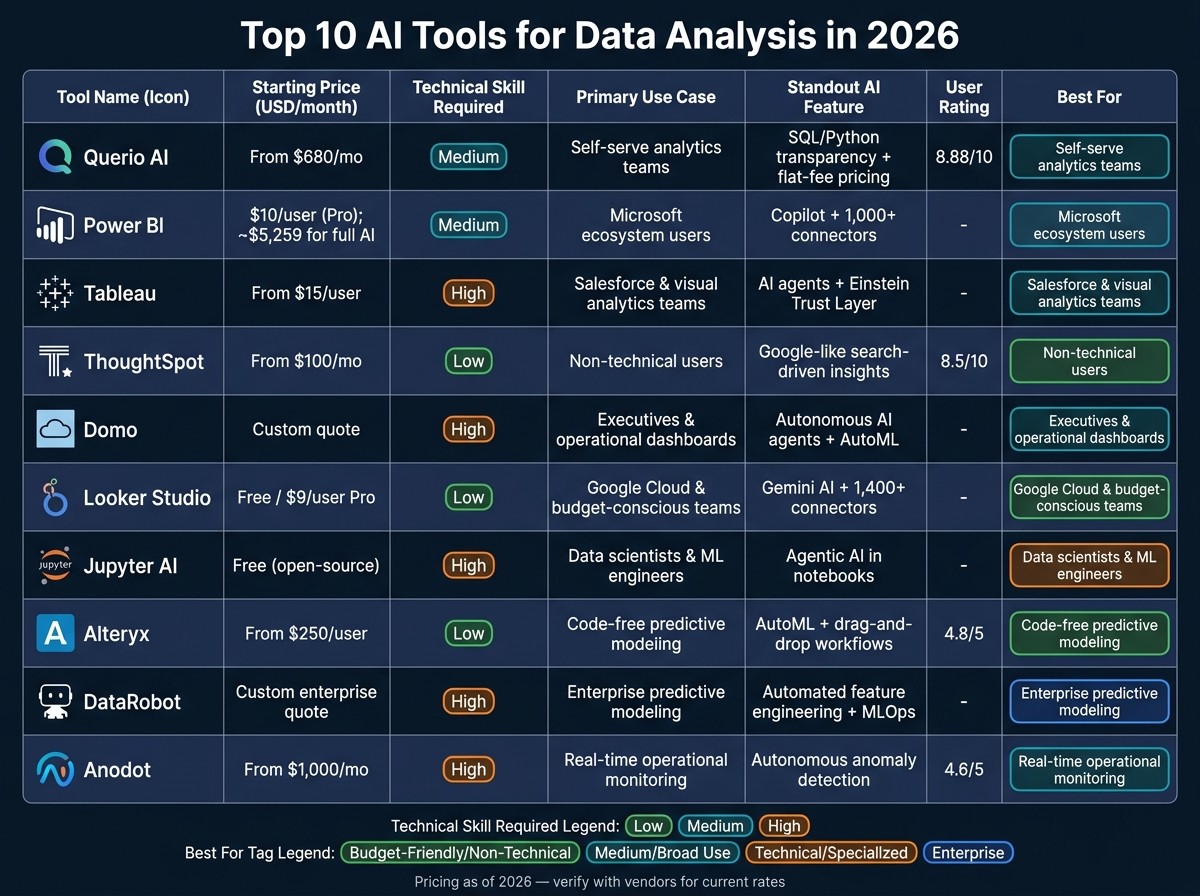
Top 10 AI Data Analysis Tools Compared: Features, Pricing & Best Use Cases (2026)
I Tested 53 AI Tools for Data Analysis - THESE 5 ARE THE BEST!
1. Querio AI Native Analytics Workspace
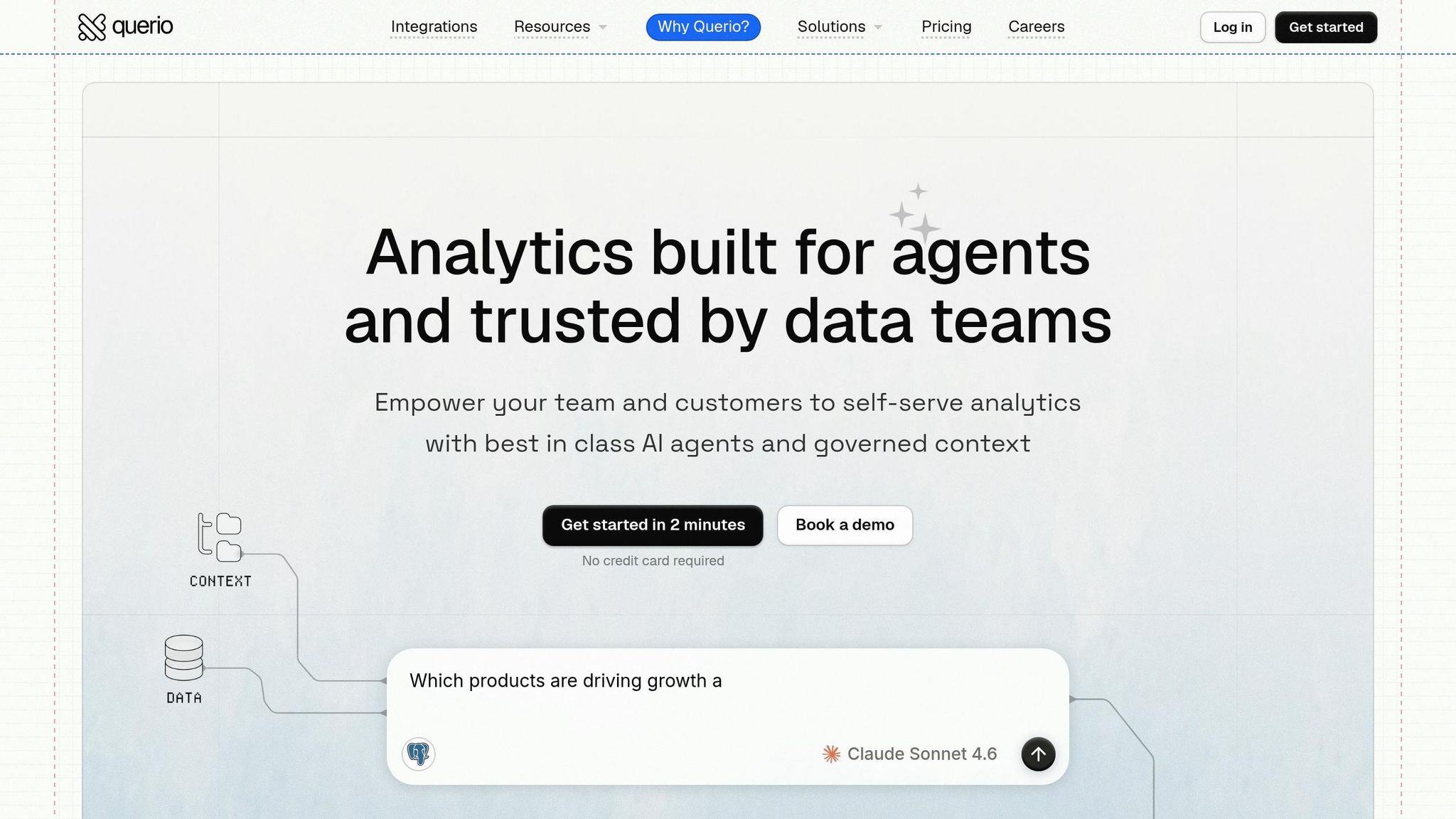
Querio takes the top spot on this list because it’s designed as an AI-driven analytics workspace. What sets it apart is its ability to let anyone on your team ask questions in plain English while generating verifiable SQL or Python code. This means ease of use for non-technical users and complete transparency for your data team, who can review exactly how results are generated.
"Finally an AI BI tool that doesn't feel like a black box. Being able to see and edit the SQL it generates is huge for building trust with our engineering team." - Neelam C., Product Hunt [1]
One of Querio’s standout features is its centralized context layer, which ensures consistent analytics across the entire organization. Data teams define business logic, metrics, and table relationships just once using versioned YAML files. From there, all users and dashboards pull from the same definitions, so metrics like "monthly revenue" stay consistent no matter who’s looking.
Querio directly integrates with your existing data warehouse - no need for data duplication or messy CSV uploads. It supports a wide range of platforms, including Snowflake, Google BigQuery, Amazon Redshift, ClickHouse, PostgreSQL, MySQL, MariaDB, Microsoft SQL Server, and MotherDuck. Connections are encrypted and read-only, keeping your data secure while eliminating the need for ETL processes. For more technical users, the AI Notebook Workspace combines a SQL editor with a Python notebook, complete with an AI co-pilot to simplify complex data tasks.
Querio’s pricing model is straightforward and designed for scalability. The platform charges a flat fee with unlimited viewers, starting at $680/month (billed annually) for the Startup tier. The Core plan, at $1,699/month, includes three data connections and unlimited viewers, while the Advanced tier, priced at $3,517/month, offers five connections, cross-datasource querying, and a dedicated EC2 instance. With an 8.88/10 consensus rating based on 65 verified reviews [1], Querio has earned high marks from users. While setting up the context layer requires an initial investment of time, the resulting consistency across your analytics justifies the Core plan’s approximately $14,000/year cost for most organizations.
2. Power BI with AI Features
Power BI continues to hold its ground as one of the most widely used analytics platforms, and its AI capabilities are expanding significantly as we approach 2026. At the forefront of these advancements is Copilot, a generative AI tool that allows users to create reports, draft DAX formulas, and ask questions in plain English. While Copilot can generate simple DAX measures with an accuracy of 85–90%, more complex formulas still require manual validation [3][4].
In addition to Copilot, Power BI includes built-in AI visuals like Key Influencers, Decomposition Trees, Smart Narratives, and Anomaly Detection. The "Explain by" feature within Anomaly Detection is particularly useful, identifying which dimensions - such as region, product, or segment - are driving unusual patterns [2][4].
Power BI also stands out for its seamless data connectivity through native integrations. It connects effortlessly with tools like Azure Synapse, Excel, Teams, and OneLake using Direct Lake Mode. This integration eliminates redundant data duplication and can reduce data cleaning efforts by 40–60% for enterprises [2].
On the governance front, Power BI offers strong administrative controls. Admins can enable or disable AI features at the tenant or workspace level, and all Copilot interactions are logged for auditing purposes. Additionally, Microsoft Information Protection sensitivity labels are maintained in AI-generated outputs, ensuring compliance. Data residency is managed based on the tenant's geographic region, which supports GDPR and HIPAA compliance requirements [2].
Pricing is another critical consideration for organizations. While basic AI visuals are included in the $10/user/month Pro plan, accessing Copilot requires Fabric F64 capacity, which starts at approximately $5,258.88 per month [3][4]. Here's a breakdown of the AI features across different pricing tiers:
AI Feature | Power BI Pro ($10/user/mo) | Premium Per User ($20/user/mo) | Fabric F64+ |
|---|---|---|---|
AI Visuals (Key Influencers, etc.) | ✅ | ✅ | ✅ |
Anomaly Detection (Basic) | ✅ | ✅ | ✅ |
Anomaly Detection (Explain By) | ❌ | ✅ | ✅ |
AutoML | ❌ | ✅ | ✅ |
Copilot | ❌ | ❌* | ✅ |
Audit Logging | ✅ | ✅ | ✅ |
Data Residency Controls | ✅ | ✅ | ✅ |
*Premium Per User (PPU) users can access Copilot only if a Fabric trial is activated on the tenant [3].
For organizations already integrated into the Microsoft ecosystem, Power BI provides a compelling option for those looking to choose the right data analytics tools for their organization. However, teams looking to adopt it solely for its AI-driven analytics should carefully weigh the high capacity costs needed to unlock its most advanced features.
3. Tableau with Tableau AI
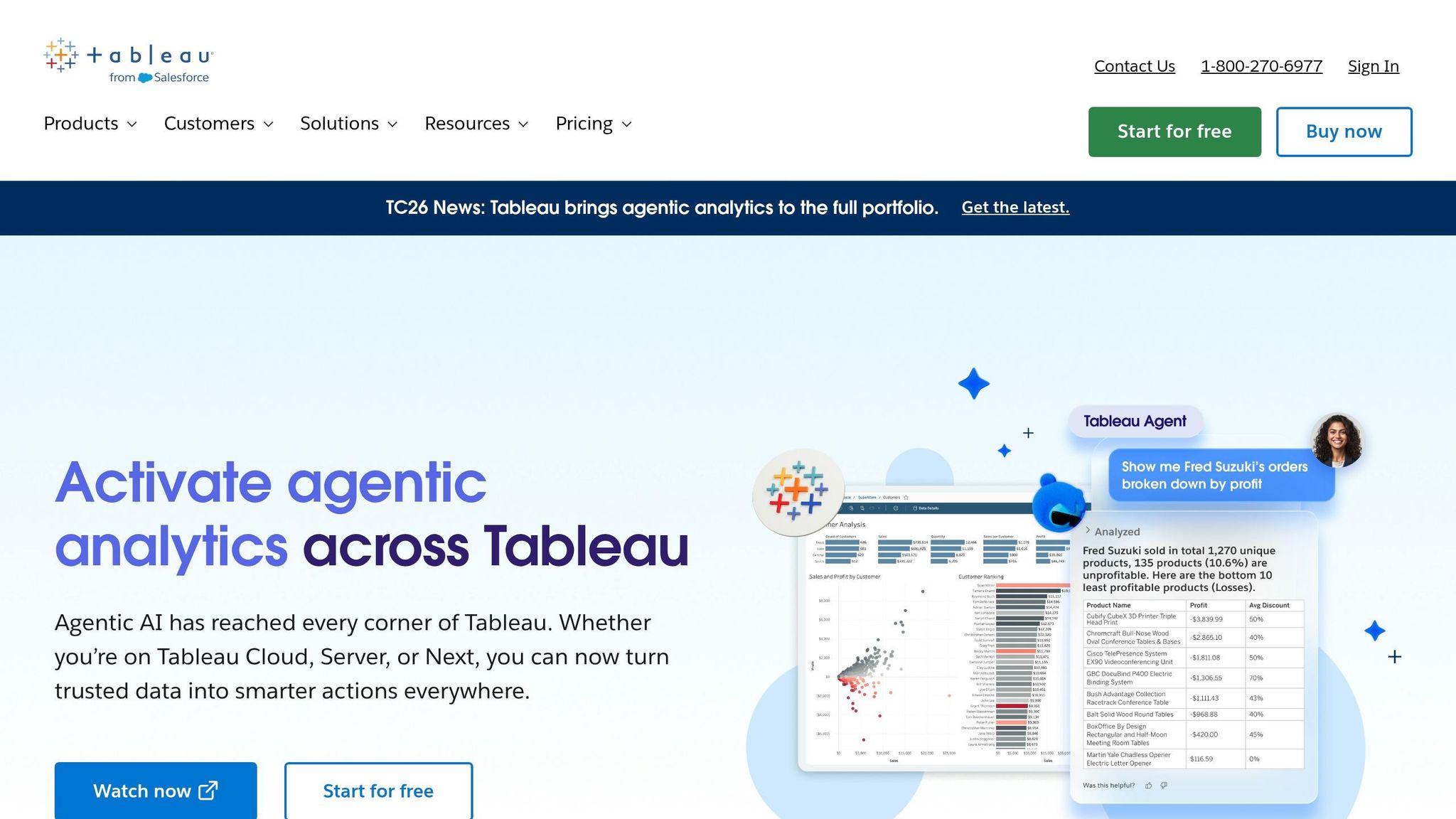
Tableau's 2026 update has redefined the way we approach data visualization. In May 2026, Salesforce introduced the Agentic Analytics Platform, transforming Tableau into what they call a "knowledge and decision engine" [5]. This update brings AI agents into the mix, allowing them to autonomously analyze data, pinpoint root causes, and even initiate workflows - like creating a Salesforce case when a specific trend is detected.
Mark Recher, GM at Salesforce, explained this shift:
"As Tableau evolves into an agentic analytics platform, we're elevating the role of an analyst into knowledge architects - turning trusted knowledge into decisions that drive action at scale." [5]
At the heart of this transformation is the Knowledge Engine, which leverages 33 million community semantic models [5]. This foundation ensures AI-driven insights are grounded in verified logic. Two standout features include the Concierge skill, which identifies root causes and suggests actions, and the Inspector skill, which keeps an eye on KPIs and flags any significant changes in trends [6].
For everyday users, Tableau Pulse simplifies staying informed. It delivers personalized metric summaries in plain language, complete with "why" explanations and citations, directly into tools like Slack or Microsoft Teams. This eliminates the need to manually sift through dashboards while keeping stakeholders updated in real-time [6][7]. These insights are paired with enterprise governance tools, ensuring data management remains seamless and secure.
Security is another priority for Tableau. The platform incorporates the Einstein Trust Layer, which safeguards data across all AI functionalities. Additionally, an analytics command center gives administrators the ability to monitor active AI agents and enforce compliance policies [5][6]. Tableau is designed to scale, capable of handling billions of records on both Tableau Cloud and Tableau Server [8].
Pricing starts at $15 per user per month for Tableau Cloud Standard, which includes Tableau Pulse. For full access to the AI suite, including Tableau Agent, the Tableau+ bundle is available through direct sales consultations [7][8].
4. ThoughtSpot Search-Driven Analytics
ThoughtSpot makes data exploration straightforward by allowing users to ask questions in plain English and receive instant visualizations - no SQL knowledge required. For example, typing something like "What were our top-selling products last quarter?" immediately generates visual insights. This approach makes it easier for both analysts and non-technical users to dive into data.
The platform uses patented tokens to convert plain English queries into SQL, powered by a governed semantic layer. This ensures that every answer is consistent and traceable. Features like the Answer Explainer and Query Visualizer let users review the underlying code and data lineage, adding an extra layer of clarity.
With Spotter AI Analyst, ThoughtSpot goes a step further by performing multi-step reasoning, testing assumptions, and even suggesting actions. Paired with SpotIQ, which identifies anomalies and conducts root-cause analysis across massive datasets, the platform excels at handling complex exploratory tasks.
ThoughtSpot’s zero-copy architecture connects directly to cloud data warehouses like Snowflake, Databricks, BigQuery, and Redshift. This setup enables real-time insights without the need for duplicating data. The Pro tier supports up to 10 billion rows, and the platform has received an impressive 8.5/10 rating from 206 reviews [9][10].
The pricing structure is tiered:
Free Plan: Supports up to 10 users and 25 million rows.
Starter Plan: Costs $100/month and handles up to 1 billion rows.
Pro Plan: Priced at $500/month for up to 10 billion rows.
Enterprise Plans: Start at $100,000/year.
However, keep in mind that dashboard customization options are somewhat limited, and setting up the initial semantic model can be a bit challenging.
5. Domo AI Capabilities
Domo has shifted its focus far beyond traditional dashboards, now emphasizing agentic AI - autonomous agents that don't just provide answers but take actionable steps. This approach addresses a critical issue highlighted by a 2025 MIT study, which found that 95% of organizations weren't seeing returns on their AI investments [11]. By offering richer data context and practical AI applications, Domo aims to close that gap.
In March 2026, Nichole Gunn, CEO of the channel marketing firm Extu, demonstrated Domo's potential by using its Agent Catalyst in combination with an Anthropic Claude integration. In just 28 minutes, she created a fully functional AI agent capable of automating tasks. The projected savings? Hundreds of thousands within months, scaling to millions in six months [11]. This kind of rapid automation has redefined operational efficiency for many users.
"Coming into Domopalooza, I had a perception of Domo being a dashboard company. After [the conference], seeing what they're doing... I see a company that is not just talking about AI but being at the forefront of AI integration." - Nichole Gunn, CEO, Extu [11]
Domo also stands out in governance. The platform achieved a perfect 5.0 score for lineage and explainability in a 2025 independent research report. Additionally, the Q2 2025 Forrester Wave™ for BI Platforms named Domo a "Strong Performer" and gave it the highest possible score in 11 criteria, including GenAI architecture and NLQ accuracy [12]. These accolades highlight its ability to provide transparency, making it easier for teams to audit insights and explain AI model outputs to stakeholders. This transparency is a cornerstone of natural language BI systems.
For organizations needing scalability, Domo's Cloud Amplifier offers zero-data-movement querying across platforms like Snowflake, Databricks, and BigQuery. Its AI Library centralizes the management of models and agents from top providers. Sony Interactive Entertainment showcased this scalability in early 2026, using App Catalyst to expand its agentic AI network. According to Tom Whipple, Senior Security Analytics Engineer, the tool allowed for faster workflow iterations and simplified the creation process [11].
6. Looker Studio with AI Add-Ons
Looker Studio offers a free core product, with the Pro tier available for $9 per user per month, which unlocks Gemini AI capabilities [16]. This pricing makes it an appealing choice for businesses, particularly those already utilizing Google Cloud.
The Pro tier introduces Conversational Analytics, which transforms natural language queries into visual charts. It also includes a Formula Assistant that simplifies creating calculated fields by interpreting plain-English descriptions, eliminating the need to write SQL manually. Additionally, the Automated Slide Generation feature allows users to export dashboards to Google Slides with AI-generated summaries in under five minutes [15]. According to Google's internal testing, grounding these AI features in Looker’s semantic layer (LookML) reduces data errors in natural language queries by up to two-thirds [13][15].
"Gemini in Looker lowers technical barriers to accessing information, enhancing collaboration, and accelerating the process of turning raw data into actionable insights." - Vijay Venugopal, Director of Product Management, Google Cloud [13]
Looker Studio connects seamlessly to over 1,400 data sources, including BigQuery, Google Ads, Google Sheets, and GA4. It also supports more than 1,300 community connectors for third-party platforms [14]. However, for the best AI performance, it's recommended to route data through BigQuery rather than relying on fragmented connectors. Teams working with Meta Ads, TikTok data, or CRM platforms should consolidate these sources into BigQuery to achieve optimal results [15].
While the AI-generated formulas and slide summaries can save time, it’s essential to review them for accuracy before sharing. As of mid-2026, Gemini in Looker Studio does not retain session context, which may require users to re-enter certain parameters [15]. On the governance front, the Pro tier centralizes report ownership within Google Cloud projects, ensuring accessibility even when team members leave. It also provides Customer-Managed Encryption Keys (CMEK) for added security [14][15].
Here’s a quick comparison of Looker Studio and Power BI Pro to help you weigh your options:
Feature | Looker Studio (Free) | Looker Studio Pro | Power BI Pro |
|---|---|---|---|
Monthly Cost | $0 | $9 per user/month | $14 per user/month |
AI Features | Limited | Gemini AI & Code Interpreter | Copilot (paid add-on) |
Viewer Cost | $0 | $0 | $14 per user |
Governance | Basic sharing | Team workspaces & audit logs | Advanced lineage & Purview |
7. Jupyter AI Notebooks
Cost: Free and open-source (BSD-3-Clause license) [17]
For Python-focused teams that need full control, Jupyter AI stands out. Version 3.0.0, released on April 1, 2026, introduced native agentic AI. This shift highlights the growing use cases for AI agents in modern data workflows. This means AI agents like Claude, Gemini, and Mistral can now handle tasks such as planning, coding, running code, checking outputs, and debugging - all seamlessly integrated into JupyterLab. This update embeds agentic capabilities directly into the workflow, streamlining every analytical process [17].
AI-generated responses appear as Python or SQL code within notebook cells. This makes it easy to review the joins, filters, or calculations the agent used, and you have the option to edit them before execution [19][20]. This level of transparency is especially useful for industries requiring strict compliance or auditing, as every step can be verified.
A built-in permission system ensures you maintain control by requiring explicit approval before any file writes or command executions. If errors occur, Jupyter Studio's AI-native extensions include a "Fix with AI" button that can diagnose issues and repair buggy cells with a single click [20].
"Jupyter AI brings agentic AI to JupyterLab... Agents are automatically detected when their dependencies are installed, so getting started is as simple as installing Jupyter AI and the agent of your choice." - JupyterLab Organization [17]
Practical tips for teams include using the #df syntax to ensure agents reference the correct variable and the /newNotebook command to create an entire analytical framework - covering data cleaning, transformations, and visualizations - from a plain-English description [18]. For those working with proprietary databases, custom MCP servers can provide agents with direct access to internal schemas and APIs [17], making Jupyter AI a powerful tool beyond individual use.
Feature | Jupyter AI | Jupyter Studio |
|---|---|---|
AI Interface | Chat-based | Inline editing (Cmd+K) + Chat |
Multi-step Agent | Yes (via ACP/MCP) | Yes (cell-level tools) |
Traceback Fixing | Manual via chat | One-click auto-fix |
Model Support | Multi-provider (Claude, Gemini, Mistral) | Any OpenAI-compatible endpoint |
License | BSD-3-Clause (free) | Apache 2.0 (free) |
8. Alteryx Intelligence Suite
Cost: Starter at $250/user/month (billed annually); Professional and Enterprise at custom pricing (contact sales) [22]
Alteryx One, introduced in May 2025, combines all of Alteryx's AI capabilities into a single platform, simplifying data analysis for businesses working with complex data from multiple sources. This unified platform allows teams to effortlessly move from data preparation to advanced analytics, streamlining workflows and saving time.
One standout feature is the natural language processing workflow builder, which lets analysts describe tasks like data preparation, transformations, and model building in plain English. Alteryx then generates workflows automatically. With AutoML, users can create regression, classification, and time series forecasting models without needing separate data science tools. When results are ready, Generative AI Summaries turn them into business-ready narratives, eliminating the need for manual presentation creation.
Alteryx shines in industries with strict regulations thanks to its focus on governance and auditability. Every action is logged, with a clear lineage of transformations, ensuring compliance with standards like SOC 2, ISO, CCPA, and GDPR through its AI Control Center [23]. For audit-heavy environments, this level of transparency provides a competitive edge and operational clarity.
"Alteryx became the backbone of how we modernized finance. It turned data into a shared language across teams and positioned us for AI and advanced analytics." - Shirley Yeung, FWD Insurance [21]
Alteryx integrates seamlessly with modern platforms like Snowflake, Databricks, BigQuery, Redshift, and enterprise applications such as SAP, Salesforce, Workday, and ServiceNow. It also supports older systems like SQL Server and Oracle. While reviewers rate it highly at 4.8/5, they often mention its steep learning curve and higher cost, which may be a hurdle for smaller teams [24].
Edition | Price (per user/mo) | Best For |
|---|---|---|
Starter | $250 (billed annually) | Small teams (1–10 users) needing code-free data preparation |
Professional | Custom (contact sales) | Teams requiring AI Copilot and automated insights |
Enterprise | Custom (contact sales) | Larger teams (10+ users) needing governance, AI Control Center, and free viewer licenses |
9. DataRobot for Predictive Analytics
Cost: Free trial available; enterprise pricing varies based on compute usage and deployment needs (contact sales for custom quotes).
When it comes to predictive modeling, DataRobot stands out as a leader in AI-driven analytics. It simplifies and speeds up the process by automating data preparation. With its Data Healing feature, it takes care of missing values and tackles imbalanced datasets through deduplication and synthetic data generation. Vibhor Rastogi, Global Director of Artificial Intelligence and Machine Learning Investments at Citi Ventures, highlights its value:
"Eighty percent of the challenge in a data science project is preparing that data and making it ready for ultimately business intelligence and machine learning, and the AI platform has solved that problem." [25]
Once the data is ready, DataRobot evaluates models - like XGBoost and ARIMA - using important accuracy metrics. Its AutoTS feature enables time series forecasting, even for cold start and real-time scenarios. Deployment is seamless, with one-click model deployment and automated retraining that continuously tests challenger models against the current champion.
DataRobot also prioritizes transparency and compliance. It integrates explainability tools, such as SHAP (Shapley values), which provide clear, row-level insights into predictions. This functionality operates 5–20x faster than its proprietary XEMP [27], ensuring models are both understandable and aligned with regulatory standards. Automated documentation further supports adherence to frameworks like the EU AI Act, NIST AI RMF, and state-level regulations such as California SB-1047.
The platform works smoothly with major data warehouses, including Snowflake, BigQuery, Redshift, Databricks, and AWS S3. By leveraging push-down technology, it performs data transformations directly within these environments, maintaining data residency and improving performance.
The impact of DataRobot in real-world scenarios is impressive. For example, a top 5 global bank achieved $70 million in ROI across more than 40 AI use cases, while a global energy company realized $200 million in ROI from over 600 use cases [26].
Capability | Description |
|---|---|
Data Healing | Handles missing values automatically without dropping rows |
Model Leaderboard | Ranks models based on key accuracy metrics |
AutoTS | Provides time series forecasting for cold start and real-time scenarios |
SHAP Explainability | Offers row-level prediction insights, processing 5–20x faster than XEMP |
Push-Down Integration | Executes transformations directly within data warehouses like Snowflake |
Auto-Retraining | Continuously tests challenger models against the champion |
10. Anodot for Anomaly Detection
Cost: Starting at $1,000/month (subscription-based); contact sales for enterprise pricing.
Anodot specializes in real-time anomaly detection, designed to identify issues before they escalate to customer-impacting problems. Its patented AI learns data patterns autonomously and monitors business data in real time, offering a proactive approach to operational management [29].
The platform excels at correlating anomalies across various data silos. By linking signals from areas like revenue, costs, partner performance, and user experience, Anodot helps businesses uncover root causes quickly. This capability is particularly useful for organizations aiming to streamline operations and address issues before they become critical.
Dr. Kim Larsen, CTO, shared:
"Anodot allows us to capture incidents sometimes an hour or two before they actually created a customer experience impact. We're using this, as we modernize our network, to get more sophistication and to also take complexities away from our operations people." [29]
Anodot integrates seamlessly with tools like Snowflake, Datadog, Microsoft Azure, and Google Cloud, and can be operational in just a few days [29]. While traditional monitoring approaches often miss a significant portion of insights - up to 85%, according to Anodot - the platform's AI analyzes the entire dataset, ensuring no critical data is overlooked [29].
This solution is ideal for industries that handle large volumes of data, such as Ad-tech, Fin-tech, eCommerce, Gaming, and Telecommunications. On GetApp, Anodot has an impressive overall rating of 4.6/5 from 25 verified users (as of March 2026). Users particularly praise its value for money (4.8/5) and note improvements in efficiency, security, and system availability [28].
Feature Category | Key Capabilities |
|---|---|
Monitoring | Real-time monitoring, high-volume processing, activity tracking |
Analytics | Correlation analysis, trend/problem indicators, predict future trends |
Integrations | Google Analytics 360, Datadog, Microsoft Azure, Snowflake, Google Cloud |
Governance | Access controls/permissions, API access, remediation management |
Comparison Table
Modern data analysis comes with its fair share of challenges, and finding the right tool can feel overwhelming. To simplify things, the table below breaks down key features, limitations, pricing, and ideal use cases for popular tools. Use this as a quick reference to determine which solution might work best for your team.
Tool | Key Strengths | Notable Limitations | Pricing (USD/month) | Best Fit |
|---|---|---|---|---|
Querio AI Native Analytics Workspace | SQL/Python output, direct data warehouse integration, flat-fee scalability, centralized governance | Initial setup of context layer takes time | From $680/month (Startup tier, billed annually) | Teams needing accurate, self-serve analytics without relying on black-box AI |
Power BI with AI Features | Deep Microsoft 365/Azure integration, Copilot for report generation, 1,000+ data connectors, strong governance via Microsoft Purview | Full Copilot requires Fabric F64 (~$5,258.88/month); AI quality depends on clean semantic models | $10/user (Pro); ~$5,259 for full AI features | Companies already invested in Microsoft tools |
Tableau with Tableau AI | Advanced visualizations, Tableau Pulse for alerts, Einstein Trust Layer for AI governance, Salesforce integration | High per-user costs; steep learning curve | From $15/user (Viewer); $75/user (Creator) | Visual analytics teams and those using Salesforce heavily |
ThoughtSpot Search-Driven Analytics | Google-like search interface, easy for business users, direct data warehouse integration | Requires significant upfront data modeling | Usage-based pricing; custom quotes | Non-technical users who prefer search-driven insights over dashboards |
Domo AI Capabilities | Low-code app building, AutoML, real-time dashboards, executive reporting | Custom pricing with mid-to-high costs; less ideal for deep data science | Custom quote | Business users and executives needing operational dashboards |
Looker Studio with AI Add-Ons | Free, seamless Google Cloud integration, broad connector library | Limited AI without BigQuery or Looker backend | Free; Pro at $9/user | Budget-conscious teams already using Google Cloud or BigQuery |
Jupyter AI Notebooks | Open source, highly flexible, supports complete ML pipelines, LLM-assisted coding | Requires coding skills; not suitable for non-technical users | Free (cloud compute costs vary) | Data scientists and ML engineers building custom analytics workflows |
Alteryx Intelligence Suite | Drag-and-drop predictive modeling, AutoML for non-coders, text mining, BI stack integration | Steep learning curve; higher cost can be a hurdle for small teams | From $250/user (Starter, billed annually) | Analysts needing predictive modeling without coding |
DataRobot for Predictive Analytics | Enterprise AutoML, automated feature engineering, MLOps, model governance | Enterprise pricing; too advanced for smaller teams | Custom enterprise quote | Enterprise teams focused on predictive modeling at scale |
Anodot for Anomaly Detection | Real-time anomaly detection, autonomous pattern learning, cross-silo correlation, reduces alert noise by 90% | Specialized for monitoring; not a general-purpose BI tool | From $1,000/month | Teams monitoring revenue, payments, or network performance in real time |
Some trends emerge when comparing these tools. General-purpose BI platforms like Power BI, Tableau, Domo, and Looker Studio cater to a wide range of reporting and dashboard needs, but their cost and AI capabilities differ. On the other hand, specialized tools such as DataRobot and Anodot focus on specific tasks like predictive modeling or anomaly detection, making them less suitable for broader analytics needs. Querio stands out by balancing accessibility and precision, offering conversational analytics with transparent governance through a flat-fee pricing model that avoids per-user costs.
Take a closer look at the table to identify the tool that aligns with your team's expertise, infrastructure, and analytics goals - whether it's for dashboards, machine learning, ad hoc exploration, or real-time monitoring.
Conclusion
The 10 tools discussed here showcase the diverse landscape of AI-driven analytics in 2026 - from self-service dashboards and natural language search to automated machine learning and real-time anomaly detection. Each tool is designed to tackle specific challenges.
To narrow down your options, start by answering three key questions: Who will use the tools daily? Where is your data currently stored? What are your biggest analytics bottlenecks? For example, if your team relies heavily on Microsoft 365 and Azure, Power BI could be an obvious choice. If your data resides in platforms like BigQuery or Snowflake and you need self-service access without overloading your data team, an AI-native workspace might be a better fit. On the other hand, if you're focused on building and deploying predictive models at scale, combining Jupyter AI Notebooks with DataRobot offers both flexibility and governance. By focusing on your team’s daily users, data location, and primary challenges, you can determine the right mix of tools - whether that's a core reporting platform, an advanced modeling solution, or a specialized tool for niche needs. Along the way, don’t overlook governance and compliance features.
Governance is critical. Many executives report difficulty trusting AI-generated insights. To address this, prioritize tools that offer transparent, auditable outputs and centralized definitions for metrics. This is especially important if your organization operates in highly regulated sectors like healthcare or finance.
Ultimately, a flexible, blended toolset often outperforms a one-size-fits-all approach. Most organizations find success by using two or three tools in combination rather than relying on a single platform. Before committing to a full rollout, pilot your selected tools over 8–12 weeks with measurable goals, such as reducing time-to-insight or improving report build times.
Choose tools that integrate smoothly with your existing data infrastructure and ensure they support strong governance practices. This approach will help you unlock the full potential of AI-driven analytics while maintaining trust and compliance.
FAQs
How do I choose the right AI data analysis tool for my team in 2026?
When selecting an AI data analysis tool in 2026, it's important to weigh factors like your team size, the complexity of your data, and your budget. For mid-sized teams (5–50 users), Querio stands out with its warehouse-native architecture, ability to handle plain English queries, and the option to inspect SQL or Python code for added transparency.
Look for tools that connect seamlessly to live data sources, provide enterprise-level security certifications like SOC 2 Type II, and use flat-fee pricing models. These features are especially valuable as your organization grows, ensuring scalability without unexpected costs.
What should I look for to trust AI-generated insights and stay compliant?
To confidently rely on AI-generated insights and maintain compliance, opt for tools that include a governed semantic layer. This helps standardize metrics and terminology across your organization, ensuring consistency. Look for transparency features like inspectable SQL or Python code to catch errors and verify the logic behind the insights.
Equally important, choose platforms that meet enterprise-grade security standards, such as SOC 2 Type II compliance. They should also use encrypted, read-only connections to protect sensitive data without the need to duplicate it. These measures provide both accuracy and security in handling your organization's information.
Can I use multiple AI analytics tools together without duplicating data?
Querio integrates seamlessly with your data warehouse by establishing live, read-only connections to platforms like Snowflake, BigQuery, and Amazon Redshift. This approach eliminates the need to move or copy data, reducing duplication. Thanks to Querio's warehouse-native design and centralized semantic layer, you can maintain consistent business metrics across multiple tools - without relying on ETL pipelines or extra storage.
Related Blog Posts