Business Intelligence
White-Label Analytics: What Your Customers Actually See
End-to-end release checklist for white-label analytics: verify branding, tenant isolation, access controls, exports, and safe error handling.

I treat white-label analytics tools as a product check - not a logo check. Before release, I test every supported role across at least 2 tenants, from sign-in to downloaded reports. If any access check fails, I block launch.
Here’s what I check:
- Branding: Your design, navigation, domain, and metric names stay consistent.
- Access: Each customer sees only the records and actions their account permits.
- Delivery: Exports, emails, and shared links preserve branding, filters, and data limits.
- Formats and errors: Dates, currency, and time zones are clear; failures don’t expose private details.
Embedding puts reports inside your app. White-labeling makes the whole reporting experience match your product. Governed metric definitions help keep the numbers aligned, but the deployed app still has to pass the tests.
::: @figure 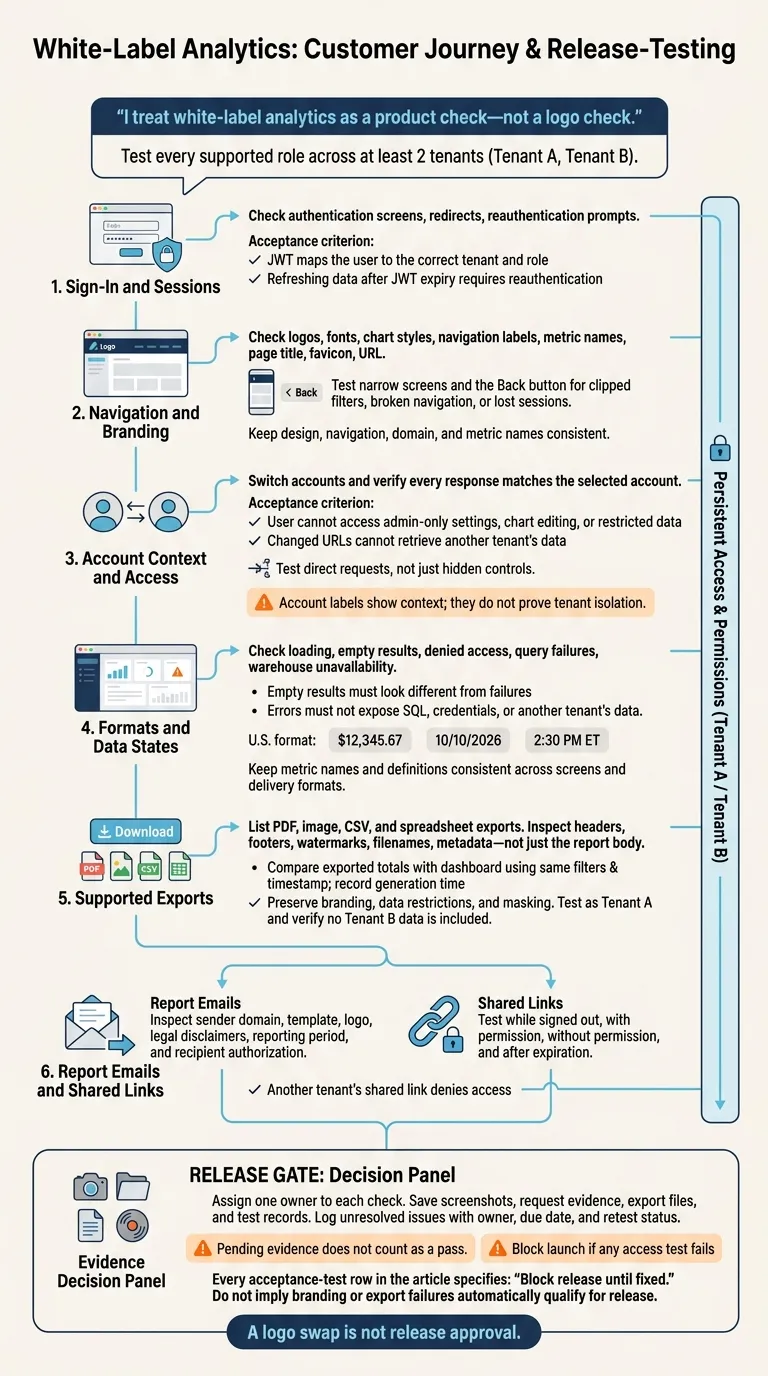 {White-Label Analytics: The Customer Journey Release Gate}
:::
{White-Label Analytics: The Customer Journey Release Gate}
:::
What White-Label Analytics Includes
Embedding puts reporting inside your app. White-labeling goes further by matching your branding, navigation, and access rules.
Embedded vs. Branded vs. White-Label Analytics
Branding and access control are different layers of security. This table shows what each approach includes.
| Customer-facing element | Basic embedded dashboards | Branded embedded analytics | Full white-label analytics |
|---|---|---|---|
| Visual identity | Vendor logo and colors | Your logo and primary colors | Full design system |
| Authentication | Separate login or basic token | Basic SSO/JWT mapping | Native SSO/JWT with role-to-tenant mapping |
| Navigation | Vendor menus | Limited customization | Host app navigation |
| Domains | Vendor subdomain | Vendor subdomain | Custom domain |
| Exports and emails | Vendor branded | Mixed branding | Your domain and logo |
| Access control | Standard user roles | Basic Row-Level Security (RLS) | Warehouse-enforced RLS and role-based access |
Match Branding, Permissions, and Metric Names
Use your product’s vocabulary for metric names and definitions. Customers should see the same numbers everywhere, not different labels or calculations depending on the screen.
Enforce tenant isolation and role-based access in the data path. Row-Level Security (RLS) can help enforce those rules. Match the account context to tenant permissions so customers see only their own data.
Next, review what customers see at each step, from sign-in through export.
What Customers See From Sign-In to Export
A screenshot shows a single moment. It does not verify sign-in, access enforcement, or export behavior. Follow a full customer journey to check each step, rather than relying on one dashboard image.
Navigation, Sign-In, and Dashboard Layout
Document a real workflow using the proper access permissions, then redact sensitive data before publishing. Annotate only what’s visible: product navigation, custom URL, dashboard tabs, colors, fonts, and spacing. Record sign-in redirects separately.
Test narrow screens and the Back button for clipped filters, broken navigation, or lost sessions. From there, check account context and how the dashboard handles different data states.
Filters, Account Context, and Data States
Inspect date selectors, account labels, and restricted actions. Check U.S. formatting:
$12,345.67, 10/10/2026, and 2:30 PM ET.
Document loading, empty results, denied access, query failures, and warehouse unavailability. Empty results should look different from failures. Errors should never expose SQL, credentials, or another tenant’s data. Account labels show context; they do not prove tenant isolation.
Exports, Report Emails, and Shared Links
Open every supported PDF, image, CSV, and spreadsheet export. Check headers, footers, watermarks, filenames, and metadata - not just the report body. Compare exported totals with the dashboard using the same filters and timestamp. Record the generation time so data changes aren’t mistaken for calculation errors.
Send report emails to a permitted test recipient. Inspect the sender domain, template, and legal disclaimers. Open shared links while signed out to check the intended access rules, and confirm that exports preserve data restrictions and masking.
Keep these files and test records alongside the annotated screenshot. Each delivery path needs its own evidence. Use these checks to build the customer-visible release checklist below.
Customer-Visible Touchpoint Checklist
Assign one owner to each check. Branding alone isn’t enough: customer-facing analytics also needs account-level access enforcement. Use this checklist to test the full customer journey in production, from sign-in to delivery.
Check Styling, Navigation, and Browser Details
Review what customers see in the deployed production experience.
| Surface | What the customer sees | Risk | Owner | Test |
|---|---|---|---|---|
| Logos, fonts, chart styles | Vendor attribution | Exposed attribution or inconsistent styling | Design | Compare dashboard and chart states in production to check branding consistency. |
| Menus and filters | Navigation labels and metric names | Vendor-hosted destinations | Product | Click through every menu path. Check each label and destination. |
| Browser details | Page title, favicon, and URL | Unexpected provider identity in browser tabs or addresses | Product | Inspect the address bar, favicon, and page title in production. |
Check Sign-In, Access Controls, and Errors
Test the live app - not just whether controls are hidden. Direct requests can reveal permission gaps. Engineering and security should test those requests, while data owners verify which records each role receives.
| Surface | What the customer sees | Risk | Owner | Test |
|---|---|---|---|---|
| Sign-in and expired sessions | Authentication screens and reauthentication prompts | Unexpected branding or continued access after a session expires | Engineering | Test sign-in and session expiration. Verify that protected requests require valid authentication. |
| Account switching | Selected account and refreshed dashboard | The previous account’s data remains accessible | Engineering | Switch accounts and verify that every response matches the selected account. |
| Role-based access | Permitted records and fields, or an access-denied state | Unexpected data exposed through requests or downloads | Security | Request restricted data directly and confirm that access is denied. |
| Tenant isolation | Only the customer’s records | Cross-tenant access through changed request parameters | Security | Attempt tenant requests without permission. Confirm that access is denied and no data is disclosed. |
| Empty results and errors | Clear status and recovery guidance | Sensitive query or infrastructure details exposed | Data Engineer | Trigger each state and check customer-visible responses for sensitive details. |
Check Report Delivery and Data Formats
Check displayed metric names against governed definitions.
| Surface | What the customer sees | Risk | Owner | Test |
|---|---|---|---|---|
| Supported downloads | Branded headers, filenames, U.S. formats, and governed metric names | Vendor logos or technical SQL column names appear | Data Engineer | Export data as Tenant A. Check branding, filenames, formats, and metric names, and verify that no Tenant B data is included. |
| Report emails | Custom sender, branded template, summary cadence, and reporting period | Unexpected domain or provider attribution; delivery to a recipient without permission | Product Manager | Trigger a scheduled report. Check the From address, logo, and recipient authorization. |
| Shared links | Report destination and access prompt | Access without permission through a reusable URL | Security | Test access with permission, without permission, and after expiration. |
| Data formats | Currency, dates, numbers, and labeled time zones | Unclear amounts or reporting periods | Data | Verify U.S. currency, date, number, and time-zone formatting across all delivery formats. |
Test the Experience Before Release
Use the checklist above as your release gate. Test the full journey in the deployed app, including emails and shared links. Save screenshots, request evidence, and log every unresolved issue with an owner, due date, and retest status.
Test Each Role and Tenant
Run these acceptance tests for every supported role across at least two tenants. Before approving release, replace “Evidence pending” with evidence showing a pass or fail. Pending evidence does not count as a pass.
| Test scenario | Expected customer experience | Evidence | Severity | Release decision |
|---|---|---|---|---|
| Sign-in / SSO | JWT maps the user to the correct tenant and role | Evidence pending | Critical | Block release until fixed. |
| Restricted role | User cannot access admin-only settings, chart editing, or restricted data | Evidence pending | High | Block release until fixed. |
| Cross-tenant access | Changed URLs cannot retrieve another tenant’s data | Evidence pending | Blocker | Block release until fixed. |
| Unauthorized link | Another tenant’s shared link denies access | Evidence pending | Blocker | Block release until fixed. |
| Expired session | Refreshing data after JWT expiry requires reauthentication | Evidence pending | Blocker | Block release until fixed. |
| Warehouse failure | A helpful, branded error shows no raw SQL or sensitive details | Evidence pending | High | Block release until fixed. |
| Report emails | Sender domain and logo match the host brand | Evidence pending | High | Block release until fixed. |
| PDF and CSV exports | Output preserves access restrictions, branding, and U.S. date and currency formats | Evidence pending | Medium | Block release until fixed. |
How Querio Supports Governed Embedded Analytics
Governed definitions only help when the deployed app follows them.
Querio keeps the analytics layer warehouse-native through live connections to Snowflake, BigQuery, Amazon Redshift, and Postgres. Teams don’t need CSV handoffs. Its governed semantic/context layer, along with inspectable and editable SQL/Python, helps data teams keep metric definitions consistent.
These capabilities support the customer experience, but they don’t replace acceptance tests. The deployed app still needs to pass the full journey.
Conclusion: Release After the Full Journey Passes
Review the annotated workflow and require touchpoint owners to sign off on authentication, access, exports, and delivery. A logo swap is not release approval. Block launch if any access test fails, and assign owners and deadlines to branding and usability gaps.
FAQs
::: faq
How can we prevent cached reports from leaking tenant data?
Enforce row-level security (RLS) at the query or semantic layer, not through frontend filters [1][2]. Include the tenant identifier in every cache key so cached results stay scoped to the requesting organization [1][3][4].
Check that warehouse connections are read-only and that RLS policies apply across every data access point, including cached queries. This prevents one tenant from viewing another tenant’s data without permission [1][3][5]. :::
::: faq
How should we retest analytics after permission changes?
Validate row-level security (RLS) and asset-level permissions in a sandbox before moving to production [1][2]. Use scripted API calls to check that backend-generated JWTs or session tokens enforce updated roles and attributes. Confirm that they block access to dashboards and drill-downs users aren’t permitted to view, as well as other tenants’ records [1][2][3].
Test role-based attacks across user profiles to verify RBAC policies [1]. Then run user acceptance testing (UAT) with a small internal group to catch edge cases before rolling out to customers in phases [4]. :::
::: faq
How can we automate white-label release checks?
Add functional and visual validation to your CI/CD pipeline. Script API checks to verify endpoint payloads. When theme files or layout components change, run visual regression tests to catch styling mismatches [1].
Version theme token files with every release, and use feature flags to roll out themes gradually. Automate role-based access control (RBAC) tests and encryption key rotation audits. These checks help prevent unexpected vendor UI elements [1]. :::