Business Intelligence
How to Document Your Data Warehouse So AI Gets It Right
Document grain, metrics, joins, and exclusions so AI generates correct SQL; start with one revenue metric and validate results.

I start with business rules - not column names - to help AI write correct SQL. Document one revenue metric first: its formula, what each row represents, approved joins, reporting dates, and exclusions. Then check AI’s SQL against a trusted query.
Here’s what I put in the approved context:
- Tables and columns: Meanings, owners, update schedules, and limits on use.
- Metrics and dates: Formulas, currency, timezones, reporting windows, and missing-value rules.
- Joins and exclusions: How to prevent double-counting and handle test accounts, refunds, and deleted records.
- Access and review: Warehouse-enforced permissions, version-controlled definitions, and owner approval.
A join that repeats each revenue row 3 times can report 300% of the correct total. That’s why I treat SQL that runs and SQL that answers the question as two different things.
I keep these rules beside the model code, give AI read-only access to approved data, and recheck results whenever the warehouse or its business rules change.
::: @figure 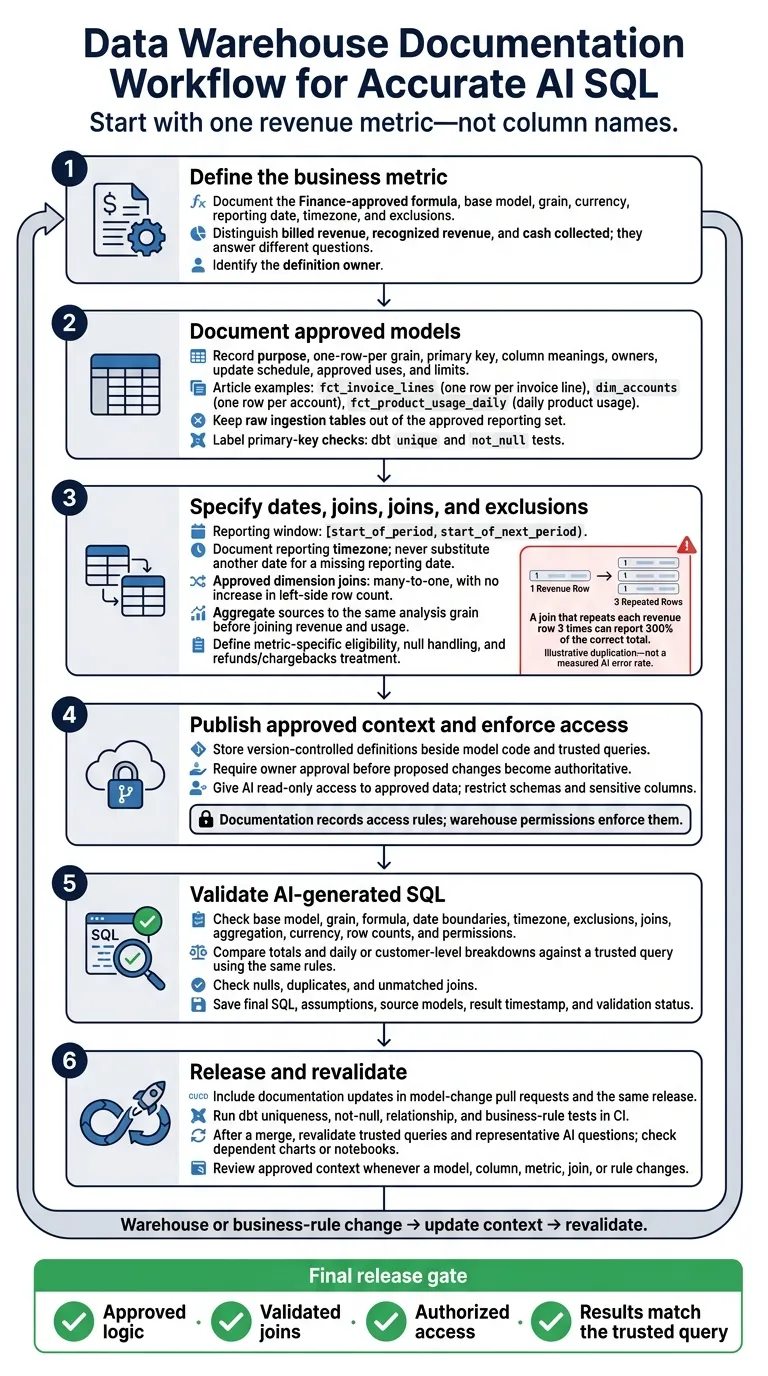 {Data Warehouse Documentation Workflow for Accurate AI SQL}
:::
{Data Warehouse Documentation Workflow for Accurate AI SQL}
:::
Document table grain, columns, and owners
Start by documenting three approved reporting models: fct_invoice_lines for billed revenue, dim_accounts, and fct_product_usage_daily for daily product usage. Without a defined grain, AI will guess what a count means. Keep raw ingestion tables out of the approved reporting set.
Give each model clear “use for” and “do not use for” boundaries. Product usage does not establish revenue, and current account attributes do not establish historical customer counts.
Use a table documentation template
Apply this template to each approved model. This example describes the invoice-line model in a hypothetical B2B SaaS warehouse.
Field Example: fct_invoice_linesTable name fct_invoice_linesPurpose Authoritative invoice-line model for billed-revenue reporting One-row-per grain One row per invoice line Source models stg_invoices,stg_invoice_lines,dim_accountsPrimary key invoice_line_id; unique and never nullOwner Finance Analytics owns definitions; Data Platform owns pipeline availability Update schedule Daily by 6:00 a.m. Eastern Time Approved use cases Gross billed revenue, discounts, taxes, and invoice-line counts Approved joins account_idtodim_accounts.account_id, many-to-one;invoice_datetodim_date.date_day, many-to-oneDo not use for Cash collections, payment settlement, or recognized revenue
Grain controls what every count and sum means. In fct_invoice_lines, COUNT(*) counts lines, COUNT(DISTINCT invoice_id) counts invoices, and COUNT(DISTINCT account_id) counts billed accounts. Sum line-level amounts only - not invoice totals repeated across rows.
For dim_accounts, define the grain as “one row per account.” Then COUNT(*) counts accounts, provided each account_id appears at most once. Pair each primary key with dbt unique and not_null tests.
Define columns and their limits
Once you've set the grain, document each column’s business meaning and limits, not just its data type. Here’s how to document the model’s line-level amount:
columns:
  - name: line_amount_usd
    description: >
      Billed amount for one invoice line before tax, represented in U.S. dollars.
      Measure; sum only at invoice-line grain.
    data_type: numeric
    meta:
      nullable: false
      unit: USD
      valid_values: ">= 0 except documented credits"
      role: measure
      timezone: not applicable
      sensitivity: internal
      synonyms: ["line revenue", "billed amount"]
      caveats: "Not cash collected or GAAP revenue recognition."
For nullable columns, explain what a missing value means. Treat null as unknown, not zero. For dates, name the business event and the timezone used to derive the date.
For invoice_status, list the allowed values. Explain that paid means the billing system marked the invoice paid; it does not confirm cash settlement. Direct cash-collection questions to a payments or receipts model.
Store these definitions in dbt YAML, warehouse comments, or version-controlled Markdown beside the model code. dbt supports descriptions and custom meta fields.
Next, define the metrics, date rules, joins, and exclusions AI is allowed to use.
Define metrics, dates, joins, and exclusions
Use the table docs from the previous section to spell out metric logic, date rules, and joins.
Specify revenue formulas and date filters
“Revenue” can mean different things. Recognized revenue means SUM(recognized_amount_usd) at invoice-line grain. Bookings, billings, and cash collected answer different questions. Name the approved base model, state its grain, and store the metric definition in the same version-controlled dbt file.
metric:
  name: recognized_revenue
  base_model: fct_invoice_lines
  base_grain: one row per invoice line
  expression: SUM(recognized_amount_usd)
  date_field: recognized_at
  source_timezone: UTC
  reporting_timezone: America/New_York
  date_filter: "[start_of_period, start_of_next_period)"
  currency: USD
  dimensions:
    - account_id
    - product_id
    - region
    - month
  exclusions:
    - is_test_account = false
    - is_internal_account = false
    - workspace_type <> 'sandbox'
    - transaction_status <> 'voided'
    - is_duplicate = false
    - is_deleted = false
  null_date_rule: Exclude from period reporting; track in a separate exception report.
  aggregation_rule: Aggregate invoice lines before any one-to-many join.
  validation_query: Trusted reconciliation query with an expected result range
  owner: Finance Analytics
  review_date: Record the actual approval date in YYYY-MM-DD.
Next, lock the reporting window. For January 2026, use this Snowflake predicate for recognized_revenue:[1][2]
WHERE CONVERT_TIMEZONE(
        'UTC',
        'America/New_York',
        recognized_at
      ) >= '2026-01-01 00:00:00'
  AND CONVERT_TIMEZONE(
        'UTC',
        'America/New_York',
        recognized_at
      ) < '2026-02-01 00:00:00'
Display dates as January 1, 2026, but use ISO dates in SQL. Never fill a missing recognized_at with invoice_date, created_at, or another fallback date. Track missing-date counts and amounts separately. For fiscal periods, use dim_fiscal_calendar instead of assuming calendar-month boundaries.
SELECT
  COUNT(*) AS null_recognized_at_rows,
  SUM(recognized_amount_usd) AS null_date_amount_usd
FROM fct_invoice_lines
WHERE recognized_at IS NULL;
Document join cardinality and aggregation rules
State the expected row multiplication, not just the join keys. Joining invoice lines directly to product events repeats each invoice line for every matching event. That inflates revenue.
To report revenue and usage together, first define the analysis grain. Then aggregate each source to that grain before joining.
Protect the metric’s grain when joining dimensions, too. A many-to-one join keeps fct_invoice_lines at invoice-line grain.
join:
  left_model: fct_invoice_lines
  right_model: dim_accounts
  join_key: account_id
  relationship: many_to_one
  expected_row_count_effect: No increase in left-side row count.
  validation:
    - dim_accounts.account_id is unique
    - orphan rate is below the approved threshold
    - Investigate orphaned account_id values; retain invoice lines with an unknown-account marker.
Prohibit direct fact-to-fact joins unless a validated allocation rule exists.
Set exclusions and access rules
Attach eligibility rules to each metric. State which rows AI may count, the column that implements each rule, its scope, and how to handle nulls.
Soft deletes do not automatically remove historical revenue. Refunds and chargebacks need metric-specific rules as well. Document whether they appear as negative rows or separate adjustments so SQL doesn’t subtract them twice.
Put row-eligibility rules in the metric contract, not in ad hoc prompts.
policy:
  name: analytics_eligible_records
  exclusions:
    - rule: test accounts
      condition: is_test_account = false
      scope: customer metrics
    - rule: internal accounts
      condition: is_internal_account = false
      scope: external revenue and customer metrics
    - rule: sandbox workspaces
      condition: workspace_type <> 'sandbox'
      scope: production usage and revenue
    - rule: voided transactions
      condition: transaction_status <> 'voided'
      scope: revenue and billing
    - rule: duplicate records
      condition: is_duplicate = false
      scope: financial metrics
    - rule: soft-deleted records
      condition: is_deleted = false
      scope: current-state reporting
  implementation: Record the model containing each policy column.
  null_behavior: Unknown eligibility requires review, not an assumed pass.
  refunds_chargebacks: Attach Finance-approved treatment to each metric.
For healthcare and financial fields, document sensitivity, permitted analytical use, masking requirements, and the access owner. For example, a restricted tax_id should not be available in general analytics.
Documentation records access rules; warehouse permissions enforce them. Warehouse roles, row- and column-level policies, masking or tokenization, application authorization, audit logging, and controlled query execution must block access without permission - even when generated SQL ignores the written policy.
Give AI approved context and check its SQL
Store context beside your dbt project
Once you’ve written the contract, give AI the same source of truth your reviewers use. Store it alongside dbt changes and trusted queries so AI follows the warehouse team’s approved rules. Use one definition per file when practical.
Each definition should include an owner, base model, grain, approved business rules, valid filters, permitted joins, review date, effective date, and example query. Require owner approval before an assistant’s proposed change becomes authoritative.
analytics/
├── models/
│   ├── staging/
│   ├── intermediate/
│   └── marts/
├── context/
│   ├── tables/
│   │   ├── fct_orders.md
│   │   └── dim_customers.md
│   ├── metrics/
│   │   ├── revenue.sql
│   │   └── active_customers.md
│   ├── joins/
│   │   └── customer_orders.md
│   └── policies/
│       ├── exclusions.md
│       └── access_rules.md
└── trusted_queries/
    ├── monthly_revenue.sql
    └── active_customers.sql
This layout keeps tables, metrics, joins, policies, and trusted queries separate but linked.
Give Querio access to the approved context without exposing restricted fields. Keep development and production credentials separate. Use read-only live warehouse connections, with restrictions on schemas and sensitive columns - not CSV exports.
Mirror the reviewed contract in Snowflake comments and tags, BigQuery descriptions and policy tags, Redshift comments and grants, or Postgres COMMENT statements. These help users find definitions, but they don’t replace the reviewed metric contract.
Compare SQL before and after documentation
This is an illustrative review, not a measured accuracy claim. Ask the same business questions before and after documentation to spot errors caused by missing rules. Then check each result against a trusted query using the same period, timezone, currency, exclusions, and source model.
User question Before SQL Error After SQL Preventive documentation rule What was revenue in December 2025? SELECT SUM(order_total) FROM orders WHERE order_date BETWEEN '2025-12-01' AND '2025-12-31'Excludes most of December 31 when order_dateis a timestamp and may use the wrong reporting timezone.SELECT SUM(order_total) FROM orders WHERE order_ts >= '2025-12-01 00:00:00' AND order_ts < '2026-01-01 00:00:00'Prevents missing the last day’s rows when a timestamp is filtered as a date. What was revenue excluding test accounts? SELECT SUM(order_total) FROM ordersIncludes internal, QA, and test accounts. SELECT SUM(order_total) FROM orders JOIN dim_accounts USING (account_id) WHERE account_type <> 'test' AND is_internal = FALSEExclude test and internal accounts from production revenue unless the question explicitly requests them. What is revenue by customer? SELECT customer_id, SUM(order_total) FROM orders JOIN events USING (order_id) GROUP BY customer_idMultiple events per order inflate revenue through one-to-many duplication. WITH event_rollup AS (SELECT order_id, COUNT(*) AS event_count FROM events GROUP BY order_id) SELECT o.customer_id, SUM(o.order_total) FROM orders o LEFT JOIN event_rollup e USING (order_id) GROUP BY o.customer_idPre-aggregate events by order_id, then join the one-row-per-order result to orders.How many active customers did we have? SELECT COUNT(*) FROM customer_activityCounts activity records rather than distinct customers and may include nonqualifying activity. SELECT COUNT(DISTINCT customer_id) FROM customer_activity WHERE activity_type IN ('purchase','subscription_renewal')Define “active” and require distinct-customer counting. How much cash settled in December? SELECT SUM(invoice_amount) FROM invoices WHERE invoice_date ...Measures billed revenue rather than cash actually settled. SELECT SUM(amount) FROM payments WHERE status = 'settled' AND settled_at >= '2025-12-01 00:00:00' AND settled_at < '2026-01-01 00:00:00'Prevents reporting invoiced amounts as settled cash or assigning receipts to the wrong period.
Test queries and keep context up to date
Before approval, check the base table, grain, formula, date boundaries, timezone, exclusions, join cardinality, aggregation, currency, row counts, and permissions. Compare totals and daily or customer-level breakdowns against trusted results. Check for nulls, duplicates, and unmatched joins, too.
Querio’s inspectable, editable SQL and Python let reviewers check the calculation. Reactive notebooks update connected charts after edits. Save the final SQL, assumptions, source models, result timestamp, and validation status. A notebook edit must not silently redefine an approved metric.
Any model change that affects grain, dates, joins, or exclusions must trigger a documentation update and revalidation. Require those updates in model-change pull requests. Run dbt uniqueness, not-null, relationship, and business-rule tests in CI, and flag renamed, removed, added, or type-changed columns.
After a merge, revalidate trusted queries and representative AI questions, then check dependent charts or notebooks. Assign owners and review dates, record when business rules take effect, and retire stale definitions.
Repeated user corrections point to documentation gaps. Turn recurring instructions such as “use settlement date” into approved context instead of fixing every answer manually.
Conclusion: Review context with every warehouse change
After validation, include the documentation in the same release. Review the approved context whenever a model, column, metric, join, or rule changes.[3][4]
Start small: document one revenue metric and the models that support it.
For
fct_invoice_lines, confirm the Finance-approved formula, reporting date, exclusions, validated joins todim_accountsanddim_date, and review owner.
Expand only after that first metric is correct.
Use the first workflow as your release gate: approved logic, validated joins, authorized access, and results that match the trusted query. AI should follow your team’s approved definitions - not guess them from column names.
FAQs
::: faq
How should we resolve conflicting metric definitions?
Keep metric logic in one governed source of truth rather than letting AI infer formulas from schema metadata. Give each core metric a business owner and a regular review schedule. Document its canonical formula, grain, and required filters - including test-account exclusions.
Version-control definitions in Git, require peer review and CI/CD validation, and run regression tests against verified queries. Resolve conflicts in the governed layer - not the AI prompt - so fixes apply consistently. :::
::: faq
What should AI do when documentation is incomplete?
AI should not generate production-grade SQL until missing business logic is clearly defined, documented, and validated. Guessing based on raw schema names can produce inconsistent results, incorrect joins, stale data, or access to data without permission.
Use a governed context layer with approved metric definitions, explicit join paths, and business rules. This gives AI vetted metadata to work from instead of leaving it to guess. :::
::: faq
How can we detect stale documentation automatically?
Keep documentation in a governed context layer that stays in sync with warehouse metadata. Version metric definitions and SQL in Git. Before deploying schema or model changes, use automated lineage to flag dashboards and AI queries those changes could affect.
Run schema consistency checks, data freshness tests, and dbt tests to catch breaking changes. Watch for repeated questions and failed searches - they can signal that definitions no longer match current business logic. :::